
Fourier filtering using the Hermite Distributed Approximation Functions as the low-pass filter

Project description
2D/3D filtering (low-pass, high-pass, band-pass, laplacian, and multi-scale laplacian) in Fourier Space
Python implementation of a low-pass filter based on Hermited Distributed Approximating Functionals (hdaf), which can be used to create additional filters such as high-pass, band-pass, laplacian and multi-scale laplacian. The references are the followings:
- Low-pass filter
- Hoffman, D.K., & Nayar, N. (1991). Analytic banded approximation for the discretized free propagator. Journal of Physical Chemistry, 95, 8299–8305.
- Bodmann, B.G., Hoffman, D.K., Kouri, D.J. et al. Hermite Distributed Approximating Functionals as Almost-Ideal Low-Pass Filters STSIP 7, 15–38 (2008). https://doi.org/10.1007/BF03549483
- high-pass, band-pass, laplacian
- D. Jiménez, M. Papadakis, D. Labate and I. A. Kakadiaris, "Improved automatic centerline tracing for dendritic structures," 2013 IEEE 10th International Symposium on Biomedical Imaging, 2013, pp. 1050-1053, doi: 10.1109/ISBI.2013.6556658.
- Jiménez, D., Labate, D., Kakadiaris, I.A. et al. Improved Automatic Centerline Tracing for Dendritic and Axonal Structures. Neuroinform 13, 227–244 (2015). https://doi.org/10.1007/s12021-014-9256-z
- Multi-scale laplacian
- Hernandez-Herrera, P., Papadakis, M., & Kakadiaris, I. A. (2016). Multi-scale segmentation of neurons based on one-class classification. Journal of neuroscience methods, 266, 94-106. https://doi.org/10.1016/j.jneumeth.2016.03.019
Please cite the paper(s) if you are using this code in your research.
Overview
The current python implementation is designed to filter the 2D/3D image in the frequency domain. The implementation requires 3 input parameters an input image, the filters to be used, and the filter´s size. It consist of the following steps:
- Compute the fourier transform of the input image (img)
img_FT = np.fft.fftn(img)
- Construct the required filter in the fourier space
filter_
- Filter the image by applying the filter to the image. This step is done by point-wise multiplication
filtered_ = filter_ * img_FT
- Return the image to the spatial domain by applying the inverse fourier transform
img_spatial_domain = np.fft.ifftn(img)img_spatial_domain = np.real(img_spatial_domain)
- Repeat step 2 to 5 for each filter (low-pass, high-pass, band-pass, laplacian).
Multi-scale laplacian filter requires a sligtly modification of these steps see paper MESON
Important note
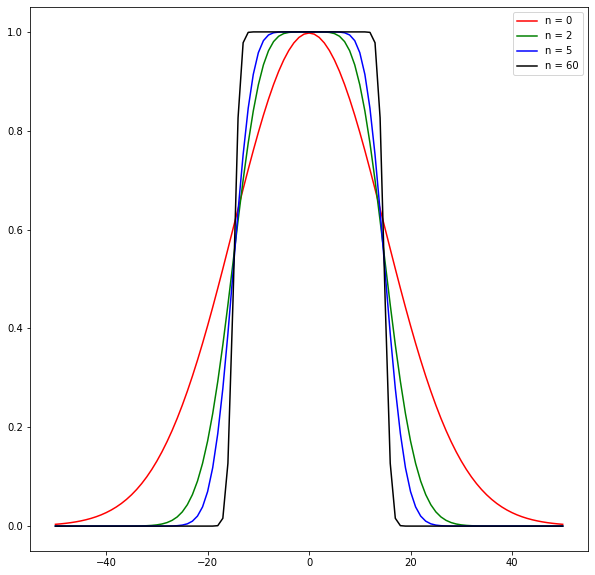
The low_pass filter is designed to resemble an almost ideal low-pass filter by setting the band transition to decrease rapidily at the cut-off frequency (n=60). The speed of decrease can be controlled by the value n in the low pass filter (see paper D. Jiménez et al. 2015 and P. Hernandez-Herrera 2016). In the implementation it is controled by hdaf.set_n(n), if the value is set to n=0 the filter in the spatial domain correspond to a GAUSSIAN FILTER. Hence, the code can be use for Gaussian filtering including DoG with the band_pass filter.
The following figure depicts the speed of decrease at the cut-off value
Instalation
Requirements
- Tested on Unix (Ubuntu 22.04) and Windows 11
- Tested on Python 3.7.13 (Google Colab) and Python 3.10.5 (locally)
Instructions
- It is recomended to create a local virtual enviroment. However, this step can be skipped
- Open terminal and move to a folder where you want to create the virtual enviroment
pip install venvpython -m venv env_hdaf_filter- Activate the virtual enviroment. Note: you always need to activate the virtual enviroment before runing the hdaf_filter module
- Windows:
.\env_hdaf_filter\Scripts\activate - Unix:
source env_hdaf_filter/bin/activate
- Windows:
- Install hadf_filter module
- PyPi:
pip install hdaf_filter==0.1.1 - Github:
pip install git+https://github.com/paul-hernandez-herrera/hdaf_filtering.git
- PyPi:
Usage
Using Python script
Use this Google Colab (requires a gmail account) 
If you want to use it locally follow this steps:
-
Import the module using
from hdaf_filter import hdaf, input_output -
Open an 2D or 3D image
img = input_output.imread(file_path)where file_path is the path to the input image.
-
Create an object of the module:
obj = hdaf.filt(img) -
Apply any filter with the appropiate radius parameter:
output1 = obj.apply_filter("low_pass", 3)output2 = obj.apply_filter("low_pass", 5)output3 = obj.apply_filter("high_pass", 1)output4 = obj.apply_filter("band_pass", [2,6])output5 = obj.apply_filter("laplacian", 2)output6 = obj.apply_filter("laplacian_multiscale",[2,3,5,7,10])output7 = obj.apply_filter("laplacian_multiscale",[1,3,4])
Using terminal
-
Open a terminal, and activate the virtual enviroment (Step 1.iv from Instructions) in case you created it.
-
Run the command:
python -m hdaf_filter --input_file path_to_input_file parameters_file path_to_parameters_filewhere path_to_input_file is the path pointing to the input file to process with extension tif or a folder containing tif images. It can be 2D or 3D image stack, and path_to_parameters_file is the path pointing to a file containing the list of filters to be applied and the parameters
-
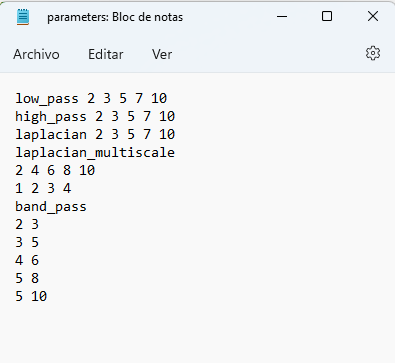
The following image shows an example of parameters file
This file indicates that the module will apply low pass filter, high pass filter, and laplacian with radius 2, 3, 5, 7, and 10. It will output 15 different results.
It will also apply 2 times the multiscale laplacian filter, first with radii equal to 2, 4, 6, 8, and 10 and next radii equal to 1,2, 3, 4. It will output only two results.
Finally, the band-pass filter will be applied with radii [2,3], [3,5], [4,6], [5,8] and [5,10]. It will output five deferent results.
-
The output of applying the filters and an image will be generated in the current working directory.
Additional parameters in terminal:
--save_output: Use this flag to avoid writing the output to disk
--save_plot: Use this flag to avoid writing the figure to disk
--folder_output path_to_folder_output: set this flag to save the output (tif output or png plot) to the desired location given by the folder path_to_folder_output
Example of applying the filter to an image
Low-pass filter
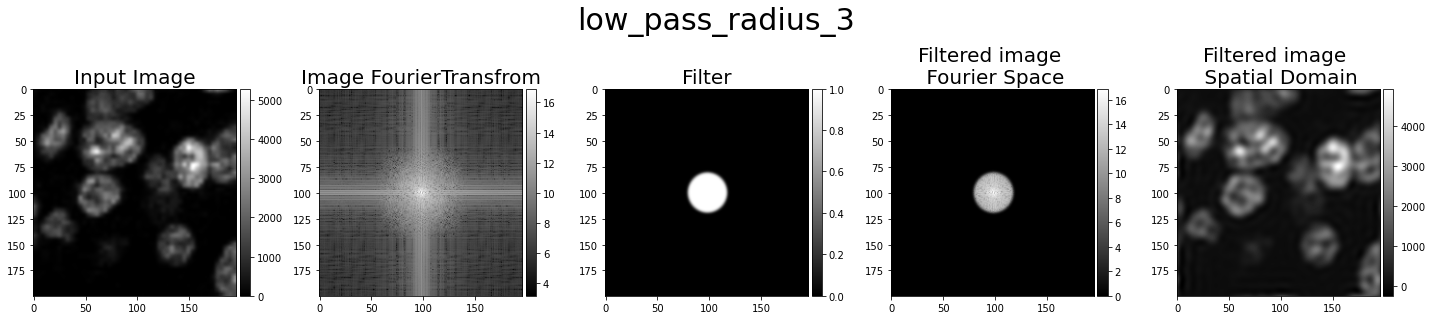
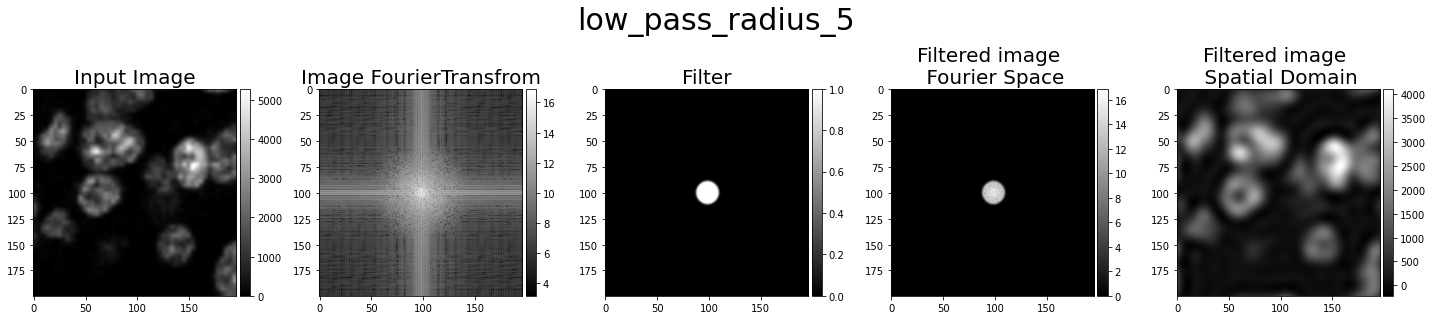
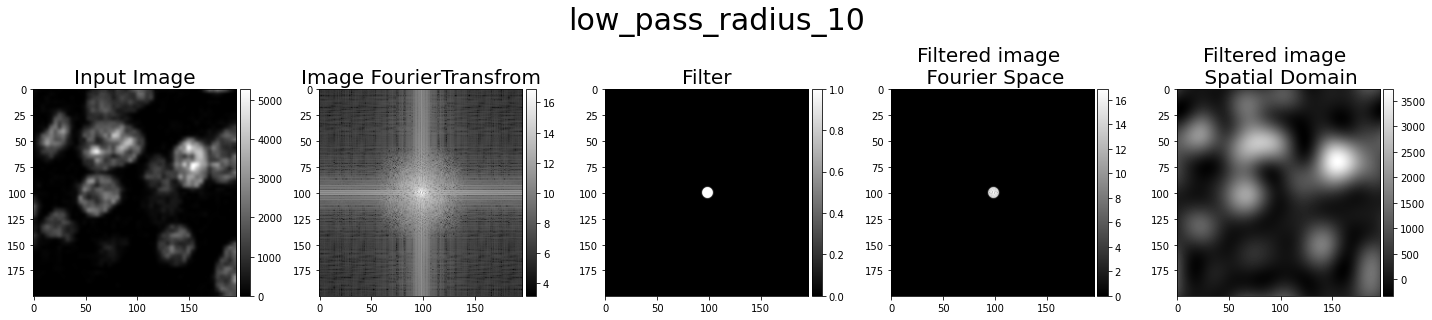
The low-pass filter allows to pass the low frequencies and elliminating (setting to low values close to zero) the high-frequencies. This filter is usefult to remove noise in the image. The following images depict examples of low-pass filters
High-pass filter
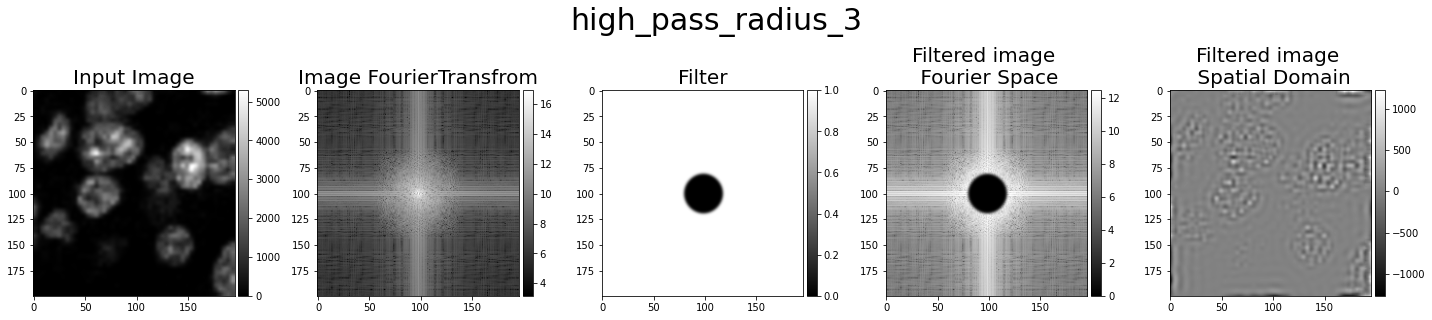
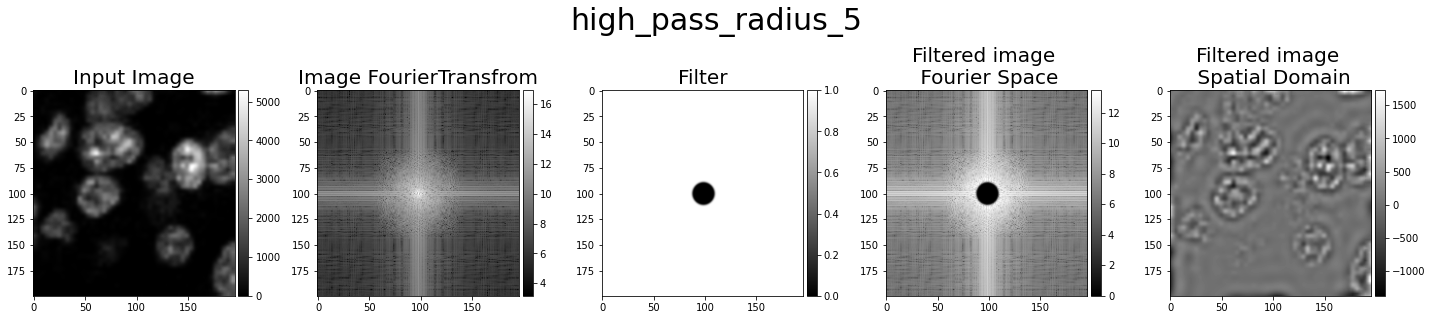
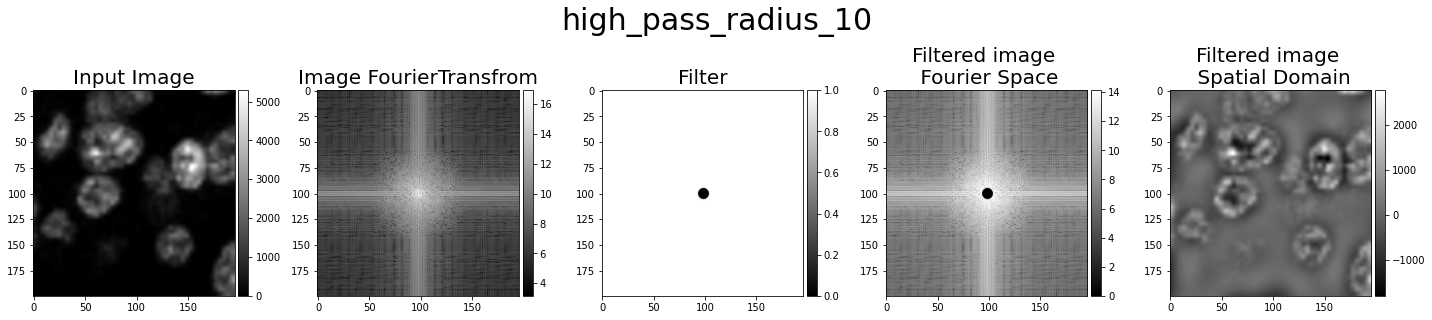
The high-pass filter allows to pass the high frequencies and elliminating (setting to low values close to zero) the low-frequencies. This filter is useful to retain large changes of intensity. The following images depict examples of high-pass filters
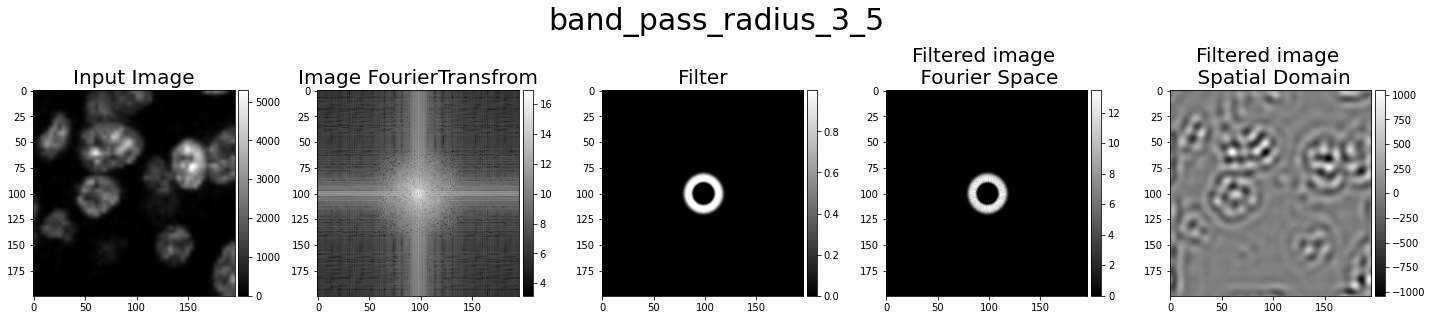
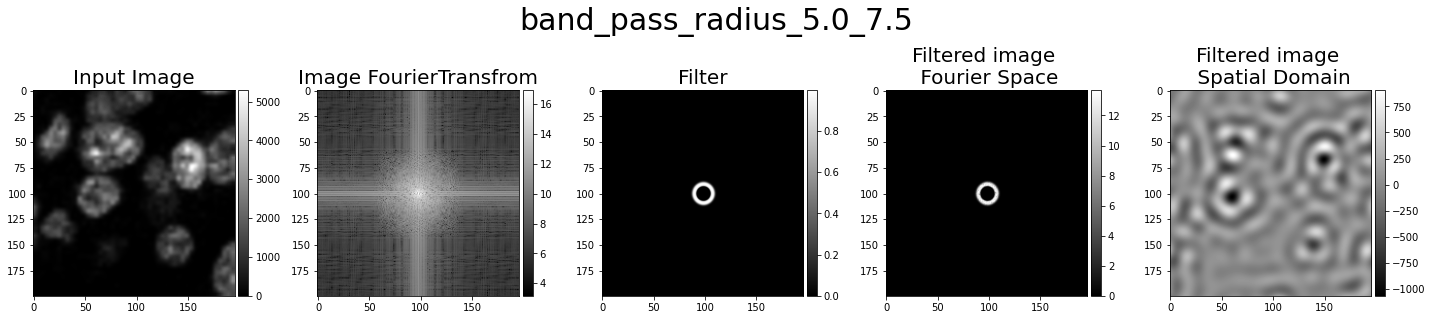
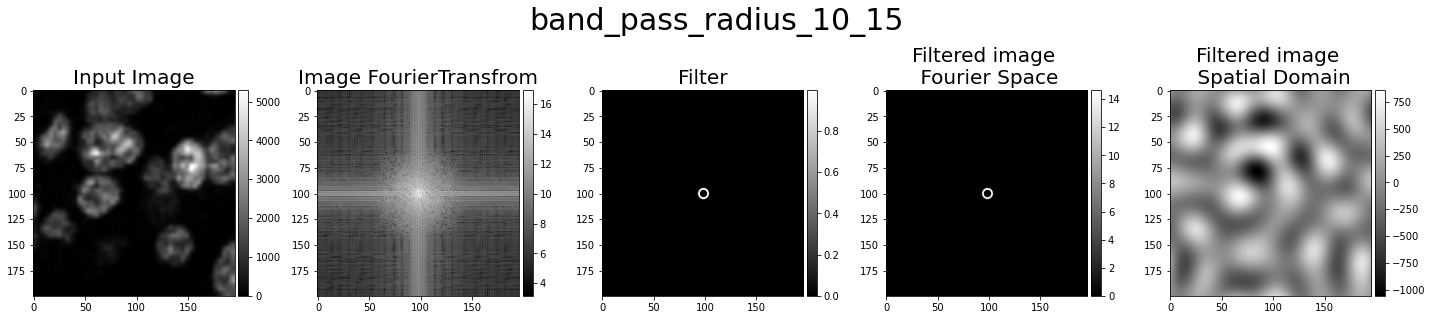
Band-pass filter
The band-pass filter allows to pass only a band of frequencies and elliminating (setting to low values close to zero) the frequencies outside the band. The following images depict examples of high-pass filters
Laplacian filter
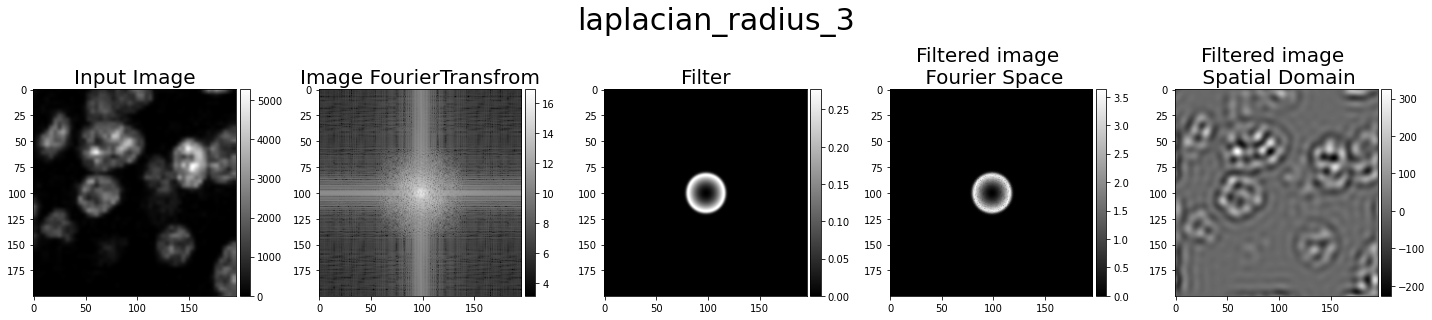
The laplacian filter smooth the image using the HDAF filter and the apply the laplacian. This filter is useful to detect edges. The following images depict examples of laplacian filters
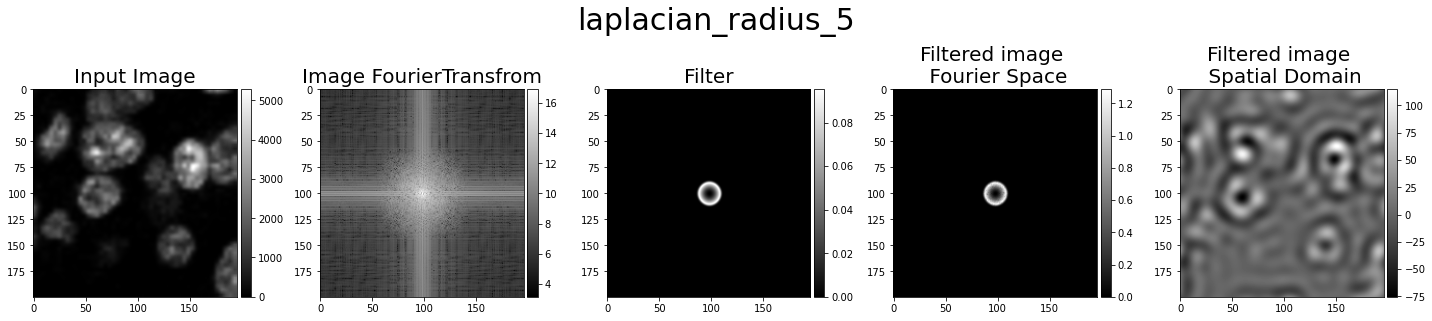
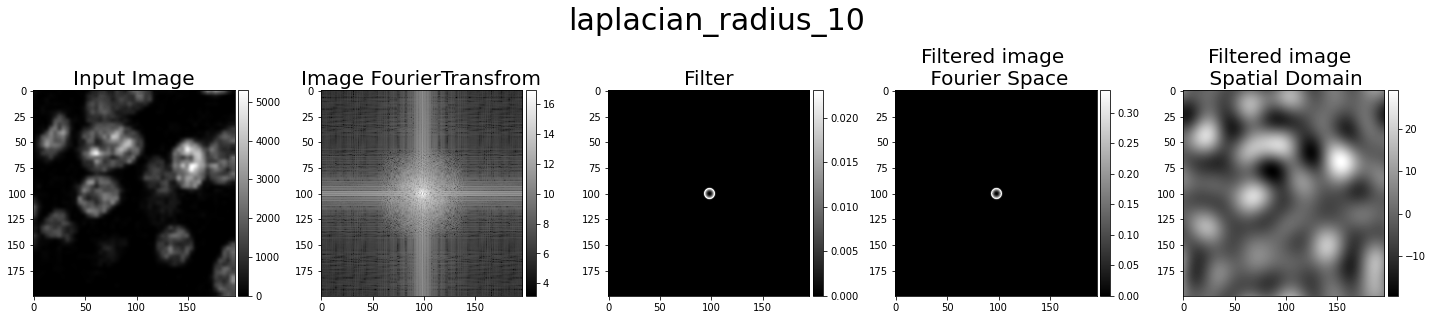
Laplacian multiscale
The laplacian multiscale smooth the image using the HDAF filter at several radius and the apply the laplacian. Then, for each pixel/voxel it selects the radius that has the laplacian with the best reponse. This filter is useful to detect edges. The following images depict examples of laplacian filters
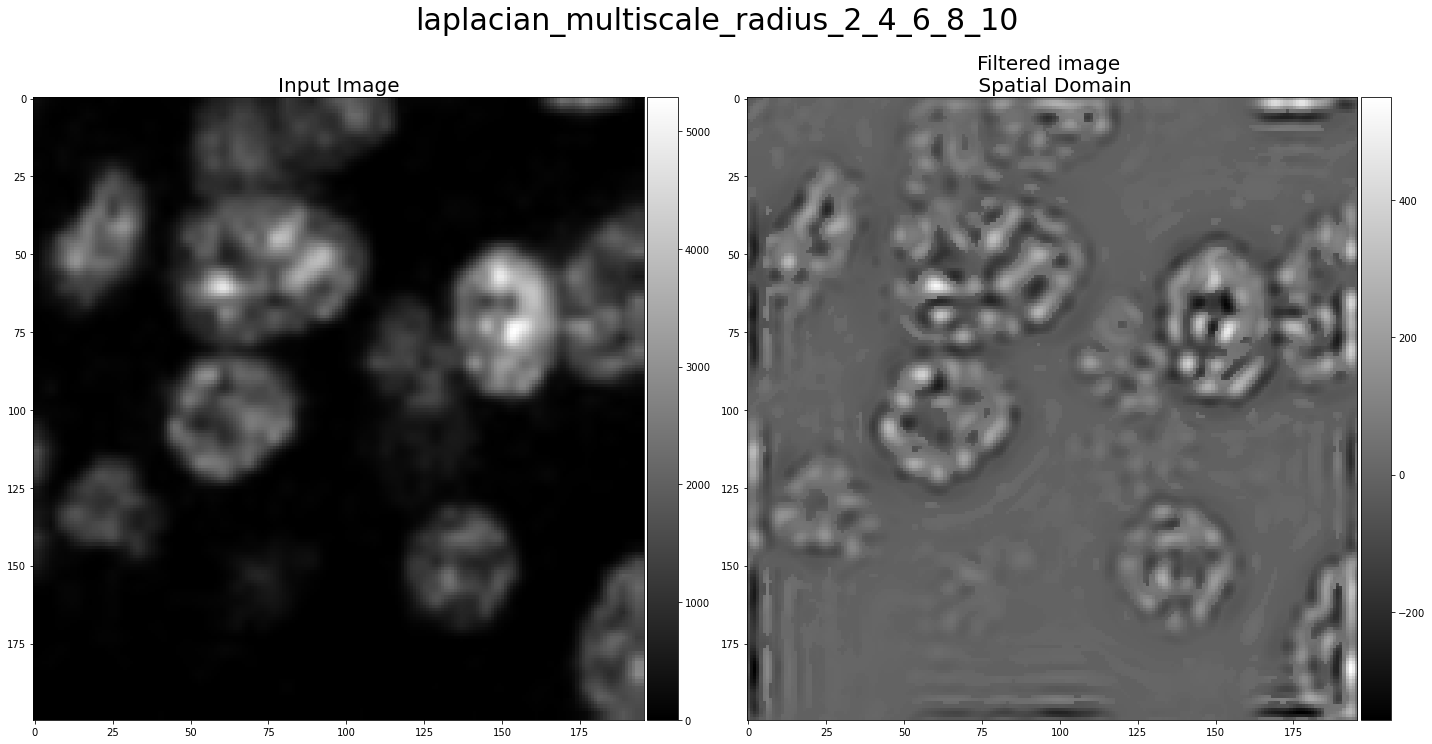
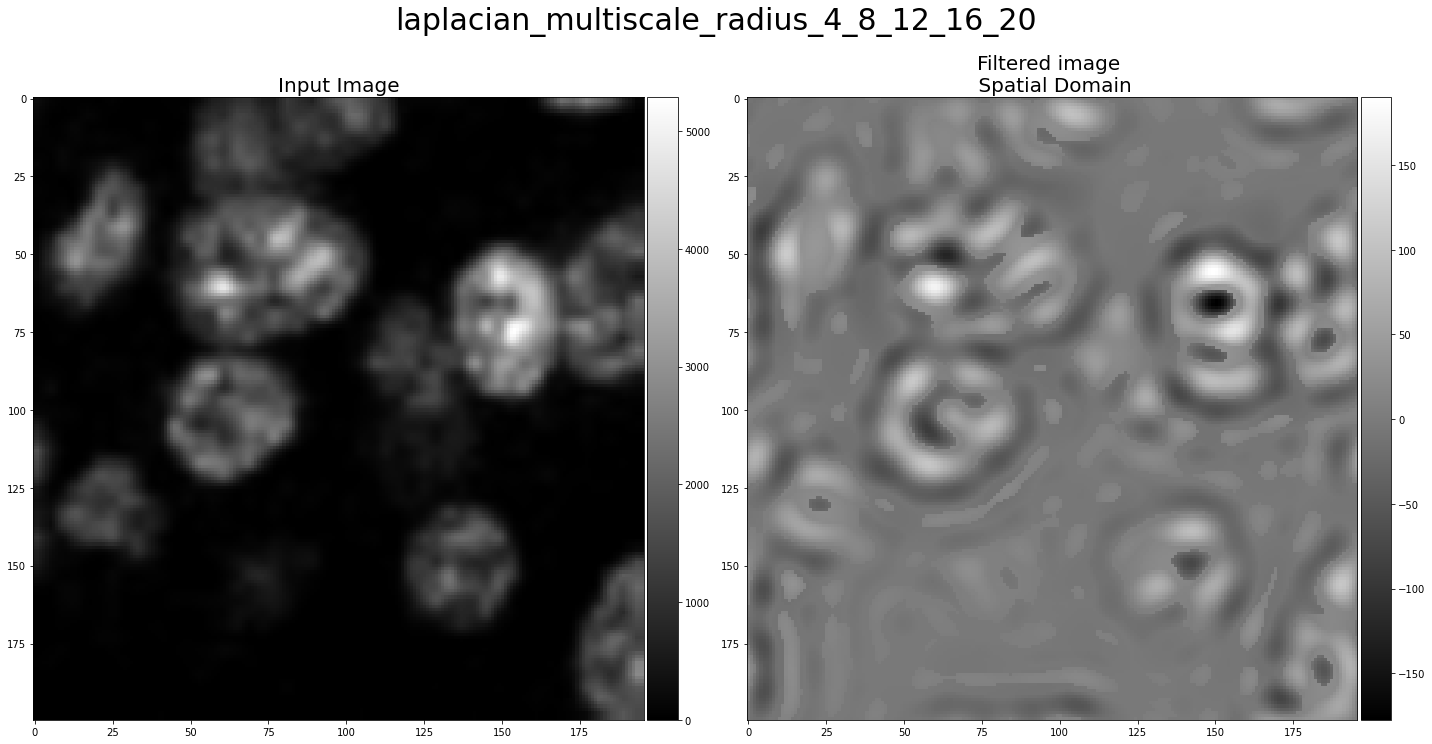
Release history Release notifications | RSS feed


Download files
Download the file for your platform. If you're not sure which to choose, learn more about installing packages.
Source Distribution
Built Distribution
Filter files by name, interpreter, ABI, and platform.
If you're not sure about the file name format, learn more about wheel file names.
Copy a direct link to the current filters
File details
Details for the file hdaf_filter-0.1.1.tar.gz.
File metadata
- Download URL: hdaf_filter-0.1.1.tar.gz
- Upload date:
- Size: 12.8 kB
- Tags: Source
- Uploaded using Trusted Publishing? No
- Uploaded via: twine/4.0.1 CPython/3.10.5
File hashes
| Algorithm | Hash digest | |
|---|---|---|
| SHA256 |
7f691f44f383e7feaf90baef8f1ae6e4b4abaa911d32a07f7524655c65d85e0c
|
|
| MD5 |
c8ef6f03209247f3671fa1ff965d9778
|
|
| BLAKE2b-256 |
d193c56c7dde9c068aca96c16550d9dccf5a1c95c0bfee1466bdfc7b13682010
|
File details
Details for the file hdaf_filter-0.1.1-py2.py3-none-any.whl.
File metadata
- Download URL: hdaf_filter-0.1.1-py2.py3-none-any.whl
- Upload date:
- Size: 10.6 kB
- Tags: Python 2, Python 3
- Uploaded using Trusted Publishing? No
- Uploaded via: twine/4.0.1 CPython/3.10.5
File hashes
| Algorithm | Hash digest | |
|---|---|---|
| SHA256 |
01e00d46364cc0796ea8cb2078f0644543c41a1d37ebb797c1c13c47bdcb3da5
|
|
| MD5 |
81a97db6e0eb88537f1b2925167f8709
|
|
| BLAKE2b-256 |
1b9d3a1669b5db4f0624a6eae1fa61a91d91c892307ba9d3c5461f9997a463d0
|






