
headless-reaper
A command-line tool that finds and stops orphaned headless browsers, with a dry run by default.

The demo starts a dedicated headless shell from a short-lived parent, then reaps that browser's /tmp profile. It never launches Google Chrome. Recording source.
Install
pipx install headless-reaper
uv tool install headless-reaper
pip install headless-reaper
Python 3.9+. Wheels install the Rust CLI and an importable Python reference. Source installs need Rust; cargo install --path rust --locked installs the standalone command.
| Platform | Observed behavior |
|---|---|
| macOS arm64 | Orphan detection and cleanup; live-parent browser preserved |
| Ubuntu 24.04 arm64 | Chromium and Firefox orphan cleanup; live-parent browser preserved |
| Windows x64 | Both editions exit 2: browser reaping is unsupported |
Quick start
Start with a dry run. These outputs came from a disposable headless-shell process. The environment variable limits every command to that one profile; replace the path with your own job's profile directory.
$ export HEADLESS_REAPER_PATH=/tmp/reaper-demo.58q834un
$ headless-reaper
headless-reaper 0.1.0: 1 orphaned group, 4 processes, 224.8 MB RSS (1024 processes scanned, paths /tmp/reaper-demo.58q834un)

ROOT   AGE  RSS       PIDS  PROFILE
18952  1s   224.8 MB  4     /tmp/reaper-demo.58q834un
       why: headless, temp profile, remote debugging; launcher gone (reparented to launchd 1)

dry run: nothing was killed. Rerun with --kill to terminate these groups.
$ headless-reaper --kill
headless-reaper 0.1.0: 1 orphaned group, 4 processes, 224.8 MB RSS (1024 processes scanned, paths /tmp/reaper-demo.58q834un)

ROOT   AGE  RSS       PIDS  PROFILE
18952  1s   224.8 MB  4     /tmp/reaper-demo.58q834un
       why: headless, temp profile, remote debugging; launcher gone (reparented to launchd 1)

reaped 1 group: sent SIGTERM to 4 of 4 processes, SIGKILL to 0.
$ headless-reaper
headless-reaper 0.1.0: no orphaned headless browsers (1024 processes scanned, paths /tmp/reaper-demo.58q834un).
The second scan confirms that the scoped browser is gone. Process counts, PIDs and RSS will differ on your machine.
Why
A crashed test can leave its browser running after the test process is gone. You can find it with ps, but deciding which helpers belong to it takes another step. headless-reaper groups the browser tree and checks whether its launcher still exists before proposing cleanup.
Use your test framework's browser-close call for normal teardown. Use ps or a process monitor when you need to inspect arbitrary processes. This tool handles leftovers: it requires a recognized browser, an automation signal, and a missing launcher. A default personal profile is excluded.
Measurements
Saved measurements from 2026-11-17: median of 20 sequential subprocess runs, warm filesystem cache, release Rust 1.100.0. Startup ran --version; scanning ran --json --path /tmp/headless-reaper-bench-empty and still read the whole process table. Peak RSS came from a separate /usr/bin/time scan. These are two hosts and their process populations, not a claim about every machine.
| Platform / edition | Startup (ms) | Scan (ms) | Peak RSS (KiB) |
|---|---|---|---|
| macOS arm64 / Python 3.12.8 | 36.078 | 122.098 | 23,296 |
| macOS arm64 / Rust | 2.856 | 11.315 | 3,136 |
| Ubuntu 24.04 arm64 / Python 3.12 | 68.953 | 76.615 | 15,144 |
| Ubuntu 24.04 arm64 / Rust | 0.841 | 5.564 | 1,892 |
Reference
| Option | Default | Meaning |
|---|---|---|
--kill |
Off | SIGTERM, wait, then SIGKILL for surviving targets |
--path PREFIX |
All profiles | Limit profile paths; repeat for several prefixes |
--min-age DURATION |
0 |
Skip younger groups; accepts 30s, 10m, 2h, 1d |
--grace DURATION |
10s |
Wait between SIGTERM and SIGKILL |
--remove-profiles |
Off | With --kill, remove eligible temporary profiles |
--json |
Off | Report groups, totals, cleanup results and errors as JSON |
--clean-clones |
Off | Inspect unused macOS code-signing clones; add --kill to delete |
--all-leftovers |
Off | Combine --kill, --clean-clones and --remove-profiles |
Exit 0 means a dry run succeeded or all targets were reaped. Exit 1 means a target survived or inspection failed. Exit 2 means invalid usage or an unsupported platform.
HEADLESS_REAPER_PATH, HEADLESS_REAPER_MIN_AGE, and HEADLESS_REAPER_GRACE set defaults. Paths use : as the separator on macOS/Linux. Flags override environment values. There is no configuration file.
Target selection
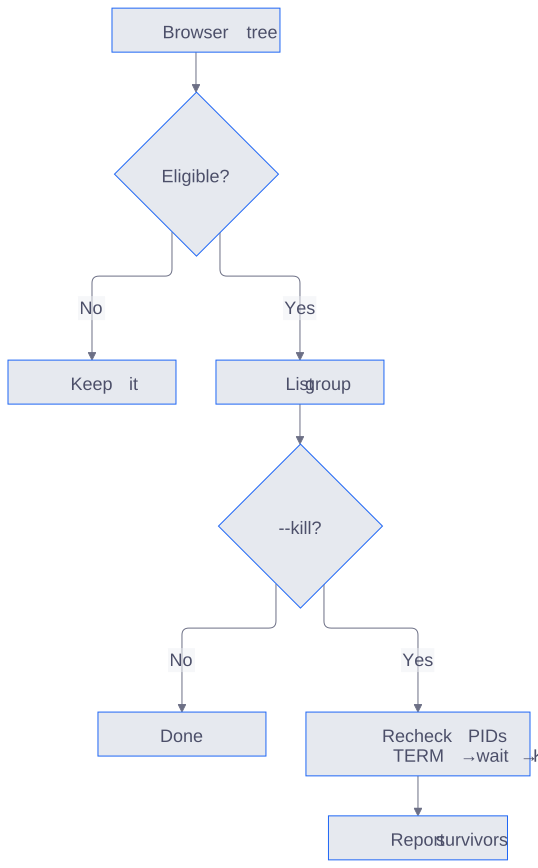
An eligible target is a recognized automation browser whose launcher is gone and whose path and age match your scope. Personal default profiles are excluded. KILL is only for processes surviving the grace period.
A root must be a recognized Chrome/Chromium, Edge, Firefox, or WebKit browser process, not a renderer or helper. It must carry --headless, a temporary or automation profile, or remote debugging together with such a profile. Its parent must be PID 1, an init process, or missing from the snapshot.
The tool groups descendants under the root. Before signalling, it compares process start times to avoid signalling a recycled PID. It excludes default personal profiles and browsers whose launcher is alive.
Profile and clone cleanup
--remove-profiles requires --kill. Cleanup preserves a profile outside temporary roots, one still used by a live browser, one with a live singleton lock, or one whose group left a survivor.
On macOS, --clean-clones examines recognized browser code_sign_clone.* directories under the current user's X temp directory. It uses a ten-minute minimum age unless you set one. Directory symlinks and live uses are preserved; matching includes device/inode identity because clones may share hard links. An open-file scan failure prevents deletion.
Clone reports distinguish apparent size, allocated blocks, and observed free-space change. Shared APFS blocks mean apparent size is not reclaimable space. --path filters browser profiles; it does not change the fixed clone scope. Clone-only mode does nothing on other operating systems.
Python
import time
from headless_reaper import find_groups, list_processes

groups = find_groups(list_processes(), now=time.time(),
                     min_age=600, paths=("/tmp/my-test",))
for group in groups:
    print(group.root.pid, group.profile, group.rss_bytes())
reap(groups) terminates selected groups; cleanup_profiles(groups) handles their temporary profiles. clean_clones(kill=False, min_age=600) performs a macOS clone dry run. python -m headless_reaper selects the Python CLI explicitly.
Limits
- A browser launched directly by launchd or systemd looks orphaned. Scope cleanup with
--path; an age threshold alone does not establish ownership. - WebKit's argument detection was checked, but a live WebKit browser was not exercised because the test host lacked GTK 4.
- macOS/Linux x86_64 backends were not exercised. Windows has no browser backend.
- The Python macOS backend reads
psoutput and cannot recover profile paths containing spaces reliably. Rust reads exact argv throughKERN_PROCARGS2; Linux reads/procin both editions. - A visible automation browser with a custom home-directory profile can remain after its launcher exits. The detector does not treat every remote-debugging browser as disposable.
Contributing
Issues and platform reports are welcome; run cargo test --manifest-path rust/Cargo.toml from the source checkout. See AGENTS.md for the code layout and safety rules.
License: MIT.
Unofficial; not affiliated with Google, Mozilla, Microsoft, or the browser automation projects mentioned here.
1 maintainer

Metadata
1 maintainer
Release files for headless-reaper 0.1.4
For a detailed explanation of source distributions (sdists) and built distributions (wheels), please see the package formats documentation.
Source distribution (sdist)
| File | Size | Uploaded | Provenance | Actions |
|---|---|---|---|---|
| headless_reaper-0.1.4.tar.gz | 43.1 kB | Without provenance | Details for headless_reaper-0.1.4.tar.gz |
Built distributions (wheels)
| File | Actions Reset | |||
|---|---|---|---|---|
| headless_reaper-0.1.4-py3-none-win_amd64.whl | Python 3 | none | Windows x86-64 | Details for headless_reaper-0.1.4-py3-none-win_amd64.whl |
| headless_reaper-0.1.4-py3-none-manylinux_2_28_x86_64.whl | Python 3 | none | Linux glibc 2.28+ x86-64 | Details for headless_reaper-0.1.4-py3-none-manylinux_2_28_x86_64.whl |
| headless_reaper-0.1.4-py3-none-manylinux_2_28_aarch64.whl | Python 3 | none | Linux glibc 2.28+ ARM64 | Details for headless_reaper-0.1.4-py3-none-manylinux_2_28_aarch64.whl |
| headless_reaper-0.1.4-py3-none-macosx_11_0_arm64.whl | Python 3 | none | macOS 11.0+ ARM64 | Details for headless_reaper-0.1.4-py3-none-macosx_11_0_arm64.whl |
| headless_reaper-0.1.4-py3-none-macosx_10_12_x86_64.whl | Python 3 | none | macOS 10.12+ x86-64 | Details for headless_reaper-0.1.4-py3-none-macosx_10_12_x86_64.whl |
Total release size: 1.6 MB
Release files / headless_reaper-0.1.4.tar.gz
| Download URL | headless_reaper-0.1.4.tar.gz |
|---|---|
| Size | 43.1 kB |
| Tags | Source |
|
SHA-256 checksum How to use checksums |
5357741ad69b7ad19b086056cdebe34e4b312b6479eafba0c8c1c6f11a6a3607
|
|
BLAKE2b-256 checksum How to use checksums |
b72a26d164f636b8a367138eb59685a5dedd74aa2f1dfbe63e5f1d5e0b1be0ff
|
| Upload date | |
|
Uploaded using Trusted Publishing? What is trusted publishing? |
Yes |
| Uploaded via |
maturin/1.16.0
|
Release files / headless_reaper-0.1.4-py3-none-win_amd64.whl
| Download URL | headless_reaper-0.1.4-py3-none-win_amd64.whl |
|---|---|
| Size | 188.7 kB |
| Tags | Python 3 Windows x86-64 |
|
SHA-256 checksum How to use checksums |
6ceb14fa54771272dd499fe9f9e19d0f9daecd68732fd879d5c1d444327ac242
|
|
BLAKE2b-256 checksum How to use checksums |
024f32bab81da39399dd6b80295475df576acdbd49cacff2b3752d0000a84a7c
|
| Upload date | |
|
Uploaded using Trusted Publishing? What is trusted publishing? |
Yes |
| Uploaded via |
maturin/1.16.0
|
Release files / headless_reaper-0.1.4-py3-none-manylinux_2_28_x86_64.whl
| Download URL | headless_reaper-0.1.4-py3-none-manylinux_2_28_x86_64.whl |
|---|---|
| Size | 338.9 kB |
| Tags | Linux glibc 2.28+ x86-64 Python 3 |
|
SHA-256 checksum How to use checksums |
67e0ddafedee1f849b61bc9e292451681bc541fa6f8b2dfb61b7c339c622e986
|
|
BLAKE2b-256 checksum How to use checksums |
99a0079190804ce9059ef6a35d5bb16c623ca31cc04bd8c08e089828b3d64b38
|
| Upload date | |
|
Uploaded using Trusted Publishing? What is trusted publishing? |
Yes |
| Uploaded via |
maturin/1.16.0
|
Release files / headless_reaper-0.1.4-py3-none-manylinux_2_28_aarch64.whl
| Download URL | headless_reaper-0.1.4-py3-none-manylinux_2_28_aarch64.whl |
|---|---|
| Size | 321.9 kB |
| Tags | Linux glibc 2.28+ ARM64 Python 3 |
|
SHA-256 checksum How to use checksums |
ba2e963a74f15d5f5bcc6014b89bbdbc82fea87cd109a3dbf2c899db8a9c78bb
|
|
BLAKE2b-256 checksum How to use checksums |
864244125e4e7f9275d4cfbde0db670b2562eb0b101d0fb24836d155d491fd6f
|
| Upload date | |
|
Uploaded using Trusted Publishing? What is trusted publishing? |
Yes |
| Uploaded via |
maturin/1.16.0
|
Release files / headless_reaper-0.1.4-py3-none-macosx_11_0_arm64.whl
| Download URL | headless_reaper-0.1.4-py3-none-macosx_11_0_arm64.whl |
|---|---|
| Size | 342.9 kB |
| Tags | Python 3 macOS 11.0+ ARM64 |
|
SHA-256 checksum How to use checksums |
e1a73e77ae90c53ce08f76af9b9d53bd5b22e644ac908a107f2baa6cd20ba64a
|
|
BLAKE2b-256 checksum How to use checksums |
b7e4b99d6c58b6d2348a6ff6a1f48b01c0563171ca4f4befa34d1fc52f514a58
|
| Upload date | |
|
Uploaded using Trusted Publishing? What is trusted publishing? |
Yes |
| Uploaded via |
maturin/1.16.0
|
Release files / headless_reaper-0.1.4-py3-none-macosx_10_12_x86_64.whl
| Download URL | headless_reaper-0.1.4-py3-none-macosx_10_12_x86_64.whl |
|---|---|
| Size | 363.0 kB |
| Tags | Python 3 macOS 10.12+ x86-64 |
|
SHA-256 checksum How to use checksums |
d8f58994834d68f0ce0edf076ff2efa9bfbae1acb2d5493b89ca63ca34bea35c
|
|
BLAKE2b-256 checksum How to use checksums |
eccd7e08f3d40e57345524cccfefe0bb4e6396eb86a7406f804b71be6b598685
|
| Upload date | |
|
Uploaded using Trusted Publishing? What is trusted publishing? |
Yes |
| Uploaded via |
maturin/1.16.0
|
Security for headless-reaper 0.1.4
Provenance
Provenance describes where a file came from. On PyPI, provenance is shared via attestations, which provide a verifiable record of the build or publishing details. View details, limitations and caveats.
No provenance found
None of the files in this release were uploaded with provenance metadata.
A note on package security
PyPI is a repository for distributing packages, not a service for auditing them. While third-party security researchers and our staff do their best to detect and remove malicious packages, PyPI cannot guarantee the quality, security or suitability of any given package.
To learn more about protecting yourself from malicious actors, visit our package security documentation.














