

Headroom
Every AI plan you pay for, on one screen.
Self-hosted dashboard for Claude, Codex, Cursor, Copilot, Grok, Antigravity and Vercel AI Gateway.
Live limits, resets, credits and spend for every account, with credentials encrypted on your own server.










Live demo · Quick start · Screenshots · Providers · How it works · Docs
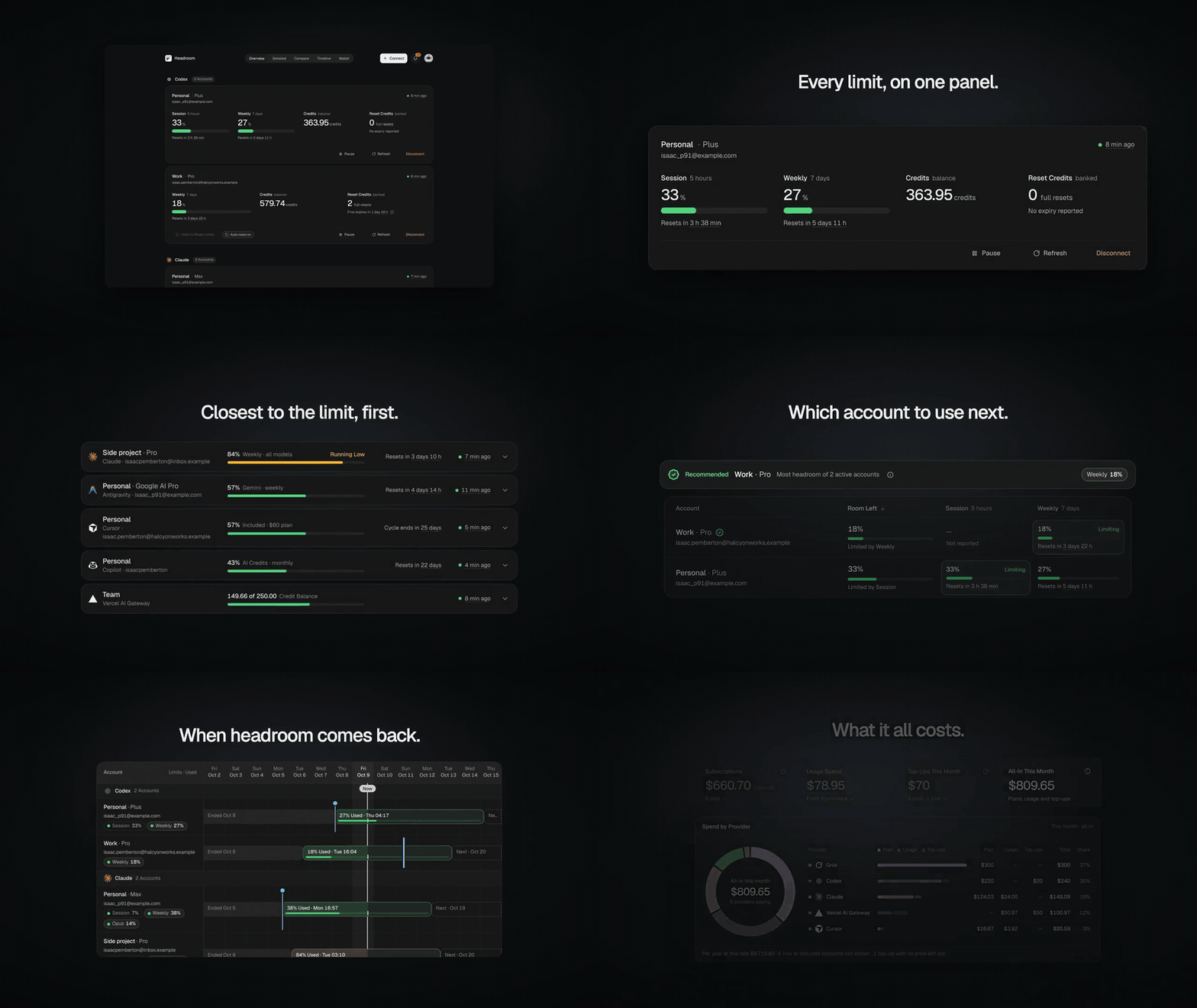
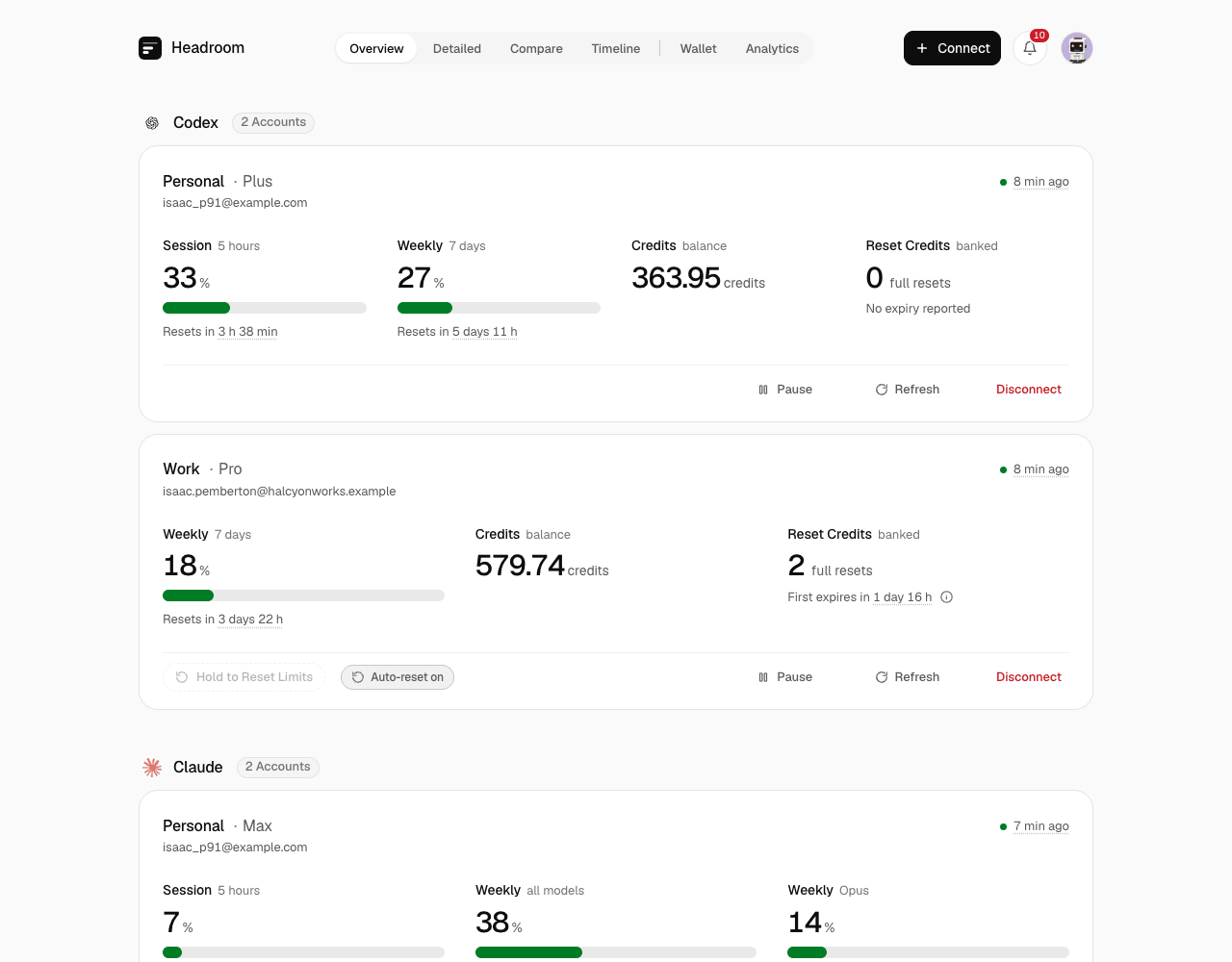
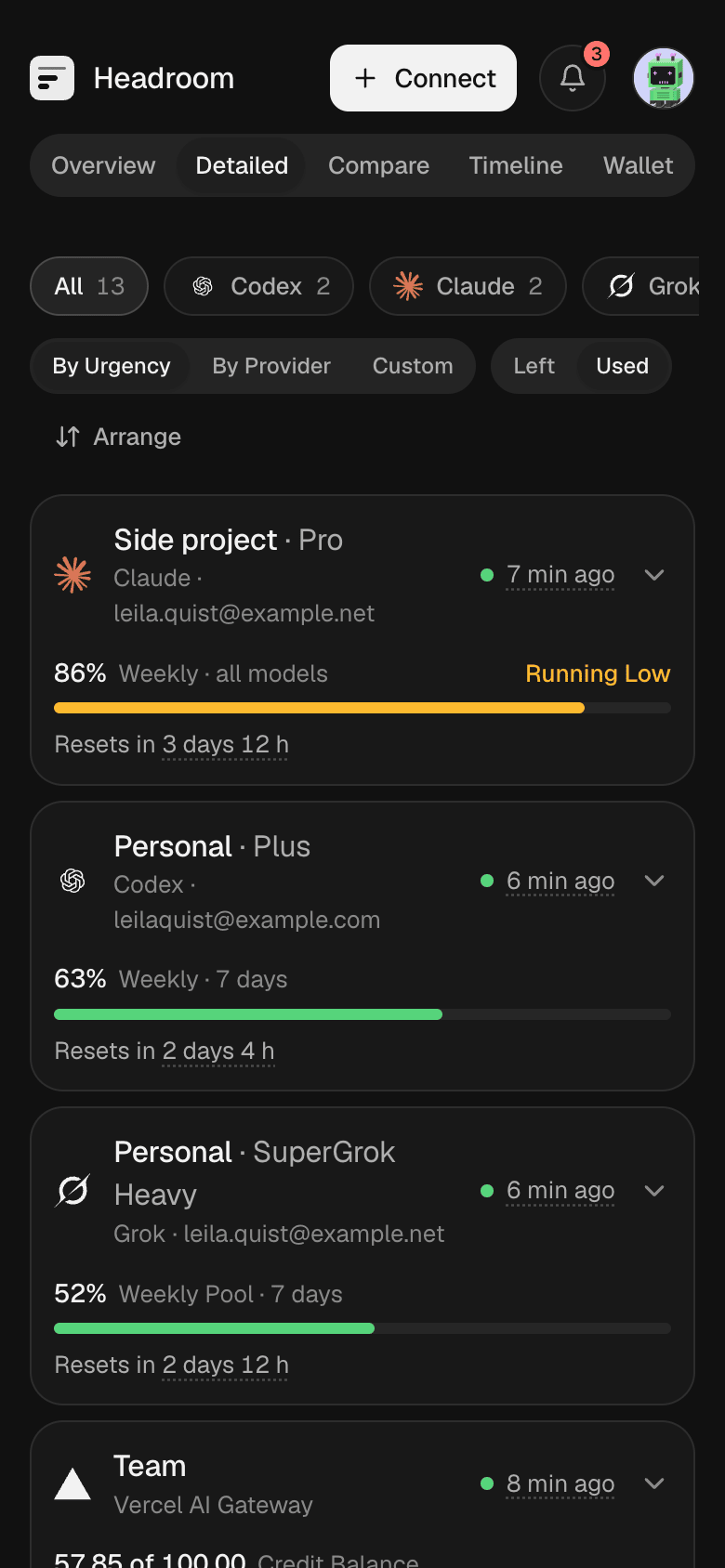
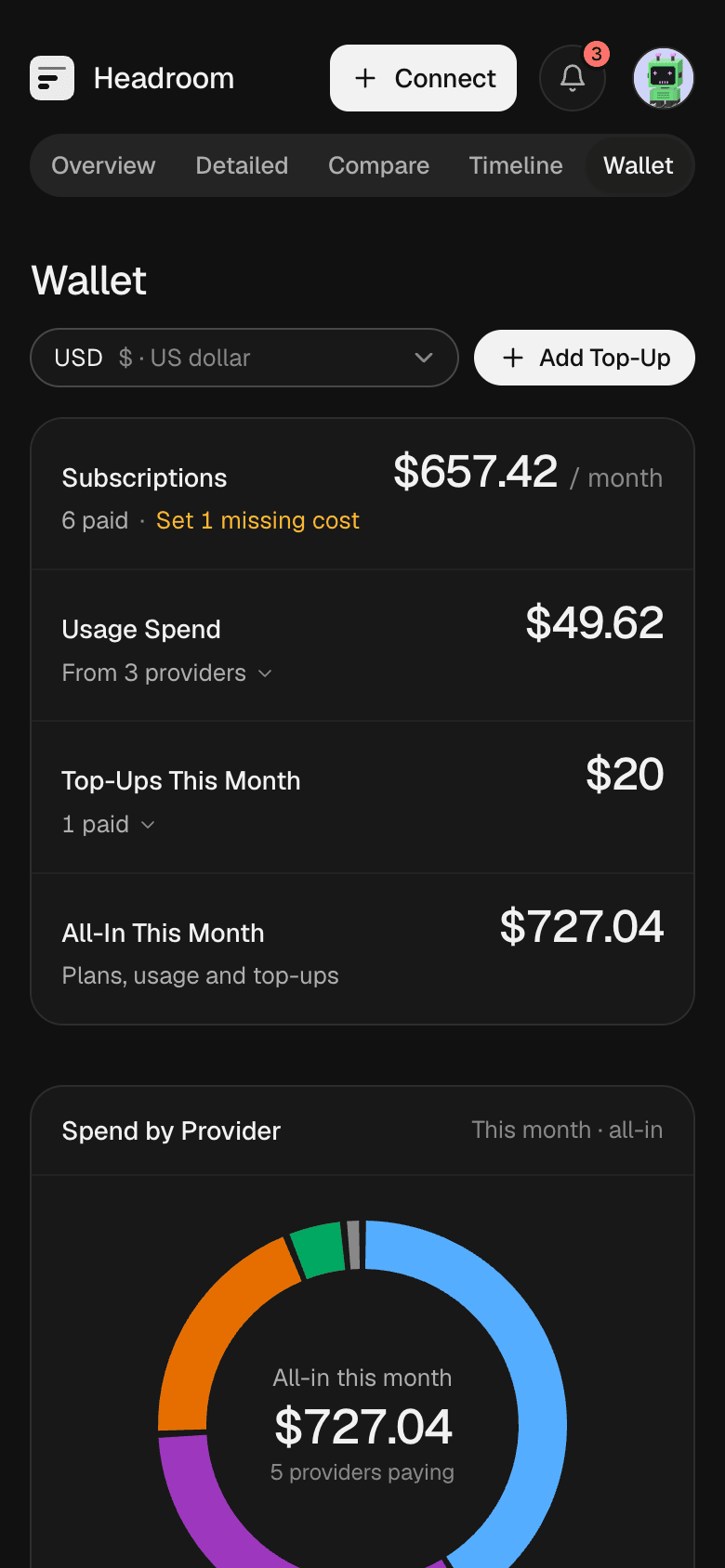
All screenshots use Demo Mode: synthetic accounts on reserved example domains.
Why Headroom
You pay for several AI plans, often more than one account each. Each one shows its limits somewhere else, in a different unit, with a different reset. You find out an account is spent when a request fails halfway through a task.
Headroom signs in to each account once, refreshes them in the background, and shows everything on one page: what is left, when it resets, which account to use next, and what it all costs.
Why there is no cloud version
Headroom holds the sign-in tokens for every AI account you connect. A hosted copy would put everyone's tokens on one server that someone else runs, which defeats the purpose. Run it on a server you control, and your tokens stay there. There is no hosted Headroom, and none is planned.
Features
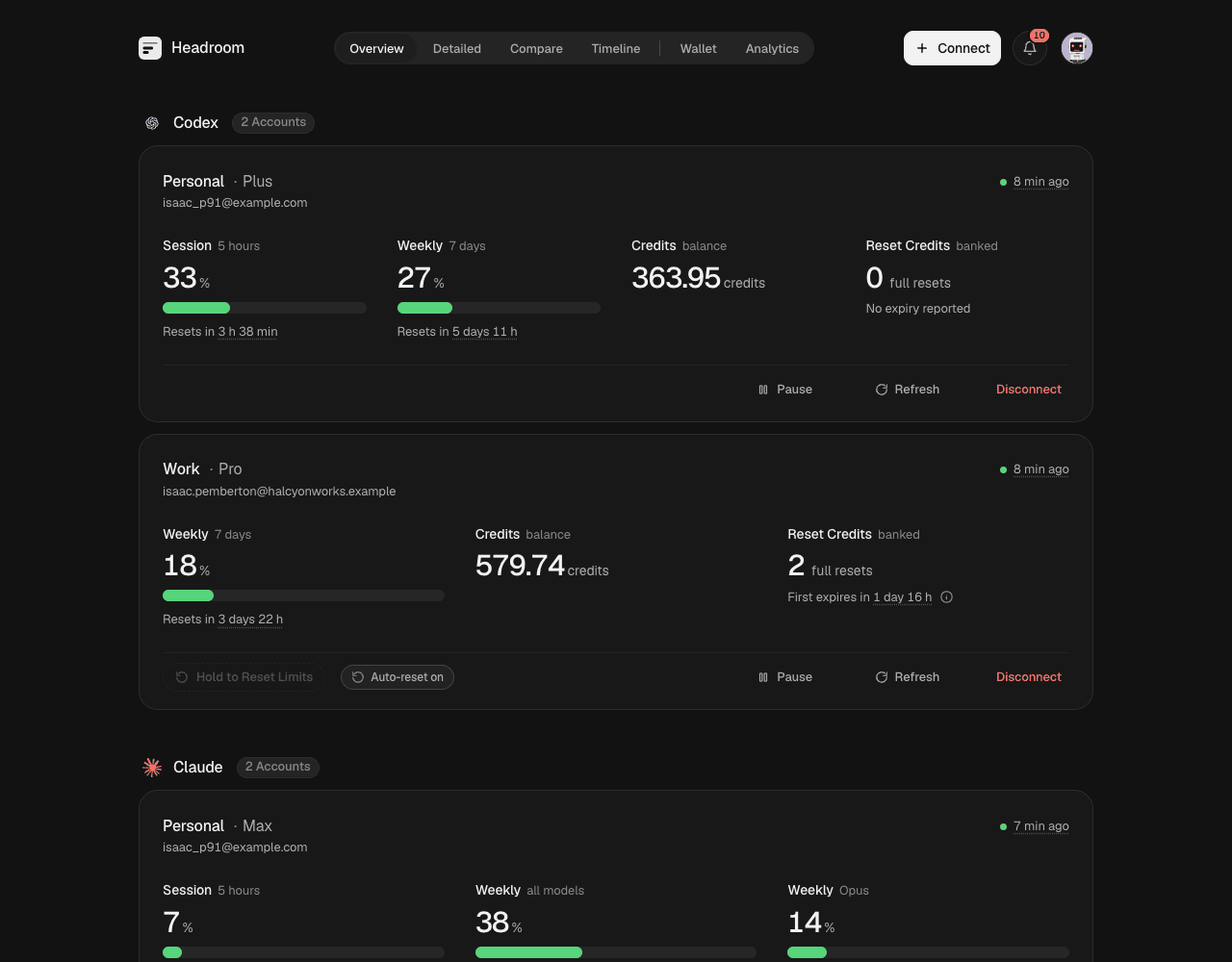
- Every limit in one place. 5-hour sessions, weekly pools, per-model limits, credit balances, banked resets and on-demand spend, side by side.
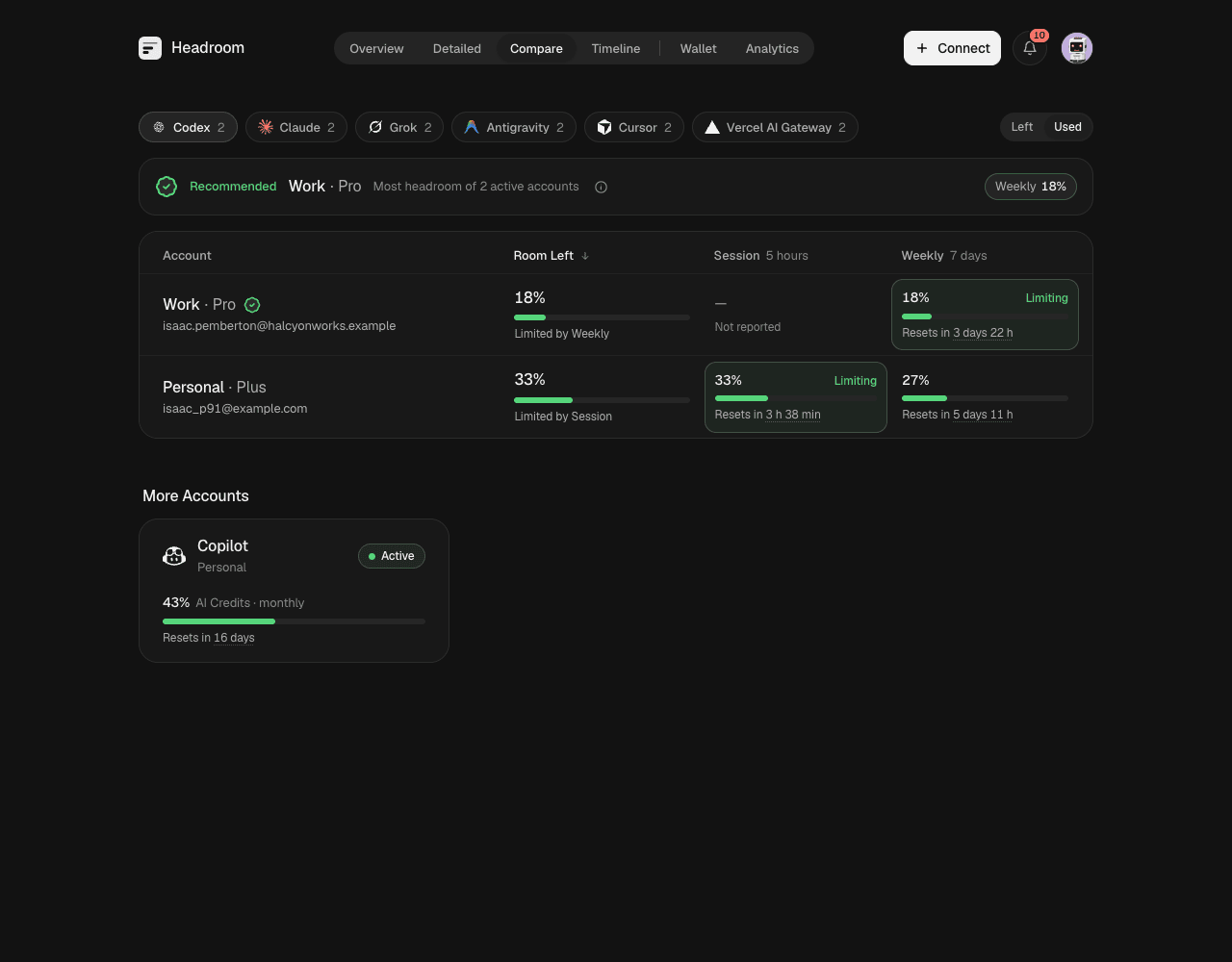
- Know which account to use next. Compare ranks accounts of a provider by the room they have left and names the one to use.
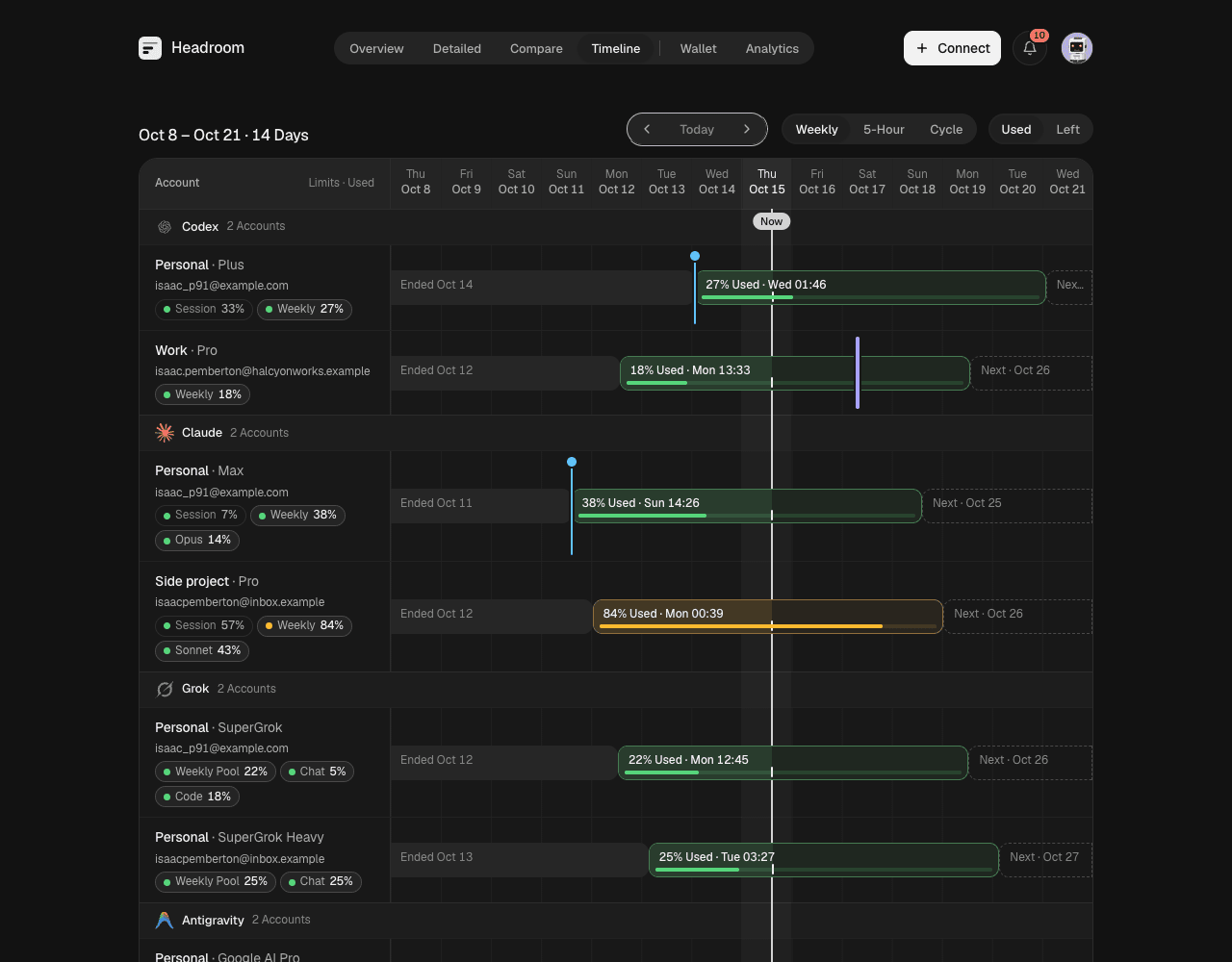
- See resets coming. Timeline lays every window on a calendar, so you know when headroom comes back.
- See how you use your limits. Analytics shows when you work, when you run out, and whether each plan fits, from the readings Headroom stores.
- Track what you pay. Wallet totals subscriptions, usage spend and top-ups in one currency, with upcoming renewals.
- Get warned in time. In-app notices, Telegram and signed webhooks for limits running low or on pace to run out before they reset, new and expiring resets, early resets, your own spend budgets and broken sign-ins.
- Automations you switch on. Use a banked Codex reset when a limit runs out, and record credit top-ups in the Wallet as soon as a balance rises.
- Many accounts per provider. Personal, work and side-project accounts stay separate, each with its own credentials.
- Private by design. One owner, passkeys, encrypted credentials, and a Privacy Mode that blurs emails on screen.
- Works on your phone. Every view is built for small screens.
Screenshots
| Overview | Compare |
|---|---|
 |
 |
| Timeline | Wallet |
 |
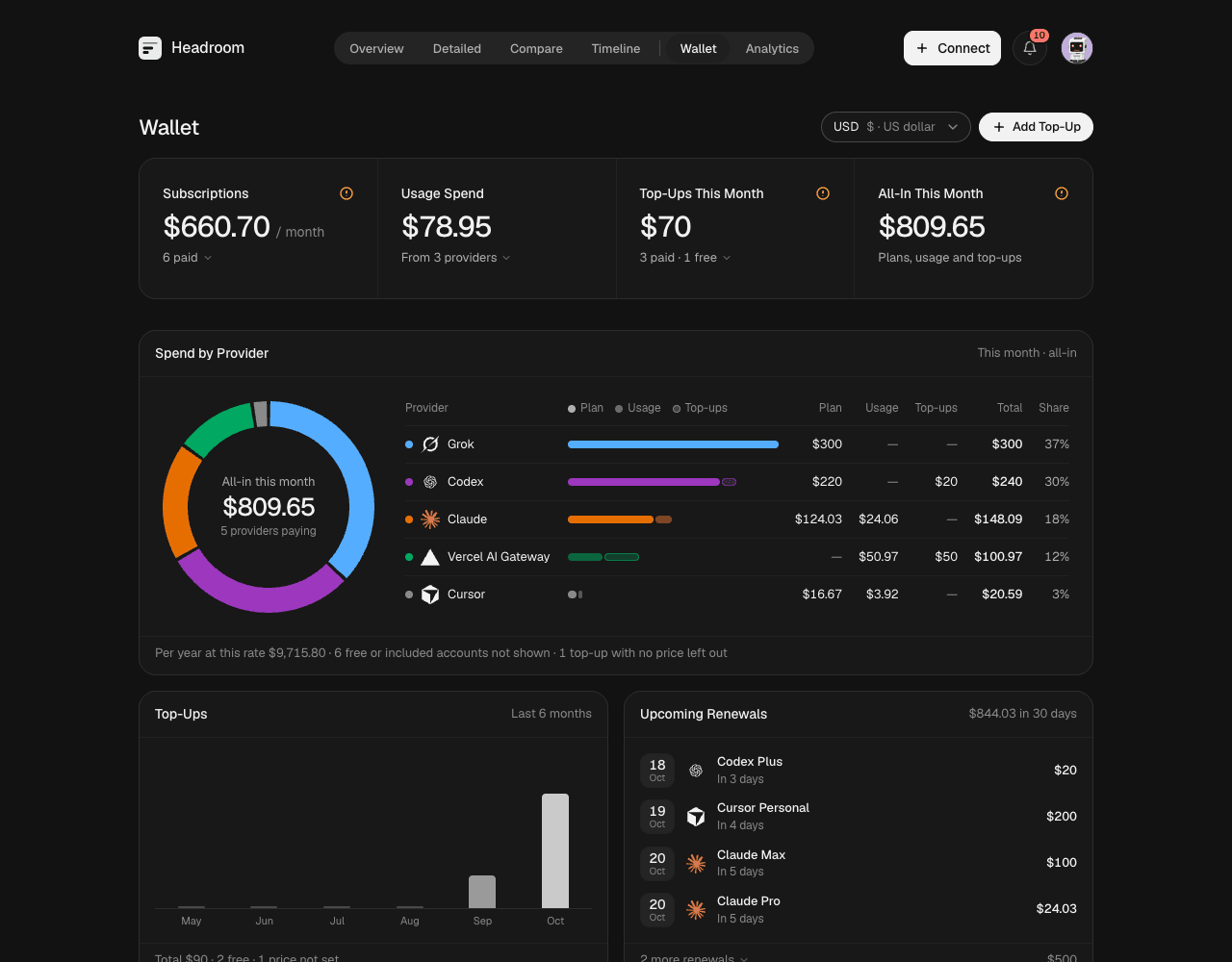 |
| Analytics | Detailed |
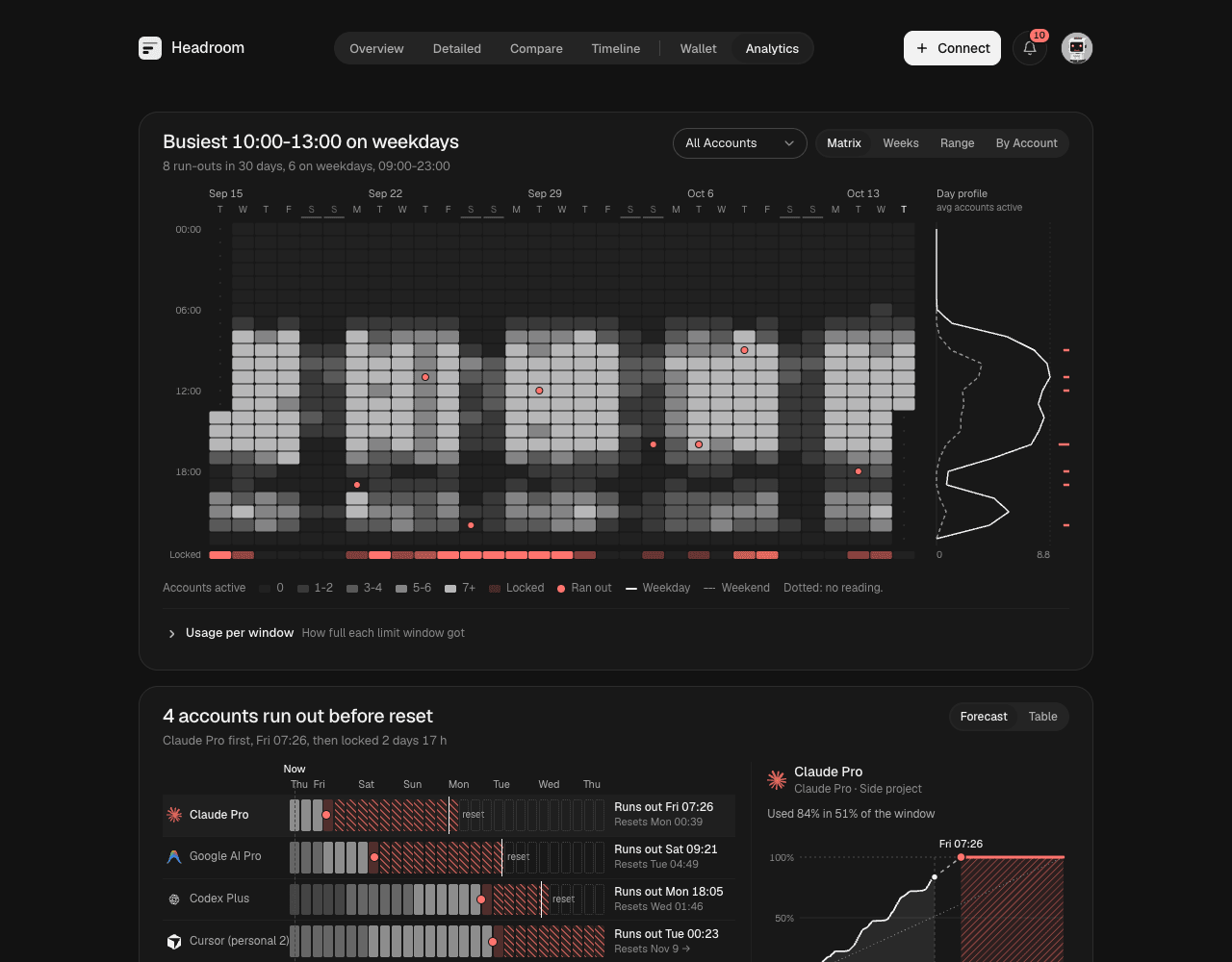 |
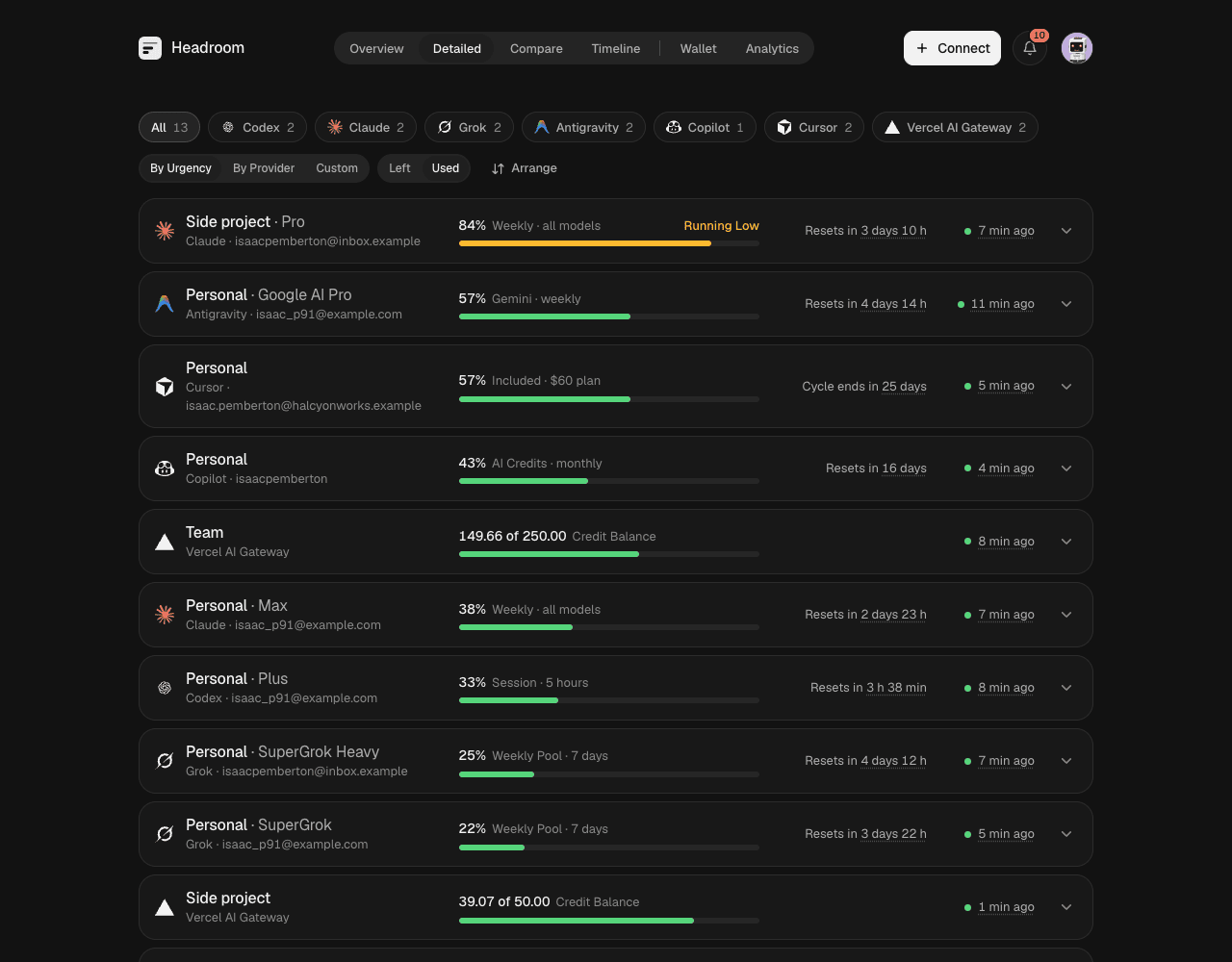 |
| Connect | Light theme |
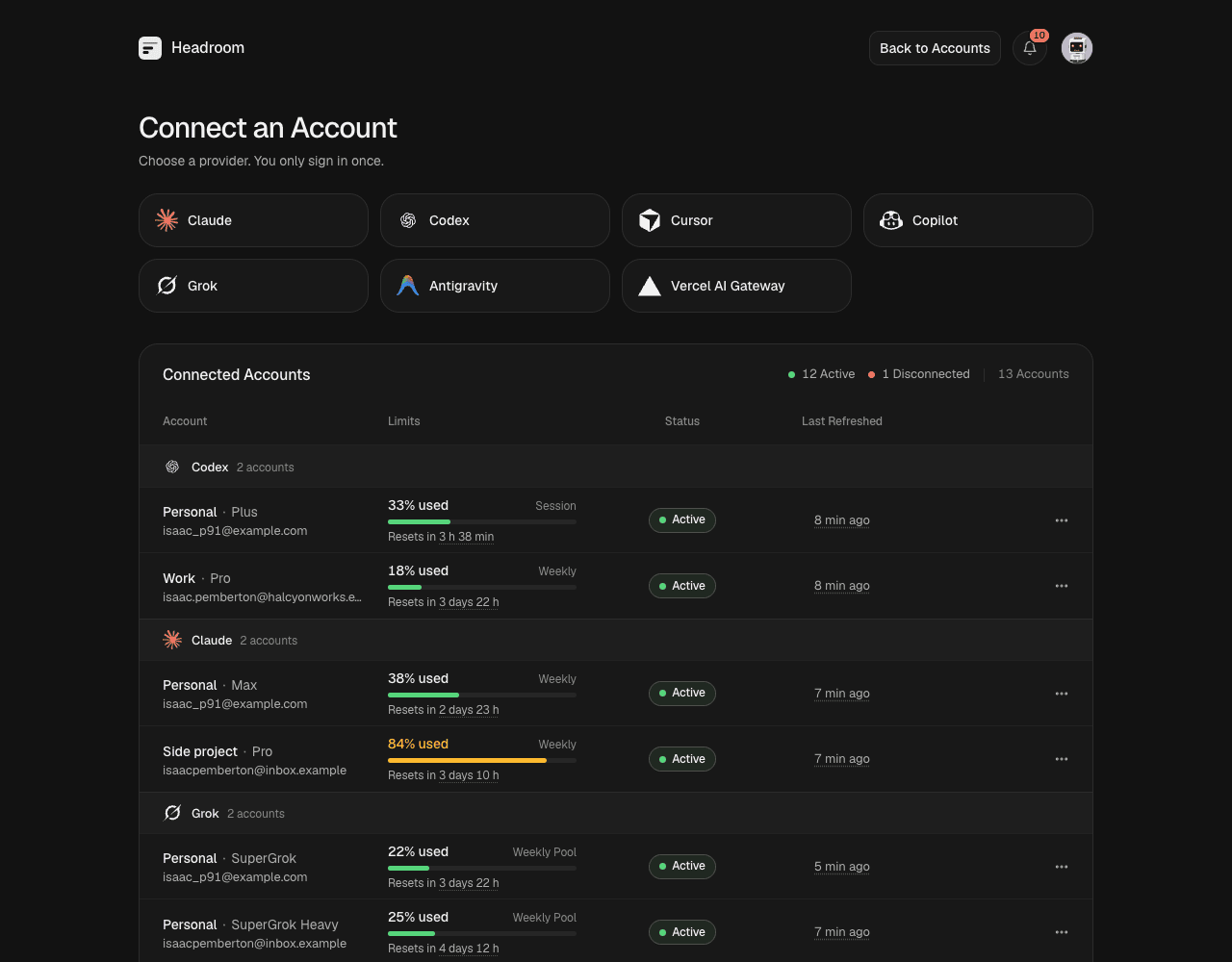 |
 |
Supported providers
| Provider | Sign-in | What you see | Interface |
|---|---|---|---|
| Claude | Claude Code sign-in, or import .credentials.json |
Session and weekly limits, per-model limits, extra-usage spend, reset grants | Private |
| Codex | Codex CLI device sign-in, or import auth.json |
5-hour and weekly limits, credits, banked reset credits | Private |
| Cursor | Browser approval | Included usage, Auto and API pools, Grok Bot, on-demand spend | Private |
| Copilot | GitHub device code, or import a gh token |
AI credits, credits used, extra usage, chat and completions | Private |
| Grok | Grok CLI device sign-in, or import auth.json |
Weekly pool, chat and code share, on-demand cap, prepaid balance | Private |
| Antigravity | Google sign-in, then paste the redirect | Gemini and Claude/GPT quota pools | Private |
| Vercel AI Gateway | API key | Credit balance, credits used, spend | Official |
- Private: the endpoint the provider's own app or CLI calls. It can change without notice.
- Official: a published API.
- Enable providers with
HEADROOM_ENABLED_PROVIDERS. The default is all seven. - Evidence: the provider dossiers record what is validated.
How it works
flowchart LR
  you([You]) -->|browser or phone| web[Web app]
  web -->|session-checked API| server[Headroom server]
  server --> db[(SQLite<br/>credentials sealed<br/>with AES-256-GCM)]
  server --> sched[Scheduler]
  sched --> conn[Connectors]
  conn -->|direct HTTPS| prov[Provider APIs]
  cli[Official CLI] -.->|once, at sign-in| server
  server -->|alerts| out[Telegram / webhooks]
- Sign in once. Where a provider needs it, its official CLI runs one time on the server to sign in. Headroom seals the result with a master key kept outside the database.
- Refresh in the background. The scheduler collects each account over direct HTTPS on your interval, refreshes tokens before they expire, and keeps 90 days of history by default.
- Read only by default. Monitoring never sends a model request, redeems a reset or buys credits. Using a banked Codex reset needs "Allow Account Actions" and either a press-and-hold or an auto-reset rule you set.
- Unknown is not zero. A figure a provider does not report shows as unknown, never as 0.
Quick start
Every way to install, update and remove Headroom is in Install.
Installer
curl -fsSL https://headroom.theblank.club/install | sh
headroom --open              # serve on 127.0.0.1:8080 and open the dashboard
headroom service install     # start at login
The script checks the download against the release checksums and puts headroom in ~/.local/bin. Run it again, or run headroom update, to upgrade. It supports macOS and Linux on arm64 and x64.
Homebrew
brew tap amitray007/headroom https://github.com/amitray007/headroom
brew install amitray007/headroom/headroom
brew services start headroom
Package runners
npx headroomhq # or bunx headroomhq, uvx headroomhq, pipx run headroomhq
Docker
docker run -d --name headroom -p 8080:8080 \
  -v headroom-data:/var/lib/headroom/data -v headroom-secrets:/etc/headroom \
  ghcr.io/amitray007/headroom:latest
Open http://localhost:8080 and create the owner account. Back up both volumes together: without the key, every account must be reconnected. A compose file is deploy/compose.simple.yaml. To reach Headroom from other devices, put an HTTPS reverse proxy in front and set HEADROOM_PUBLIC_URL to its address. Image tags are in Releases.
Docker on a Tailscale tailnet
Headroom publishes no port. A Tailscale container serves it over HTTPS to your own devices only.
git clone https://github.com/amitray007/headroom.git && cd headroom/deploy
cp .env.example .env   # set TS_AUTHKEY and HEADROOM_PUBLIC_URL
docker compose up -d --build
Open https://<TS_HOSTNAME>.<tailnet>.ts.net and create the owner account. The full guide, including Dokploy and moving an existing instance, is in Self-hosting on a tailnet.
From source
Requires mise, which installs the pinned Bun.
mise install && mise run install
mise run start         # builds the web app and the binary, then serves on :8080
Open http://localhost:8080. In the checkout, mise sets data to .data/ and the two secret files to .state/. Back up .state/headroom.key with .data/headroom.db: without the key every account must be reconnected.
The binary
The binary keeps per-user state: on macOS under ~/Library/Application Support/Headroom/, on Linux data in ${XDG_DATA_HOME:-~/.local/share}/headroom/ and the key and secret in ${XDG_CONFIG_HOME:-~/.config}/headroom/. Codex, Claude and Grok sign in through their official CLI: install it on the same machine, or use Import. See Install.
headroom --open          # serve on 127.0.0.1:8080 and open the dashboard
headroom --help          # commands, flags and the resolved file locations
headroom paths           # print the data, key and secret locations
headroom update          # install the newest release (--check only reports)
headroom service install # run at login (launchd on macOS, a systemd user unit on Linux)
headroom service status  # installed and running?
headroom service uninstall
service install must run from the compiled binary, not bun. On a headless Linux server also run loginctl enable-linger $USER. Back up the key with the database.
Configuration
| Variable | Default | Purpose |
|---|---|---|
HEADROOM_PUBLIC_URL |
none | The address you open Headroom at. Required behind a proxy; passkeys and cookies use it |
HEADROOM_ENABLED_PROVIDERS |
all seven | Comma list: codex, claude, grok, antigravity, copilot, cursor, vercel_ai_gateway |
HEADROOM_HOST |
127.0.0.1 |
Listen address. The container image sets 0.0.0.0 |
HEADROOM_PORT |
8080 |
HTTP port (--port overrides) |
HEADROOM_DATA_DIR |
macOS ~/Library/Application Support/Headroom/data, Linux ~/.local/share/headroom/data |
Where the database lives |
HEADROOM_MASTER_KEY_FILE |
next to the data on macOS, ~/.config/headroom/headroom.key on Linux |
The key that seals credentials. Keep it out of the data folder |
HEADROOM_AUTH_SECRET_FILE |
same folder as the key, headroom.auth-secret |
Session signing secret |
HEADROOM_CODEX_BIN, HEADROOM_CLAUDE_BIN, HEADROOM_GROK_BIN |
resolved on PATH |
Absolute path of a sign-in CLI. Sign-in runs it with a private HOME, so a version-manager shim that finds the CLI through HOME fails; point this at the real binary |
Every variable is listed in Deployment and credential storage.
Security
- Credentials are sealed per account with AES-256-GCM. The master key never enters the database.
- One owner account, with username and password or passkeys. Sign-up closes after the first account.
- Provider requests time out, and a redirect to another host never carries your tokens.
- Provider errors are mapped to fixed messages, so raw responses never reach logs or the browser.
- Demo Mode swaps in synthetic data for screenshots, and Privacy Mode blurs identities on screen.
Report a vulnerability privately as described in SECURITY.md.
Development
mise run dev                  # API server with reload on :8080
mise exec -- bun run web:dev   # Vite on :5173, proxying /api to :8080
mise run check                # docs, format, lint, typecheck, knip and tests
apps/server            Hono API, scheduler, notifications
apps/web               React 19 app
packages/core          Enumerations, stores, crypto, connector contract
packages/view-model    Presenters shared by every view, Demo Mode data
packages/connectors/*  One direct-HTTP client per provider
docs/                  Product, architecture, provider research, decisions
Start with CONTRIBUTING.md and the documentation index.
Support
Headroom is free, and there is no paid cloud version. If it saves you a surprise limit, you can sponsor its development. Sponsorship pays for connector fixes when a provider changes its API, new providers, releases and documentation.
License
MIT. Headroom also contains work from other projects under their own licenses: see Third-party notices and LICENSES/. See also the Disclaimer.
1 maintainer

Metadata
1 maintainer
Release files for headroomhq 0.1.12
For a detailed explanation of source distributions (sdists) and built distributions (wheels), please see the package formats documentation.
Built distributions (wheels)
| File | Reset | |||
|---|---|---|---|---|
| headroomhq-0.1.12-py3-none-manylinux_2_17_x86_64.manylinux2014_x86_64.whl | Python 3 | none | Linux glibc 2.17+ x86-64 | Details |
| headroomhq-0.1.12-py3-none-manylinux_2_17_aarch64.manylinux2014_aarch64.whl | Python 3 | none | Linux glibc 2.17+ ARM64 | Details |
| headroomhq-0.1.12-py3-none-macosx_11_0_arm64.whl | Python 3 | none | macOS 11.0+ ARM64 | Details |
| headroomhq-0.1.12-py3-none-macosx_10_15_x86_64.whl | Python 3 | none | macOS 10.15+ x86-64 | Details |
Total release size: 139.8 MB
Release files / headroomhq-0.1.12-py3-none-manylinux_2_17_x86_64.manylinux2014_x86_64.whl
| Download URL | headroomhq-0.1.12-py3-none-manylinux_2_17_x86_64.manylinux2014_x86_64.whl |
|---|---|
| Size | 39.7 MB |
| Tags | Linux glibc 2.17+ x86-64 Python 3 |
|
SHA-256 checksum How to use checksums |
46f32b034551313fc0b234ae7f2120629c9ed9658c8e5bd0e9c97b5ef083845d
|
|
BLAKE2b-256 checksum How to use checksums |
18c9c8b9317ee72318a9a1597ebe65a87f28967573972e2bf67ac70344a310dd
|
| Upload date | |
|
Uploaded using Trusted Publishing? What is trusted publishing? |
Yes |
| Uploaded via |
twine/7.0.0 CPython/3.13.14
|
Release files / headroomhq-0.1.12-py3-none-manylinux_2_17_aarch64.manylinux2014_aarch64.whl
| Download URL | headroomhq-0.1.12-py3-none-manylinux_2_17_aarch64.manylinux2014_aarch64.whl |
|---|---|
| Size | 39.7 MB |
| Tags | Linux glibc 2.17+ ARM64 Python 3 |
|
SHA-256 checksum How to use checksums |
67dcbba4786d02b7b72b376826991b5316a490278497b6baf627f31b69210823
|
|
BLAKE2b-256 checksum How to use checksums |
0e241bd37981e8d84d34ed476fb17f7dee88dcd0a608c85b0f5814c5852ee670
|
| Upload date | |
|
Uploaded using Trusted Publishing? What is trusted publishing? |
Yes |
| Uploaded via |
twine/7.0.0 CPython/3.13.14
|
Release files / headroomhq-0.1.12-py3-none-macosx_11_0_arm64.whl
| Download URL | headroomhq-0.1.12-py3-none-macosx_11_0_arm64.whl |
|---|---|
| Size | 28.8 MB |
| Tags | Python 3 macOS 11.0+ ARM64 |
|
SHA-256 checksum How to use checksums |
a636a9da2e9f2b8f60f2abce2fa73752a0e989aa8647421799b3d018cb16fd16
|
|
BLAKE2b-256 checksum How to use checksums |
4250fec110e40673af64f59ffbb0e75f7686a6cff4ccf2842bd7853563e9f87a
|
| Upload date | |
|
Uploaded using Trusted Publishing? What is trusted publishing? |
Yes |
| Uploaded via |
twine/7.0.0 CPython/3.13.14
|
Release files / headroomhq-0.1.12-py3-none-macosx_10_15_x86_64.whl
| Download URL | headroomhq-0.1.12-py3-none-macosx_10_15_x86_64.whl |
|---|---|
| Size | 31.5 MB |
| Tags | Python 3 macOS 10.15+ x86-64 |
|
SHA-256 checksum How to use checksums |
0b599e6254b0084e14e56a94b213876e0ec01798f08f5fc36f968bbfb8fa9462
|
|
BLAKE2b-256 checksum How to use checksums |
f08eac0267701b985b2e62113163d19180a44c282760200cc3b75730bb51734f
|
| Upload date | |
|
Uploaded using Trusted Publishing? What is trusted publishing? |
Yes |
| Uploaded via |
twine/7.0.0 CPython/3.13.14
|
Security for headroomhq 0.1.12
Provenance
Provenance describes where a file came from. On PyPI, provenance is shared via attestations, which provide a verifiable record of the build or publishing details. View details, limitations and caveats.
No provenance found
None of the files in this release were uploaded with provenance metadata.
A note on package security
PyPI is a repository for distributing packages, not a service for auditing them. While third-party security researchers and our staff do their best to detect and remove malicious packages, PyPI cannot guarantee the quality, security or suitability of any given package.














