
HeadVox
Script → voiceover + word‑aligned SRT/VTT captions + per‑word JSON timings, in one command.






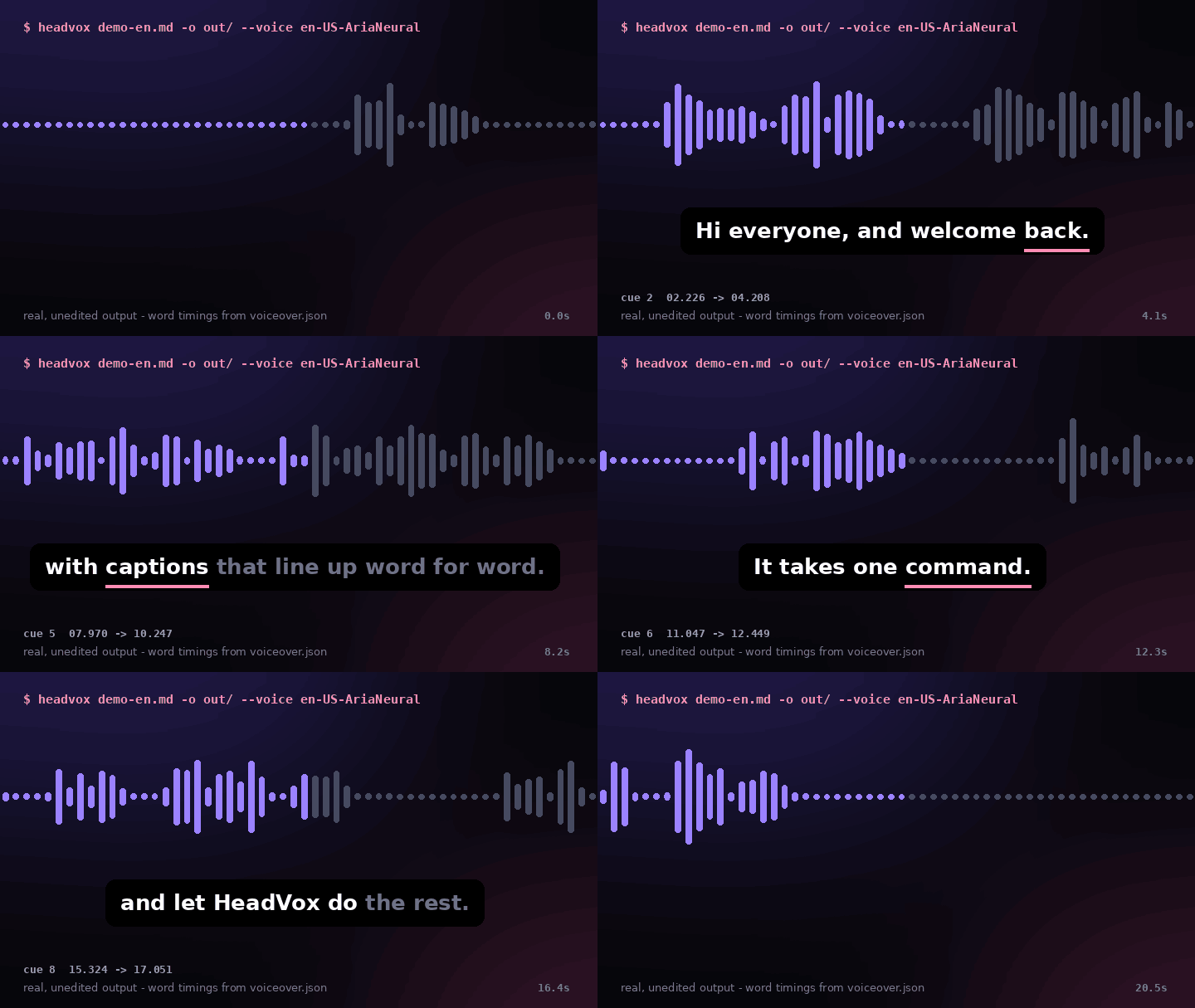
Real, unedited output of headvox examples/demo-en.md --voice en-US-AriaNeural. The highlighted word is driven by voiceover.json. Watch with sound (MP4) · more samples, incl. Chinese
HeadVox is a free, MIT‑licensed Python CLI and library for creators who write their own scripts. Give it a plain‑text or Markdown script and it produces a neural text‑to‑speech voiceover, SRT and WebVTT captions timed to the words as they are actually spoken, and a JSON manifest with millisecond timings for every word — then, if you like, puts it all on your talking‑head or B‑roll clip with ffmpeg. Chinese, English and Japanese are first‑class, including width‑aware caption breaking for CJK text.
✨ Highlights
- 🎯 Captions that don't drift — cues are built from the TTS engine's own word‑boundary events, not estimated from character counts.
- 🀄 CJK‑aware line breaking — a Chinese/Japanese character counts as two columns; lines break at punctuation inside a width budget, so mixed 中文 + English fits a 9:16 screen.
- 🧭 Per‑word JSON — drive karaoke captions, avatar lip‑sync, B‑roll cuts or chapter markers (the GIF above is rendered from it).
- ⏸️ Pacing control — automatic sentence/paragraph pauses plus
[pause 1.5s]anywhere. - 📝 Markdown in, speech out — headings, emphasis, links, lists and code fences are reduced to what a narrator would say.
- 🎬 One‑step video — loop a clip to the voiceover length, duck background music, add soft or burned‑in subtitles.
- ⚡ Clip cache — re‑rendering after a small edit is ~8× faster on our demo scripts (see Performance).
- 🧩 Pluggable backends — free online
edgevoices (no API key), offlinesinefor tests, or your own engine in ~10 lines. - 🪶 Zero required dependencies — pure Python + ffmpeg. No model download, no GPU.
📰 News
- 2026‑11‑08 · v0.1.2 — real demo, measured performance, pipeline diagram, roadmap and risks in the README.
- 2026‑11‑08 · v0.1.1 — full docs in English / 简体中文 / 日本語, reproducible benchmark script, live samples page.
- 2026‑11‑08 · v0.1.0 — first public release on PyPI.
Contents
- Quick start · What you get · Performance · How it works
- Writing a script that sounds good · Recipes · Python API · Timing manifest · Voices
- Which tool should I use? · Roadmap · Troubleshooting · FAQ
- Risks & limitations · Contributing · Citation · Acknowledgments
🚀 Quick start
pip install "headvox[edge]"      # Python 3.9+; also needs ffmpeg + ffprobe on PATH
headvox script.md -o out/ --voice en-female
headvox script.md -o out/ --voice zh-male --rate +8          # another voice, a bit faster
headvox script.md --dry-run                                  # preview segmentation, no TTS call
headvox script.md -o out/ --video avatar.mp4 --music bed.mp3 # straight to a finished MP4
echo "Hello from HeadVox." | headvox - -o out/               # read from stdin
ffmpeg: macOS brew install ffmpeg · Ubuntu sudo apt install ffmpeg · Windows winget install ffmpeg.
All CLI options
| Option | Default | What it does |
|---|---|---|
-v, --voice |
zh-female |
preset (zh-female, zh-male, en-female, en-male, ja-female, ja-male) or any edge‑tts voice id |
-b, --backend |
edge |
edge, sine, or a registered custom backend |
--rate / --pitch / --volume |
0 |
speed %, pitch Hz, volume % (e.g. +8, -5) |
--format |
mp3 |
mp3, wav, m4a |
--sentence-pause / --paragraph-pause |
250 / 700 |
silence in ms |
--caption-chars |
42 |
caption width budget (CJK char = 2) |
--video |
– | clip to put the voiceover on |
--fit |
loop |
loop the clip to the audio length, or cut to audio |
--music / --music-volume |
– / 0.12 |
background bed, looped and ducked |
--burn-subs / --no-subs |
off | burn captions into the picture / attach none |
--proxy |
– | HTTP proxy for the online backend (or HEADVOX_PROXY) |
--dry-run |
off | print the segments and exit |
📦 What you get
| File | What it is | Typical use |
|---|---|---|
voiceover.mp3 |
the narration (24 kHz; wav/m4a optional) |
drop on your editor's audio track |
voiceover.srt |
captions, word‑aligned | Premiere, Resolve, Final Cut, CapCut/剪映, YouTube upload |
voiceover.vtt |
same captions as WebVTT | HTML5 <track>, web players |
voiceover.json |
segments + per‑word start_ms/end_ms + cues |
karaoke captions, lip‑sync, auto B‑roll cuts |
voiceover.mp4 |
(with --video) clip + voice + music + subtitles |
publish directly |
📊 Performance
Measured with scripts/bench.py on the two demo scripts in examples/ — a 2‑vCPU aarch64 cloud sandbox, Python 3.12, edge voices reached through an HTTP proxy (2026‑11‑08). Cold includes the network round‑trips to the TTS service; cached is a re‑run with the clip cache warm.
| Script | Backend / voice | Audio | Captions | Widest cue | Overlaps | Cold | Cached | Cold RTF |
|---|---|---|---|---|---|---|---|---|
demo-en.md |
edge · en‑US‑AriaNeural | 20.1 s | 9 | 41 / 42 | 0 | 5.75 s | 0.63 s | 0.29 |
demo-zh.md |
edge · zh‑CN‑XiaoxiaoNeural | 23.2 s | 8 | 38 / 42 | 0 | 5.25 s | 0.65 s | 0.23 |
demo-en.md |
sine (offline) | 18.4 s | 9 | 39 / 42 | 0 | 0.93 s | 0.60 s | 0.05 |
RTF = processing time ÷ audio duration (lower is faster). Your numbers will mostly depend on your network latency to the TTS service. Reproduce:
pip install "headvox[edge]"
python scripts/bench.py examples/demo-en.md --voice en-US-AriaNeural
python scripts/bench.py examples/demo-zh.md --voice zh-CN-XiaoxiaoNeural
⚙️ How it works
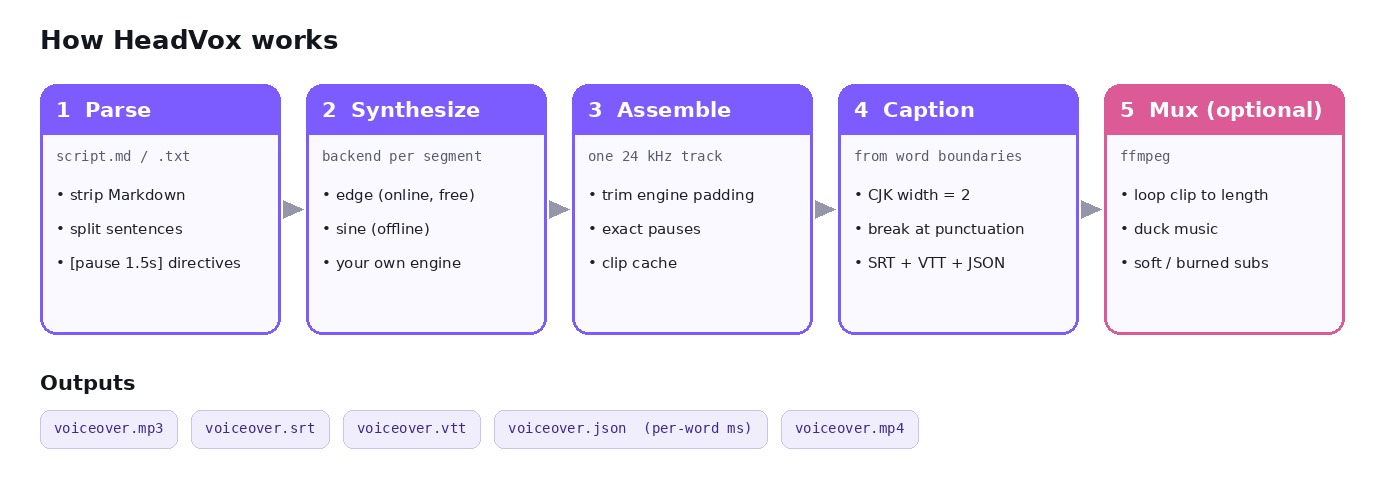
- Parse — split the script into speakable segments, strip Markdown, honour
[pause]directives. - Synthesize — call the backend per segment, cached by text + voice settings.
- Assemble — build one 24 kHz track, trimming engine padding so pauses are exact.
- Caption — build cues from word boundaries, breaking at punctuation within a CJK‑aware width budget; cues never overlap.
- Mux (optional) — ffmpeg loops the clip, ducks music with sidechain compression, adds soft or burned‑in subtitles.
Writing a script that sounds good
- One idea per sentence. Shorter sentences give shorter, punchier captions and more natural breathing.
- Use blank lines between paragraphs — they become longer pauses (
--paragraph-pause). - Add beats deliberately:
That's it. [pause 0.8s] Now the fun part. - Spell out what should be said: write "two thousand twenty‑six" or "v zero point one" if the engine mispronounces a token.
- Markdown is fine —
# Headingsare spoken as plain sentences,**bold**loses its asterisks, code fences are skipped. - For vertical video (9:16) try
--caption-chars 28; for 16:9 the default 42 works well.
Recipes
YouTube Shorts / TikTok / Douyin (9:16, burned‑in captions)
headvox short.md -o out/ --voice en-male --rate +6 --caption-chars 28 \
        --video portrait_avatar.mp4 --burn-subs --music bed.mp3
Course lesson with toggleable subtitles (16:9)
headvox lesson-03.md -o lesson-03/ --voice zh-female --video slides.mp4 --fit audio
Bilingual versions from two scripts
headvox intro.zh.md -o out/zh --voice zh-female
headvox intro.en.md -o out/en --voice en-female
Import into an editor — drop voiceover.mp3 + voiceover.srt into Premiere Pro, DaVinci Resolve, Final Cut (via SRT import) or CapCut/剪映; the captions land on the right frames.
Batch a folder
for f in scripts/*.md; do headvox "$f" -o "out/$(basename "$f" .md)"; done
Unchanged sentences come from the cache, so re‑runs are fast.
Make a karaoke preview like the one above — python scripts/render_demo.py out/ renders frames from any output folder (needs numpy and pillow).
Python API
from headvox import synthesize, Script, VoiceSettings

res = synthesize(
    Script.from_file("talk.md"),
    "out/",
    backend="edge",
    settings=VoiceSettings(voice="zh-CN-XiaoxiaoNeural", rate_pct=5),
)
print(res.duration_ms, "ms,", len(res.cues), "captions")
for cue in res.cues:
    print(cue.start_ms, cue.end_ms, cue.text)
synthesize() returns the paths of the audio, SRT, VTT and manifest, the total duration, the caption cues and per‑segment word timings.
Custom backend
from headvox.backends import SegmentAudio, WordMark, register_backend

class MyBackend:
    name = "mine"
    def synthesize_segment(self, text, settings):
        audio, fmt, dur = my_tts(text, settings.voice)   # bytes, "wav"/"mp3", ms
        return SegmentAudio(audio, fmt, dur, [WordMark("hi", 0, 200)])

register_backend("mine", lambda **kw: MyBackend())
Then headvox script.md -b mine. Any engine that can report word timings (or that you align afterwards) gets HeadVox's captioning, pacing, caching and muxing for free.
Timing manifest
voiceover.json holds everything downstream tools need:
{
  "tool": "headvox",
  "backend": "edge",
  "duration_ms": 19600,
  "segments": [
    {"index": 0, "text": "Hi everyone, and welcome back.",
     "start_ms": 250, "end_ms": 2232,
     "words": [{"text": "Hi", "start_ms": 250, "end_ms": 412}]}
  ],
  "cues": [{"index": 1, "start_ms": 250, "end_ms": 2232, "text": "Hi everyone, and welcome back."}]
}
Use it to drive mouth shapes on an avatar, highlight the active word (karaoke‑style captions), cut B‑roll on sentence boundaries, or generate chapter markers.
Voices
| Preset | edge‑tts voice |
|---|---|
zh-female |
zh-CN-XiaoxiaoNeural |
zh-male |
zh-CN-YunxiNeural |
en-female |
en-US-AvaMultilingualNeural |
en-male |
en-US-AndrewMultilingualNeural |
ja-female |
ja-JP-NanamiNeural |
ja-male |
ja-JP-KeitaNeural |
Any other edge‑tts voice id works too (edge-tts --list-voices), which opens up many more languages and accents; caption line‑breaking is tuned for CJK and Latin scripts.
🤔 Which tool should I use?
Honest positioning — pick the tool that fits the job:
| You want… | Good fit |
|---|---|
| One‑liner TTS of a short string to MP3 | the edge-tts CLI itself |
| Voice cloning / voice design / studio‑grade local speech models | a model such as VoxCPM, CosyVoice or F5‑TTS (GPU recommended) |
| "Topic → AI script → stock footage → video" automation | an end‑to‑end short‑video generator |
| Subtitles for a video that already has speech | a Whisper‑based transcription tool |
| Your own script → voiceover + captions that match it word for word, CJK‑friendly, with pause control, a reusable timing file, and optional mux onto your clip | HeadVox |
HeadVox is deliberately the focused, composable layer between "a script" and "a publishable clip": it hands clean MP3/SRT/VTT/JSON/MP4 files to whatever editor or pipeline you already use, and any speech engine can sit behind it as a backend.
🗺️ Roadmap
- Local‑model backends (e.g. VoxCPM / CosyVoice) with word timings, for fully offline and cloned voices
- ASS output with styled / karaoke captions
- Multi‑speaker scripts (
[voice zh-male]switches) - Per‑language line‑breaking rules beyond CJK + Latin
- Optional web UI
Ideas and PRs welcome — open an issue.
Troubleshooting
| Symptom | Fix |
|---|---|
ffmpeg not found |
install ffmpeg and make sure ffmpeg and ffprobe are on PATH |
NoAudioReceived from edge |
the voice id is wrong or temporarily unavailable — try another voice, or retry |
| Network blocked / corporate proxy | --proxy http://host:port or export HEADVOX_PROXY=... |
--burn-subs fails |
your ffmpeg lacks libass; use soft subtitles (default) or install a full ffmpeg build |
| Captions too long on vertical video | lower --caption-chars (e.g. 24–28) |
FAQ
Is HeadVox free? Yes. HeadVox is MIT‑licensed. The default edge backend uses the free online service behind Microsoft Edge's read‑aloud via the edge-tts package; it needs internet but no API key or account.
Does it work offline? Parsing, stitching, captioning and video muxing are fully local. Speech synthesis with edge needs internet; plug in a local engine through the backend API for a fully offline setup.
Why are the captions more accurate than splitting by sentence? HeadVox uses the word‑boundary events the engine emits while speaking, trims the leading/trailing silence some engines add, and then places line breaks — so each cue starts when its first word is actually heard.
Can it generate a talking‑head avatar? No — HeadVox doesn't render faces. It produces the voiceover, captions and per‑word timings that an avatar or lip‑sync tool consumes, and it can put the result on an avatar clip you already have.
Can I use the output commercially? HeadVox's code is MIT. Rights to synthesized speech depend on the TTS service you use — check its terms for your use case.
Is this affiliated with Microsoft or edge‑tts? No. HeadVox is an independent, original project that uses edge-tts as one optional backend.
⚠️ Risks & limitations
- Online backend. The default
edgebackend sends your script text to Microsoft's online read‑aloud service and needs internet. Use a local backend for confidential scripts. - Voice rights. HeadVox's code is MIT, but the rights to synthesized speech come from the TTS service you use — check its terms for commercial use.
- Disclosure. Synthetic narration can be mistaken for a real person. Don't use it to impersonate anyone, and label AI‑voiced content where your platform or audience expects it.
- Engine availability. Individual voices can be temporarily unavailable (
NoAudioReceived); switch voice or retry. - Scope. HeadVox does not render faces, clone voices or transcribe existing audio.
🤝 Contributing
git clone https://github.com/yyert123/headvox.git
cd headvox
pip install -e ".[dev]"
pytest            # runs fully offline via the 'sine' backend
Especially welcome: new backends, line‑breaking rules for more languages, caption styles, and docs translations.
📖 Citation
If HeadVox helps your course, research or product, please cite it via CITATION.cff (GitHub's "Cite this repository" button), and consider starring ⭐ the repo.
📄 License
MIT. HeadVox is original work and is not affiliated with Microsoft or the edge-tts project.
🙏 Acknowledgments
- edge-tts for the Python client to Microsoft Edge's online voices
- FFmpeg for audio/video processing
- Everyone who tries HeadVox, files issues and sends ideas
⭐ Star history
1 maintainer

Metadata
1 maintainer
Release files for headvox 0.1.2
For a detailed explanation of source distributions (sdists) and built distributions (wheels), please see the package formats documentation.
Source distribution (sdist)
| File | Size | Uploaded | Provenance | Actions |
|---|---|---|---|---|
| headvox-0.1.2.tar.gz | 34.0 kB | Without provenance | Details for headvox-0.1.2.tar.gz |
Built distribution (wheel)
| File | Interpreter | ABI | Platform | Actions Reset |
|---|---|---|---|---|
| headvox-0.1.2-py3-none-any.whl | Python 3 | none | any | Details for headvox-0.1.2-py3-none-any.whl |
Total release size: 60.8 kB
Release files / headvox-0.1.2.tar.gz
| Download URL | headvox-0.1.2.tar.gz |
|---|---|
| Size | 34.0 kB |
| Tags | Source |
|
SHA-256 checksum How to use checksums |
1e3eaf1c3d84dfe0476e715fcc6eea44e78c9f5eec4bc4dd4751fd7b3cfa84a9
|
|
BLAKE2b-256 checksum How to use checksums |
caffa99409065a6aea7408ba4b465df430f42f1566bb9be17b3419a7f164fd52
|
| Upload date | |
|
Uploaded using Trusted Publishing? What is trusted publishing? |
No |
| Uploaded via |
twine/7.0.0 CPython/3.12.15
|
Release files / headvox-0.1.2-py3-none-any.whl
| Download URL | headvox-0.1.2-py3-none-any.whl |
|---|---|
| Size | 26.9 kB |
| Tags | Python 3 |
|
SHA-256 checksum How to use checksums |
8e8a85b4bf450f10eb406b49d6483e8cf5d34536ffc88c73beee9d2ba4f5fa28
|
|
BLAKE2b-256 checksum How to use checksums |
4eea94538408616da541b4a9b835a971ba24994745b6e4038b2fc16b000227c2
|
| Upload date | |
|
Uploaded using Trusted Publishing? What is trusted publishing? |
No |
| Uploaded via |
twine/7.0.0 CPython/3.12.15
|
Security for headvox 0.1.2
Provenance
Provenance describes where a file came from. On PyPI, provenance is shared via attestations, which provide a verifiable record of the build or publishing details. View details, limitations and caveats.
No provenance found
None of the files in this release were uploaded with provenance metadata.
A note on package security
PyPI is a repository for distributing packages, not a service for auditing them. While third-party security researchers and our staff do their best to detect and remove malicious packages, PyPI cannot guarantee the quality, security or suitability of any given package.
To learn more about protecting yourself from malicious actors, visit our package security documentation.














