
Heartbeat analysis using Deep Learning, Signal Processing, and AI Agents.

Project description
🎵 Heart Murmur Detection with LSTM
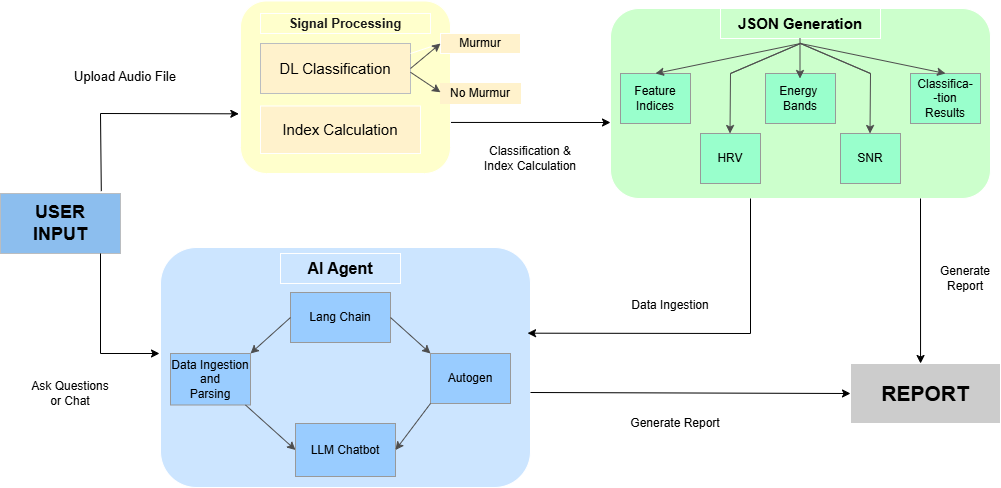
A deep learning application that uses LSTM neural networks to detect heart murmurs from audio recordings. The application provides a user-friendly Streamlit interface for uploading audio files and getting real-time predictions with signal processing.
 ---
---
📁 Project Structure
heart_app/
│
├── main.py                         # Streamlit entry point
│
├── classification/
│   ├── __init__.py
│   ├── model_loader.py             # Loads the trained LSTM model
│   ├── classifier.py               # Runs prediction + preprocessing
│
├── signal_processing/
│   ├── __init__.py
│   ├── loader.py                   # Load & normalize wav
│   ├── preprocessing.py            # Bandpass filter, envelope extraction
│   ├── features.py                 # Peak detection, HRV, SNR, Energy, etc.
│   ├── visualizer.py               # Plot waveform, spectrogram, histograms
│   ├── analyzer.py                 # Combines all steps, generates report
│
├── utils/
│   ├── __init__.py
│   ├── printer.py                  # Pretty print reports
│
├── models/
│   └── lstm_model.h5               # Pre-trained LSTM model
│
├── reports/
│   ├── heartbeat_report.json       # Generated reports (saved outputs)
│
├── requirements.txt
└── README.md
Quick Start
Prerequisites
- Python 3.8 or higher
- Windows 10/11 (PowerShell)
- Git (optional, for cloning)
Installation Steps
-
Clone or Download the Project
git clone <repository-url>
cd Heart-Murmur-Disease
Or download and extract the project folder.
-
Create Virtual Environment
python -m venv hvenv
-
Activate Virtual Environment
hvenv\Scripts\Activate.ps1
You should see
(hvenv)at the beginning of your command prompt. -
Install Dependencies
pip install -r requirements.txt
-
Run the Application
streamlit run app.py
-
Access the Application
- Open your web browser
- Navigate to
http://localhost:8501 - Upload a WAV or MP3 audio file
- Get instant heart murmur predictions with signal processing !
Install Dependencies
The requirements.txt file contains all necessary packages:
Install them with:
pip install -r requirements.txt
Step 4: Run the Application
streamlit run app.py
About Model Architecture
The LSTM model uses a hybrid CNN-LSTM architecture:
- Input: Raw audio data (52 timesteps, 1 feature)
- CNN Layers: 3 Conv1D layers with MaxPooling and BatchNormalization
- LSTM Layers: 2 LSTM layers for sequence modeling
- Dense Layers: 3 fully connected layers with dropout
- Output: 3 classes (Normal, Abnormal, Murmur)
- Total Parameters: 14,130,371 (53.90 MB)
Performance Tips
- Sample Rate: The model expects 22050 Hz (automatically handled)
Technical Details
Input Preprocessing
- Audio is loaded at 22050 Hz sample rate
- Truncated or padded to exactly 52 samples
- Reshaped to (1, 52, 1) for model input
Contributing
- Fork the repository
- Create a feature branch
- Make your changes
- Test thoroughly
- Submit a pull request
Happy Heart Murmur Detection!
Release history Release notifications | RSS feed


Download files
Download the file for your platform. If you're not sure which to choose, learn more about installing packages.
Source Distribution
Built Distribution
Filter files by name, interpreter, ABI, and platform.
If you're not sure about the file name format, learn more about wheel file names.
Copy a direct link to the current filters
File details
Details for the file heart_murmur_analysis-0.1.5.tar.gz.
File metadata
- Download URL: heart_murmur_analysis-0.1.5.tar.gz
- Upload date:
- Size: 87.8 kB
- Tags: Source
- Uploaded using Trusted Publishing? No
- Uploaded via: twine/6.2.0 CPython/3.12.10
File hashes
| Algorithm | Hash digest | |
|---|---|---|
| SHA256 |
0e3848c82e37f263189a47550ddc47f755f1cc27faec4e1008ba4221594edbc8
|
|
| MD5 |
7f3d247220e9b62cd7c786c3e0786256
|
|
| BLAKE2b-256 |
24b2a08512eefe43bc7a7ea6274f70f159d969430e9fb3a33d23c544f245c55e
|
File details
Details for the file heart_murmur_analysis-0.1.5-py3-none-any.whl.
File metadata
- Download URL: heart_murmur_analysis-0.1.5-py3-none-any.whl
- Upload date:
- Size: 92.4 kB
- Tags: Python 3
- Uploaded using Trusted Publishing? No
- Uploaded via: twine/6.2.0 CPython/3.12.10
File hashes
| Algorithm | Hash digest | |
|---|---|---|
| SHA256 |
406702af323b79a01954b7b9d3cc3a9b753942d33ee4ce076181f03928a7d327
|
|
| MD5 |
e451bf5f309391771612ea2509422435
|
|
| BLAKE2b-256 |
4c8a57486d8f2d5151b077de0367d8f702e5e3c63237de55a65516c2aade8985
|






