

FastAPI-native, server-rendered interfaces in pure Python.
Typed components · HTMX requests · Alpine.js local behavior · No frontend build







Documentation · Quickstart · Showcase · API · Security
Hedron lets FastAPI applications return Python component trees as safe HTML pages and fragments. It adds a typed UI model and progressive interaction without taking away FastAPI routes, dependencies, middleware, lifespan hooks, JSON endpoints, responses, or OpenAPI.
The result is one application with one routing, rendering, security, state, and deployment authority—without a generated frontend project, Node.js toolchain, virtual DOM, or whole-script rerun loop.
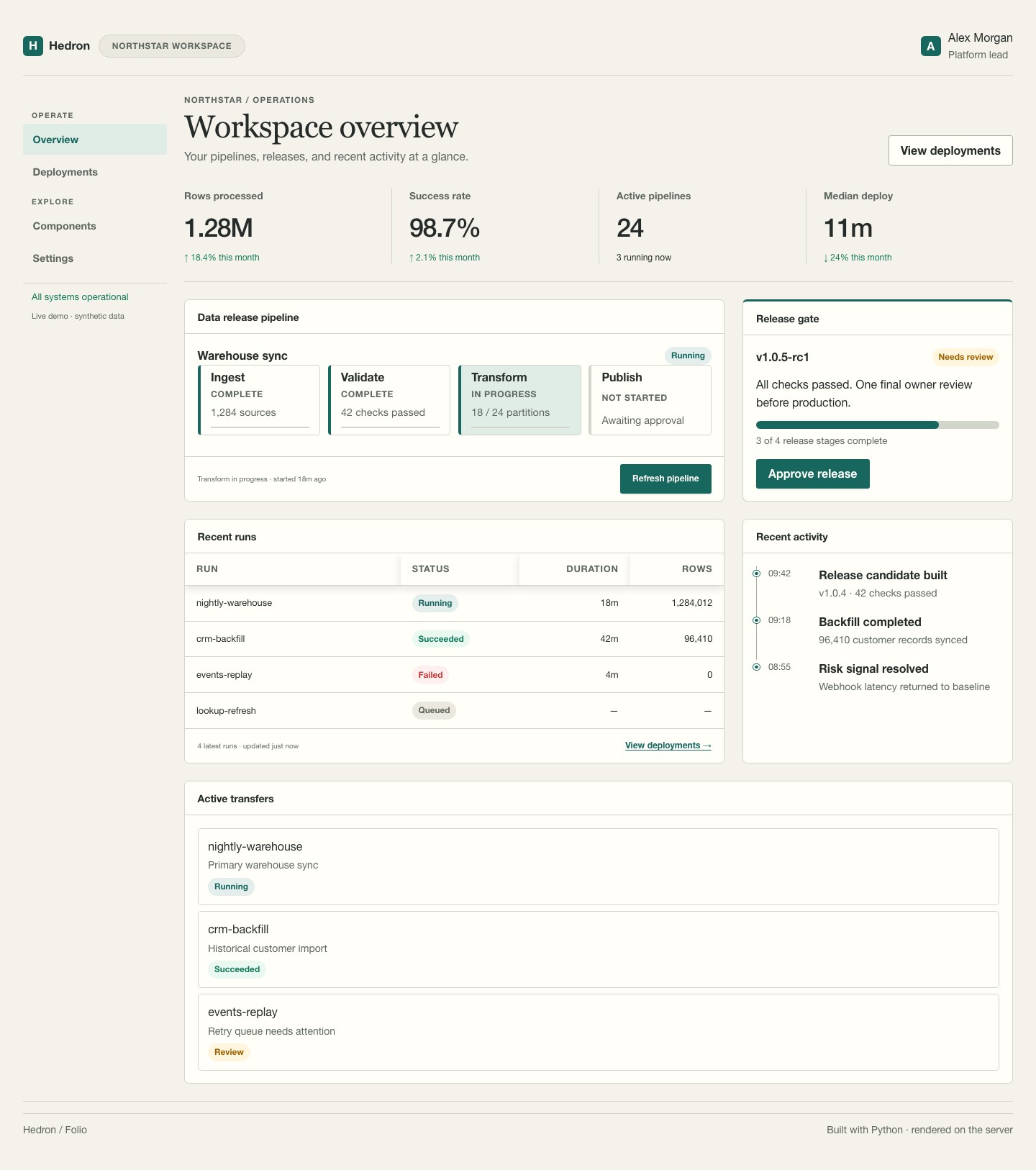
Explore the complete showcase → · View the reproducible source
Package maturity: Stable · Version line documented:
1.0.xEvery command and example below targets the Hedron 1.0 API. Supported Python versions are 3.10–3.14; applications should require the
>=1.0.0stable compatibility floor shown below.
Start in under a minute
The fastest path uses uv:
uvx --from "hedron>=1.0.0" hedron new my-hedron-app
cd my-hedron-app
uv sync
uv run hedron run app:app --reload
Open http://127.0.0.1:8000. The generated project is ordinary Python and includes a complete page, an addressable view, a typed action, built-in styling, and progressive HTTP fallbacks.
Adding Hedron to an existing project is just as direct:
uv add "hedron>=1.0.0" "uvicorn[standard]"
# or: python -m pip install "hedron>=1.0.0" "uvicorn[standard]"
The core model
Hedron deliberately gives each route one clear responsibility:
| Role | Responsibility | Typical result |
|---|---|---|
@app.page |
Render a complete navigable document | A component tree or explicit Page |
@app.view |
Render an independently addressable read fragment | A component or fragment tree |
@app.action |
Process an unsafe request and declare its outcome | Refresh, redirect, validation, or another typed outcome |
from datetime import datetime, timezone

from hedron import Hedron, Heading, Stack, Text, html

app = Hedron(title="Operations", security="standard")


@app.view("/status")
def status():
    stamp = datetime.now(timezone.utc).strftime("%H:%M:%S UTC")
    return html.div(
        Text(f"All systems operational · {stamp}"),
        role="status",
        aria={"live": "polite"},
    )


@app.page("/")
def home():
    return Stack(
        Heading("Operations"),
        status(),
        status.refresh_button("Refresh status"),
    )
Run it with hedron run app:app --reload or uvicorn app:app --reload.
Calling status() composes its initial output into the page. Its route handle also carries the
declared endpoint and target policy needed for later fragment refreshes. Hedron rejects requests
that attempt to update an undeclared target.
Typed actions
Unsafe requests cross an explicit validation and CSRF boundary:
from typing import Annotated

from pydantic import BaseModel, Field

from hedron import FormBody, Text


class Note(BaseModel):
    message: str = Field(min_length=1, max_length=200)


@app.action("/notes", fallback="/")
def add_note(note: Annotated[Note, FormBody()]):
    save_authorized_note(note)
    return Text("Note saved")


# Compose the native progressive form in any page:
# add_note.form(submit_label="Save note")
Hedron owns request parsing, validation lowering, CSRF integration, and response semantics. Authentication, row authorization, transactions, idempotency, and durable audit records remain application responsibilities.
What you get
| Concern | Built-in capability |
|---|---|
| UI composition | Application shells, navigation, grids, cards, forms, tables, dialogs, media, status, and accessibility primitives |
| Interaction | Addressable views, typed actions, declared targets, HTMX swaps, out-of-band updates, polling, and ordinary HTTP fallbacks |
| Styling | Responsive built-in themes, light/dark modes, design tokens, recipes, and component styling with no app-authored CSS required |
| FastAPI integration | Dependencies, middleware, lifespan, mounts, responses, JSON routes, OpenAPI, and root-path support |
| Safety | Contextual escaping, typed safe URLs, explicit trusted-HTML boundaries, CSRF profiles, security headers, and conservative caching |
| Operations | Build manifests, diagnostics, generated interaction tests, conformance reports, observability hooks, and deployment checks |
| Extension | Feature packages, component packages, Jinja/HDJ, Web Components, charts, maps, adapters, and a framework-neutral renderer |
The built-in theme follows the browser color preference, supports explicit light/dark selection, and collapses application shells and content grids for narrow screens. Custom CSS is optional, not a prerequisite for a finished application.
Browser behavior has clear ownership
Hedron uses two small, complementary runtimes:
Browser-local presentation state       Server interaction and domain state
Alpine.js                               HTMX + FastAPI
disclosures, tabs, menus, focus         requests, fragments, actions, jobs
Alpine state is disposable and reconstructable from rendered HTML. HTMX owns requests, fragment replacement, and declared request lifecycles. Application and domain state stay on the server.
Hedron vendors Alpine.js 3.16.3 as a CSP-compatible, same-origin asset and emits it only when a
page needs Alpine behavior. Required plugins are pinned and demand-driven. Use built-in components
and typed AlpineAttrs; arbitrary executable Alpine strings are outside the stable authoring API.
Read the HTMX/Alpine ownership guide.
Components are ordinary Python values
from hedron import Card, Heading, SafeUrl, Stack, Text, UrlPurpose, html

summary = Card(
    Stack(
        Heading("Quarterly summary", level=2),
        Text("Revenue increased 18%."),
        html.a(
            "View report",
            href=SafeUrl.parse("/reports/q4", purpose=UrlPurpose.NAVIGATION),
        ),
    )
)
User-controlled strings remain text. HTML and URLs cross explicit trust boundaries, so database, tenant, upload, and generated content cannot silently become executable markup.
Project-owned components are normal Python packages. They can participate in the same theme, asset, accessibility, inspection, and conformance contracts as built-ins.
Use only the packages you need
The stable 1.0 family is intentionally small:
| Package | Purpose |
|---|---|
hedron-core |
Framework-neutral components, rendering, interaction, and security contracts |
hedron |
FastAPI-native application and authoring facade |
hedron-data |
Bounded data tables, editors, queries, and workspaces |
hedron-charts |
First-party chart specifications, rendering, and adapters |
hedron-maps |
Accessible maps, layers, markers, and URL policies |
edron |
Higher-level class-oriented application authoring |
Install coordinated capabilities through extras:
uv add "hedron[data,charts,maps]>=1.0.0"
Other extras activate optional or Beta integrations such as dev, jinja, markdown, auth,
native, elements, conformance, notebook, gradio, mcp, and posit. Those packages may
release independently; consult the
compatibility matrix rather than guessing
compatible floors.
Add Hedron to an existing FastAPI application
Hedron can supply UI routes and static assets without replacing application construction:
from fastapi import FastAPI

from hedron import HTML, HedronRouter, Text, hedron_response, mount_hedron_static
from hedron.security.policy import SecurityPolicy

app = FastAPI()
app.state.hedron_security = SecurityPolicy.from_name("standard")
mount_hedron_static(app)

ui = HedronRouter()


@ui.get("/hello", **hedron_response())
def hello():
    return HTML(Text("Hello from Hedron"))


app.include_router(ui)
Read the integration guide for lifespan, assets, root paths, and response behavior. The renderer is framework-neutral, with first-party Beta host adapters for Flask and Django.
Production checklist
Hedron provides secure defaults and inspectable boundaries. Before deployment:
- Set a strong application-specific session secret; never ship a scaffold fallback.
- Authenticate users and authorize every protected page, view, action, row, and download.
- Use shared state, cache, and job backends for multi-worker deployments.
- Keep tenancy, persistence, transactions, retries, idempotency, and audit storage in application services.
- Treat user, database, upload, and generated content as untrusted input.
- Validate proxy trust, root paths, HTTPS, cookies, CSP, artifact paths, and topology-specific behavior with deployment checks.
- Prefer polling for durable job status unless SSE/WebSocket proxy buffering, timeouts, and backpressure have been verified.
Hedron is not an ORM, identity provider, database, durable job broker, hosted service, or client-side SPA runtime.
Inspect before you ship
# Inspect a trusted application
hedron --app app:app routes
hedron --app app:app components
hedron --app app:app graph

# Run diagnostics and static migration checks
hedron --app app:app check
hedron check --project . --target 1.0 --format sarif

# Build assets and inspect the installed package fleet
hedron --app app:app build
hedron fleet
The CLI also covers component previews, accessibility inspection, security posture, themes, generated interaction tests, conformance, package authoring, and offline upgrade reports.
Hedron or Edron?
Choose Hedron when you want direct component-tree composition, FastAPI-native function routes, host integration, or framework extension points.
Choose Edron when you want a smaller class-oriented API, batteries-included data/chart/map dependencies, familiar dashboard vocabulary, and Streamlit migration tooling. Edron lowers into this same Hedron runtime; it is not a parallel framework.
See the complete application
The Hedron Showcase is a responsive, light/dark operations console built from the same public source linked by the documentation. It covers application chrome, metrics, workflow status, tables, fragment refresh, and a typed action without documentation-only UI or custom application CSS.
For the smallest interaction, use the Hello + Refresh example.
Learn more
- Installation
- Core concepts
- Choose Edron or Hedron
- Cookbook
- Testing
- Deployment
- Threat model
- Architecture
- Source
- Changelog
- Issues
License
Hedron is available under the MIT License.
1 maintainer

Metadata
1 maintainer
Release files for hedron 1.1.3
For a detailed explanation of source distributions (sdists) and built distributions (wheels), please see the package formats documentation.
Source distribution (sdist)
| File | Size | Uploaded | |
|---|---|---|---|
| hedron-1.1.3.tar.gz | 343.4 kB | Details |
Built distribution (wheel)
| File | Interpreter | ABI | Platform | Reset |
|---|---|---|---|---|
| hedron-1.1.3-py3-none-any.whl | Python 3 | none | any | Details |
Total release size: 757.9 kB
Release files / hedron-1.1.3.tar.gz
| Download URL | hedron-1.1.3.tar.gz |
|---|---|
| Size | 343.4 kB |
| Tags | Source |
|
SHA-256 checksum How to use checksums |
fb167d1f6c035789fc93f23834e8f0ef5d24088ad230033dd6e64432151e95f0
|
|
BLAKE2b-256 checksum How to use checksums |
07180bede3f9a1b9b80ef86e6d9ffddc90b74168122ba154407f3b28358e2af6
|
| Upload date | |
|
Uploaded using Trusted Publishing? What is trusted publishing? |
No |
| Uploaded via |
uv/0.12.1 {"installer":{"name":"uv","version":"0.12.1","subcommand":["publish"]},"python":null,"implementation":{"name":null,"version":null},"distro":{"name":"Ubuntu","version":"24.04","id":"noble","libc":null},"system":{"name":null,"release":null},"cpu":null,"openssl_version":null,"setuptools_version":null,"rustc_version":null,"ci":true}
|
Release files / hedron-1.1.3-py3-none-any.whl
| Download URL | hedron-1.1.3-py3-none-any.whl |
|---|---|
| Size | 414.5 kB |
| Tags | Python 3 |
|
SHA-256 checksum How to use checksums |
2484f6957d7201d92649c87d76e793a11b4a9e225b26be4cee82118fbec6b20d
|
|
BLAKE2b-256 checksum How to use checksums |
b7e230ded0c734c0869996a821f59cafa4c53243bd71901d31f6b03a31960196
|
| Upload date | |
|
Uploaded using Trusted Publishing? What is trusted publishing? |
No |
| Uploaded via |
uv/0.12.1 {"installer":{"name":"uv","version":"0.12.1","subcommand":["publish"]},"python":null,"implementation":{"name":null,"version":null},"distro":{"name":"Ubuntu","version":"24.04","id":"noble","libc":null},"system":{"name":null,"release":null},"cpu":null,"openssl_version":null,"setuptools_version":null,"rustc_version":null,"ci":true}
|














