
A Computer Vision System for Dynamic Monitoring of Chemical Experiments

Project description
HeinSight4.0 – A Computer Vision System for Dynamic Monitoring of Chemical Experiments
HeinSight4.0 is a computer vision system designed for real-time monitoring of chemical behavior. It detects and classifies chemical phases (air, liquid, solid) within vessels, enabling automated observation of common experimental behaviors such as dissolution, melting, suspension, mixing, settling, and more. It also extracts additional visual cues like turbidity and color through image analysis.
This model was tested on chemistry within vials and EasyMax reactor.
💡 Installation is now available with
pip install heinsight👉 Try it out with the HeinSight Demo app.
How It Works?
HeinSight4.0 employs a hierarchical detection approach by training two separate models (Figure 1):
- Vessel Detection Model: Identifies transparent laboratory equipment (e.g., reactors and vessels) and marks them as "vessels."
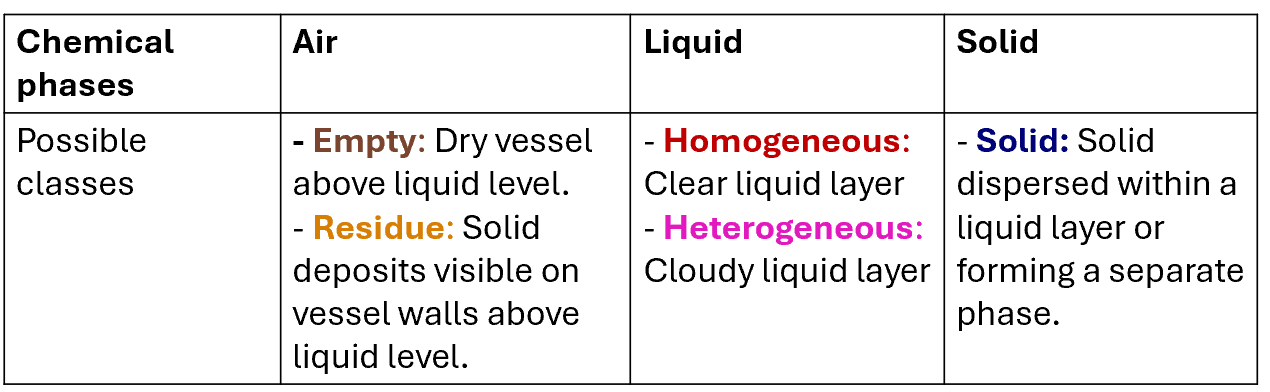
- Chemical Detection Model: Detects chemical artifacts and phases within the identified vessels. The model classifies chemical phases into five categories, as outlined in Table 1.
The output of the vessel detection model serves as input for the chemical detection model, enabling phase-specific analysis. Both models were fine-tuned from YOLOv8 pretrained on the COCO dataset and adapted to our customized datasets. Details on models training can be found here: https://zenodo.org/records/15605098.
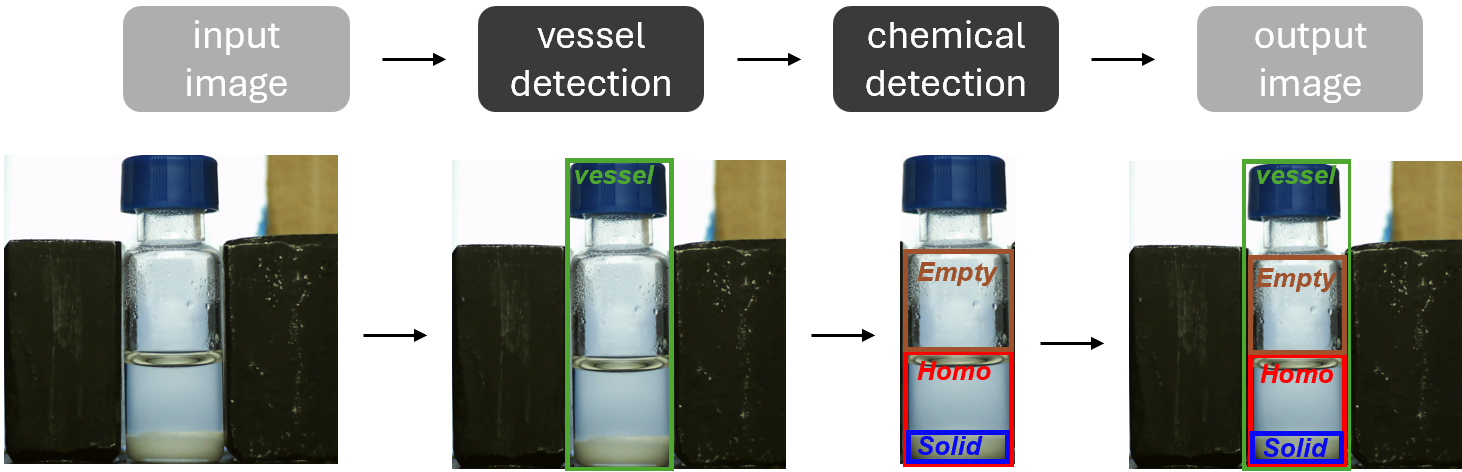
Table 1. Classes names for chemical detection model.
Datasets
Vessel Dataset
Composed of 6493 images from the HeinSight3.0 dataset combined with additional images of reactors and vessels to expand detection capabilities across various laboratory setups.
Chemical Dataset
Includes 3801 images captured from video footage of dynamic chemical experiments. Features diverse scenarios:
- Varied background lighting
- A range of colored liquids and compounds
- Different solid forms and behaviors in liquid environments This dataset enables monitoring of key experimental behaviors, including dissolution, melting, mixing, settling, and others, to address complex experimental conditions. A representative set of images is shown in Figure 2.
Dataset can be accessed at https://zenodo.org/records/14630321
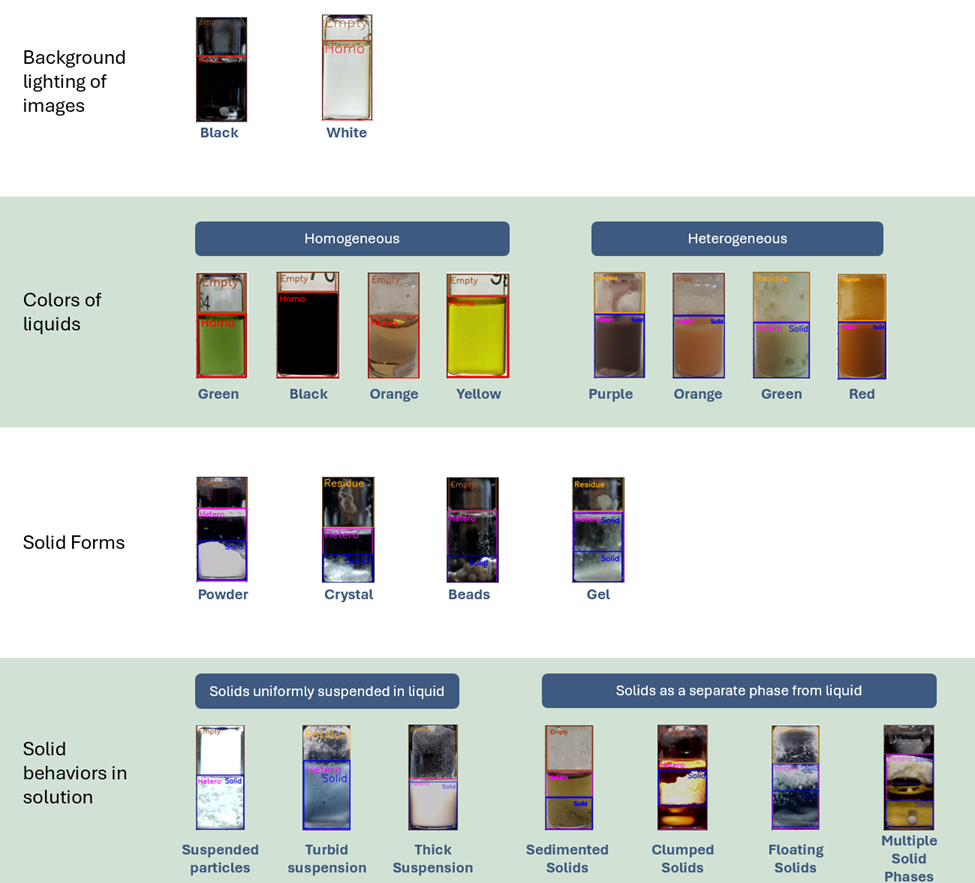
Figure 2. Overview of diverse images in the training dataset used for the chemical detection model
Installation
The script was developed on Window, and tested on Windows and a Raspberry Pi 5. Python versions should be flexible and align with the requirements of Ultralytics (Python>=3.8 environment with PyTorch>=1.8).
git clone https://gitlab.com/heingroup/heinsight4.0.git
cd heinsight4.0
pip install -r requirements.txt
cd heinsight
Enable CUDA
Note that PyTorch installation can be different when using a Nvidia GPU, check the PyTorch page for more detail.
pip install torch torchvision torchaudio --index-url https://download.pytorch.org/whl/cu118
Installation on a Raspberry Pi
Depending on the model sizes, and Pi model (pi 4 or 5), it might need to use headless openCV to avoid GUI conflict. Check out the Stream section for real time monitoring on a Pi device.
pip uninstall opencv-python
pip install opencv-python-headless
Note that picamera2 installation uses apt. Check formal installation guide for more details
sudo apt install -y python3-picamera2
Usage
Quickstart with demo image (image mode)
Output: heinsigh_output/output.png
python heinsight.py
Video analysis
Output:
- heinsigh_output/output.mkv: analysis output
- heinsigh_output/output_per_phase.csv: turbidity and color (overall and per phase) over time
- heinsigh_output/output_raw.csv: turbidity per row over time
from heinsight import HeinSight
heinsight = HeinSight(vial_model_path=r"models/best_vessel.pt",
                      contents_model_path=r"models/best_content.pt", )

# video analysis example
heinsight.run("path/to/video.mp4")
Realtime monitoring with a webcam
Output: Video analysis output + raw video capture
# realtime analysis example
heinsight.run(0)
Other arguments
heinsight.run("path/to/video.mp4",
              save_directory="new_folder",  # save to other path
              output_name="filename",       # save with other base filename
              fps=5,                        # capture frame rate, only available with webcam
              res=(1920, 1080))             # capture resolution
Stream
Stream with a FastAPI app, in stream.py
from heinsight import HeinSight

...

heinsight = HeinSight(vial_model_path=r"models/best_vessel.pt",
                      contents_model_path=r"models/best_content.pt", )
source = 0

...
pip install "fastapi[standard]"
cd heinsight
fastapi run stream.py
URLs
- Docs: localhost:8000/docs
- Start monitoring: localhost:8000/start
- Stop monitoring: localhost:8000/stop
- Frame output; get to stream video frames: localhost:8000/frame
- Data output: localhost:8000/data
Acknowledgements
Rama El-khawaldeh, Ivory Zhang, Ryan Corkery


Download files
Download the file for your platform. If you're not sure which to choose, learn more about installing packages.
Source Distribution
Built Distribution
Filter files by name, interpreter, ABI, and platform.
If you're not sure about the file name format, learn more about wheel file names.
Copy a direct link to the current filters
File details
Details for the file heinsight-0.4.3.tar.gz.
File metadata
- Download URL: heinsight-0.4.3.tar.gz
- Upload date:
- Size: 68.8 MB
- Tags: Source
- Uploaded using Trusted Publishing? No
- Uploaded via: twine/6.1.0 CPython/3.9.23
File hashes
| Algorithm | Hash digest | |
|---|---|---|
| SHA256 |
d9632c2e01f18abdf75b1b7bc335f54b97c0ffc1aa59af59d84dd248707e5634
|
|
| MD5 |
474bcc99d3f681f324dbf0fbae0aa68a
|
|
| BLAKE2b-256 |
b2c49743ca675f66cf3637718443ea65601f4547fcc334ee86f66a779a86f8eb
|
File details
Details for the file heinsight-0.4.3-py3-none-any.whl.
File metadata
- Download URL: heinsight-0.4.3-py3-none-any.whl
- Upload date:
- Size: 68.8 MB
- Tags: Python 3
- Uploaded using Trusted Publishing? No
- Uploaded via: twine/6.1.0 CPython/3.9.23
File hashes
| Algorithm | Hash digest | |
|---|---|---|
| SHA256 |
12f0696141d4f34baaccd76361364775c65e3f07046d3e446793c2ed4943afd0
|
|
| MD5 |
584432dbbf331c3eca885fd7224a218f
|
|
| BLAKE2b-256 |
ad7d8c3aca37a14fb44dda5d10ae97508690d9e833ae72a6ffc096705baadfbf
|








