
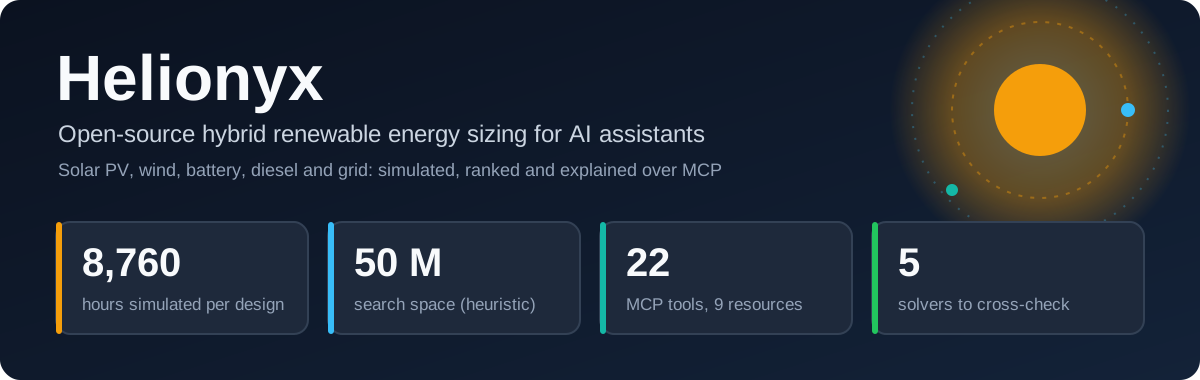




Helionyx
Helionyx is a Model Context Protocol (MCP) server, command-line interface and Claude skill that sizes hybrid systems (solar PV, wind, battery storage, diesel generator and utility grid) through conversation with an AI assistant. It reproduces the core HOMER Pro workflow with open-source engines that need no licence:
- simulate every candidate design hour by hour for a year;
- discard designs that break constraints;
- rank the rest by net present cost (NPC).
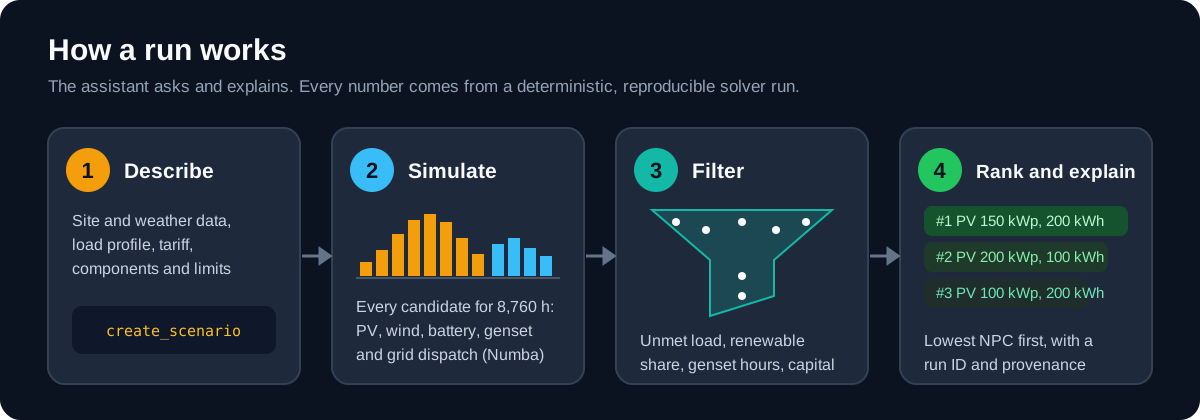
The assistant never produces numbers itself. It asks scoping questions, calls deterministic tools and explains the results. Every figure comes from a solver run and carries a run ID that anyone can reproduce.
Helionyx ships with a Sri Lankan country pack (lk): CEB and LECO tariff structures
and export schemes, alignment of UTC weather data to Asia/Colombo (UTC+05:30), grid
outage modelling and load archetypes for Sri Lankan building types. The engine is
country-agnostic; other countries can be added as data packs.
Helionyx is a pre-feasibility and teaching tool that complements HOMER, not a clone of it. See the Product Requirements Document and the Software Requirements Specification.
Status
| Release | State | Highlights |
|---|---|---|
| v0.1 MVP | Released | Engine, MCP server, CLI, Claude skill, lk pack, reference cases |
| v0.2.0 Validation | Released 7 October 2026 | Cross-check solvers, heuristic and Pareto search, two-variable sensitivity, Excel reports, HOMER parity kit |
| v0.3.0 | Released 7 October 2026 | Multi-year load growth and capacity expansion; PyPI and MCP Registry packaging |
| v1.0 | In development | Hosted mode with Entra ID, retention, OpenTelemetry, ecosystem packaging (planned) |
The tariff rates, component costs, fuel price, discount rates and emission factors in the
lkpack are unverified placeholders. They exist so the software can be built and tested. Do not use the results for real decisions until a maintainer has verified the data (SRS Appendix A, items V3, V8 and V9).validate_scenarioraises warning HNX-W001 for every unverified tariff.
See docs/IMPLEMENTATION_PLAN.md for the build plan, implementation decisions and open items.
Architecture
flowchart LR
    U([User]) <--> C["MCP client<br/>Claude Code · Claude Desktop<br/>Copilot Studio · custom agent"]
    C <-->|"stdio or<br/>Streamable HTTP"| S

    subgraph H["Helionyx (local-first, deterministic)"]
        S["MCP server<br/>22 tools · 9 resources · 6 prompts"]
        S --> SV["Services<br/>scenario · run · sensitivity · results · export"]
        SV --> K["Engine<br/>Numba dispatch kernel · pvlib · economics · billing"]
        SV --> ST[("SQLite metadata<br/>Parquet artefacts")]
        SV --> P["Country packs<br/>tariffs · components · archetypes"]
    end

    SV -.->|"HTTPS, cached"| W["NASA POWER · PVGIS"]
    SV -.->|"cross-check"| R["REopt v3 API"]
    SV -.->|"JSON subprocess"| X["helionyx-microgridspy (EUPL)<br/>helionyx-sama (AGPL)"]
The server never calls an LLM. Copyleft solvers run as separate processes, so the core stays Apache-2.0.
A sizing conversation
sequenceDiagram
    autonumber
    actor User
    participant AI as AI assistant
    participant HX as Helionyx tools
    User->>AI: "Size PV and a battery for my 60-room hotel in Negombo"
    AI->>HX: create_site, fetch_resource, synthesize_load
    AI->>HX: list_tariffs, compute_bill (baseline)
    AI->>HX: create_scenario, validate_scenario
    HX-->>AI: assumptions and warnings
    AI->>User: confirm assumptions?
    User->>AI: yes
    AI->>HX: run_optimization → get_job_status
    AI->>HX: get_results, explain_run, get_monthly_summary
    HX-->>AI: ranked designs, NPC, bills, run ID
    AI->>User: top three designs, every number cited to the run
Solvers
| Solver | Method | Use it for | Licence and install |
|---|---|---|---|
native |
Full enumeration, 8,760-hour dispatch | The default; exact optimum of the search space | Built in |
heuristic |
Seeded multi-start pattern search | Spaces above the enumeration limit: up to 50 million candidates, sampled within a budget of 50 to 50,000 evaluations (default 4,000) | Built in |
reopt |
MILP with perfect foresight (NREL REopt v3) | Cross-checking grid-connected designs | API key; load leaves the machine |
microgridspy |
LP with HiGHS | Cross-checking off-grid designs | helionyx-microgridspy, EUPL-1.2 |
sama |
Particle swarm | Cross-checking off-grid designs | helionyx-sama, AGPL-3.0 |
compare_runs puts the results side by side. Multi-year scenarios run on native and
heuristic only.
Multi-year analysis
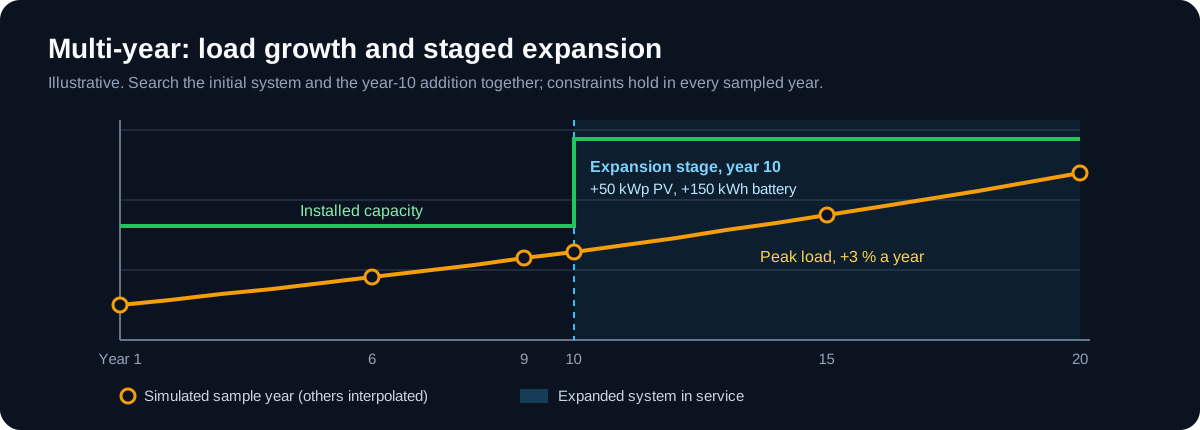
Add multi_year to a scenario to grow the load and search a staged investment:
multi_year:
  load_growth_rate: 0.03        # year y load = year-1 load × 1.03^(y−1)
  sample_every_years: 5         # plus each stage boundary and the last year
  expansion:
    - year: 10
      pv_add_kwp: [0, 50, 100]
      bess_add_kwh: [0, 150]
The expansion sizes become extra search axes. Stage capital enters the cash flow in its
year, with its own replacements and salvage, and reliability constraints must hold in
every sampled year. Each candidate reports its sampled years under multi_year.years.
See the methodology (decision D20).
Features
- Resource data: hourly GHI, temperature and wind from NASA POWER (and PVGIS where covered), CSV import, on-disk caching, offline mode, UTC → local civil time alignment, leap-day removal and gap filling. NASA POWER 2023 data for three Sri Lankan sites is bundled, so the reference cases run offline.
- Load profiles: 11 synthetic archetypes, random variability with a seed, calibration to 12 monthly bills, composite loads and measured-load import (15/30/60-minute).
- Tariffs and bills: versioned YAML tariffs with flat, block and TOU energy charges, fixed, demand and minimum charges, levies, and the net metering, net accounting and net plus export schemes.
- Scenario builder: defaults from the country pack, a full assumption audit (origin, source and date for every value), validation rules, SHA-256 scenario hashes, versioning and YAML round-trips. Scheduled and random grid outages.
- Simulation and optimisation: an 8,760-hour dispatch kernel in Numba (PV via pvlib, wind power curves, idealised battery, diesel genset with load-following or cycle-charging, grid-connected TOU strategy), parallel enumerative search, HOMER-style economics (NPC, LCOE, replacements, salvage, payback, IRR) and emissions.
- Search: full enumeration, or a seeded heuristic pattern search for spaces of up to 50 million candidates; Pareto front of NPC, CO₂ and capacity shortage.
- Multi-year analysis: annual load growth and up to three capacity-expansion stages, searched together with the initial system and costed year by year.
- Sensitivity: one-variable sweeps and two-variable grids with re-optimisation, optimal architecture per case and NPC elasticities.
- Grounded explanations: structured cost breakdowns, cost drivers, binding constraints, dispatch statistics and comparisons, with provenance and a disclaimer on every result.
- Exports: HOMER-importable series plus a parameter sheet, Markdown and Excel reports, hourly time series and scenario YAML.
- Cross-check solvers compared with
compare_runs: REopt v3 (API key), and MicroGridsPy and SAMA as separately licensed add-on packages (see docs/adapters.md). - HOMER parity kit: protocol, results template and
helionyx parity compare. - Claude skill and MCP prompts for guided workflows, plus a grounding checker.
Install
Helionyx needs Python 3.11–3.13.
# run without installing (recommended for MCP clients)
uvx helionyx serve

# or install from PyPI
pip install helionyx
From source, for development:
git clone https://github.com/Jayzilva/helionyx.git helionyx
cd helionyx

# with uv
uv venv
uv pip install -e ".[dev]"

# or with pip
python -m venv .venv
.venv/bin/pip install -e ".[dev]"      # Windows: .venv\Scripts\pip install -e ".[dev]"
Quickstart
Run a reference case from the command line (works offline):
helionyx run reference_cases/rc2_hotel_negombo.yaml
This sizes PV and battery for a 60-room hotel in Negombo on the CEB hotel TOU tariff and prints the five lowest-NPC designs with the grid-only base case. The first run takes a little longer while Numba compiles the dispatch kernel.
See docs/quickstart.md for a full walk-through.
Connect to an AI assistant
Claude Code
claude mcp add helionyx -- uvx helionyx serve
Claude Desktop
Add this to claude_desktop_config.json:
{
  "mcpServers": {
    "helionyx": {
      "command": "helionyx",
      "args": ["serve"]
    }
  }
}
If helionyx is not on your PATH, use uv instead:
{
  "mcpServers": {
    "helionyx": {
      "command": "uv",
      "args": ["run", "--directory", "/path/to/helionyx", "helionyx", "serve"]
    }
  }
}
Streamable HTTP (local testing only)
helionyx serve --transport http --port 8080
This serves MCP at http://127.0.0.1:8080/mcp and a health check at /healthz. Set
HNX_API_KEY to require Authorization: Bearer <key> (development-grade protection; the CLI
refuses a non-local bind without it). OAuth 2.1 with Microsoft Entra ID arrives with hosted
mode in v1.0.
Claude skill
Copy the skill so Claude follows the Helionyx workflow and grounding rules:
cp -r skills/helionyx ~/.claude/skills/
Clients without skill support can use the MCP prompts listed below instead. See docs/skill-guide.md.
MCP tools
| # | Tool | Purpose |
|---|---|---|
| 1 | create_site |
Register a site (location, time zone, country pack) |
| 2 | fetch_resource |
Hourly GHI, temperature and wind from NASA POWER or PVGIS, aligned to local time |
| 3 | import_timeseries |
Import a measured load or resource series from CSV; extend 4+ weeks of load to a year |
| 4 | synthesize_load |
Build a load from archetypes, optionally calibrated to monthly bills |
| 5 | list_tariffs |
Browse the tariff pack |
| 6 | get_tariff |
Tariff charges, TOU periods, export schemes and staleness warnings |
| 7 | compute_bill |
Baseline bill for a load, or a bill for import/export series |
| 8 | list_components |
Browse the component library |
| 9 | create_scenario |
Combine all inputs and the search space into a scenario |
| 10 | validate_scenario |
Errors, warnings and the full assumption audit |
| 11 | run_optimization |
Start an asynchronous job: native (enumeration), heuristic, reopt, microgridspy or sama |
| 12 | get_job_status |
Poll a job (state, progress, ETA, run ID) |
| 13 | cancel_job |
Cancel a job |
| 14 | get_results |
Ranked designs, base case, search method, provenance and disclaimer |
| 14b | get_pareto_front |
Non-dominated designs over NPC, CO₂ and capacity shortage |
| 15 | explain_run |
Structured explanation of one design |
| 16 | get_monthly_summary |
Monthly energy flows and bills before and after |
| 17 | run_sensitivity |
One-variable sweep or two-variable grid with re-optimisation (asynchronous) |
| 18 | get_sensitivity_results |
Optimal design per value and NPC elasticity |
| 19 | compare_runs |
Side-by-side comparison of runs (for example native vs REopt) |
| 20 | export_homer_csv |
HOMER-importable series and parameter sheet |
| 21 | export_report |
Client report in Markdown or Excel |
run_optimization, run_sensitivity and get_job_status accept wait_seconds (0–20).
With 0 they return immediately; otherwise they wait and send progress notifications.
Resources
| URI | Content |
|---|---|
hnx://packs/{country}/tariffs/{tariff_id} |
Tariff definition (JSON) |
hnx://packs/{country}/components/{type} |
Component library entries (JSON) |
hnx://packs/{country}/archetypes/{archetype} |
Load archetype definition (JSON) |
hnx://datasets/{dataset_id}.csv |
Hourly resource or load series |
hnx://scenarios/{scenario_id} |
Canonical resolved scenario (JSON) |
hnx://runs/{run_id}/results.csv |
Every candidate with sizes, metrics and feasibility |
hnx://runs/{run_id}/candidates/{rank}/timeseries.csv |
Hourly flows of a candidate |
hnx://runs/{run_id}/report.md |
Generated report |
hnx://docs/methodology |
Equations and documented differences from HOMER |
Prompts
| Prompt | Purpose |
|---|---|
size_cni_rooftop_tou |
Commercial or industrial rooftop PV + battery under a TOU tariff |
size_offgrid_village |
Off-grid village microgrid |
diesel_replacement_island |
Hybridise an existing diesel system |
explain_for_client |
Grounded explanation for a technical or executive audience |
homer_crosscheck |
Guided export to HOMER Pro and a comparison checklist |
teach_me |
Tutoring with small worked runs |
Command-line interface
| Command | Purpose |
|---|---|
helionyx serve [--transport stdio|http] [--host] [--port] |
Start the MCP server |
helionyx run <study.yaml> [--solver native] [--top 5] [--sort-by npc] |
Run a study or scenario file |
helionyx results <run_id> [--top 10] |
Print results |
helionyx export homer <scenario_id> <dir> |
Write HOMER files |
helionyx export report <run_id> [--format md] [--output path] |
Write a report |
helionyx pack validate <path> |
Validate a data pack |
helionyx pack build <path> <out_dir> |
Build a release archive and checksum manifest (maintainers) |
helionyx pack update [--country lk] [--manifest URL] |
Install a newer, checksum-verified pack release |
helionyx parity compare <homer.csv> [--output report.md] |
Compare HOMER Pro results with Helionyx on RC-1…RC-3 |
helionyx eval grounding <transcripts_dir> [--threshold 0.95] |
Run the grounding checker |
helionyx version |
Print the version |
Configuration
Copy .env.example or set these environment variables:
| Variable | Default | Meaning |
|---|---|---|
HNX_WORKSPACE |
~/.helionyx |
Workspace for the database, artefacts, cache and exports. File paths outside it are rejected. |
HNX_OFFLINE |
0 |
1 uses only cached and bundled data; no network calls |
HNX_MAX_JOBS |
2 |
Maximum concurrent jobs per user |
HNX_JOB_TIMEOUT_S |
900 |
Job time limit in seconds |
HNX_REOPT_API_KEY |
— | REopt API key (developer.nlr.gov) |
HNX_REOPT_FIXTURE |
— | Replay a recorded REopt response instead of calling the API (tests) |
HNX_REOPT_URL |
https://developer.nlr.gov/api/reopt/stable |
REopt base URL |
HNX_LOG_LEVEL |
INFO |
Log level |
HNX_API_KEY |
— | Bearer key required by HTTP mode (development only); needed to bind to a non-local address |
HNX_MICROGRIDSPY_CMD |
helionyx-microgridspy |
Command of the MicroGridsPy adapter package |
HNX_SAMA_CMD |
helionyx-sama |
Command of the SAMA adapter package |
Repository layout
src/helionyx/
  api/            MCP server, CLI, Streamable HTTP host, output schemas
  services/       site/resource, load, tariff, scenario, run, sensitivity, results, export, study
  core/           Pydantic models, engine (PV, wind, dispatch kernel, outages), economics, billing
  adapters/       solver adapter interface and REopt v3 adapter
  infra/          settings, SQLite store, Parquet artefact store, HTTP cache, jobs, pack loader
  packs/lk/       Sri Lanka country pack (tariffs, components, archetypes, emissions, defaults, samples)
  templates/      report and HOMER parameter templates, methodology
packages/         separately licensed solver adapters (helionyx-microgridspy, helionyx-sama)
skills/helionyx/  Claude skill
reference_cases/  RC-1 to RC-3 study files
evals/grounding/  grounding evaluation prompt set
scripts/          maintainer scripts (refresh bundled samples)
tests/            unit, property, contract and regression tests
docs/             quickstart, methodology, data-pack guide, skill guide, implementation plan, assets/ (README graphics)
Documentation
- Quickstart
- Methodology
- Data-pack guide
- Skill guide
- Solver adapters
- Implementation plan
- Contributing · Changelog
Licence
- Code: Apache License 2.0.
- Data packs: CC BY 4.0, citing the original source of each record.
- Copyleft solvers ship as separate packages run as subprocesses:
helionyx-microgridspy(EUPL-1.2) andhelionyx-sama(AGPL-3.0). The core never imports them.
Disclaimer
Helionyx results are pre-feasibility estimates based on simplified models, synthetic or user-supplied data, and dated, unverified placeholder tariff and cost assumptions. They are not engineering design, a bankable yield assessment, financial advice or a grid-compliance study, and are no substitute for review by a chartered engineer. The software is provided "as is", without warranty or liability (Apache-2.0 §7–8). Helionyx is an independent project, not affiliated with or endorsed by HOMER Energy / UL Solutions, NREL, NASA, the EC JRC, CEB, LECO or Anthropic; trademarks belong to their owners. Some features send site or load data to third-party services. Read the full disclaimer before use.
1 maintainer

Metadata
1 maintainer
Release files for helionyx 0.3.0
For a detailed explanation of source distributions (sdists) and built distributions (wheels), please see the package formats documentation.
Source distribution (sdist)
| File | Size | Uploaded | |
|---|---|---|---|
| helionyx-0.3.0.tar.gz | 424.8 kB | Details |
Built distribution (wheel)
| File | Interpreter | ABI | Platform | Reset |
|---|---|---|---|---|
| helionyx-0.3.0-py3-none-any.whl | Python 3 | none | any | Details |
Total release size: 854.9 kB
Release files / helionyx-0.3.0.tar.gz
| Download URL | helionyx-0.3.0.tar.gz |
|---|---|
| Size | 424.8 kB |
| Tags | Source |
|
SHA-256 checksum How to use checksums |
1582a839a8bca5e516e2ce2b9de184270c71b0c7ed75cff7a7918b478f3e2089
|
|
BLAKE2b-256 checksum How to use checksums |
2a382d85fe916cce83c5904140d3b9c052d8333ace326241b3878263d6524a71
|
| Upload date | |
|
Uploaded using Trusted Publishing? What is trusted publishing? |
No |
| Uploaded via |
uv/0.6.4
|
Release files / helionyx-0.3.0-py3-none-any.whl
| Download URL | helionyx-0.3.0-py3-none-any.whl |
|---|---|
| Size | 430.1 kB |
| Tags | Python 3 |
|
SHA-256 checksum How to use checksums |
aba9fb1ef5581d1befb349c0c39e14b8bfede4812694c176aec8ebb657c54dbf
|
|
BLAKE2b-256 checksum How to use checksums |
d4b4e3d47008e9d3cba4c43822f4542a1cb8d98583673c74335a2b2ca5be316f
|
| Upload date | |
|
Uploaded using Trusted Publishing? What is trusted publishing? |
No |
| Uploaded via |
uv/0.6.4
|













