
Hemisphere Harness


A small Python agent harness with two unequal parts. A generative LLM leads: it reads the situation, proposes options, and decides what results mean. A fast decision model serves: it picks among options it is handed and says how sure it is. The harness in between enforces which of them may commit to what.
The design borrows from Iain McGilchrist's account of the cerebral hemispheres in The Master and His Emissary.
The idea
McGilchrist argues that the hemispheres differ less in what they do than in how they attend. The right attends broadly: to the whole, to context, to what is new or implicit. The left attends narrowly: it isolates what is already known, makes it explicit, and categorises it so it can be used. Both are needed, and they work best in a particular order. Experience arrives in the right, is handed to the left to be unpacked, and must return to the right to be understood again as part of the whole. The title's warning is about what happens when the emissary starts acting as the master.
This project uses that as an architecture. It makes no claims about neuroscience.
| Right hemisphere: the Master | Left hemisphere: the Emissary | |
|---|---|---|
| Backed by | A generative LLM from any provider: OpenAI, NVIDIA, xAI, OpenRouter, a local model, or one you add | A decision model: TypeSafe AI's hosted Jev, or an open one served locally by Ollama. Also an offline mock, and an experimental chat-model stand-in |
| Sees | The whole world state | A narrow slice the harness hands it |
| Does | Plans, proposes options, judges verdicts in context, reintegrates results, writes all text | Answers typed questions (choice, score, yes/no) with calibrated probabilities, in one pass |
| Never | Is bypassed on a high-stakes or open-ended decision | Generates text, invents an option, or writes to the world state |
The relationship is enforced in code:
- Only the right generates.
LeftHemispherehas one method, and it returns typed answers. There is nothing on it that could produce text or a new option. - The left commits only what it is entitled to. It may act on its own pick when the right marked the decision routine and low-stakes, the pick is probable enough, and policy allows it. Any doubt sends the decision back to the right.
- The right has the last word before anything is done, except where the operator's policy requires a human.
- Every step ends in the right. Reintegration is the only thing that updates the running picture of the situation.
Quickstart
Requires Python 3.11 or newer.
pip install "hemisphere-harness[web]"

hemisphere-harness web                                # the web UI, in your browser
python -m hemisphere_harness.examples.simple_loop     # the offline demo, in the terminal
To work on the code instead:
git clone https://github.com/Zaenus/hemisphere-harness.git && cd hemisphere-harness
python -m venv .venv && source .venv/bin/activate    # or: uv venv && source .venv/bin/activate
pip install -e ".[dev]"                               # or: uv pip install -e ".[dev]"

python -m hemisphere_harness.examples.simple_loop
With nothing configured the example runs offline. Both hemispheres are scripted stand-ins, so what you see is the control flow, and no model is judging anything.
To use real models, copy .env.example to .env and fill it in:
cp .env.example .env
python -m hemisphere_harness.examples.simple_loop
python -m hemisphere_harness.examples.simple_loop "Your own goal or ticket text"
| You set | Right hemisphere | Left hemisphere |
|---|---|---|
| nothing | scripted | scripted mock |
RIGHT_PROVIDER, RIGHT_MODEL, and that provider's key |
your LLM | heuristic mock |
the same, and JEV_API_KEY |
your LLM | TypeSafe's hosted Jev |
the same, and LEFT_PROVIDER=ollama, LEFT_MODEL |
your LLM | a local decision model |
Both hemispheres can run on your own machine through Ollama, with no keys and nothing leaving it:
ollama pull tev1             # a 4.6 GB decision model, for the left

RIGHT_PROVIDER=ollama RIGHT_MODEL=<a chat model you have pulled> \
LEFT_PROVIDER=ollama  LEFT_MODEL=tev1 \
python -m hemisphere_harness.examples.simple_loop
The example never touches a real system. Its actions are simulated.
Web UI
pip install -e ".[web]"         # already included in .[dev]
hemisphere-harness web
This starts a local server at http://127.0.0.1:8765 and opens it in your browser. It has
four parts:
- Settings for both hemispheres. Pick a provider and fetch the list of models its
endpoint serves; for Ollama the left only accepts decision models. Enter API keys, and
test each hemisphere with one small real call. Settings are saved to
.envin the directory you started from, which is the same file the command-line example reads. - Conversations. Start one with a goal, context, an operator policy and a step limit, or from one of the example tasks, then reply under the answer as in any chat. The two demo tickets run offline, at a pace you can watch, until a right hemisphere is set up.
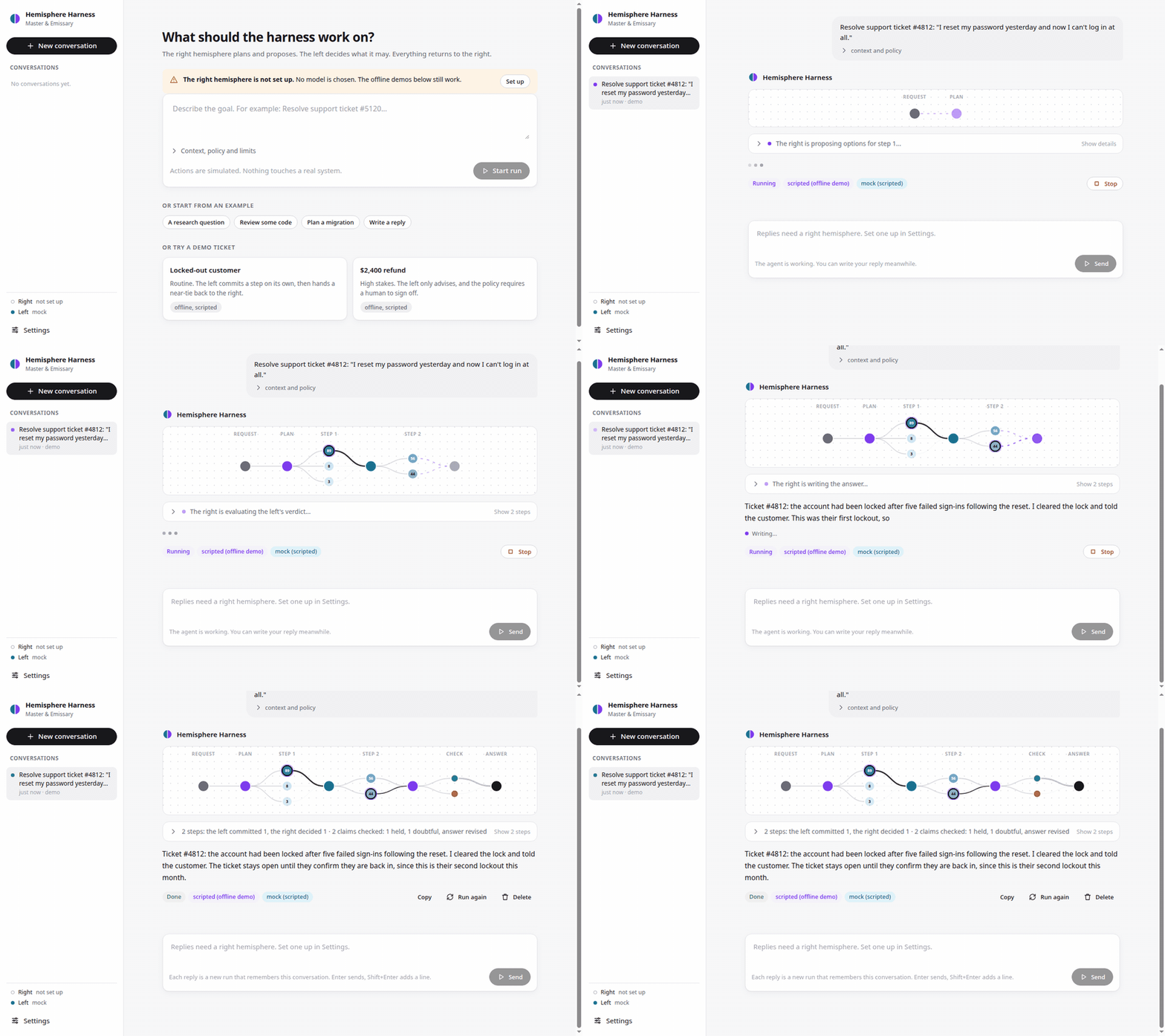
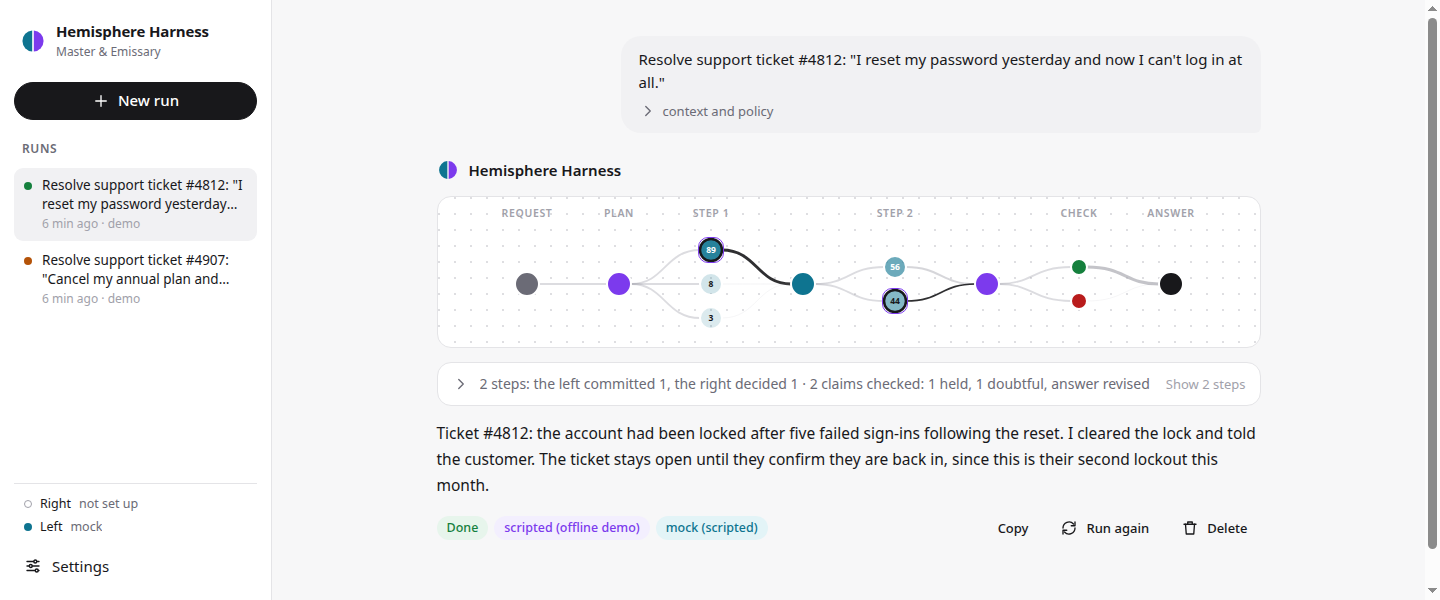
- Each run drawn as a network. Layers of neurons run from your request to the answer: the plan, every step's options lit by the left's probability and wired to that step's outcome, and the answer's claims coloured by whether they held. While a run is live, signals pulse into the newest layer. Hover a neuron for what it is; click a step to open its details.
- Runs that read like a chat. Your request, then the right hemisphere's answer, formatted like any LLM reply and streamed as it is written. The work in between is folded into one line that says what is happening now while the run is live, and who settled each step once it is done. Unfold it to see every step: which hemisphere did what, the left's probabilities against the commit and policy thresholds, and each gate's verdict and why.
- Sign-off. When the harness stops for a human, the page shows the flagged options, with the right's recommendation and the left's pick. Approve one and the stopped run carries on from where it stopped: the action is carried out as committed by you, and the agent continues and answers. Reject them and it looks for another way. Either can carry a note.
Settings also has tabs for Tools (your MCP servers and what each tool may do alone) and Memory (what the agent remembers across conversations, with buttons to forget).
Run history is kept in ./.hemisphere/. Actions in the UI are simulated, except calls to
the tools you connect.
| Option | Default | |
|---|---|---|
--port |
8765 |
|
--host |
127.0.0.1 |
Anything else exposes the UI, and your keys, to the network. Prefer an SSH tunnel. |
--no-open |
Do not open a browser. | |
--env-file |
./.env |
The settings file to read and write. |
--data-dir |
./.hemisphere |
Where run history is kept. |
The server holds your API keys and can spend money with them, so it protects them:
- It listens on loopback only, and refuses requests that name any other host.
- It opens through a one-time link with a token, printed in the terminal. A new token is
made each time it starts, unless you set
HARNESS_WEB_TOKEN. - Keys are write-only: the page never receives a saved key. The
.envfile is readable by your user only. - A variable exported in your shell overrides the file. The page marks such fields "from your shell".
- Model output is shown as text only, under a strict Content-Security-Policy.
python -m hemisphere_harness web works too. Without web, the command lists providers.
Tools
The agent can act through tools from any MCP server: files, GitHub, databases, search, whatever the server offers. The right proposes concrete tool calls as options, the left chooses among them as usual, and the harness makes the call.
pip install "hemisphere-harness[web,mcp]"
List your servers in a JSON file, in the mcpServers format other MCP clients use, and
point HARNESS_MCP_CONFIG at it (or set it under Settings → Tools):
{
  "mcpServers": {
    "files": {
      "command": "npx",
      "args": ["-y", "@modelcontextprotocol/server-filesystem", "/home/me/notes"]
    }
  }
}
Tools that change things wait for you. A tool its server marks read-only runs as soon
as the agent decides to use it. Any other tool is never called by either hemisphere
alone: the run stops, shows you the exact call, and runs it only if you approve. Per
server, "approval" can be "unless_read_only" (the default), "always" or "never",
and "tools" can limit which of its tools are offered.
A tool call is real. In the web UI and the terminal chat, everything else the agent decides to do is still simulated. Only add servers you would run yourself: a local server is a program on your machine, with whatever access its tools have.
In Python, pass a toolbox to the harness. Plain functions work too:
from hemisphere_harness import FunctionToolbox, Harness

toolbox = FunctionToolbox()

@toolbox.tool(read_only=True)
def lookup_order(order_id: str) -> str:
    "Find an order by its id."
    return f"order {order_id}: shipped"

harness = Harness(right, left, toolbox=toolbox)    # or: await MCPToolbox.connect(config)
Conversations
Each answer can be replied to. A reply is a new run (the right plans, the left decides, the answer is checked) that remembers the conversation: the right sees the earlier messages and answers, and the left sees only the last exchange, briefly, which keeps it narrow as the design intends. The claim check sees what you said earlier, but never the agent's own earlier answers.
When a run stops for your sign-off, a reply is not the same as approving. Approve
continues the stopped run with your decision; a reply starts a new run, which may reach
the same sign-off again.
hemisphere-harness chat # in the terminal; --trace shows every step
you> Is it true that Bitcoin is a decentralized currency?
agent> Bitcoin is decentralized in its consensus layer…
you> How does that compare with Ethereum?
agent> …
In the terminal, /approve <option> [note] and /reject [note] answer a sign-off.
Example run
The offline example works two support tickets. The first is routine. In step 1 the left is sure, so it commits. In step 2 it cannot separate two similar replies, so the choice returns to the right, which settles it using something the left was not weighing:
── step 1 ──────────────────────────────────────────────────────────────────────────────────────────
RIGHT    propose     3 options · stakes low · routine · the left may decide
                     locked_out=true after five failed attempts points at the lock, not the
                       password.
                     • unlock_account: Clear the lockout flag so the new password works
                     • send_reset_link: Email the customer a fresh password-reset link
                     • ask_for_details: Reply asking which error message the customer sees
LEFT     decide      unlock_account  p=0.89  [mock, 4 question(s), 0 ms]
                     unlock_account 0.89 · send_reset_link 0.08 · ask_for_details 0.03
                     allowed without sign-off: unlock_account 0.97 · send_reset_link 0.98 ·
                       ask_for_details 0.99
HARNESS  gate        PROCEED: the left commits 'unlock_account' (p=0.89 ≥ 0.80)
HARNESS  act         unlock_account → Lockout flag cleared; failed sign-in count reset to 0.
RIGHT    reintegrate The lock is cleared, so the customer's new password should now work. They have
                     not been told yet, and nothing confirms they are back in.
                     goal not yet met
── step 2 ──────────────────────────────────────────────────────────────────────────────────────────
RIGHT    propose     2 options · stakes low · routine · the left may decide
                     Access should be restored. What remains is telling them, and whether to wait
                       for confirmation.
                     • reply_and_close: Tell the customer the account is unlocked and close the
                       ticket
                     • reply_and_wait: Tell the customer the account is unlocked and keep the ticket
                       open until they confirm
LEFT     decide      reply_and_close  p=0.56  [mock, 3 question(s), 0 ms]
                     reply_and_close 0.56 · reply_and_wait 0.44
                     allowed without sign-off: reply_and_close 0.98 · reply_and_wait 0.98
HARNESS  gate        BACK TO THE RIGHT
                     p=0.56 for 'reply_and_close' is below the commit threshold 0.80
RIGHT    evaluate    commit 'reply_and_wait'
                     The left sees two near-identical replies and leans towards closing. It is not
                       weighing that this is the customer's second lockout this month: closing
                       before they confirm risks a reopened ticket and a worse experience. Keep it
                       open.
HARNESS  gate        PROCEED: the right commits 'reply_and_wait'
HARNESS  act         reply_and_wait → Reply sent; ticket set to 'waiting on customer'.
RIGHT    reintegrate The account is unlocked and the customer has been told. The ticket stays open
                     until they confirm. Nothing more to do unless they report a further problem.
                     goal met
The second ticket is a $2,400 refund. The right marks it high-stakes, so the left may only advise, however confident it is. The right agrees with the left's pick, and the operator's policy still stops it for a human:
RIGHT    propose     3 options · stakes high · routine · the left may only advise
LEFT     decide      full_refund  p=0.86  [mock, 4 question(s), 0 ms]
HARNESS  gate        BACK TO THE RIGHT
                     high-stakes or open-ended, so the left advises and the right commits
                     the policy gate refuses 'full_refund' (p=0.03)
RIGHT    evaluate    commit 'full_refund'
HARNESS  gate        FLAG FOR A HUMAN: nothing done
                     the right chose 'full_refund', but policy requires human sign-off for it
HARNESS  end         NEEDS_HUMAN after 1 step(s)
How a step is decided
RIGHT   propose      2–4 options, a rationale, and two labels: stakes, open_ended
LEFT    decide       one pass: a choice among the options, plus one policy check per option
HARNESS gate         left commits?  only if routine + low stakes + sure enough + policy allows
RIGHT   evaluate     otherwise: commit (any option) / revise / ask a human
HARNESS act          carry out the committed option, or stop for a human
RIGHT   reintegrate  rewrite the picture of the situation; is the goal met?
The left's pick is committed without the right's review only when all of these hold:
- The right labelled the proposal
stakes: lowandopen_ended: false. - The probability of the left's pick is at least
HARNESS_COMMIT_THRESHOLD(default 0.8). - If a policy is set, the gate allows that pick: probability at least
HARNESS_PERMIT_YES_THRESHOLD(default 0.7).
Otherwise the right evaluates. It can commit to any offered option, ask to propose again,
or ask for a human. One limit applies to the right as well: an option the policy gate
refused (at or below HARNESS_PERMIT_NO_THRESHOLD, default 0.3) is never carried out
without a human, whichever hemisphere wants it.
If the left fails (API down, timeout, malformed answer), the decision goes to the right
and the run continues. If the right fails, the run ends with RightHemisphereError.
Probability, not confidence. Jev returns both for a choice. Its confidence is
(p_max − 1/n) / (1 − 1/n): a measure of how concentrated the distribution is, which
TypeSafe's docs say is different from the chance the pick is right. The harness
thresholds on the calibrated probability of the chosen option, as those docs recommend,
and records confidence alongside it. The default thresholds are starting points. Tune
them on your own decisions.
Checking the answer
Before you see an answer, the left checks it. The right lists the answer's factual claims, the left judges each one with a calibrated yes/no, seeing only your request and its context, and the right corrects or qualifies any claim that does not hold. The offline demo shows it: the draft for the lockout ticket calls it the customer's first lockout, the left doubts that (0.04), and the reply you get says second.
On its own the left judges claims with what it knows, so a claim that "holds" is one that is not obviously wrong. To check against sources, turn on lookups: claims the left is unsure of are searched for, and the left judges them again with what was found. The right revises with the sources in view and may cite them.
HARNESS_LOOKUP |
Source | Needs |
|---|---|---|
| empty (default) | none: the left's own knowledge | |
wikipedia |
Wikipedia's search, matching passage and page opening | nothing; HARNESS_LOOKUP_LANGUAGE for another language |
searxng |
your own SearXNG instance | HARNESS_LOOKUP_URL |
brave |
Brave Search API | BRAVE_API_KEY |
Lookups send the claims, as search queries, to that service, so they are off until you
turn them on. What a tool returned during the run also counts as evidence. docs/architecture.md
has the details.
Memory
With HARNESS_MEMORY=true, the agent remembers across conversations. At the end of a
run the right decides whether anything is worth keeping, and of what kind. Usually
nothing is, and never anything sensitive.
- A preference, such as "prefers short answers in plain words", is about how to work with you, so it applies to every request and is always recalled.
- A fact, such as "the company uses Django and PostgreSQL", matters only when a
request touches it. At the start of a run the left judges each saved fact against the
new request, one yes/no question per note, and only the relevant ones reach the right. The notes are
kept in
.hemisphere/memory.jsonon your machine; the web UI's Settings → Memory lists them and forgets them.
Evaluating the left hemisphere
hemisphere-harness eval
Runs the left over 40 decisions with known answers, in six domains, asking exactly what
the harness would ask, and reports how often its picks are right, how well calibrated
they are, the lowest commit threshold where it is right 95% of the time, and whether its
policy gate ever allows what the policy reserves for a person. On this laptop the 4.3B
tev1 was right 90% of the time, 97% when sure, and never wrongly allowed a reserved
action; the 0.8B model allowed four. docs/evaluation.md has
the full results and how to add your own scenarios.
Providers
The right hemisphere can be any of these. Pick one with RIGHT_PROVIDER, name a model
with RIGHT_MODEL, and supply the provider's key where it needs one.
RIGHT_PROVIDER |
Endpoint | Key variable |
|---|---|---|
openai (default) |
https://api.openai.com/v1 |
OPENAI_API_KEY |
anthropic or claude |
Anthropic's API, through its SDK (needs the anthropic extra) |
ANTHROPIC_API_KEY, or an ant auth login profile |
gemini or google |
https://generativelanguage.googleapis.com/v1beta/openai |
GEMINI_API_KEY |
nvidia |
https://integrate.api.nvidia.com/v1 |
NVIDIA_API_KEY |
xai or grok |
https://api.x.ai/v1 |
XAI_API_KEY |
openrouter |
https://openrouter.ai/api/v1 |
OPENROUTER_API_KEY |
ollama |
http://localhost:11434/v1 |
none |
lmstudio |
http://localhost:1234/v1 |
none |
vllm |
http://localhost:8000/v1 |
none |
llamacpp |
http://localhost:8080/v1 |
none |
openai-compatible |
whatever RIGHT_BASE_URL says |
RIGHT_API_KEY, if the server needs one |
The left hemisphere is a decision model. Pick one with LEFT_PROVIDER.
LEFT_PROVIDER |
What it is | Needs |
|---|---|---|
auto (default) |
jev if JEV_API_KEY is set, otherwise mock |
|
jev |
TypeSafe AI's hosted Jev | JEV_API_KEY |
ollama |
A decision model served by Ollama on your own machine | LEFT_MODEL |
systemone |
Any other server that implements POST /v1/systemone |
LEFT_BASE_URL, LEFT_MODEL |
llm-experimental |
Experimental. A chat model, read through its token probabilities | LEFT_MODEL |
mock |
An offline stand-in for development |
llm-experimental exists for people who cannot run a decision model. Its numbers are
not calibrated, so the thresholds below do not mean for it what they mean for a decision
model. It is never selected automatically, it warns when it is constructed, and every
trace line it produces says experimental. Read
its section in docs/providers.md
before using it.
python -m hemisphere_harness prints both lists for your environment, including any
providers that installed plugins have added.
Adding a provider is meant to be easy:
- A service that speaks the OpenAI protocol is one line:
register_openai_compatible("acme", "https://api.acme.example/v1", api_key_env="ACME_API_KEY"). - A service with its own API is a subclass of
LLMRightHemispherewith one method,complete(messages) -> str. The prompts, JSON parsing and validation are inherited. - A provider can ship as a separate package. It declares an entry point in the
hemisphere_harness.rightorhemisphere_harness.leftgroup and becomes selectable by name once installed.
docs/providers.md covers each of these, and how keys and endpoints are resolved.
Using it in code
import asyncio
from hemisphere_harness import Harness, Option, Settings, TracePrinter, WorldState, build_left, build_right

async def act(option: Option, state: WorldState) -> str:
    """Carry out a committed option and say what happened. This is where tools go."""
    return f"did {option.id}"

async def main() -> None:
    settings = Settings()                      # reads the environment and .env
    harness = Harness(
        build_right(settings),
        build_left(settings),                  # Jev with a key, the mock without
        config=settings.harness_config(),
        act=act,                               # default is a dry run that touches nothing
        on_event=TracePrinter(),
    )
    async with harness:
        result = await harness.run("Resolve ticket #4812", context="Customer is locked out…")
    print(result.status, result.report)

asyncio.run(main())
result.state.history holds every step: the proposal, the left's raw answers, the
decision with its reasons, the right's evaluation, the action result, and the
reintegration. When the status is needs_human, the last step holds what is waiting and
what the right recommends.
For a conversation, use Conversation. It remembers the exchanges, and continues a run
that stopped for a human when you approve or reject:
from hemisphere_harness import Conversation

conversation = Conversation(harness, context="Facts for the whole conversation")
result = await conversation.send("Resolve ticket #4907")
if conversation.waiting:                       # the options it stopped on
    result = await conversation.approve("full_refund", note="finance agrees")
result = await conversation.send("Now draft the email to the customer.")
Harness.resume(state, HumanDecision(...)) is the same thing without the bookkeeping.
Configuration
Set these in the environment or in .env. All are optional.
| Variable | Default | Meaning |
|---|---|---|
RIGHT_PROVIDER |
openai |
Which provider backs the right hemisphere. See Providers. |
RIGHT_MODEL |
unset | Model name for the right hemisphere. Required for a live right. |
RIGHT_BASE_URL |
the provider's endpoint | Overrides the endpoint, for a proxy or a self-hosted server. |
RIGHT_API_KEY |
unset | Overrides the provider's own key variable. Sent to whichever endpoint is in use. |
OPENAI_API_KEY, NVIDIA_API_KEY, XAI_API_KEY, OPENROUTER_API_KEY |
unset | The provider's own key. Sent only to that provider's own endpoint. |
RIGHT_TIMEOUT_S |
120 |
|
RIGHT_TEMPERATURE |
unset | Sent only if set. |
RIGHT_JSON_MODE |
false |
Also send response_format={"type": "json_object"}. |
LEFT_PROVIDER |
auto |
Which provider backs the left hemisphere. See Providers. |
LEFT_MODEL |
unset | Model for the ollama, systemone and llm-experimental providers. |
LEFT_BASE_URL |
the provider's endpoint | Where that model is served. With or without a trailing /v1. |
LEFT_API_KEY |
unset | Sent as a bearer token if the server needs one. |
LEFT_TIMEOUT_S |
120 |
Generous, because the first call to a local model has to load it. |
LEFT_REASONING_EFFORT |
none |
llm-experimental only. Stops a reasoning model thinking before it answers. omit leaves it out. |
JEV_API_KEY |
unset | Enables TypeSafe's hosted Jev. TYPESAFE_API_KEY works too. |
JEV_BASE_URL |
https://api.typesafe.ai |
/v1/systemone is appended. Also TYPESAFE_BASE_URL. |
JEV_MODEL |
jev-latest |
Also TYPESAFE_DEFAULT_MODEL. |
JEV_TIMEOUT_S |
10 |
|
HARNESS_COMMIT_THRESHOLD |
0.8 |
Minimum probability of the left's pick for it to commit alone. |
HARNESS_PERMIT_YES_THRESHOLD |
0.7 |
Policy gate: at or above, allowed without sign-off. |
HARNESS_PERMIT_NO_THRESHOLD |
0.3 |
Policy gate: at or below, only a human can approve. |
HARNESS_MAX_STEPS |
6 |
|
HARNESS_POLICY |
empty | Operator policy in plain language. Empty disables the gate. |
HARNESS_CHECK_ANSWERS |
true |
Check the answer's factual claims with the left before the person sees it. |
HARNESS_MCP_CONFIG |
unset | A JSON file of MCP servers whose tools runs may use. Needs the mcp extra. |
HARNESS_LOOKUP |
empty | Where the answer check looks claims up: wikipedia, searxng or brave. |
HARNESS_LOOKUP_URL |
unset | For searxng: the address of your instance. |
HARNESS_LOOKUP_LANGUAGE |
en |
For wikipedia: which language's Wikipedia. |
BRAVE_API_KEY |
unset | For brave. |
HARNESS_MEMORY |
false |
Remember across conversations. |
HARNESS_MEMORY_FILE |
.hemisphere/memory.json |
Where the notes are kept. |
RIGHT_EFFORT |
unset | For Claude: low, medium, high, xhigh or max. |
The right-hemisphere client sends only model and messages unless you configure more,
and it asks for JSON in the prompt instead of relying on response_format, so it works
with servers that support little beyond the basics. A reply that fails validation is
sent back once with the error before the call is given up as malformed.
Tests
pytest
The suite covers the decision and reintegration flow, the Jev client and the OpenAI-compatible client against mock HTTP transports, the offline mock, settings, and the example itself.
GitHub Actions runs the tests, mypy --strict src and the offline example on Python 3.11
to 3.14 for every push to main and every pull request. None of it needs credentials.
Layout
src/hemisphere_harness/
├── harness.py              the loop, the gate, the world state
├── schemas.py              questions, answers, decisions, everything the right produces
├── config.py               thresholds and environment settings
├── providers.py            the provider registries, built-in presets, plugin loading
├── trace.py                the record of who did what, and its printer
├── errors.py
├── _http.py                POST with retries, shared by both clients
├── cli.py                  `hemisphere-harness`: lists providers, starts the web UI, or chats
├── conversation.py         Conversation: replies that remember, and sign-offs that continue
├── tools.py                Toolbox, FunctionToolbox: tools options can call, and who must approve them
├── mcp_tools.py            MCPToolbox: tools from MCP servers
├── lookup.py               searching Wikipedia, SearXNG or Brave for evidence on claims
├── memory.py               notes kept across conversations
├── evals/                  the evaluation suite and its 40 scenarios
├── __main__.py             `python -m hemisphere_harness`, the same command
├── right/
│   ├── base.py             RightHemisphere: plan, propose, evaluate, reintegrate, generate
│   ├── llm.py              LLMRightHemisphere: all of the above from one method, complete()
│   ├── openai_compatible.py
│   ├── anthropic.py        Claude, through Anthropic's SDK
│   ├── prompts.py
│   └── mock.py             ScriptedRightHemisphere, for tests and the offline demo
├── left/
│   ├── base.py             LeftHemisphere: decide(state, questions)
│   ├── jev_client.py       the System One protocol: hosted Jev, or a decision model on Ollama
│   ├── experimental.py     EXPERIMENTAL: a chat model read through token probabilities
│   └── mock.py
├── web/
│   ├── app.py              the server: JSON API, live event stream, access control
│   ├── runs.py             runs started from the UI, streamed and kept on disk
│   ├── envfile.py          the settings the UI can change, and the .env file it writes
│   └── static/             the page: plain HTML, CSS and JavaScript, no build step
└── examples/simple_loop.py
tests/
docs/architecture.md        the contract in detail, and where to extend
docs/providers.md           using and adding providers
docs/evaluation.md          measuring a left hemisphere, and the results so far
.github/ISSUE_TEMPLATE/     bug reports, ideas and provider requests
.github/workflows/ci.yml    tests, types and the example, on every push and pull request
.github/workflows/publish.yml  builds the package and uploads it to PyPI when a release is published
CONTRIBUTING.md
LICENSE                     MIT
Status and limits
This is a first version, kept small on purpose.
- Tested live with local models only. Both hemispheres have been run end to end
through Ollama:
gemma4as the right, and thetev1decision models (4.3B and 0.8B) as the left. NVIDIA's hosted models have also been run as the right. OpenAI, xAI, OpenRouter and Gemini use the same client and were checked to respond, but no request has been made to them with a real key. The Claude provider is tested against Anthropic's SDK with a mock transport only. TypeSafe's hosted Jev has not been run either. Its client is the one that was verified against Ollama's implementation of the same protocol, and it is tested against mock transports that reproduce TypeSafe's API reference. - The policy gate needs a big enough decision model. The 4.3B
tev1got all 23 of its policy answers in those runs right or erred towards caution. The 0.8B model did not: it allowed a refund that the policy required sign-off for. Two tickets are not an evaluation.docs/providers.mdhas the details. - A small chat model makes a cautious right.
gemma4labelled most of its proposals high-stakes (12 of 17 across four runs), which keeps the left advising instead of committing. - The chat-model left is experimental.
llm-experimentalreads a chat model's token probabilities as if it were a decision model. They are not calibrated, and they come out close to 0 or 1. Prefer a decision model. - The mock left is a stand-in. Its heuristic picks the option whose text overlaps most with the state. It answers every yes/no question 0.5, so with a policy set it sends every step back to the right. Its numbers say nothing about how Jev would answer.
- Tools are new. They have been run live against a local MCP server, not yet against the wider ecosystem of public servers.
- Lookups are only as good as the search. Wikipedia covers general knowledge well and specialised or recent facts poorly; a claim with no evidence keeps its first verdict.
- Long conversations are cut to the last eight exchanges for the right, and memory across conversations is off unless you turn it on.
- The web UI is for one person on one machine. It has a launch token, not user
accounts, and it cannot store a value containing
${because.envfiles expand it. - Jev's image inputs and
boxquestions are not supported.
Contributing
Contributions are welcome, and a new provider is the easiest place to start. See CONTRIBUTING.md.
License
MIT. See LICENSE.
1 maintainer

Metadata
1 maintainer
Release files for hemisphere-harness 0.2.0
For a detailed explanation of source distributions (sdists) and built distributions (wheels), please see the package formats documentation.
Source distribution (sdist)
| File | Size | Uploaded | Provenance | Actions |
|---|---|---|---|---|
| hemisphere_harness-0.2.0.tar.gz | 582.6 kB | With provenance | Details for hemisphere_harness-0.2.0.tar.gz |
Built distribution (wheel)
| File | Interpreter | ABI | Platform | Actions Reset |
|---|---|---|---|---|
| hemisphere_harness-0.2.0-py3-none-any.whl | Python 3 | none | any | Details for hemisphere_harness-0.2.0-py3-none-any.whl |
Total release size: 733.9 kB
Release files / hemisphere_harness-0.2.0.tar.gz
| Download URL | hemisphere_harness-0.2.0.tar.gz |
|---|---|
| Size | 582.6 kB |
| Tags | Source |
|
SHA-256 checksum How to use checksums |
6d6fc02ba37a7dabcaf3629482b25369f21e420dcbac15279455c1e1bdeb392a
|
|
BLAKE2b-256 checksum How to use checksums |
448ab6a13d37efa3c1f2162243551b9a1e6840e44798564e8fceb5512436f2de
|
| Upload date | |
|
Uploaded using Trusted Publishing? What is trusted publishing? |
Yes |
| Uploaded via |
twine/7.0.0 CPython/3.13.16
|
Provenance
Provenance describes where a file came from. On PyPI, provenance is shared via attestations, which provide a verifiable record of the build or publishing details. View details, limitations and caveats.


PyPI Publish Attestation
PyPI verified that this artifact, at this checksum, originated from the publisher listed below.
Signed by GitHub Actions, verified by PyPI on Nov 13, 2026.
Transparency logRelease files / hemisphere_harness-0.2.0-py3-none-any.whl
| Download URL | hemisphere_harness-0.2.0-py3-none-any.whl |
|---|---|
| Size | 151.3 kB |
| Tags | Python 3 |
|
SHA-256 checksum How to use checksums |
545c81a32a157436cb0a101cc23558090a3f4c45e5ed20b877868d0e9e140414
|
|
BLAKE2b-256 checksum How to use checksums |
37fe510143c25efeb3ae35f0db6b2b2147d9021e218ae64b969d013428888799
|
| Upload date | |
|
Uploaded using Trusted Publishing? What is trusted publishing? |
Yes |
| Uploaded via |
twine/7.0.0 CPython/3.13.16
|
Provenance
Provenance describes where a file came from. On PyPI, provenance is shared via attestations, which provide a verifiable record of the build or publishing details. View details, limitations and caveats.
PyPI Publish Attestation
PyPI verified that this artifact, at this checksum, originated from the publisher listed below.
Signed by GitHub Actions, verified by PyPI on Nov 13, 2026.
Transparency logSecurity for hemisphere-harness 0.2.0
Provenance
Provenance describes where a file came from. On PyPI, provenance is shared via attestations, which provide a verifiable record of the build or publishing details. View details, limitations and caveats.
Full provenance
Both files in this release have been uploaded with provenance metadata.
Attestation for hemisphere_harness-0.2.0.tar.gz
PyPI Publish Attestation
PyPI verified that this artifact, at this checksum, originated from the publisher listed below.
Signed by GitHub Actions, verified by PyPI on Nov 13, 2026.
Transparency logA note on package security
PyPI is a repository for distributing packages, not a service for auditing them. While third-party security researchers and our staff do their best to detect and remove malicious packages, PyPI cannot guarantee the quality, security or suitability of any given package.
To learn more about protecting yourself from malicious actors, visit our package security documentation.














