
HEP Paper Manager (HPM)





HPM is a command-line tool that helps add papers from Inspire HEP to Notion database according to its ArXiv ID.
Features:
- Retrieve papers by arXiv ID.
- Customizable paper template.
- Interactive CLI for easy setup and usage.
Installation
pip install hep-paper-manager
Try to add a paper to a demo database
Before we start, please make sure you have installed this app successfully.
In this step-by-step guide, we will together add "[1511.05190] Jet image -- deep learning edition"(link) to a demo database.
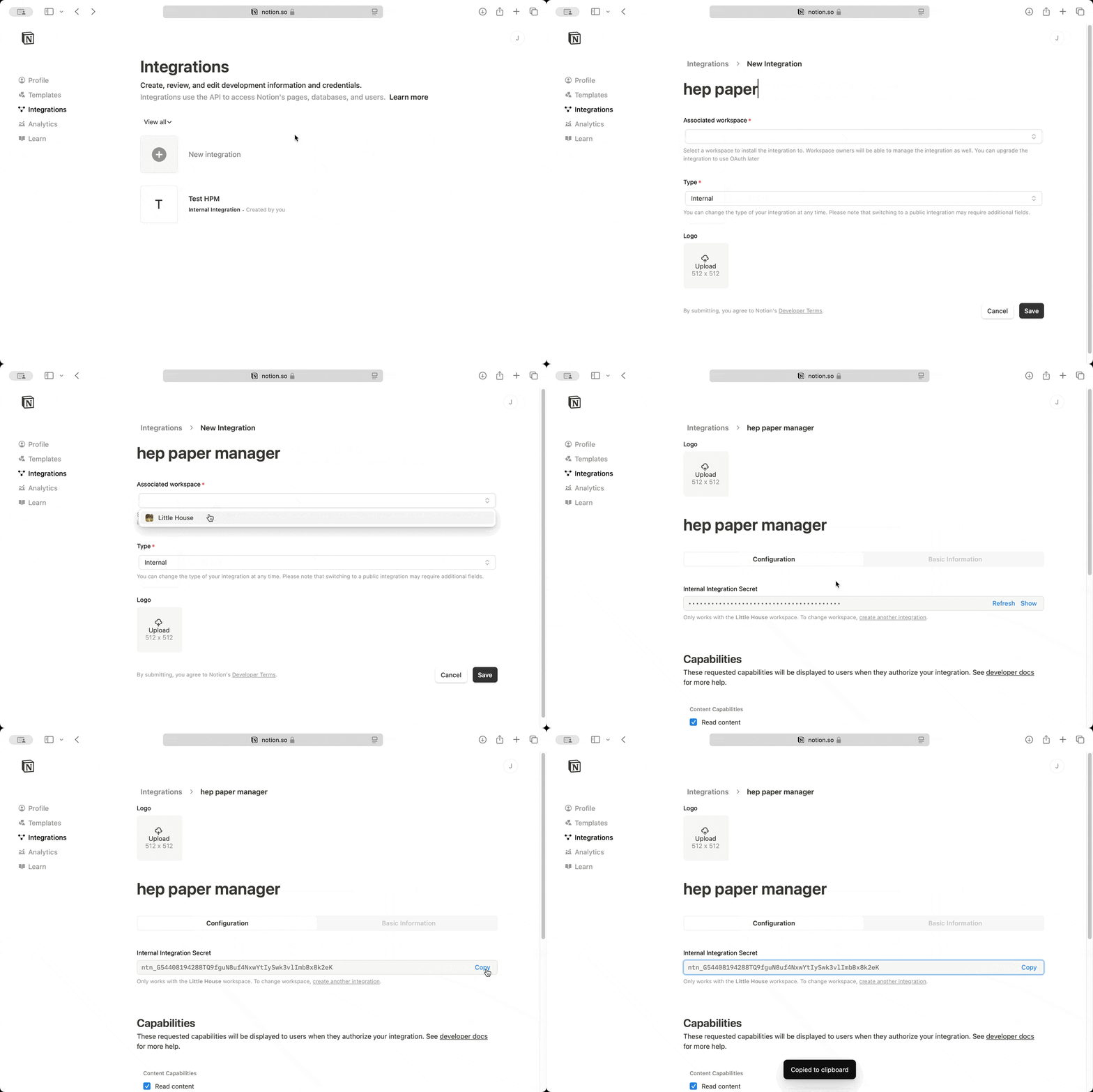
Step 1: Create an integration in Notion
- Open My Integrations.
- Click
+ New integration. - Enter a name for your integration.
- Select your workspace.
- Click
showandcopythe integration secret as your token.
To learn more about integrations, please check the official guide here.
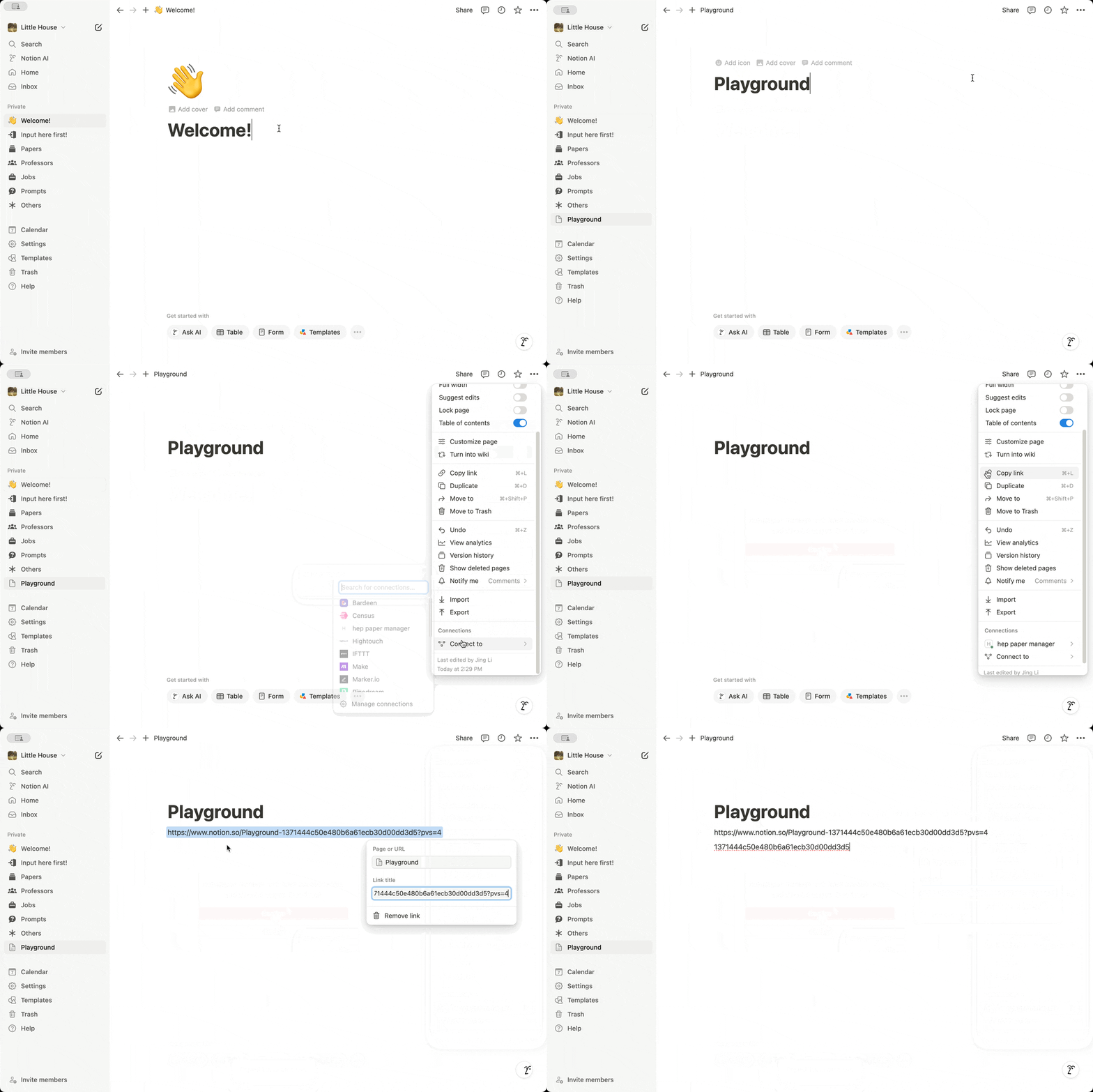
Step 2: Create a blank page and link the integration to it
- Click the
+button next to your workspace name to create a new blank page. - In the three-dot menu in the upper right, find
Connect to. - Select the integration you created in the previous step.
Step 3: Create a demo database via hpm
Open your terminal, and input:
hpm demo -t <token> -p <page_id>
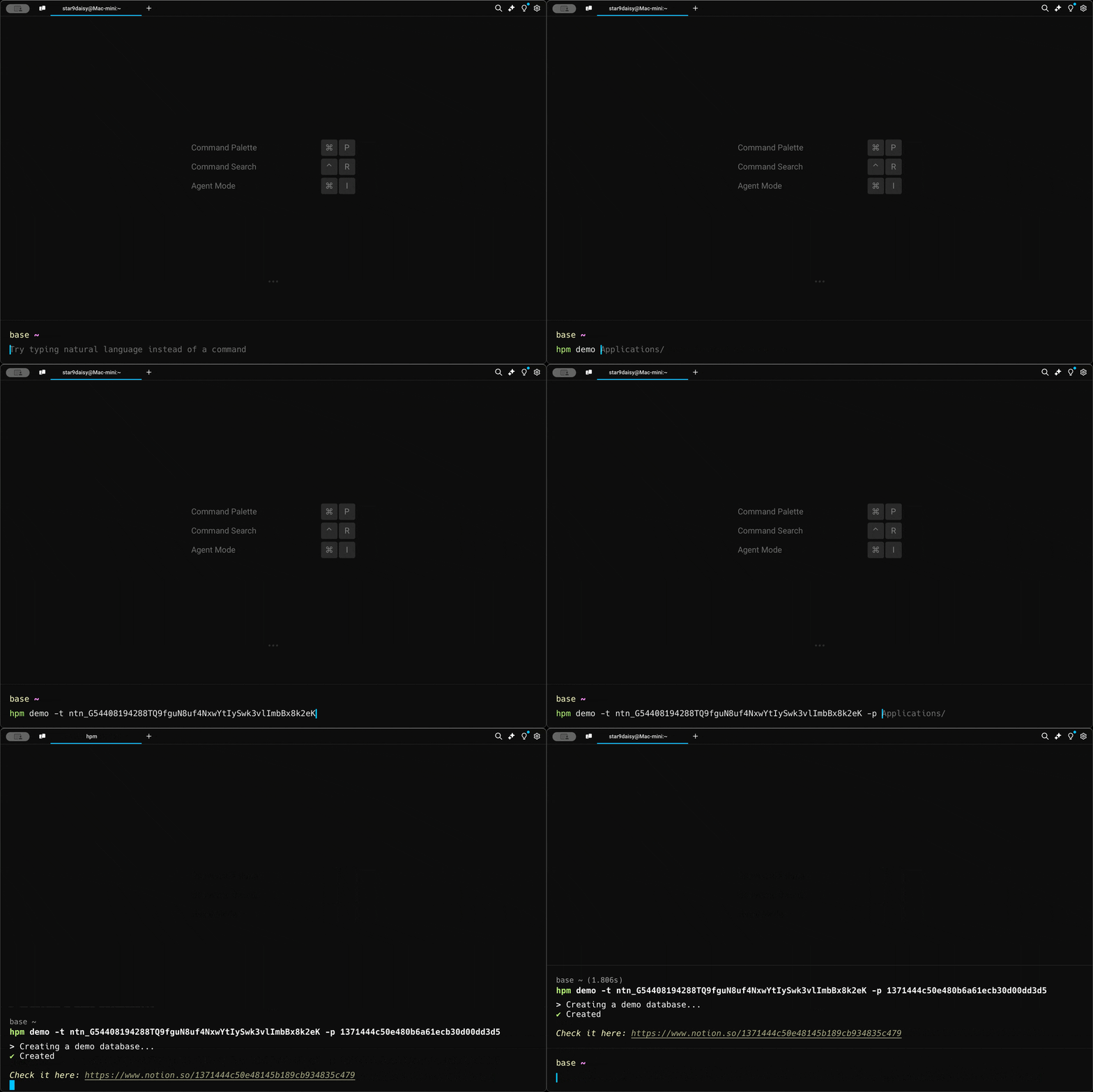
You should see a database is created and connected to the integration.
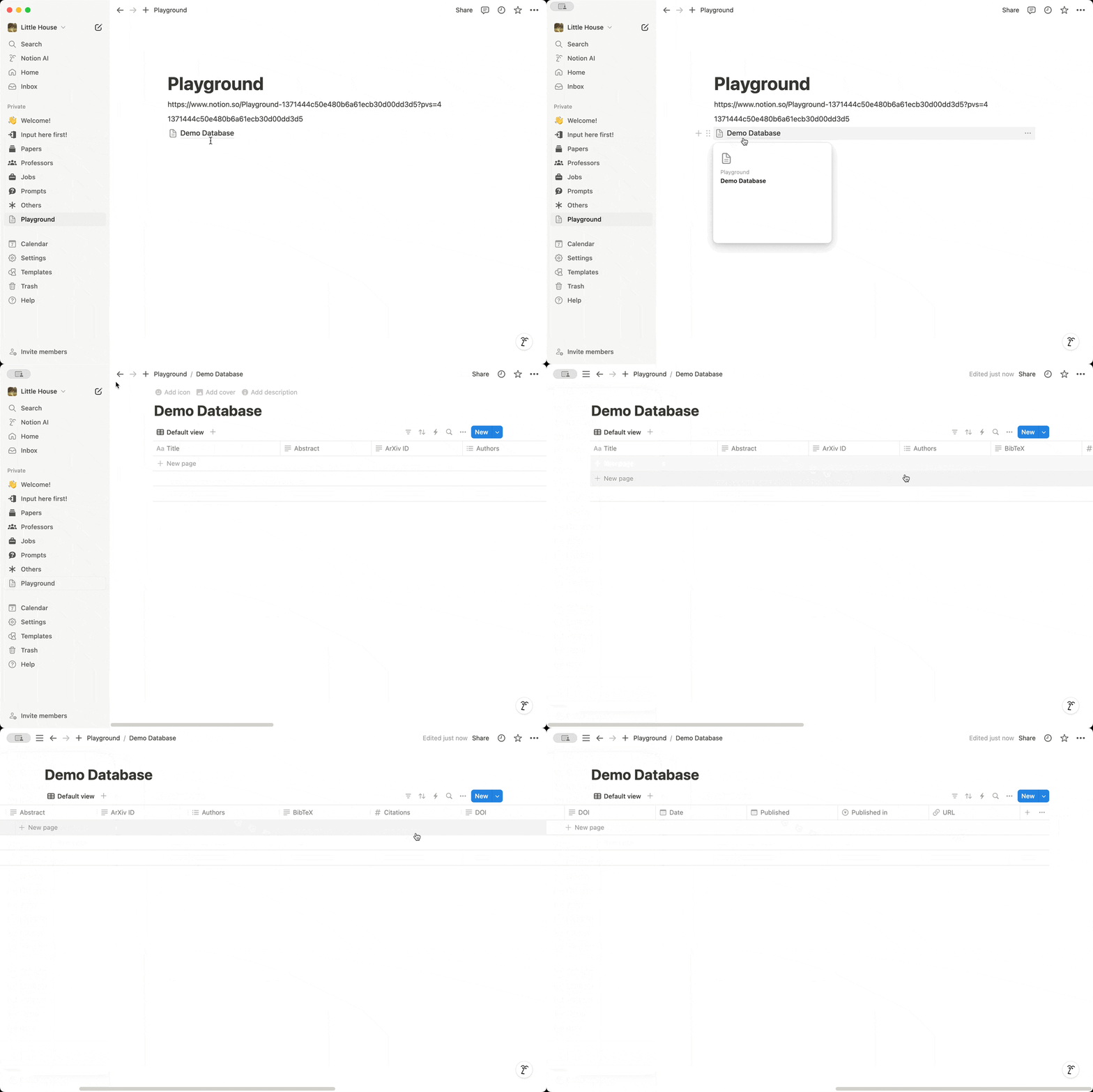
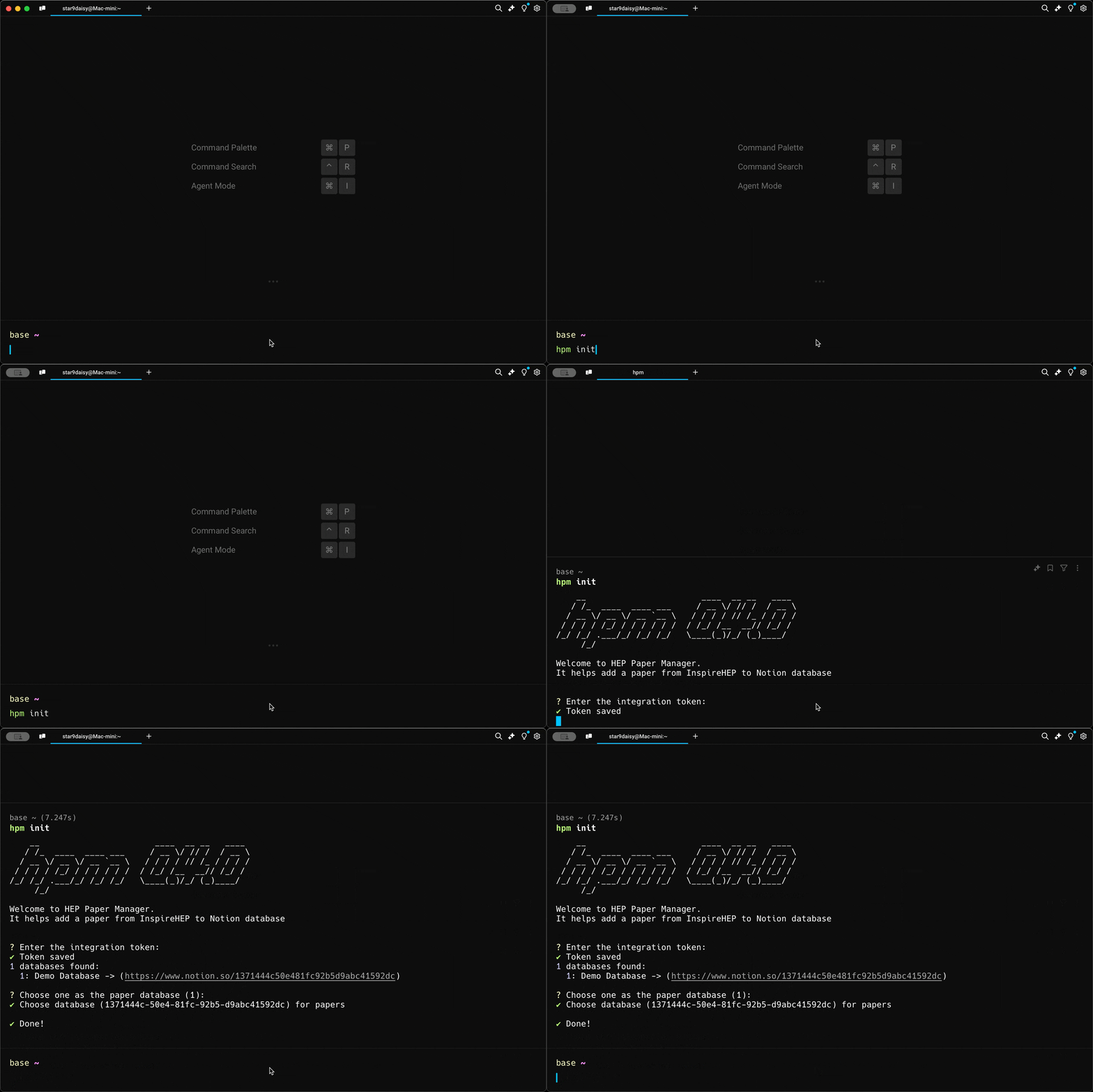
Step 4: Initialize the hpm app
Use the token to initialize the hpm app.
hpm init -t <token>
Step 5: Add the paper to the database
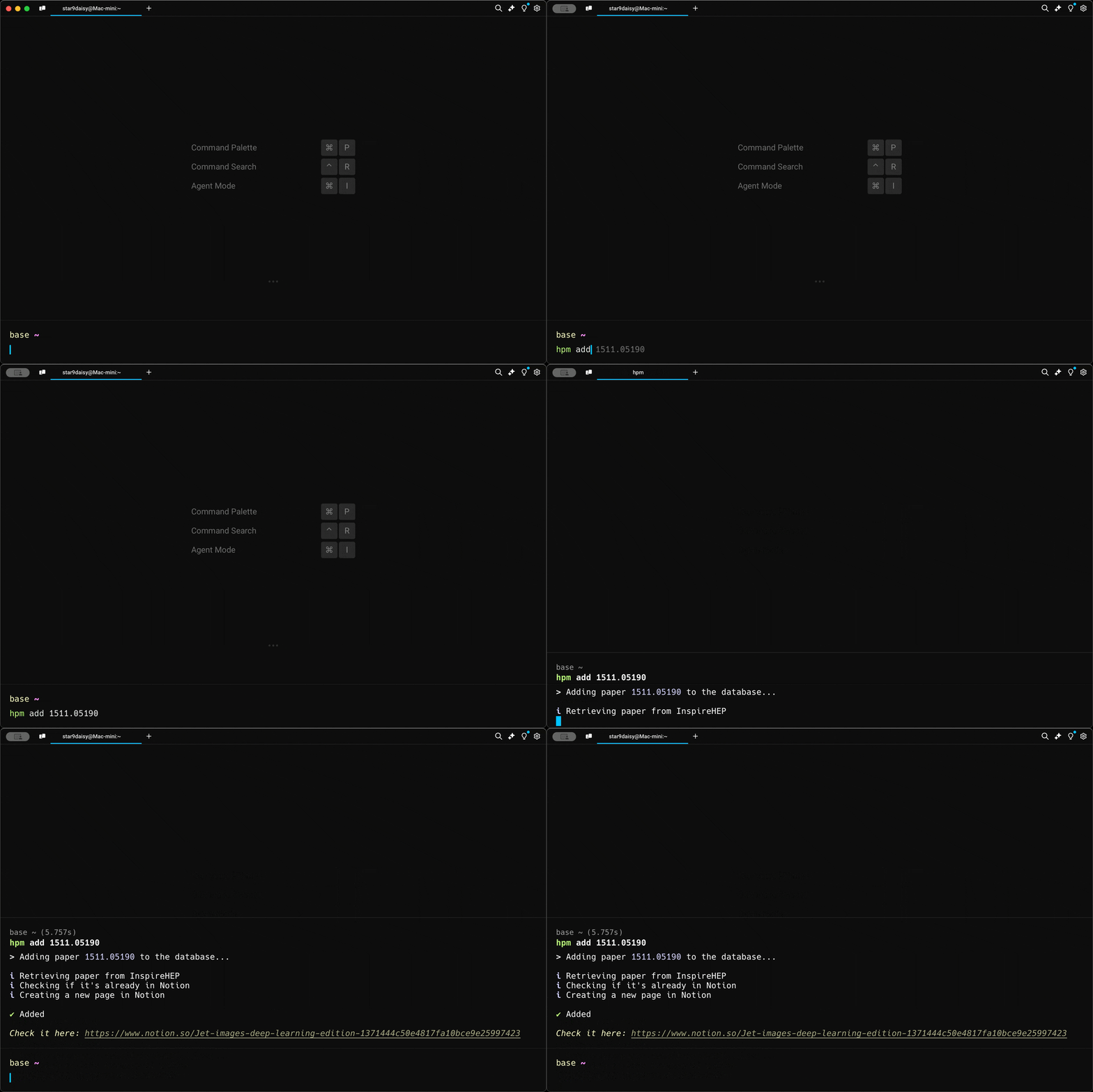
Use hpm add to add it into the demo database.
hpm add 1511.05190
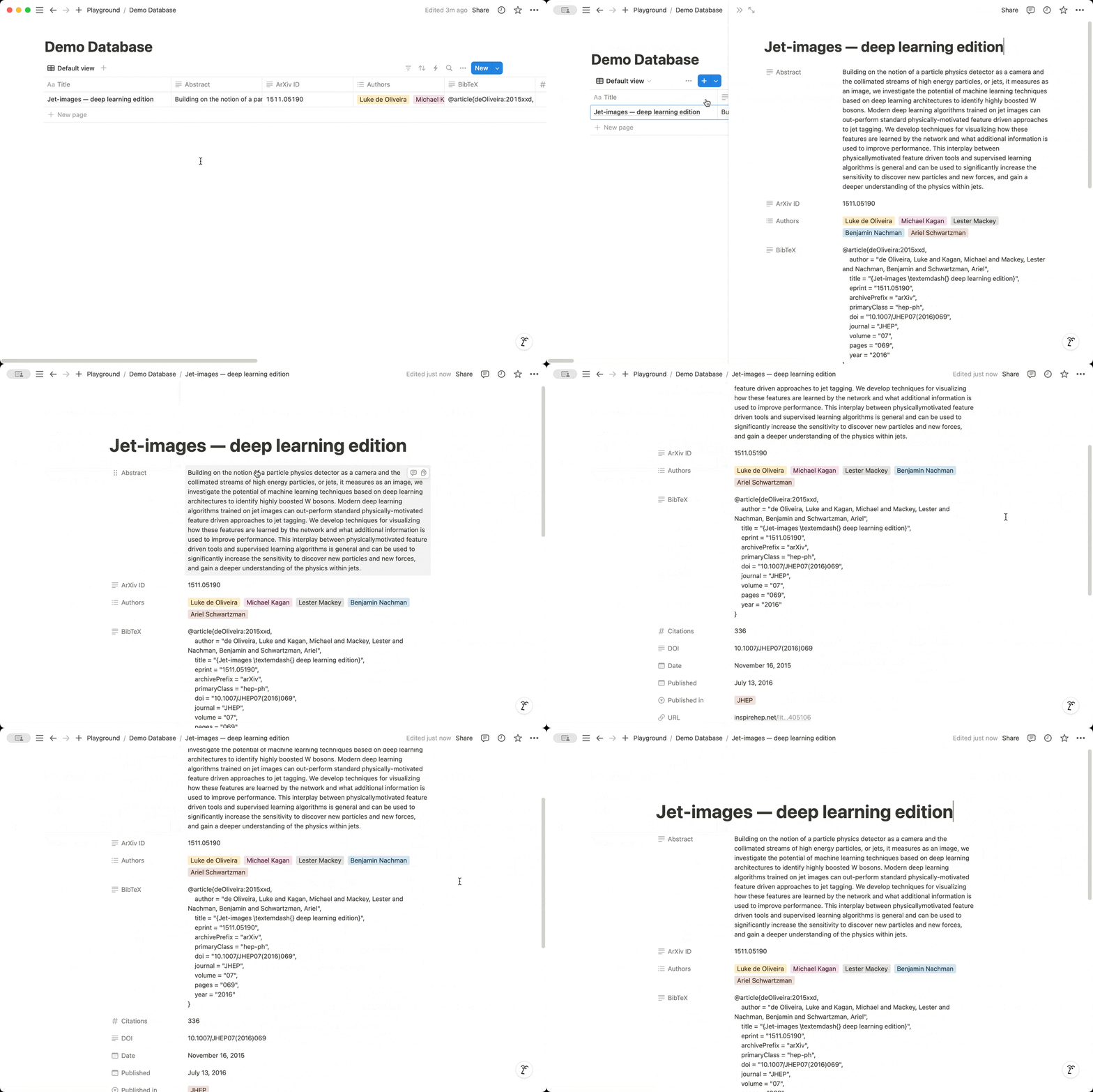
Go back and check the database page. The paper is right there!
Try to add more papers as you like!
Modify the default paper template
You can use hpm info to find the app directory. The default paper template is
located at {app_dir}/templates/paper.yml:
database_id: <your database_id>
properties:
  id: null
  url: URL
  type: null
  source: null
  title: Title
  authors.name: Authors
  created_date: Date
  published_place: Published in
  published_date: Published
  eprint: ArXiv ID
  citation_count: Citations
  abstract: Abstract
  doi: DOI
  bibtex: BibTeX
The keys in the properties section are the paper information retrieved from
Inspire HEP. Their values correspond to the Notion page properties. Modify them
as you like. null means that information will not be recorded in the database.
Other commands
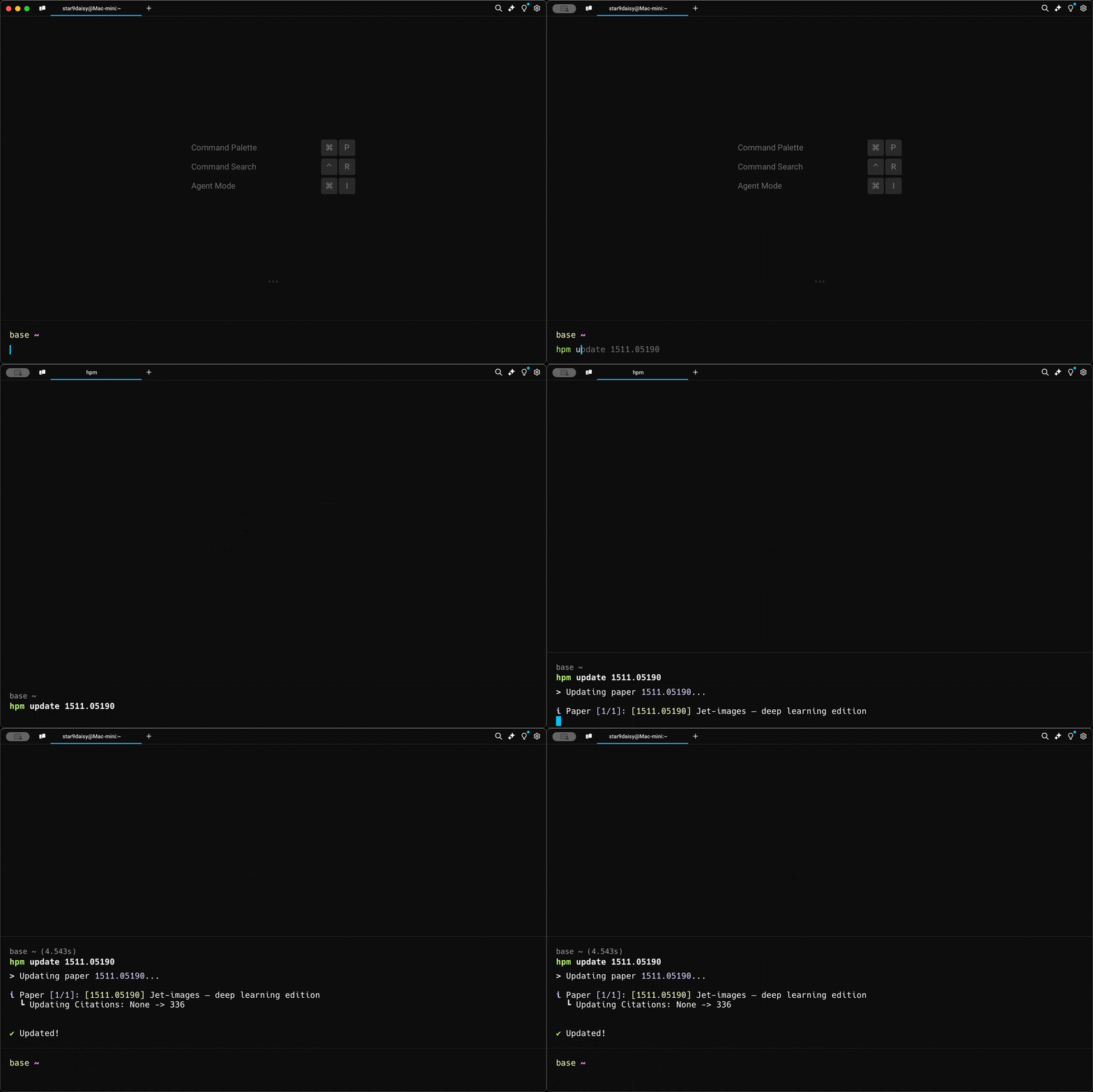
hpm update [<arxiv_id>|all]: Update one paper according to its ArXiv ID or all papers in the database.
hpm info: Show all file paths related to this app.hpm clean: Remove all files related to this app.
Updates
v0.4.0
- Refactor the codebase and reorganize the file structure.
v0.3.0
- Refactor the codebase by only allowing adding papers by arXiv ID.
v0.2.2
- Fix the error when
hpm addsome conference papers that may have no publication info.
v0.2.1
- Fix the bug that
hpm addonly checks the first 100 pages in the database. - Fix the checkmark style.
v0.2.0
- Refactor the codebase by introducing
notion_database. - Add
hpm updateto update one paper in the database. - Add
hpm infoto show the information of this app.
v0.1.4
- Update print style.
- Add friendly error message when the
database_idis not specified.
v0.1.3
- Update
hpm addto check if the paper already exists in the database. - You can now create a database with more properties then the template.
v0.1.2
- Update paper from Inspire engine to include url, bibtex, and source.
v0.1.1
- Add
hpm initfor interactive setup. - Add
hpm addfor adding a paper to a Notion database. - Introduce the default
Inspireengine andpaper.ymltemplate.
1 maintainer

Metadata
1 maintainer
Release files for hep-paper-manager 0.4.0
For a detailed explanation of source distributions (sdists) and built distributions (wheels), please see the package formats documentation.
Source distribution (sdist)
| File | Size | Uploaded | Provenance | Actions |
|---|---|---|---|---|
| hep_paper_manager-0.4.0.tar.gz | 13.7 kB | Without provenance | Details for hep_paper_manager-0.4.0.tar.gz |
Built distribution (wheel)
| File | Interpreter | ABI | Platform | Actions Reset |
|---|---|---|---|---|
| hep_paper_manager-0.4.0-py3-none-any.whl | Python 3 | none | any | Details for hep_paper_manager-0.4.0-py3-none-any.whl |
Total release size: 29.9 kB
Release files / hep_paper_manager-0.4.0.tar.gz
| Download URL | hep_paper_manager-0.4.0.tar.gz |
|---|---|
| Size | 13.7 kB |
| Tags | Source |
|
SHA-256 checksum How to use checksums |
19b1187a6ae96aed5ee8ef5b73687a00fd3fb87404046a3a38e17e02216d2d10
|
|
BLAKE2b-256 checksum How to use checksums |
c6bbdb7f8da8764a9562fcf98511dbc9aebfd618690daa5e47eb2a9ce2bbf6f8
|
| Upload date | |
|
Uploaded using Trusted Publishing? What is trusted publishing? |
No |
| Uploaded via |
poetry/1.8.4 CPython/3.11.9 Linux/5.15.0-122-generic
|
Release files / hep_paper_manager-0.4.0-py3-none-any.whl
| Download URL | hep_paper_manager-0.4.0-py3-none-any.whl |
|---|---|
| Size | 16.2 kB |
| Tags | Python 3 |
|
SHA-256 checksum How to use checksums |
dc366b2c96c54a54336134ee16e7a1982d7ac800b013d4e08ab6eda03cc68df0
|
|
BLAKE2b-256 checksum How to use checksums |
1ff948d46f17b6fe6835feed9dc5ccdaf7ca8cf1e387bd470d45df8158487881
|
| Upload date | |
|
Uploaded using Trusted Publishing? What is trusted publishing? |
No |
| Uploaded via |
poetry/1.8.4 CPython/3.11.9 Linux/5.15.0-122-generic
|
Security for hep-paper-manager 0.4.0
Provenance
Provenance describes where a file came from. On PyPI, provenance is shared via attestations, which provide a verifiable record of the build or publishing details. View details, limitations and caveats.
No provenance found
None of the files in this release were uploaded with provenance metadata.
A note on package security
PyPI is a repository for distributing packages, not a service for auditing them. While third-party security researchers and our staff do their best to detect and remove malicious packages, PyPI cannot guarantee the quality, security or suitability of any given package.
To learn more about protecting yourself from malicious actors, visit our package security documentation.














