
Connect your Mac to the internet and turn it into a programmable runtime. Modal, for Macs.

Project description
🍎 Herds
Connect your Mac to the internet and turn it into a programmable runtime.
Modal, for Macs.
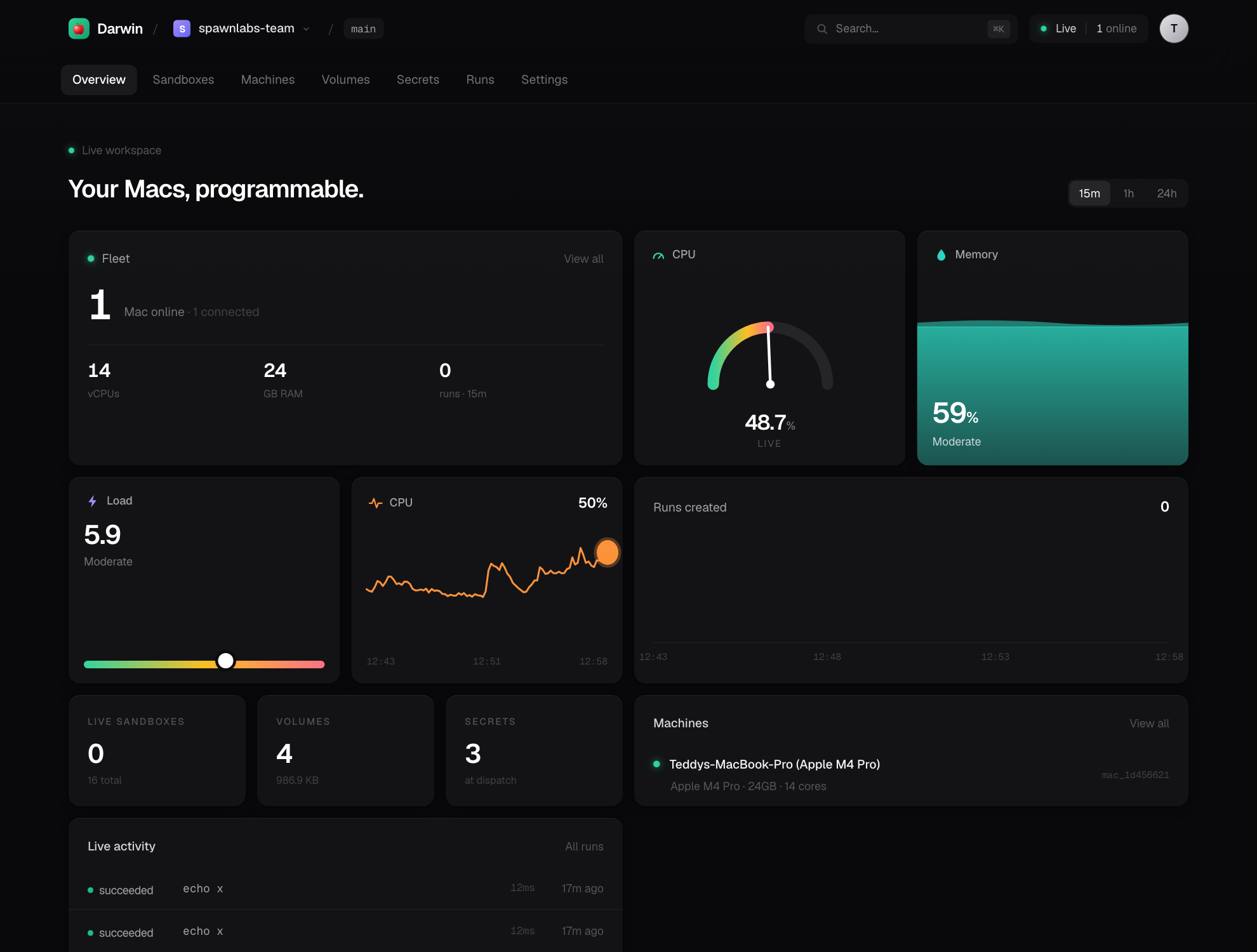
Herds makes any Mac you own into a runtime that agents, SDKs, CLIs, cron jobs, and applications can execute against from anywhere. Install the daemon, sign in, and your Mac becomes an API.
import herds

mac = herds.mac()
result = mac.run("xcodebuild -scheme MyApp build")
print(result.stdout)
Nobody cares about SSH. Nobody cares about Tailscale. Nobody cares about machine management. They just have a Mac.
The mental model
It's not "rent Macs." It's not "manage servers." It's not "a CI system."
Every Mac becomes an API.
The developer surface intentionally echoes Modal, so the mental model transfers
directly — App, Image, Volume, Sandbox — except the runtime is your
Mac, and Apple's licensing makes that something Modal/AWS structurally can't
offer as dense rented cloud. Your Mac, already licensed, is the cloud.
Architecture
Three small pieces. Your Mac never opens an inbound port; the daemon dials home over a persistent WebSocket (the same NAT-traversal pattern as GitHub Actions runners, Tailscale, and Cloudflare Tunnel), and commands are pushed back down that socket.
┌─────────────┐   REST: start a job    ┌──────────────┐   WS (agent dials home)  ┌─────────────┐
│  Python SDK │ ───────────────────►   │ Control Plane│ ◄──────────────────────  │ Mac Daemon  │
│   + CLI     │ ◄═══ WS: stream logs ══ │  (FastAPI)   │  ═══ exec / stdout ════► │ (executor)  │
└─────────────┘                        └──────────────┘                          └─────────────┘
   herds.mac().run()                    sqlite + fan-out                            your real Mac
The control plane is deliberately tiny — it remembers who owns what and job status. Volumes, sandboxes, images, and caches never leave the Mac. The Mac is the cloud.
Quickstart
pip install herds # or: uv tool install herds
Self-host in one command
herds host turns this Mac into a self-hosted Herds: control plane + the full
web dashboard + a secure public link + this Mac as a compute node — one process,
one SQLite file, no managed infrastructure.
herds host
# ✓ Herds host is live
#   Dashboard   https://<you>.trycloudflare.com   (or a permanent Tailscale Funnel link)
#   Host token  herds_sk_…
#   Add a Mac   herds connect https://… herds_sk_…
Open the link, paste the token once, and you're in. Other Macs join the pool with
herds connect <link> <token>. For a permanent link, run herds host setup
once to enable Tailscale Funnel (free).
Or drive it from Python
import herds

mac = herds.mac()
print(mac.run("sw_vers").stdout)
print(mac.run("xcodebuild -version").stdout)
The SDK
Run commands
mac = herds.mac()

# blocking, returns a Result(exit_code, stdout, stderr, duration_ms)
r = mac.run("swift build", check=True)

# stream output live to your terminal
mac.run("npm test", stream=True)

# iterate output yourself
for stream, line in mac.stream("xcodebuild build"):
    handle(line)
Images — environment recipes resolved on the Mac
mac.run("xcodebuild build", image=herds.Image.xcode("26"))   # selects DEVELOPER_DIR
mac.run("node --version",   image=herds.Image.node("22"))     # pins via mise
mac.run("python script.py", image=herds.Image.python("3.13"))
On a Mac an Image isn't a container — it's a recipe that selects the right Xcode
(DEVELOPER_DIR, never clobbering concurrent jobs) or runtime (mise). If a
toolchain isn't installed, the command still runs against the host and Herds
tells you what it would have pinned.
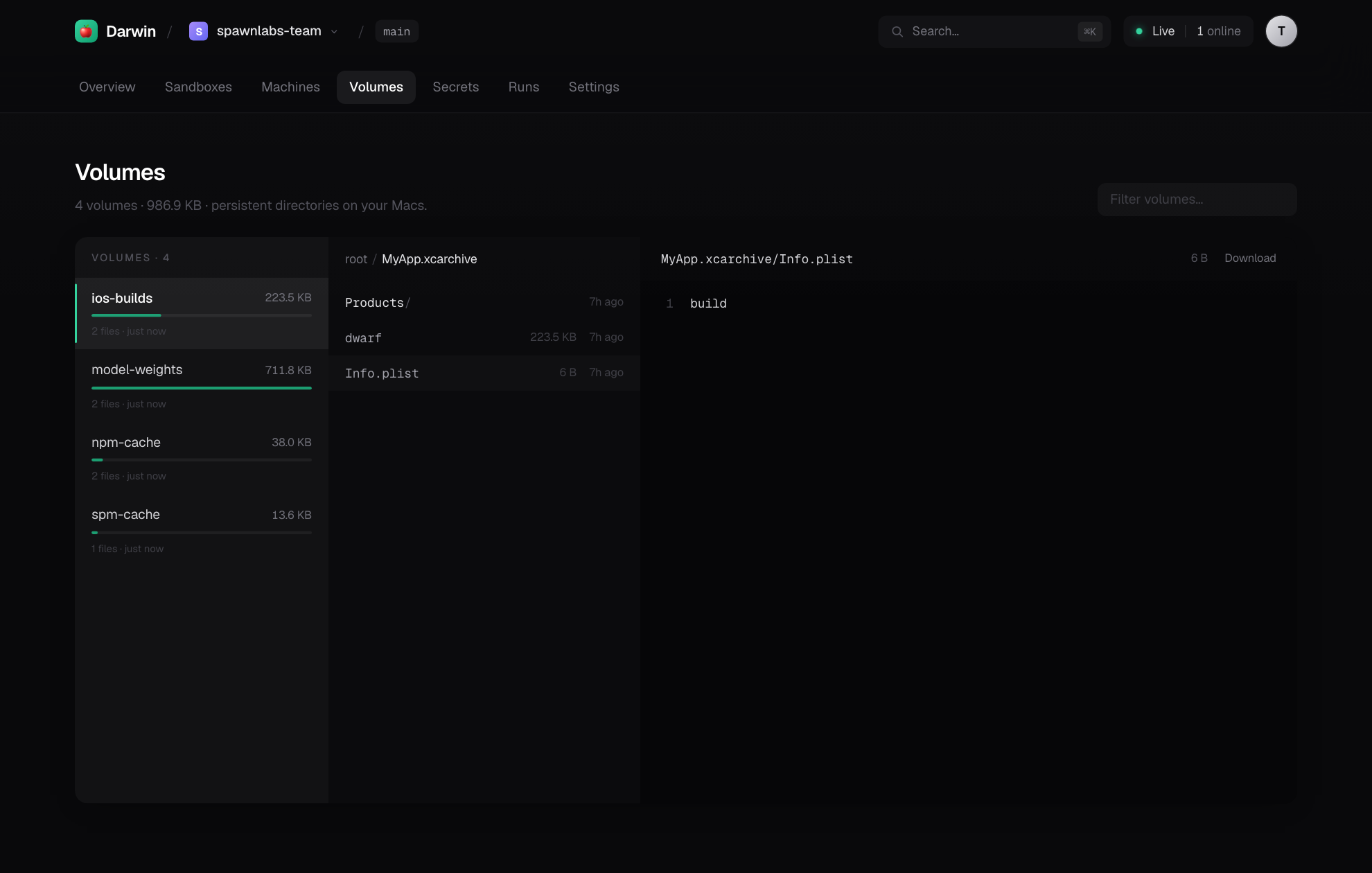
Volumes — persistent directories on the Mac
vol = herds.Volume.from_name("ios-builds")
# Reachable as ./builds (relative to the working dir) and via the env var.
mac.run("xcodebuild archive -archivePath $HERDS_VOLUME_IOS_BUILDS/App.xcarchive",
        volumes={"builds": vol})
On a bare Mac there's no container, so a volume is mounted under the working
directory at the mount name and exposed as an absolute path through
$HERDS_VOLUME_<NAME> — both unambiguous. (Absolute /workspace-style mounts
arrive with the Tart VM backend.)
Sandboxes — isolated, persistent workspaces
with herds.Sandbox.create(image="xcode:26") as sbx:
    sbx.exec("git clone https://github.com/me/app .")
    sbx.exec("xcodebuild -scheme App build", check=True)
Each sandbox is its own directory tree with redirected HOME/TMPDIR and
toolchain caches, its own process session (so timeouts kill the whole tree), and
an optional sandbox-exec write-fence. Files persist between exec calls.
Expose a server — a sandbox becomes a URL
sbx.spawn("python -m http.server 8000", keep_alive=True)
url = sbx.expose(8000)            # → https://<you>.trycloudflare.com/p/<sbx>/8000/
Run a web app or API inside a sandbox and get a hittable public link. Requests
tunnel through the agent WebSocket — control plane → daemon → the sandbox's
localhost:port — so it works behind NAT with no inbound ports. With a wildcard
domain you get named subdomains (https://myapi--teddy.herds.run).
Apps & functions — run real Python on your Mac
app = herds.App("builds")

@app.function(image=herds.Image.python("3.13"))
def inspect(target: str) -> dict:
    import platform
    return {"target": target, "ran_on": platform.node()}

@app.local_entrypoint()
def main():
    print(inspect.remote("release"))   # ships source, runs on the Mac
The dashboard
herds host serves a full web dashboard — bundled into the package as a static
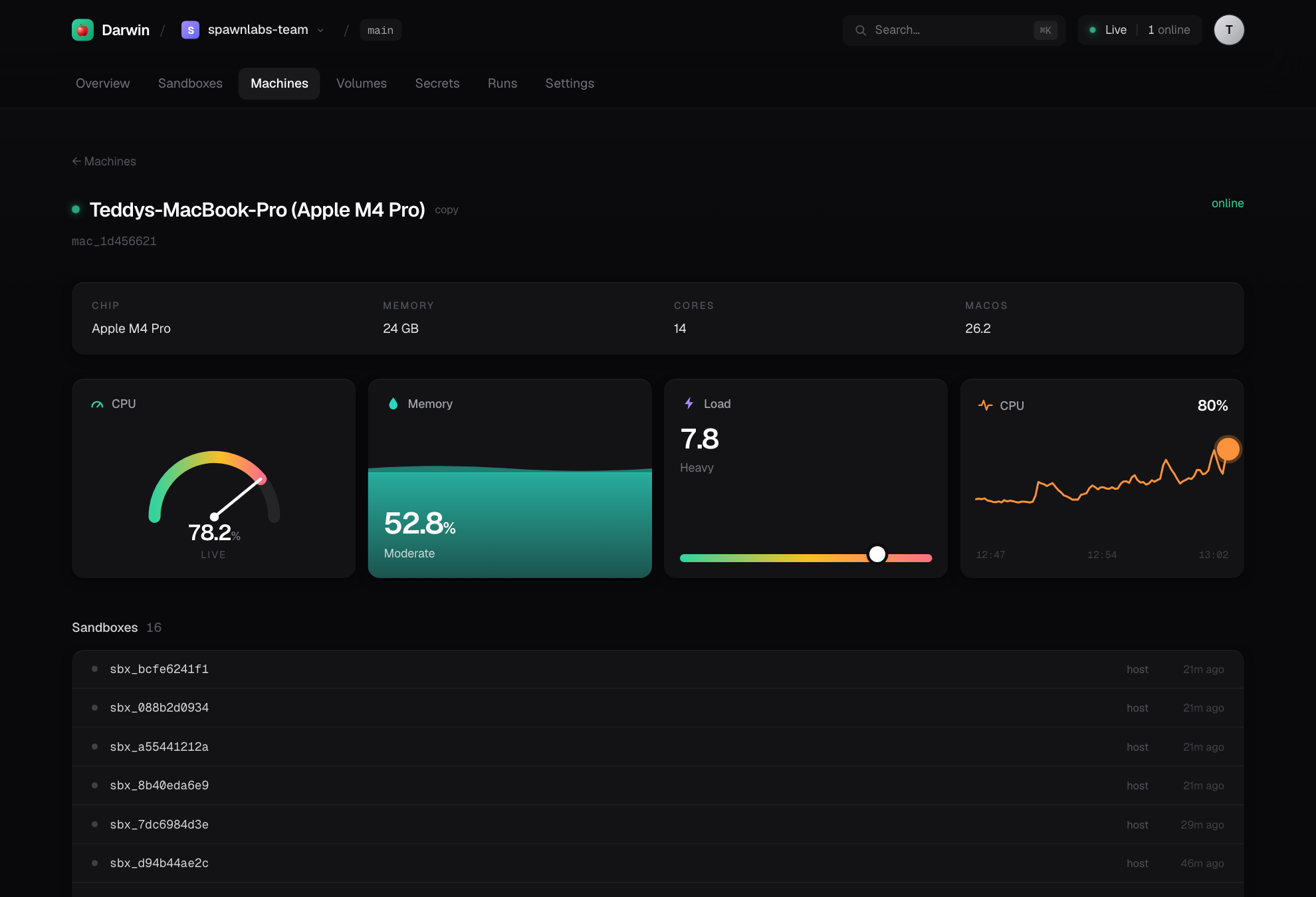
build, served by the control plane (no Node.js at runtime). Live metrics, a
sandbox explorer with exposed ports, a deep file browser for volumes, secrets,
run history — all polling the same API the SDK and CLI use.
 |
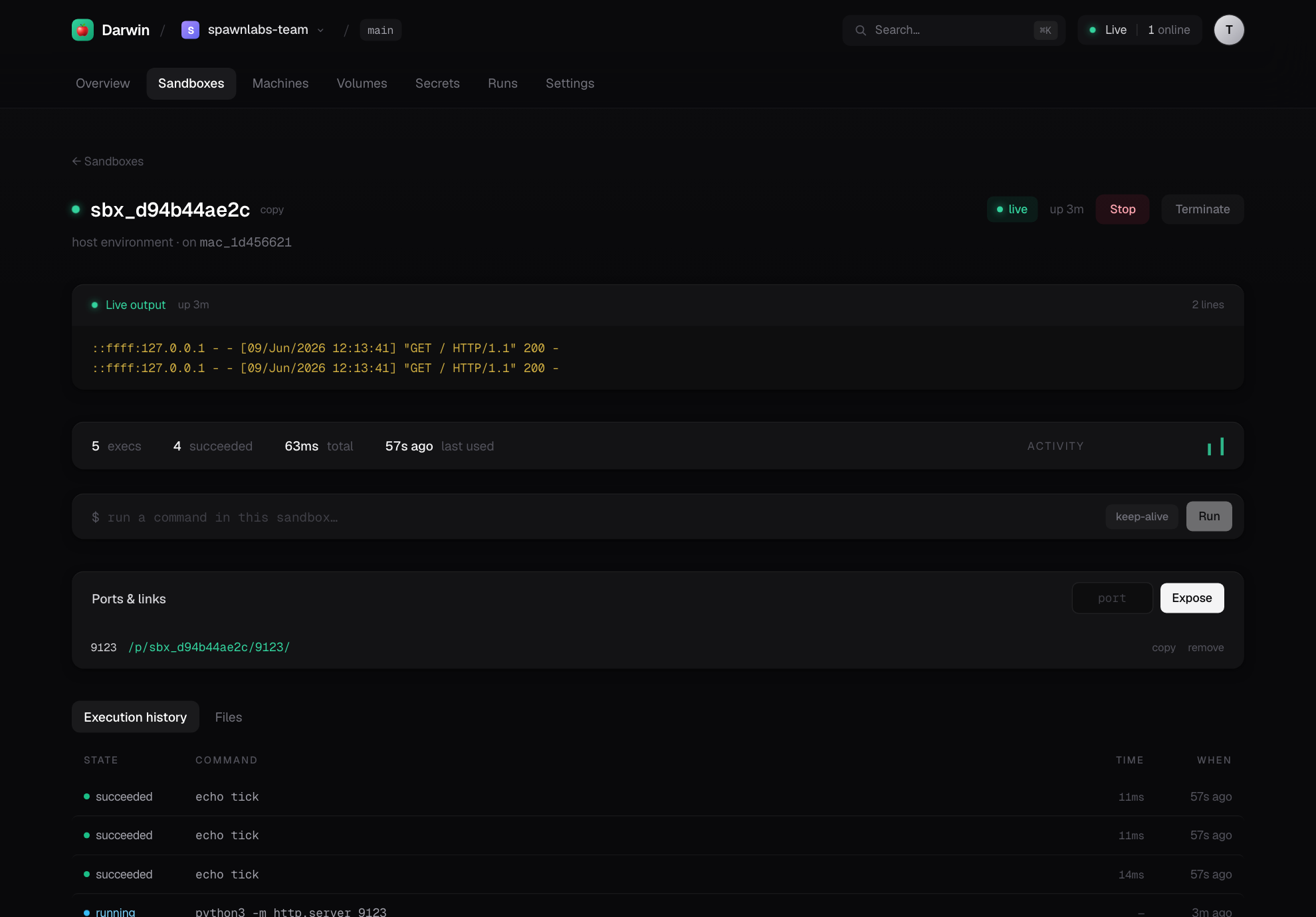 |
| Per-Mac live gauges | Sandboxes — activity + exposed ports |
 |
|
| Volumes — a real file explorer |
The CLI
herds host               self-host: control plane + dashboard + public link
herds host setup         enable a permanent Tailscale Funnel link
herds connect <link> <token>   join another Mac to a host
herds serve              run a bare control plane locally
herds machines           list your connected Macs
herds run -- <cmd>       run a command on a Mac (streams output)
herds shell -c <cmd>     one-off command (SSH-equivalent)
herds logs               recent jobs
herds status             local configuration
herds volume ls|create|rm
herds image ls           toolchain images available on this Mac
herds install            launchd LaunchAgent — stay online on login
herds uninstall
Isolation, honestly
The MVP isolates with per-sandbox directories, a clean allowlisted environment,
process-group teardown, and (when available) a sandbox-exec write-fence. This
is the right model for trusted code — the user owns the Mac and runs their own
builds — and it starts instantly.
The documented next tier is Tart VMs (Apple's Virtualization.framework, OCI
images, near-instant APFS copy-on-write clones) for true OS-level isolation, and
Apple's native container for Linux jobs on macOS 26. The Image/Volume/
Sandbox API is drawn so those become a backend swap, not an API change. See
DESIGN.md and ROADMAP.md.
Apple licensing — the moat
Apple's macOS SLA limits virtualization to 2 VMs per physical Mac and forbids "service bureau / time-sharing." The BYO-Mac model sidesteps this: the Mac and its macOS license belong to you, so Herds runs as personal/dev use on hardware you own — which is exactly what the license permits and what makes "Modal for Macs" both accurate and hard to copy as a rented-fleet cloud.
Build from source
git clone https://github.com/teddyoweh/herds
cd herds
uv venv && uv pip install -e ".[dev]"
uv run pytest                      # backend tests
./scripts/build_release.sh         # build the dashboard + wheel (with UI bundled)
The dashboard lives in web/ (Next.js, static-exported). scripts/build_release.sh
exports it and bundles it into the wheel, so pip install ships the whole UI.
Status
Works today, end-to-end: herds host (control plane + bundled dashboard +
public tunnel + token auth), connect Macs, run commands, stream logs, mount
volumes, drive sandboxes, expose ports as URLs, run remote Python. See
ROADMAP.md for what's next (self-hostable tunnel relay, Tart VM
backend, code-shipping for functions).
License
Apache-2.0
Release history Release notifications | RSS feed


Download files
Download the file for your platform. If you're not sure which to choose, learn more about installing packages.
Source Distribution
Built Distribution
Filter files by name, interpreter, ABI, and platform.
If you're not sure about the file name format, learn more about wheel file names.
Copy a direct link to the current filters
File details
Details for the file herds-0.1.0.tar.gz.
File metadata
- Download URL: herds-0.1.0.tar.gz
- Upload date:
- Size: 1.2 MB
- Tags: Source
- Uploaded using Trusted Publishing? No
- Uploaded via: uv/0.9.13 {"installer":{"name":"uv","version":"0.9.13"},"python":null,"implementation":{"name":null,"version":null},"distro":{"name":"macOS","version":null,"id":null,"libc":null},"system":{"name":null,"release":null},"cpu":null,"openssl_version":null,"setuptools_version":null,"rustc_version":null,"ci":null}
File hashes
| Algorithm | Hash digest | |
|---|---|---|
| SHA256 |
3230a7506f2201c4f01c8f4684fa7e0a19b706170cd56cf41b7747e9d4cd77df
|
|
| MD5 |
bc3fd34f68eb21f6602b4caf06544d4d
|
|
| BLAKE2b-256 |
5c60965e17364b88e9336ca298a44100d43ac535609ecfe5508fdf8eae140aba
|
File details
Details for the file herds-0.1.0-py3-none-any.whl.
File metadata
- Download URL: herds-0.1.0-py3-none-any.whl
- Upload date:
- Size: 721.2 kB
- Tags: Python 3
- Uploaded using Trusted Publishing? No
- Uploaded via: uv/0.9.13 {"installer":{"name":"uv","version":"0.9.13"},"python":null,"implementation":{"name":null,"version":null},"distro":{"name":"macOS","version":null,"id":null,"libc":null},"system":{"name":null,"release":null},"cpu":null,"openssl_version":null,"setuptools_version":null,"rustc_version":null,"ci":null}
File hashes
| Algorithm | Hash digest | |
|---|---|---|
| SHA256 |
23c6e89413face05438373f807e4ee271e10640d130ed70297da934d3c280592
|
|
| MD5 |
cff5c5ace96a1d967ca44840245f6ef9
|
|
| BLAKE2b-256 |
00fc9da564369fc447e8e699e9ddc4ec1e9c6598fc28f698e32d6dd5b60acbb7
|






