
Qdrant Memory for Hermes






Runtime 0.2.1 provides the standalone CLI/MCP and fixes explicit writes of distinct, highly similar texts. MCP distribution 0.1.1 pins Runtime 0.2.1. The Hermes Plugin Catalog has its own reviewed immutable pin. A PyPI release does not upgrade it. One writer per destination remains required. See release notes and validation.
Native long-term memory plugin for Hermes Agent, implemented as a MemoryProvider.
Hermes performs extraction
through its trusted ctx.llm facade. Qdrant stores named dense vectors and schema-v1
payloads. No Mem0 SDK, separate LLM SDK, telemetry, or core modifications.
Available in the official Hermes Plugin Catalog as a community-maintained plugin.
How it works
For non-Hermes users, install in a private Python 3.11+
environment: pip install 'hermes-plugin-qdrant-memory[mcp]==0.2.1' (omit [mcp]
for CLI only). qdrant-memory is the CLI and mcp is its server subcommand.
Standalone does not require Hermes. See setup and quick start.
MCP-focused agents may instead use the metadata-only distribution.
Public releases: Runtime on PyPI
and MCP distribution on PyPI.
For native Hermes use its official plugin installation mechanism below. Before
an authorized upgrade, verify the same profile, collection and embedding pipeline.
flowchart LR
    turn["Hermes turn"] --> admit["Provider callback"]
    admit --> ledger[("SQLite ledger<br/>durable admission")]
    ledger -.async.-> extract["LLM extraction +<br/>relation checks"]
    extract --> store[("Qdrant<br/>dense vectors + payloads")]
    ask["Recall / search"] --> search["Scoped dense search"]
    search --> store
Why this plugin
- Durable, private memory for Hermes Agent: conversations become searchable memories in your own Qdrant store, with recall, update and scoped deletion.
- A native Hermes
MemoryProvider, not Mem0. Themigrate mem0command imports existing Mem0 exports. - Embedded Qdrant needs no separate service. The same code targets self-hosted Server and Qdrant Cloud.
- A fully local setup works: embedded Qdrant and local Ollama keep the data on your machine.
- Data locality follows the destination. Extraction uses the LLM configured in Hermes, and embedding uses the configured embedding service. Either can be remote. See Data flow and privacy.
- Not supported in this preview: multi-writer Server/Cloud, hybrid search and a web UI.
Additional compatibility with other agents
The plugin primarily provides Hermes Agent's durable memory integration. As an
additional capability, its shared backend can serve other agents through the
Runtime's qdrant-memory --home PATH JSON CLI and optional local stdio MCP
interface. Standalone use does not require Hermes. These interfaces support explicit scoped
memory operations and maintenance/migration. Automatic extraction and prefetch
remain Hermes lifecycle features. See standalone setup for
configuration and boundaries, and the agent-neutral
qdrant-memory skill
for multi-agent installation and usage guidance.
The optional MCP server exposes four scoped tools: qdrant_memory_search,
qdrant_memory_add, qdrant_memory_update and qdrant_memory_delete. Compatible
clients launch it as a local stdio process and discover/call those tools.
Maintenance and migration use the operator CLI. See the
MCP capabilities and connection guide for setup, shared-memory
boundaries and the verified agent matrix. Runtime 0.2.0 published these interfaces.
The published v0.1.0 plugin release does not include the MCP entrypoint.
See it in action
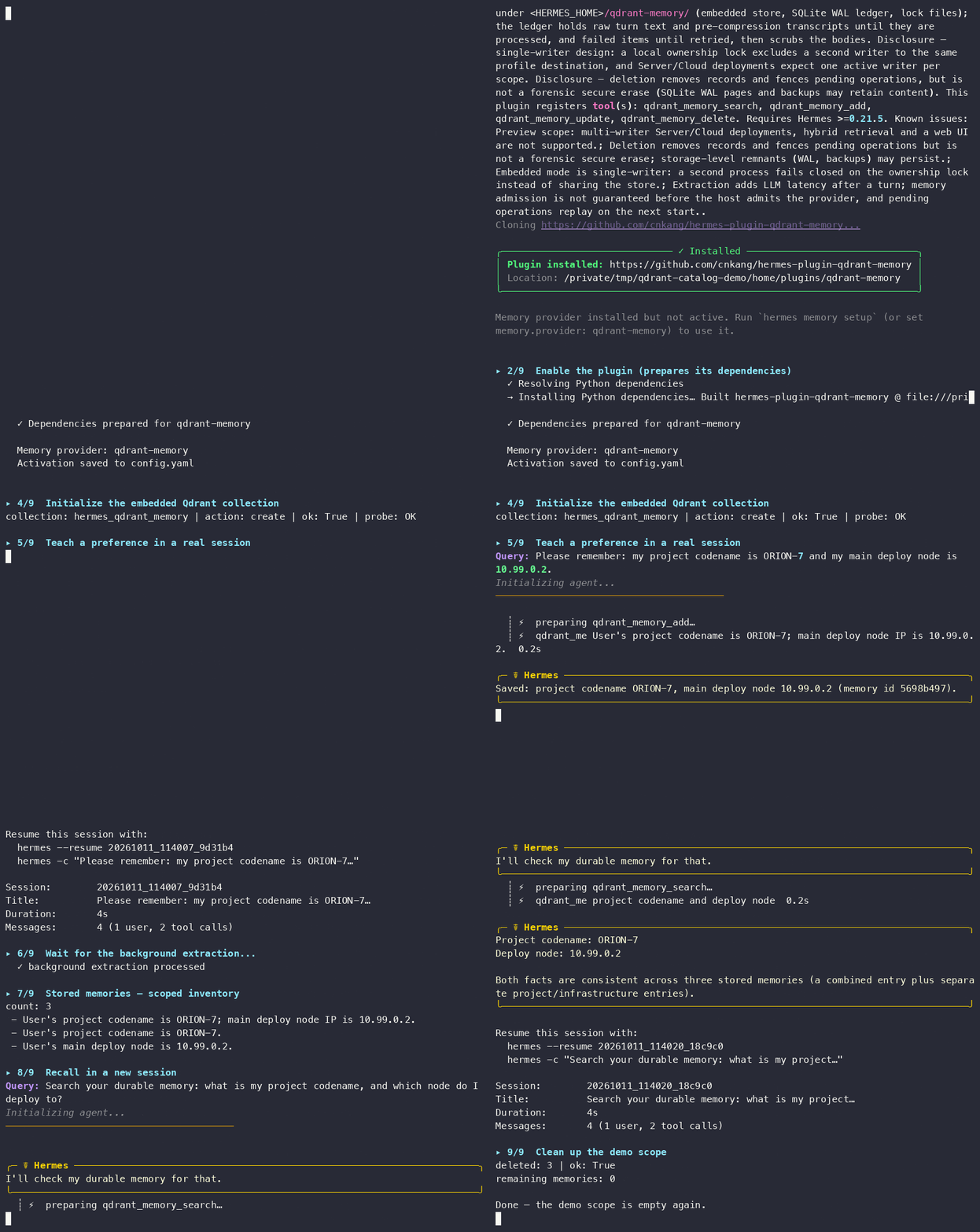
The recording shows the full flow on a clean profile. It installs from the
official Hermes Plugin Catalog, teaches a preference, and waits for the
background extraction. Then it recalls the preference in a new session and
cleans up the demo scope. All steps
run in embedded mode. scripts/demo.sh reproduces the same walkthrough with
the pinned release.
Install
Requirements: Python 3.11+, a compatible Hermes installation, and a reachable
embedding service. The minimum supported Hermes release is v0.21.5 (v2026.9.24).
The CI services page documents the tested host versions.
The default model needs Ollama and enough local resources
to serve qwen3-embedding:4b.
Choose the active profile's home explicitly. Do not reuse another profile's data.
Recommended: install from the official Hermes Plugin Catalog.
export HERMES_HOME="/absolute/path/to/your/hermes-profile"
ollama pull qwen3-embedding:4b
# Start Ollama if it is not running. Keep its service available.
hermes plugins install qdrant-memory
hermes plugins enable qdrant-memory
hermes memory setup
hermes config set memory.provider qdrant-memory
hermes qdrant-memory init
The install resolves the catalog's reviewed commit and prints the entry's declared
tools, requirements and known issues before it clones anything.
hermes plugins enable prepares the declared dependencies through Hermes PM.
Version-locked: install the verified Runtime 0.2.1 source through the Hermes CLI.
This immutable source revision includes the explicit-write fix. It does not depend on a PyPI release or a catalog update.
export HERMES_HOME="/absolute/path/to/your/hermes-profile"
ollama pull qwen3-embedding:4b
# Start Ollama if it is not running. Keep its service available.
hermes plugins install https://github.com/cnkang/hermes-plugin-qdrant-memory \
  --ref 8929693fcccd1efa91bfa062145e35d2369ca9cc   # verified Runtime 0.2.1 source
hermes plugins enable qdrant-memory
hermes memory setup
hermes config set memory.provider qdrant-memory
hermes qdrant-memory init
For this version-locked form, hermes plugins install checks out the given ref, and
hermes plugins enable prepares the declared dependencies through Hermes PM.
--ref takes a full 40-character commit SHA. The
releases page
lists the release commits. Do not pip-install into a managed Hermes
environment. Omit --ref to track main, the development line.
Historical release: clone a published tag manually.
The v0.1.0 tag below predates the standalone interfaces and the explicit-write fix. Use the pinned source above for Runtime 0.2.1.
export HERMES_HOME="/absolute/path/to/your/hermes-profile"
mkdir -p "$HERMES_HOME/plugins"
RELEASE_TAG=v0.1.0   # set a published release tag
git clone --branch "$RELEASE_TAG" --depth 1 \
  https://github.com/cnkang/hermes-plugin-qdrant-memory.git \
  "$HERMES_HOME/plugins/qdrant-memory"
ollama pull qwen3-embedding:4b
# Start Ollama if it is not running. Keep its service available.
hermes memory setup
hermes config set memory.provider qdrant-memory
hermes qdrant-memory init
Then verify the install:
hermes qdrant-memory status
hermes qdrant-memory doctor
A healthy install reports the destination, the embedding service and the
schema fingerprint. doctor validates runtime discovery, manifest parsing,
import and registration. For development installs, see
development setup.
The release notes, supported Hermes/Python versions and the current
limitations live in docs/releases/v0.1.0.md.
main stays the development line.
For local development, symlink the repository into a disposable profile:
mkdir -p "$HERMES_HOME/plugins"
ln -s /path/to/hermes-plugin-qdrant-memory "$HERMES_HOME/plugins/qdrant-memory"
hermes memory setup
hermes config set memory.provider qdrant-memory
Restart the conversation after configuration changes. Existing system prompts
and toolsets stay fixed for prompt caching. Packaged installations expose the
hermes_agent.memory_providers entry point and keep cli.py and config_schema.py
next to the package entry point.
Defaults use embedded Qdrant and Ollama qwen3-embedding:4b (2560 dimensions).
Run the embedding service and provision that model before you activate the provider.
For server/Cloud, configure the mode in $HERMES_HOME/qdrant-memory.json. Supply
QDRANT_URL / QDRANT_API_KEY in the active profile's secret scope.
Capabilities
- Embedded, self-hosted server and Cloud using the same Qdrant client.
- Ollama
/api/embedand OpenAI-compatible/v1/embeddings, with strict probe, vector-count/dimension validation and pipeline fingerprint checks. - Main LLM inheritance, plugin auxiliary task routing and operator-trusted overrides.
- User/agent scope filtering for recall, exact-ID update and deletion.
- Turn persistence to the plugin's private SQLite ledger after Hermes admits the
provider callback. Serialized writes, cached session recall and builtin memory
mirroring use authoritative
previous_content. - SQLite WAL event/operation ledger, transport retries and restart recovery.
- Source-ID-only Mem0 JSON/Qdrant migration, re-embedding, dry runs, resumable manifests, supplemental updates, and verification of IDs and payload hashes.
- Read-only
listinventory, portableexport(Mem0-importable JSON) and a durable scopeddelete-allwith prepared-write fencing.
Unlike hosted memory services, your memory data lives in your own Qdrant destination. The plugin makes no calls to external memory services. Its private SQLite ledger (pending operations, dedupe/retry bookkeeping and session mappings) stays in the local Hermes home. Back up that home together with your Qdrant data. Migration from Mem0 is one-way, and version 0.1 has no vector reuse or hybrid retrieval.
Explicit add deduplicates only canonical text in the same scope and never calls
an LLM. Different texts are saved regardless of similarity. Update replaces only
the authorized exact ID. For automatic Hermes extraction,
similarity is a candidate-selection signal, not proof that two facts are identical.
SAME skips, SUPERSEDES updates, CONFLICT creates a linked record, and
UNRELATED adds a record. Migration uses source IDs instead of semantic merging.
The four agent tools are qdrant_memory_search, qdrant_memory_add,
qdrant_memory_update, and qdrant_memory_delete. Maintenance stays in the CLI:
hermes qdrant-memory status
hermes qdrant-memory init
hermes qdrant-memory doctor
hermes qdrant-memory stats
hermes qdrant-memory verify
hermes qdrant-memory retry
status is local-only. doctor and verify probe existing collections without
creating or repairing them. Run init after first-time configuration to probe
embeddings, create the collection, record its pipeline fingerprint and build
Server/Cloud payload indexes. It makes no LLM calls and writes no conversation
memories. Repeated runs validate the existing collection. Incompatible dimensions,
distance or fingerprint fail without overwriting existing data.
When the collection exists, init asks for use (the default on Enter) or clear.
Reuse validates the named dense vector, dimensions, distance and pipeline identity,
then checks every stored memory's payload, content hash and vector. A validation
failure returns a nonzero exit code. The plugin cannot reuse a nonempty
collection without a trusted fingerprint.
Clear probes embeddings first, then deletes and rebuilds the target collection and
discards that destination's local replay work and migration records. The plugin
keeps other destinations and the transcript provenance quarantine. Clearing is
irreversible, and deletion/recreation is not atomic. Rerun init if remote
recreation fails.
An interrupted clear leaves a durable reset intent. Other destination commands fail
with reset_recovery_required. Rerun init for the same destination to resume the
already authorized reset before you enable the provider.
For scripts, explicitly pass --existing use or --existing clear. The clear
choice authorizes deletion. --collection NAME overrides only this command's
target, not the collection configured for subsequent agent sessions.
init, migrate and retry require exclusive writer ownership in all deployment
modes. The OS lease coordinates local processes that use that profile destination.
It is not a distributed lock. Stop every Hermes session or gateway on every host
that writes to the same destination before you run them. If doctor already
reports ok: true, the collection is ready. Initialization is unnecessary. Remote
doctor, stats and verify can inspect it while the writer runs.
retry requeues failed events for the next provider
startup and retries prepared operations. Stop the agent before you run maintenance
on an embedded store. Qdrant's local persistence permits only one client process.
Memory inventory, export and scoped deletion
hermes qdrant-memory list                        # read-only inventory
hermes qdrant-memory export --output backup.json # portable JSON for re-import
hermes qdrant-memory delete-all --user alice --confirm
list reports stored memories with scope, provenance and timestamps. It also
reports the destination's pending/failed operation counts. Use --user and
--agent to filter. Omitting both covers the whole collection. --limit
bounds the output, and the command refuses --agent without --user.
export writes every stored memory, optionally one scope, as portable JSON in
the shape the Mem0 importer accepts. hermes qdrant-memory migrate mem0 --source-json backup.json then restores it into a fresh destination (imports
re-embed, and version 0.1 has no vector reuse). Round trips preserve text,
scope, categories and timestamps. Mem0-migrated memories re-import to the same
points, and native memories keep their original point UUID in the exported
record for provenance. The plugin writes exports owner-only and refuses to
overwrite without --force. An export covers stored memories only. Pending
events, retry history and crash-recovery state stay in the local ledger. Back
up the profile home for a full recovery point.
delete-all durably deletes stored memories and pending work for one scope
(--user required). It records a reset-style intent first. Then it fences every
enumerated point and every prepared write for that scope, including writes
whose points were never stored. It invalidates admitted-but-unprocessed turn
events for the scope, deletes the scope in one filtered operation, and clears
the intent only after the scope becomes empty. A scope is exactly one
(user, agent) pair. Omitting --agent selects the no-agent scope, and the
default profile scope uses an agent (hermes). Pass --agent hermes to
target it, or --all-agents to delete every agent scope of the user. Without
--all-agents, the result reports other_agent_scopes when other agent
scopes still hold memories. A literal * is an ordinary agent id, not a
wildcard. --dry-run previews the per-scope counts.
--confirm authorizes deletion. An interrupted deletion fails closed: other
commands and provider startup return scope_delete_recovery_required until
delete-all --confirm resumes it. Deletion intents are versioned and explicit.
A pre-versioned intent cannot show whether * is a single agent or all agents,
so the plugin refuses it (scope_delete_legacy_intent). Resolve it with
--resolve-legacy single_agent, or with --resolve-legacy all_agents when the
record's agent is * or absent. Turns admitted after the deletion can still
add new memories. Everything admitted before it, including stored memories, prepared
writes and unprocessed turn events, is removed or invalidated. list,
export and delete-all do not require the embedding service.
Data flow and privacy
This provider sends data only toward services you configure. What each component carries and where it can go:
| Component | Carries | Destination |
|---|---|---|
| Chat / agent turns | Your conversation | The model configured for the Hermes session |
Memory extraction (llm.mode: inherit) |
The turn's user and assistant text | The same session model. With a cloud model, turn text reaches that cloud |
| Relation checks | The candidate memory and the similar stored memory | Same routing as extraction. It runs only when similarity selects a review candidate |
Embeddings (embedding) |
Memory and search text | Ollama by default, or your OpenAI-compatible endpoint |
Storage (qdrant) |
Memory payloads and provenance. The ledger stays local | Embedded local path, self-hosted server, or Qdrant Cloud |
Three common deployments:
| Deployment | Chat model | Extraction LLM | Embeddings | Storage |
|---|---|---|---|---|
| Fully offline | local (for example Ollama) | inherits the local model | local Ollama | embedded local |
| Hybrid | cloud | inherits the cloud model by default | local Ollama | embedded local |
| Full cloud | cloud | cloud | OpenAI-compatible endpoint | Qdrant Cloud |
A fully offline setup needs enough local compute for the chat model and the embeddings together. On a 24 GB host, a 27B local chat model plus local embeddings exceeded comfortable VRAM during validation. Local-model turns can take minutes each. Budget accordingly or use a smaller local model.
In the hybrid layout, extraction and relation checks inherit the session model.
Route them elsewhere with llm.mode: task (the plugin's auxiliary task on a
local model) or llm.mode: override (an explicit provider and model).
Extraction instructions exclude obvious credentials and transient statuses, but
any configured LLM or Qdrant destination can see the memories it processes.
Treat them accordingly. Logical scrubbing of the local
ledger is not secure erasure. See operations and
security.
Extraction and relation checks run as Hermes auxiliary calls. Their per-task
timeout defaults to 30 seconds, and a slow local model can exceed it easily.
Raise auxiliary.qdrant_memory_extraction.timeout (seconds) for fully local
deployments. A timed-out extraction becomes failed work, and
hermes qdrant-memory retry requeues it.
Configuration and migration
Behavior lives in $HERMES_HOME/qdrant-memory.json. Credentials belong in the
active profile's Hermes secret scope. Defaults use embedded Qdrant.
During setup, the wizard reuses existing QDRANT_URL and QDRANT_API_KEY from
the active profile's environment without another prompt. Setup reports their
presence without showing values, asks only for missing settings and saves environment
references rather than copying supplied values or keys. An environment URL replaces
any older explicit URL in the saved plugin settings. For server or
Cloud, set qdrant.mode, collection and endpoint. Cloud requires HTTPS and a
Database API key. Configuration examples and defaults
cover Ollama, OpenAI-compatible embeddings, LLM routing and explicit fallbacks.
Use a separate target collection and keep the Mem0 source unchanged:
hermes qdrant-memory migrate mem0 --source-json /path/to/export.json --dry-run
# Stop CLI/foreground writers; for an installed background gateway:
hermes gateway status
hermes gateway stop
hermes qdrant-memory migrate mem0 --source-json /path/to/export.json \
  --target-collection hermes_qdrant_memory --resume --verify
hermes qdrant-memory verify --collection hermes_qdrant_memory
Re-embedding is the default. --resume needs the same snapshot and pipeline.
Add --retry-failed to retry failed operations from that manifest. Migration
verification checks exact IDs, scope and payload hashes, not just record count.
Canceled migration records become terminal SUPERSEDED work. They never count
as successful writes. Resume preserves later deletion intent. --verify reports
the conflict as migration_superseded with a nonzero exit code. While failed
records remain, --verify reports migration_incomplete instead. Correct and
resume the failures before any conflict review or deliberate fresh import. Only
a fresh import or changed snapshot authorizes replanning.
Recovery reads operations and events in finite bounded pages. Retained ledger
history still needs disk-capacity monitoring.
Before a real import, stop all sessions/gateways writing to the target, including
for Server/Cloud. writer_busy requires stopping the active writer, not deleting
lock or ledger files. A successful dry-run does not check writer ownership.
Read the migration guide for executable gateway
stop/start, migration, verification and interrupted-import recovery commands.
Operations and security
The private SQLite ledger can contain raw turn events and prepared payloads. It
logically scrubs committed event bodies and committed/superseded operation bodies,
except operations still needed by an incomplete migration manifest. Identity/status
rows and manifests remain. Pending/failed work retains its body for recovery. There
is no time-based expiry for ledger rows or manifests. Deleting a Qdrant memory does
not purge pending or failed ledger work. Treat state.db, SQLite WAL/SHM sidecars,
copied snapshots and backups as sensitive. Stop the agent before you back up the
ledger with the embedded store. init --existing clear clears the selected
collection's ledger rows, but logical scrubbing/reset is not secure erasure from disk
pages or previously copied backups. Do not delete state.db to recover failed work.
Changing embedding identity requires a new collection.
The durability guarantee starts only after Hermes calls the provider's sync_turn
callback and the plugin commits the event to SQLite. Hermes currently submits that
callback to an in-memory background queue. An abrupt host exit or its bounded
shutdown can abandon work that has not reached plugin admission. After ledger
admission, the plugin replays pending events and prepared operations after restart.
This plugin ledger does not make the earlier host queue durable.
Tool arguments cannot override user/agent scope. Automatic writes exclude bot and non-primary-agent turns. Treat recalled content as untrusted data. See security, operating procedures, troubleshooting and architecture.
Compatibility and scope
Version 0.1 implements dense retrieval. Hybrid sparse vectors, RRF/DBSF, reranking
and recency weighting remain future capabilities. The plugin rejects unsupported
config. Named dense vectors preserve a path to future sparse vectors.
The plugin feature-detects embedding inherit and requires an explicit
inherit_fallback. The future host facade must provide dimensions,
fingerprint, embed_documents() and embed_query(). Current Hermes has no
documented global embedding facade.
Compatibility requires Hermes MemoryProvider, checkpoint v2, trusted turn authors,
authoritative builtin previous_content, scoped secrets and context threads.
Earlier tags have incomplete contracts. The minimum supported release is v0.21.5 (v2026.9.24). See
validation for tested environments and remaining live-service
checks. Read configuration, migration,
security and operations before deployment.
Development
Run Ruff lint and format checks before you commit. Install the repository pre-commit hook as described in development setup. The hook checks the staged snapshot. CI runs lint, both Python versions, Snyk and SonarCloud. See CI services for the tested host versions and lanes.
Build isolated dependency environments with Hermes PM. Then run the host's
canonical test runner against this repository's tests. The tests import the real
host and use a temporary HERMES_HOME.
cd /path/to/hermes-agent
python -m pm.build_env --source /path/to/hermes-agent --group test \
  --export-requirements /tmp/hermes-qdrant-test-requirements.txt
python -c 'import sys, tomllib; from pathlib import Path; p = tomllib.loads(Path(sys.argv[1]).read_text()); print("\n".join(p["project"]["dependencies"] + p["dependency-groups"]["test"]))' \
  /path/to/hermes-plugin-qdrant-memory/pyproject.toml >> /tmp/hermes-qdrant-test-requirements.txt
python -m pm.build_env --out /path/to/hermes-plugin-qdrant-memory/.test-env \
  --requirements /tmp/hermes-qdrant-test-requirements.txt
HERMES_PYTHON=/path/to/hermes-plugin-qdrant-memory/.test-env/bin/python \
  scripts/run_tests.sh /path/to/hermes-plugin-qdrant-memory/tests -j 1 --file-retries 0
The build reads the plugin's test development dependency group from
pyproject.toml. The tested host PM exports runtime requirements only. Append the
plugin runtime dependencies and test group before you build the combined
environment.
Run the real embedding pilot from the plugin checkout with the host import path:
PYTHONPATH=/path/to/hermes-agent .test-env/bin/python scripts/evaluate.py
It uses a temporary embedded collection and UTF-8 JSON dataset. A custom dataset
contains memories objects with id/text, and queries with query/relevant_ids.
The default fixture now contains 24 labeled queries, including Chinese, English,
mixed-language and hard-negative cases. The
original 12-query recording is a historical
synthetic regression baseline. Rerun the current fixture for current measurements.
These fixtures do not establish production recall quality. See the recovery benchmark
for a separate synthetic replay and retained-storage measurement.
CI runs tests, SonarCloud quality gates and Snyk dependency/code scans. See CI service setup and validation evidence.
License
MIT. Copyright © 2026 Kang Liu. See LICENSE.
1 maintainer

Metadata
1 maintainer
Release files for hermes-plugin-qdrant-memory 0.2.1
For a detailed explanation of source distributions (sdists) and built distributions (wheels), please see the package formats documentation.
Source distribution (sdist)
| File | Size | Uploaded | |
|---|---|---|---|
| hermes_plugin_qdrant_memory-0.2.1.tar.gz | 126.6 kB | Details |
Built distribution (wheel)
| File | Interpreter | ABI | Platform | Reset |
|---|---|---|---|---|
| hermes_plugin_qdrant_memory-0.2.1-py3-none-any.whl | Python 3 | none | any | Details |
Total release size: 202.4 kB
Release files / hermes_plugin_qdrant_memory-0.2.1.tar.gz
| Download URL | hermes_plugin_qdrant_memory-0.2.1.tar.gz |
|---|---|
| Size | 126.6 kB |
| Tags | Source |
|
SHA-256 checksum How to use checksums |
e027300c0d4b6b0ac2166a2e36c9d41c71c7b3213b29964b91474a261a9cc843
|
|
BLAKE2b-256 checksum How to use checksums |
8832733f63406c6934ab90d128cb3998810a7e67438da89c08dc5651b46ee312
|
| Upload date | |
|
Uploaded using Trusted Publishing? What is trusted publishing? |
Yes |
| Uploaded via |
twine/7.0.0 CPython/3.13.14
|
Provenance
Provenance describes where a file came from. On PyPI, provenance is shared via attestations, which provide a verifiable record of the build or publishing details. View details, limitations and caveats.


PyPI Publish Attestation
PyPI verified that this artifact, at this checksum, originated from the publisher listed below.
Signed by GitHub Actions, verified by PyPI on Oct 13, 2026.
Transparency logRelease files / hermes_plugin_qdrant_memory-0.2.1-py3-none-any.whl
| Download URL | hermes_plugin_qdrant_memory-0.2.1-py3-none-any.whl |
|---|---|
| Size | 75.8 kB |
| Tags | Python 3 |
|
SHA-256 checksum How to use checksums |
2810af33d9de9d3829537a3a2434c4dc2b4ac272d4d4c9ef6f559b4a6d0f688c
|
|
BLAKE2b-256 checksum How to use checksums |
3108dcca16f496f954b0c7ab2038c0fb792062767920577b7728ae3204d08777
|
| Upload date | |
|
Uploaded using Trusted Publishing? What is trusted publishing? |
Yes |
| Uploaded via |
twine/7.0.0 CPython/3.13.14
|
Provenance
Provenance describes where a file came from. On PyPI, provenance is shared via attestations, which provide a verifiable record of the build or publishing details. View details, limitations and caveats.
PyPI Publish Attestation
PyPI verified that this artifact, at this checksum, originated from the publisher listed below.
Signed by GitHub Actions, verified by PyPI on Oct 13, 2026.
Transparency log













