
Hermes - Advanced XSS Scanning Tool
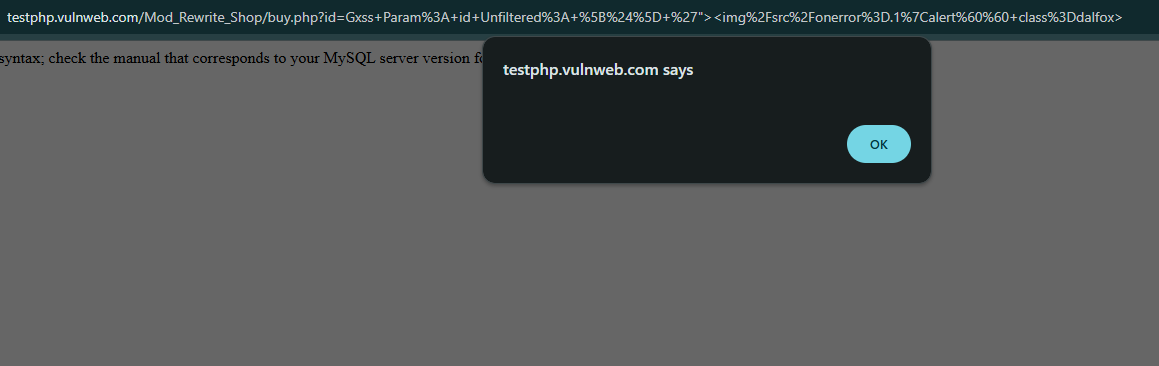

Overview
Hermes is a powerful, automated tool designed for detecting Cross-Site Scripting (XSS) vulnerabilities in web applications. It integrates multiple open-source tools and custom techniques to perform comprehensive scanning, including DOM-based XSS detection, payload mutation, and HTTP parameter pollution testing. With features like parallel processing, smart filtering, and detailed reporting, Hermes is ideal for security researchers and penetration testers.
Features
- DOM XSS Detection: Identifies potential DOM-based XSS vulnerabilities by analyzing JavaScript patterns.
- Payload Mutation: Includes a variety of XSS payloads (basic, AngularJS, Vue.js, filter bypass).
- Smart Filtering: Uses
gf,uro,Gxss, andkxssto refine potential XSS vectors. - HTTP Parameter Pollution Testing: Injects payloads into URL parameters to test for vulnerabilities.
- Custom Header Testing: Checks for XSS via custom HTTP headers.
- Asynchronous Discord Notifications: Sends real-time alerts for detected vulnerabilities via Discord webhooks.
- Comprehensive Reporting: Generates JSON, text reports for easy analysis.
- Multi-Target Support: Scans single targets or multiple targets from a file.
- Parallel Processing: Configurable thread counts for faster scanning.
Requirements
- Python 3.6+
- Python Packages:
pip install requests beautifulsoup4
- External Tools (automatically checked by the script):
gaugfuroGxsskxssdalfoxwaybackurlshakrawler
Installation
-
PyPI Installation:
pip install hermes-tod
-
Install external tools:
GO111MODULE=on go install github.com/lc/gau/v2/cmd/gau@latest
GO111MODULE=on go install github.com/tomnomnom/gf@latest
pip install uro
GO111MODULE=on go install github.com/KathanP19/Gxss@latest
GO111MODULE=on go install github.com/Emoe/kxss@latest
GO111MODULE=on go install github.com/hahwul/dalfox/v2@latest
GO111MODULE=on go install github.com/tomnomnom/waybackurls@latest
GO111MODULE=on go install github.com/hakluke/hakrawler@latest
-
(Optional) Configure Discord webhook for notifications: Modified a
config.jsonfile in the project root [/usr/local/lib//dist-packages/hermes]:{ "discord_webhook_url": "https://discord.com/api/webhooks/your-webhook-url" }
Usage
Run Hermes with the following command-line options:
hermes -h
Options
-t, --target: Single target to scan (e.g.,example.com).-l, --list: File containing multiple targets (one per line).-o, --output: Output directory for results (defaults toresults/<target>).-p, --payload: Custom XSS payload.-T, --threads: Number of threads for parallel processing (default: 5).
Examples
-
Scan a single target:
hermes -t example.com -o results/example
-
Scan multiple targets from a file:
hermes -l targets.txt -T 10
-
Use a custom payload:
hermes -t example.com -p '<script>alert("custom")</script>'
Output
Results are saved in the specified output directory (or results/<target> by default):
all_urls.txt: Crawled URLs from the target.xss_filtered.txt: Filtered URLs with potential XSS vectors.final_candidates.txt: Final list of XSS candidates.final_results.json: Raw JSON results from Dalfox.readable_results.txt: Human-readable vulnerability report.hermes.log: Log file with detailed execution information.
Notes
- Responsible Use: This tool is for authorized security testing only. Always obtain permission before scanning any target.
- SSL Warnings: The tool disables SSL warnings (
verify=False) for testing purposes. Use with caution. - Dependencies: Ensure all external tools are installed and accessible in your system's PATH.
- Discord Notifications: Configure a Discord webhook in
config.jsonfor real-time alerts.
Contributing
Contributions are welcome! To contribute:
- Fork the repository.
- Create a new branch (
git checkout -b feature/your-feature). - Commit your changes (
git commit -m 'Add your feature'). - Push to the branch (
git push origin feature/your-feature). - Open a pull request.
Please submit bug reports or feature requests via GitHub Issues.
License
This project is licensed under the MIT License.
Disclaimer
Hermes is provided for educational and ethical security testing purposes only. The author is not responsible for any misuse or damage caused by this tool.
Acknowledgments
- Built with inspiration from the security community.
- Leverages open-source tools:
gau,gf,uro,Gxss,kxss,dalfox,waybackurls,hakrawler.
Created by anonre | Star us on GitHub! ⭐

1 maintainer

Release files for hermes-tod 2.0
For a detailed explanation of source distributions (sdists) and built distributions (wheels), please see the package formats documentation.
Source distribution (sdist)
| File | Size | Uploaded | |
|---|---|---|---|
| hermes_tod-2.0.tar.gz | 8.7 kB | Details |
Built distribution (wheel)
| File | Interpreter | ABI | Platform | Reset |
|---|---|---|---|---|
| hermes_tod-2.0-py3-none-any.whl | Python 3 | none | any | Details |
Total release size: 18.1 kB
Release files / hermes_tod-2.0.tar.gz
| Download URL | hermes_tod-2.0.tar.gz |
|---|---|
| Size | 8.7 kB |
| Tags | Source |
|
SHA-256 checksum How to use checksums |
1ddfded9f6614c80c6a8dee75bb430253de839bf74d7980b4cbcc8062269aefd
|
|
BLAKE2b-256 checksum How to use checksums |
a27f4c8de17b5fec9e61c3f78b106d2ee4b8c1f5cebee96d68f8d351dfdee1a0
|
| Upload date | |
|
Uploaded using Trusted Publishing? What is trusted publishing? |
No |
| Uploaded via |
twine/6.1.0 CPython/3.13.3
|
Release files / hermes_tod-2.0-py3-none-any.whl
| Download URL | hermes_tod-2.0-py3-none-any.whl |
|---|---|
| Size | 9.5 kB |
| Tags | Python 3 |
|
SHA-256 checksum How to use checksums |
9e1f0a2207cd6780216234d44ac4b3a4c87b08b639fb19d4cf3c44d7f96ddb7c
|
|
BLAKE2b-256 checksum How to use checksums |
d257df6b729d6e4db6dc2945dcd52de5c6191b4453096e1b87bb8f21a0b787aa
|
| Upload date | |
|
Uploaded using Trusted Publishing? What is trusted publishing? |
No |
| Uploaded via |
twine/6.1.0 CPython/3.13.3
|













