

XMemo for Hermes Agent
Native, user-owned long-term memory for Hermes Agent.
Recall across sessions, preserve working state, and keep Hermes connected to the same private memory layer as your other AI agents.









Quick start · Architecture · Tools · Configuration · Reliability · Security
hermes-xmemo is the native XMemo memory provider for
Hermes Agent. It joins Hermes'
memory lifecycle directly: pre-turn recall, explicit memory tools, built-in
memory mirroring, per-session working context, and session-end snapshots.
At a glance
| Package | hermes-xmemo |
| Hermes provider | xmemo |
| Runtime role | Native memory provider |
| Configuration | $HERMES_HOME/xmemo.json |
| Cloud service | https://xmemo.dev |
| Python | 3.10+ |
| License | MIT |
Why a native provider?
- First-class lifecycle — recall starts before a turn and snapshots happen when a session ends.
- Cross-agent continuity — Hermes can recall user-approved XMemo memories written by other connected agents.
- Bounded context — recall is ranked and limited before it reaches the prompt.
- Write isolation — Hermes-authored entries use a dedicated bucket and scope while reads can span all memories visible to the account.
- Graceful degradation — timeouts, a circuit breaker, local read cache, and a write outbox keep memory failures from blocking the conversation.
Quick start
1. Install with XMemo CLI (recommended)
npm install -g @xmemo/client
xmemo login
xmemo setup hermes
This installs or updates the Python package, deploys the native provider into Hermes, and reuses your user-scoped XMemo credential. Hosted MCP is not added by default.
For a custom Hermes home:
xmemo setup hermes --hermes-home /path/to/.hermes
2. Install directly from PyPI
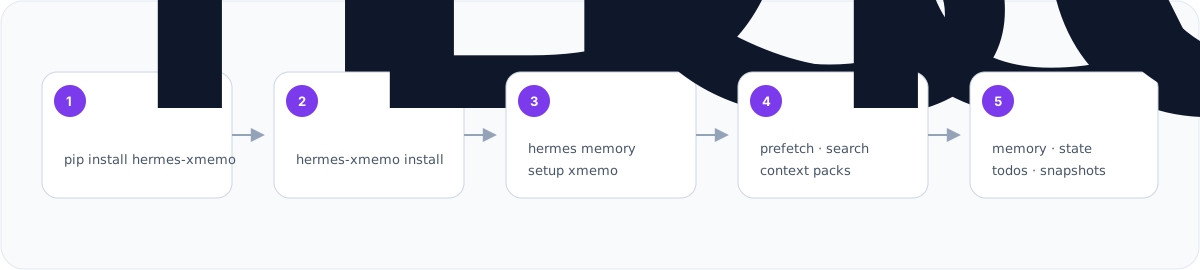
pip install hermes-xmemo
hermes-xmemo install
hermes memory setup xmemo
3. Install without cloning
curl -fsSL https://raw.githubusercontent.com/yonro/hermes-xmemo-plugin/main/install-remote.sh | bash
hermes memory setup xmemo
The native Hermes setup wizard remains supported. If xmemo login has already
stored a shared credential, the wizard can reuse it; otherwise it asks for an
XMemo token.
Architecture
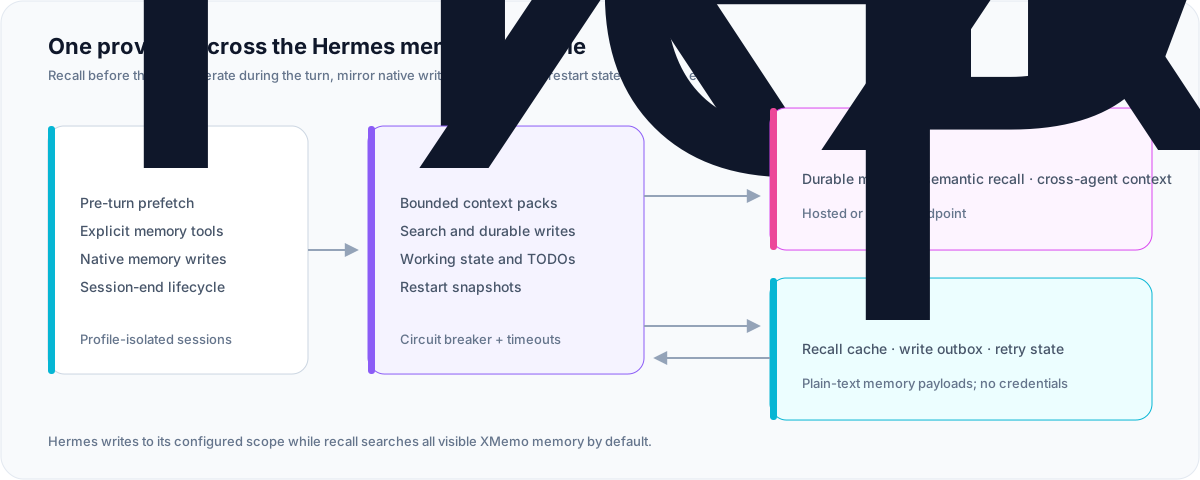
The provider runs inside Hermes and communicates with XMemo over bounded HTTPS requests. Its local SQLite reliability layer belongs to the Hermes profile; it is not a second source of truth.
Lifecycle
- Before a turn — Hermes starts a background prefetch and injects a bounded XMemo context pack when it is ready.
- During a turn — the agent can search, remember, or update working state
with explicit tools. Writes through Hermes' built-in
memorytool are mirrored to XMemo while this provider is active. - After a turn — high-signal timeline capture is available as an opt-in.
- At session end — the provider captures a restart snapshot and schedules a final outbox sync.
Prefetch state is isolated by profile and session, preventing one concurrent Hermes session from receiving another session's recall context.
Native provider or hosted MCP?
| Native provider | Hosted MCP | |
|---|---|---|
| Best for | Hermes Agent | MCP-only clients |
| Hermes lifecycle hooks | Yes | No |
| Pre-turn context injection | Yes | Client-dependent |
| Built-in memory mirroring | Yes | No |
| Local cache and outbox | Yes | Client-dependent |
| Endpoint | Installed plugin | https://xmemo.dev/mcp |
Use the native provider for Hermes. Add xmemo setup hermes --with-mcp only
when you deliberately want the portable MCP fallback as well.
Tools
Default
| Tool | Purpose |
|---|---|
xmemo_recall_context |
Build a bounded, ranked context pack |
xmemo_search |
Search durable memories semantically |
xmemo_get |
Retrieve full untruncated content of a single memory by ID |
xmemo_list |
List memories under an optional path prefix or category |
xmemo_remember |
Save a durable fact, preference, or decision |
xmemo_update_state |
Save active task, next action, or blocker with TTL |
Optional workflow tools
Set "enable_workflow_tools": true in xmemo.json:
| Tool | Purpose |
|---|---|
xmemo_record_event |
Append a timeline event or milestone |
xmemo_create_reminder |
Create a TODO or action item |
xmemo_list_reminders |
List open or completed reminders |
xmemo_complete_reminder |
Mark a reminder complete |
Optional destructive tool
Set "enable_destructive_tools": true to expose xmemo_forget. Deletion
requires an exact memory ID and stays disabled by default.
Configuration
Most installations need no manual configuration. Non-secret settings live in
$HERMES_HOME/xmemo.json:
| Key | Default | Purpose |
|---|---|---|
agent_id |
hermes |
Agent family identifier |
agent_instance_id |
generated | Stable, opaque installation identifier |
bucket |
work |
Namespace for new Hermes-authored writes |
scope |
hermes/default |
Scope for new Hermes-authored writes |
read_bucket |
% |
Recall/search bucket filter (% means all visible) |
read_scope |
unset | Recall/search scope filter (unset means all visible) |
timeout_seconds |
5.0 |
REST request timeout |
prefetch_max_items |
5 |
Maximum recalled items |
prefetch_max_tokens |
900 |
Maximum recalled context tokens |
enable_workflow_tools |
false |
Expose reminder and event tools |
enable_destructive_tools |
false |
Expose xmemo_forget |
capture_timeline |
false |
Record high-signal turns |
enable_non_idempotent_replay |
false |
Auto-replay non-idempotent queued writes |
Example:
{
  "bucket": "work",
  "scope": "hermes/default",
  "read_bucket": "%",
  "prefetch_max_items": 5,
  "prefetch_max_tokens": 900,
  "enable_workflow_tools": false
}
Environment overrides
| Variable | Overrides |
|---|---|
XMEMO_KEY |
API key |
XMEMO_URL |
Service base URL |
XMEMO_AGENT_ID |
agent_id |
XMEMO_AGENT_INSTANCE_ID |
agent_instance_id |
XMEMO_BUCKET |
bucket |
XMEMO_SCOPE |
scope |
XMEMO_READ_BUCKET |
read_bucket |
XMEMO_READ_SCOPE |
read_scope |
XMEMO_TIMEOUT_SECONDS |
timeout_seconds |
XMEMO_PREFETCH_MAX_ITEMS |
prefetch_max_items |
XMEMO_PREFETCH_MAX_TOKENS |
prefetch_max_tokens |
Legacy MEMORY_OS_API_KEY, MEMORY_OS_MCP_TOKEN, and MEMORY_OS_URL
variables remain accepted.
Credential resolution
Credentials are resolved in this order:
XMEMO_KEY, then the supported legacy environment variables.- The user-scoped credential saved by
xmemo login.
Secrets are never read from or written to xmemo.json. The setup flow can sync
the active token to $HERMES_HOME/.env for Hermes compatibility.
Reliability
The plugin maintains $HERMES_HOME/xmemo_cache.db so temporary service or
network failures degrade safely.
| Layer | Behavior |
|---|---|
| Fresh read cache | Reuses matching recall/search results for 5 minutes |
| Stale fallback | Returns marked cache results during transient failures, up to 24 hours old |
| Write outbox | Queues transiently failed writes with stable idempotency keys |
| Replay | Retries idempotent writes up to 5 times with exponential backoff capped at 1 hour |
| Non-idempotent writes | Held by default to avoid duplicate reminders or events |
| Dead letters | Permanent failures and exhausted retries are retained for diagnosis |
| Retention | Sent entries: 24 hours; failed entries: 7 days; failed queue capped at 100 |
Fallback responses are explicitly marked with stale: true and
source: "cache" so the agent does not confuse an offline cache result with
fresh cloud state.
Security
| Control | Default |
|---|---|
| Credentials outside project configuration | Enabled |
| Destructive memory tool | Disabled |
| Automatic timeline capture | Disabled |
| Exact ID required for deletion | Enabled |
| Per-session prefetch isolation | Enabled |
| Bounded network timeout | 5 seconds |
| Circuit breaker | Enabled |
Avoid committing $HERMES_HOME/.env, xmemo.json, or runtime cache files.
Treat the XMemo token like any other service credential.
Operations
Disable XMemo without removing files:
hermes config set memory.provider ""
Re-enable it:
hermes config set memory.provider xmemo
Remove the installed provider:
rm -rf "${HERMES_HOME:-$HOME/.hermes}/plugins/xmemo"
Development
git clone https://github.com/yonro/hermes-xmemo-plugin.git
cd hermes-xmemo-plugin
python -m pip install -e .
python -m pytest -q
python -m build
The implementation shipped to Hermes lives in
src/hermes_xmemo/xmemo/. Keep its bundled README aligned with this repository
README whenever installation or configuration behavior changes.
Agent-readable metadata
| Field | Value |
|---|---|
| Package | hermes-xmemo |
| Provider name | xmemo |
| Recommended mode | hermes_plugin_preferred |
| Agent discovery | https://xmemo.dev/.well-known/agent-discovery.json |
| Hermes configuration | https://xmemo.dev/v1/mcp/config/hermes |
| MCP fallback | https://xmemo.dev/mcp |
| Repository | https://github.com/yonro/hermes-xmemo-plugin |
Links
License
MIT © XMemo contributors.
1 maintainer

Metadata
1 maintainer
Release files for hermes-xmemo 1.1.3
For a detailed explanation of source distributions (sdists) and built distributions (wheels), please see the package formats documentation.
Source distribution (sdist)
| File | Size | Uploaded | |
|---|---|---|---|
| hermes_xmemo-1.1.3.tar.gz | 97.2 kB | Details |
Built distribution (wheel)
| File | Interpreter | ABI | Platform | Reset |
|---|---|---|---|---|
| hermes_xmemo-1.1.3-py3-none-any.whl | Python 3 | none | any | Details |
Total release size: 139.2 kB
Release files / hermes_xmemo-1.1.3.tar.gz
| Download URL | hermes_xmemo-1.1.3.tar.gz |
|---|---|
| Size | 97.2 kB |
| Tags | Source |
|
SHA-256 checksum How to use checksums |
6b0733b909b24b9bf4eff6c914f296ffc94b2b6f9d7c520de33f7f76a9c7ef55
|
|
BLAKE2b-256 checksum How to use checksums |
734d4cec41b241d41e62ea4b5232186b278242eccef2014ed589ca939180c2e7
|
| Upload date | |
|
Uploaded using Trusted Publishing? What is trusted publishing? |
Yes |
| Uploaded via |
twine/7.0.0 CPython/3.13.14
|
Provenance
Provenance describes where a file came from. On PyPI, provenance is shared via attestations, which provide a verifiable record of the build or publishing details. View details, limitations and caveats.


PyPI Publish Attestation
PyPI verified that this artifact, at this checksum, originated from the publisher listed below.
Signed by GitHub Actions, verified by PyPI on Sep 20, 2026.
Transparency logRelease files / hermes_xmemo-1.1.3-py3-none-any.whl
| Download URL | hermes_xmemo-1.1.3-py3-none-any.whl |
|---|---|
| Size | 41.9 kB |
| Tags | Python 3 |
|
SHA-256 checksum How to use checksums |
581aefad4cee3b6feb72aaf07788c190f17e1ca87bb64b4d7ff31d82073b4039
|
|
BLAKE2b-256 checksum How to use checksums |
347b820992bd441f89a8d2837c182216edb60c60838c01fe827359c712e5b377
|
| Upload date | |
|
Uploaded using Trusted Publishing? What is trusted publishing? |
Yes |
| Uploaded via |
twine/7.0.0 CPython/3.13.14
|
Provenance
Provenance describes where a file came from. On PyPI, provenance is shared via attestations, which provide a verifiable record of the build or publishing details. View details, limitations and caveats.
PyPI Publish Attestation
PyPI verified that this artifact, at this checksum, originated from the publisher listed below.
Signed by GitHub Actions, verified by PyPI on Sep 20, 2026.
Transparency log













