
hermesd
A real-time TUI monitoring dashboard for Hermes Agent.
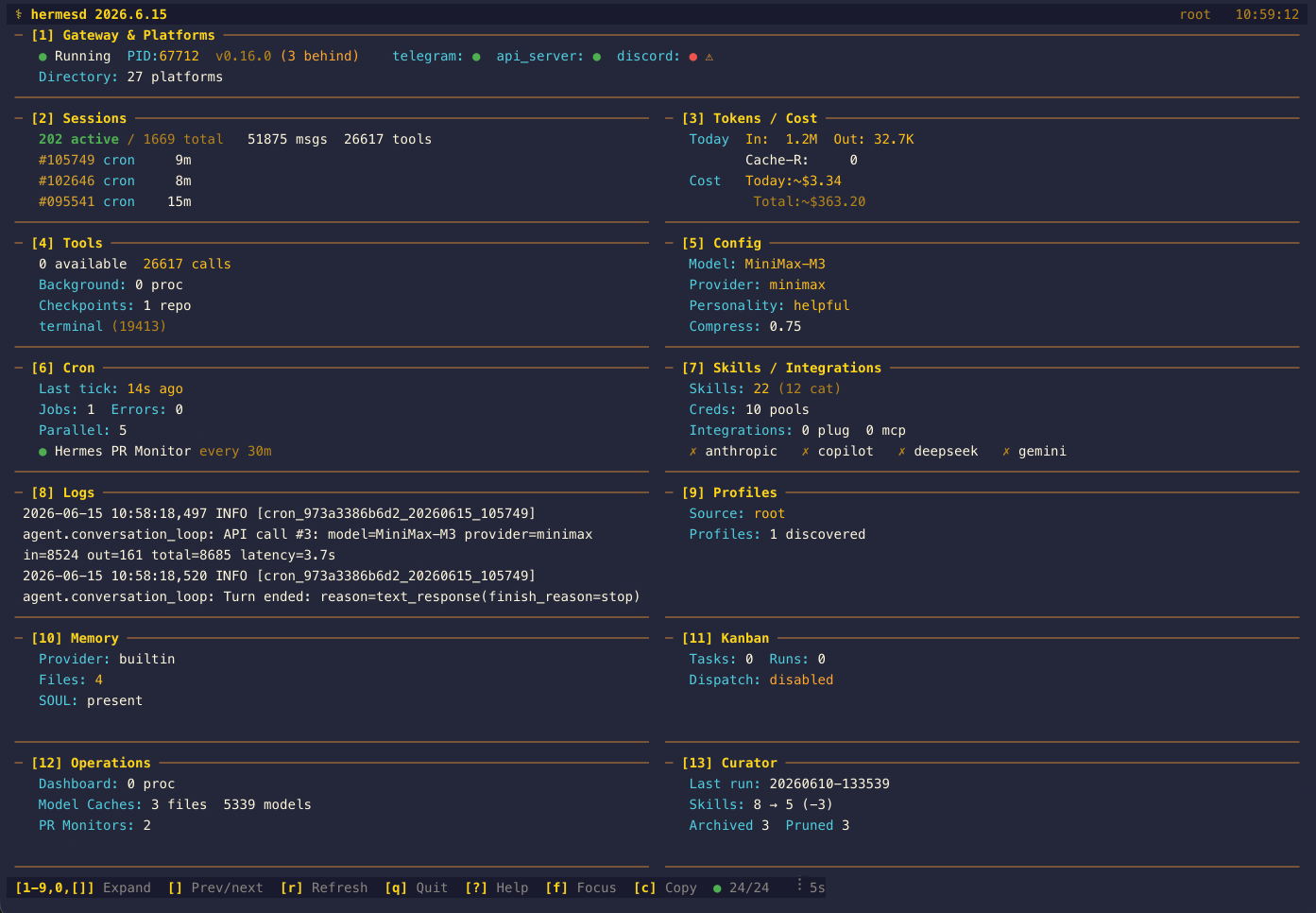
Screenshots are from v2026.6.15; panel content has grown since, but the layout and interactions are unchanged.
Why This Exists
When you run Hermes Agent seriously — gateway handling Telegram, Discord, Slack, and WhatsApp simultaneously, cron jobs firing reminders, multiple CLI sessions with sub-agents spawning sub-agents, dozens of skills loaded, 7+ LLM providers configured — the information gets scattered fast.
The problem: there was no single place to answer the obvious questions:
- Is my gateway actually running? Which platforms are connected?
- How many tokens have I burned today and what's the estimated cost?
- Which sessions are active and how much context are they consuming?
- What cron jobs are scheduled, and did the last one succeed or fail?
- Which skills are installed and what do they do?
- What's in my error log right now?
The only way to answer these was running hermes status, hermes sessions list, hermes cron list, tailing log files, and mentally stitching together a picture from 5+ different sources. That friction adds up.
The solution: hermesd — a single terminal command that reads ~/.hermes/ and presents everything in one live-updating dashboard. Gateway health, sessions, tokens, costs, tools, cron, skills, logs — all refreshed automatically, no API keys, no network access, zero writes to your agent state.
It's not trying to replace the Hermes CLI or your Telegram interface. It's the at-a-glance overview layer that tells you whether everything is healthy and where your tokens are going — so you can make decisions without hunting for data.
Features
13 Dashboard Panels
| # | Panel | What It Shows |
|---|---|---|
| 1 | Gateway & Platforms | Live gateway PID, Hermes version, update status, drain/scale-to-zero state, served-profile record, per-platform profile routing and recorded shared-listener ingress URL, loop-tick witness verdict, crash forensics, respawn-storm counts, web-client attachment, synthesized per-profile mirror URLss, multiplex-migration verdict, channel aliases/staleness, platform families, per-platform connection dots, and channel-directory inventory |
| 2 | Sessions | Active/total count, identity-verified live surfaces, display names, pinned sessions, branch/profile, last-activity age, compression-failure warnings, turn leases/compression locks, hygiene cooldowns, decoded chat routes, reset churn, CLI terminals, active compression-recovery state (live failure cooldown, armed anti-thrash probe deadline, fallback streak, ineffective-compaction strikes), message/tool/API call totals, cwd, archived state, handoff metadata, and parent-session lineage |
| 3 | Tokens / Cost | Today's and all-time token usage, per-model usage from session_model_usage (all-time/24h/7d) with actual vs estimated cost, an auxiliary-work subtotal, cost-status reconciliation, recent-window rollups, and provider/endpoint breakdowns |
| 4 | Tools | Available tools count, toolset availability (enabled/unavailable/lazy/disabled), per-session call stats, background processes with purpose/port/profile and a dead-pid marker, filesystem checkpoints, full tool name grid |
| 5 | Config | Point-in-time backups/config/ snapshots, model, provider, personality, MoA, Tool Search, dashboard auth, kanban, code execution, gateway, routing and memory/session settings, agent limits (delegation concurrency/depth/orchestrator, goal turn budget, tool-loop guardrails, live sessions, streaming, logging) and integrations (MCP, plugins, updates, proxy presence) |
| 6 | Cron | Scheduler tick/provider, ticker health, recorded ticker error, missed-run catch-up policy and counter, open incidents, Chronos config presence, suggestion count, job table with schedule, delivery target, 24 h run counters, error count, latest error, and output metadata |
| 7 | Skills / Integrations | Provider auth status/freshness, credential pools, hooks, separate agent/Desktop plugin inventories, agent-plugin configured-activation gate, catalog drift/removal checks, Nous free-tier badge, plugin manifest format and precedence conflicts, plugin install/catalog provenance with --ref drift, declared version gate and capabilities, MCP inventory and schema-cache validity, prompted-skill snapshot, BOOT.md presence, skills with descriptions |
| 8 | Logs | Tailed agent, gateway, errors, cron, desktop, dashboard, GUI, update, gateway-error, crash, audit, MCP-stderr, and workspace logs with Tab switching, inline filtering, and a per-stream scope label (root vs. profile) |
| 9 | Profiles | Read-only profile discovery with session counts, log freshness, skill counts, DB size, and SOUL excerpts |
| 10 | Memory | Memory provider, MEMORY.md/USER.md word counts, learning summary, SOUL.md size/excerpt, and memory file inventory |
| 11 | Kanban | Read-only kanban task/run/event/comment counts, multi-board summaries, stale claims, dispatch config, active workers, blocked/failing tasks, completion contracts with breaker state, notify-subscription backlog, and recent runs |
| 12 | Operations | Dashboard process count, Desktop and Web UI build stamps, Response Store, verification evidence, goals, async delegations with handoff counts, live delegation transcripts, process receipts, checkpoint-prune and corrupt-ledger markers, state.db maintenance, snapshot backups, MoA trace metadata, Projects/correlations/newest repos, model-cache summaries, PR monitor state (including open/conflicting PR counts), blocked-script counts, hosted-room coordination counts, and retained API run reservations |
| 13 | Curator | Skill hygiene from skills/.usage.json (patch-reuse backlog, state counts, threshold windows) plus scheduler state and the newest memory-curation run: skill before/after counts, archived/pruned/added totals, model/provider, duration, tool-call total + per-tool breakdown, state-transition trail, and LLM summary or error |
Key Features
- Read-only — hermesd never writes to
~/.hermes/or modifies Hermes Agent state - Live-updating — polls every 5 seconds (configurable with
--refresh-rate) - Snapshot mode —
--snapshotrenders one overview frame to stdout and exits;--snapshot-panel Nselects any registered detail panel for text snapshots and annotates JSON snapshots (0aliases panel 10);--snapshot-file PATHwrites either form to disk outside the Hermes home;--snapshot-format jsonemits machine-readable full-state snapshots - Bounded log reads —
--log-tail-bytescaps how much of each log file and cron output excerpt is read per refresh - Opt-in profiles — root mode stays the default; use
--profile NAMEorHERMES_PROFILE=NAMEto read profile-scoped runtime data - Adaptive layout — full 13-panel grid on wide terminals, a tall-narrow single-column overview for vertical tmux splits, and a denser all-panel overview on 80x24
- Detail views — press
1-9or0for panel 10 to expand directly, or use[/]to move through every panel including Kanban, Operations, and Curator - Focus toggle — press
fto jump between the overview and the last selected full-screen panel - Clipboard export — press
cto copy the current rendered view as plain text via OSC 52 in compatible terminals - Inline detail filters — press
/in Sessions or Logs detail view to live-filter the current table/log stream with field-aware queries, including message-content and severity-threshold filters - Session sorting — press
sin Sessions detail to cycle recent/cost/token ordering - Jump navigation — press
g/Gin scrollable detail views to jump to the top or bottom - Footer health indicator — a green/yellow/red dot shows how many collector sources succeeded on the last refresh, with failed source names surfaced inline when degraded
- Header status — the top-left header shows the installed
hermesdversion, while the header/footer surface anAGENT OFFLINEwarning when Hermes Agent appears inactive - Scrollable detail views —
j/kscroll Gateway, Sessions, Cron, Skills, Logs, and Operations; every listed panel except Logs scrolls its complete rendered detail, while Logs scrolls the selected stream - Profile inspection — press
pinside the Profiles panel to cycle the viewed profile without changing the selected data source - Resilient — keeps showing last known good data on transient SQLite and log-read failures
- Theme-aware — inherits your Hermes Agent skin and updates live when
config.yamlchanges - SSH/tmux compatible —
tty.setcbreakmode, escape sequence handling for remote terminals - Cost estimation — computes ~USD from token counts when the provider doesn't report costs
- Zero config — no config file, no API keys, just
hermesdand go
Screenshots
Overview — The Full Picture
The main dashboard shows all 13 panels at a glance. The header starts with the installed hermesd version, then shows the current profile mode and time on the right. Gateway status with PID and Hermes Agent version sits at the top (note the discord ⚠ connection-error marker), sessions and token costs side by side, tools and config, cron and skills, logs plus profile metadata, and dedicated memory, kanban, operations, and curator panels at the bottom. The footer shows keyboard shortcuts and a polling indicator.
[1] Gateway & Platforms — Is Everything Connected?
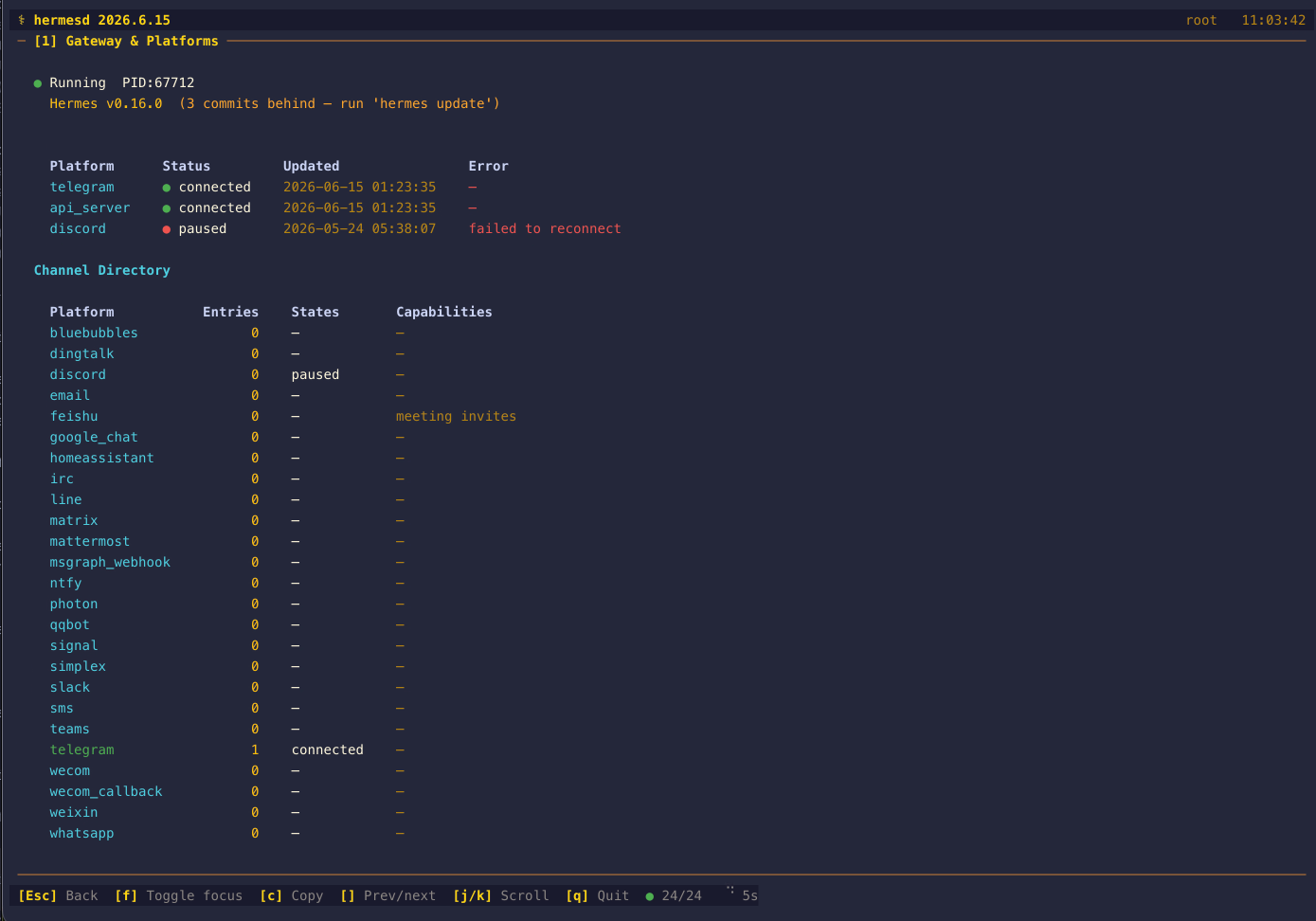
Press 1 to expand. Shows whether the gateway process is alive (with the replacement PID after a launchd restart, without treating the previous process's topology as current), Hermes version with update status, the served-profile record, busy/drainable state, external drain markers, scale-to-zero idle timeout and relay-only intent, channel-alias inventory/staleness, platform family labels, and a per-platform table with connection state, a Profile column, an Owner column, last-seen timestamps, and an Error column surfacing per-platform connection failures (e.g. discord "failed to reconnect"), plus the active-agent count and a restart-requested marker. Catches the "gateway says running but the PID is dead" case.
Shared-listener routing and ingress. Under gateway.multiplex_profiles one default gateway serves every profile, and it keys each served profile's adapter as <profile>:<platform> in gateway_state.json. hermesd splits that key against the grammar upstream itself validates unconditionally, so the platform table shows the platform in Platform and the profile it belongs to in Profile (the compact strip renders dev/telegram) — and a key that fails the grammar is kept verbatim with no profile, because splitting an arbitrary string out of a process-local JSON file would invent a profile name. Each entry's recorded ingress_url — the shared-listener callback URL a vendor console needs — is surfaced in a Shared-Listener Ingress section, redacted at the data boundary like every other URL, and only where upstream would surface it: nothing is kept unless the process that wrote the state file is still live, and empty values or adapter states of fatal/disconnected/stopped are also suppressed. A live replacement PID still makes the gateway itself running, but cannot promote its predecessor's served-profile list or ingress URLs to current topology; once a writer has been observed dead, the unchanged record stays non-authoritative even if the same numeric PID reappears, and authority returns only after the replacement writes fresh state. The section states plainly that these are values the gateway recorded and that hermesd never requests them; a bare path (/p/dev/telegram/webhook) means the default profile had no live listener when the URL was recorded, and is flagged as such.
Served profiles are a tri-state, not a list. served_profiles absent, unparseable, and explicitly empty all used to render identically. An empty list from a current state writer is authoritative — it serves nobody else — and now says so; an absent key renders nothing; and a list left behind by a writer that is no longer current is labelled (record, writer not current) instead of being presented as the current topology. A served profile writes no gateway_state.json of its own, so under --profile dev the root file's dev:<platform> entries are the only evidence of its routing.
Multiplex migration is progress evidence, never proof. gateway_migration.json is written inside the per-secondary loop, before hermes-agent flips gateway.multiplex_profiles and before it restarts the default gateway, and is never updated afterwards — the verified and the applied-but-unverified exit paths both leave the identical file behind, and it carries no completion field. A manifest on disk therefore cannot distinguish a migration in flight, one that crashed after a single secondary, one that was applied but never verified, and one that fully succeeded; rollback deletes it on success, so its absence cannot distinguish "never migrated" from "rolled back" either. The Multiplex Migration section keeps three things apart: the recorded intent (migrated_at, always labelled Started: because it is when the attempt began, plus the recorded flag_was, homes and service managers), intermediate progress (flag flipped? default gateway live? a live served record? which recorded profiles does it cover?), and one verified current topology verdict. That verdict is ● multiplexed (verified) only when the manifest has a valid supported version-1 schema, gateway.multiplex_profiles is on, the default gateway source is fresh and live, and its current served_profiles covers default plus every secondary the manifest recorded; otherwise it is ⚠ migration unverified with the specific missing evidence named. If the base gateway source fails, migration is marked degraded and keeps its own last-good verdict instead of checking a newly written manifest against cached topology. Because the flag is read from config — where an environment override hermes-agent honours is invisible to hermesd — the verdict is always labelled "as recorded in config". The panel never says "migrated". The manifest's recorded home values are display data only and are never used to build a path hermesd reads. Note also that upstream verifies against every profile in its plan, which includes profiles that never had a standalone gateway and so are absent from the manifest: hermesd can only see the manifest, so its expected set is a subset of upstream's.
Platform record ownership. gateway_state.json re-stamps its top-level pid/start_time on every write, while each platform entry keeps the writer_pid/writer_start_time of the process that recorded it. hermesd compares the two by exact equality — the same rule upstream's /api/status uses to tell a live record from a preserved one — and renders current, ⚠ preserved (the entry outlived the gateway life that wrote it, so its state may describe a process that is gone), or — when the record carries no usable writer identity (an older gateway, or a host that could not resolve a process start time). Ownership is evaluated separately from heartbeat freshness: a ticking event loop says nothing about who wrote a given platform row, and the compact view adds ⚠ N platform record(s) outlived their writer. Because the comparison needs a start-time stamp on both sides, a matching PID alone is never treated as identity — the same PID reused by a later process reads as preserved, not current.
Liveness, lifecycle and updates. The compact view adds a loop: indicator next to the running dot — ticking (heartbeat ≤ 90 s), stale (≤ 300 s), wedged (older while the gateway still claims to be running), or unknown — plus one-line warnings for "config changed, restart needed", "update unfinished", "code skew", "migration unverified", and any pending/failed deliveries. Platforms flagged needs_attention get a ! marker.
The detail view adds a Liveness section (heartbeat age, incarnation count, restarts in the last 24 h, current incarnation uptime, running code version/short sha, config generation, session-store status), the gateway lifecycle (phase, last exit code/reason, and a warning when the previous life ended without recording an exit), an Updates section (outcome, finish age, from → to version, first failed step, the recorded post-restart fleet matrix as state counts, and the runtime code-skew verdict with the evidence behind it), the Shared-Listener Ingress and Multiplex Migration sections described above, and a Delivery Obligations table with the five newest undelivered messages (platform, state, attempts, age, truncated last error — message content is never read). The platform table gains a Retrying age column and a ! needs attention status marker.
The heartbeat is not the loop. state/gateway.heartbeat is written off-loop (upstream #90502), so a fresh file no longer proves the event loop is dispatching. When the payload advertises a witness, hermesd probes it read-only — connect, read one byte, expect "1" — at state/gateway.loop-tick.<pid>.sock, or its 127.0.0.1 TCP port on Windows. An answer is alive however stale the file is; a fresh file with a silent witness stays ambiguous; and only sustained silence across three consecutive refreshes, with a stale file and an armed witness, becomes wedged. A payload predating the witness key renders as legacy heartbeat, where staleness alone is evidence because that writer was still on-loop. The detail view's Witness: line says which witness decided the verdict, and the probe never escalates from a single miss because a short synchronous stall can outlast one read timeout.
Crash forensics, respawn storms and the web client. The lifecycle sentinel's prior_unclean_exit / prior_suspected_oom flags and the previous exit code/reason are carried through, so a gateway that came back after OOM reads as such. The respawn-storm ledger (gateway-starts.log) is reported as starts-inside-the-window against the cap, with ⚠ respawn backoff when upstream would be backing off; both the window and the cap are read from the root config.yaml's gateway.respawn_storm policy (5 / 120 s by default), so a deliberately raised cap is not mistaken for a storm and a lowered one is not missed — the environment overrides upstream also honours belong to the gateway's own environment and are not visible here. An absent ledger is never rendered as zero restarts, and HERMES_GATEWAY_MAX_STARTS<=0 disables the writer upstream, so a leftover ledger yields no verdict at all. Crash forensics come from the tail of logs/gateway-exit-diag.log (last tag and age, unclean exits in the last 24 h, size with a ⚠ oversized warning past 2 MiB — upstream never prunes it), while gateway-shutdown-diag.log, gateway_faulthandler.log and launchd-reload.log are reported by size and age only: growth, not absence, is the signal, and tracebacks or argv are never parsed. state/dashboard_clients.heartbeat is stat'd for its mtime — a web client attached in the last minute renders a ⌁ web client chip — and a missing marker means "never", not "idle". Finally, Inbound callback URLs on the shared listener are synthesized for each served secondary as <listener_base>/p/<profile><mirror_path> from the default profile's own api_server/webhook entries, redacted like every other URL and only for a binder upstream itself would mirror (a live writer in a serving state).
Sources: state/gateway.heartbeat (plus the witness node it advertises), state/gateway.lifecycle.json, gateway-starts.log, logs/gateway-exit-diag.log and its stat-only companions, state/dashboard_clients.heartbeat, the gateway.respawn_storm policy of root config.yaml, the code_sha/code_version/config_generation/session_store/exit_reason/served_profiles keys and the per-platform ingress_url of gateway_state.json, logs/update_receipts/latest.json, gateway_migration.json, the gateway.multiplex_profiles key of config.yaml, and the gateway_heartbeats / delivery_obligations tables of state.db (all optional; anything missing renders as —).
[2] Sessions — What’s Active and Where Did It Fork?
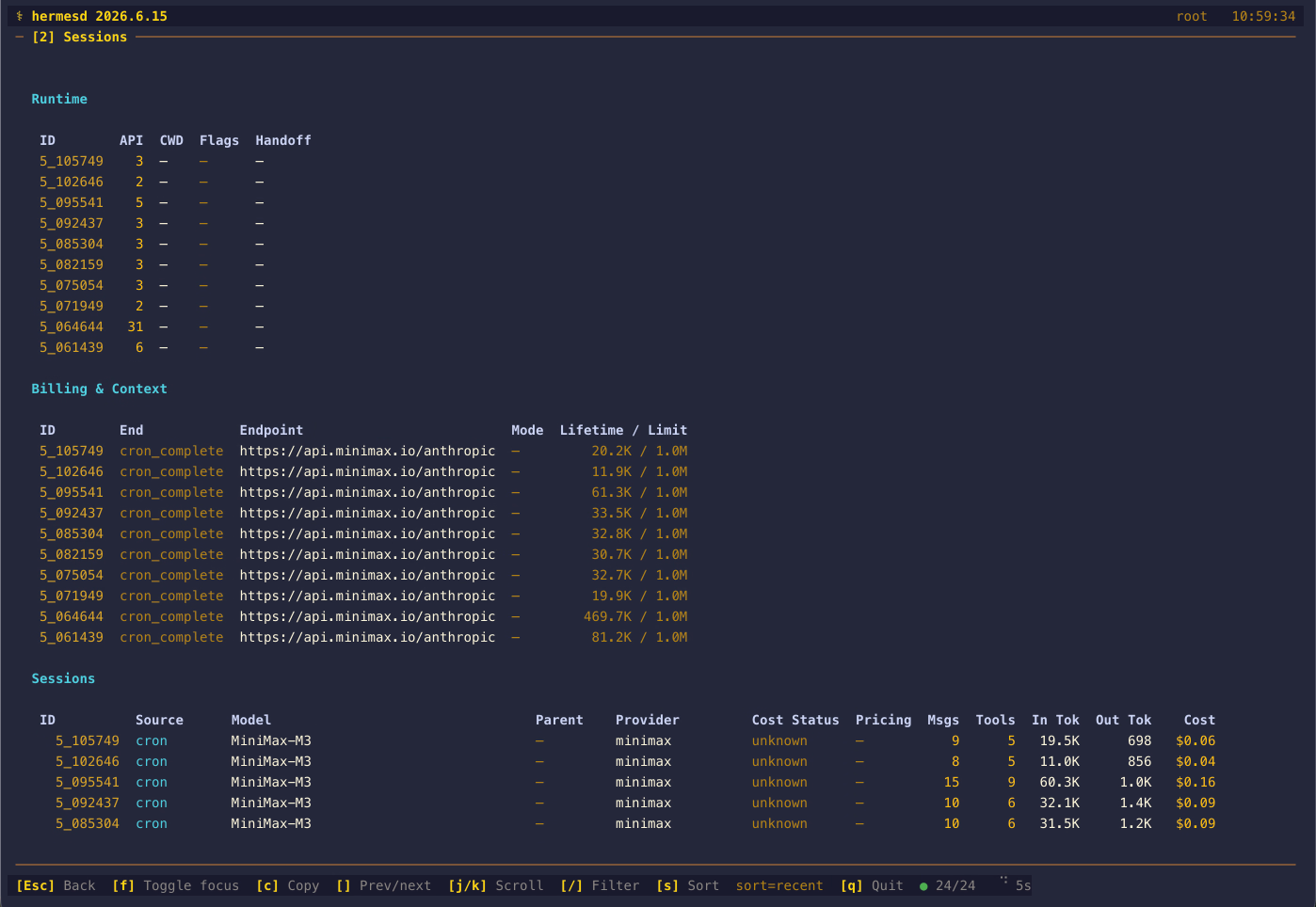
Press 2 to expand. An Activity section (hermes-agent 0.21 and newer) shows each session's display name (display_name, falling back to title), branch, profile, chat type, age from last_activity_at (falling back to started_at), and last-activity description, with a pin marker on pinned sessions; a Live Surfaces section lists the leases recorded in runtime/active_sessions.json with their PID, lease id, how long the lease has been held, and an identity-verified liveness state (live, dead, or unverified) — plus a moved marker when upstream transferred the lease to another session id and a tracked marker on desktop leases; a Warnings section shows truncated compression_failure_error text; a Runtime section surfaces API call counts, cwd, archived state, rewind count, and handoff metadata; and a Billing & Context section shows each session's end reason, billing endpoint, billing mode, and the model's context-window limit (joined from context_length_cache.yaml). Session costs prefer a positive provider-billed actual_cost_usd and also preserve an explicit zero when its cost status is authoritative (reported/exact/included); the compact header shows N surface(s) for the registry entries, identity-verified M live and K unverified counts, and cap C or no cap for the configured active-session lease cap, so a registry entry is never presented as a running turn.
Capacity is three numbers, never one. The Live Surfaces header line keeps them apart: the configured capacity (max_concurrent_sessions, rendered cap C leases or no active-session cap configured), the observed registry occupancy (N registry entries), and the verified executing activity (M verified executing, which counts only identity-verified leases — an unverifiable one is listed beside it and never folded in). A fourth figure, distinct pids, sits next to them because several leases can name one process, so occupancy is not a process count. max_concurrent_sessions is a cross-process lease cap checked when a surface attaches (try_acquire_active_session: "Capacity second, and only when an operator asked for one"), and a refusal under it names the holders per surface; it is resolved exactly as upstream resolves it — the top-level key, else gateway.max_concurrent_sessions — with 0/null/invalid/absent all reading as not configured rather than as a limit of zero. Scope note: hermesd reads the selected profile's registry, while upstream's orphan reclamation sweeps the root home and every profile home, so the occupancy shown is one registry's and not the install's (see .codex/rules/source-ownership.md).
Surface liveness verifies process identity, not just the PID. PIDs are reused, so "a process with this PID exists" is not evidence that the recorded session is still running. hermesd compares the registry's process_start_time against the start time observed for that PID on this host and reports live (identity matched), dead (the PID is gone, or it now belongs to a different process), or unverified (the PID exists but the start time was never recorded or could not be observed here). The two sources use different units — this registry records epoch seconds, while gateway_state.json records centiseconds — and are never compared against each other. Start times are read from /proc/<pid>/stat field 22 on Linux, and elsewhere from a single bounded ps -o lstart= call covering every PID at once, since hermesd has no psutil dependency; lstart reports whole seconds against a fractional recorded stamp, so identity is matched within a 2-second tolerance rather than by exact equality. A PID that cannot be observed is reported as unverified, never as dead. Press / to filter the currently loaded sessions by ID, source, model, lineage, provider, title, cwd, archived state, handoff state, platform, or message content via message:term, and press s to cycle recent/cost/token sorting. Use j/k or g/G to reach the full detail content at smaller terminal heights. Databases without the 0.21 columns simply omit the new sections.
Coordination state beside the session table. Four profile-scoped state.db tables that had no reader are now surfaced under one session_coordination model, each with its own health source and last-good fallback. Turn Leases & Locks lists session_turn_leases and compression_locks with the holder pid, hold duration, remaining TTL and a verdict: an expired lease whose holder still matches is labelled benign (upstream revives it rather than stealing it), a provably dead holder reads orphaned, and a holder with no parseable pid stays unverifiable instead of being declared dead — kernel proof only, never a guess. Hygiene Cooldowns joins gateway_hygiene_state to the chat's recorded compression_failure_error and explains the effect: the ladder runs ×1/×3/×9 over the configured base, clamped at an hour, so streak 3 renders as compaction suspended, cooldown up to 1h. Chat Routes decodes gateway_routing.entry_json into platform, chat type, a redacted display name and the state flags — suspended, resume-pending, was-auto-reset — flags a route whose session id has no sessions row as dangling, and marks a durable turn token older than the five-minute unwind grace as turn never unwound; token counters and Slack watermarks in that payload are never carried into state. Reset Churn lists the top chats by conversation_generations plus the lifetime reset total, and because upstream never prunes that table a shrinking row count raises an explicit invariant-break warning rather than quietly reporting fewer chats. Counts are exact even when the row lists are capped (hygiene_total, route_total), and CLI Terminals reports the breadcrumbs under terminal-sessions/ from the last 24 hours as an upper bound on open terminals, with the scan bound stated when the directory was cut.
[3] Tokens / Cost — Where Are My Tokens Going?
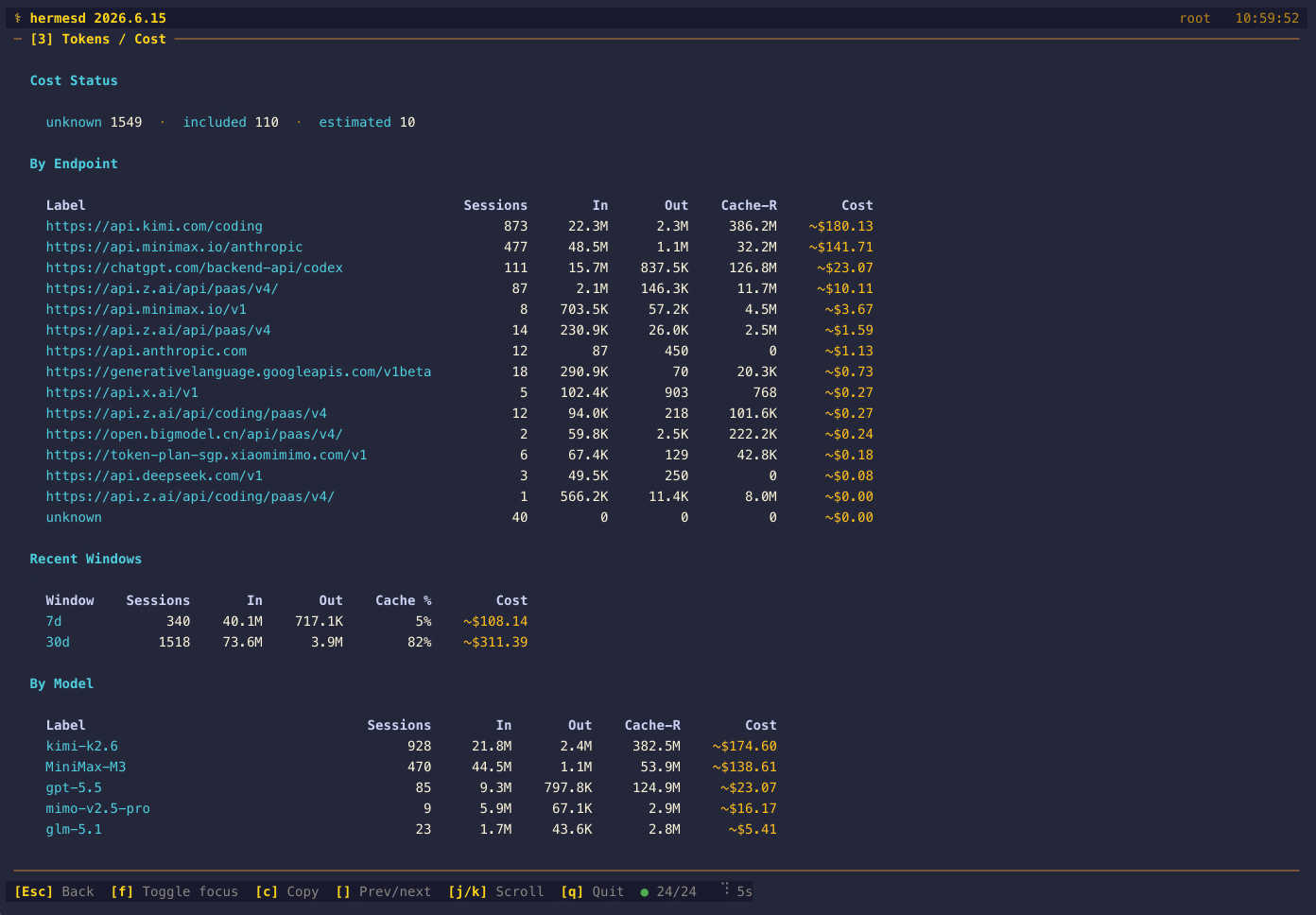
Press 3 for the full per-session token breakdown plus recent 7d/30d rollups and read-only model/provider/endpoint cost summaries, and a Cost Status reconciliation line (unknown vs subscription-included vs estimated). When hermes-agent 0.21's session_model_usage table is present, By Model is driven by it: per-model API calls, tokens and cost aggregated across sessions (top 50 by token volume), with provider-billed costs shown plainly and estimates marked est., task-tagged auxiliary work collapsed into a single aux subtotal row, and a 24h/7d window summary line; the compact view adds a top-3 model line. Older databases keep the per-session model breakdown unchanged. In both the compact and detail views, costs carry a ~$ prefix when estimated and a plain $ prefix when the provider cost is authoritative (reported/exact/included); subscription-included sessions render an authoritative $0.00.
[4] Tools — What's Available and What's Being Used?
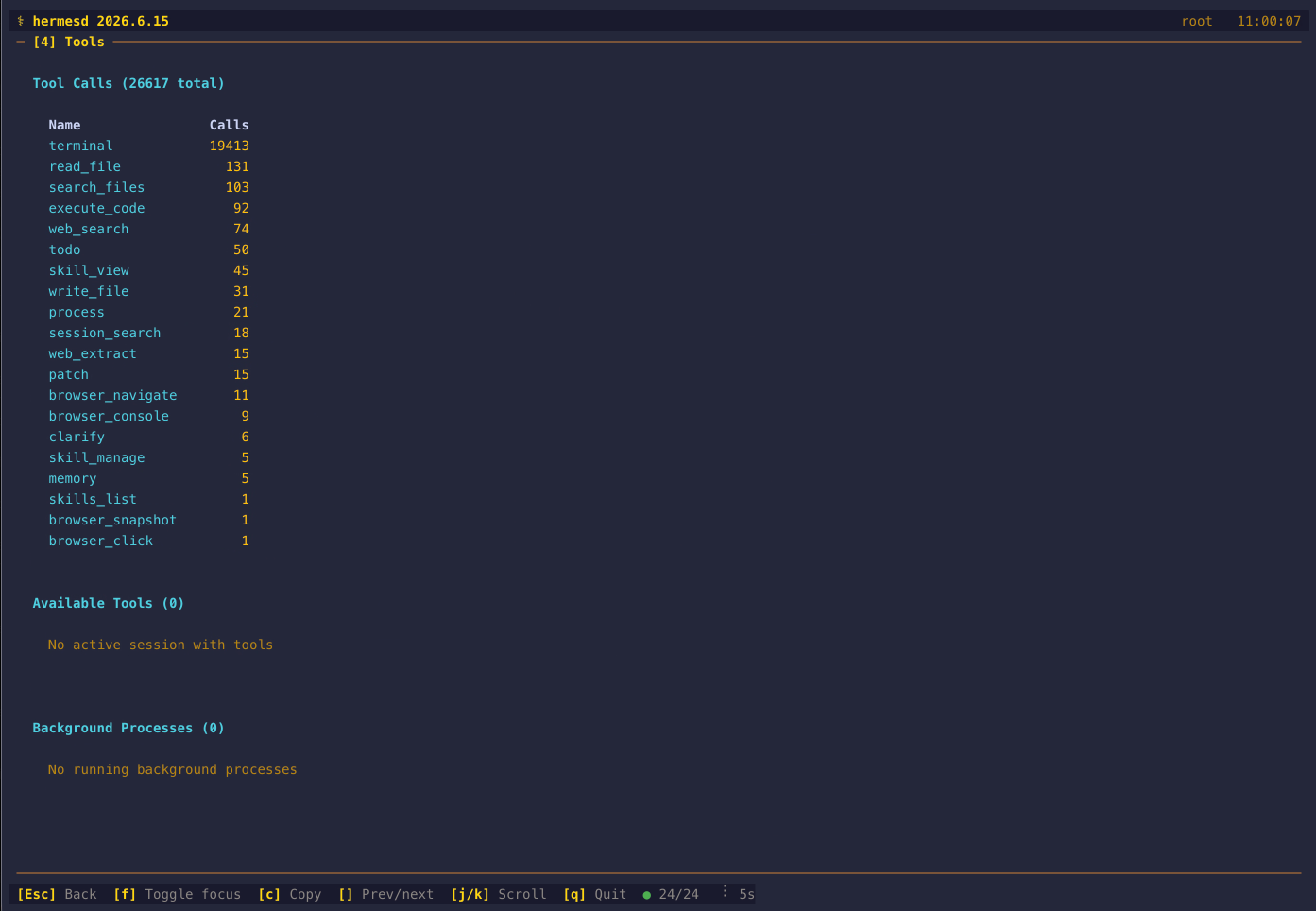
Press 4 for four sections: Tool Calls showing the current call leaders by name (tool names when the messages table provides them, otherwise fallback session labels), Available Tools listing the union of tools discovered across session files in a 3-column grid followed by a Toolsets: N enabled · unavailable: … · N lazy · N disabled line read from the availability block of cache/banner_snapshot.json (the compact view shows a ⚠ N toolsets unavailable marker whenever any toolset failed to load), Background Processes showing the live registry (spawn-ledger.json, falling back to the legacy processes.json) with PID, purpose, port, profile, notify-on-complete, watch-pattern summary, start time, and command — a PID whose process is gone is marked with ✗, and absent purpose/port/profile render as — — and Checkpoints showing filesystem shadow repos with workdir name, commit depth, and latest checkpoint reason. The compact view shows the top callers plus the current background-process and checkpoint counts.
[5] Config — Current Agent Configuration
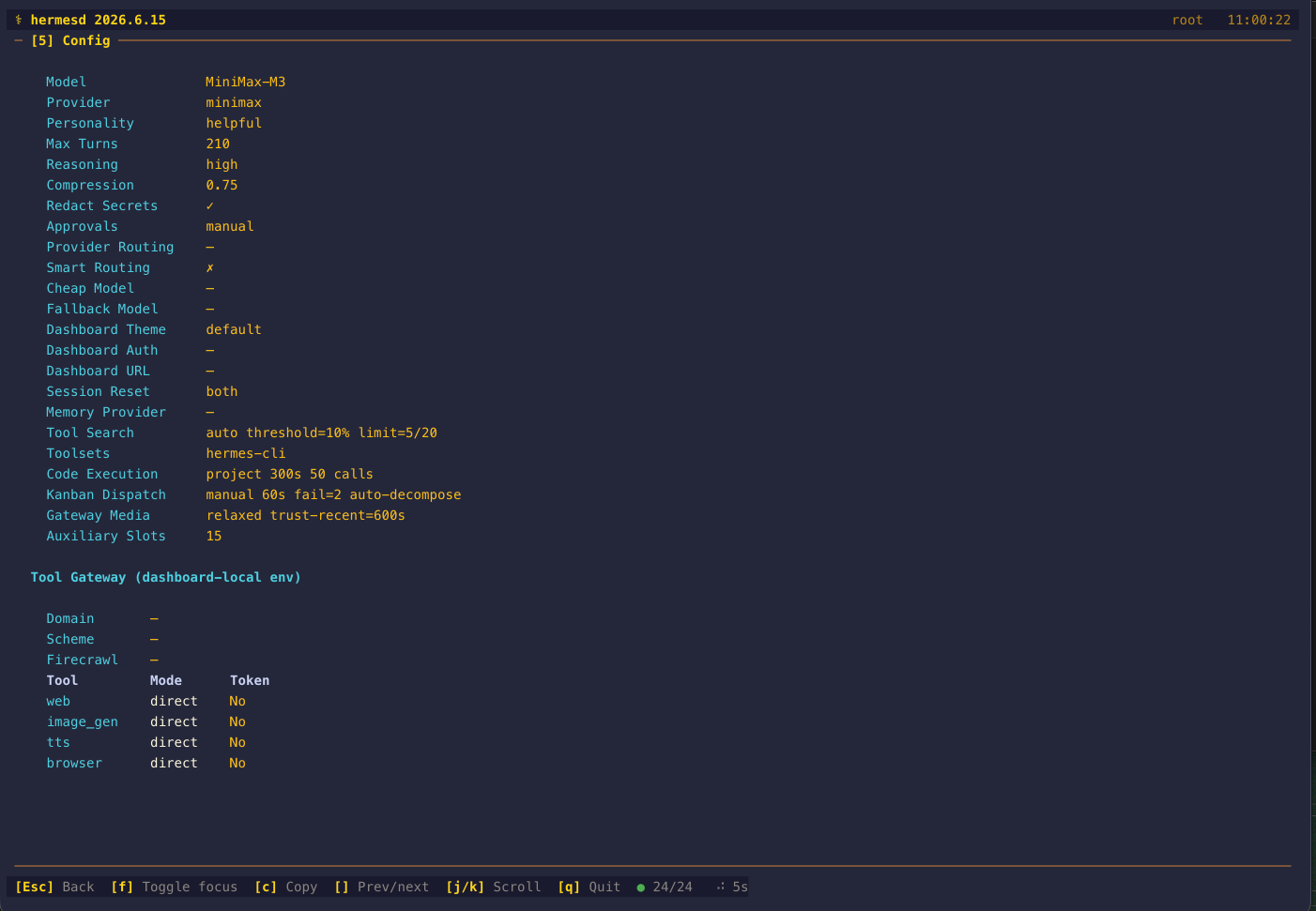
Press 5 for the full config key-value table: model, provider, personality, max turns, reasoning effort, compression threshold, secret redaction, approval mode, provider routing summary, smart routing, fallback model, dashboard theme/auth/public URL, session reset mode, memory provider, Tool Search, toolsets, code execution, kanban dispatch settings, gateway media trust, MoA preset/reference/aggregator/trace settings, and auxiliary slot count. Tool Gateway domain, scheme, Firecrawl endpoint, and route token presence are shown from config plus environment with secret-bearing values redacted.
A Session Capacity sub-section always lists both session caps, each named for the resource it actually governs, because conflating them would misreport capacity: Active-Session Lease Cap (max_concurrent_sessions) renders 4 (max_concurrent_sessions) when configured and not configured (unbounded) when not, and In-Memory Live-Session Cap (max_live_sessions) renders 16 (max_live_sessions) or not configured (LRU eviction off). The first is a cross-process lease cap enforced when a surface attaches; the second is a soft LRU cap on the gateway's in-memory sessions that evicts only detached ones (end_reason="lru_evict"). Both are resolved the way upstream resolves them — the top-level key, else its gateway.* fallback — and the two fallbacks deliberately differ, because upstream's differ: the lease cap resolves on key presence, so a top-level max_concurrent_sessions: null shadows gateway.*, while the LRU cap falls back on a null value. An unset max_live_sessions reads as 0/off rather than as the 16 in config_defaults.py, because the gateway's own reader uses a config load that skips the defaults merge.
Two further sub-sections summarise the hermes-agent 0.21 config sections when they are present: Agent limits (delegation.max_concurrent_children, delegation.max_spawn_depth, delegation.orchestrator_enabled; goals.max_turns; tool_loop_guardrails.warnings_enabled / hard_stop_enabled; streaming.enabled, logging.level) and Integrations (configured MCP server count and names, plugins.enabled/plugins.disabled counts, updates.check / updates.pre_update_backup / updates.backup_keep, and whether a network proxy is configured). Both sections list only non-default values and fall back to —. Values are never rendered for these keys — MCP server configs and proxy URLs can embed credentials, so hermesd reports names, counts, and flags only. The compact view adds one mcp N · plugins N · goals N line.
A Config Backups section dates the config itself from backups/config/: the newest good copy is rendered as "config last changed" with its age, corrupt snapshots are a hard alert, and pre-setup/migration stamps appear as an audit trail. Both caveats are stated on the panel: a good copy is written only when config.yaml's bytes change, so an old stamp means an unchanged config rather than a stale reader, and the stamps are the writer's local time. Groups are ranked so the load-bearing good/corrupt rows survive the group cap, and truncation is flagged in both views. Under --profile these copies stay on the root config the panel displays (see .codex/rules/source-ownership.md).
[6] Cron — Scheduled Jobs
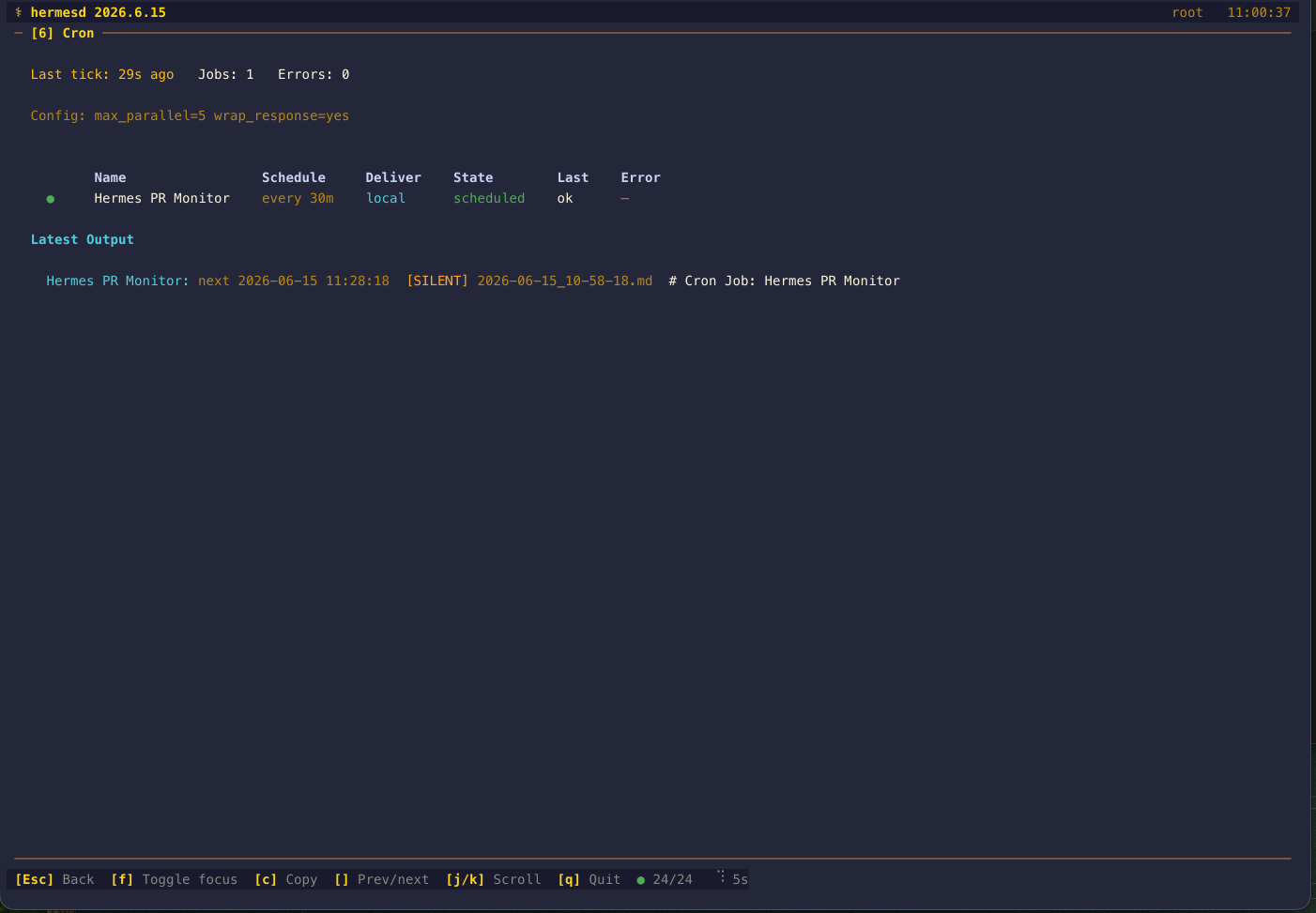
Press 6 to see cron scheduler state, provider, Chronos managed-cron config presence, persisted suggestion counts, max parallelism, response wrapping mode, all configured jobs, delivery targets, current state, last execution status, latest error, and latest saved output metadata from ~/.hermes/cron/output/. [SILENT] runs are surfaced explicitly so “nothing to report” is distinguishable from missing output.
Ticker health is derived from ~/.hermes/cron/ticker_heartbeat and ~/.hermes/cron/ticker_last_success (one epoch float each, written by the 60 s ticker): ok when the heartbeat is under 120 s old and the last success under 600 s, failing when the heartbeat is fresh but the last success has fallen behind, stale when the heartbeat itself has stopped, and unknown when neither file exists. A recorded cron/ticker_last_error escalates an otherwise ok ticker to failing, because hermes-agent only unlinks that marker on a clean tick — so a marker that is still there means the last tick failed even inside the 600 s window. It never escalates unknown (no heartbeat means hermesd cannot claim the loop runs at all) and never downgrades stale. Both ages are shown in the detail view; the existing cron/.tick.lock age remains as the fallback tick indicator. Note a threshold divergence that is deliberately not papered over: hermes cron status calls the ticker STALLED after TICKER_INTERVAL_SECONDS * 3 + 20 ≈ 200 s, while hermesd's last-success window is 600 s, so there is a range where hermes cron status already says STALLED and panel 6 still says ok/failing.
Missed-run catch-up is its own detail section, because two of hermes-agent's markers describe dropped work and neither can be read as a clean bill of health. cron/catch_up_occurrences is a monotonic lifetime counter that _fast_forward_missed_recurring increments when a recurring job's next_run_at was more than its grace window in the past; it carries no timestamp and is never reset, so it is rendered as a lifetime total and never as a rate or an age. Upstream's own reader returns 0 for a missing file and for a genuine zero alike, which is the one distinction an operator needs, so hermesd keeps them apart: Catch-ups: no counter observed versus Catch-ups: 0 recorded. The configured policy is shown beside it from cron.catch_up_missed in config.yaml, read with upstream's exact cast — an identity check, so only a literal YAML false disables catch-up while null, 0, 'no' and a missing key all leave it on. When it is off the panel flags it distinctly, because that is the silent-failure case: hermes-agent then re-anchors the schedule without recording anything, so missed runs are dropped and the counter stays flat while they are. Per job, a last_dispatch.kind of catch_up is labelled catch-up after missed fire rather than shown as late, matching upstream's CLI wording — the two mean different things.
Neither marker proves anything by its absence, and the detail view says so on every render: ticker_last_error is deleted on the next clean tick, so a ticker that failed for hours and then recovered leaves no trace, and catch_up_occurrences is written best effort and not at all while catch-up is off. Under --profile both are read from the root store, like the rest of cron/, so a selected profile's own tick failure and catch-up counter are invisible (see .codex/rules/source-ownership.md).
Execution history comes from ~/.hermes/cron/executions.db (read-only). The recent-executions list is capped; SQL aggregates cover the whole retained table for the 24h window, and each job's latest run is selected across its history. Timestamps are compared chronologically, including UTC offsets and naive-as-UTC values. These queries may scan historical rows; a capped result does not guarantee bounded scan work. Each job shows its last-24-hour counters (7✓ 2✗ 1▶ 1? for completed / failed / running / unknown) alongside the last run's status, duration (finished_at − started_at), and first-line error excerpt. The ? bucket is shown rather than absorbed: unknown is a real hermes-agent terminal status, and any status hermesd has not seen lands there too, because folding an unresolved outcome into ✗ would imply a retry is safe. The underlying total_24h denominator is exposed in the JSON snapshot so the four buckets can be checked to reconcile. The detail view adds a Recent Executions table (the last 10 runs with job name, status, start age, duration, and error excerpt) and an Open Incidents table from cron_incidents (job, state, failure type, first/last seen age, error excerpt) with open and unacked counts. Both degrade to empty summaries — never an error — when the database or either table is missing, as on older agents.
Delivery is reported separately from execution. A run can complete successfully and still have its notification suppressed, so the two are never collapsed into one number. Where the schema has the newer delivery_outcome / handoff_pending / scheduled_instant columns, the Recent Executions table gains a Delivery column (suppressed, delivered, queued, not_configured, suppressed_acked, failed, or unrecorded, plus a ⤵ handoff marker) and the detail view adds a Delivery Outcomes (24h) section counting each recorded outcome verbatim per job, with unrecorded rows and pending handoffs kept apart. Outcomes hermesd has not seen are preserved as written rather than bucketed, and the retained vocabulary is bounded per job. A schema without those columns reports delivery_tracked: false and renders no delivery column at all — an older agent recording nothing is not the same as a window where every delivery went unrecorded.
The job rows also surface the newer cron/jobs.json keys: failure_streak (shown as ✗3 in the compact row), paused_at/paused_reason (⏸ — either one alone is enough to mark a job paused), last_delivery_error, last_dispatch lateness and kind, repeat progress, and no_agent script-only jobs.
Retention qualification. hermes-agent prunes terminal execution history to MAX_TERMINAL_EXECUTIONS (1000) records, keeping the newest by finished_at; in-flight rows are never pruned. Every aggregate therefore describes recorded attempts, not every attempt that ever happened, and the detail view says so: a Recorded attempts: N retained (M terminal) spanning Xs to Yh ago line exposes the retained counts and the observed bounds. When the terminal count reaches the cap, a qualified warning notes that older terminal runs were pruned — and explicitly that a capped history does not by itself make any particular 24h window incomplete, since the retained span can cover far more than a day. retention_cap is 0 when the table could not be read at all, which is distinct from an empty one.
[7] Skills & Integrations — What's Installed?
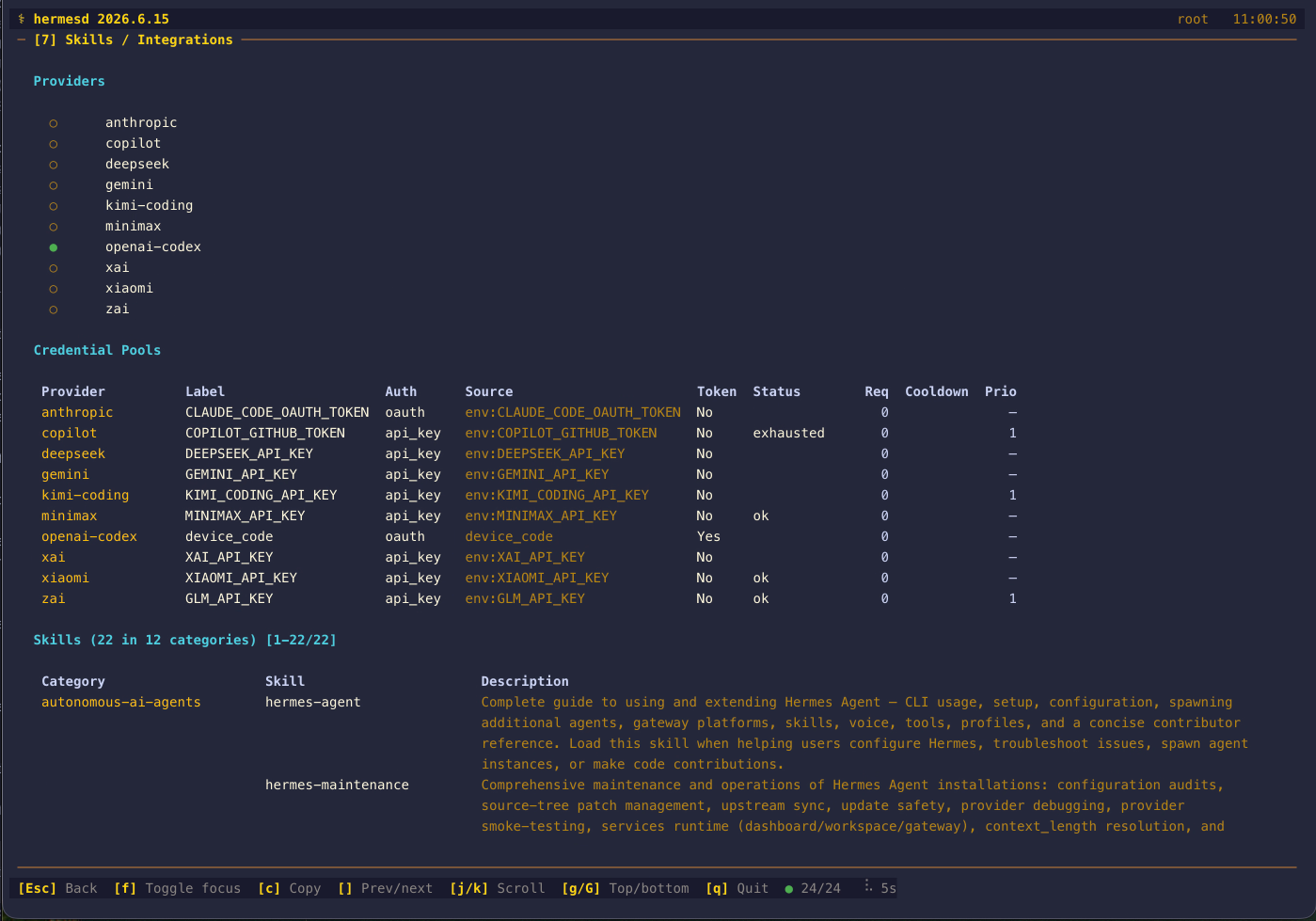
Press 7 for provider and integration visibility in one place: Providers with active auth state and safely persisted credential freshness/expiry metadata, Credential Pools with redacted metadata, Hooks discovered from ~/.hermes/hooks/, agent Plugins from ~/.hermes/plugins/, app-level Desktop Plugins from ~/.hermes/desktop-plugins/, MCP Servers from config.yaml with secret-bearing args and URL query params redacted, BOOT.md presence, and Skills grouped by category with descriptions loaded from each skill's SKILL.md frontmatter. Use j/k to scroll through the full detail view.
The agent Plugins table reports configured activation, not a yes/no "is it on" flag, because hermes-agent requires an explicit plugins.enabled opt-in — a plugin that is merely present on disk will not load. The Activation column reproduces upstream's gate order and shows one of enabled, disabled (in plugins.disabled, which wins over the allow-list), not enabled (discovered but absent from plugins.enabled), category (an exclusive memory provider, activated through <category>.provider config instead), removed (a legacy Relay plugin key that core now refuses), or unknown (a manifest that exists but did not parse). Both the path-derived manifest key and the bare name are matched against each list, so a plugin opted in under its legacy name is still recognised. Only a manifest with no kind key triggers the bounded __init__.py marker scan; an explicit null, blank, non-string or unknown kind falls back to standalone, matching upstream. The scan reads text and never imports or executes plugin code. Activation is what the configuration says hermes-agent would do; it is not proof the plugin loaded successfully.
Discovery covers both directory shapes and all three manifest filenames hermes-agent accepts. A flat ~/.hermes/plugins/<name>/ is keyed by its manifest name; a category ~/.hermes/plugins/<category>/<name>/ is keyed by its path (observability/tracer), which is the spelling plugins.enabled/plugins.disabled actually contain. A directory with no manifest is a category, not a plugin: it is never reported on its own account and is recursed into exactly one level, matching upstream's depth cap. Manifests are accepted in upstream's precedence order — plugin.yaml, then plugin.yml, then a portable Agent Plugin plugin.json — and a directory carrying more than one is resolved by that precedence and reported: the winning filename lands in manifest_file/manifest_format, the losers in manifest_shadowed, and the detail view lists the conflicts under the table rather than resolving them silently. A portable manifest is validated with every upstream load-blocking v1 check, including author, homepage/repository/license, keywords and extension-namespace shapes; only name/version/description are retained, because that is all upstream's own mapping keeps. A plugin.json that declares kind, capabilities or requires_hermes is therefore not read as declaring them. Any format that is present but unusable degrades to unknown with a reason instead of disappearing. Unlike upstream, hermesd refuses a symlinked manifest (including the symlinked plugin.json upstream accepts) and an oversized one; both are what stop a plugin tree from steering a read outside ~/.hermes. The walk itself is budgeted — at most 200 entries per directory and 200 retained plugins — and hitting either bound sets plugin_scan_truncated, rendered as ⚠ plugin list truncated in the detail view and a + after the count in the compact view, so a bounded sample never presents itself as an inventory.
The Provenance column keeps two different claims apart, because they are written by two different sidecars and can disagree. catalog:<tier>@<sha8> comes from <plugin_dir>/.hermes-catalog.json and is the commit the Hermes plugin catalog reviewed; git@<sha8> / git pinned@<sha8> comes from ~/.hermes/plugins/.install-metadata.json (one file keyed by manifest name, read once per pass) and is the commit actually installed, with pinned set only for an explicit hermes plugins install --ref. Those are the same two annotations hermes plugins list renders. They differ by design when --ref is used: install_catalog_entry installs at ref or entry.sha and then writes the sidecar from the catalog entry, so the sidecar keeps describing the reviewed commit while the metadata records the checked-out HEAD. hermesd therefore shows both plus a ⚠ drift marker when the two full 40-hex SHAs disagree, and drops the redundant second token when they agree — the catalog sidecar alone is not evidence of what code is on disk. Both source and repo URLs are passed through the same secret-URL redactor as every other URL hermesd reads, at the data boundary rather than in the panel, so a credential that survived upstream's own scrubbing still never reaches the display or --snapshot-format json. A revision that is not a full 40-hex SHA is reported as no revision at all: a corrupt sidecar is not a pin, and drift is never claimed from a value hermesd could not parse.
The Declares column shows what a manifest claims — its requires_hermes version gate and a caps:N count of declared capabilities — and the note under the table states on every pass that activation, provenance and declarations are all read from files and that hermesd never imports plugin code, so none of them proves a plugin loads. That wording is deliberate: upstream evaluates requires_hermes against the running version at load time and gates every declared capability behind an explicit grant under plugins.entries.<id>.granted_capabilities, neither of which is observable from outside. The capability count is the full declared one, not the length of the display-bounded list, so capping that list cannot change what the panel reports. Declared capability ids are preserved as written rather than filtered to the ids this build recognises — for a consent screen dropping an unknown id is the fail-closed choice, but for a dashboard an unrecognised declaration is exactly what an operator needs to see.
The Desktop Plugins section is a separate, root-scoped inventory of folders containing a regular plugin.js. It never follows the selected profile, never reads or executes JavaScript, and does not claim a plugin is enabled or loaded because that live Desktop runtime state is not safely observable on disk. The scan refuses symlinked roots, folders and entry files, retains at most 200 root entries, and marks a capped result with + in compact view and a truncation note in detail view. A transient listing failure has its own desktop_plugins health source and preserves the last good inventory without blanking the rest of Skills / Integrations.
An MCP section summarises ~/.hermes/cache/mcp_schema_cache.json: how many servers have a cached schema, their names, the cache age, and a No cache entry row listing servers configured in config.yaml with no entry in that cache. The row is deliberately worded as an observation, not a history — a missing entry does not prove a server never connected, since the cache may have been cleared, invalidated, or written under another profile; when the cache file itself is absent the section says no cache file observed instead. Membership is computed from the complete configured and cached name sets, so the 20-name display cap cannot make a cached server look uncached; when a list is capped the row shows (+N more) rather than silently looking complete. Cached payloads are treated as opaque and never rendered. A Prompted skills: N (snapshot 2h ago) line summarises ~/.hermes/.skills_prompt_snapshot.json. The compact view adds mcp N cached when the cache is populated.
Catalog drift, and the free tier. Each installed plugin is compared against the live catalog cache (cache/plugin-catalog.json): update available when the catalog pins a different full commit than the reviewed sidecar, removed when the name or normalized repo is on the kill list (with the recorded reason), and unmanaged when neither provenance sidecar recorded anything. Both SHAs must be full 40-hex revisions first, so a malformed sidecar reads as corruption rather than as drift. An absent cache renders as "checks unavailable" and so does a cache that is present but not the {"entries": [...]} object upstream writes — a panel must never answer "plugins match the catalog" from a file it could not read. A Nous free tier badge marks providers.nous with auth_method set to anonymous — the single condition upstream's is_guest_state tests, since a sign-in rewrites that field in place; only key names are compared, and no credential value is read into state or rendered.
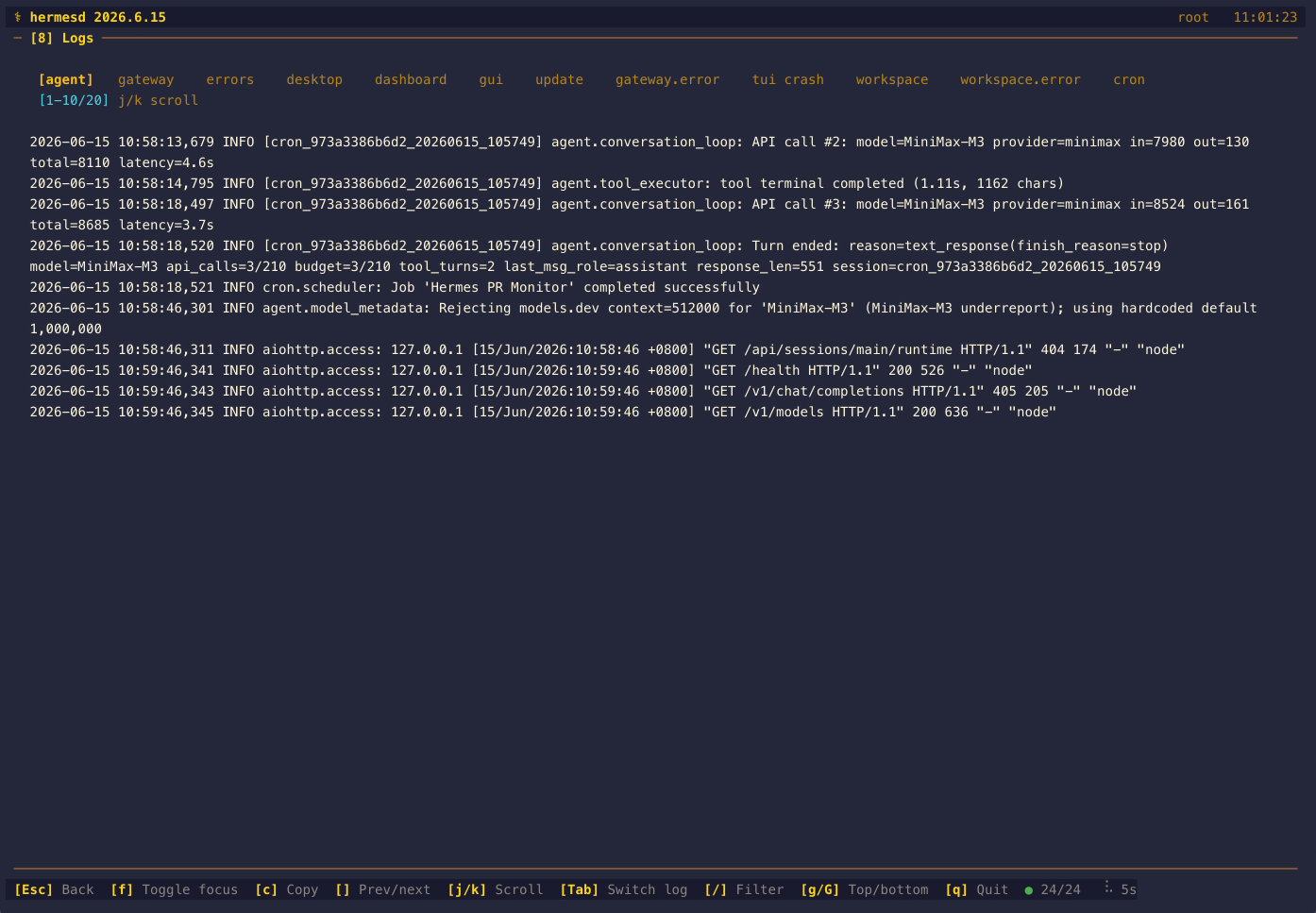
[8] Logs — What Just Happened?
Press 8 for the full log viewer with discovered streams such as agent, gateway, errors, cron, desktop, dashboard, gui, update, gateway.error, tui crash, workspace, workspace.error, audit, and mcp.stderr (each shown only when its file exists). Press Tab to switch between them, / to filter the current log stream by level:, minlevel:, component:, session:, or free text, j/k to move the viewport, and g/G to jump to the top or bottom.
The stream list is not one directory: agent, gateway and errors come from the selected profile's logs/, while the rest come from ~/.hermes/logs/. Since a stream's file name alone cannot tell profiles/coding/logs/agent.log apart from logs/agent.log, the detail view prints a Scope: profile / Scope: root line under the tab bar for the stream you are reading, and --snapshot-format json carries the same value as logs.streams[].scope. The label names the resolver that owns the stream, not the directory it happened to resolve to — with no profile selected everything lives under ~/.hermes/, but the profile-owned streams still read profile. Which scope owns every other source is recorded in .codex/rules/source-ownership.md.
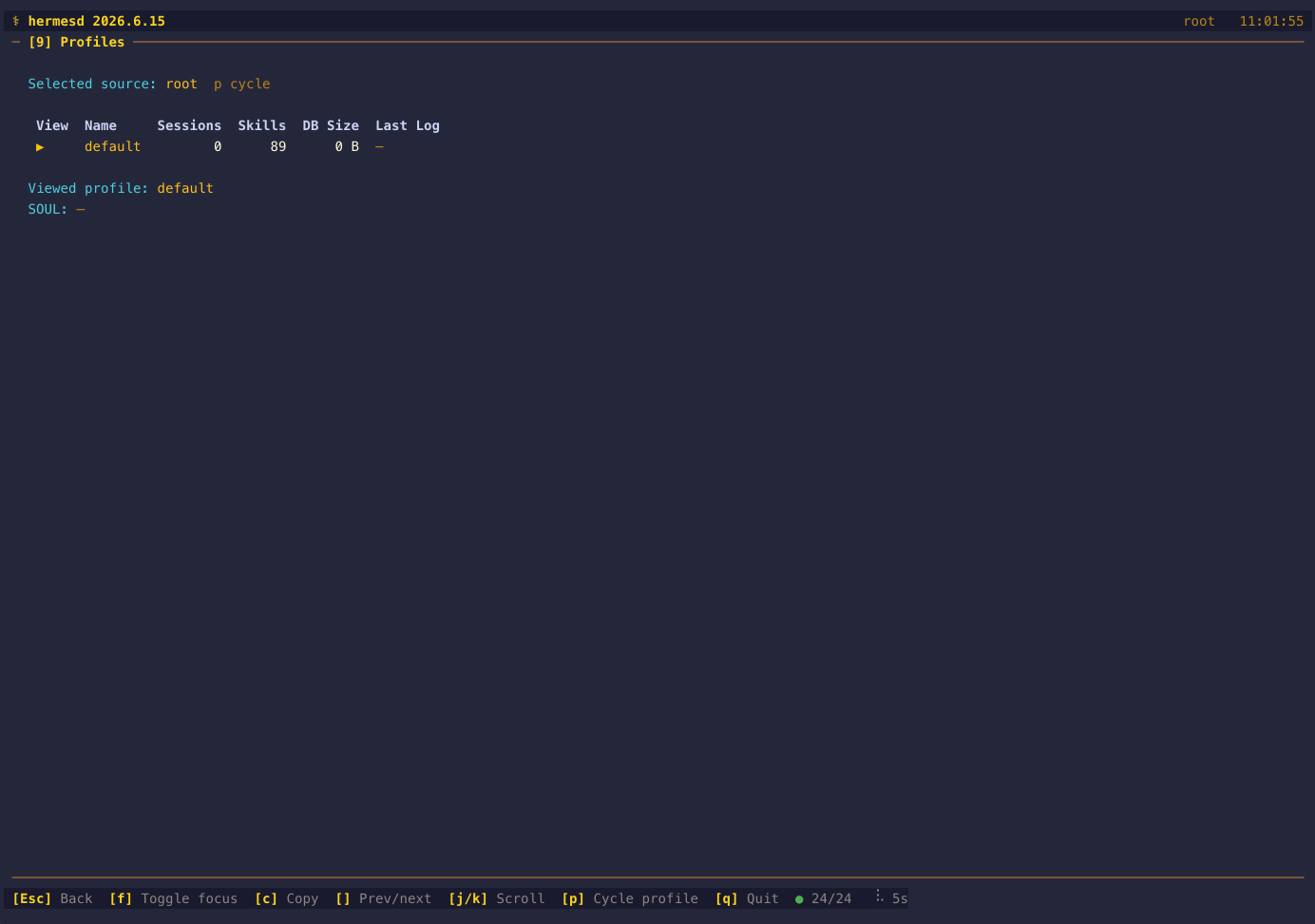
[9] Profiles — Which Runtime State Am I Looking At?
Press 9 for a read-only profile table discovered from ~/.hermes/profiles/*/. It shows per-profile session count, latest log mtime, skill count, DB size, and a short SOUL.md excerpt when present. Press p in this panel to cycle the viewed profile highlight without changing the dashboard's selected data source.
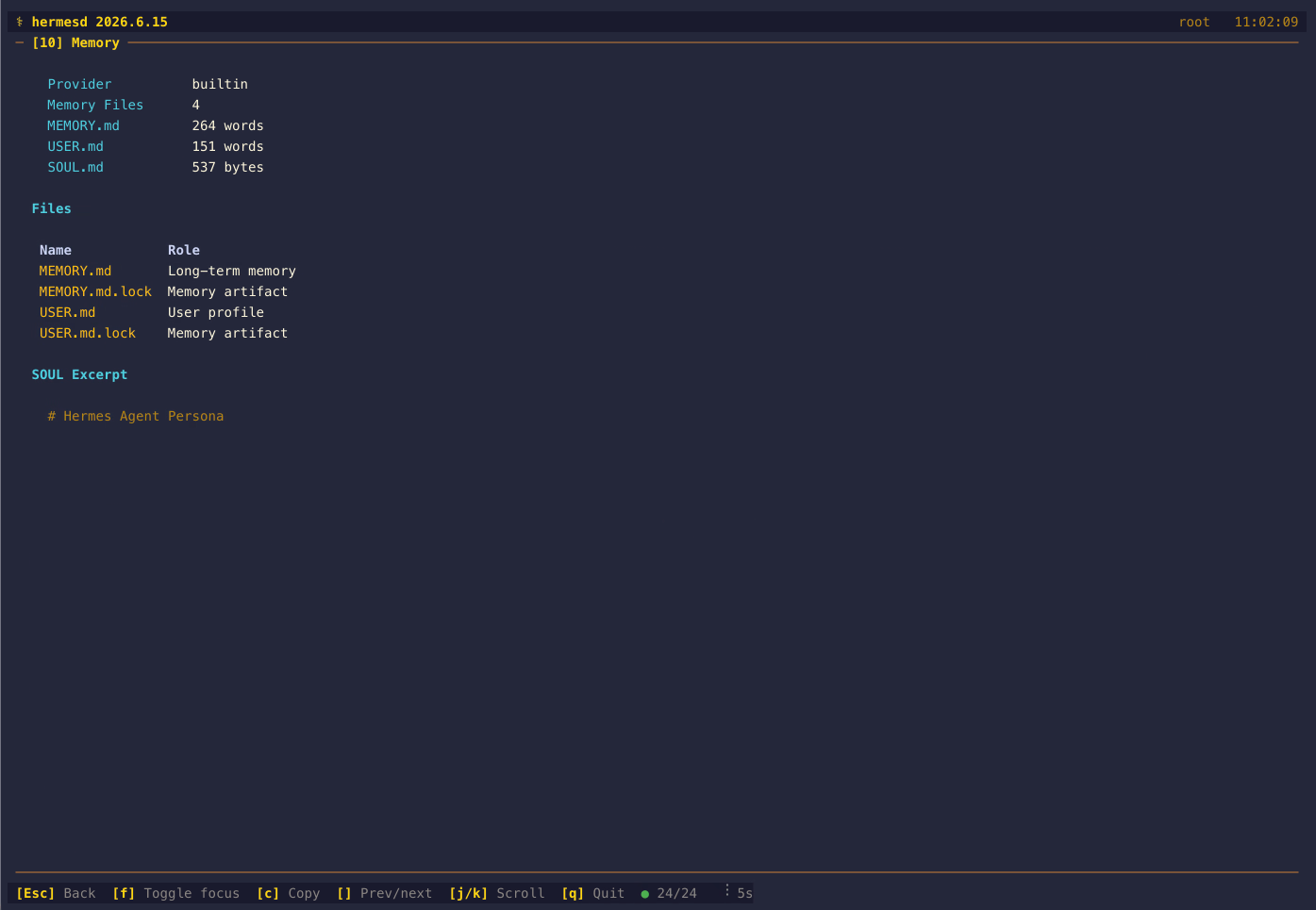
[10] Memory — What Context Is Persisted?
Press 0 to expand. The Memory panel shows the configured memory provider, memory-file count, MEMORY.md and USER.md word counts, a lightweight learning summary from skill usage and learned skill metadata, SOUL.md size, and a short SOUL.md excerpt with the discovered memory files listed below.
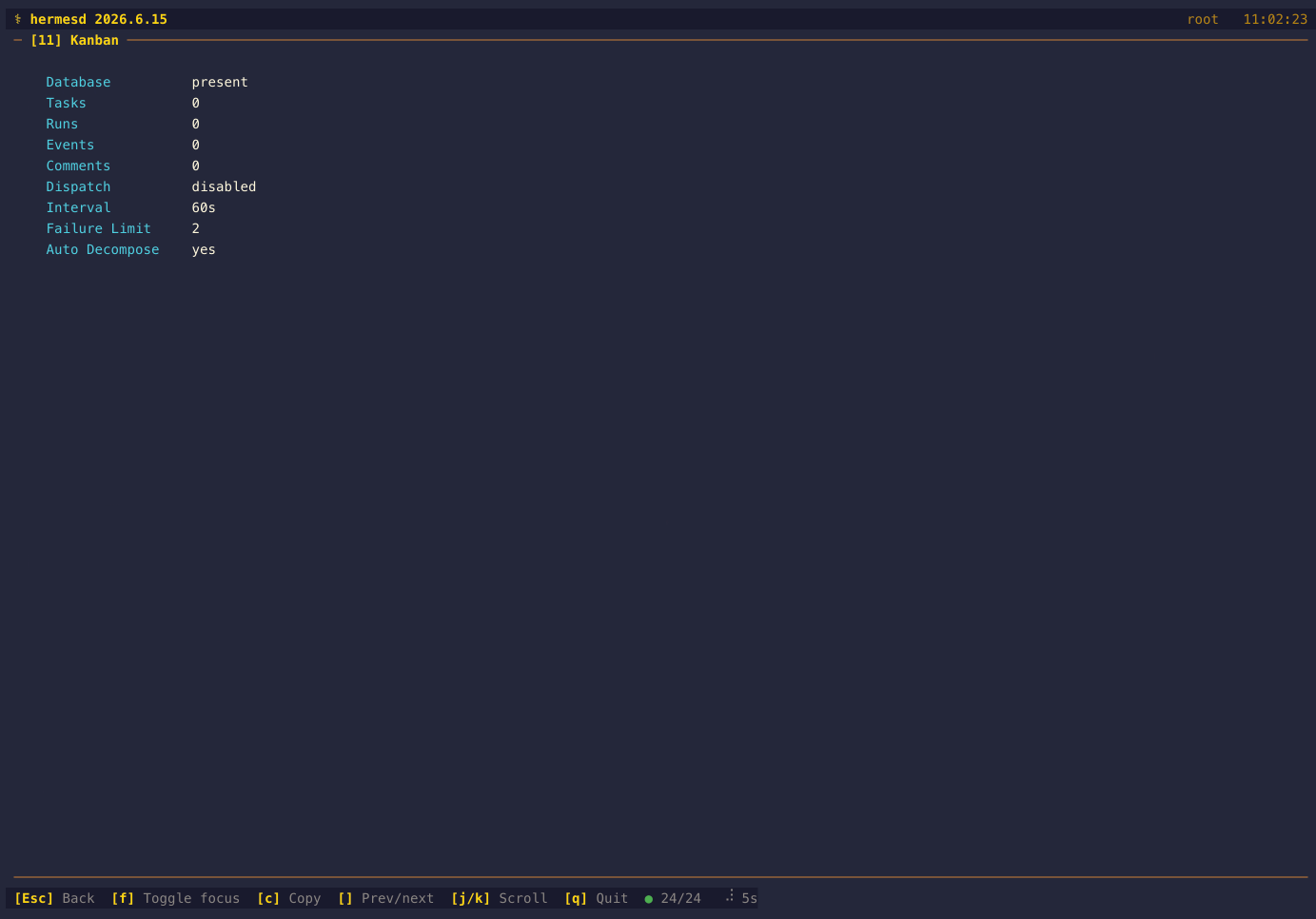
[11] Kanban — What Are Workers Doing?
Use ] from panel 10 or --snapshot-panel 11 to expand. The Kanban panel reads ~/.hermes/kanban.db and ~/.hermes/kanban/boards/*/kanban.db in read-only mode and shows board counts, the current board, stale claim counts, typed blocker counts, configured dispatch mode, status breakdowns, active worker claims, blocked/failing tasks, recent run outcomes, a parent→child Decomposition Tree (task_links), and a Task Metadata table (branch, workspace, goal mode, current step) when those columns are populated.
Notify subscriptions and the breaker. A kanban_notify source reads kanban_notify_subs from the same root-anchored board and reports, per subscription, the backlog of that task's own events newer than its cursor (id > last_event_id, as upstream's notifier claims them) — a backlog that only grows means the watcher that owns the subscription is wedged or gone. The panel shows subscriber counts rolled up per platform (case-insensitively, matching notifier routing), the total and worst backlog, a bounded worst-first table, and subscriptions whose notifier_profile names a profile that no longer exists; the default profile is excluded (upstream reports "default" for the root home) and orphan detection stays silent when profiles/ itself cannot be read. The source fails independently of the board read. Review cards also carry their completion_contract (NULL = local-only, OWNER/REPO for PR publication, or an exact PR URL), and the Failures column doubles as a breaker read-out: consecutive_failures is upstream's trip counter (preserved across review reopens, not a retry budget) and the effective threshold follows upstream's order exactly — per-task max_retries (including an explicit 0, which trips immediately) over the configured kanban.failure_limit over the default 2.
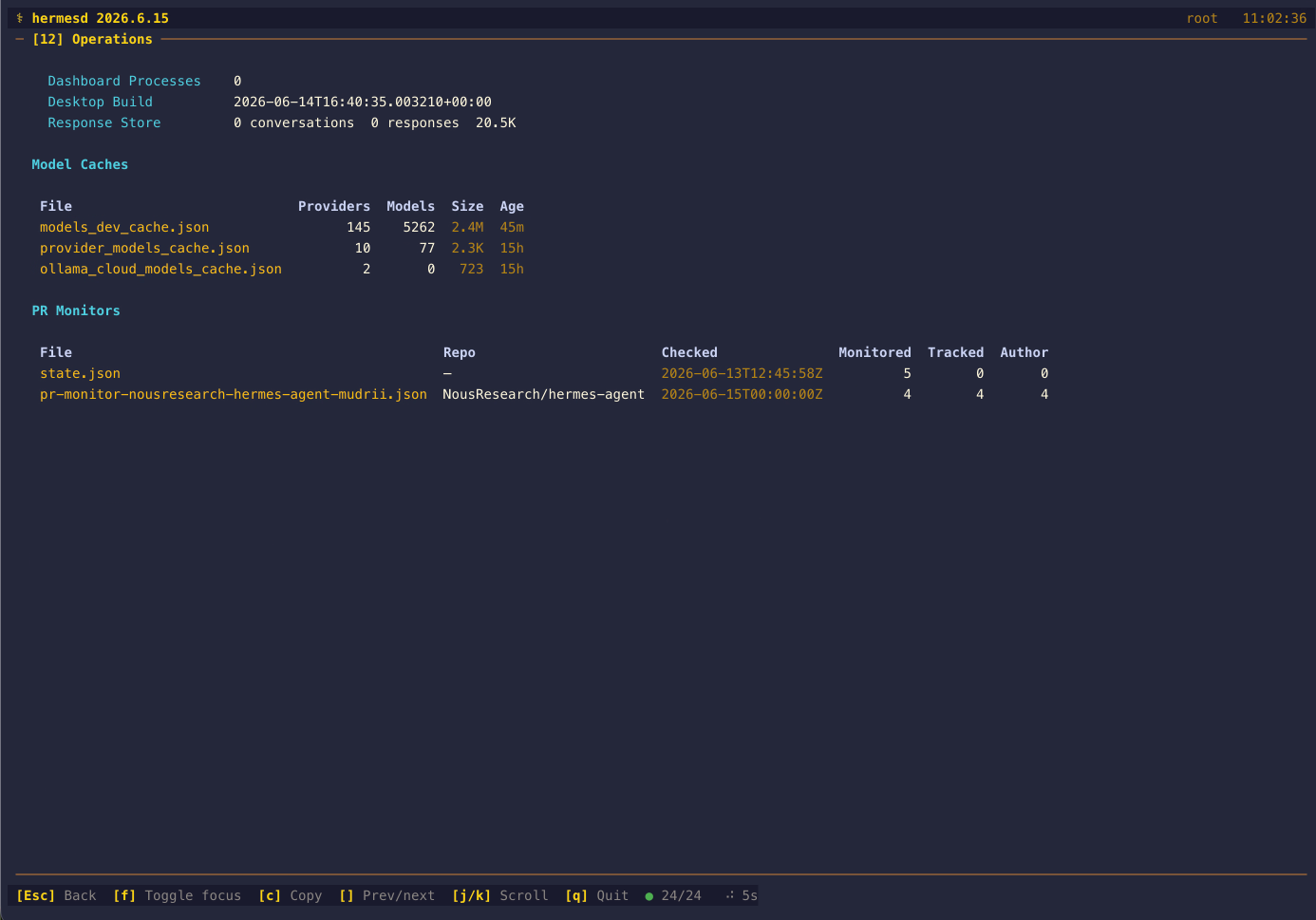
[12] Operations — What Runtime Artifacts Exist?
Use ] from Kanban or --snapshot-panel 12 to expand. The Operations panel summarizes dashboard background processes, Desktop build metadata, Response Store stats (conversation/response row counts + size from response_store.db), Verification Evidence from verification_evidence.db, active/waiting Goals from state.db, MoA Traces inventory and bounded latest-record metadata from moa-traces/*.jsonl, Projects from projects.db with missing primary paths, newest discovered repos, and verification/Kanban correlations, model-cache provider/model counts, cache ages, and PR monitor files across all of the agent's naming families (flat + subdirectory) with per-repo dedup. cron/state/pr_monitor.json is also read in its PR-keyed shape (a mapping of PR number to {state, mergeable, title, updatedAt, …}), which adds Open and Conflict columns to the PR table. A Blocked scripts row counts the shell scripts the agent refused to run under cache/blocked-scripts/ with the newest age and the three newest file names — a bounded, symlink-safe, stat-only scan; the script contents are never read. It also reports Delegations from the async_delegations table in state.db — a compact Delegations: N running · N failed · N undelivered line whenever any counter is non-zero, and a detail table of the 10 newest delegations (id, state, delivery state and attempt count, whether the owner pid is still alive, duration, the goal parsed out of task_json, and the status/error excerpt parsed out of result_json), alongside a count of live subagent transcripts under cache/delegation/live/<id>/task-*.log. Both JSON columns are size-capped before parsing and every excerpt is clipped to 80 characters. A State DB section reports the schema_version, database and WAL size, last auto-prune and auto-archive ages, db_file_generation and fts_storage_version from state_meta; all of it comes from the same mtime-cached state.db open as the goals, so a refresh never snapshots the (multi-hundred-megabyte) WAL database twice. Snapshots summarizes state-snapshots/ (count, total size, newest age) from a bounded, one-level, stat-only scan registered as its own state_snapshots health source, and Web UI Build shows the short content hash and build age from web-ui-build-stamp.json. Delegation tables and build stamps are simply omitted when the agent version does not produce them.
Delegation forensics. A Delegations row now also accounts for the async subagent handoff durably recorded in result_json: the Procs column sums handed-off, orphaned (with runtime) and unread-completion counts across every per-child entry, including partial mid-flight rows, while session ids, commands and output tails are never copied out of the payload. Live Delegation Transcripts parses cache/delegation/live/<id>/manifest.json into one card per newest delegation — model, provider, task count, per-task status and exit reason, and a redacted tail of task-<index>.log derived from the task index rather than the manifest's stored path — with the run directory's mtime rendered as dispatch age (it does not advance while a task runs) and an explicit note that the live roster (per-task tool counts, steer state, depth) exists only in gateway memory and over RPC. The scan is bounded at every level: at most 200 run directories, a 64 KiB manifest cap, five cards, and task logs tailed only for the tasks a card actually displays. Process Receipts lists the newest logs/process-results/proc_*.json receipts with exit code, completion reason, ages and a doubly-redacted output tail (upstream redacts at write time, hermesd again at its own boundary); an absent directory renders as "no receipts yet", which the 7-day / 64-file retention makes the normal quiet-machine case. Two markers close the section: Checkpoint Prune compares the profile's checkpoints/.last_prune against twice the configured checkpoints.min_interval_hours (24 h by default) with the caveat inline that a fresh marker proves the wrapper ran, not that pruning succeeded; and a ROOT spawn-ledger.json.corrupt raises a red flag with its age — upstream's parking bay for an unparseable ledger, whose contents are never parsed.
A Database Recovery section reports what hermes-agent's own repair code left beside state.db, as its own db_recovery health source: the repair-attempt ledger (state.db.repair-attempts.json) with its failed_attempts, its last_attempt as an age, and whether the recorded budget of 3 is exhausted; the settled forensic backups (state.db.malformed-backup-*) with count, total bytes including their -wal/-shm/-journal sidecars, and newest age; the retired-WAL generations (state.db.retired-wal-*/) with the newest one's captured_at, trigger, wal.bytes and main.mode read from its manifest.json; and the state.db.repair.lock / state.db.auto-maintenance.lock files as presence booleans. Mid-write artifacts — .backup-staging-*, *.incomplete* and .partial generations — get their own In Progress row and are never counted as completed captures. This is presence and metadata only: hermesd never runs a repair, a checkpoint or an integrity check, and never hashes the database (the live state.db is ~480 MB, and hashing it is exactly the expensive work excluded here) — the reader stats a bounded, symlink-safe directory listing and parses two small JSON documents, and it never opens state.db at all. Three wording rules follow from upstream's behaviour: a successful repair deletes the ledger, so none — no failed repair recorded is not evidence the database is healthy; budget exhausted counts the ledger's recorded failures and does not recompute the fingerprint upstream also matches them against, so it cannot tell whether the file changed since; and a lock file on disk is not a held lock, since upstream opens both with a+b and never deletes them. Note also that ~/.hermes/recovery/ is an operator-made remediation bundle directory that no upstream repair code writes, so it is deliberately not read as recovery evidence.
Two more sections cover gateway coordination stores hermesd did not previously open at all, each registered as its own health source so a corrupt or vanished database degrades only itself.
A Hosted Rooms section reads shared-state.db as its own hosted_rooms source. That file is ROOT-scoped even under --profile, and it is deliberately not the master state.db: gateway/hosted_rooms.py:398-414 resolves even a profile gateway to the shared root copy, because pointing profile gateways at the session store makes every profile process a long-lived writer on it — the multi-writer corruption vector that file exists to avoid. The live ~/.hermes/state.db still carries hosted_rooms, hosted_room_events and every sibling table with zero rows and no DDL in hermes_state_common.py; they are legacy leftovers, so hermesd never opens state.db for this and a test pins the SQL target. The section reports active versus disbanded room counts, a bounded per-room table (id, name, member count, authority epoch, revision, latest_seq derived as next_seq - 1, accounted event bytes, age, and active/disbanded state), the event count with a histogram over the closed event-kind vocabulary plus an unknown complement, accounted event_bytes, retired-id and revoked-grant counts, link and remote-run counts, and peer reservations split live / expired / revoked. It is content-free by construction: hosted_room_links.grant, catalog_json and target_url (a target URL may embed a credential), hosted_room_events.payload_json and actor_json, hosted_room_revoked_grants.scope_key and everything in the hosted_room_policy_transcript* conversation tables are never selected — member_count is the length of members_json parsed under a 128 KiB cap, never its contents, and a kind outside the closed enum is counted as unknown rather than carried as a string. The counts are whole-table aggregates, so the eight-row display cap sets rooms_truncated and renders showing 8 of 12 without changing any number above it.
A Retained API Run Reservations section reads runs_idempotency.db as its own api_runs source. This one is PROFILE-scoped (get_hermes_home()/"runs_idempotency.db", api_server_run_idempotency.py:67) — the opposite of the room store rendered beside it. The label says retained rather than recent on purpose: _prune_stale_terminal_locked (:168-186) runs inside every reserve/lookup and deletes an aged row only once its stored run status is terminal, and long room runs push retention_until out, so an empty store is not evidence that the API was idle. Nor can hermesd detect the alternative: when the file cannot be opened, upstream logs and falls back to ":memory:" (:63-84), and the resulting durable capability is advertised only over HTTP (api_server.py:2276), never written to disk — so the file may be absent or stale while the gateway is actively reserving in process memory. The section reports the store size, reservation count, a distinct-scope count, newest and oldest ages, acknowledged and pid-recorded counts, how many rows are already past retention_until, and a bounded per-row table of run id, status, created/updated ages, retention remaining (or overdue), and ownership. Statuses are allowlisted against the vocabulary upstream actually sets (queued, running, waiting_for_approval, stopping, completed, failed, cancelled, interrupted) and anything else is reported as unknown rather than dropped or guessed. fingerprint, idempotency_key and scope are never surfaced. owner_started is reduced to "identity recorded / unverified" and never rendered as a timestamp, because upstream fills it from gateway/status.get_process_start_time, which returns /proc ticks on Linux and psutil centiseconds elsewhere — comparable only against the same host's own reading.
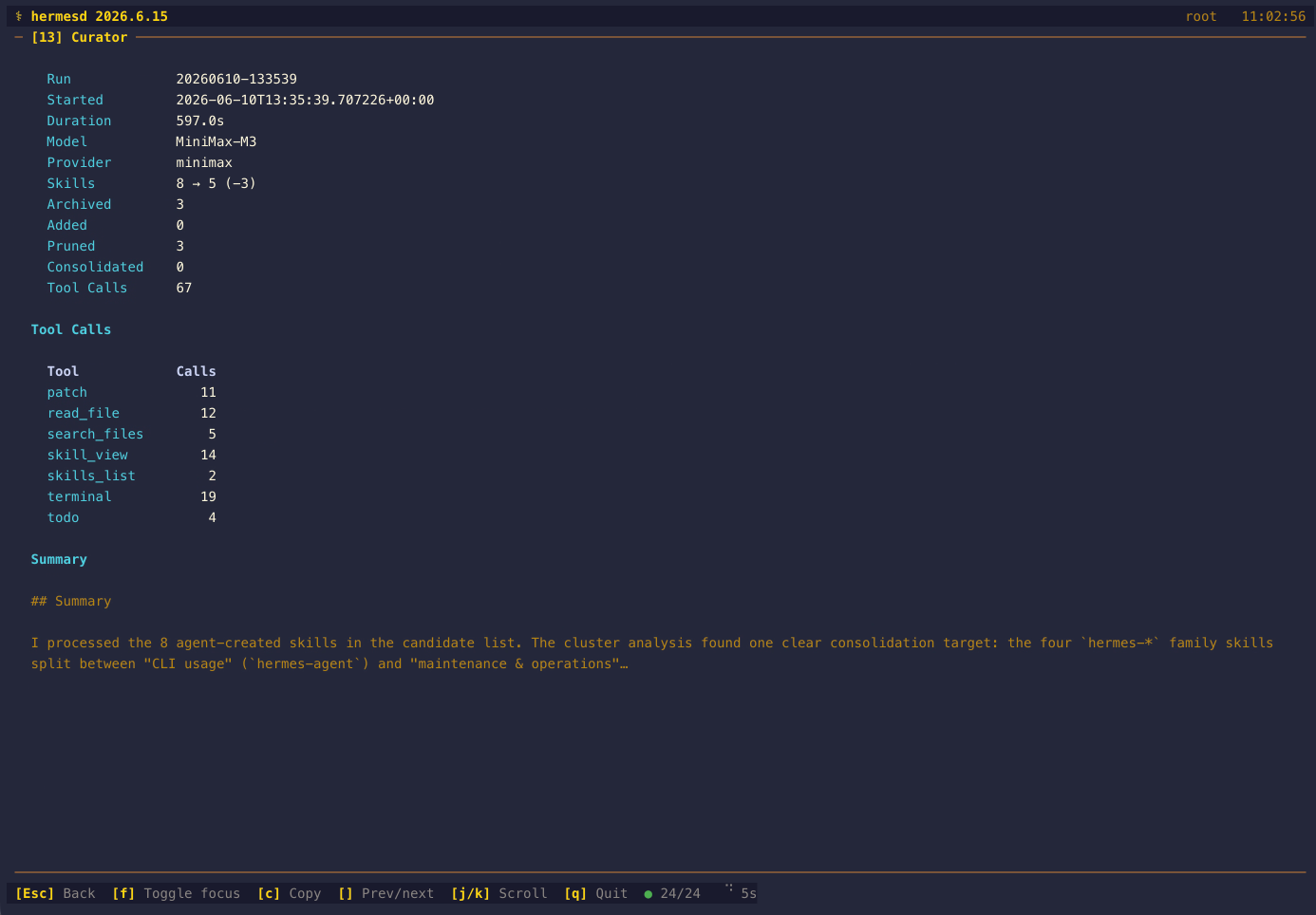
[13] Curator — What Did the Last Memory Curation Do?
Use ] from Operations or --snapshot-panel 13 to expand. The Curator panel reads skills/.curator_state for scheduler pause/run/report state and the newest usable non-symlinked ~/.hermes/logs/curator/<stamp>/run.json for skill before/after/delta counts, archived/added/pruned/consolidated totals, the model and provider used, run duration, total tool calls plus a per-tool call breakdown, the state-transition trail, and the LLM summary (or error).
A Skill Hygiene section reads skills/.usage.json: how many skills were patched but never re-used (the patch-reuse loop), state counts (active/stale/archived) with pinned skills kept separate, and each skill's distance to the curator's stale/archive thresholds, honouring curator.stale_after_days / curator.archive_after_days overrides (14/30 days by default, and 0 keeps the configured meaning of "keep forever"). Windows run from the last use/view/patch; created_at stays excluded, as upstream excludes it.
Installation
Requires Python 3.11+ and a working Hermes Agent installation (~/.hermes/ must exist).
Via pip
pip install hermesd
hermesd
hermesd --snapshot
Via uv
uv tool install hermesd
hermesd
From Source
git clone https://github.com/mudrii/hermesd.git
cd hermesd
uv venv .venv --python 3.11
source .venv/bin/activate
uv pip install -e .
hermesd
Docker
docker build -t hermesd .
docker run -it -v ~/.hermes:/home/hermesd/.hermes:ro hermesd
Nix Flake
# Run directly
nix run github:mudrii/hermesd

# Dev shell
nix develop github:mudrii/hermesd
Usage
# Launch the dashboard (reads ~/.hermes by default)
hermesd

# Custom hermes home directory
hermesd --hermes-home ~/.hermes-work

# Read profile-scoped runtime data from ~/.hermes/profiles/coding
hermesd --profile coding

# Faster polling (every 2 seconds)
hermesd --refresh-rate 2

# Disable colors
hermesd --no-color

# Show version
hermesd --version

# Write a one-shot overview snapshot outside the Hermes home
hermesd --snapshot-file /tmp/hermesd.txt

# Export a single panel detail snapshot
hermesd --snapshot-panel 10

# Panel 10 also accepts the interactive shortcut alias
hermesd --snapshot-panel 0

# Emit a machine-readable JSON snapshot of the full dashboard state
hermesd --snapshot-format json

# Annotate a JSON snapshot with a selected panel number
hermesd --snapshot-panel 8 --snapshot-format json

# Export new higher-numbered panels
hermesd --snapshot-panel 11
hermesd --snapshot-panel 12 --snapshot-format json
hermesd --snapshot-panel 13

# Reduce log-read overhead for large log files and cron output excerpts
hermesd --log-tail-bytes 8192
Environment Variables
| Variable | Default | Description |
|---|---|---|
HERMES_HOME |
~/.hermes |
Override the Hermes home directory |
HERMES_PROFILE |
unset | Read profile-scoped runtime data from profiles/<name>; root mode remains the default when unset |
Keyboard Shortcuts
| Key | Action |
|---|---|
1-9, 0 |
Expand panels 1-10 to full-screen detail view (0 opens panel 10) |
[ / ] |
Move to the previous/next registered panel, including panels 11-13 |
Esc |
Return to overview |
f |
Toggle focus mode for the last selected panel |
c |
Copy the current rendered view as plain text via OSC 52 |
j / k |
Scroll down/up in scrollable detail views |
Tab |
Cycle log sub-view for the discovered log streams (panel 8) |
/ |
Edit the inline filter for Sessions or Logs detail |
s |
Cycle session sort in Sessions detail |
g / G |
Jump to top/bottom in scrollable detail views |
p |
Cycle the viewed profile in Profiles detail |
r |
Force immediate refresh |
q |
Quit |
? |
Toggle help overlay |
Troubleshooting / FAQ
Running hermesd without a TTY (cron, CI, pipes)
The interactive TUI expects a terminal: the input thread only starts when stdin is a TTY (tty.setcbreak mode), and the Rich Live display forces terminal output. Run non-interactively with --snapshot (overview), --snapshot-panel N (one panel), or --snapshot-format json (machine-readable full state) — these render one frame to stdout and exit, so they work from cron:
*/5 * * * * hermesd --snapshot-format json --snapshot-file /tmp/hermesd-state.json
What does AGENT OFFLINE mean?
The header/footer show AGENT OFFLINE when Hermes Agent appears inactive: the gateway process is not running, no sessions are active, and the most recent activity is older than 5 minutes. Start the gateway or a session and the banner clears on the next refresh.
What does the footer health dot mean?
The green/yellow/red dot next to the polling spinner shows how many collector sources succeeded on the last refresh (ok/total). Green means every source read cleanly, yellow means some failed (the failed source names are listed inline), red means none did. A (stale) marker after the refresh interval means the last refresh failed outright and hermesd is showing cached data.
Does hermesd fight Hermes Agent for the SQLite database?
No. Source databases without a WAL sidecar use immutable, read-only connections. Databases with a WAL sidecar are copied with their available -wal/-shm sidecars to a private temporary directory outside your Hermes home and opened read-only there. Any SQLite shared-memory coordination is confined to that copy, including when another connection in the same process is writing to the source. The shared state.db snapshot is reused until the source changes; updates require another copy, which adds I/O for large databases. If a read fails transiently (e.g. during a WAL checkpoint), hermesd keeps the last good data on screen and retries on the next poll instead of blanking panels.
hermesd is slow with very large log files
Each refresh reads only the last --log-tail-bytes bytes of every log file and cron output excerpt (default: 32768). Lower it to cut I/O on multi-GB logs:
hermesd --log-tail-bytes 8192
Architecture
hermesd is a read-only companion — it reads files from ~/.hermes/ and never writes to Hermes Agent state. The only write path is the explicit --snapshot-file PATH export, which is rejected when the target is under the Hermes home.
~/.hermes/                        hermesd
  state.db (SQLite WAL) ───────> db.py      Read-only (mode=ro), data_version cache
  gateway_state.json ──────────> collector.py  JSON/YAML mtime-cached readers
  gateway.pid ─────────────────>
  config.yaml ─────────────────>
  cron/jobs.json ──────────────>
  cron/executions.db ──────────>
  cron/ticker_* ───────────────>
  kanban.db ───────────────────>
  channel_directory.json ──────>
  model cache JSON ────────────>
  pr-monitor*.json ────────────>
  auth.json ───────────────────>
  skills/*/SKILL.md ───────────>
  sessions/*.json ─────────────>
  logs/*.log ──────────────────>
                                     |
                                     v
                                 models.py   Pydantic DashboardState
                                     |
                                     v
                                 app.py      Rich TUI (Live + Layout + threads)
                                     |
                                     v
                                 panels/*.py  13 panel renderers (compact + detail)
Design Decisions
| Decision | Why |
|---|---|
SQLite mode=ro + check_same_thread=False |
Guarantees no writes; safe for cross-thread polling/render |
PRAGMA data_version caching |
Skips re-reads when agent hasn't written, minimizing I/O |
| Cache preservation on error | Transient SQLite lock contention keeps last good data visible |
| Auto-reconnect after 3 errors | Recovers from WAL checkpoint invalidation |
gateway.pid fallback |
Detects correct PID after launchd/systemd restarts |
tty.setcbreak (not setraw) |
Preserves signal handling over SSH/tmux |
os.read(fd, 64) bulk read |
Captures escape sequences as single chunks |
| Cost estimation from tokens | Shows ~USD when provider doesn't report costs |
| Adaptive layout threshold | Width < 100 with height >= 50 gets the tall single-column layout; smaller terminals get the compact mixed grid |
Themes
hermesd inherits the active skin from Hermes Agent's config.yaml:
| Skin | Style |
|---|---|
default |
Gold/bronze on dark — the classic Hermes look |
ares |
Deep red with gold accents |
mono |
Grayscale minimalist |
slate |
Cool blue tones |
poseidon |
Ocean blue |
sisyphus |
Silver/stone gray |
charizard |
Warm orange/amber |
Development
CI/CD and release policy — branch protection, release eligibility, dependency
pinning, and update cadence — is documented canonically in
docs/ci-release-policy.md.
git clone https://github.com/mudrii/hermesd.git
cd hermesd
uv venv .venv --python 3.11
source .venv/bin/activate
uv sync --locked --all-extras --dev

# Run the full local gate set for the active interpreter.
# CI runs the same checks across Python 3.11, 3.12, 3.13, and 3.14.
uv run ruff check .
uv run ruff format --check .
uv run mypy hermesd scripts
uv run python -m compileall hermesd
uv run pytest tests/ -q -ra --tb=short -W error::ResourceWarning --cov=hermesd --cov-report=term-missing
uv run python scripts/pip_audit_gate.py
uv lock --check
uv build
python -m venv /tmp/hermesd-wheel-smoke
/tmp/hermesd-wheel-smoke/bin/python -m pip install dist/hermesd-*.whl
/tmp/hermesd-wheel-smoke/bin/hermesd --version
/tmp/hermesd-wheel-smoke/bin/python -I -m hermesd --version
/tmp/hermesd-wheel-smoke/bin/python scripts/installed_smoke.py
python -m venv /tmp/hermesd-sdist-smoke
/tmp/hermesd-sdist-smoke/bin/python -m pip install dist/hermesd-*.tar.gz
/tmp/hermesd-sdist-smoke/bin/hermesd --version
/tmp/hermesd-sdist-smoke/bin/python -I -m hermesd --version
/tmp/hermesd-sdist-smoke/bin/python scripts/installed_smoke.py
uv run twine check dist/*

# Run the dashboard
hermesd
See CONTRIBUTING.md for the full TDD-first contributor workflow.
Releases
User-facing release notes live in CHANGELOG.md. Before tagging, bump the package version in pyproject.toml, keep flake.nix aligned, move user-facing [Unreleased] notes into a dated release section matching the package version, and update screenshot URLs if the release refreshes images. PyPI publishing is driven from GitHub Releases: tag the release as vYYYY.M.D, publish the release on GitHub, and the python-publish workflow reruns the test matrix, verifies that the tag, package version, changelog section, and distribution filenames match, smoke-tests the wheel and sdist, checks package metadata, then uploads to PyPI via OIDC. GitHub Actions dependencies are pinned to immutable SHAs with version comments and tracked by Dependabot.
Project Structure
hermesd/
  __init__.py          Version derived from package metadata
  __main__.py          CLI entry point (argparse)
  app.py               Rich TUI: Live context, input thread, adaptive layout
  collector.py         Collector orchestration + public facade over collect/
  collect/        Per-domain readers behind the collector facade
    api_runs.py   Retained API run reservations from runs_idempotency.db
                  (profile-scoped; status allowlisted, keys never read)
    common.py     Coercion, path-safety and file-stat primitives
    config.py     config.yaml and auth.json summaries
    cron.py       Cron output discovery, excerpts, suggestions,
                  executions.db history/incidents, ticker health
    desktop_plugins.py
                  Content-free app-level Desktop plugin inventory
    gateway.py    Gateway heartbeat, lifecycle, updates, ledgers
    hosted_rooms.py
                  Hosted-room coordination from the ROOT shared-state.db
                  (counts only: grants, payloads, actors, link targets and
                  policy transcripts are never read)
    kanban.py     Kanban board SQL readers and board discovery
    logs.py       Log line parsing constants and helpers
    migration.py  gateway_migration.json: recorded intent, progress,
                  and the verified-topology predicate
    operations.py Verification, goals, projects, MoA, curator
    plugins.py    Agent-plugin discovery (3 manifest formats, 2 directory shapes),
                  the configured-activation gate, and install/catalog provenance
    recovery.py   state.db recovery evidence: repair ledger, forensic
                  backups, retired-WAL generations, lock files (stat only)
    redaction.py  Secret redaction for URLs, argv, config, log text
    sessions.py   Session, token and cost analytics
    skills.py     Skill, memory and SOUL filesystem readers
    sqlite_util.py Read-only SQLite helpers
    system.py     Process liveness, git checkpoints, activity age
  defaults.py          Shared refresh-rate and log-tail-bytes defaults
  db.py                Read-only SQLite with data_version caching
  file_cache.py        mtime-keyed JSON/YAML cache
  models.py            Pydantic models for dashboard state
  paths.py             HermesPaths root/profile path resolution (source
                       ownership: .codex/rules/source-ownership.md)
  theme.py             Skin/color system matching Hermes Agent
  panels/
    __init__.py        Panel dispatch and registry
    formatting.py      Shared rendering helpers
    gateway.py         [1] Gateway & Platforms
    sessions.py        [2] Sessions
    tokens.py          [3] Tokens / Cost
    tools.py           [4] Tools
    config_panel.py    [5] Config
    cron.py            [6] Cron
    overview.py        [7] Skills / Integrations
    logs.py            [8] Logs
    profiles.py        [9] Profiles
    memory_panel.py    [10] Memory
    kanban.py          [11] Kanban
    operations.py      [12] Operations
    curator_panel.py   [13] Curator
tests/                 Test suite: panels, data, resilience, edge cases
Adding a Panel
hermesd uses TDD-first contribution (see CONTRIBUTING.md). Write the failing test first, then implement:
- Write the failing test in
tests/test_your_panel.py— acceptance-level (fullCollector → DashboardState → renderflow) + unit tests for edge cases - Add data model to
hermesd/models.py - Collect data in the matching
hermesd/collect/*.pyreader, wired in viahermesd/collector.py - Create
hermesd/panels/your_panel.pywithrender_*(state, theme, detail)function - Register in
hermesd/panels/__init__.py(PANEL_NAMESand_RENDERERS) - Add the panel number to the overview layout specs in
hermesd/app.py(_WIDE_LAYOUT_SPEC,_COMPACT_LAYOUT_SPEC,_TALL_NARROW_LAYOUT_SPEC) as needed - Update
CHANGELOG.mdunder[Unreleased]
Requirements
- Python >= 3.11
- Hermes Agent installed with
~/.hermes/directory present - Terminal with 256-color or truecolor support
Dependencies
Only 3 runtime dependencies:
| Package | Version | Purpose | In hermes-agent? |
|---|---|---|---|
rich |
>= 14.0 | TUI rendering (Live, Layout, Panel, Table, Text) | Yes |
pyyaml |
>= 6.0 | Reading config.yaml | Yes |
pydantic |
>= 2.0 | Data models and validation | Yes |
If you install hermesd into the same environment as Hermes Agent, these dependencies are usually already present, so no additional downloads may be needed.
License
Credits
Built for Hermes Agent by Nous Research.
1 maintainer

Release files for hermesd 2026.9.13
For a detailed explanation of source distributions (sdists) and built distributions (wheels), please see the package formats documentation.
Source distribution (sdist)
| File | Size | Uploaded | |
|---|---|---|---|
| hermesd-2026.9.13.tar.gz | 848.0 kB | Details |
Built distribution (wheel)
| File | Interpreter | ABI | Platform | Reset |
|---|---|---|---|---|
| hermesd-2026.9.13-py3-none-any.whl | Python 3 | none | any | Details |
Total release size: 1.2 MB
Release files / hermesd-2026.9.13.tar.gz
| Download URL | hermesd-2026.9.13.tar.gz |
|---|---|
| Size | 848.0 kB |
| Tags | Source |
|
SHA-256 checksum How to use checksums |
749f06800d543fd37ee6869d85f540d95cdfb46e5ba40679f659bdb106b3d636
|
|
BLAKE2b-256 checksum How to use checksums |
e5e6420ff054bfaa3431500d33a18e42570ba874e7511a78b02320e64c83651c
|
| Upload date | |
|
Uploaded using Trusted Publishing? What is trusted publishing? |
Yes |
| Uploaded via |
twine/7.0.0 CPython/3.13.14
|
Provenance
Provenance describes where a file came from. On PyPI, provenance is shared via attestations, which provide a verifiable record of the build or publishing details. View details, limitations and caveats.


PyPI Publish Attestation
PyPI verified that this artifact, at this checksum, originated from the publisher listed below.
Signed by GitHub Actions, verified by PyPI on Sep 13, 2026.
Transparency logRelease files / hermesd-2026.9.13-py3-none-any.whl
| Download URL | hermesd-2026.9.13-py3-none-any.whl |
|---|---|
| Size | 317.5 kB |
| Tags | Python 3 |
|
SHA-256 checksum How to use checksums |
3752479c6404740be1c99d222961cbf4b449723dfb6403e06e1b6d0d56db81fa
|
|
BLAKE2b-256 checksum How to use checksums |
5f47a6f94fe38e7ac2dc70f76f675536052258a38828c8853cbf43c20a8abef2
|
| Upload date | |
|
Uploaded using Trusted Publishing? What is trusted publishing? |
Yes |
| Uploaded via |
twine/7.0.0 CPython/3.13.14
|
Provenance
Provenance describes where a file came from. On PyPI, provenance is shared via attestations, which provide a verifiable record of the build or publishing details. View details, limitations and caveats.
PyPI Publish Attestation
PyPI verified that this artifact, at this checksum, originated from the publisher listed below.
Signed by GitHub Actions, verified by PyPI on Sep 13, 2026.
Transparency log













