
Hetzner DNS Manager
A command-line tool to interact with the Hetzner Cloud DNS API, allowing you to manage DNS records by editing a set of YAML files.
It is designed for small to medium installations with up to 100 zones. Function scope is limited to managing records within existing zones for now.
Features
- Import zones and records from the Hetzner Cloud DNS API
- Check DNS records against actual DNS entries
- Create missing and update mismatched DNS records
- Delete DNS records
- Stores zone data in YAML files for easy manual editing
Example Workflow
After initial import, add records to an RRSet in a zone YAML file:

Then run update to push the change to the API:
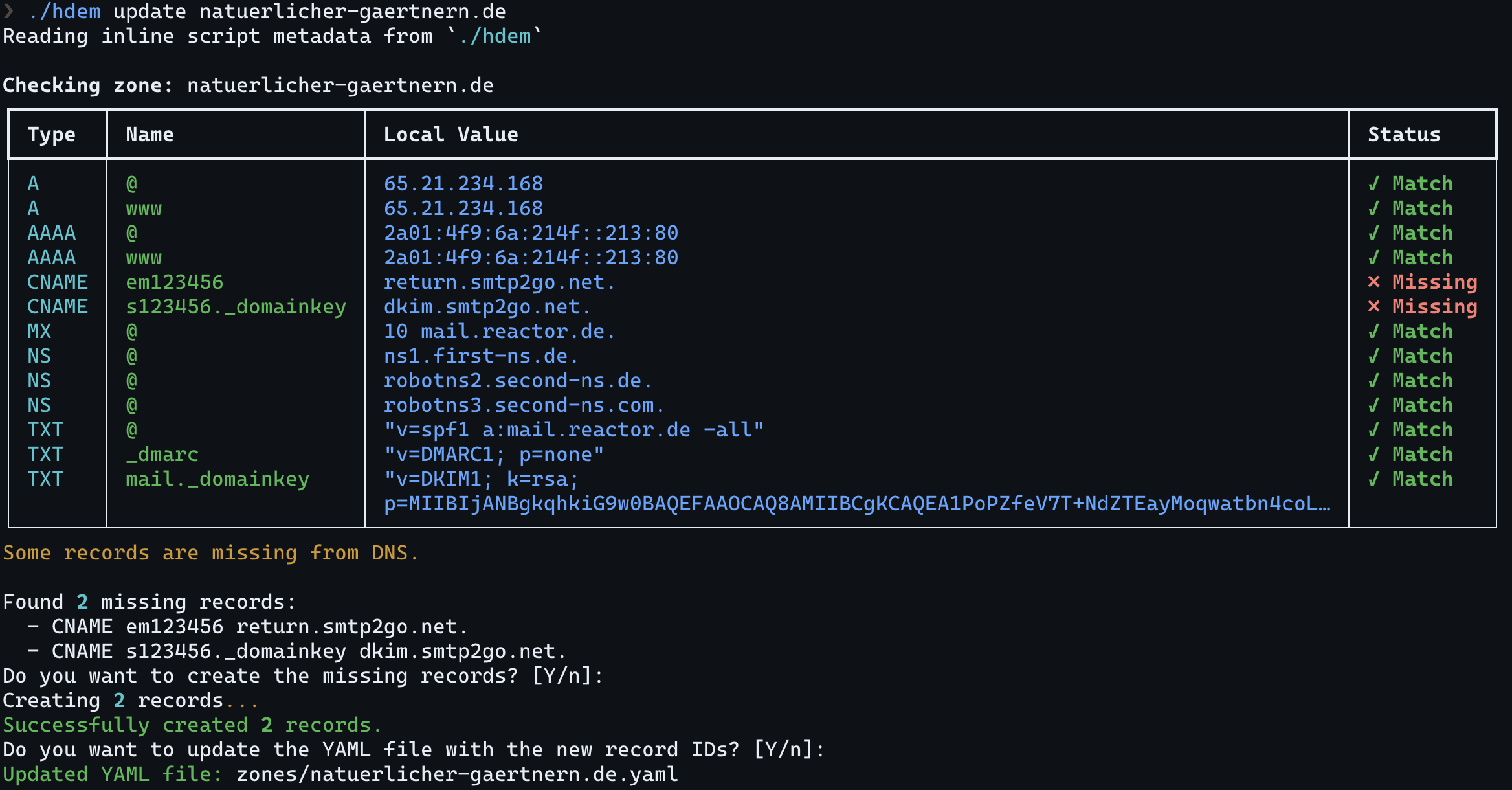
The same way you can update records and push those.
Installation
The script uses PEP 723 for dependency management, so it's self-contained. You'll need Python 3.10 or higher and a working installation of uv, installed via your OS's package manager or via pip.
# Clone the repository
git clone https://github.com/serpent213/hetzner-dns-manager.git
cd hetzner-dns-manager
or
# Download raw script directly
curl -LO https://github.com/serpent213/hetzner-dns-manager/raw/refs/heads/master/hdem
chmod +x hdem
Install from PyPI
Alternatively install from PyPI:
# Install using pip
pip install hetzner-dns-manager

# Or with pipx for isolated installation
pipx install hetzner-dns-manager
After installation, you'll have access to the hdem command in your terminal.
Configuration
Set your Hetzner Cloud API token as an environment variable:
export HCLOUD_TOKEN="your_api_token_here"
You may want to add this to your shell profile file (.bashrc, .zshrc, etc.) for persistence.
By default, hdem reads and writes zone files in ./zones. Use --zones-dir or HDEM_ZONES_DIR
to select a different inventory:
hdem --zones-dir ./live-zones check --all
export HDEM_ZONES_DIR="$HOME/infrastructure/dns"
Usage
The database consists of one YAML file per zone in the configured zones directory.
Import Zones and Records
Import a specific zone:
hdem import example.com
Import all zones:
hdem import --all
This will create YAML files in the configured zones directory.
Segmented TXT records (like "abc" "def") will be concatenated (to "abcdef") by default. This might be undesirable and can be disabled by passing --no-txt-concat.
Check DNS Records
Check a specific zone against actual DNS entries using one of the domain's authoritative servers:
hdem check --verbose example.com
Check all zones:
hdem check --all
SOA records will be ignored as they are updated automatically by Hetzner.
Update DNS Records
Check and update mismatched records for a specific zone:
hdem update example.com
Check and update mismatched records for all zones:
hdem update --all
To create new records, add them to the relevant RRSet in your zone YAML. To create a new name/type pair, add a new RRSet.
Delete DNS Records
Delete a specific record by name:
hdem delete example.com www
If there is more than one candidate, hdem will ask you which records to delete.
Migrate Local YAML Files
Rewrite a legacy flat records: file into the native RRSet format:
hdem migrate example.com
Rewrite all local zone files:
hdem migrate --all
Data Structure
The YAML files in the configured zones directory follow this RRSet-based structure:
version: 2
id: 123456
name: example.com
ttl: 86400
rrsets:
  - name: www
    type: A
    records:
      - value: 192.0.2.1
  - name: '@'
    type: MX
    records:
      - value: '10 mail.example.com.'
Older flat records: files are still accepted when reading. Normal writes preserve the file format that was read. Use hdem migrate example.com or hdem migrate --all to rewrite local files in the RRSet format.
Related Projects
Some other tools dealing with Hetzner DNS (that are not dynamic DNS updaters):
1 maintainer

Metadata
1 maintainer
Release files for hetzner-dns-manager 0.4.0
For a detailed explanation of source distributions (sdists) and built distributions (wheels), please see the package formats documentation.
Source distribution (sdist)
| File | Size | Uploaded | |
|---|---|---|---|
| hetzner_dns_manager-0.4.0.tar.gz | 18.6 kB | Details |
Built distribution (wheel)
| File | Interpreter | ABI | Platform | Reset |
|---|---|---|---|---|
| hetzner_dns_manager-0.4.0-py3-none-any.whl | Python 3 | none | any | Details |
Total release size: 40.6 kB
Release files / hetzner_dns_manager-0.4.0.tar.gz
| Download URL | hetzner_dns_manager-0.4.0.tar.gz |
|---|---|
| Size | 18.6 kB |
| Tags | Source |
|
SHA-256 checksum How to use checksums |
1631acedd6ef3b23dd2cad53d7b3f3f95e0b3f4906b844f2605b20492c2ad0cd
|
|
BLAKE2b-256 checksum How to use checksums |
8d5e890256f3fa3ad870d7c3d2c69337400f2dbbac8e9c08624d3e81d609a627
|
| Upload date | |
|
Uploaded using Trusted Publishing? What is trusted publishing? |
No |
| Uploaded via |
uv/0.11.11 {"installer":{"name":"uv","version":"0.11.11","subcommand":["publish"]},"python":null,"implementation":{"name":null,"version":null},"distro":{"name":"macOS","version":null,"id":null,"libc":null},"system":{"name":null,"release":null},"cpu":null,"openssl_version":null,"setuptools_version":null,"rustc_version":null,"ci":null}
|
Release files / hetzner_dns_manager-0.4.0-py3-none-any.whl
| Download URL | hetzner_dns_manager-0.4.0-py3-none-any.whl |
|---|---|
| Size | 22.0 kB |
| Tags | Python 3 |
|
SHA-256 checksum How to use checksums |
8408577d42513410c1a2f914f12018a27a4d19ebb5d1f4fa2591db0cb42ba61f
|
|
BLAKE2b-256 checksum How to use checksums |
1e5b2705ddcd3ab6a36702516096fb34e7cb4f2919a9650e0e8d365bcb316501
|
| Upload date | |
|
Uploaded using Trusted Publishing? What is trusted publishing? |
No |
| Uploaded via |
uv/0.11.11 {"installer":{"name":"uv","version":"0.11.11","subcommand":["publish"]},"python":null,"implementation":{"name":null,"version":null},"distro":{"name":"macOS","version":null,"id":null,"libc":null},"system":{"name":null,"release":null},"cpu":null,"openssl_version":null,"setuptools_version":null,"rustc_version":null,"ci":null}
|














