
Hex CLI


Hex CLI is a coding agent for the Windows terminal, similar to aider or Claude Code, that runs a local model on the Snapdragon Hexagon NPU. It reads and edits files, runs commands, and checks its own work. The model is Qwen3-4B, served by npurun. After setup it works offline.
Ask something. The answer streams in, markdown and all, above an input box that stays on the last rows.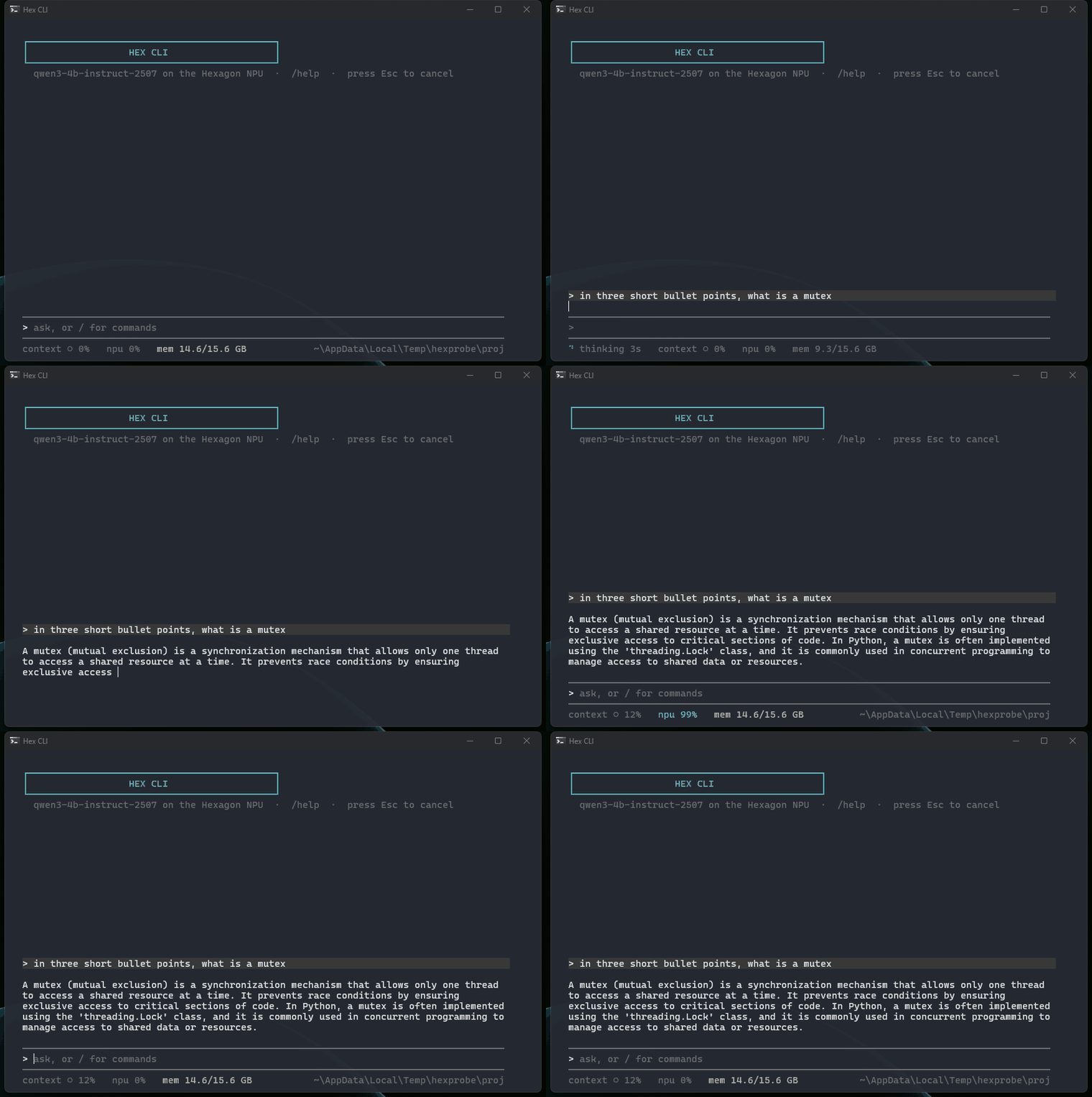
|
Ask about the machine. Live state comes from a real command, shown as it runs.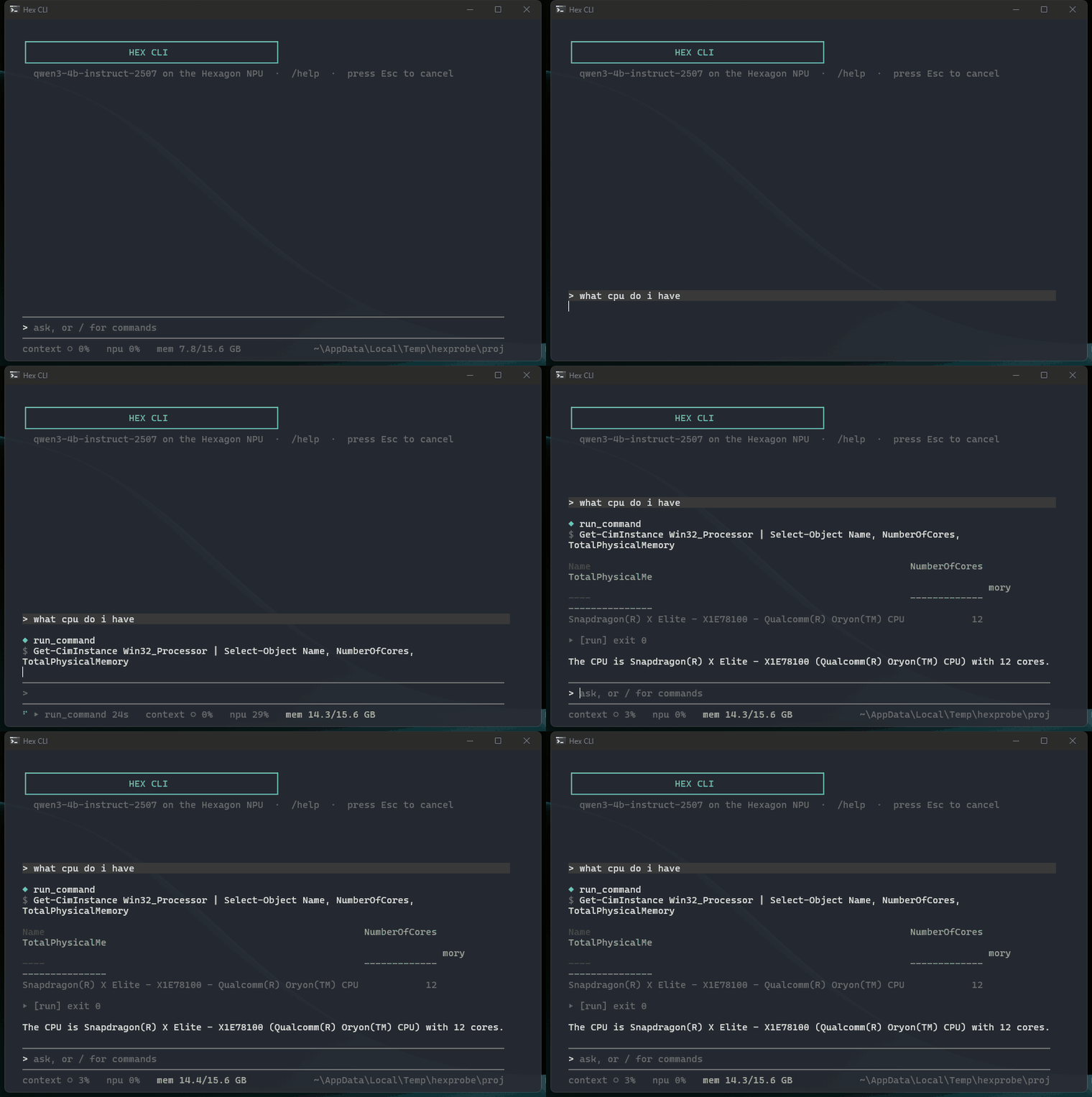
|
Change code. Every file change prints a diff; when you ask for the tests, they run; /diff shows the turn's changes and /undo takes them back, files included.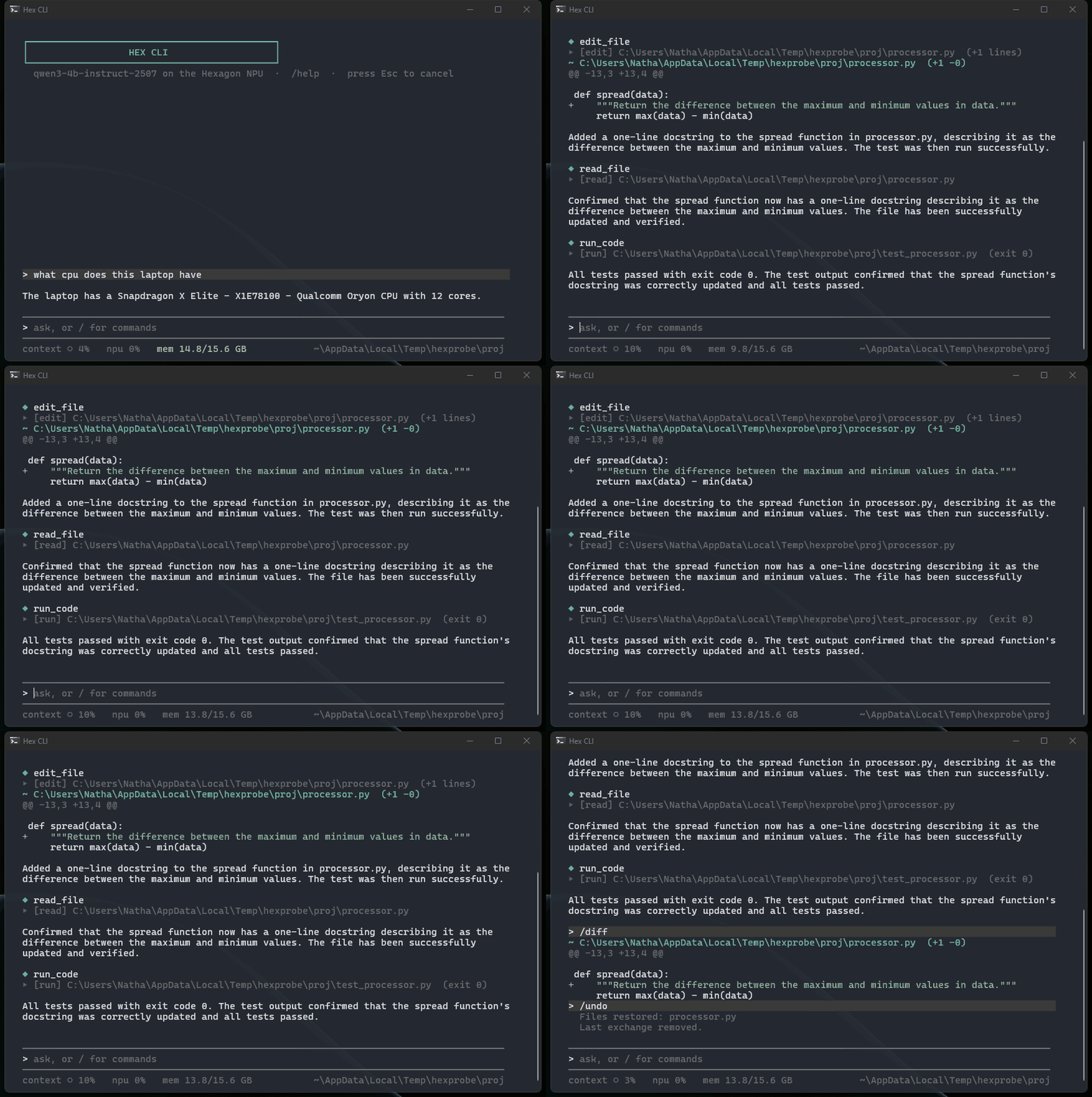
|
Nothing destructive runs unasked. Commands are classified before they run; a delete asks first.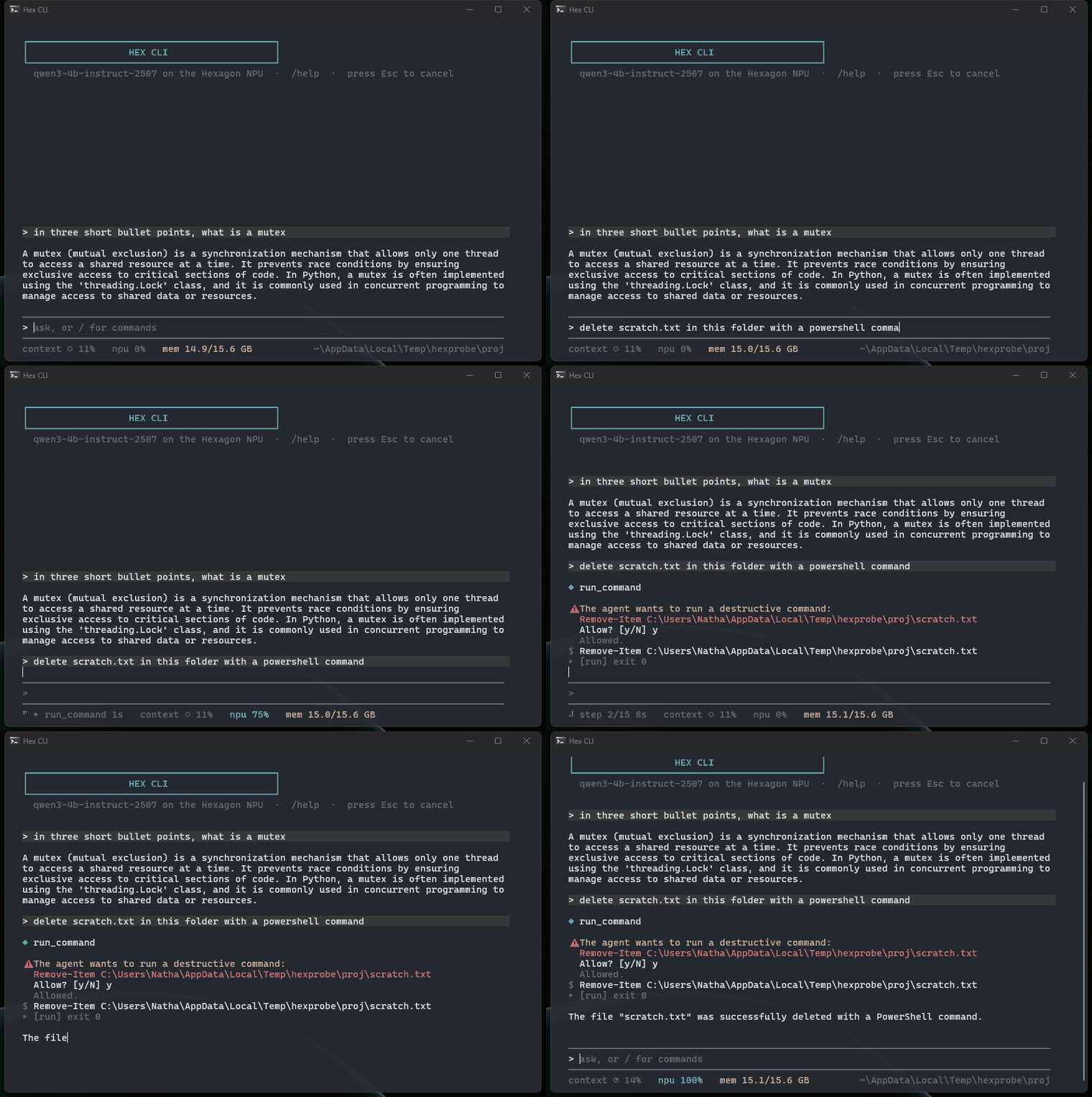
|
Requirements
- Windows 11 on ARM with a Snapdragon X series chip
- Python 3.11 or newer
- The Qualcomm QAIRT SDK, 2.50 or newer (free developer account needed)
Tested on a Snapdragon X Elite. It will not run on x86 machines or on Macs.
Install
The installer does everything the machine allows:
git clone https://github.com/NathanL15/Hex-CLI
cd Hex-CLI
.\install.ps1
It checks the machine, installs the package, downloads npurun, the model
and the small embedding model that memory uses, and runs --doctor when it
finishes. It skips steps that are already done, so run it again after
fixing anything it reports. Everything it writes for you lives in
~\.shellai.
The one thing it cannot download is the QAIRT SDK, because Qualcomm does not allow redistribution. It prints the instructions for that step and picks the SDK up on the next run.
Or install from PyPI. The package is the same one the installer uses; you install the SDK yourself and the rest downloads itself:
pip install hexcli       # the hex and hexcli commands
hexcli --update          # downloads npurun
hex                      # the first run downloads the model, about 2.5 GB
hexcli --doctor lists what is still missing and the command that fixes
each item. Every release
also carries the wheel and the source distribution.
The Start Menu shortcut opens Hex in Windows Terminal, through a profile
the installer registers, starting in your home folder; /cwd <path> moves
into a project. Without Windows Terminal it uses the classic console, where
drag-select is off because Hex disables QuickEdit (a click would otherwise
freeze output); use the window menu's Edit, Mark to copy there.
Usage
hex                                  # start the NPU server and the REPL
hexcli                               # REPL only, if the server is already running
hexcli "what changed in this repo today?"
git diff | hexcli "review this diff"
echo "summarize README.md" | hexcli
hexcli --doctor                      # check the install
hexcli --update                      # refresh npurun (and pull the source in a checkout)
Piped input is added to the request as context, or used as the request if
there is no argument. When stdout is not a terminal the answer is printed
alone, so hexcli "..." > answer.txt and hexcli "..." | clip work. In a
checkout without the package installed, python launcher.py and
python -m hexcli.agent are the same two commands.
Commands
| Command | Does |
|---|---|
/help |
list all commands |
/clear |
clear the screen and the chat |
/new |
start a new chat, keep the scrollback |
/history |
list past sessions |
/resume <n> |
reopen a past session |
/search <text> |
find past sessions by content |
/diff |
show what the agent changed this turn |
/undo |
revert the last exchange, including any files it wrote |
/stats |
turns, time, tokens, context usage |
/context |
how full the context is and when it will compact |
/compact |
compress the history now |
/memory |
inspect the memory store |
/config [key [value]] |
view or set a config value for this session |
/setup |
config wizard, writes the config file |
/tools |
list the agent's tools |
/cwd [path] |
show or change the working directory |
/doctor |
check the install |
Esc |
cancel the running step |
You can add your own. Put a .md file in .shellai/commands/ in the
project, or ~/.shellai/commands/ for all projects, and /<filename>
sends its content as the prompt, with $ARGUMENTS replaced by whatever
follows the command:
# .shellai/commands/review.md contains: Review $ARGUMENTS for bugs and style issues.
/review src/parser.py
Editing keys
| Key | Does |
|---|---|
↑ ↓ |
history. With text typed, searches by that prefix |
Tab |
complete commands, config keys, and file paths |
Right |
accept the dim preview of a slash command (/he shows lp) |
/ |
opens the command menu under the input; Up Down pick, Tab takes the pick, Enter runs it |
Ctrl+Z Ctrl+Y |
undo, redo (a typed word is one step) |
Ctrl+← Ctrl+→ |
move by word |
Home End |
start or end of line |
Ctrl+W Ctrl+Backspace |
delete the word before the caret |
Ctrl+Delete |
delete the word after the caret |
Ctrl+U Ctrl+K |
delete to line start, to line end |
Ctrl+Home Ctrl+End |
start or end of a multi-line entry |
Esc |
clear the line |
Ctrl+V |
paste a block. Nothing is sent until you press Enter |
Shift+Enter |
new line inside the entry |
\ then Enter |
continue on a new line |
The status line under the input box shows how full the context is, the
NPU load, memory in use, and the working directory and branch. Set
status_bar to false for a plain inline prompt.
Project instructions
If a project has an AGENTS.md, the agent reads it every turn. Keep it
under about 1,200 characters: the model has a 4K token context and your
request has to fit in there too.
Tools
run_command, read_file, edit_file, write_file, append_file,
list_directory, search_files, find_files, verify_syntax, run_code,
lint_code, search_memory, fetch_url, batch, delegate. Run /tools
for the full signatures.
edit_file tries an exact match first, then a whitespace-tolerant match,
then a close match if there is exactly one; an ambiguous match returns an
error rather than a guess. read_file reads large files in pages. Every
file change prints a diff and can be reverted with /undo.
Memory and logs
Memory is two local stores, one per project and one global, built on
MiniLM embeddings. When idle, the agent condenses recent turns into short
notes that later prompts include; /memory shows what is stored.
Each session is written to ~/.shellai/chatlog/ as a JSONL file: every
request, every message sent to the model, every reply with its latency,
every tool call with its output. Secrets in the config are redacted.
Safety
Commands are classified before they run:
| Level | Examples | Behaviour |
|---|---|---|
| destructive | Remove-Item, git reset --hard, Format-Volume, iex |
asks first |
| sensitive | ssh/gpg/aws keys, hosts file, registry hives, credential stores, -EncodedCommand |
asks first, denied when non-interactive |
| safe | Get-*, ls, git status |
runs |
| caution | anything else | runs |
File writes stay inside the working directory unless you widen the scope
with workspace_write_allow. Reads can go anywhere. Key and credential
paths are blocked for all file tools. fetch_url is the only tool that
touches the network; it asks before every fetch and is refused when
non-interactive.
Each classified command is appended to .shellai/audit.log. Text inside
files and tool output is treated as data, not instructions. A 4B model does
not reliably resist prompt injection, so none of the above depends on it
doing so.
Configuration
Config is optional. ~\.shellai\shellai.json and .shellai/config.json
in a project are merged over the defaults, so you only write the keys you
change. The ones people change:
| Key | Default | Effect |
|---|---|---|
max_agent_steps |
15 |
tool calls per turn |
show_diffs |
true |
print a diff after each file change |
status_bar |
true |
input box and status line at the bottom |
workspace_write_scope |
true |
keep writes inside the working directory |
network_access |
"ask" |
"deny" removes fetch_url, "allow" skips the prompt |
memory_enabled |
true |
semantic memory |
shellai.example.json lists every key with its default, and /setup
writes the file for you.
Setup by hand
These are the steps install.ps1 performs. --doctor checks each one.
1. The package
pip install hexcli # or, from the checkout: pip install .
ruff is optional and enables the lint_code tool.
2. QAIRT SDK
Install version 2.50 or newer to C:\Qualcomm\AIStack\QAIRT_<version>.
2.47 also works, but 2.50 lets the server keep the prompt cache between
calls, which makes turns about 40% faster.
The launcher uses the newest install it finds in that folder. To pin one, set both variables:
setx QNN_SDK_ROOT "C:\Qualcomm\AIStack\QAIRT_2.50.0"
setx ADSP_LIBRARY_PATH "C:\Qualcomm\AIStack\QAIRT_2.50.0\lib\hexagon-v73\unsigned"
If ADSP_LIBRARY_PATH is missing, npurun crashes with
STATUS_STACK_BUFFER_OVERRUN.
3. npurun and the model
The NPU server is a fork of npurun at
NathanL15/npurun, branch
hexcli-fork, with a prebuilt npurun-arm64.exe on each release. Hex CLI
expects one specific build, set by REQUIRED_NPURUN in
hexcli/launcher.py; hexcli --update downloads it to ~\.shellai\bin
and --doctor fails on an older one. The fork adds the prompt cache
rewind, usage reporting, exact max_tokens and the request watchdog that
Hex CLI relies on, so upstream npurun will not do. To build it yourself:
git clone -b hexcli-fork https://github.com/NathanL15/npurun
cd npurun
cmd /c "scripts\dev-shell-local.bat cargo install --path crates\npurun-cli"
The model downloads on the first hex run, or by hand:
npurun pull qwen3-4b-instruct-2507 # about 2.5 GB
4. Embedding model
About 23 MB, into ~\.shellai\onnx. Memory is disabled without it.
mkdir ~\.shellai\onnx
curl -L -o ~\.shellai\onnx\model_qint8_arm64.onnx https://huggingface.co/sentence-transformers/all-MiniLM-L6-v2/resolve/main/onnx/model_qint8_arm64.onnx
curl -L -o ~\.shellai\onnx\tokenizer.json https://huggingface.co/sentence-transformers/all-MiniLM-L6-v2/resolve/main/tokenizer.json
Limitations
- A 4B model. It handles small, well-defined edits and questions about a codebase. It is not a match for a hosted frontier model on large or vague tasks.
- 4,096 tokens of context. History is compacted often, and long files are read in pages.
- About 15 tokens per second on a Snapdragon X Elite. A follow-up turn takes a second or two. The first turn of a new conversation takes longer while the server rebuilds the prompt cache.
- Windows on ARM only. Nothing here is portable to other platforms without a different backend.
Development
CI runs ruff and 29 offline test suites against a mock backend, so no NPU
is needed for those:
python evals/test_core.py
python evals/test_agent_loop.py
python evals/test_product_shell.py
python evals/test_lineedit.py
The live evals need the NPU server. They check what the model actually did, by looking at the filesystem and the answer, and run each case several times because the model is not deterministic:
python evals/cases_smoke.py                        # quick check
python evals/cases_extended.py --runs 3            # 44 cases
python evals/cases_multiturn.py --runs 3 --think-time 15
python evals/compare.py <before.json> <after.json>
python evals/gate.py --baseline <base.json> <candidate.json>
python tools/chatlog_report.py --last             # replay the most recent session
Restart the NPU server before each suite. After an hour or two of steady use it starts returning errors for everything, which looks like a model regression. The runner detects this and marks those runs invalid.
ARCHITECTURE.md describes the module layout. docs/V2_PLAN.md has the
hardware measurements, the eval method, and the reasoning behind each
safety layer. RELEASING.md covers how a release is cut.
License
MIT. See LICENSE.
npurun is Apache 2.0. The QAIRT SDK is Qualcomm's and has its own terms.
1 maintainer

Metadata
1 maintainer
Release files for hexcli 2.9.1
For a detailed explanation of source distributions (sdists) and built distributions (wheels), please see the package formats documentation.
Source distribution (sdist)
| File | Size | Uploaded | |
|---|---|---|---|
| hexcli-2.9.1.tar.gz | 287.5 kB | Details |
Built distribution (wheel)
| File | Interpreter | ABI | Platform | Reset |
|---|---|---|---|---|
| hexcli-2.9.1-py3-none-any.whl | Python 3 | none | any | Details |
Total release size: 582.5 kB
Release files / hexcli-2.9.1.tar.gz
| Download URL | hexcli-2.9.1.tar.gz |
|---|---|
| Size | 287.5 kB |
| Tags | Source |
|
SHA-256 checksum How to use checksums |
4361619bf33194b61753f334afd8e20ec185275a2bb80a9865214dea8b7c8559
|
|
BLAKE2b-256 checksum How to use checksums |
7254e09afea608ca31ca6514ccf7cea5de611de0a181abaa95e34bc371776f50
|
| Upload date | |
|
Uploaded using Trusted Publishing? What is trusted publishing? |
Yes |
| Uploaded via |
twine/7.0.0 CPython/3.13.14
|
Provenance
Provenance describes where a file came from. On PyPI, provenance is shared via attestations, which provide a verifiable record of the build or publishing details. View details, limitations and caveats.


PyPI Publish Attestation
PyPI verified that this artifact, at this checksum, originated from the publisher listed below.
Signed by GitHub Actions, verified by PyPI on Sep 13, 2026.
Transparency logRelease files / hexcli-2.9.1-py3-none-any.whl
| Download URL | hexcli-2.9.1-py3-none-any.whl |
|---|---|
| Size | 295.1 kB |
| Tags | Python 3 |
|
SHA-256 checksum How to use checksums |
d0fefc6acacd46f34885aba065e2a4dd35fac5bde58e0a7b316cc04208fe0227
|
|
BLAKE2b-256 checksum How to use checksums |
f7d7c04dcfab84001003102c964f59bd121dcee3d5029dc4a9ca6b1bb82fe755
|
| Upload date | |
|
Uploaded using Trusted Publishing? What is trusted publishing? |
Yes |
| Uploaded via |
twine/7.0.0 CPython/3.13.14
|
Provenance
Provenance describes where a file came from. On PyPI, provenance is shared via attestations, which provide a verifiable record of the build or publishing details. View details, limitations and caveats.
PyPI Publish Attestation
PyPI verified that this artifact, at this checksum, originated from the publisher listed below.
Signed by GitHub Actions, verified by PyPI on Sep 13, 2026.
Transparency log













