

hexiel
An open-source AI coding agent for your terminal and browser — a guardian angel for your codebase.
Runs on local models (Ollama, even on a mini-PC iGPU) or any big cloud model.
A free, self-hostable alternative to Claude Code and opencode.
🌐 Website: hexiel.tech · designed by JKagiDesigns LLC
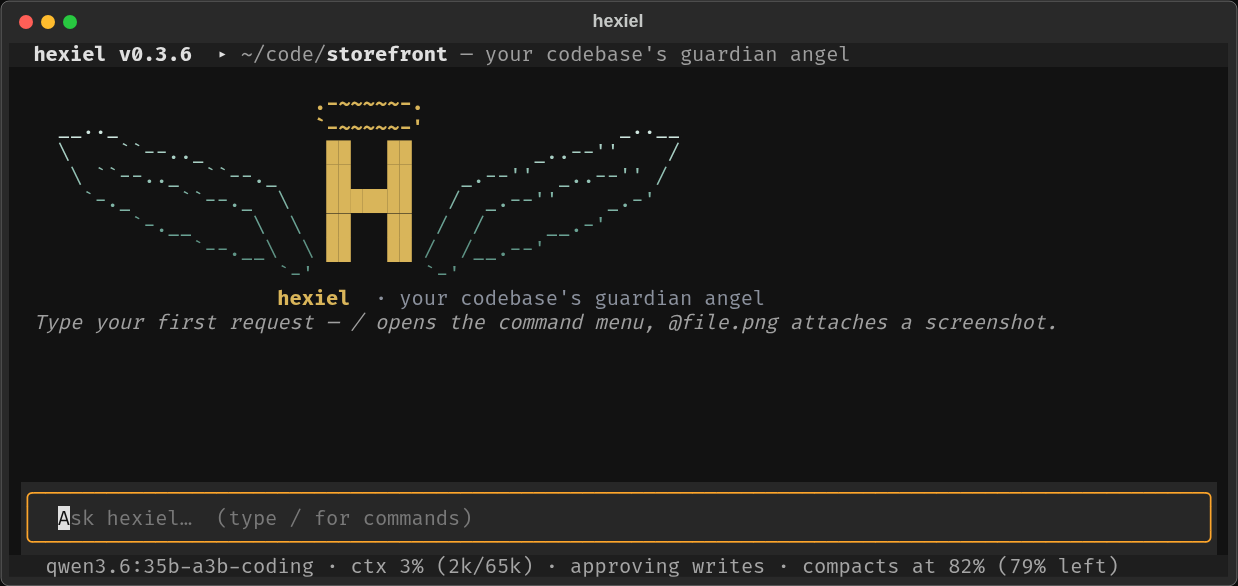
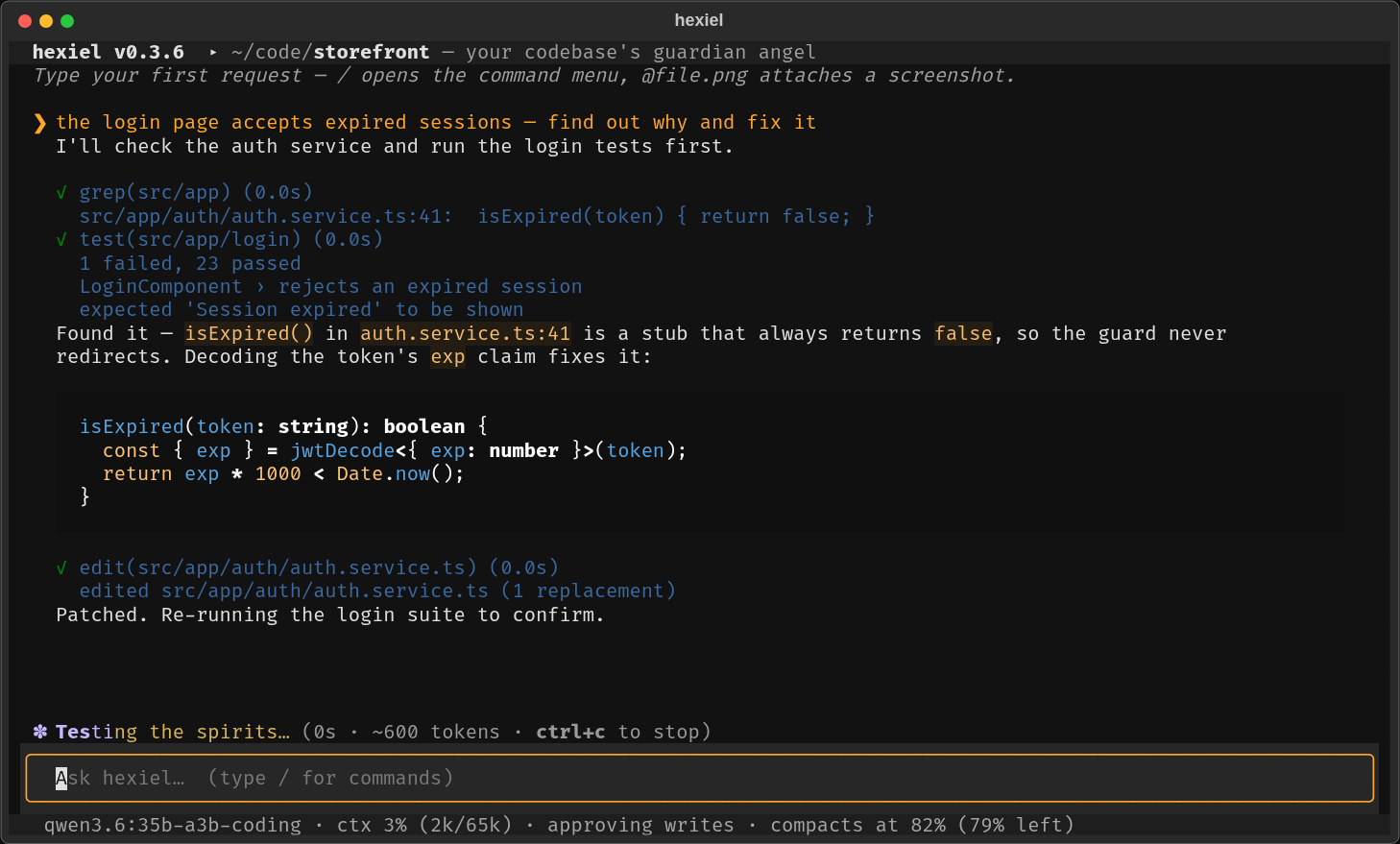
Why hexiel
- Built for modest hardware. Everything that doesn't need a model (searching,
mapping the project, waiting on tests, distilling web pages, batching work in a
pythonscript) runs locally in Python. The prompt is kept lean: on an Intel iGPU mini-PC runningqwen3.6:35b-a3b-coding, each request's prompt processing dropped from 46.5 s to 23.7 s in v0.2.6. - Any model, local or cloud. Ollama (local or Cloud), Anthropic, OpenAI, Gemini, xAI, OpenRouter, DeepSeek, or any OpenAI-compatible server (vLLM, LM Studio, TGI). Switch per session or permanently, from the UI.
- Terminal and browser. A full-screen TUI, a browser UI, one-shot headless runs, and an OpenAI-compatible API — one agent core behind all of them.
- Brings your ecosystem. Your existing Claude Code skills (
~/.claude/skills) and OpenWebUI tool/pipe/filter plugins work as-is. - Remembers and keeps track. File-based memory (
MEMORY.md), atodo.mdthat survives crashes, auto-compaction at a Claude-Code-sized context window. - Fixes itself. Crashes become incident files;
/healreproduces, fixes, tests and proposes a merge request — you approve it. - Free to use, can't be resold. GPLv3 + Commons Clause.
Quickstart
The quickest way, from PyPI:
pipx install 'hexiel[serve]'          # or: pip install 'hexiel[serve]'
hexiel --doctor                       # preflight checks with copy-paste fixes
cd ~/code/your-project && hexiel
Or from source (to hack on it):
git clone https://gitlab.com/jkagidesigns1/public/applications/hexiel.git
cd hexiel
python -m venv .venv
.venv/bin/pip install -e '.[serve]'     # Windows: .venv\Scripts\pip install -e ".[serve]"
.venv/bin/hexiel --doctor               # preflight checks with copy-paste fixes
.venv/bin/hexiel                        # start the TUI
Then put it on your PATH so it runs from any project:
ln -s "$PWD/.venv/bin/hexiel" ~/.local/bin/hexiel
cd ~/code/your-project && hexiel
hexiel always treats the directory you launch it from as the project: it
detects that tree's toolchain, reads its skills and keeps its state
(.hexiel/ — todo, memory, incidents, web cache) right there. The header shows
the hexiel version and the project you're in; hexiel -c resumes the last
conversation of this project.
Windows: works out of the box — the agent shells through PowerShell (pwsh,
winget install Microsoft.PowerShell), and bash falls back to it when no
WSL/git-bash is on PATH.
Ways to run it
hexiel                    # full-screen terminal UI
hexiel --serve            # browser UI at http://127.0.0.1:8777
hexiel -p "explain this repo in one paragraph"   # one-shot, headless
hexiel -c                 # resume this project's last conversation
hexiel -m sonnet          # pick a model profile for this run
Using it
 |
 |
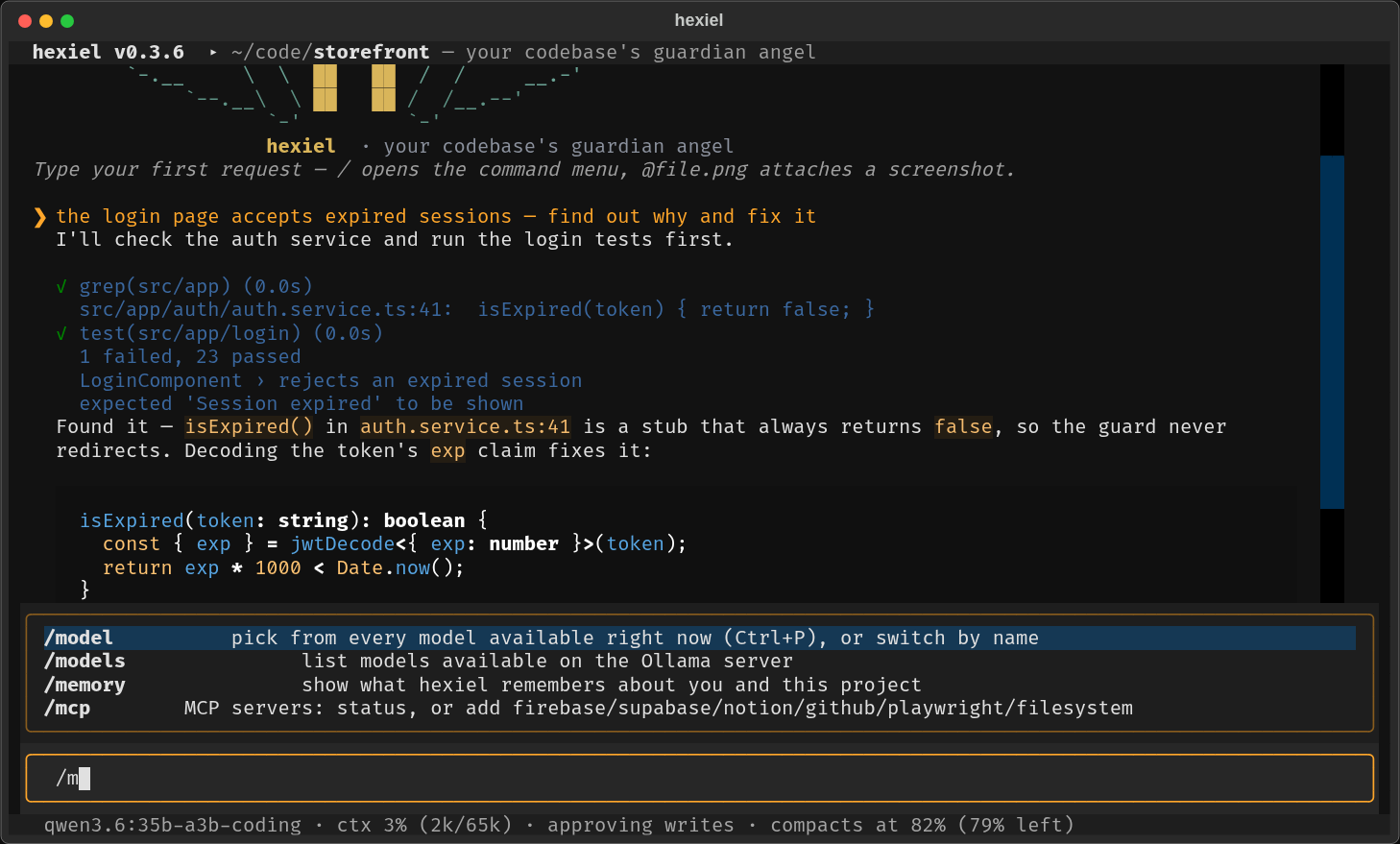
Type / for the command menu — every command and skill with what it does; ↑/↓, Tab to complete, Enter to run. /model lists your profiles. |
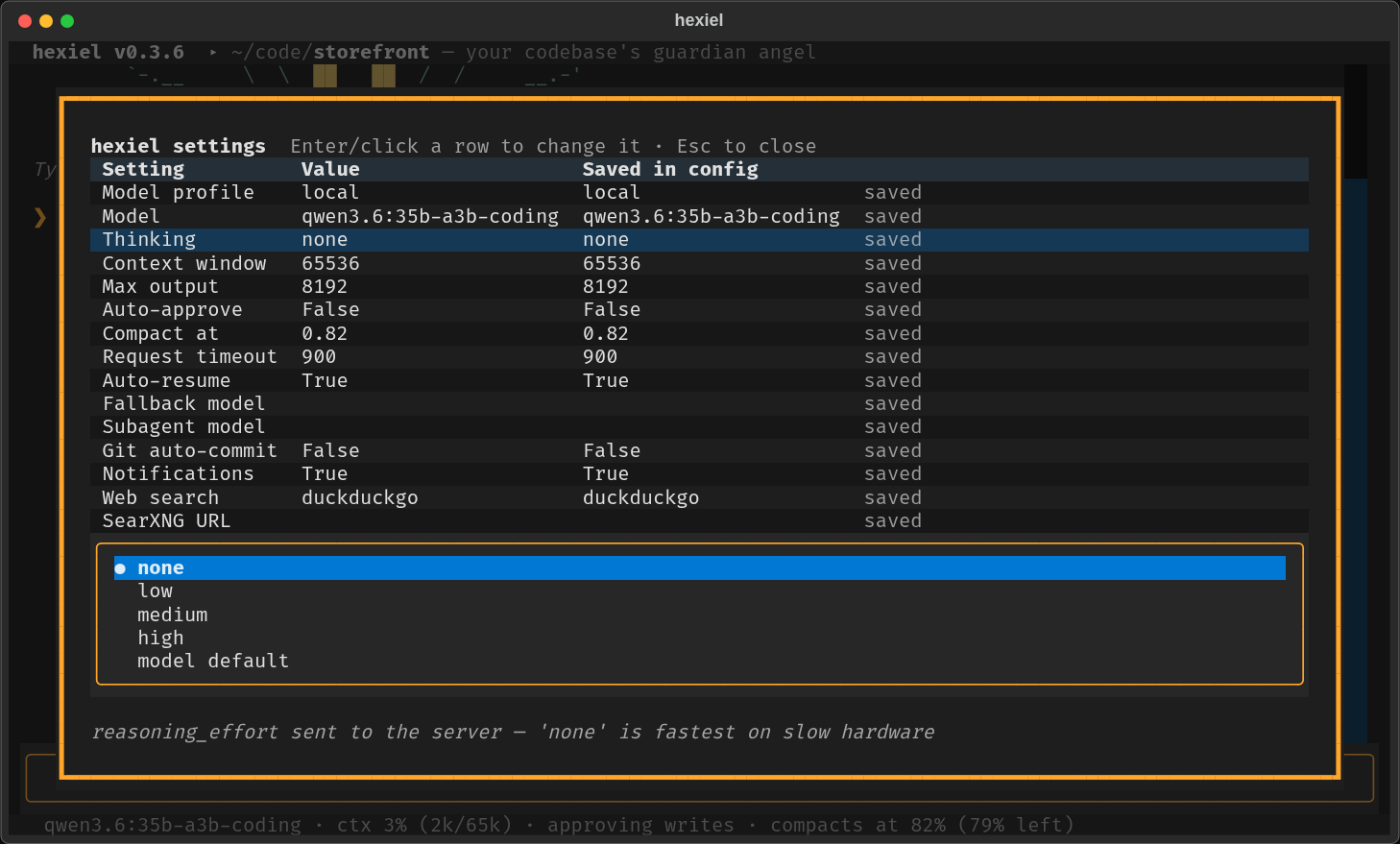
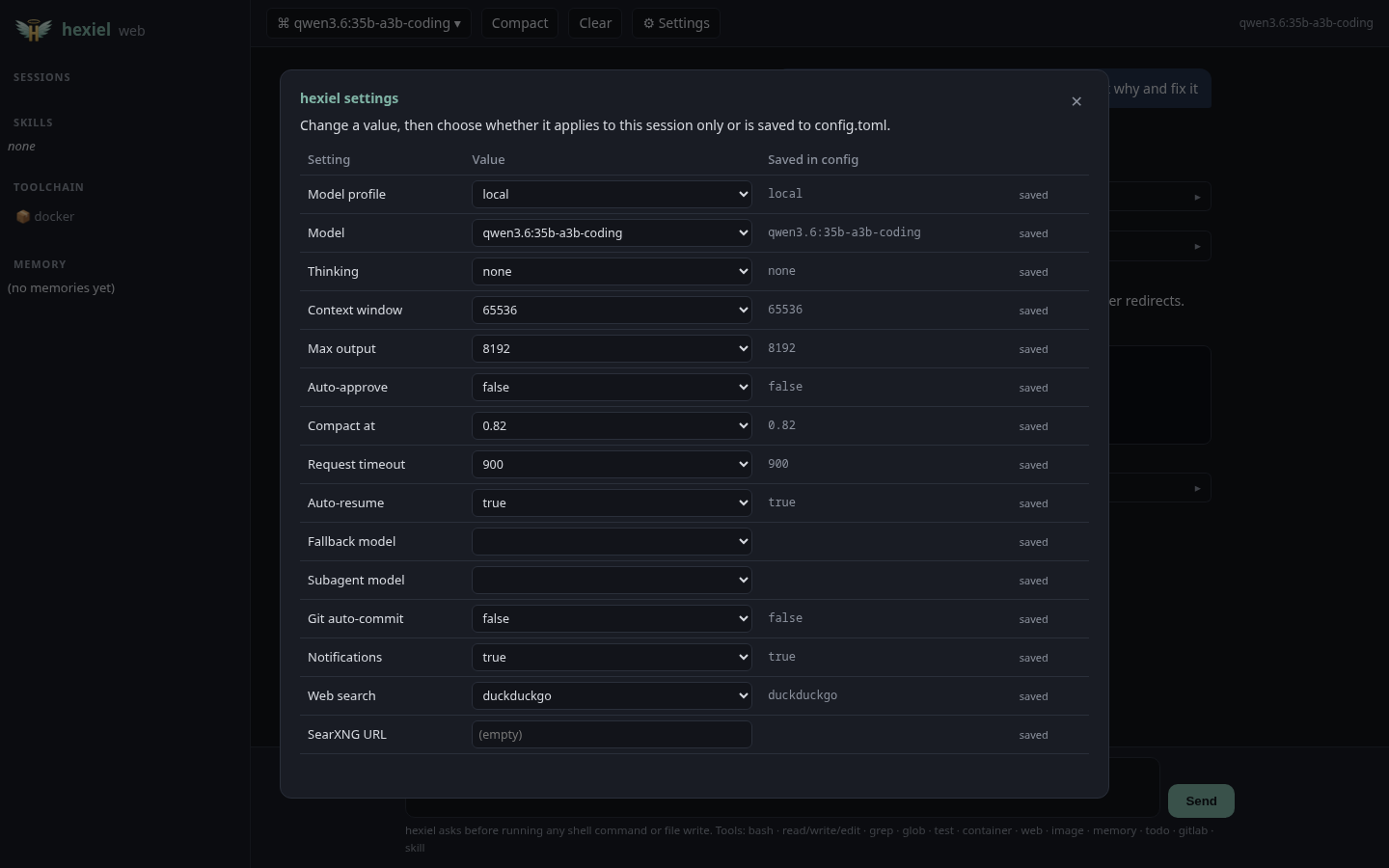
/config shows every setting in a table. Pick a row, pick a value, then choose this session or save permanently (one line of config.toml changes; comments are kept). |
- Screenshots: type an image path in your message (
why does @shot.png look broken?,~/Pictures/error.jpg) and it's attached for vision models. - Activity line: while hexiel works, the bottom-left shows what it's doing —
thinking, writing, running your tests — with elapsed time and tokens.
Ctrl+Cstops a turn. - Approvals: edits and commands ask first (
y/always /n);/autogoes hands-free. - Updates: hexiel checks for new releases in the background.
/update(or the web UI's update button) installs it and restarts, resuming your conversation. It refuses to update a checkout with uncommitted changes.
Control, safety and flow
Model picker (Ctrl+P / /model) |
Every model reachable right now — local Ollama, Ollama Cloud, Anthropic, OpenAI, OpenRouter… queried live each time, searchable |
| Auto-resume | Hit a rate or usage limit? hexiel counts down to the reset and continues the same turn; with fallback_profile it switches to e.g. your local model instead |
| Permission rules | Claude Code syntax — Bash(git status:*), Read(./.env), Edit(src/**), WebFetch(domain:…); deny > ask > allow; reads .claude/settings.json. "Always" answers are scoped to that kind of call |
Plan mode (/plan) |
Investigate and propose a plan; nothing is changed until you turn it off |
Undo (/undo) |
Reverts the files hexiel changed in its last turn, turn by turn |
| Hooks | Claude Code compatible (PreToolUse, PostToolUse, UserPromptSubmit, Stop, SessionStart); exit 2 blocks |
| Custom commands | Markdown prompts in .hexiel/commands/ or .claude/commands/ become /name (with $ARGUMENTS) |
Subagents (task tool) |
Searches and research run in a helper's own context; only the answer comes back — optionally on a cheaper/local subagent_profile |
| Instant checks | Every write/edit is syntax-checked locally (Python, JSON, TOML, shell, JS) in the same step |
| Also | /usage (tokens in/cached/out), desktop notifications when you're needed, opt-in git auto_commit, Claude prompt caching, a guard that stops runaway model output |
For analysts, researchers and small businesses
No code needed — just ask:
| Ask | What hexiel does (locally, cheaply) |
|---|---|
| "Which region beat its target? sales.csv vs targets.xlsx" | Reads a compact schema card of each file (not the file), answers with SQL (DuckDB) across CSV / Excel / Parquet / JSON — only the aggregated result reaches the model |
| "Keep a list of my customers and invoices" | Creates and updates a local SQLite database (.hexiel/data.db) — no setup |
| "Add an 'actual' column to Q3 in budget.xlsx" | Edits Excel cells, ranges and sheets, keeping your formatting |
| "Chart revenue by month" | An interactive HTML chart you can open in any browser |
| "Every Monday at 8am, summarise last week's sales and flag anything odd" | A scheduled job that runs even when hexiel is closed (systemd/cron, launchd, Windows Task Scheduler); results land in /inbox with a desktop notification |
| "What do these papers say about irrigation? Cite pages." | Indexes your PDFs / Word / Markdown once, then answers from the best passages with [file p.N] citations — keyword + (optional, local) semantic search, never whole documents in the prompt |
| "Research the state of IndexNow adoption" | Deep research: plans sub-questions, then searches and reads many pages in parallel in Python and hands the model one cited evidence pack |
| "Connect my Firebase project" | /mcp add firebase — also supabase, notion, github, playwright (browser automation), filesystem |
Data and scheduling tools load only when needed (automatically when a project contains data files, or on request), so coding sessions don't pay for them in every prompt.
Browser UI
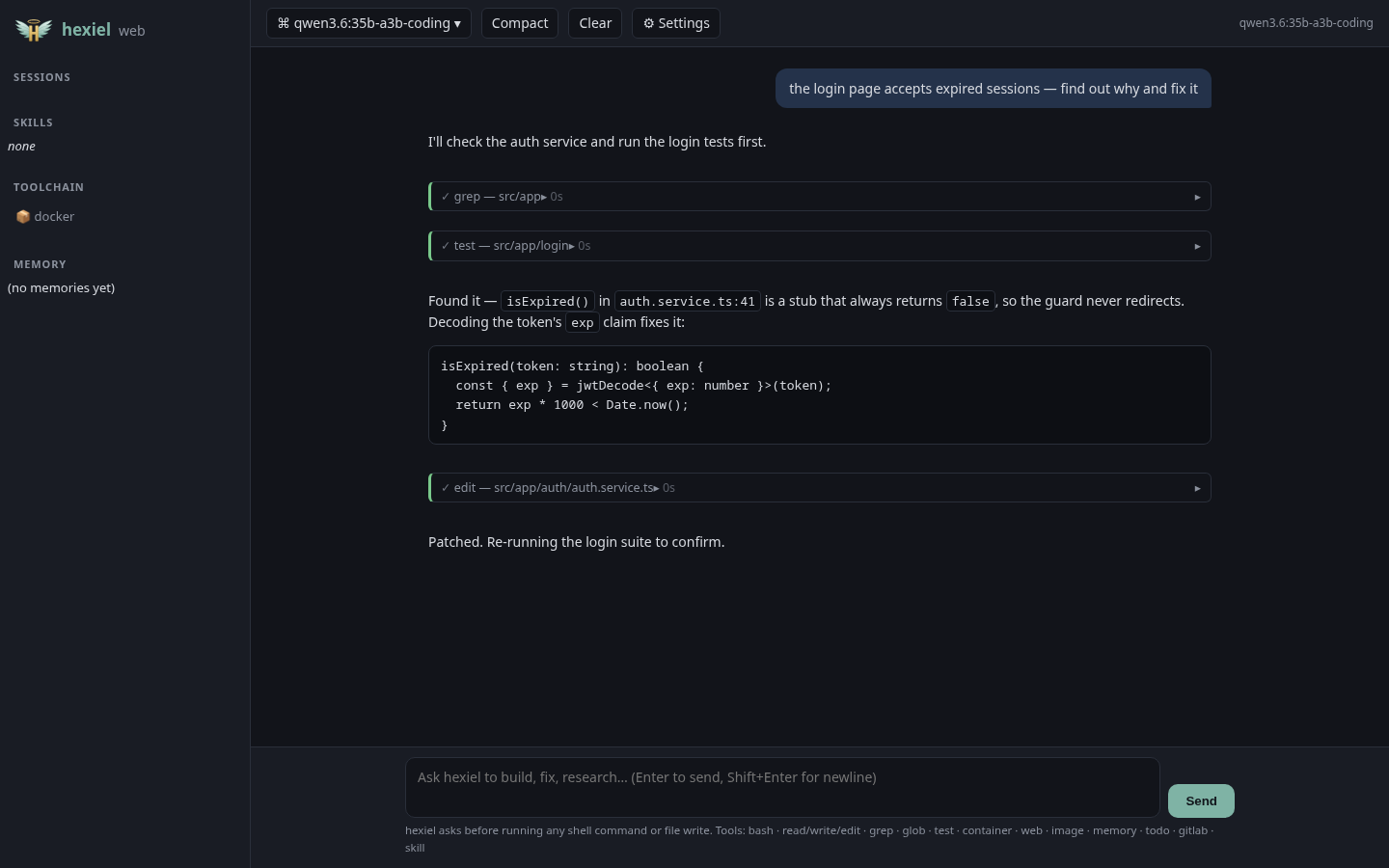
hexiel --serve runs the same agent in a browser (with the same / command menu and live model picker): streamed markdown, tool-call
cards, approval dialogs, model picker, ⚙ settings, context gauge, todo, memory
and sessions. Local-only by default; --host 0.0.0.0 prints a loud warning
(anyone who can reach the port can run commands on your machine).
 |
 |
Models
Fastest start: /model add <preset> in the terminal UI — presets for Claude
(sonnet, opus, haiku), OpenAI (gpt), Gemini (gemini), xAI (grok),
DeepSeek, Kimi, GLM, Mistral, Groq, Together, Fireworks, OpenRouter, Azure,
Bedrock, and local Ollama / LM Studio / vLLM / llama.cpp. hexiel --presets
lists them; docs/MODELS.md has copy-paste config for each,
including provider quirks hexiel handles for you.
Profiles live in ~/.config/hexiel/config.toml (written on first run). Switch
with /model NAME, hexiel -m NAME, or the settings table.
default = "local"

[models.local]                      # Ollama on this machine or a home server
provider = "openai"
base_url = "http://localhost:11434/v1"
model = "qwen3.6:35b-a3b-coding"    # coding + screenshots + tool calling in one model
context_window = 65536              # match the server's OLLAMA_CONTEXT_LENGTH
extra_body = { reasoning_effort = "none" }   # skip slow "thinking" on modest hardware

[models.sonnet]
provider = "anthropic"
model = "claude-sonnet-5-5"
api_key_env = "ANTHROPIC_API_KEY"
Picking a local model: on low-end hardware, prefer mixture-of-experts
models with ~3B active parameters (they run several times faster than dense
models of the same size) that have vision + tool-calling. qwen3.6:35b-a3b-coding
passed all of hexiel's checks (tool calls, screenshots, a compiled Java task) on
an Intel iGPU at ~12 tokens/s. Hybrid "thinking" models should run with
reasoning_effort = "none"; otherwise one step can take minutes.
What hexiel does
Tools
bash · python (batch many steps into one local script) · read · write ·
edit · glob · grep · list · map (cached project tree) · file_info ·
powershell · test (your detected runner) · container (docker/podman +
compose) · view_image / image_edit · web_search / web_fetch (no API key
needed) · memory · todo · gitlab_mr · skill — plus any MCP server's tools and any OpenWebUI plugin in plugins/.
Context discipline
- Auto-compaction, Claude-Code style: at 82% of the context window, older history is summarized (task, recent work, decisions, errors, next steps) and the conversation continues. Real provider usage numbers drive it.
- Local-first token economy: tool output is budgeted and distilled in Python before the model sees it.
| Work | Where it runs |
|---|---|
| Toolchain discovery, project map, file indexing | local (Python) |
| Multi-step reads/searches/parsing | one python script instead of many model round-trips |
| Long command output | head + tail kept, middle elided |
| Waiting for tests / containers / builds | local; only the verdict + failures reach the model |
| Duplicate tool calls in a turn | answered from cache |
| Web pages | distilled to text; full text parked on disk for follow-up reads |
| Old tool output and images in long sessions | dropped locally before any summarization call |
| Skills | one-line index; full instructions load only when used |
| Reasoning, planning, writing code | the model — spend tokens there, nowhere else |
Project instructions, todo and memory — maintained automatically
- Project instructions:
AGENTS.md/CLAUDE.md/HEXIEL.md(any letter case) at the project root are loaded into every session; a roottodo.mdis pointed out so the model reads it when you say "continue". - todo.md: multi-step work is tracked in
<project>/.hexiel/todo.md(- [ ]queued, one- [~]in progress,- [x]done). When a request takes three or more tool calls and the model hasn't planned it itself, hexiel logs it as a task, refreshes the where we left off line after every step and ticks it off when the turn completes — in Python, at zero token cost. If hexiel or your laptop dies mid-task,hexiel -cresumes from an accurate checkpoint. - Memory:
~/.local/share/hexiel/memory/(global) and<project>/.hexiel/memory/(project), markdown notes indexed byMEMORY.md. The model saves what it learns; and every auto-compaction also extracts durable facts (build/test commands, conventions, your preferences) intoauto-facts.md— deduplicated, no extra model call. - Skills are
SKILL.mdfolders from~/.local/share/hexiel/skills/, the project, and~/.claude/skills/— Claude Code skills work unchanged.
Self-healing — fix hexiel, then share the fix with everyone
Crashes and provider errors are recorded to .hexiel/incidents/. Run /heal
(or /heal <what went wrong> for a bug you noticed) and hexiel:
- makes an isolated copy of its own source at the version you're running
(a git worktree — or, for
pipinstalls, a clone of the release tag) under~/.local/share/hexiel/heal/. Your project and your install are untouched; - reproduces the bug, fixes the root cause and adds a test, running the suite there;
- opens a lazygit-style review: changed files on the left with checkboxes,
a colour diff on the right (
spaceinclude/exclude,aall/none); - you choose:
- Send to hexiel (and keep) — commits only the files you ticked and opens a
merge request to the official repo (via a fork if you're not a maintainer), so
every hexiel user gets the fix once it's reviewed. Needs a free GitLab account
(
/setup-gitlab <token>). - Keep just for me — applies the ticked files to your hexiel.
- Discard, or decide later with
/heal review.
- Send to hexiel (and keep) — commits only the files you ticked and opens a
merge request to the official repo (via a fork if you're not a maintainer), so
every hexiel user gets the fix once it's reviewed. Needs a free GitLab account
(
MCP servers
hexiel runs Model Context Protocol servers —
local (stdio) and remote (streamable HTTP). It reads Claude Code's .mcp.json
from your project (and ~/.config/hexiel/mcp.json), so existing setups just work:
{ "mcpServers": {
    "files":  { "command": "npx", "args": ["-y", "@modelcontextprotocol/server-filesystem", "."] },
    "remote": { "type": "http", "url": "https://example.com/mcp",
                "headers": { "Authorization": "Bearer ${MY_TOKEN}" } } } }
or in config.toml, with an optional allowlist to keep prompts small on modest hardware:
[mcp.servers.files]
command = "npx"
args = ["-y", "@modelcontextprotocol/server-filesystem", "."]
tools = ["read_file", "list_directory"]     # expose only these
Tools appear as mcp__<server>__<tool>; read-only tools skip the approval prompt.
/mcp shows each server's status, tool count and schema-token cost.
GitLab merge requests for your own projects (/ship, gitlab_mr)
- Owner flow: turn uncommitted work into a merge request (branch → commit → push → MR), approving each step.
- Contributor flow: hexiel forks the repo, pushes to your fork and opens an MR upstream — attributed to you.
- Auth via
HEXIEL_GITLAB_TOKEN/GITLAB_TOKENor/setup-gitlab <token>. gitlab.com and self-hosted.
OpenWebUI compatibility
- Use hexiel from OpenWebUI (or any OpenAI client): point a connection at
http://127.0.0.1:8777/v1/chat/completions. Read-only tools stay available; write tools are disabled over the API. - Use OpenWebUI plugins in hexiel: drop
Tools/Pipe/Filterplugin files intoplugins/— methods become tools,Valvesare honored.
Contributing
Fork → branch → merge request; the maintainer reviews and approves. hexiel can
do the whole flow for you (/ship). See CONTRIBUTING.md.
.venv/bin/pytest                    # 117 tests: tools, providers, compaction, TUI, MCP,
                                    # self-heal, settings, updater, web UI, plugins
.venv/bin/python scripts/screenshots.py   # regenerate these screenshots
License
GPLv3 with the Commons Clause: free to use, study, fork and contribute — not free to sell as a product or service.
1 maintainer

Metadata
1 maintainer
Release files for hexiel 0.3.6
For a detailed explanation of source distributions (sdists) and built distributions (wheels), please see the package formats documentation.
Source distribution (sdist)
| File | Size | Uploaded | |
|---|---|---|---|
| hexiel-0.3.6.tar.gz | 196.4 kB | Details |
Built distribution (wheel)
| File | Interpreter | ABI | Platform | Reset |
|---|---|---|---|---|
| hexiel-0.3.6-py3-none-any.whl | Python 3 | none | any | Details |
Total release size: 374.6 kB
Release files / hexiel-0.3.6.tar.gz
| Download URL | hexiel-0.3.6.tar.gz |
|---|---|
| Size | 196.4 kB |
| Tags | Source |
|
SHA-256 checksum How to use checksums |
0b0aef32e2a4769e622be44de5c334093735bcf7739ba716acaf01289fc2b81a
|
|
BLAKE2b-256 checksum How to use checksums |
3b55675ef65ebe5ab9869417d48bc13ed6ccc87d4954f40ca65ff32f665f04dd
|
| Upload date | |
|
Uploaded using Trusted Publishing? What is trusted publishing? |
Yes |
| Uploaded via |
twine/7.0.0 CPython/3.12.14
|
Release files / hexiel-0.3.6-py3-none-any.whl
| Download URL | hexiel-0.3.6-py3-none-any.whl |
|---|---|
| Size | 178.2 kB |
| Tags | Python 3 |
|
SHA-256 checksum How to use checksums |
f31afcc55e1102483e777f007bef5220fbd26bdc4df782fd503376cfc7900d38
|
|
BLAKE2b-256 checksum How to use checksums |
0bb1fb9379282d1d63d8d3c73d575f3b2e1bd92474c7bd612d0ce33c95079337
|
| Upload date | |
|
Uploaded using Trusted Publishing? What is trusted publishing? |
Yes |
| Uploaded via |
twine/7.0.0 CPython/3.12.14
|














