
heywtf
AI-powered terminal assistant for macOS. Ask how to do things in the terminal, or diagnose the last failed command.
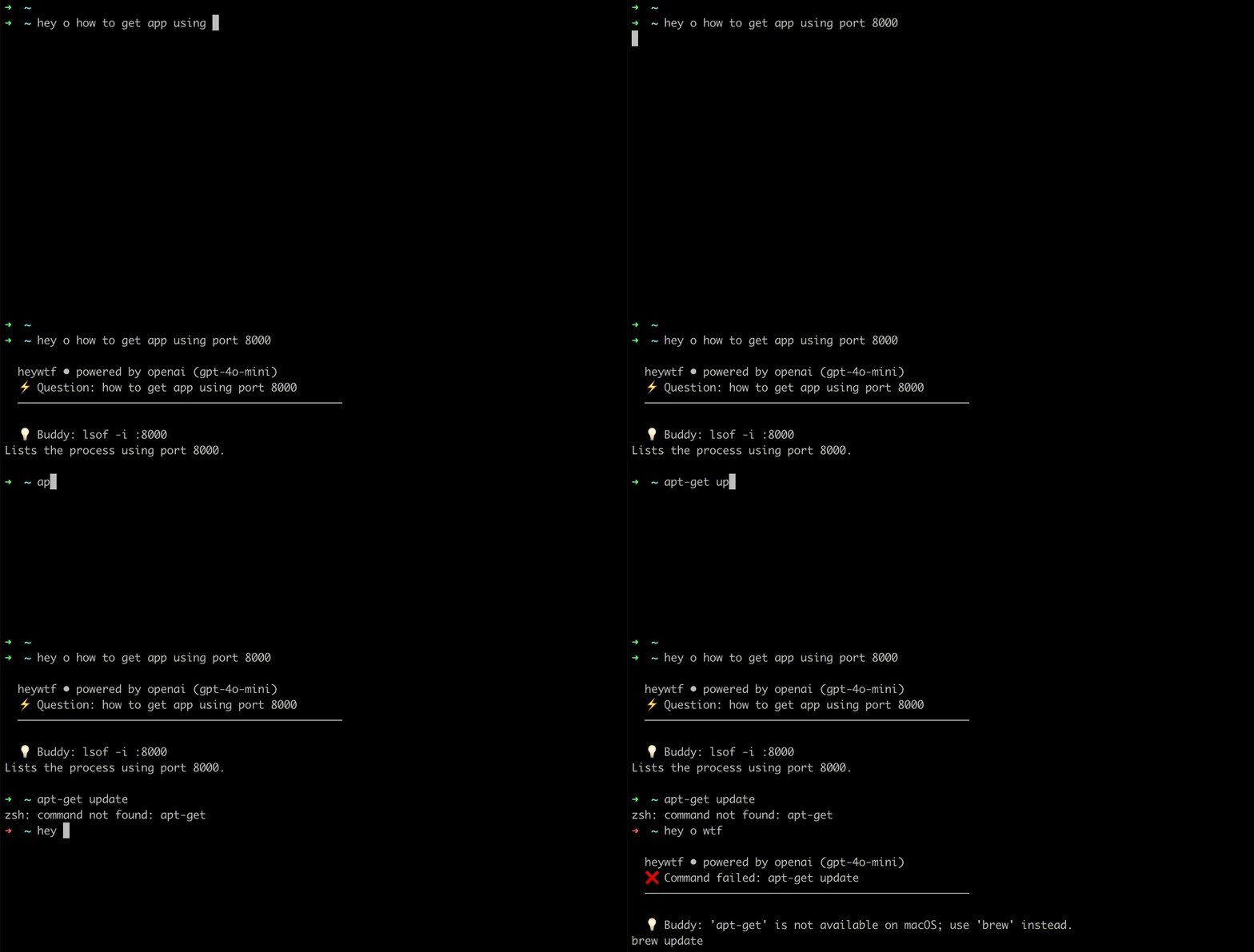
Platform: macOS with zsh. Linux works for
heyqueries, buthey wtfshell integration is zsh-only.
Quick start
uv tool install heywtf   # don't have uv? brew install uv
hey config               # pick a backend, set an API key, enable shell integration
hey how to check my ip   # ask away
hey config is a guided wizard — the only setup you need. Default backend is Ollama (local, private, no API key); OpenAI and Gemini are also supported.
What you can do
Ask a question — get the command, instantly:
hey how to count words in a file
hey find all python files modified in the last 24 hours
Diagnose a failure — run hey wtf right after any command fails:
$ chmod 777 /etc/hosts
chmod: changing permissions of '/etc/hosts': Operation not permitted

$ hey wtf

  heywtf • powered by ollama (qwen2.5-coder:0.5b)
  💥 Command failed: chmod 777 /etc/hosts
  ──────────────────────────────────────────────────

  💡 Buddy: Permission denied — use sudo for system files:
  sudo chmod 777 /etc/hosts
The suggested command is auto-copied to your clipboard — just paste and run.
hey wtfneeds shell integration (enabled byhey config). Pause/resume capture withbuddy-off/buddy-onbefore an interactive session.
Switch backend for one query:
hey o explain async/await in Python    # OpenAI
hey g difference between TCP and UDP    # Gemini
hey l how to tail a log file            # Ollama (local)
Configuration
hey config                               # re-run the setup wizard
hey config show                          # view current config
hey config set backend openai            # change default backend
hey config set openai_api_key sk-...     # set an API key
hey config set ollama_model qwen3-coder:3b
hey config set copy_to_clipboard false   # disable clipboard auto-copy
API keys can also come from the OPENAI_API_KEY / GOOGLE_API_KEY environment variables.
Using Ollama (the default): install and pull a model first —
brew install ollama && ollama serve
ollama pull qwen2.5-coder:0.5b
How hey wtf works
A zsh preexec hook captures each command and its stderr; a precmd hook saves the command and error when the exit code is non-zero. hey wtf reads that context and asks the AI to diagnose it. Interactive commands (vim, ssh, top, etc.) are skipped.
Development
git clone https://github.com/litlig/heywtf.git && cd heywtf
python3 -m venv .venv && source .venv/bin/activate
pip install -e .
source heywtf/shell/buddy.zsh    # load shell hooks in the current session
License
MIT
1 maintainer

Metadata
1 maintainer
Release files for heywtf 0.2.0
For a detailed explanation of source distributions (sdists) and built distributions (wheels), please see the package formats documentation.
Source distribution (sdist)
| File | Size | Uploaded | Provenance | Actions |
|---|---|---|---|---|
| heywtf-0.2.0.tar.gz | 14.8 kB | Without provenance | Details for heywtf-0.2.0.tar.gz |
Built distribution (wheel)
| File | Interpreter | ABI | Platform | Actions Reset |
|---|---|---|---|---|
| heywtf-0.2.0-py3-none-any.whl | Python 3 | none | any | Details for heywtf-0.2.0-py3-none-any.whl |
Total release size: 31.8 kB
Release files / heywtf-0.2.0.tar.gz
| Download URL | heywtf-0.2.0.tar.gz |
|---|---|
| Size | 14.8 kB |
| Tags | Source |
|
SHA-256 checksum How to use checksums |
fb1276b49dd6534ef8c456af02474de404647dd42e7c0651cd23bdc69b20dcd8
|
|
BLAKE2b-256 checksum How to use checksums |
deb5a5781e24654d51c60c07aed30d235b121059c8813a7fd96f24ea28bbb10e
|
| Upload date | |
|
Uploaded using Trusted Publishing? What is trusted publishing? |
No |
| Uploaded via |
uv/0.6.12
|
Release files / heywtf-0.2.0-py3-none-any.whl
| Download URL | heywtf-0.2.0-py3-none-any.whl |
|---|---|
| Size | 17.0 kB |
| Tags | Python 3 |
|
SHA-256 checksum How to use checksums |
a1c72d2c3da82c77d0ddaf4f899d9e5c99d208d982aed3a36ee2f9751e99f0c1
|
|
BLAKE2b-256 checksum How to use checksums |
1b0267a9675744fc6bc1a76f03de6ac3acdfa170f227cd1b9106f02a11d2c758
|
| Upload date | |
|
Uploaded using Trusted Publishing? What is trusted publishing? |
No |
| Uploaded via |
uv/0.6.12
|
Security for heywtf 0.2.0
Provenance
Provenance describes where a file came from. On PyPI, provenance is shared via attestations, which provide a verifiable record of the build or publishing details. View details, limitations and caveats.
No provenance found
None of the files in this release were uploaded with provenance metadata.
A note on package security
PyPI is a repository for distributing packages, not a service for auditing them. While third-party security researchers and our staff do their best to detect and remove malicious packages, PyPI cannot guarantee the quality, security or suitability of any given package.
To learn more about protecting yourself from malicious actors, visit our package security documentation.














