
Stream HuggingFace datasets to Vespa JSON format
Verified details
These details have been verified by PyPIProject links
GitHub Statistics
Maintainers

Project description
hf2vespa
Stream HuggingFace datasets to Vespa JSON format
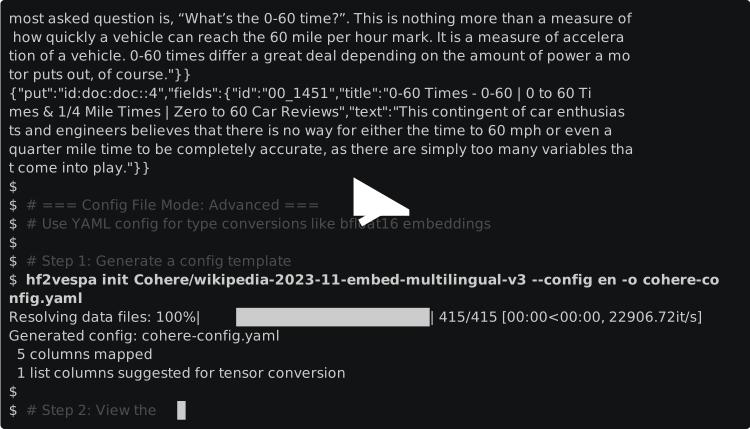
Description
A command-line tool for streaming HuggingFace datasets directly to Vespa's JSON feed format without intermediate files or loading entire datasets into memory. Define field mappings via YAML configuration or CLI arguments, then pipe output directly to vespa feed - for efficient ingestion of millions of records.
Installation
with uv
Run with uvx for a fast, isolated installation:
uvx hf2vespa
or install globally:
uv tool install hf2vespa
or with pip:
pip install hf2vespa
From Source
git clone https://github.com/thomasht86/hf2vespa.git
cd hf2vespa
uv tool install .
Requirements: Python 3.10+
Quick Start
Basic Usage
Stream a HuggingFace dataset to Vespa JSON format:
hf2vespa feed mteb/msmarco-v2 --config corpus --split corpus --rename _id:id --limit 3
Output:
{"put":"id:doc:doc::0","fields":{"id":"00_0","title":"0-60 Times - 0-60 | 0 to 60 Times & 1/4 Mile Times | Zero to 60 Car Reviews","text":"0-60 Times - 0-60 | 0 to 60 Times & 1/4 Mile Times | Zero to 60 Car Reviews."}}
{"put":"id:doc:doc::1","fields":{"id":"00_172","title":"0-60 Times - 0-60 | 0 to 60 Times & 1/4 Mile Times | Zero to 60 Car Reviews","text":"This allow for a more accurate measure, as does running the test first in one direction and then in the exact opposite direction..."}}
{"put":"id:doc:doc::2","fields":{"id":"00_587","title":"0-60 Times - 0-60 | 0 to 60 Times & 1/4 Mile Times | Zero to 60 Car Reviews","text":"Instead, some believe the measure should include a range of times rather than one finite mark..."}}
--- Completion Statistics ---
Total records processed: 3
Successful: 3
Errors: 0
Throughput: 4.5 records/sec
Elapsed time: 0.67s
Preview Dataset Schema
Inspect a dataset and generate a YAML configuration template:
hf2vespa init Cohere/wikipedia-2023-11-embed-multilingual-v3 --config en -o cohere-config.yaml
Generated cohere-config.yaml:
namespace: doc
doctype: doc
id_column:

mappings:
  - source: _id
    target: _id
    type:  # string
  - source: url
    target: url
    type:  # string
  - source: title
    target: title
    type:  # string
  - source: text
    target: text
    type:  # string
  - source: emb
    target: emb
    type: tensor  # Sequence[float32] -> suggested: tensor
Use Config File
Edit the config to customize type conversions, then apply it:
hf2vespa feed Cohere/wikipedia-2023-11-embed-multilingual-v3 --config en --config-file cohere-config.yaml --limit 5
See Two Modes of Operation below for a complete example with bfloat16 hex encoding.
Two Modes of Operation
hf2vespa supports two modes depending on your needs:
CLI Mode (Quick & Simple)
Use CLI arguments when you need:
- Column renaming (
--rename old:new) - Column filtering (
--include col1 --include col2) - Custom namespace/doctype (
--namespace,--doctype) - Preview data structure
Example: Rename columns and stream MS MARCO corpus:
hf2vespa feed mteb/msmarco-v2 --config corpus --split corpus --rename _id:id --limit 5
Output:
{"put":"id:doc:doc::0","fields":{"id":"00_0","title":"0-60 Times - 0-60 | 0 to 60 Times...","text":"0-60 Times - 0-60 | 0 to 60 Times..."}}
{"put":"id:doc:doc::1","fields":{"id":"00_172","title":"0-60 Times...","text":"This allow for a more accurate measure..."}}
Config File Mode (Advanced)
Use hf2vespa init + YAML config when you need:
- Type conversions (tensor, hex-encoded formats)
- bfloat16/int8 quantized embeddings
- Sparse or mixed tensors
- Complex multi-field transformations
Example: Convert Cohere embeddings to hex-encoded bfloat16:
- Generate a config template:
hf2vespa init Cohere/wikipedia-2023-11-embed-multilingual-v3 --config en --output cohere-config.yaml
- Edit the config to use
tensor_bfloat16_hexfor the embedding field:
# cohere-config.yaml
namespace: doc
doctype: doc
id_column:

mappings:
  - source: _id
    target: _id
  - source: url
    target: url
  - source: title
    target: title
  - source: text
    target: text
  - source: emb
    target: emb
    type: tensor_bfloat16_hex  # Convert to hex-encoded bfloat16
- Stream with the config file:
hf2vespa feed Cohere/wikipedia-2023-11-embed-multilingual-v3 --config en --config-file cohere-config.yaml --limit 2
Output:
{"put":"id:doc:doc::0","fields":{"_id":"20231101.en_13194570_0","url":"https://en.wikipedia.org/wiki/British%20Arab%20Commercial%20Bank","title":"British Arab Commercial Bank","text":"The British Arab Commercial Bank PLC (BACB) is an international wholesale bank...","emb":{"values":"3aeabd253b963d1a3b833d8f3d8bbb16bc3e3b01..."}}}
{"put":"id:doc:doc::1","fields":{"_id":"20231101.en_13194570_1","url":"https://en.wikipedia.org/wiki/British%20Arab%20Commercial%20Bank","title":"British Arab Commercial Bank","text":"BACB has a head office in London...","emb":{"values":"3baabcd7bc3c3d623cc13d853d94ba8dbb45bcb5..."}}}
The emb field is now hex-encoded bfloat16, reducing storage size by 50% compared to float32.
YAML Configuration
Configuration files define field mappings and document settings for Vespa feed generation.
Basic Structure
The minimal YAML configuration:
# Vespa document settings
namespace: doc              # Namespace for document IDs
doctype: doc               # Document type name
id_column:                 # Column to use as document ID (optional, auto-increment if omitted)

# Field mappings (optional - all columns included by default)
mappings:
  - source: text           # Dataset column name
    target: body           # Vespa field name (optional, defaults to source)
    type: string           # Type converter (optional)
All fields are optional. If you omit mappings, all dataset columns are included as-is. The target field defaults to the source field name if not specified.
Field Types
Type converters transform dataset values into Vespa-compatible formats.
Basic Types
| Type | Purpose | Example Input | Vespa Output |
|---|---|---|---|
string |
Text data | 123 |
"123" |
int |
Integer values | "42" |
42 |
float |
Decimal values | "3.14" |
3.14 |
tensor |
Vector embeddings | [0.1, 0.2, 0.3] |
{"values": [0.1, 0.2, 0.3]} |
Hex-Encoded Tensors (v2.0)
Memory-efficient tensor formats using hex encoding:
| Type | Cell Type | Hex Chars/Value | Use Case |
|---|---|---|---|
tensor_int8_hex |
int8 (-128 to 127) | 2 | Quantized embeddings |
tensor_bfloat16_hex |
bfloat16 | 4 | ML model weights |
tensor_float32_hex |
float32 | 8 | Standard precision |
tensor_float64_hex |
float64 | 16 | High precision |
mappings:
  - source: quantized_embedding
    target: qvector
    type: tensor_int8_hex  # [11, 34, 3] → {"values": "0b2203"}
Scalar Types (v2.0)
| Type | Purpose | Example Input | Vespa Output |
|---|---|---|---|
position |
Geo coordinates | {"lat": 37.4, "lng": -122.0} |
{"lat": 37.4, "lng": -122.0} |
weightedset |
Term weights | {"tag1": 10, "tag2": 5} |
{"tag1": 10, "tag2": 5} |
map |
Key-value pairs | {1: "one", 2: "two"} |
{"1": "one", "2": "two"} |
Sparse and Mixed Tensors (v2.0)
For advanced tensor structures like ColBERT-style multi-vector embeddings:
| Type | Purpose | Use Case |
|---|---|---|
sparse_tensor |
Single mapped dimension | Term weights, feature importance |
mixed_tensor |
Mapped + indexed dimensions | Multi-vector embeddings |
mixed_tensor_hex |
Mapped + hex-encoded indexed | Memory-efficient multi-vectors |
mappings:
  # Sparse tensor: {"word1": 0.8, "word2": 0.5} → {"cells": [{"address": {"key": "word1"}, "value": 0.8}, ...]}
  - source: term_weights
    target: weights
    type: sparse_tensor

  # Mixed tensor: {"w1": [1.0, 2.0], "w2": [3.0, 4.0]} → {"blocks": {"w1": [1.0, 2.0], "w2": [3.0, 4.0]}}
  - source: token_embeddings
    target: colbert
    type: mixed_tensor
If type is omitted, values are passed through as-is (no conversion).
Complete Examples
1. Basic text dataset (rename columns)
Simple configuration that renames columns without type conversion:
namespace: docs
doctype: article

mappings:
  - source: text
    target: body
  - source: title
    target: headline
2. Dataset with embeddings (tensor conversion)
Configuration with type conversions for embedding vectors:
namespace: search
doctype: document
id_column: doc_id

mappings:
  - source: content
    target: text
    type: string
  - source: embedding
    target: vector
    type: tensor
3. Generated config example
This is what the init command produces when you inspect a dataset schema:
namespace: doc
doctype: doc
id_column: # null = auto-increment

mappings:
  - source: premise
    target: premise
    type:  # string
  - source: hypothesis
    target: hypothesis
    type:  # string
  - source: label
    target: label
    type:  # int
The commented type hints show inferred types based on dataset schema. Uncomment and modify as needed.
Tip: Use hf2vespa init <dataset> to generate a starter config with all fields detected from the dataset schema.
CLI Reference
hf2vespa feed
Stream HuggingFace dataset to Vespa JSON format.
Usage:
hf2vespa feed DATASET [OPTIONS]
Arguments:
DATASET- HuggingFace dataset name (required)
Options:
--split TEXT- Dataset split to use [default: train]--config TEXT- Dataset config name (for multi-config datasets like glue)--include TEXT- Columns to include (repeatable, e.g.,--include title --include text)--rename TEXT- Rename columns as 'old:new' (repeatable, e.g.,--rename text:body)--namespace TEXT- Vespa namespace for document IDs [default: doc]--doctype TEXT- Vespa document type [default: doc]--config-file PATH- YAML configuration file for field mappings--limit INTEGER- Process only first N records (useful for testing)--id-column TEXT- Dataset column to use as document ID (omit for auto-increment)--on-error [fail|skip]- Error handling mode [default: fail]--num-workers INTEGER- Number of parallel workers for dataset loading [default: CPU count]
Examples:
Basic streaming:
hf2vespa feed glue --config ax
Stream specific split with limit:
hf2vespa feed glue --config ax --split test --limit 10
Filter specific columns:
hf2vespa feed glue --config ax --include premise --include hypothesis
Custom namespace and doctype:
hf2vespa feed squad --namespace wiki --doctype article
Use config file for complex mappings:
hf2vespa feed squad --config-file vespa-config.yaml
Skip errors instead of failing:
hf2vespa feed my-dataset --on-error skip
hf2vespa init
Generate a YAML config by inspecting a HuggingFace dataset schema.
Usage:
hf2vespa init DATASET [OPTIONS]
Arguments:
DATASET- HuggingFace dataset name (required)
Options:
-o, --output PATH- Output file path [default: vespa-config.yaml]-s, --split TEXT- Dataset split to inspect [default: train]-c, --config TEXT- Dataset config name (required for multi-config datasets)
Examples:
Generate config for a multi-config dataset:
hf2vespa init glue --config ax
Specify output file:
hf2vespa init squad --output my-config.yaml
Inspect a specific split:
hf2vespa init my-dataset --split validation --output val-config.yaml
hf2vespa install-completion
Install shell tab-completion for hf2vespa.
Usage:
hf2vespa install-completion [SHELL]
Arguments:
SHELL- Shell type (bash, zsh, fish). Auto-detected if omitted.
Examples:
Auto-detect shell:
hf2vespa install-completion
Explicit shell:
hf2vespa install-completion bash
After installation, restart your shell or source your shell config file (e.g., source ~/.bashrc).
Backward Compatibility
For convenience, the feed subcommand can be omitted:
# These are equivalent:
hf2vespa feed glue --config ax
hf2vespa glue --config ax
However, we recommend using the explicit feed subcommand for clarity, especially in scripts.
Cookbook
Real-world examples using public HuggingFace datasets. All commands are copy-paste ready.
Example 1: Question Answering (SQuAD)
Stream Stanford Question Answering Dataset:
# Generate config
hf2vespa init squad --output squad-config.yaml

# Preview data structure
hf2vespa feed squad --limit 3

# Full streaming with custom doctype
hf2vespa feed squad --doctype qa --namespace squad > squad-feed.jsonl
Output format: Each record contains id, title, context, question, answers fields.
Example 2: Text Classification (GLUE)
Stream GLUE benchmark tasks for NLU:
# MRPC (paraphrase detection)
hf2vespa feed glue --config mrpc --limit 5

# SST-2 (sentiment analysis)
hf2vespa feed glue --config sst2 --namespace sentiment --limit 5

# With column filtering (ax only has test split)
hf2vespa feed glue --config ax --split test --include premise --include hypothesis
Example 3: Retrieval (MS MARCO)
Stream MS MARCO passage retrieval dataset:
# Generate config to see structure
hf2vespa init ms_marco --config v1.1 --output msmarco-config.yaml

# Stream passages
hf2vespa feed ms_marco --config v1.1 --doctype passage --limit 1000
Example 4: Wikipedia
Stream Wikipedia articles:
# Check available configs (language editions)
# Use 20220301.en for English Wikipedia snapshot

hf2vespa init wikipedia --config 20220301.simple --output wiki-config.yaml
hf2vespa feed wikipedia --config 20220301.simple --limit 100 --doctype article
Note: Full Wikipedia is large. Use --limit for testing.
Example 5: Custom Embeddings Dataset
For datasets with pre-computed embeddings:
# embedding-config.yaml
namespace: vectors
doctype: document
id_column: doc_id

mappings:
  - source: text
    target: content
    type: string
  - source: embedding
    target: vector
    type: tensor
hf2vespa feed your-embedding-dataset --config-file embedding-config.yaml
The tensor type converts Python lists to Vespa tensor format: {"values": [0.1, 0.2, ...]}
Example 6: Hex-Encoded Embeddings (v2.0)
For memory-efficient embedding storage, use hex-encoded tensors:
# hex-embedding-config.yaml
namespace: search
doctype: document
id_column: doc_id

mappings:
  - source: text
    target: content
    type: string
  # Full precision (8 hex chars per value)
  - source: embedding
    target: vector_f32
    type: tensor_float32_hex
  # Quantized (2 hex chars per value, 4x smaller)
  - source: quantized_embedding
    target: vector_int8
    type: tensor_int8_hex
hf2vespa feed your-embedding-dataset --config-file hex-embedding-config.yaml
Example 7: ColBERT Multi-Vector Embeddings (v2.0)
For ColBERT-style token-level embeddings:
# colbert-config.yaml
namespace: colbert
doctype: passage
id_column: passage_id

mappings:
  - source: text
    target: content
  # Token embeddings: {"token1": [0.1, 0.2, ...], "token2": [...]}
  - source: token_embeddings
    target: colbert_rep
    type: mixed_tensor_hex  # Uses float32 hex by default
The mixed_tensor_hex type supports cell_type options: int8, bfloat16, float32 (default), float64.
Example 8: Geo and Weighted Data (v2.0)
For location-aware search with term weights:
# geo-weighted-config.yaml
namespace: places
doctype: venue

mappings:
  - source: name
    target: title
  # Geo coordinates for geo-search
  - source: coordinates
    target: location
    type: position  # {"lat": 37.4, "lng": -122.0}
  # Category weights for boosting
  - source: categories
    target: category_weights
    type: weightedset  # {"restaurant": 10, "cafe": 5}
Piping to Vespa
Stream directly to a Vespa instance:
# Using vespa-cli
hf2vespa feed squad --limit 1000 | vespa feed -

# Or save and feed later
hf2vespa feed squad > feed.jsonl
vespa feed feed.jsonl
Type Reference (v2.0)
Complete reference for all supported type converters.
Basic Types
string
Converts any value to string.
Input: 123 → Output: "123"
int
Converts value to integer.
Input: "42" → Output: 42
float
Converts value to float.
Input: "3.14" → Output: 3.14
tensor
Converts list to Vespa indexed tensor (JSON array format).
Input: [0.1, 0.2, 0.3]
Output: {"values": [0.1, 0.2, 0.3]}
Hex-Encoded Tensors
Memory-efficient tensor encoding for embeddings. Values are packed as binary and hex-encoded.
tensor_int8_hex
8-bit signed integers (-128 to 127). 2 hex chars per value.
Input: [11, 34, 3]
Output: {"values": "0b2203"}
Use case: Quantized embeddings, reduced storage (4x smaller than float32).
tensor_bfloat16_hex
Brain floating point (truncated float32). 4 hex chars per value.
Input: [1.0, -1.0, 0.0]
Output: {"values": "3f80bf800000"}
Use case: ML model weights, good range with reduced precision.
tensor_float32_hex
IEEE 754 single precision. 8 hex chars per value.
Input: [3.14159]
Output: {"values": "40490fdb"}
Use case: Standard embedding precision.
tensor_float64_hex
IEEE 754 double precision. 16 hex chars per value.
Input: [3.141592653589793]
Output: {"values": "400921fb54442d18"}
Use case: High-precision scientific data.
Scalar Types
position
Geo coordinates for location-based search.
Input: {"lat": 37.4, "lng": -122.0}
Output: {"lat": 37.4, "lng": -122.0}
Validation: Latitude must be -90 to 90, longitude -180 to 180.
weightedset
Key-weight pairs for weighted search.
Input: {"tag1": 10, "tag2": 5}
Output: {"tag1": 10, "tag2": 5}
Note: Keys are stringified, weights converted to integers.
map
Generic key-value maps.
Input: {1: "one", 2: "two"}
Output: {"1": "one", "2": "two"}
Note: Keys are stringified.
Sparse and Mixed Tensors
sparse_tensor
Single mapped dimension using Vespa cells notation.
Input: {"word1": 0.8, "word2": 0.5}
Output: {"cells": [{"address": {"key": "word1"}, "value": 0.8},
                   {"address": {"key": "word2"}, "value": 0.5}]}
Use case: Term weights, feature importance scores.
mixed_tensor
Combined mapped + indexed dimensions using Vespa blocks notation.
Input: {"w1": [1.0, 2.0], "w2": [3.0, 4.0]}
Output: {"blocks": {"w1": [1.0, 2.0], "w2": [3.0, 4.0]}}
Use case: ColBERT-style multi-vector embeddings. Validation: All block arrays must have the same length.
mixed_tensor_hex
Mixed tensor with hex-encoded dense dimensions.
Input: {"w1": [11, 34, 3], "w2": [-124, 5, -1]}  (with cell_type=int8)
Output: {"blocks": {"w1": "0b2203", "w2": "8405ff"}}
Cell types: int8, bfloat16, float32 (default), float64
Use case: Memory-efficient ColBERT embeddings.
Troubleshooting
Authentication Errors
Symptom: 401 Unauthorized or 403 Forbidden when accessing private/gated datasets
Cause: HuggingFace authentication token not provided or invalid
Solution:
# Option 1: Environment variable
export HF_TOKEN=your_token_here
hf2vespa feed your-private-dataset

# Option 2: HuggingFace CLI login (persistent)
pip install huggingface_hub
huggingface-cli login
Get your token at: https://huggingface.co/settings/tokens
Memory Issues with Large Datasets
Symptom: Process killed, MemoryError, or system becomes unresponsive
Cause: Dataset too large to fit in memory (this tool uses HF datasets streaming)
Solution:
# Use --limit to process in batches
hf2vespa feed large-dataset --limit 10000 > batch1.jsonl
hf2vespa feed large-dataset --limit 10000 --skip 10000 > batch2.jsonl

# Or pipe directly to Vespa (recommended)
hf2vespa feed large-dataset | vespa feed -
Note: HuggingFace datasets library handles streaming efficiently. Memory issues are rare but can occur with very wide datasets (many columns) or large individual records.
Type Conversion Errors
Symptom: TypeError or ValueError during feed generation
Cause: Column type doesn't match expected converter (e.g., tensor on non-list field)
Solution:
- Check your YAML config mappings
- Verify the source column type with
init:hf2vespa init your-dataset --config your-config
- Match converter type to actual data:
- Use
tensoronly for list/sequence columns (embeddings) - Use
string,int,floatfor scalar values
- Use
Multi-Config Dataset Errors
Symptom: "This dataset has multiple configurations" error
Cause: Dataset requires a --config argument (like glue, super_glue, etc.)
Solution:
# List available configs (check HuggingFace dataset page)
# Then specify one:
hf2vespa feed glue --config ax
hf2vespa init glue --config cola
Dataset Not Found
Symptom: DatasetNotFoundError or 404 error
Cause: Dataset name misspelled, private without auth, or doesn't exist
Solution:
- Verify dataset exists on HuggingFace Hub
- Check spelling (case-sensitive)
- For private datasets, ensure HF_TOKEN is set (see Authentication Errors)
Contributing
Issues and pull requests are welcome. Please open an issue to discuss major changes before submitting PRs.
License
MIT License - see repository for details.
Project details
Verified details
These details have been verified by PyPIProject links
GitHub Statistics
Maintainers
Release history Release notifications | RSS feed


Download files
Download the file for your platform. If you're not sure which to choose, learn more about installing packages.
Source Distribution
Built Distribution
Filter files by name, interpreter, ABI, and platform.
If you're not sure about the file name format, learn more about wheel file names.
Copy a direct link to the current filters
File details
Details for the file hf2vespa-0.1.1.tar.gz.
File metadata
- Download URL: hf2vespa-0.1.1.tar.gz
- Upload date:
- Size: 273.9 kB
- Tags: Source
- Uploaded using Trusted Publishing? Yes
- Uploaded via: uv/0.9.30 {"installer":{"name":"uv","version":"0.9.30","subcommand":["publish"]},"python":null,"implementation":{"name":null,"version":null},"distro":{"name":"Ubuntu","version":"24.04","id":"noble","libc":null},"system":{"name":null,"release":null},"cpu":null,"openssl_version":null,"setuptools_version":null,"rustc_version":null,"ci":true}
File hashes
| Algorithm | Hash digest | |
|---|---|---|
| SHA256 |
a94e98074334b23f8088653eb879054fbcf30a8b78498045804918dd756fe769
|
|
| MD5 |
01c8f8dab1c3a0da205b438602e27388
|
|
| BLAKE2b-256 |
429002f16ad1d58d58ea62f197db0fee02909a5557180c8ebcc5237d4b7dbe3e
|
File details
Details for the file hf2vespa-0.1.1-py3-none-any.whl.
File metadata
- Download URL: hf2vespa-0.1.1-py3-none-any.whl
- Upload date:
- Size: 27.2 kB
- Tags: Python 3
- Uploaded using Trusted Publishing? Yes
- Uploaded via: uv/0.9.30 {"installer":{"name":"uv","version":"0.9.30","subcommand":["publish"]},"python":null,"implementation":{"name":null,"version":null},"distro":{"name":"Ubuntu","version":"24.04","id":"noble","libc":null},"system":{"name":null,"release":null},"cpu":null,"openssl_version":null,"setuptools_version":null,"rustc_version":null,"ci":true}
File hashes
| Algorithm | Hash digest | |
|---|---|---|
| SHA256 |
8ae634f657fe40e44dcb0a97ba594ea39fbb212e611e2170e37c0d6112660be3
|
|
| MD5 |
51e2422e6899c7a861cdadf3cf1de60d
|
|
| BLAKE2b-256 |
8753e8e5e0c6ff857774188fbe86a1b6e6ba2e842bb426ef71c94ef7daa67883
|






