
HFL
Download, run and try any Hugging Face model on your own machine.
One command takes a model from the Hub to a local chat or to an OpenAI-, Ollama- and Anthropic-compatible API. No account. No cloud of its own — by design.





Quick start · Why HFL · Install · Use it · API · Docs · Español
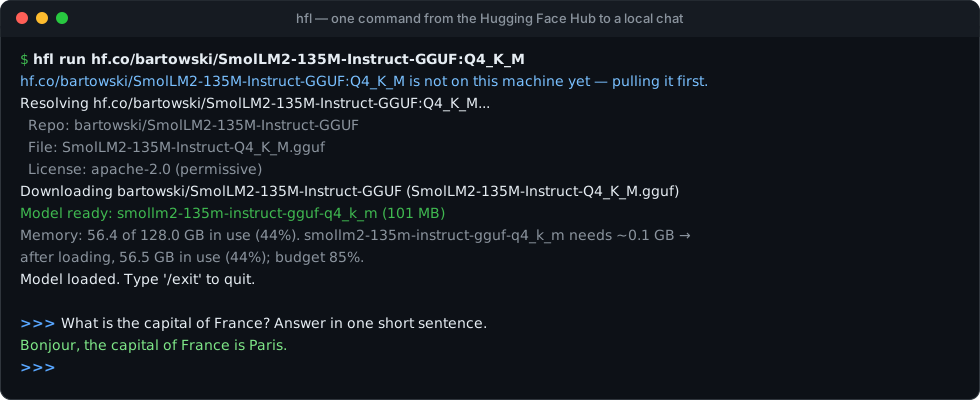
Quick start
pip install "hfl[llama,mlx]"        # the MLX part installs only on Apple Silicon

hfl run hf.co/bartowski/Llama-3.2-3B-Instruct-GGUF:Q4_K_M
The model is downloaded the first time and reused from disk after that. To serve it instead:
hfl serve --model hf.co/bartowski/Llama-3.2-3B-Instruct-GGUF:Q4_K_M
Any OpenAI, Ollama or Anthropic client can now talk to http://localhost:11434 — and
opening that address in a browser gives you a chat page, served by HFL itself
(no account, nothing loaded from the internet): your conversations, a system
prompt and temperature per conversation, and images for models that can see
them. Its model panel searches the Hub, downloads (with progress) and deletes
models — owner operations, so the page is allowed them only once you start HFL
with HFL_ORIGINS=http://127.0.0.1:11434 (that trusts every page served at
that address, including /docs, which loads scripts from a CDN).
Why HFL
- The whole Hub, not one file format. GGUF repos run through llama.cpp, MLX builds run natively on Apple Silicon, and safetensors checkpoints are converted and quantized for you on pull. Copy a repo name from the Hub and run it.
- Browse the Hub from your terminal.
hfl searchpages through the live Hub with sizes, downloads and formats at a glance; ask in plain words ("coding assistant 7b") or filter by GGUF or by size, press a number and the model is pulled, license check included. - Yours alone. No account, no sign-in, no cloud service behind it. On its own HFL talks to one server, the Hugging Face Hub, to fetch weights; its web-search endpoints reach the web only when a client calls them, and a test pins every host the code can reach. With no network, everything you have already pulled keeps working.
- Plugs into what you already use. OpenAI (chat, completions, embeddings,
Responses), Ollama and Anthropic Messages APIs on one port, with structured
tool calling for Qwen, Llama 3, Mistral, Gemma 4, gpt-oss, DeepSeek, GLM and
Hermes families and JSON-schema outputs.
Existing
OLLAMA_*settings such asOLLAMA_HOSTare honoured. - As many models as your memory holds. Before every load HFL estimates what the model will take (weights + KV cache) and keeps the machine under a memory budget you set: models load side by side while they fit, idle ones make room, one in use is never pulled out from under a request, and one that cannot fit is refused with the numbers — before anything is unloaded. GPU-aware on NVIDIA.
- Knows the Hub. Find models that fit your hardware (
hfl recommend), pick the best community quant for your machine (hfl pull-smart), size Mixture-of-Experts models by their total parameters, check licenses before downloading and keep a provenance record of every pull.
Compared with downloading the files yourself
hf download and git lfs clone fetch a repo's files; what to do with them
is left to you. HFL fetches only the files a model needs and runs them:
hf download / git lfs |
HFL | |
|---|---|---|
| Which files | the whole repo, or the patterns you give | the one quant you asked for (plus a split model's parts and a vision projector) |
| safetensors checkpoints | downloaded as they are | converted to GGUF and quantized, or run as they are (MLX, Transformers) |
| Checked after download | hf download: the size; git lfs: each object's sha256 |
against the Hub's sha256; a damaged file is fetched again |
| License | not looked at | checked before downloading, and kept with the model with the repo and commit it came from |
| Then | your own code or server | a chat, and OpenAI, Ollama and Anthropic APIs on one port |
Install
| How | Command |
|---|---|
| pip (recommended) | pip install "hfl[llama,mlx]" |
| Docker | docker run -p 127.0.0.1:11434:11434 -v hfl:/var/lib/hfl ghcr.io/ggalancs/hfl (this machine only; to open it to the network, publish -p 11434:11434 with -e HFL_API_KEY=…) |
| Installers | .dmg, .msi and standalone binaries on the releases page |
| From source | git clone https://github.com/ggalancs/hfl && cd hfl && pip install -e ".[llama,mlx]" |
Optional extras — GPU, speech, vLLM and more
| Extra | Adds |
|---|---|
llama |
llama.cpp for GGUF models (Metal on Apple Silicon out of the box) |
mlx |
Native MLX backend on Apple Silicon |
transformers |
Transformers backend for GPU inference with bitsandbytes |
vllm |
vLLM backend |
convert |
Tools to convert safetensors to GGUF |
tts / coqui |
Text-to-speech (Bark, SpeechT5 / Coqui XTTS, VITS) |
stt |
Speech-to-text (Whisper) |
mcp |
Model Context Protocol client and server |
all |
Everything above |
Converting safetensors to GGUF fetches llama.cpp's converter (Python) the
first time and quantizes with a llama-quantize already on the machine:
Homebrew's (brew install llama.cpp), a distro package's, or the one inside
llama-cpp-python (pip install 'hfl[llama]'). Nothing is compiled unless none
of those exists; then it needs git, cmake and a C++ compiler.
Pre-quantized GGUF and MLX models need none of this.
Use it
Search and pick from the terminal
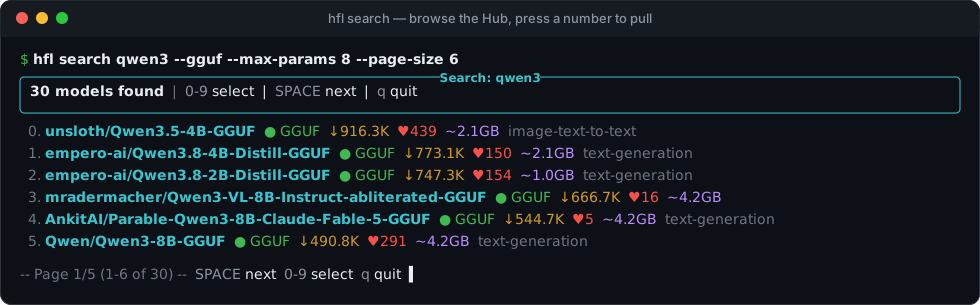
hfl search qwen3                          # everything matching, most downloaded first
hfl search qwen3 --gguf --max-params 8    # GGUF only, 8B or smaller — searched across the whole Hub
hfl search llama --sort likes             # or: downloads (default), created
hfl search "coding assistant 7b"         # read as: coding models of about 7B
Each page lists up to ten models with their size, downloads, likes, format and task. Press 0–9 to pull one (you confirm, and its license is checked first), SPACE for the next page, p for the previous one, q to leave. Sizes are total parameters, so Mixture-of-Experts models are not shown smaller than they are.
Chat
hfl run hf.co/bartowski/Llama-3.2-3B-Instruct-GGUF:Q4_K_M   # from the Hub, pulled on first use
hfl run qwen3-coder                                          # a short name, looked up on the Hub
hfl run hf.co/mlx-community/Qwen2.5-0.5B-Instruct-4bit       # an MLX build on Apple Silicon
hfl run llama70b --system "You are a Python expert"          # a local name or alias
hfl run llama70b --session work                              # resume and save a conversation
The hf.co/ prefix is optional. :Q4_K_M picks a quantization, @<ref> pins a
branch, tag or commit.
A short name (qwen3-coder, llama3.2, qwen3:8b, gemma3:4b-q8_0) that is
not a local model is looked up among the Hub's GGUF builds: instruct builds and
the usual quantizers first, derivatives (abliterated, merges...) left out, and a
quantization that fits your machine (Q4_K_M unless it does not). You pick from the
list before anything is downloaded (--yes takes the first), and the name is kept
as an alias, so the next hfl run qwen3-coder is local. Ollama clients get the
same over /api/pull {"model": "llama3.2"}.
--session <name> keeps the conversation: the next hfl run <model> --session <name> picks it up where it stopped. Sessions are JSON files under
~/.hfl/sessions/:
hfl sessions list          # name, model, messages, last update
hfl sessions show work     # print a session's messages
hfl sessions rm work       # delete it
Pull, search and manage
hfl pull meta-llama/Llama-3.3-70B-Instruct                 # Q4_K_M by default
hfl pull meta-llama/Llama-3.3-70B-Instruct --quantize Q5_K_M --alias llama70b
hfl pull meta-llama/Llama-3.3-70B-Instruct@a1b2c3d          # reproducible: pinned revision

hfl list                                # what is on this machine
hfl inspect llama70b                    # details and license
hfl outdated                            # newer versions on the Hub? (downloads nothing)
hfl rm llama70b

hfl import ~/.lmstudio/models/lmstudio-community/Qwen3-8B-GGUF   # a GGUF you already have
hfl import ~/.lmstudio/models/mlx-community/Qwen3-8B-4bit        # or MLX / Hugging Face weights
hfl import registers a model where it is — no copy, no server — for models
downloaded by LM Studio, llama.cpp, huggingface-cli or by hand: a GGUF (a
split model or a vision model's projector beside it are handled) or a folder of
MLX or Hugging Face weights (config.json and .safetensors). hfl rm never
deletes anything outside HFL's own folder.
Find the right model
hfl recommend                           # top models that fit THIS machine's RAM/VRAM
hfl discover --family qwen              # filter the live Hub; marks what you already have
hfl pull-smart Qwen/Qwen3-30B-A3B       # best community variant for your hardware
hfl verify <model>                      # tokenizer, chat template, smoke generation, tools
hfl bench <model>                       # time to first token, tokens/s, p50/p95
See docs/hub-native-features.md for every option.
Several models at once
HFL keeps every model that fits under HFL_MEMORY_BUDGET — the share of total
RAM the machine may have in use after a load, other programs included (default
85%). Each load reports the numbers before it happens:
Memory: 65.3 of 128.0 GB in use (51%). qwen3-14b needs ~9.0 GB → after loading, 74.3 GB in use (58%); budget 85%.
- fits → it loads next to the models already resident;
- does not fit → idle models are unloaded, least recently used first;
- the room is held by models answering requests → the load waits for them;
- cannot fit even alone → refused with the numbers (HTTP 507), nothing unloaded.
With an NVIDIA GPU the model must also fit the card (read through nvidia-smi).
Idle models unload after keep_alive (default 5m, renewed on every use).
hfl ps and GET /api/ps show what is loaded and how much room is left.
Tool calling — agents work out of the box
Send tools on /api/chat, /v1/chat/completions or /v1/messages: HFL
renders them through the model's own chat template (Qwen and Hermes
<tool_call>, Llama 3 <|python_tag|>, Mistral [TOOL_CALLS], gpt-oss's
Harmony channels, DeepSeek's and GLM's own markers), parses the reply into
message.tool_calls with the arguments as an object, and accepts
role: "tool" results on the next turn. When a model's template has no place
for tools (Hermes-3, DeepSeek-R1), HFL writes them into the system prompt in
the Hermes convention.
curl http://localhost:11434/api/chat -d '{
  "model": "qwen3-32b-q4_k_m",
  "stream": false,
  "messages": [{"role": "user", "content": "Save Hello at topics/hello.md"}],
  "tools": [{"type": "function", "function": {
    "name": "write_wiki", "description": "Create or overwrite a wiki article",
    "parameters": {"type": "object",
      "properties": {"path": {"type": "string"}, "content": {"type": "string"}},
      "required": ["path", "content"]}}}]
}'
{"message": {"role": "assistant", "content": "",
  "tool_calls": [{"function": {"name": "write_wiki",
    "arguments": {"path": "topics/hello.md", "content": "Hello"}}}]},
 "done": true}
When streaming, tool_calls arrive on the final done: true chunk. The
executable spec lives in tests/test_tool_calling_acceptance.py.
Text to speech — Bark, SpeechT5, Coqui XTTS
pip install "hfl[tts,audio]"
hfl pull suno/bark-small --alias bark
hfl tts bark "Hello, this is a test." -o hello.wav     # write a file (wav, mp3, ogg)
hfl speak bark "Hola mundo" --lang es --speed 0.9      # play it
Options: --lang, --voice, --speed (0.25–4.0), and for tts also
--output, --rate and --format. The same voices are served over HTTP:
# OpenAI-compatible
curl http://localhost:11434/v1/audio/speech -H "Content-Type: application/json" \
  -d '{"model": "bark", "input": "Hello world", "voice": "alloy"}' --output speech.wav

# Native: language, speed, sample rate and format (wav, mp3, ogg)
curl http://localhost:11434/api/tts -H "Content-Type: application/json" \
  -d '{"model": "bark", "text": "Hola mundo", "language": "es"}' --output speech.wav
More tools — LoRA, KV snapshots, speculative decoding, MCP, Hub upload
hfl lora apply|remove|list— hot-swap LoRA adapters without reloading the base model. With--parallel(llama-server), its process starts again with the new set, once no reply is in progress.hfl snapshot save|load|list|delete— persist the KV cache to disk for warm starts.hfl draft-recommend— pick a small Hub sibling for speculative decoding.hfl train <model> --data data.jsonl— train a LoRA adapter on a local safetensors model (Apple Silicon,[mlx]); the result is a model of its own.--fusemerges it,--gguf Q4_K_Malso exports it for llama.cpp. AlsoPOST /api/train(owner, on the host).hfl mcp serve/hfl mcp connect— run as a Model Context Protocol server, or use MCP tools.hfl compliance-dashboard— license risk across your local models.POST /api/push— upload a registered model to the Hub.WS /ws/chat— bidirectional chat with frame-level cancellation.
Connect your tools
Coding agents. One command opens Claude Code or Codex on a local model:
hfl launch claude -m hf.co/unsloth/Qwen3-Coder-30B-A3B-Instruct-GGUF:Q4_K_M
hfl launch codex  -m qwen-coder                 # a local name or alias works too
hfl launch claude -m qwen-coder --print         # just show the settings for your shell
HFL downloads the model if needed, starts a server if none is running (and
stops it when the agent exits), loads the model and hands the agent its real
context window. Nothing in the agent's own configuration is changed.
Arguments after -- go to the agent: hfl launch claude -m qwen-coder -- -p "fix the tests".
The server listens on http://localhost:11434 and speaks three APIs. It answers
one request at a time per GGUF model by default; hfl serve --parallel 4 (with
llama.cpp installed) serves several at once — what coding agents and several
users need.
OpenAI — /v1/chat/completions, /v1/completions, /v1/embeddings, /v1/responses,
/v1/audio/speech, /v1/audio/transcriptions, /v1/images/generations
from openai import OpenAI

client = OpenAI(base_url="http://localhost:11434/v1", api_key="not-needed")
reply = client.chat.completions.create(
    model="hf.co/bartowski/Llama-3.2-3B-Instruct-GGUF:Q4_K_M",
    messages=[{"role": "user", "content": "Explain quantum computing in one paragraph"}],
)
print(reply.choices[0].message.content)
Ollama — /api/chat, /api/generate, /api/embed, /api/tags, /api/ps, /api/pull,
/api/delete (only from the server's own machine) and more
curl http://localhost:11434/api/chat -d '{"model": "llama70b",
  "messages": [{"role": "user", "content": "Hello!"}]}'
Anthropic — /v1/messages, /v1/messages/count_tokens
curl http://localhost:11434/v1/messages -H "Content-Type: application/json" \
  -d '{"model": "llama70b", "max_tokens": 256,
       "messages": [{"role": "user", "content": "Hello!"}]}'
A reasoning model's thinking never comes back as its answer. Each API gets it
where it puts reasoning: message.thinking on /api/chat (with think),
reasoning_content on /v1/chat/completions, a reasoning item on
/v1/responses, a thinking block on /v1/messages (with thinking enabled).
think: false, reasoning_effort: "none" and thinking: {"type": "disabled"}
tell the model not to think at all.
Models can be named by their local name, an alias, or the Hub reference they
were pulled from (hf.co/org/repo:QUANT). The server never downloads on its
own: hfl pull or hfl serve --model <reference> does.
Reference
Configuration
| Variable | Default | What it does |
|---|---|---|
HFL_HOME |
~/.hfl |
Where models, the registry and logs live |
HF_TOKEN |
— | Hugging Face token for gated models (or hfl login) |
HFL_MEMORY_BUDGET |
85 |
% of total RAM that may be in use after a load |
HFL_KEEP_ALIVE |
5m |
How long an idle model stays loaded (-1 = forever) |
HFL_MAX_LOADED_MODELS |
0 |
Optional ceiling on the number of loaded models |
HFL_LANG |
en |
CLI language: en or es |
Settings Ollama also has (OLLAMA_HOST, OLLAMA_KEEP_ALIVE,
OLLAMA_NUM_PARALLEL, OLLAMA_MAX_LOADED_MODELS, …) are read under either
name. The full list is in docs/env-vars.md.
hfl config prints the directories, server address, rate limits, inference
defaults and timeouts in effect, environment variables applied.
Protect the API with a key: hfl serve --api-key <secret>, then send
Authorization: Bearer <secret> or X-API-Key: <secret>.
Concurrency and backpressure
llama.cpp and Transformers drive a single model instance that cannot take two requests at once, so HFL runs inference one request at a time behind a bounded queue, shared by the three APIs:
| Setting | Env var | Default |
|---|---|---|
| Requests running at once | HFL_QUEUE_MAX_INFLIGHT |
1 |
| Requests allowed to wait | HFL_QUEUE_MAX_SIZE |
16 |
| Seconds a request may wait | HFL_QUEUE_ACQUIRE_TIMEOUT |
60 |
A full queue answers 429 with Retry-After; a request that waited too long
answers 503. Every response carries X-Queue-Depth and related headers, and
GET /healthz reports the live state.
Quantization levels
Q4_K_M is the default and the usual balance between size and quality. Q5_K_M,
Q6_K and Q8_0 stay closer to the original model and take more memory; Q3_K_M
and Q2_K take less, at a visible cost in quality; F16 is not quantized.
HFL tells you before loading whether a model fits — and hfl recommend suggests
the ones that do.
How it works
hfl pull / run ──▶ Hugging Face Hub ──▶ ~/.hfl/models ──▶ GGUF? ── yes ──▶ llama.cpp
                   (search, download,                  MLX build (Apple Silicon) ──▶ MLX
                    license check)                     safetensors ── convert + quantize ──▶ GGUF

hfl serve ──▶ OpenAI · Ollama · Anthropic APIs ──▶ memory-budgeted model set ──▶ one inference at a time
The architecture guide covers the modules, engine selection, the conversion pipeline and every endpoint (en español).
Documentation
- Hub-native features — discover, recommend, pull-smart, verify, bench and more
- Environment variables — every setting and its default
- Apple Silicon and Docker clients
- Using HFL with other tools — Open WebUI, AnythingLLM, Continue, aider, LangChain, LiteLLM: recipes run for real
- Engine plugins — add an engine from another package
- Metrics — what
/metricsexports for Prometheus: speed, time to first token, memory, queue - Benchmarks — HFL, Ollama and llama-server on the same GGUF, with the script to rerun it
- Model compatibility — chat, tool calling, reasoning and vision checked for real on 13 families and both GGUF backends
- Architecture guide
- Changelog
Status: beta — 4,000+ tests at ~90% coverage. Windows builds and installers are published, but Windows is less tested than macOS and Linux.
Contributing
Issues and pull requests are welcome — see CONTRIBUTING.md.
git clone https://github.com/ggalancs/hfl && cd hfl
pip install -e ".[dev]"
bash scripts/ci-local.sh        # lint, types and the full test suite, as CI runs them
If HFL saves you a download–convert–quantize afternoon, a ⭐ helps other people find it.
Legal notices
Model licenses. Models keep their own licenses (Llama, Gemma, OpenRAIL,
CC-BY-NC, …) and you are responsible for complying with them. HFL shows a
model's license before downloading it, stores it with the model and records the
pull's provenance — see hfl inspect <model>. Common restrictions include
non-commercial use only (CC-BY-NC, MRL), attribution (Llama, Gemma) and usage
restrictions (OpenRAIL).
Export compliance. HFL only downloads publicly available open-weight models from the Hugging Face Hub and does not facilitate access to closed-weight or export-controlled weights. Users are responsible for complying with the export regulations of their jurisdiction.
Disclaimer. AI models may generate inaccurate, biased or inappropriate content. Users are solely responsible for evaluating and using model outputs. See DISCLAIMER.md.
Trademarks. "OpenAI" is a trademark of OpenAI, Inc. "Ollama" is a trademark of Ollama, Inc. "Anthropic" is a trademark of Anthropic, PBC. "Hugging Face" and the Hugging Face logo are trademarks of Hugging Face, Inc. These marks are used for identification only. HFL is an independent project, not affiliated with, endorsed by or officially connected to any of these companies. References to their services describe technical interoperability only.
License
HFL is licensed under the Apache License 2.0 — you may use, modify, distribute and sell it, including commercially, as long as you keep the copyright and license notices. See LICENSE and NOTICE.
HFL ships responsible-use safeguards: license checking, AI disclaimers, provenance tracking, privacy protections and respect for gated models. Apache-2.0 does not require you to keep them; as a project norm we ask that redistributions leave them active. See DISCLAIMER.md, PRIVACY.md and NOTICE-EU-AI-ACT.md.
HFL's license covers HFL itself, not the models you download.
1 maintainer

Metadata
1 maintainer
Release files for hfl 0.23.0
For a detailed explanation of source distributions (sdists) and built distributions (wheels), please see the package formats documentation.
Source distribution (sdist)
| File | Size | Uploaded | |
|---|---|---|---|
| hfl-0.23.0.tar.gz | 1.5 MB | Details |
Built distribution (wheel)
| File | Interpreter | ABI | Platform | Reset |
|---|---|---|---|---|
| hfl-0.23.0-py3-none-any.whl | Python 3 | none | any | Details |
Total release size: 2.2 MB
Release files / hfl-0.23.0.tar.gz
| Download URL | hfl-0.23.0.tar.gz |
|---|---|
| Size | 1.5 MB |
| Tags | Source |
|
SHA-256 checksum How to use checksums |
bc5134ebc6cd1ebf020d42e3cc776030367c84d6a12f23be9cc9e78639defdf6
|
|
BLAKE2b-256 checksum How to use checksums |
12f441ee3a752aab3967ccad0dcd41ea3c92618ba61db7c712b969a5b26cd937
|
| Upload date | |
|
Uploaded using Trusted Publishing? What is trusted publishing? |
Yes |
| Uploaded via |
twine/7.0.0 CPython/3.13.14
|
Provenance
Provenance describes where a file came from. On PyPI, provenance is shared via attestations, which provide a verifiable record of the build or publishing details. View details, limitations and caveats.


PyPI Publish Attestation
PyPI verified that this artifact, at this checksum, originated from the publisher listed below.
Signed by GitHub Actions, verified by PyPI on Sep 28, 2026.
Transparency logRelease files / hfl-0.23.0-py3-none-any.whl
| Download URL | hfl-0.23.0-py3-none-any.whl |
|---|---|
| Size | 673.9 kB |
| Tags | Python 3 |
|
SHA-256 checksum How to use checksums |
f366604e2aa1beb33be66e7951b81ea69106860a4068f0ece0bfab3b8f5e3f4a
|
|
BLAKE2b-256 checksum How to use checksums |
2195a5bc903e14311932093c87bb06df97cb65149c1102bf9538fdf6ec1b5609
|
| Upload date | |
|
Uploaded using Trusted Publishing? What is trusted publishing? |
Yes |
| Uploaded via |
twine/7.0.0 CPython/3.13.14
|
Provenance
Provenance describes where a file came from. On PyPI, provenance is shared via attestations, which provide a verifiable record of the build or publishing details. View details, limitations and caveats.
PyPI Publish Attestation
PyPI verified that this artifact, at this checksum, originated from the publisher listed below.
Signed by GitHub Actions, verified by PyPI on Sep 28, 2026.
Transparency log













