
Reports symlink targets and file types, like `which` and `file`.

Project description
Basic Operation:
This is a combination of the which and file commands. It will follow symlinks, reporting each link on the way, and then use libmagic to tell you what type of file it is. If you happen to be using BASH, this commands offers some of the same features as the type command, only prettier. Also, findfunc is installed so any bash functions that are found will be syntax highlighted. On apt-based systems it will use the CommandNotFound module to show installable packages for missing commands.
Example:
Determine where rlogin is linked, and what type of file it is:
whichfile rlogin
Output:
/usr/bin/rlogin:
    -> /etc/alternatives/rlogin
        -> /usr/bin/slogin
            -> /usr/bin/ssh
                Type: ELF 64-bit LSB  shared object, x86-64, version 1 (SYSV), dynamically linked (uses shared libs), for GNU/Linux 2.6.24, BuildID[sha1]=2d691144f816b05319ba27679df4b847107b99d7, stripped
This means that rlogin links to /etc/alternatives/rlogin, which links to slogin, and finally ssh.
Extended operation for BASH users:
If an executable binary can’t be found, it will look for an alias/function in ~/bash.alias.sh or ~/.bash_aliases.
Example:
Determine whether ll is a BASH function or alias:
whichfile ll
Output:
/home/cj/bash.alias.sh:
    -> ll
        -> alias ll="ls -alh --group-directories-first --color=always" # Long list dir
This means that ll is an alias in ~/bash.alias.sh.
Extended operation for CommandNotFound-enabled systems:
If all of that fails, and you have CommandNotFound installed (pre-installed on debian-based machines) it will look for a package containing the executable, and suggest install instructions.
Example:
Determine whether mess is an installed executable:
whichfile mess
Output:
There were errors resolving 1 path, 1 is installable.

    The program 'mess' is currently not installed.
        You can install it by typing: sudo apt install mess
This means that the mess executable cannot be found, but is installable through the mess package.
Options:
Usage:
    whichfile -h | -p | -v
    whichfile PATH... [-b | -B] [-c] [-D] [-N] [-s]
    whichfile PATH... [-d | -m] [-c] [-D] [-N] [-s]

Options:
    PATH             : Directory path or paths to resolve.
    -b,--builtins    : Only show builtins when another binary exists.
    -B,--nobuiltins  : Don't check BASH builtins.
    -c,--ignorecwd   : Ignore files in the CWD, and try $PATH instead.
    -d,--dir         : Print the parent directory of the final target.
                       This enables --nobuiltins.
    -D,--debug       : Print some debugging info.
    -h,--help        : Show this help message.
    -m,--mime        : Show mime type instead of human readable form.
                       This enables --nobuiltins.
    -N,--debugname   : Shows bash alias/function lines that don't match
                       a function/alias pattern, but were found in the
                       line. This is for debugging `whichfile` itself.
    -p,--path        : List directories in $PATH, like:
                       echo "$PATH" | tr ':' '\n'
    -s,--short       : Short output, print only the target.
                       On error nothing is printed and non-zero is
                       returned.
                       Broken symlinks will be prepended with 'dead:'.
    -v,--version     : Show version.
Installation:
Pip:
whichfile is a PyPi package, and can be installed with pip:
pip install whichfileThis will create a whichfile executable that you can run.
Git:
You can also clone the repo and do a manual install:
git clone https://github.com/welbornprod/whichfile.git

cd whichfile
python3 setup.py install --user
Demo:
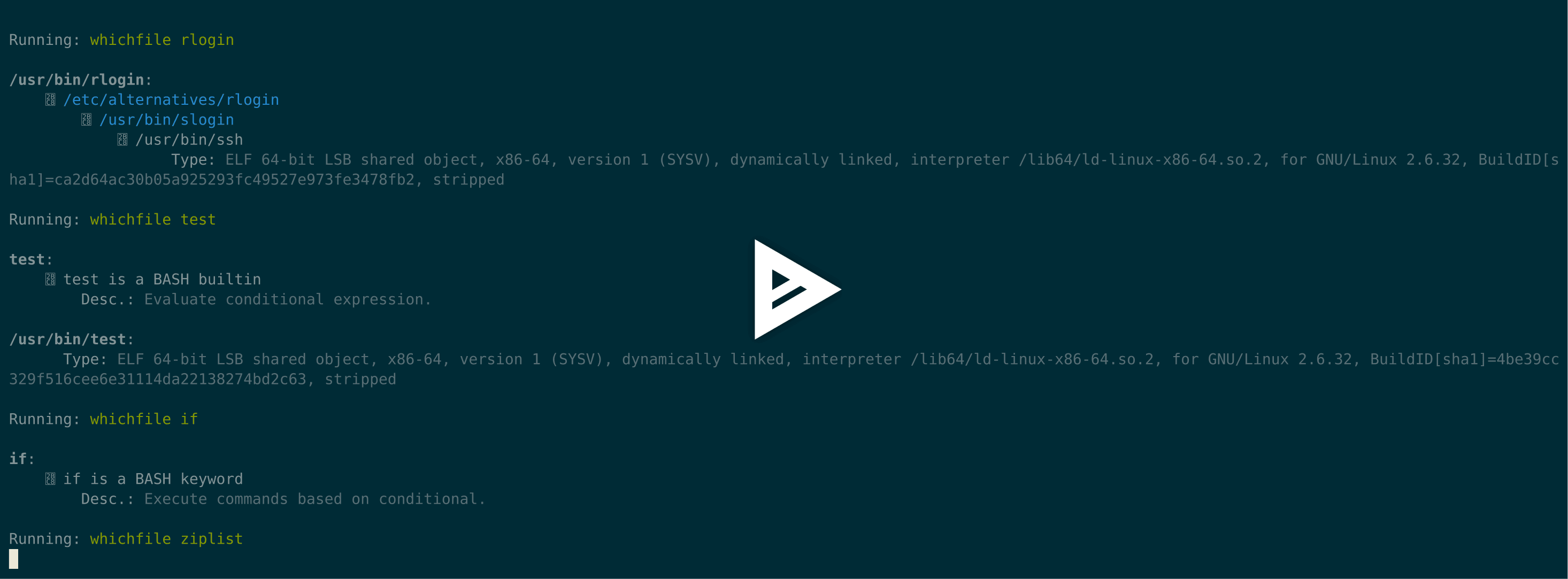
This is a recording of several runs, showing WhichFile’s output for the various types it can handle. Error output was included to show how installable apt packages are handled.
Release history Release notifications | RSS feed

Download files
Download the file for your platform. If you're not sure which to choose, learn more about installing packages.
Source Distribution
Built Distribution
Filter files by name, interpreter, ABI, and platform.
If you're not sure about the file name format, learn more about wheel file names.
Copy a direct link to the current filters
File details
Details for the file hichFile-1.0.3.tar.gz.
File metadata
- Download URL: hichFile-1.0.3.tar.gz
- Upload date:
- Size: 4.7 kB
- Tags: Source
- Uploaded using Trusted Publishing? No
- Uploaded via: twine/3.8.0 pkginfo/1.8.3 readme-renderer/34.0 requests/2.27.1 requests-toolbelt/0.10.1 urllib3/1.26.12 tqdm/4.64.1 importlib-metadata/4.8.3 keyring/23.4.1 rfc3986/1.5.0 colorama/0.4.5 CPython/3.6.8
File hashes
| Algorithm | Hash digest | |
|---|---|---|
| SHA256 |
6504f7cc37eb0eaf5df6fb0938efa3be4ff43ca7e7bebe7149cb05a435dfe384
|
|
| MD5 |
3f60a903800622d7249c59761f3cea9e
|
|
| BLAKE2b-256 |
5df46b757b7dd0d3d96271bb7e64e55c176420a6e3060ec022eed11629068a42
|
File details
Details for the file hichFile-1.0.3-py3-none-any.whl.
File metadata
- Download URL: hichFile-1.0.3-py3-none-any.whl
- Upload date:
- Size: 4.0 kB
- Tags: Python 3
- Uploaded using Trusted Publishing? No
- Uploaded via: twine/3.8.0 pkginfo/1.8.3 readme-renderer/34.0 requests/2.27.1 requests-toolbelt/0.10.1 urllib3/1.26.12 tqdm/4.64.1 importlib-metadata/4.8.3 keyring/23.4.1 rfc3986/1.5.0 colorama/0.4.5 CPython/3.6.8
File hashes
| Algorithm | Hash digest | |
|---|---|---|
| SHA256 |
7b3def42d67f3836cb226cf0da27d7ccdaee611d56784fbd62e3c5b9abc6a54d
|
|
| MD5 |
52a3a0f609443fa74358e38154a76153
|
|
| BLAKE2b-256 |
63f2b215cb3cd544cbdef9f96c2a10c93b33c73c1f1aeb41eef20371b2c10c98
|






