
Generates multi-view diagrams from textual descriptions

Project description
Introduction
hiearch is a CLI utility that generates diagrams from textual descriptions,
a.k.a., “diagrams as code”. Unlike many other generators such as graphviz it
is designed to support hierarchical decomposition of nodes and multiple views,
in which sense it is similar to https://structurizr.com. In other words,
hiearch generates multiple diagrams (views) from a single description, where
each node is a hierarchy of nodes, that is automatically expanded, collapsed, or
hidden, depending on configuration of a particular view. Currently, hiearch
uses graphviz to generate diagrams, but other backends may be added in the
future.
The main purpose of hiearch is graphical representation of complex systems,
but it is meant to be generic and may find other applications.
Why would anyone need another diagram generator when there is a multitude of
tools that support UML, C4, etc? I believe that the most important aspects of
the system are its decomposition into components and connections between them,
hiearch provides just that, nothing more, so that you can focus on documenting
your system rather than fitting it into a specific design framework.
Features
-
hiearchdoes not use a DSL, but rather parses a set of inputyamlfiles in arbitrary order. The file contents get composed into a single description, which, in turn, gets decomposed into views. -
Description files have flat structure without nesting or inclusion and contain lists of the following objects: nodes, edges, and views. Hierarchical relations between nodes are specified using node parameters.
-
Unlike
graphviz,hiearchdoes not have a concept of subgraphs: each node may automatically become a subgraph depending on a view. -
hiearchis also somewhat stricter thangraphviz: for example, all nodes must be defined explicitly and cannot be deduced from edge definitions. -
View is not the same thing as
graphvizlayer https://graphviz.org/docs/attrs/layer/:graphvizplaces all nodes on each layer and simply makes some of them invisible, which results in awkward spacing. -
hiearchallows nodes to have multiple parent nodes, which is referenced here as ‘multiscoping’. The idea is, of course, to show parents in different views, for example, to outline system from logical or hardware point of view. However, it is possible to visualize all parents in the same diagram, which may be a bit kinky. -
hiearchsupports label templates, which facilitates automatic generation of URLs, tables, icon inclusions, etc. -
There are a few predefined styles distributed with the utility, e.g., for generation of state machine graphs.
Examples
Command line options
usage: hiearch [-h] [-o OUTPUT] [-f FORMAT] <filename> [<filename> ...]

Generates diagrams

positional arguments:
  <filename>            Input files

optional arguments:
  -h, --help            show this help message and exit
  -o OUTPUT, --output OUTPUT
                        Output directory [hiearch]
  -f FORMAT, --format FORMAT
                        Output format [SVG]
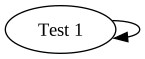
Trivial
-----------------------------------------------------------
nodes:
    - id: ["Test 1", test1]  # [label, unique id]
edges:
    - link: [test1, test1]   # [from node id, to node id]
views:
    - id: view1              # unique id / output filename
      nodes: [test1]         # nodes to include
|
view1 |
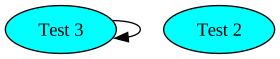
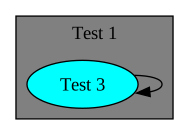
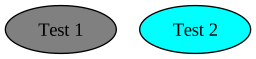
Node relations
-----------------------------------------------------------
nodes:
    - id: ["Test 1", test1]
      graphviz:  # set graphviz attributes directly
        fillcolor: grey
        style: filled
    - id: ["Test 2", test2]
      graphviz:  # set graphviz attributes directly
        fillcolor: aqua
        style: filled
    - id: ["Test 3", test3]
      scope: test1  # test3 is contained in test1
      style: test2  # test3 inherits all test2 attributes
edges:
    - link: [test3, test3]
views:
    - id: view1
      nodes: [test2, test3]
    - id: view2  # test1 is shown as subgraph
      nodes: [test1, test3]
    - id: view3
      nodes: [test1, test2]
|
view1 |
view2 |
|
view3 |
Node selection using tags
-----------------------------------------------------------
nodes:
    - id: ["Test 1", test1]
      # tags: ["default"] if not specified
    - id: ["Test 2", test2]
      tags: ["test2_tag"]
edges:
    - link: [test1, test1]
    - link: [test2, test2]
views:
    - id: view1
      tags: ["test2_tag"]
    - id: view2
      tags: ["default"]
|
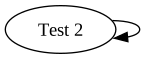
view1 |
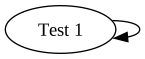
view2 |
-----------------------------------------------------------
nodes:
    - id: ["Test 1", test1]
# if no views are specified explicitly, a default one is
# added with 'tags: ["default"]'
|
default |
Style inheritance without tags
-----------------------------------------------------------
nodes:
    - id: ["Node A", node_a]
      tags: ["custom_tag"]
      graphviz:
        fillcolor: grey
        style: filled
    - id: ["Node B", node_b]
      style: node_a
    - id: ["Node C", node_c]
      # no need to explicitly override inherited tags,
      # which is useful for dealing with pure style nodes.
      style_notag: node_a
views:
    - id: view_default          # includes node C
    - id: view_custom           # includes nodes A and B
      tags: ["custom_tag"]
|

view_default |
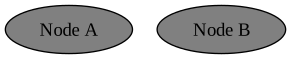
view_custom |
Neighbour node selection
-----------------------------------------------------------
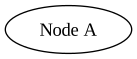
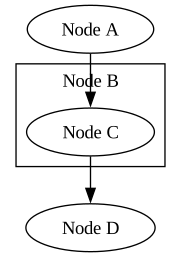
nodes:
    - id: ["Node A", node_a]
    - id: ["Node B", node_b]
    - id: ["Node C", node_c]
      scope: [node_b]
    - id: ["Node D", node_d]
edges:
    - link: [node_a, node_c]
    - link: [node_c, node_d]
views:
    - id: explicit
      nodes: [node_a]
      # only node_a
      #neighbours: explicit
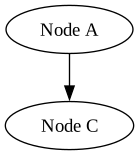
    - id: direct
      nodes: [node_a]
      # node_a and node_c (directly connected)
      neighbours: direct
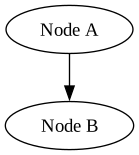
    - id: parent
      nodes: [node_a]
      # node_a and node_b (parent of connected node C)
      neighbours: parent
    - id: recursive_out
      nodes: [node_a]
      # node_a, node_c, node_d (all connected)
      # + node_b -- parent of c
      neighbours: recursive_out
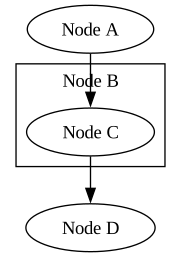
    - id: recursive_in
      nodes: [node_d]
      # node_a, node_c, node_d (all connected)
      # + node_b -- parent of c
      neighbours: recursive_in
    - id: recursive_in_c
      nodes: [node_c]
      # node_a, node_c
      neighbours: recursive_in
|
explicit |
direct |
|
parent |
|
recursive_in |
|
recursive_out |
|

recursive_out_c |
View styles
-----------------------------------------------------------
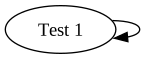
nodes:
    - id: ["Test 1", test1]
edges:
    - link: [test1, test1]
views:
    - id: style
      nodes: []  # explicitly empty view is not rendered
      # defaults, overriden by node/edge attributes
      graphviz:
          graph:
              style: filled
              bgcolor: coral
          node:
              fontsize: "24"
              fontname: times
          edge:
              dir: both
    - id: styled
      nodes: [test1]
      style: style  # inherit style from another view
    - id: plain
      nodes: [test1]
|

styled |
plain |
Edge labels
-----------------------------------------------------------
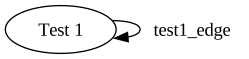
nodes:
    - id: ["Test 1", test1]
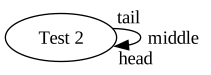
    - id: ["Test 2", test2]
edges:
    - link: [test1, test1]
      label: 'test1_edge'
    - link: [test2, test2]
      label: ['tail', 'middle', 'head']
views:
    - id: view1
      nodes: [test1]
    - id: view2
      nodes: [test2]
|
view1 |
view2 |
Edge styles
-----------------------------------------------------------
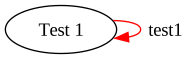
nodes:
    - id: ["Test 1", test1]
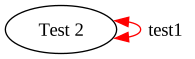
    - id: ["Test 2", test2]
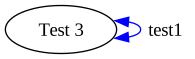
    - id: ["Test 3", test3]
    # helper node to define "invisible" edges used purely
    # as style templates
    - id: ["StyleNode", stylenode]
      # invisible unless this tag is requested in a view
      # note that tags are inherited too
      tags: ["mystyle"]
edges:
    # "pure" style link
    - link: [stylenode, stylenode, stylelink]
      graphviz:
        color: red
    - link: [test1, test1]
      label: 'test1'
      style: stylelink
    # optional third link parameter introduces an explicit
    # id, which must be unique
    - link: [test2, test2, edge2]
      # style can be referenced by link attribute
      style: [test1, test1]
      graphviz:
        dir: both
    - link: [test3, test3]
      # style can also be an explicit id
      style: edge2
      graphviz:
        color: blue
views:
    - id: view1
      nodes: [test1]
    - id: view2
      nodes: [test2]
    - id: view3
      nodes: [test3]
|
view1 |
view2 |
|
view3 |
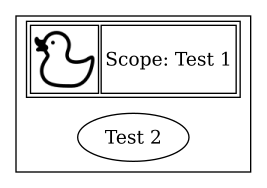
Formatted labels
nodes:
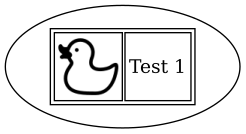
    - id: ["Test 1", test1]
      # https://www.svgrepo.com/svg/479843/duck-toy-illustration-3
      # https://www.svgrepo.com/svg/479405/casa-pictogram-5
      graphviz:
        node_label_format: '<<table><tr><td><img src="https://raw.githubusercontent.com/asherikov/hiearch/master/icon_{id}.svg"/></td><td>{label}</td></tr></table>>'
        scope_label_format: '<<table><tr><td><img src="https://raw.githubusercontent.com/asherikov/hiearch/master/icon_{id}.svg"/></td><td>Scope: {label}</td></tr></table>>'
    - id: ["Test 2", test2]
      scope: test1
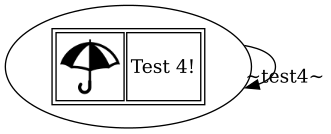
    - id: ["Test 3", test3]
      tags: []
      substitutions:
        suffix: '!'
      graphviz:
        node_label_format: '<<table><tr><td><img src="https://raw.githubusercontent.com/asherikov/hiearch/master/icon_{style}.svg"/></td><td>{label}{suffix}</td></tr></table>>'
    - id: ["Test 4", test4]
      style: test3
views:
    - id: view1
      nodes: [test1]
    - id: view2
      nodes: [test1, test2]
    - id: view3
      nodes: [test4]
Note that SVG with other embedded SVG is not always rendered properly, and
embedded pictures may get lost during conversion to other formats. The PNG files
below were generated with
rsvg-convert view1.svg --format=png --output=view1.png, exporting directly to
PNG using graphviz won’t work. Also, the included images must be present in the
output directory.
view1 |
view2 |
view3 |
Multiscoping
-----------------------------------------------------------
nodes:
    # root nodes
    - id: ["Test 1", test1]
    - id: ["Test 2", test2]
    # child nodes
    - id: ["Test 3", test3]
      # a child of both root nodes: if both scopes are
      # present in a view they are automatically ranked
      # to form a hierarchy
      scope: [test1, test2]
    # Both root nodes also include non-shared nodes.
    # Since is not possible to visualize overlaping
    # subgraphs with graphviz, one of them is going to be
    # divided into two parts.
    - id: ["Test 4", test4]
      scope: test2
    - id: ["Test 5", test5]
      scope: [test1]
views:
    - id: default
      tags: ["default"]
    - id: autoranking
      nodes: [test1, test2, test3]
|
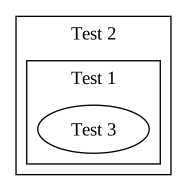
autoranking |
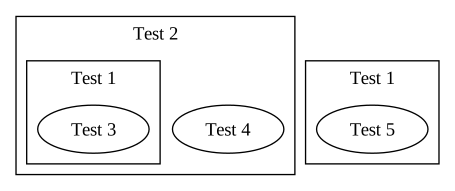
default |
Predefined styles
- All predefined styles are automatically added to input files on invocation of
hiearch. - Generally it is necessary to override tags inherited from style nodes.
State machine
-----------------------------------------------------------
nodes:
    - id: ["", choice1]
      style_notag: hh_state_machine_choice
    - id: [state1, state1]
      style_notag: hh_state_machine_regular
    - id: [state2, state2]
      style_notag: hh_state_machine_regular
    - id: ["", fork1]
      style_notag: hh_state_machine_junction
    - id: ["", join2]
      style_notag: hh_state_machine_junction
    - id: ["", start]
      style_notag: hh_state_machine_initial
    - id: ["", end1]
      style_notag: hh_state_machine_final
    - id: ["", end2]
      style_notag: hh_state_machine_final
edges:
    - link: [start, choice1]
      label: "from start\nto choice"
    - link: [choice1, fork1]
      label: "from choice\nto fork"
    - link: [choice1, join2]
      label: "from choice\nto join"
    - link: [choice1, end2]
      label: "from choice\nto end"
    - link: [fork1, state1]
      label: "from fork\nto state"
    - link: [fork1, state2]
      label: "from fork\nto state"
    - link: [state2, join2]
      label: "from state\nto join"
    - link: [state1, end1]
      label: "from state\nto end"
    - link: [join2, end1]
      label: "from join\nto end"
views:
    # Example
    - id: state_machine_example
      style: hh_state_machine_view
|
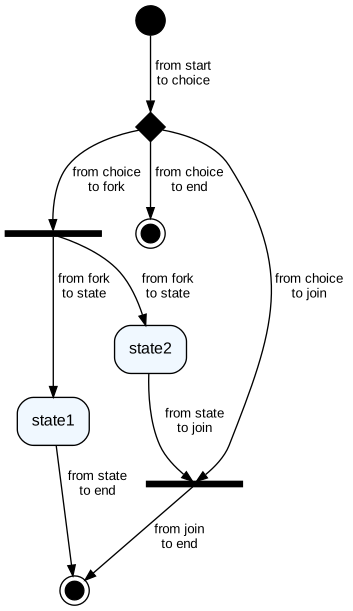
state machine example |
Use Case
-----------------------------------------------------------
nodes:
    - id: ["User", user]
      style_notag: hh_use_case_actor
    - id: ["Admin", admin]
      style_notag: hh_use_case_actor
    - id: ["Login System", system_boundary]
      style_notag: hh_use_case_system_boundary
    - id: ["Login", login]
      style_notag: hh_use_case_case
      scope: system_boundary
    - id: ["Logout", logout]
      style_notag: hh_use_case_case
      scope: system_boundary
    - id: ["Reset Password", reset_password]
      style_notag: hh_use_case_case
      scope: system_boundary
    - id: ["Register", register]
      style_notag: hh_use_case_case
      scope: system_boundary
    - id: ["Validate Credentials", validate_credentials]
      style_notag: hh_use_case_case
      scope: system_boundary
    - id: ["2FA Authentication", two_factor_auth]
      style_notag: hh_use_case_case
      scope: system_boundary
edges:
    - link: [user, login]
      style: hh_use_case_association
    - link: [user, logout]
      style: hh_use_case_association
    - link: [user, reset_password]
      style: hh_use_case_association
    - link: [user, register]
      style: hh_use_case_association
    - link: [admin, reset_password]
      style: hh_use_case_association
    - link: [login, validate_credentials]
      style: hh_use_case_include
    - link: [two_factor_auth, login]
      style: hh_use_case_extend
views:
    - id: use_case_example
      style: hh_use_case_view
|
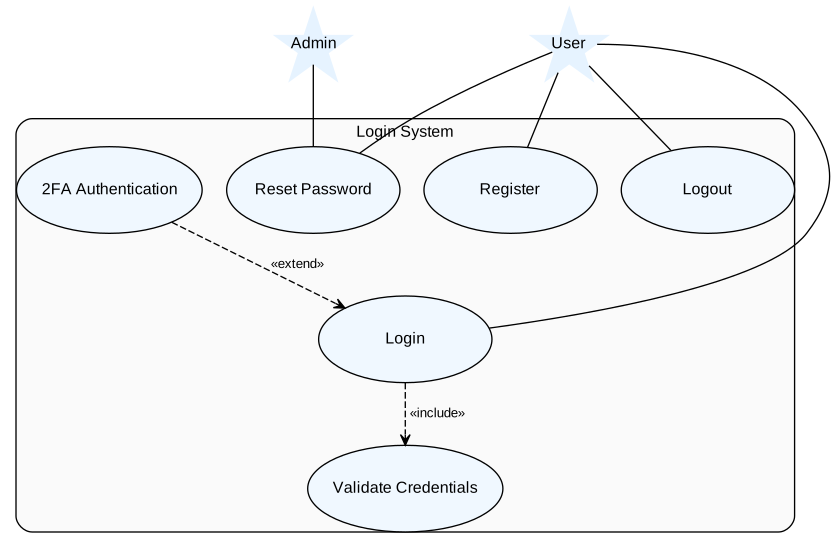
use case example |
Dinit service graph
-----------------------------------------------------------
nodes:
    - id: ["cdinit_log", cdinit_log]
      style_notag: hh_dinit_process
    - id: ["cdinit_sessionsync", cdinit_sessionsync]
      style_notag: hh_dinit_process
    - id: ["cdinit_ros2_bag", cdinit_ros2_bag]
      style_notag: hh_dinit_process
    - id: ["px4_offboard_demo_py_node",
            px4_offboard_demo_py_node]
      style_notag: hh_dinit_process
    - id: ["px4sitl_dds_agent", px4sitl_dds_agent]
      style_notag: hh_dinit_process
    - id: ["px4sitl_gz_clock", px4sitl_gz_clock]
      style_notag: hh_dinit_process
    - id: ["px4sitl_gz_headless", px4sitl_gz_headless]
      style_notag: hh_dinit_process
    - id: ["px4sitl_gz_gui", px4sitl_gz_gui]
      style_notag: hh_dinit_process
    - id: ["px4sitl_gz_wait", px4sitl_gz_wait]
      style_notag: hh_dinit_scripted
    - id: ["px4sitl_px4", px4sitl_px4]
      style_notag: hh_dinit_process
    - id: ["px4sitl_qgroundcontrol",
            px4sitl_qgroundcontrol]
      style_notag: hh_dinit_process
    - id: ["px4sitl_ros", px4sitl_ros]
      style_notag: hh_dinit_internal
edges:
    - link: [px4_offboard_demo_py_node, cdinit_log]
      style: hh_dinit_depends_ms
    - link: [px4_offboard_demo_py_node, cdinit_ros2_bag]
      style: hh_dinit_depends_ms
    - link: [px4_offboard_demo_py_node, px4sitl_px4]
      style: hh_dinit_depends_on
    - link: [cdinit_ros2_bag, cdinit_log]
      style: hh_dinit_depends_ms
    - link: [cdinit_ros2_bag, cdinit_sessionsync]
      style: hh_dinit_depends_ms
    - link: [px4sitl_dds_agent, cdinit_log]
      style: hh_dinit_depends_ms
    - link: [px4sitl_gz_clock, cdinit_log]
      style: hh_dinit_depends_ms
    - link: [px4sitl_gz_clock, px4sitl_gz_headless]
      style: hh_dinit_depends_on
    - link: [px4sitl_gz_gui, cdinit_log]
      style: hh_dinit_depends_ms
    - link: [px4sitl_gz_gui, px4sitl_gz_wait]
      style: hh_dinit_depends_on
    - link: [px4sitl_gz_gui, px4sitl_ros]
      style: hh_dinit_depends_on
    - link: [px4sitl_gz_headless, cdinit_log]
      style: hh_dinit_depends_ms
    - link: [px4sitl_gz_wait, cdinit_log]
      style: hh_dinit_depends_ms
    - link: [px4sitl_gz_wait, px4sitl_gz_headless]
      style: hh_dinit_depends_on
    - link: [px4sitl_px4, cdinit_log]
      style: hh_dinit_depends_ms
    - link: [px4sitl_px4, px4sitl_gz_wait]
      style: hh_dinit_depends_on
    - link: [px4sitl_qgroundcontrol, cdinit_log]
      style: hh_dinit_depends_ms
    - link: [px4sitl_qgroundcontrol, px4sitl_px4]
      style: hh_dinit_depends_on
    - link: [px4sitl_ros, px4sitl_dds_agent]
      style: hh_dinit_depends_on
    - link: [px4sitl_ros, px4sitl_gz_clock]
      style: hh_dinit_depends_on
    - link: [px4sitl_ros, px4sitl_gz_headless]
      style: hh_dinit_depends_on
    - link: [cdinit_log, cdinit_sessionsync]
      style: hh_dinit_depends_ms

views:
    - id: dinit_service_example
      nodes: [px4sitl_gz_gui, px4sitl_qgroundcontrol,
              px4_offboard_demo_py_node]
      neighbours: recursive_out
      style: hh_dinit_service_view
|

dinit service example |
Release history Release notifications | RSS feed


Download files
Download the file for your platform. If you're not sure which to choose, learn more about installing packages.
Source Distribution
Built Distribution
Filter files by name, interpreter, ABI, and platform.
If you're not sure about the file name format, learn more about wheel file names.
Copy a direct link to the current filters
File details
Details for the file hiearch-0.4.0.tar.gz.
File metadata
- Download URL: hiearch-0.4.0.tar.gz
- Upload date:
- Size: 16.5 kB
- Tags: Source
- Uploaded using Trusted Publishing? No
- Uploaded via: twine/6.2.0 CPython/3.12.3
File hashes
| Algorithm | Hash digest | |
|---|---|---|
| SHA256 |
9bdcae88b266dfafbed5ff734866905e417fab7c68c7df20625e2d1e0744df64
|
|
| MD5 |
450e33f8217c1a9374b1afa172d93502
|
|
| BLAKE2b-256 |
70b969538f5223881e874750e85528232e7b91e459a42f433bec693d75c5b00c
|
File details
Details for the file hiearch-0.4.0-py3-none-any.whl.
File metadata
- Download URL: hiearch-0.4.0-py3-none-any.whl
- Upload date:
- Size: 20.3 kB
- Tags: Python 3
- Uploaded using Trusted Publishing? No
- Uploaded via: twine/6.2.0 CPython/3.12.3
File hashes
| Algorithm | Hash digest | |
|---|---|---|
| SHA256 |
cbcd88e06268b87ff941d214886781c873c48ec55300b3be9469faadf1572360
|
|
| MD5 |
25c3282f79a6e9a9d66082f9fd11e54a
|
|
| BLAKE2b-256 |
eacf339cfa8d51580005ede8becc273b049b2a2d59883f9bb04aa0f15b63b651
|






