
HighJax: A JAX implementation of the HighwayEnv driving environment

Project description
HighJax: Highway Driving environment for Reinforcement Learning research
PPO agent learning to drive on a 4-lane highway

HighJax is an autonomous driving environment for Reinforcement Learning research. It's a JAX implementation of the HighwayEnv. HighJax provides a fully JIT-compilable and vectorizable highway driving simulation.
Besides being much faster than the original, it provides Octane, a Rust-based TUI for examining your experiment runs. Octane provides an interface for defining behaviors and then measuring how much each policy exhibits them.
HighJax was produced as part of our research project about BXRL:Behavior-Explainable Reinforcement Learning.
Installation
pip install highjax-rl # Minimal installation
pip install "highjax-rl[cuda12]" # Including GPU support
pip install "highjax-rl[trainer]" # Including PPO implementation
pip install "highjax-rl[cuda12,trainer]" # Including both
Quick Start
import jax
import highjax

env, params = highjax.make('highjax-v0')
key = jax.random.PRNGKey(0)
obs, state = env.reset(key, params)
obs, state, reward, done, info = env.step(key, state, 1, params)  # IDLE
Using with JAX RL Libraries
HighJax follows the gymnax API, so it works with JAX RL frameworks that expect gymnax-style environments:
- PureJaxRL — drop-in gymnax replacement (no PureJaxRL install needed), see
examples/use_purejaxrl.py - Stoix — via
stoagymnax adapter, seeexamples/use_stoix.py - Rejax — pass env object directly, see
examples/use_rejax.py
Training
Train a PPO agent via the CLI:
highjax-trainer train
Key options:
| Flag | Default | Description |
|---|---|---|
--n-epochs / -e |
300 | Training epochs |
--n-es |
400 | Parallel episodes per epoch |
--n-ts |
40 | Timesteps per episode |
--seed / -s |
0 | Random seed |
--actor-lr |
3e-4 | Actor learning rate |
--critic-lr |
3e-3 | Critic learning rate |
--n-npcs |
50 | NPC vehicles |
--no-trek |
— | Disable trek recording |
--n-sample-es |
1 | Episodes to sample per epoch for trek |
--trek-path |
auto | Custom trek directory path |
--discount |
0.95 | Discount factor (gamma) |
--n-lanes |
4 | Number of highway lanes |
Training automatically records episode data to ~/.highjax/t/ for browsing with Octane (the TUI). Use --no-trek to disable.
Here's a snazzy one-liner that will let you explore the results of the current experiment run using VisiData:
pip install visidata
vd "$(ls -d ~/.highjax/t/2*/ | tail -1)"/epochia.pq
Use the following command line to produce similar results as seen in Figure 2 of the paper:
highjax-trainer train --n-es 128 --n-ts 400 --n-epochs 300 --target-kld 0.0005
Octane (Episode Browser)
This repo also includes Octane, which is a Rust-based TUI for browsing HighJax experiments.
Installation
sudo apt-get install build-essential # C toolchain (needed by Rust)
sudo apt-get install ffmpeg # Needed for `octane animate`
git clone https://github.com/HumanCompatibleAI/HighJax # Clone this repo
cd HighJax
curl --proto '=https' --tlsv1.2 -sSf https://sh.rustup.rs | sh # Install Rust
source "$HOME/.cargo/env"
cd octane && cargo build --release # Build Octane
alias octane="$(readlink -f octane/target/release/octane)"
The binary will be at octane/target/release/octane.
Usage
After training, launch Octane to see all the experiments you ran with highjax-trainer:
octane
Figures
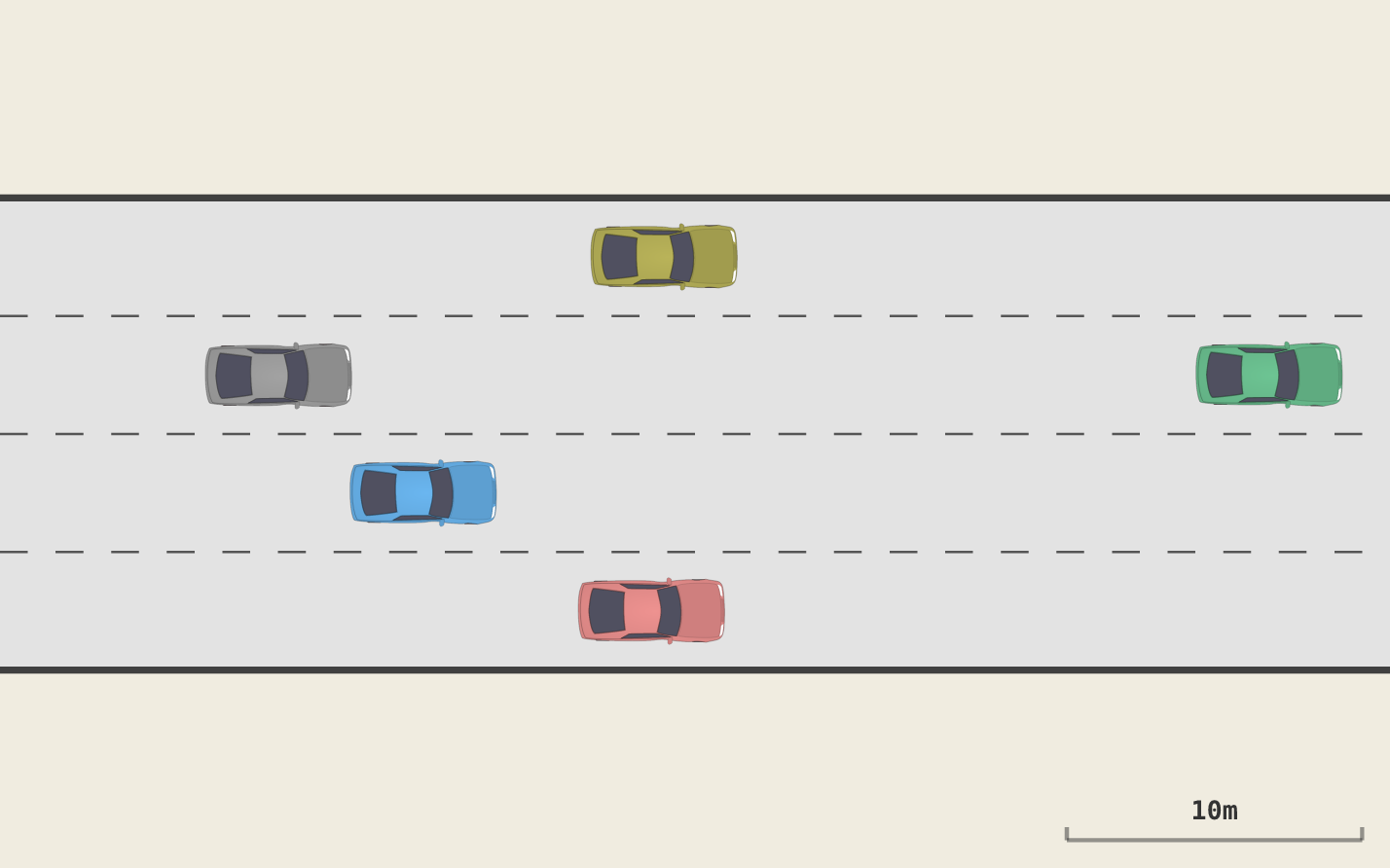
Use Octane to make figures for your paper:
octane draw -t ~/.highjax/t/2026-03-15-20-02-25-101327 --epoch 300 -e 0 --timestep 19 --theme light \
  --zoom 1.8 --png ~/figure.png
Behavior crafting
Octane includes a behavior explorer for defining measurable policy properties. While watching an episode, press b to capture a scenario — mark which actions you want (positive weight) or don't want (negative weight) at that traffic state. Name it, and Octane saves the behavior to ~/.highjax/behaviors/. The next time you run highjax-trainer train, all discovered behaviors are evaluated every epoch and their scores are recorded as behavior.{name} columns in epochia.parquet.
Defining a behavior scenario in Octane
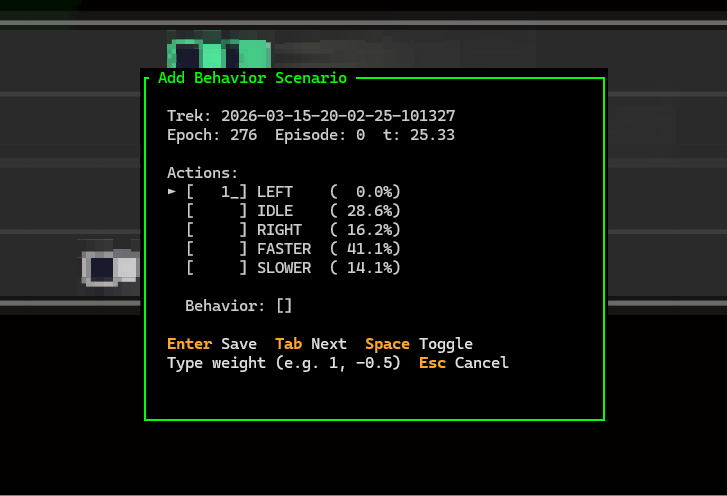
Press B (Shift-B) to open the full Behavior Explorer tab.
See the Octane docs for full details.
Documentation
Full documentation is in the docs/ folder:
- HighJax environment docs — state, observations, reward, NPCs, physics
- Octane TUI docs — episode browser, configuration, key bindings
- Coding conventions — naming, array indices, style
Examples
examples/basic_usage.py— Create env, reset, step, print observationsexamples/train_ppo.py— Train a PPO agent and evaluate itexamples/use_purejaxrl.py— PureJaxRL integration (vectorized scan loop)examples/use_stoix.py— Stoix integration (via stoa gymnax adapter)examples/use_rejax.py— Rejax integration (JIT-compiled training, vmapped seeds)
Citation
If you use HighJax in your research, please cite:
@article{rachum2025bxrl,
  title={BXRL: Behavior-Explainable Reinforcement Learning},
  author={Rachum, Ram and Amitai, Yotam and Nakar, Yonatan and Mirsky, Reuth and Allen, Cameron},
  year={2025}
}


Download files
Download the file for your platform. If you're not sure which to choose, learn more about installing packages.
Source Distribution
Built Distribution
Filter files by name, interpreter, ABI, and platform.
If you're not sure about the file name format, learn more about wheel file names.
Copy a direct link to the current filters
File details
Details for the file highjax_rl-0.1.3.tar.gz.
File metadata
- Download URL: highjax_rl-0.1.3.tar.gz
- Upload date:
- Size: 67.0 kB
- Tags: Source
- Uploaded using Trusted Publishing? No
- Uploaded via: twine/6.2.0 CPython/3.14.0
File hashes
| Algorithm | Hash digest | |
|---|---|---|
| SHA256 |
1a0ac62989a5acf1156540311f2b26daa8acbdaa36ae14e4a7299fd970d50562
|
|
| MD5 |
b6448f8dd218610c765af2842e33922d
|
|
| BLAKE2b-256 |
7f5f70a472927df21d72dad91c6fa58d75f2c05f81da0b4c2ccf5520655cc6e7
|
File details
Details for the file highjax_rl-0.1.3-py3-none-any.whl.
File metadata
- Download URL: highjax_rl-0.1.3-py3-none-any.whl
- Upload date:
- Size: 76.5 kB
- Tags: Python 3
- Uploaded using Trusted Publishing? No
- Uploaded via: twine/6.2.0 CPython/3.14.0
File hashes
| Algorithm | Hash digest | |
|---|---|---|
| SHA256 |
4b318b07260fd2601988351fbaf8561aee5360fee9e1fb81d8b34cb4f1fe3539
|
|
| MD5 |
d288526dbab8a3c710beeeba8c24c14a
|
|
| BLAKE2b-256 |
13759da7dc2ef249f56d235541b6d2244e24556cadff530426ce0165d4136b42
|






