

An open-source, ultra-fast, and efficient quantitative trading framework in C++/Python




English | 简体中文
Hikyuu Quant Framework builds on mature systematic trading and portfolio management concepts, with a core focus on a fast research workflow for strategy (or asset) portfolios. It decomposes quantitative analysis into independently replaceable strategy parts — market environment, signals, stop-loss / take-profit, money management, profit goals, slippage, multi-factor models and fund allocation — which you can freely combine into your own strategy library and validate through backtesting.
⚠️ Disclaimer: This project is an open-source financial technology research tool. It is intended for personal study, academic research and data analysis only. It does not constitute any investment advice or trading guidance, and it does not provide or embed any securities trading service. The framework only offers generic interface extension capability; users are advised to connect only to compliant trading terminals provided by licensed institutions. Any trading interface, extension or actual operation added or developed by the user is entirely at the user's own risk and legal responsibility. Connecting to illegal trading channels or using the framework for non-compliant trading scenarios is strictly prohibited.
📊 Key Metrics
⚡ 166msSum over 19.13 million K-line bars after warm-up (AMD 7950x) |
🧩 10+Core strategy parts · freely composable asset library |
💾 4 typesStorage backends (HDF5 / MySQL / ClickHouse / SQLite) |
🔗 Quick Links
| Item | Link |
|---|---|
| 🏠 Project home page | https://hikyuu.org/ |
| 📚 Documentation | https://hikyuu-en.readthedocs.io/en/latest/ |
| 🚀 Getting started | Jupyter Notebook tutorial series |
| 🧰 Strategy part library | https://gitee.com/fasiondog/hikyuu_hub |
⚡ Quick Start (run your first backtest)
Requirements
- Python 3.10+ (3.9 and below are no longer supported for pip installation since 2.8.0)
- Windows / Linux / macOS (Linux: Ubuntu 24.04+)
- Main dependencies are installed automatically:
numpy,pandas,matplotlib,PySide6,tables, etc.
Step 1: Install
pip install hikyuu
If the download is slow (for users in China), use a mirror:
pip install hikyuu -i https://pypi.tuna.tsinghua.edu.cn/simple
Step 2: Import market data
Import historical A-share market data with either method:
# Graphical interface (recommended for first use; it generates the configuration file)
HikyuuTDX

# Command line (requires having run HikyuuTDX once to generate the configuration)
importdata
ℹ️ Data coverage: HikyuuTDX downloads China A-share historical data only and needs a one-time initial configuration in the GUI. Overseas markets (US stocks, etc.) are not available yet and will be supported gradually.
Step 3: Run your first backtest
from hikyuu.interactive import *

# Create a simulated trading account for backtesting, with initial capital of 300,000
my_tm = crtTM(init_cash=300000)

# Create a signal indicator (fast line: 5-day EMA; slow line: 10-day EMA)
# Buy when the fast line crosses above the slow line, sell otherwise
my_sg = SG_Flex(EMA(CLOSE(), n=5), slow_n=10)

# Buy a fixed 1000 shares each time
my_mm = MM_FixedCount(1000)

# Create the trading system and run it
sys = SYS_Simple(tm=my_tm, sg=my_sg, mm=my_mm)
sys.run(sm['sz000001'], Query(-150))

📖 See the Jupyter Notebook tutorial series for the complete example.
❓ FAQ
| Symptom | Solution |
|---|---|
pip install on Windows hangs while downloading PyQt / PySide6 |
Use the Tsinghua mirror: pip install hikyuu -i https://pypi.tuna.tsinghua.edu.cn/simple |
HikyuuTDX GUI cannot import data |
Use the importdata command instead (run the GUI once first to generate the config) |
| Errors about a missing hdf5 / dll | Run pip install tables to reinstall HDF5 support |
| Build tool for building from source | This project uses xmake, not cmake |
💡 For more questions see the documentation, or open an issue on Gitee.
🚀 Why Hikyuu?
Powerful features for your quantitative trading research
💹 Flexible composition: build a categorized strategy asset library
Hikyuu provides a lightweight abstraction over systematic trading methods, encapsulating the market environment, signal generators, stop-loss / take-profit, money management, profit goals, slippage and fund allocation as independently replaceable strategy parts. You can combine them freely, backtest efficiently, and focus on the effect and impact of a single part during research. See "Core parts of the systematic trading architecture" below for the complete list.

🚀 Extreme performance: build your own quant application with ease
The project consists of three parts: a high-performance C++ core library, the Python interface layer (hikyuu), and the interactive exploration tool.
- Measured on an AMD 7950x: loading the full A-share market (19.13 million daily K-line bars) and computing and summing the 20-day moving average for the first time takes only 6 seconds; once the data is warm, the same operation takes only 166 milliseconds (📊 Performance benchmark details, article in Chinese).
- C++ core library: ships with a complete strategy framework, native multi-threading and multi-core acceleration, leaving room to scale for very high computing demands. The core library can also be used standalone, helping developers build custom quantitative tools quickly.
- Python interface layer (hikyuu): a lightweight wrapper around the C++ core with TA-Lib integrated; converts seamlessly to and from numpy and pandas, so it plugs into the mainstream Python data analysis ecosystem.
- hikyuu.interactive: the interactive exploration tool, with built-in visualization of candlesticks, indicators and signals, suitable for rapid strategy validation and backtest analysis.
🍳 Concise syntax: explore strategies faster and more freely
Both object-oriented and command-line styles are supported. Especially during strategy exploration, the command-line style is minimal and expressive, letting you validate ideas and iterate faster.
🔐 Self-controlled: build your own cloud quant platform
Combining Python + Jupyter with a cloud server gives you a fully self-controlled cloud quant platform. Once deployed, access it anywhere (phone, tablet or computer) and turn new ideas into practice quickly. It also integrates with mature AI and data analysis tools such as numpy, scipy, pandas and TensorFlow for building intelligent quantitative systems. You can customize the interface or deploy it as a service as needed.
🎁 Modular and extensible data storage
Four storage backends are currently supported: HDF5, MySQL, ClickHouse and SQLite, with HDF5 as the default (compact, fast to read and write, and easy to back up). ClickHouse is available through a plugin: it reads and writes faster than HDF5 and uses far less space than MySQL, making it a better fit for minute-level and higher-frequency data.
💻 Concise API design
A complete strategy backtest system takes only a few lines of code — the intuitive API makes strategy development more efficient.
🔓 Open source and transparent, with data under your control
Released under the Apache 2.0 license, with fully auditable source code. Core data and strategies stay entirely under your local control; the C++ core library can be used standalone, so you can build your own client tools without worrying about third-party platform restrictions.
🏗️ Core parts of the systematic trading architecture
Rigorously architected around systematic trading concepts; every part can be replaced and combined freely
| Layer | Part | Description |
|---|---|---|
| Portfolio layer | Portfolio / PF |
Portfolio: strategy scheduling across multiple systems |
Selector / SE |
Selector: system / strategy screening | |
AllocateFunds / AF |
Fund allocation: capital allocation across systems | |
MultiFactor / MF |
Multi-factor model: factor scoring and ranking | |
| Trading system SYS | Environment / EV |
Environment: market regime validity assessment |
Condition / CN |
Condition: situations where the system applies | |
Signal / SG |
Signal: generates buy / sell signals | |
Stoploss / Stopprofit / ST |
Stop-loss / take-profit: risk-control exits | |
MoneyManager / MM |
Money management: order size control | |
ProfitGoal / PG |
Profit goal: exit when the target is reached | |
Slippage / SP |
Slippage: price simulation in backtesting | |
| Trade management | TradeManager / TM |
Trade manager: account cash and position records |
OrderBroker / OB |
Order broker: broker connection for live trading | |
| Data layer | StockManager |
Unified security management |
KData |
K-line price / volume series | |
Query |
Time-range query and filtering |
📂 Browse the source
A Star ⭐ is welcome, as are contributions
| Platform | Link | Recommendation |
|---|---|---|
| GitHub | https://github.com/fasiondog/hikyuu | Overseas |
| Gitee | https://gitee.com/fasiondog/hikyuu | ✅ Recommended in China |
| GitCode | https://gitcode.com/hikyuu/hikyuu | ✅ Recommended in China |
❤️ Sponsorship
🙏 Overseas sponsorship is being arranged. International payment channels are not available yet. If you would like to support Hikyuu from overseas, please email fasiondog@sina.com and we will work out a way together.
Supporters in China can use the Alipay / WeChat subscription plans listed in the Chinese edition. Non-monetary support is equally welcome — see How you can help below.
🌟 How you can help
Community contributions are welcome:
- 🐛 Test and report bugs
- 📝 Write documentation
- 🔧 Develop new features
- 🎨 Improve the website
💡 Please contribute by opening an issue on GitHub / Gitee / GitCode
📦 Dependencies
The open-source projects directly depended on by the C++ core, together with their project URLs and licenses, are summarized in THIRD_PARTY_LICENSES.md (indirect dependencies are not listed). Thanks to all the open-source authors for their contributions 👍
Python-side dependencies are listed in requirements.txt.
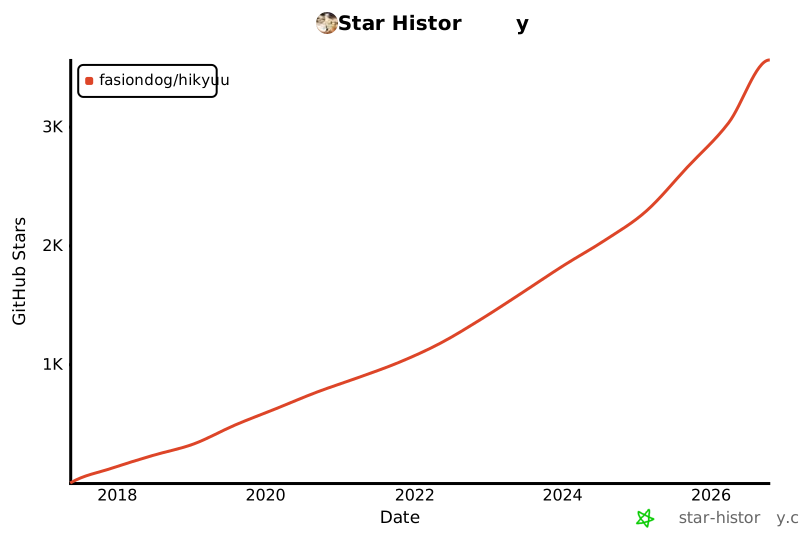
Star History
1 maintainer

Metadata
1 maintainer
Release files for hikyuu 2.8.3
For a detailed explanation of source distributions (sdists) and built distributions (wheels), please see the package formats documentation.
Built distributions (wheels)
| File | Reset | |||
|---|---|---|---|---|
| hikyuu-2.8.3-py3-none-win_amd64.whl | Python 3 | none | Windows x86-64 | Details |
| hikyuu-2.8.3-py3-none-manylinux2014_x86_64.whl | Python 3 | none | Linux glibc 2.17+ x86-64 | Details |
| hikyuu-2.8.3-py3-none-manylinux2014_aarch64.whl | Python 3 | none | Linux glibc 2.17+ ARM64 | Details |
| hikyuu-2.8.3-py3-none-macosx_11_0_arm64.whl | Python 3 | none | macOS 11.0+ ARM64 | Details |
Total release size: 228.0 MB
Release files / hikyuu-2.8.3-py3-none-win_amd64.whl
| Download URL | hikyuu-2.8.3-py3-none-win_amd64.whl |
|---|---|
| Size | 41.7 MB |
| Tags | Python 3 Windows x86-64 |
|
SHA-256 checksum How to use checksums |
da6672cbe5bf327f5676cc05cf6e1676146a014a8046455eda5d742b1d832b31
|
|
BLAKE2b-256 checksum How to use checksums |
fe9490afd65ee538450655f5972de0a6d1ff7bc00942888d42d3d94bcbd349c3
|
| Upload date | |
|
Uploaded using Trusted Publishing? What is trusted publishing? |
No |
| Uploaded via |
twine/6.2.0 CPython/3.12.12
|
Release files / hikyuu-2.8.3-py3-none-manylinux2014_x86_64.whl
| Download URL | hikyuu-2.8.3-py3-none-manylinux2014_x86_64.whl |
|---|---|
| Size | 76.1 MB |
| Tags | Linux glibc 2.17+ x86-64 Python 3 |
|
SHA-256 checksum How to use checksums |
3c412cadb913d5a917812b44d0512ad5641e10b3df2e7fd32bdbd29c8f952f98
|
|
BLAKE2b-256 checksum How to use checksums |
1a5146a461d485afd1668b4bdc4c989b01ff26a6534df18f6d33e8362f20ae0a
|
| Upload date | |
|
Uploaded using Trusted Publishing? What is trusted publishing? |
No |
| Uploaded via |
twine/6.2.0 CPython/3.12.9
|
Release files / hikyuu-2.8.3-py3-none-manylinux2014_aarch64.whl
| Download URL | hikyuu-2.8.3-py3-none-manylinux2014_aarch64.whl |
|---|---|
| Size | 57.9 MB |
| Tags | Linux glibc 2.17+ ARM64 Python 3 |
|
SHA-256 checksum How to use checksums |
dfadda77c3adb1557f3c783b236b6490a31432b63990cc6711a57ea92c02dc41
|
|
BLAKE2b-256 checksum How to use checksums |
40495f1a079995f7cefe8cceabf637bd0d129916db1495acedeba996ee845a32
|
| Upload date | |
|
Uploaded using Trusted Publishing? What is trusted publishing? |
No |
| Uploaded via |
twine/6.2.0 CPython/3.13.5
|
Release files / hikyuu-2.8.3-py3-none-macosx_11_0_arm64.whl
| Download URL | hikyuu-2.8.3-py3-none-macosx_11_0_arm64.whl |
|---|---|
| Size | 52.3 MB |
| Tags | Python 3 macOS 11.0+ ARM64 |
|
SHA-256 checksum How to use checksums |
079310a43d31491eae6e73712b14ea8ee3ff429735cb37afe116ea9a27b68390
|
|
BLAKE2b-256 checksum How to use checksums |
bd01896ea5f0510c1cd7568c3821f54879801b4bde455a01c460265dee64b8cf
|
| Upload date | |
|
Uploaded using Trusted Publishing? What is trusted publishing? |
No |
| Uploaded via |
twine/6.2.0 CPython/3.13.12
|














