
A diagnostic suite for Quantum Machine Learning encodings.

Project description
HilbertLens



HilbertLens is a diagnostic tool for Quantum Machine Learning (QML). It visualizes the hidden geometry of your quantum encodings and "diagnoses" their capacity to learn complex data.
Instead of blindly training Variational Quantum Circuits (VQC) and guessing why they fail, HilbertLens tells you:
- Spectrum Analysis: Does the circuit have enough bandwidth (expressibility) for the data?
- Geometry Analysis: Does the encoding preserve the topological structure of the data?
Installation
Install the latest stable release from PyPI:
pip install hilbertlens
To upgrade:
pip install -U hilbertlens
Development Installation
Clone the repository and install in editable mode:
git clone https://github.com/mamuncseru/hilbertlens.git
cd hilbertlens
pip install -e .
Quick Start
1. The "Doctor" Check
Pass your circuit to the QuantumLens and ask for a diagnosis.
import hilbertlens as hl
from qiskit.circuit import ParameterVector, QuantumCircuit

# Define your circuit
x = ParameterVector('x', 2)
qc = QuantumCircuit(2)
qc.h([0, 1])
qc.rz(x[0], 0)
qc.rz(x[1], 1)
qc.cx(0, 1) # Entanglement

# Initialize Lens
lens = hl.QuantumLens(qc, params=list(x), framework='qiskit')

# Run Diagnosis (Auto-runs Spectrum and Geometry checks)
lens.diagnose()
2. Manual Inspection
You can run individual checks and save the plots.
# Check Frequency Spectrum (Capacity)
lens.spectrum(mode='global', save_path="spectrum.png")

# Check Geometry Preservation (using synthetic Swiss Roll)
lens.geometry(save_path="geometry.png")
PennyLane Example
You can also pass a standard PennyLane QNode directly.
import hilbertlens as hl
import pennylane as qml

# 1. Define Device & Circuit
dev = qml.device("default.qubit", wires=2)

@qml.qnode(dev)
def circuit(x):
    # x is the input data array
    qml.Hadamard(wires=0)
    qml.Hadamard(wires=1)

    # Data Encoding
    qml.RX(x[0], wires=0)
    qml.RY(x[1], wires=1)

    # Entanglement
    qml.CNOT(wires=[0, 1])

    # Must return state for analysis
    return qml.state()

# 2. Initialize Lens
# Note: For PennyLane, we don't need to pass a params list.
lens = hl.QuantumLens(circuit, framework='pennylane')

# 3. Diagnose
lens.diagnose()
Understanding the Report
- [GOLD STANDARD]: Your circuit has a rich spectrum (multiple frequencies) AND preserves geometry. It is ready for research.
- [SAFE BUT SIMPLE]: Your circuit is linear (). It will work on simple data (Iris) but underfit complex data (Moons).
- [BROKEN GEOMETRY]: Your circuit destroys the data structure (e.g., score < 0.5). Check your data scaling!
Supported Frameworks
- Qiskit (Native support)
- PennyLane (Auto-detected if installed)
Sample Output
Testing with Real Data: Two Moons
Data Shape: (200, 2)
Features: 2
i. Quantum Circuit
Circuit Created: 2-Qubit Entangled Network
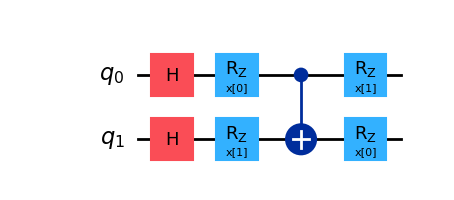
[HilbertLens] Initialized for framework: qiskit
ii. Geometry Check (Two Moons)
Status: Analyzing Geometry
- Geometry Score (Spearman Correlation):
0.9182 - Output:
moons_geometry.png
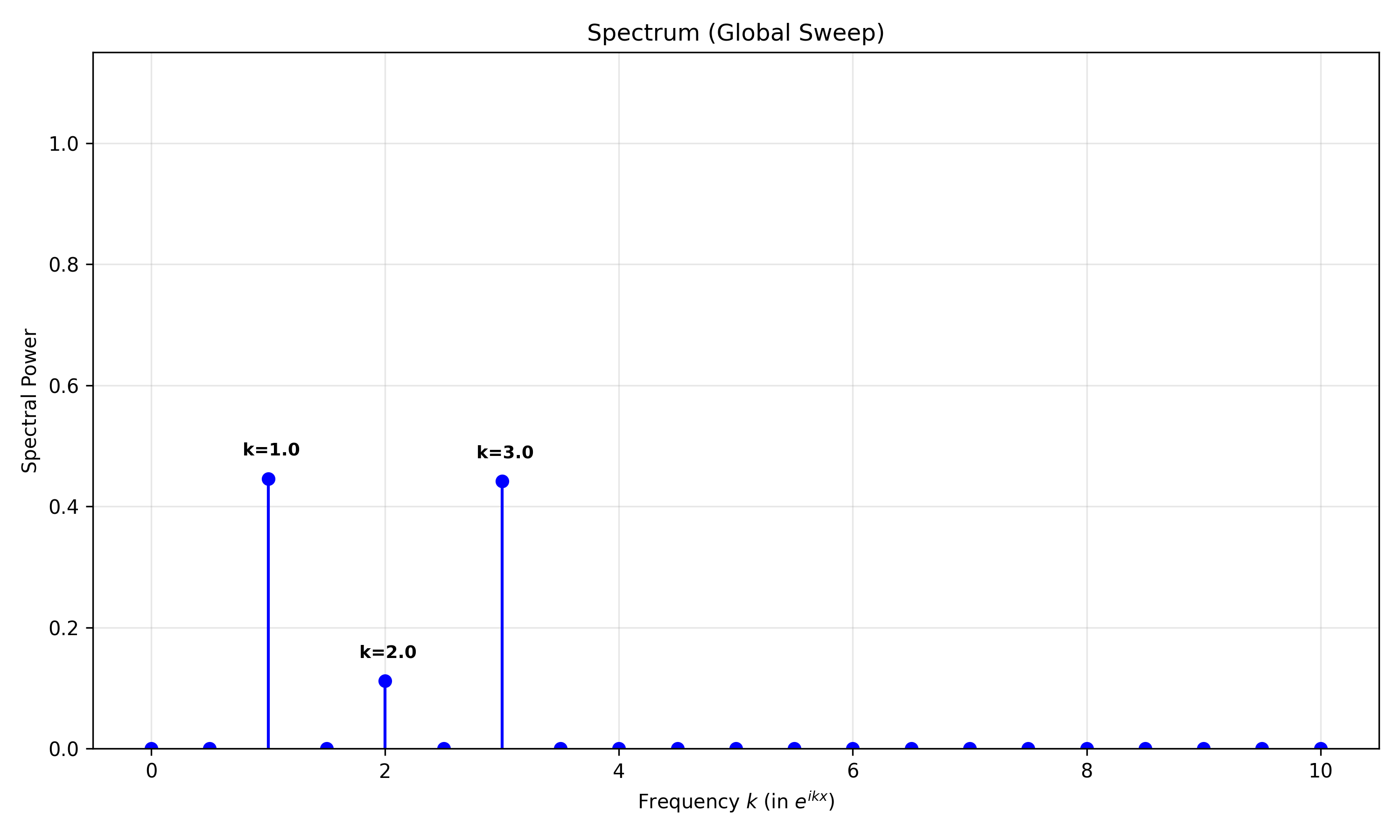
iii. Spectrum Check
Status: Computing Spectrum
Mode: Global
Dominant Frequencies — Global Sweep
- k = 1.0 | Power:
0.446 - k = 3.0 | Power:
0.442 - k = 2.0 | Power:
0.112
Output: moons_spectrum.png
HILBERTLENS DIAGNOSIS REPORT
[1] Spectrum Analysis — Capacity & Expressibility
- Active Frequencies: 3 (Richness)
- Max Frequency:
k = 3.0(Bandwidth) - Category: High Capacity (Rich Expressibility)
- Assessment: Complex spectrum with three active frequencies; capable of deep nuance.
- Advice: Gold standard. Capable of universal classification.
[2] Geometry Analysis — Inductive Bias
- Preservation Score:
0.9182(Spearman ρ) - Category: Excellent Preservation
- Assessment: The quantum kernel faithfully preserves the topological structure of the input data.
[3] Final Verdict
[GOLD STANDARD] READY FOR RESEARCH
Your circuit exhibits High Capacity (Rich Spectrum) and Stable Geometry.
It can learn complex decision boundaries without breaking data topology.
Cite this work
@software{hilbertlens,
  title        = {HilbertLens: Diagnosing Expressibility and Geometry in Quantum Machine Learning},
  author       = {Al Mamun, Md. Abdullah},
  year         = {2025},
  url          = {https://github.com/mamuncseru/hilbertlens},
  note         = {Python package available at https://pypi.org/project/hilbertlens/}
}


Download files
Download the file for your platform. If you're not sure which to choose, learn more about installing packages.
Source Distribution
Built Distribution
Filter files by name, interpreter, ABI, and platform.
If you're not sure about the file name format, learn more about wheel file names.
Copy a direct link to the current filters
File details
Details for the file hilbertlens-0.1.3.tar.gz.
File metadata
- Download URL: hilbertlens-0.1.3.tar.gz
- Upload date:
- Size: 20.5 kB
- Tags: Source
- Uploaded using Trusted Publishing? No
- Uploaded via: twine/6.2.0 CPython/3.11.12
File hashes
| Algorithm | Hash digest | |
|---|---|---|
| SHA256 |
42f859036854656ab8792e3add9aae65d341b0c3ef5cf81a0fb5fc499afbbf98
|
|
| MD5 |
ba7bb502c1dde7cbf51e447a37ef6416
|
|
| BLAKE2b-256 |
5e0cc2b94fee3f08de5e2a4daa8613e178b73d26c033468abfa407adc1234e29
|
File details
Details for the file hilbertlens-0.1.3-py3-none-any.whl.
File metadata
- Download URL: hilbertlens-0.1.3-py3-none-any.whl
- Upload date:
- Size: 17.2 kB
- Tags: Python 3
- Uploaded using Trusted Publishing? No
- Uploaded via: twine/6.2.0 CPython/3.11.12
File hashes
| Algorithm | Hash digest | |
|---|---|---|
| SHA256 |
1775fb29991fb667ea548363a1f3337a090307e140b06a13a774fc2401cf919c
|
|
| MD5 |
cf148fdc8dadb7482d5f97ab0a9f5216
|
|
| BLAKE2b-256 |
21c3c2b4f60728578897c7d67e3a858df4cad3eda59de92f87319219f24c417e
|






