
HiPlot - High dimensional Interactive Plotting






Community-maintained fork: This is a community-maintained fork of Facebook Research's HiPlot, which has been archived. We aim to keep the project alive with bug fixes, security updates, and new features.
HiPlot is a lightweight interactive visualization tool to help AI researchers discover correlations and patterns in high-dimensional data using parallel plots and other graphical ways to represent information.
Try a demo now with sweep data or upload your CSV or 
There are several modes to HiPlot:
- As a web-server (if your data is a CSV for instance)
- In a jupyter notebook (to visualize python data), or in Streamlit apps
- In CLI to render standalone HTML
Quick Start
# Render a CSV to interactive HTML (no install needed)
uvx hiplot-mm data.csv > output.html

# Or start an interactive server
uvx --from 'hiplot-mm[server]' hiplot --port 8765
Installation
# Core package (HTML export, CLI rendering)
pip install hiplot-mm

# With Jupyter notebook support
pip install hiplot-mm[notebook]

# With web server support (hiplot command)
pip install hiplot-mm[server]

# With Streamlit support
pip install hiplot-mm[streamlit]

# Everything
pip install hiplot-mm[all]
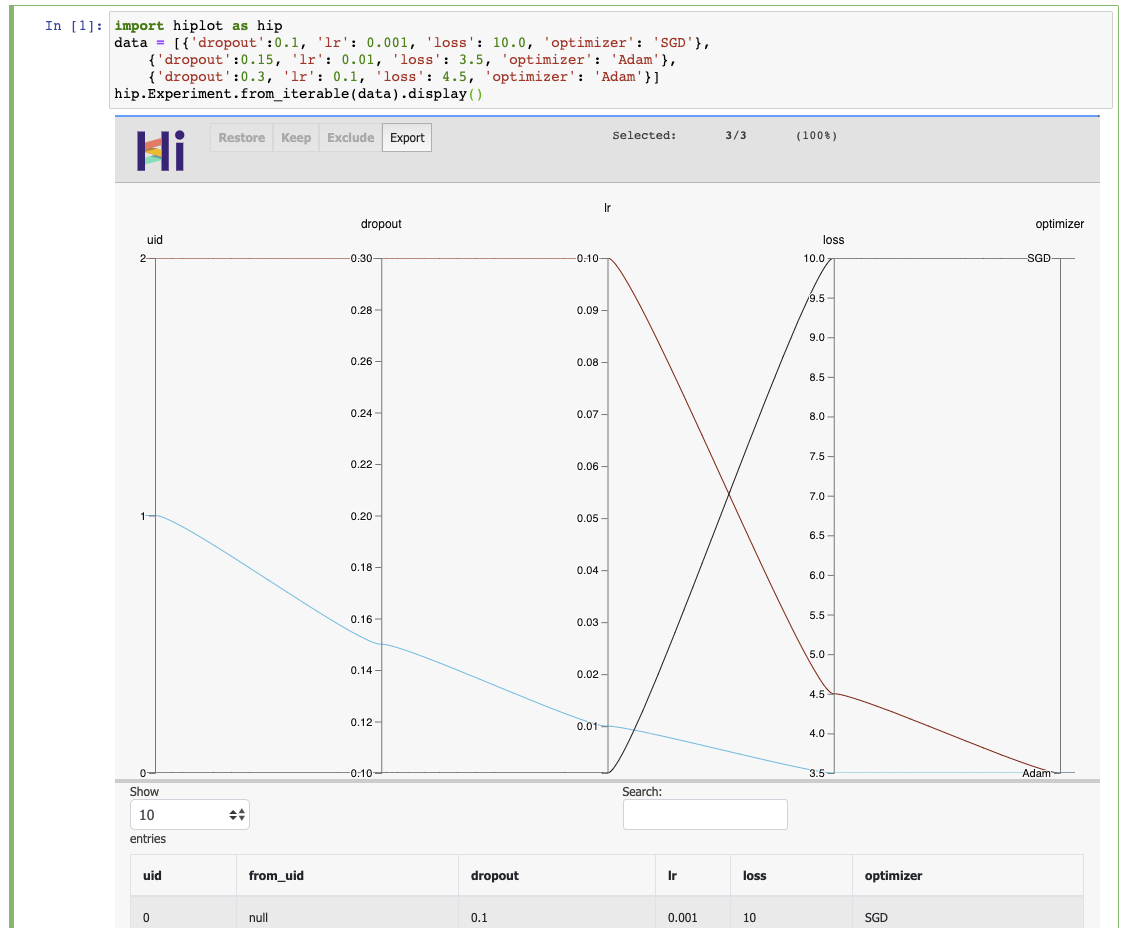
If you have a Jupyter notebook, you can get started with something as simple as:
import hiplot as hip
data = [{'dropout':0.1, 'lr': 0.001, 'loss': 10.0, 'optimizer': 'SGD'},
        {'dropout':0.15, 'lr': 0.01, 'loss': 3.5, 'optimizer': 'Adam'},
        {'dropout':0.3, 'lr': 0.1, 'loss': 4.5, 'optimizer': 'Adam'}]
hip.Experiment.from_iterable(data).display()
See the live result
Links
- Repository: https://github.com/mindthemath/hiplot
- Documentation: https://mindthemath.github.io/hiplot/
- PyPI package: https://pypi.org/project/hiplot-mm/
- Examples: https://github.com/mindthemath/hiplot/tree/main/examples
- Original blog post: https://ai.facebook.com/blog/hiplot-high-dimensional-interactive-plots-made-easy/
Development
To build from source:
# Install dependencies
bun install
uv sync --all-extras

# Build JavaScript bundles
bun run build

# Build Python package
uv build

# Or use the all-in-one build script
./build.sh
Output directories:
npm-dist/- NPM package artifactsdist/- Python wheel and sdisthiplot/static/built/- JS bundle included in Python package
Run the dev server:
uv run --extra server hiplot --port 8765
Citing
@misc{hiplot,
    author = {Haziza, D. and Rapin, J. and Synnaeve, G.},
    title = {{Hiplot, interactive high-dimensionality plots}},
    year = {2020},
    publisher = {GitHub},
    journal = {GitHub repository},
    howpublished = {\url{https://github.com/facebookresearch/hiplot}},
}
Credits
Inspired by and based on code from Kai Chang, Mike Bostock and Jason Davies.
External contributors (please add your name when you submit your first pull request):
License
1 maintainer

Metadata
1 maintainer
Release files for hiplot-mm 0.0.3
For a detailed explanation of source distributions (sdists) and built distributions (wheels), please see the package formats documentation.
Source distribution (sdist)
| File | Size | Uploaded | |
|---|---|---|---|
| hiplot_mm-0.0.3.tar.gz | 893.2 kB | Details |
Built distribution (wheel)
| File | Interpreter | ABI | Platform | Reset |
|---|---|---|---|---|
| hiplot_mm-0.0.3-py3-none-any.whl | Python 3 | none | any | Details |
Total release size: 1.8 MB
Release files / hiplot_mm-0.0.3.tar.gz
| Download URL | hiplot_mm-0.0.3.tar.gz |
|---|---|
| Size | 893.2 kB |
| Tags | Source |
|
SHA-256 checksum How to use checksums |
3a304afb2492b643798635b03ef435b7075b80b550c7c3aa81b93b9e4fea0564
|
|
BLAKE2b-256 checksum How to use checksums |
00591951f570294f60602bea32ca3fa992bea571184683b7995711e116520b9c
|
| Upload date | |
|
Uploaded using Trusted Publishing? What is trusted publishing? |
Yes |
| Uploaded via |
twine/6.1.0 CPython/3.13.7
|
Provenance
Provenance describes where a file came from. On PyPI, provenance is shared via attestations, which provide a verifiable record of the build or publishing details. View details, limitations and caveats.


PyPI Publish Attestation
PyPI verified that this artifact, at this checksum, originated from the publisher listed below.
Signed by GitHub Actions, verified by PyPI on Feb 3, 2026.
Transparency logRelease files / hiplot_mm-0.0.3-py3-none-any.whl
| Download URL | hiplot_mm-0.0.3-py3-none-any.whl |
|---|---|
| Size | 903.2 kB |
| Tags | Python 3 |
|
SHA-256 checksum How to use checksums |
4a9f9090c5461f96acff3570117cb602ad946b93c5916127843290e52f0900ba
|
|
BLAKE2b-256 checksum How to use checksums |
d5fe32feb5097fc00b8d12896f83dca040407d1e9e48b312f713913f56ca4c46
|
| Upload date | |
|
Uploaded using Trusted Publishing? What is trusted publishing? |
Yes |
| Uploaded via |
twine/6.1.0 CPython/3.13.7
|
Provenance
Provenance describes where a file came from. On PyPI, provenance is shared via attestations, which provide a verifiable record of the build or publishing details. View details, limitations and caveats.
PyPI Publish Attestation
PyPI verified that this artifact, at this checksum, originated from the publisher listed below.
Signed by GitHub Actions, verified by PyPI on Feb 3, 2026.
Transparency log













