

Whole-slide image alignment for H&E and multiplex IHC markers



"Align once. Map everywhere."
"一次配准,处处映射"
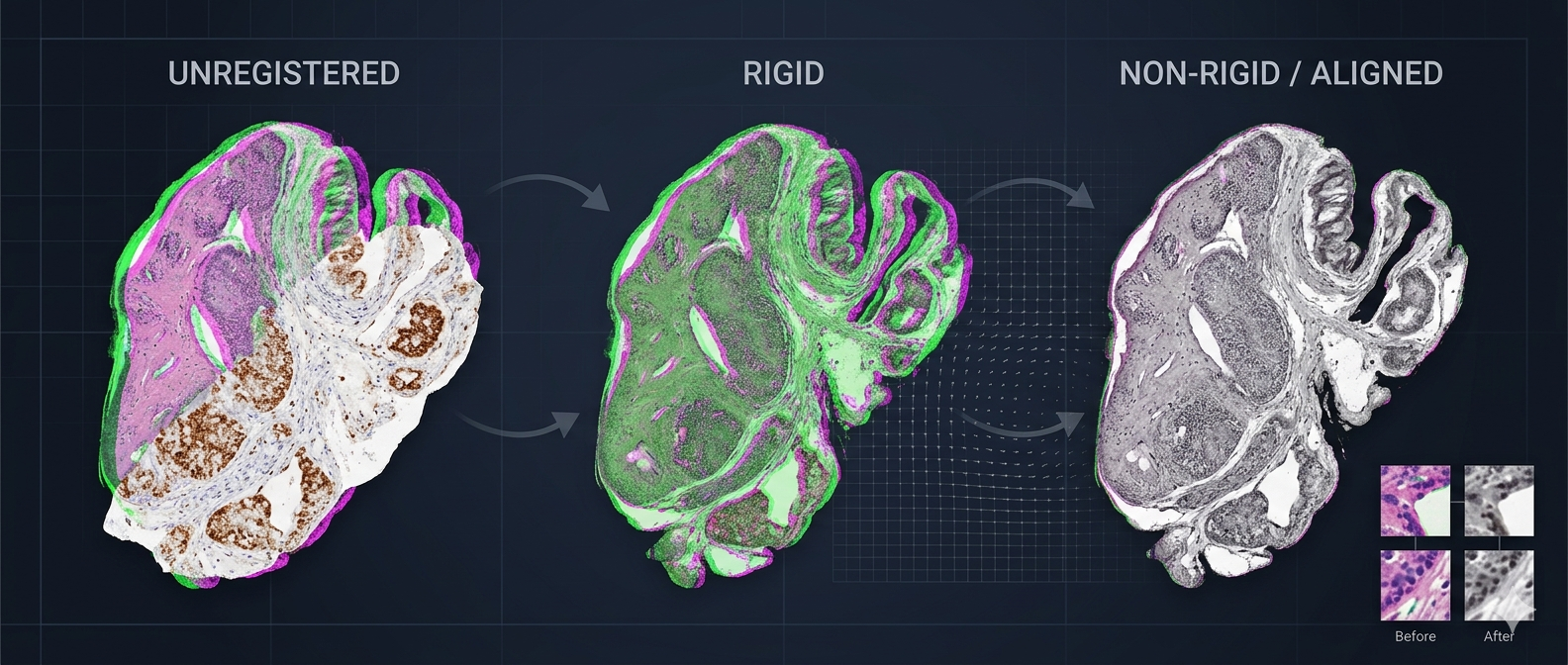
✨ Why HISAlign
| Problem | Solution |
|---|---|
| H&E and multiple IHC slides of the same tissue are spatially misaligned | Rigid + optical-flow non-rigid registration, per-marker alignment to H&E |
| Registration results depend on open slide handles and are hard to reuse | Only numpy arrays and transform parameters are saved; fully serializable |
| Downstream analysis needs to map ROIs from H&E to IHC | Offline warp_xy interface: provide level-0 coordinates and get mapped coordinates |
| Need a quick way to assess registration quality | Optional unified viz_report.html with slide summary and patch gallery |
🎨 Workflow
flowchart LR
    HE["H&E Reference"]
    IHC["IHC Markers\nCD3 / Ki67 / ..."]
    PRE["Optical Density\nPreprocessing"]
    RIGID["Rigid Registration"]
    NR["Optical-Flow\nNon-Rigid"]
    MODEL["model.pkl\nSerializable Model"]
    WARP["warp_xy\nOffline Mapping"]
    VIZ["viz_report.html"]

    HE --> PRE
    IHC --> PRE
    PRE --> RIGID
    RIGID --> NR
    NR --> MODEL
    MODEL --> WARP
    NR --> VIZ
🚀 Installation
Install from PyPI using uv:
uv tool install hisalign
Or install it as a library in your current environment:
uv pip install hisalign
Verify the CLI entry point:
hisalign --help
🧪 Quickstart
Python API
from hisalign import HisAlign, HisAlignModel

# 1. Fit and save the model
aligner = HisAlign(
    he_path="HE.kfb",
    ihc_paths={"CD3": "CD3.svs", "Ki67": "Ki67.svs"},
    registration_level=3,
    max_image_dim_px=1024,
    preprocessing="od",
    feature_detector="kaze",
    mpp=0.25,  # explicit when slide metadata lacks MPP
)
model = aligner.fit()
model.save("model.pkl")

# 2. Offline coordinate mapping (no slides needed)
loaded = HisAlignModel.load("model.pkl")
mapped = loaded.warp_xy(
    coords=[[1000, 2000]],  # H&E level-0 pixel coordinates
    marker="CD3",
    direction="he_to_ihc",
)
print(mapped)  # -> [[ihc_x, ihc_y]]
CLI
1. Register and save the model
hisalign register \
  --he HE.kfb \
  --ihc CD3=CD3.svs \
  --ihc Ki67=Ki67.svs \
  --output model.pkl \
  --config configs/default.yaml \
  --mpp 0.25
If you omit
marker=, the marker name is derived from the last token of the filename stem.hisalign registeronly producesmodel.pklby default; setgenerate_report: truein the config to also emitviz_report.html.
2. Warp coordinates with the model
hisalign warp \
  --model model.pkl \
  --marker CD3 \
  --direction he_to_ihc \
  --coords coords.csv \
  --output mapped.csv
The input CSV must contain x and y columns; the output adds marker and direction columns.
3. Generate visualizations from an existing model
hisalign visualize \
  --model model.pkl \
  --output-dir ./out \
  --config configs/default.yaml
Default behavior:
hisalign registeronly writesmodel.pklby default. Setgenerate_report: truein your config (or inconfigs/default.yaml) to also produce the unifiedviz_report.html.
register also writes viz_report.html automatically when visualization is enabled.
🖼️ Works with Plain Images Too
The repo includes whole-slide thumbnail exports of an H&E slide and a CD3 IHC slide (examples/images/he.jpg and examples/images/ihc.jpg) for a quick demo:
python examples/register_jpg.py --output-dir ./out
For synthetic data:
python examples/register_jpg.py --synthetic --output-dir ./out
Or provide your own images:
python examples/register_jpg.py --he he.jpg --ihc ihc.jpg --output-dir ./out
📐 Coordinate Convention
⚠️ All coordinates are level-0 (highest resolution) pixel coordinates.
- Order is
(x, y)=(column, row). - Origin is the top-left corner.
- For coordinates from another pyramid level, scale them to level-0 first.
📦 Supported Formats
| Type | Formats |
|---|---|
| KFBio native | .kfb |
| OpenSlide | .svs, .tif/.tiff, .ndpi, .vms/.vmu, .mrxs, .scn |
| Plain images | .jpg, .jpeg, .png, .bmp |
📤 Outputs
After running hisalign register:
model.pkl— serializable alignment model containing all spatial transforms; no original slides required afterwards.
If visualization is enabled, the same directory also contains:
viz_report.html— unified visualization report: a single self-contained web page with two tabs. The "Slide Summary" tab shows overlay comparisons, rTRE statistics, per-marker thumbnails, and deformation fields. The "Patch Gallery" tab shows the sampled patches with global context and local HE/IHC patch comparisons. Images are JPEG-compressed and web-sized so the file stays small enough to open and share.
Tip: The default
configs/default.yamlhasgenerate_report: false. Set it totrueto getviz_report.htmldirectly fromhisalign registerwithout runninghisalign visualize.
⚙️ Configuration
Key items in configs/default.yaml:
registration_level: 3          # pyramid level used for registration
max_image_dim_px: 1024         # longest side of the processed registration image
preprocessing: "od"            # "od" optical density | "gray" simple grayscale
feature_detector: "kaze"       # kaze / akaze / sift / orb / brisk
feature_n_levels: 3
match_max_ratio: 1.0           # Lowe ratio test; 1.0 disables
mpp: null                      # level-0 pixel size (µm/px); set when metadata is missing

# Visualization
viz_sample_n: 8              # number of patches in gallery, 0 to disable
viz_global_thumb_max_dim_px: 512  # longest side of global location thumbnails
viz_image_format: "jpeg"      # png | jpeg — base format for most figures
viz_image_quality: 85         # JPEG quality (0-100), ignored for PNG
viz_overlay_dpi: 80           # DPI for overlay figures
viz_thumb_dpi: 80             # DPI for per-marker thumbnails
viz_deformation_dpi: 60       # DPI for deformation field plots
viz_patch_dpi: 80             # DPI for patch gallery figures
viz_patch_image_format: "jpeg"  # format specifically for patch gallery
viz_patch_image_quality: 85     # JPEG quality for patch gallery
viz_patch_max_px: 512         # local patches are resized to this longest side before plotting
viz_patch_col_inches: 2.5     # width per marker column in patch gallery figures
generate_report: false        # whether to generate viz_report.html
report_rtre_threshold: 5.0    # rTRE threshold for "good" highlighting
🗂️ Project Structure
hisalign/
├── README.md
├── README.zh.md
├── pyproject.toml
├── configs/default.yaml
├── examples/
│   ├── register_jpg.py
│   └── images/
│       ├── he.jpg
│       └── ihc.jpg
├── src/hisalign/
│   ├── api.py
│   ├── cli.py
│   ├── preprocessing.py
│   ├── registration/
│   ├── slide_io/
│   └── viz.py
└── tests/
🧪 Try It
The fastest way to verify the installation and see HISAlign in action is to run the bundled example:
python examples/register_jpg.py --output-dir ./out
This registers the real whole-slide thumbnails in examples/images/ and produces:
out/model.pklout/00_unregistered.pngout/01_rigid.pngout/02_nonrigid.png
Example Results
After running the command above, open the generated overlays:
out/00_unregistered.png— green/magenta overlay before registration (structures are shifted).out/01_rigid.png— overlay after rigid registration.out/02_nonrigid.png— overlay after non-rigid registration; overlapping structures turn white/gray.
Green = H&E, magenta = CD3 IHC.
🙋 Author
Created with 💙 by Yifan Feng
📧 evanfeng97@gmail.com
📚 References
- VALIS: Virtual Alignment of pathology Image Series
- DISK: Learning local features with policy gradient (Tyszkiewicz et al., NeurIPS 2020)
- LightGlue: Local Feature Matching at Light Speed (Lindenberger et al., CVPR 2023)
Making whole-slide alignment as intuitive as solving a jigsaw puzzle.
1 maintainer

Release files for hisalign 0.2.1
For a detailed explanation of source distributions (sdists) and built distributions (wheels), please see the package formats documentation.
Source distribution (sdist)
| File | Size | Uploaded | |
|---|---|---|---|
| hisalign-0.2.1.tar.gz | 2.1 MB | Details |
Built distribution (wheel)
| File | Interpreter | ABI | Platform | Reset |
|---|---|---|---|---|
| hisalign-0.2.1-py3-none-any.whl | Python 3 | none | any | Details |
Total release size: 2.2 MB
Release files / hisalign-0.2.1.tar.gz
| Download URL | hisalign-0.2.1.tar.gz |
|---|---|
| Size | 2.1 MB |
| Tags | Source |
|
SHA-256 checksum How to use checksums |
8169bc3f24fd21e2f3eae400d7d3dac11c44d6602cddea02bb77c88d230c9d74
|
|
BLAKE2b-256 checksum How to use checksums |
a1a9ea25e190cb254513d764f570ae839e754d0c340246f7d2272966fabf7c9f
|
| Upload date | |
|
Uploaded using Trusted Publishing? What is trusted publishing? |
Yes |
| Uploaded via |
twine/7.0.0 CPython/3.13.14
|
Provenance
Provenance describes where a file came from. On PyPI, provenance is shared via attestations, which provide a verifiable record of the build or publishing details. View details, limitations and caveats.


PyPI Publish Attestation
PyPI verified that this artifact, at this checksum, originated from the publisher listed below.
Signed by GitHub Actions, verified by PyPI on Jul 31, 2026.
Transparency logRelease files / hisalign-0.2.1-py3-none-any.whl
| Download URL | hisalign-0.2.1-py3-none-any.whl |
|---|---|
| Size | 52.6 kB |
| Tags | Python 3 |
|
SHA-256 checksum How to use checksums |
2862c0580999db08325a68f414fa1b2d4e6b66b799e277af52742ad10c3c738b
|
|
BLAKE2b-256 checksum How to use checksums |
156863645fdaf75cbf18c35ffa51204bdc19a6793885d5d525d51f7492c7caec
|
| Upload date | |
|
Uploaded using Trusted Publishing? What is trusted publishing? |
Yes |
| Uploaded via |
twine/7.0.0 CPython/3.13.14
|
Provenance
Provenance describes where a file came from. On PyPI, provenance is shared via attestations, which provide a verifiable record of the build or publishing details. View details, limitations and caveats.
PyPI Publish Attestation
PyPI verified that this artifact, at this checksum, originated from the publisher listed below.
Signed by GitHub Actions, verified by PyPI on Jul 31, 2026.
Transparency log













