
Finance MCP



An MCP server that gives an AI assistant read access to your real brokerage account and the market around it — and gives you, not the assistant, the only button that sends an order.
41 tools over Webull, Saxo, IBKR, Yahoo Finance, SEC EDGAR, BLS, the Federal Reserve and the BEA, plus a Streamlit dashboard that is the sole path to execution. The list is filtered to what your broker can actually serve, so a given account sees 39 or 40 of them.
The assistant can draft an order. It cannot place one. Drafts go to a local queue; sending requires a broker preview and your click in the dashboard. That path does not exist on the tool side, so no prompt can reach it.
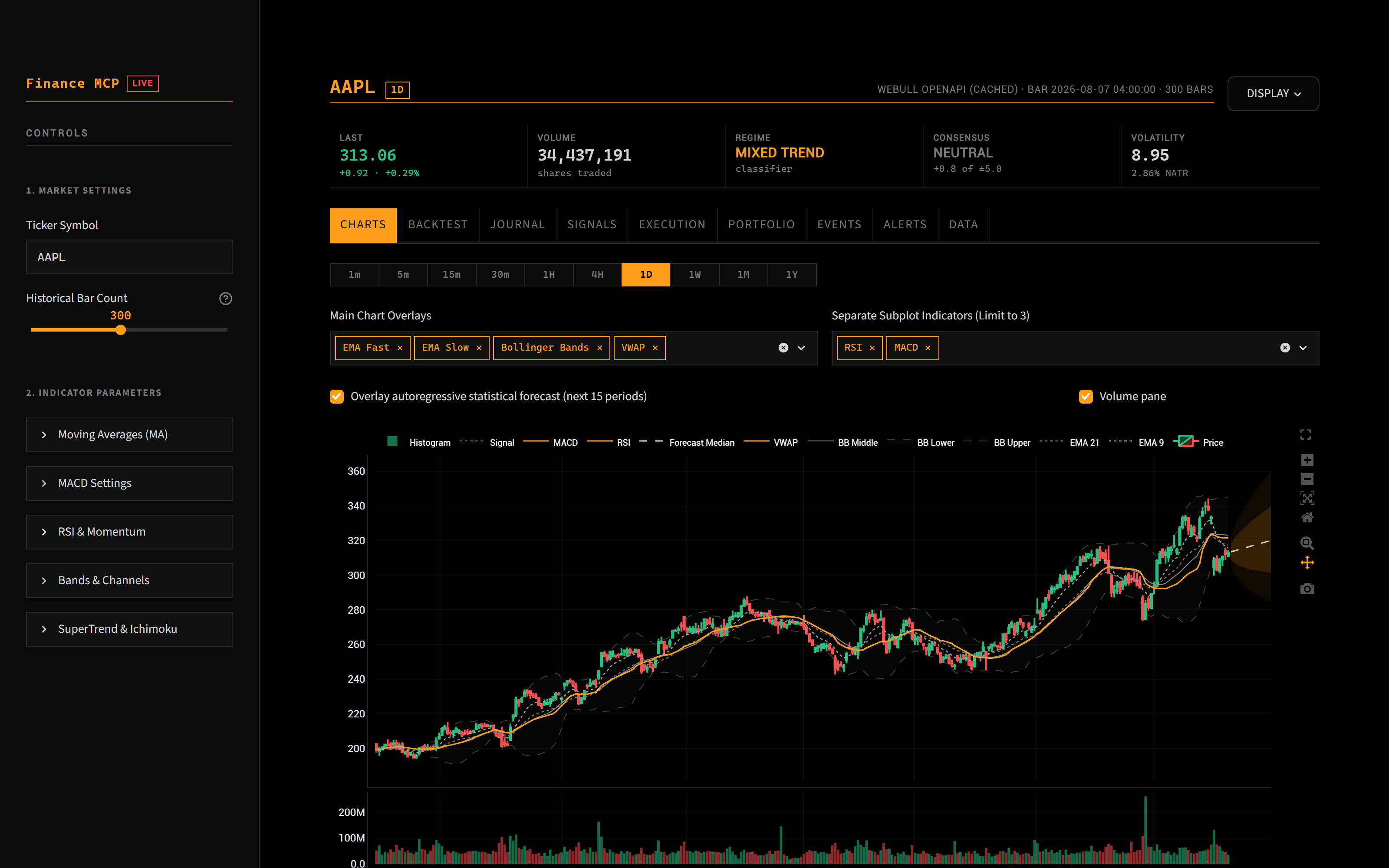
Candles with overlays, a volume pane and the forecast cone. Weekends and market holidays are collapsed, so there are no blank stretches.
What it does
| Prices | Live OHLCV from Webull with a Yahoo fallback, behind an integrity gate that checks bar ordering, staleness in trading sessions, and OHLC sanity. Every price says which bar it came from and how old that bar is. |
| Analysis | 96 pinned technical indicators, volume profile with POC and value area, Black-Scholes greeks and implied volatility, backtesting, position sizing from an ATR-aware stop, portfolio concentration and correlation. |
| Filings | SEC EDGAR parsed rather than forwarded: Form 4 with transaction codes and 10b5-1 status, 8-K by item code, 13F, 13D/G, 144, NPORT, inline XBRL. One Form 4 is ~6,600 tokens of XML; the tool returns the answer instead. |
| Macro | Economic calendar from BLS, the Fed (FOMC, dot-plot meetings flagged) and BEA (PCE, GDP), each row carrying the print that happened or the prior one, never a forecast. |
| Execution | Draft, broker preview, human approval. Pre-trade checks block naked shorts, verify per-currency buying power, and refuse orders the broker's own rules would reject. |
What you need
| OS | Windows, macOS, Linux. Desktop alerts use each platform's own notifier (PowerShell, osascript, notify-send) and report plainly when a machine has none, which a headless server will not. |
| Install | uv tool install --with streamlit --with plotly hitl-finance-mcp, then point your client at the finance-mcp command. Scripted installers (install.sh, install.bat) add a config template, client registration and a shortcut. |
| Python | 3.10 or 3.12, both covered by CI. uv is installed for you. |
| Broker | Webull, Saxo or IBKR — set FINANCE_BROKER. Only Webull has been run against a live account. Without any broker, prices fall back to Yahoo and the account and order tools are not registered; the other 31 still work. |
| Keys | SEC_USER_AGENT (a contact address, required by the SEC for filings) and optionally a free BLS key. |
Installation guide → — fifteen minutes, most of it waiting for free API keys.
This places real orders against a real account. The consensus score is a fixed-weight heuristic that underperformed buy-and-hold in backtest and is labelled as such throughout. Not financial advice; see LICENSE.
Brokers
| Broker | Status |
|---|---|
| Webull | Verified end to end — a real order drafted, previewed, placed, watched resting and cancelled. |
| Saxo Bank | Unverified. Built from Saxo's published OpenAPI reference and never run against their API. |
| Interactive Brokers | Unverified. Built from the Client Portal Web API reference and never run against it. Needs the local Client Portal Gateway. |
Both unverified adapters say so in every tool output that uses them, and refuse rather than guess on the paths the docs did not pin down.
dashboard/broker_protocol.py is the interface; tests/test_broker_conformance.py
runs the same suite against every adapter. FINANCE_BROKER=ibkr selects which
adapter the protocol and the MCP tools report through.
What works with which broker
31 of the 41 tools are broker-agnostic — indicators, options, SEC filings, insider and institutional data, earnings, macro. They work the same whoever you clear through, though the prices underneath them now come from your broker where it serves bars (see below).
Eight are account and order tools, and they go through
broker_protocol.py, so they work with any adapter that declares the capability
they need:
| Tool | Needs |
|---|---|
get_account_info get_open_positions get_open_orders |
accounts positions open_orders |
draft_order preview_order cancel_order |
buying_power preview_order cancel_order |
calculate_position_size get_portfolio_risk |
buying_power positions |
A tool is only registered when the configured broker can serve it. Start with
FINANCE_BROKER=saxo and cancel_order is not in tools/list at all — Saxo
cancels by its own order id and documents no mapping from ours, so a cancel tool
would be a tool that can only refuse. An unusable tool costs a model context on every
request and is one more wrong choice available to it.
Two more exist only for the broker that has them: saxo_corporate_actions
(dividends, splits, tenders and their election deadlines — Saxo is the only one
of the three with them) and ibkr_market_scanner (the exchange-side scan,
rather than inferring rotation from eleven ETF price pulls).
Capability is resolved per account, not per broker name, because three different things have to line up:
capability = what the SDK implements
           ∩ what the regional entity serves
           ∩ what this account is entitled to
Webull alone runs twelve independent regional entities on separate hosts, and
market-data entitlements are bought per account on top of that — an order book
that returns one level means an L1 subscription, not a missing endpoint.
dashboard/capabilities.py keeps a cache keyed on broker × entity × account, a
probe can only ever withdraw a capability and never invent one, and it records
what a call did rather than why. Inferring a cause from an error message is
how this file previously came to blame a region for a parameter mistake.
Prices come from your broker
fetch_data tries the configured broker first and Yahoo second, so a Saxo user
gets Saxo's /chart/v1/charts and an IBKR user gets
/iserver/marketdata/history — for every price in the server, not just the
account tools. Before this, supplying Saxo or IBKR credentials still left the
whole price feed on the public fallback, which was invisible because the tools
still worked. The fallback always announces itself when it is used.
Both broker feeds sort ascending before returning. Webull returned newest-first and nothing sorted it, so every indicator ran on a reversed series and the sector heatmap ranked the worst performers as leaders; that is not a mistake worth making twice.
contract_rules() fetches real tick and lot sizes, and rule_violations() uses
them when supplied — the check that catches an order preview prices cleanly and
placement then refuses.
The dashboard's submit button is still Webull-only. The MCP tools route through the protocol; the Streamlit approve-and-submit path does not yet, and moving it means putting two adapters nobody has run on the one code path that has been exercised for real. Verification comes first — which is what HELP-WANTED.md is asking for.
IBKR is the Client Portal Web API — plain request/response JSON — not the TWS socket API. That distinction is why it is an adapter and not a rewrite. It also brought the one broker behaviour the protocol did not already have: IBKR can answer a placement with warnings instead of an order, each needing confirmation before anything is transmitted. Client libraries normally answer those from a table of canned replies. This one raises them to the person who approved the order, which is the whole point of the tool.
Help wanted → — an hour with a Saxo simulation token or an IBKR paper account would close the verification gap. The scripts that do it read only; they never place an order.
Works with any MCP client
Nothing in the server is specific to one assistant. It speaks MCP over stdio, so anything that speaks MCP can run it. The installer registers it with every client it finds on the machine; to wire one up by hand, add this to that client's MCP config:
{
  "mcpServers": {
    "finance": {
      "command": "finance-mcp",
      "args": []
    }
  }
}
| Client | Where that goes |
|---|---|
| Claude Desktop | %APPDATA%\Claude\claude_desktop_config.json |
| Claude Code | claude mcp add finance -- finance-mcp |
| Cursor | ~/.cursor/mcp.json |
| Windsurf | ~/.codeium/windsurf/mcp_config.json |
| VS Code | .vscode/mcp.json, or the user-level MCP settings |
| Anything else | Whatever that client calls its MCP config; the JSON above is the standard shape |
The dashboard is a separate Streamlit app and does not care which client you use. Order approval happens there regardless.
Macro Calendar & Real-Time Filings
Four public sources sit alongside the broker feed, so Claude can see the events that move price as well as the price itself.
| Tool | What it gives you |
|---|---|
get_economic_calendar |
Scheduled US events from three sources — BLS (CPI, PPI, NFP, JOLTS), the Federal Reserve (FOMC decisions, flagged when they carry a dot plot), and BEA (PCE, GDP, trade) — each row carrying the actual print where it has happened and the prior print where it has not. |
get_updates |
What has changed since a timestamp: new SEC filings, macro releases that printed, and outsized price moves. Answers "anything new?" without refetching everything. |
get_macro_data |
Historical CPI, core CPI, unemployment, payrolls, PPI and wages with MoM/YoY changes. source="markets" gives policy rates, the yield curve and financial conditions from FRED, the ECB and the Bank of England. |
get_edgar_filings |
SEC filings in three modes: one company's filings, the all-registrant live feed, or full-text search across filing bodies. |
get_insider_activity |
Parsed Form 3/4/5 — who traded, at what price, whether the sale was under a Rule 10b5-1 plan, and opening positions. forms="144" gives proposed sales, filed ahead of the trade, with the plan-adoption date. |
read_filing |
Form-aware: executive pay from a DEF 14A, the cover page of a 13D/13G, the press release from an 8-K, a named Item (Risk Factors, MD&A) from a 10-K, or a text search. |
get_institutional_holdings |
Latest 13F-HR portfolio, positions merged across manager rows. source="NPORT" gives a registered fund's monthly portfolio, including the bonds and derivatives 13F omits. |
Filings are parsed, not forwarded. Most of what an analyst wants from a filing is already a machine-readable field. "Was that sale pre-scheduled?" is <aff10b5One> in the Form 4 XML — a boolean. So the server extracts and answers rather than handing over a document: one Form 4 is ~6,600 tokens of raw XML, and a single 10-K is ~610,000 tokens, which is three times a 200k context window. get_insider_activity also separates real decisions (codes P/S) from compensation mechanics — grants, option exercises, and shares withheld for tax — which are routinely misreported as "insiders sold $X".
On latency. EDGAR acceptance timestamps are exact to the second, so an earnings 8-K (item 2.02) is visible as soon as it is accepted. The delay you experience is your own polling interval, not the feed. get_earnings uses that same item code to confirm which quarters were actually released, and flags an upcoming date that Yahoo is only estimating — Yahoo publishes an unset date as a window and a set one as a single day, and the two are indistinguishable once formatted.
No consensus, and it says so. Street forecasts are a licensed product with no free source, so every comparison in the calendar is against the previous print and is labelled that way. A "surprise" measured against a prior reading is not a surprise: the market trades the gap to expectations, and expectations are the one thing not available here.
Rate and quota handling. BLS allows 25 API queries a day unregistered; the release-schedule pages are ordinary web fetches and deliberately do not draw on that budget. Results are cached (6h for macro series, 24h for schedules, 2min for filings), so a repeated calendar call costs nothing. The SEC's 10 req/s ceiling is enforced at the client.
Normalization. Filer names and release text arrive in mixed scripts and number conventions. A dedicated layer folds Unicode to a canonical form, expands atomic Latin letters that have no decomposition (Ærø → AEro, not r), converts non-ASCII digits, and parses numbers written US, European, Swiss or Indian style — including accounting negatives like (1,234.56).
Getting a BLS key (optional, free, ~2 minutes)
Unregistered access is capped at 25 API queries a day. To lift it to 500:
- Register at data.bls.gov/registrationEngine — the key arrives by return email.
- Add
BLS_API_KEY=<your key>to.envand restart the server. - Run the
validate_bls_keytool to confirm it was accepted.
That last step matters: a mistyped key does not raise an error, it silently drops you back to the 25/day tier, which only shows up days later as an exhausted quota. Registered access also extends history from 10 to 20 years and returns BLS's own computed percentage changes, which the server checks its own arithmetic against.
Use get_data_sources at any time to see every source's configuration and remaining quota.
Help wanted
Three things where an hour from someone else is worth more than a day from me:
- Verify the Saxo adapter. Written from Saxo's published reference, never run
against their API. A 24-hour simulation token is free and needs no approval,
and
tests/verify_saxo.pyanswers the six open questions without placing an order. - Verify the IBKR adapter. Same situation, and a paper account is enough.
Run the Client Portal Gateway, log in through a browser, then
python -m tests.verify_ibkr. It submits nothing — it reads, and it calls IBKR's own non-bindingwhatif. → HELP-WANTED.md - Install it on a clean machine.
install.batandinstall.share covered by unit tests and inspection, never by a fresh OS — the first thing every new user touches is the least proven path here.
Also open: IG Markets (REST, similar shape to Saxo).
dashboard/broker_protocol.py is the interface;
tests/test_broker_conformance.py runs against anything that implements it.
Where the numbers come from
Not all data carries the same weight, and the tools say which is which.
| Class | Source | Validation |
|---|---|---|
| Prices & bars | Webull OpenAPI, Yahoo fallback | Full integrity gate: ordering, session-based staleness, OHLC sanity |
| Filed financials | SEC EDGAR XBRL | Authoritative — the filing itself, stamped with form and filing date |
| Macro | BLS | Official series; our MoM/YoY cross-checked against BLS's own figures on the registered tier |
| Third-party fundamentals | Yahoo | Cross-checked against the XBRL filing where a comparable figure exists; disagreements are reported |
| Consensus score | Computed here | A fixed-weight heuristic, labelled as such — it underperformed buy & hold in backtest |
get_company_financials returns the filed figures directly. Where Yahoo and the filing disagree, the filing wins and the tool says so.
IV rank is the one measure that cannot be sourced authoritatively for free: no public feed publishes implied-volatility history. Rather than pretend otherwise, the server records one ATM IV observation per symbol per day as options are queried, and reports a true IV rank once a symbol has 30 days of its own history. Until then it shows a realised-volatility proxy, explicitly labelled, with a count of how many more observations are needed.
Data Integrity
Market data is the foundation everything else rests on, so it is checked rather than trusted. Every price frame — from either source — passes a single gate before any tool sees it:
- Bar ordering is enforced. The Webull API returns bars newest-first. Frames are sorted ascending and the invariant is asserted, so
.iloc[-1]is always the most recent bar. (Without this, tools reported the oldest bar of the window as the current price and computed every indicator on a time-reversed series.) - Staleness is measured in trading sessions, using a built-in NYSE calendar — not calendar days, which cannot tell a holiday weekend from an outage.
- Sanity checks reject NaN prices and impossible OHLC bars.
- Failures are errors, not text. Tools raise real MCP errors rather than returning
"Error: ..."as content, so a failure can never be mistaken for a finding. - Source substitution is announced. When the Webull feed fails and Yahoo serves the request, every affected tool says so.
Run the suite with pytest. It is entirely offline — no credentials, no network, no orders.
Installation
Path A — the installer (Windows, no Python required)
- Unzip this package anywhere (e.g. your Desktop).
- Double-click
install.bat. - It installs the
uvPython engine if missing, registers the server in%APPDATA%\Claude\claude_desktop_config.jsonunder the namefinance, writes a.envtemplate, and drops a Finance MCP Dashboard shortcut on your Desktop. - Fill in
.env(see Authentication). - Restart Claude Desktop. The server is only read at startup.
The installer prints an ACTION NEEDED block if WEBULL_APP_KEY or
SEC_USER_AGENT are still at their placeholder values, so a half-configured
install does not look like a finished one.
Nothing is installed system-wide beyond uv; dependencies are resolved into a
cache the first time the server or dashboard runs, so the first launch is
slower than the rest.
Path B — clone the repo
No installer, no shortcut. You wire up the two entry points yourself.
git clone <repo> && cd finance-mcp
uv venv && uv pip install -e ".[dev,dashboard]"
cp .env.example .env      # then edit it — see Authentication below
The MCP server (what Claude talks to). Add this to
%APPDATA%\Claude\claude_desktop_config.json on Windows, or
~/Library/Application Support/Claude/claude_desktop_config.json on macOS, and
restart Claude Desktop:
{
  "mcpServers": {
    "finance": {
      "command": "uv",
      "args": ["run", "--with", "pandas", "--with", "numpy", "--with", "fastmcp",
               "--with", "yfinance", "--with", "tabulate", "--with", "lxml",
               "--with", "html5lib", "--with", "webull-openapi-python-sdk",
               "/absolute/path/to/finance_mcp.py"]
    }
  }
}
Use an absolute path, and forward slashes even on Windows. Claude Code users
can instead run claude mcp add finance -- uv run /absolute/path/to/finance_mcp.py.
The dashboard (what you look at). Run it from the repo root, not from
Module boundaries. dashboard/webull_client.py is the market-data client and
the shared signed-request plumbing; dashboard/broker.py is the trading surface
(accounts, buying power, positions, the order lifecycle). They are separate
because they fail differently: a price feed degrades to a fallback and says so,
while an order path must refuse rather than substitute.
dashboard/barcache.py is a small on-disk cache of validated bar frames shared
between the MCP server and the dashboard — a hit skips the download, never the
integrity gate. Disable it with FINMCP_BAR_CACHE=0.
dashboard/ — app.py resolves its sibling modules and .streamlit/config.toml
relative to the working directory, and launching from elsewhere loses the theme:
streamlit run dashboard/app.py            # inside the venv
# or, without activating anything:
uv run --with streamlit --with plotly --with pandas --with numpy \
       --with yfinance --with lxml --with html5lib --with tabulate \
       --with webull-openapi-python-sdk streamlit run dashboard/app.py
It opens on http://localhost:8501. Add --server.port 8899 to move it.
The alert manager (optional, Windows toast notifications). The dashboard starts it automatically in a background thread; to run it standalone:
python -m dashboard.alert_manager
Verify the install — pytest runs the whole suite offline, with no
credentials and no network:
pytest -q
Then ask Claude to run get_data_sources — it reports which credentials are
configured, which feeds are reachable and what quota is left, without touching
your account. check_connection confirms the Webull session specifically.
Authentication
- Open the newly generated
.envfile located in this folder. - Paste your Webull
WEBULL_APP_KEYandWEBULL_APP_SECRET. - Save the file.
.env and conf/token.txt are gitignored, and SDK logs are credential-redacted at write time — the Webull SDK dumps the full signed request (key, HMAC signature, access token) at ERROR level, which routine rate-limit responses would otherwise write straight to disk.
Optional settings
| Variable | Default | Purpose |
|---|---|---|
WEBULL_ENVIRONMENT |
prod |
prod is the default and trades the real account — which is the point: reads are what the tool is for, and no order leaves without your approval in the dashboard. paper is not "live data, simulated orders" — it repoints the entire client at Webull's sandbox, quotes included, and the sandbox has its own app registry, so production keys return 401 there and nothing works. Use it only with WEBULL_PAPER_APP_KEY/SECRET to rehearse the approval flow. paper (aliases uat, sandbox, simulated) routes every call to Webull's simulated environment for your region, so the whole approval path — draft, preview, approve, submit — can be rehearsed without risking anything. The dashboard shows LIVE or PAPER beside the wordmark and on the Execution tab. If no sandbox host is published for your region the client refuses to start rather than falling through to production. |
WEBULL_PAPER_APP_KEY / WEBULL_PAPER_APP_SECRET |
— | Optional, paper mode only. Webull's sandbox is a separate deployment with its own app registry, so a production key authenticates there as 401 UNAUTHORIZED — verified live. Register a sandbox app and set these; paper falls back to the production pair when they are unset, which will 401. |
WEBULL_ACCOUNT_ID |
(unset) | Pin a specific account. Required if your login has more than one — the server refuses to guess rather than silently trading the wrong account. |
WEBULL_MIN_REQUEST_INTERVAL |
0.25 |
Seconds between Webull API calls. Pacing keeps list-sweeping tools (sector heatmap, watchlist scans) off the rate limiter. |
WEBULL_MAX_RETRIES |
3 |
Attempts before a rate-limited call gives up and falls back. |
WEBULL_RETRY_BACKOFF |
0.75 |
Base seconds for exponential backoff on HTTP 429. |
WEBULL_REGION_ID |
th |
Webull region. Also gates the Yahoo .BK ticker fallback. |
SEC_USER_AGENT |
(unset) | Required for the EDGAR tools. The SEC's fair-access policy demands a descriptive User-Agent with a real contact address, e.g. Your Name (you@example.com). Requests are refused locally without one rather than sent anonymously, which risks an IP ban. |
BLS_API_KEY |
(unset) | Optional. BLS works with no key at 25 queries/day; a free key raises it to 500/day and unlocks longer history. |
Using it
From the assistant
Restart your MCP client so it picks up the server, then ask for what you want: "How does NVDA look on the daily?", "What's due on the economic calendar this week?", "Draft a limit buy for 10 AAPL at 300." The last one writes a draft to the queue and stops there.
In the dashboard
Double-click the Finance MCP Dashboard shortcut, or run
streamlit run dashboard/app.py from the repo root. Nine tabs:
| Tab | What it is for |
|---|---|
| Charts | Candles with overlays, a volume pane and the forecast cone. Drag to pan, scroll to zoom, double-click to reset; drag a single axis to scale it alone. Weekends and market holidays are collapsed, so there are no blank stretches. |
| Backtest | Runs the adaptive consensus rules over the loaded window and reports CAGR, Sharpe, max drawdown, profit factor and exposure. |
| Journal | Theses Claude logged via log_journal_entry, with a drift warning when the logged price has moved away from the market. |
| Signals | The four indicator verdicts behind the consensus score, and the regime weighting matrix that produced them. |
| Execution | The approval desk. See below. |
| Portfolio | Live balance, buying power and open positions with P&L, straight from the broker, plus a value-over-time chart. Position marks are labelled in their own currency — a USD holding inside a THB account is never summed with the account base. |
| Events | The economic calendar (BLS, FOMC, BEA) with each row's actual or prior print, SEC filings for your watchlist, and a "what changed since" diff over filings and price moves. |
| Alerts | Price, RSI and MACD-cross alerts; the manager fires Windows notifications and stamps which bar triggered. |
| Data | Every computed indicator column for the loaded window, newest first. |
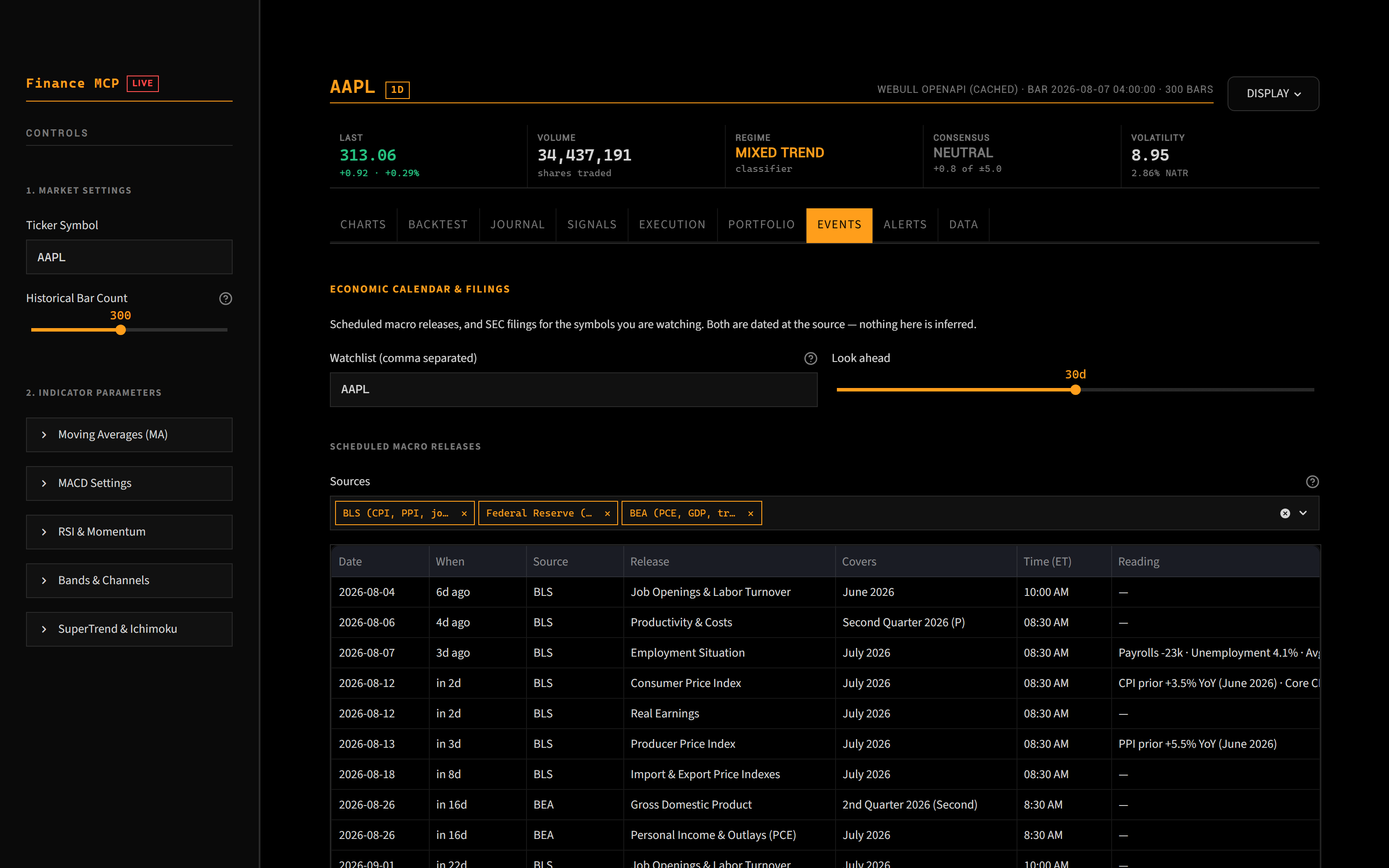
The Events tab: the economic calendar with each row's actual or prior print, earnings dates flagged as confirmed, disputed or estimated, and watchlist filings with a hover preview.
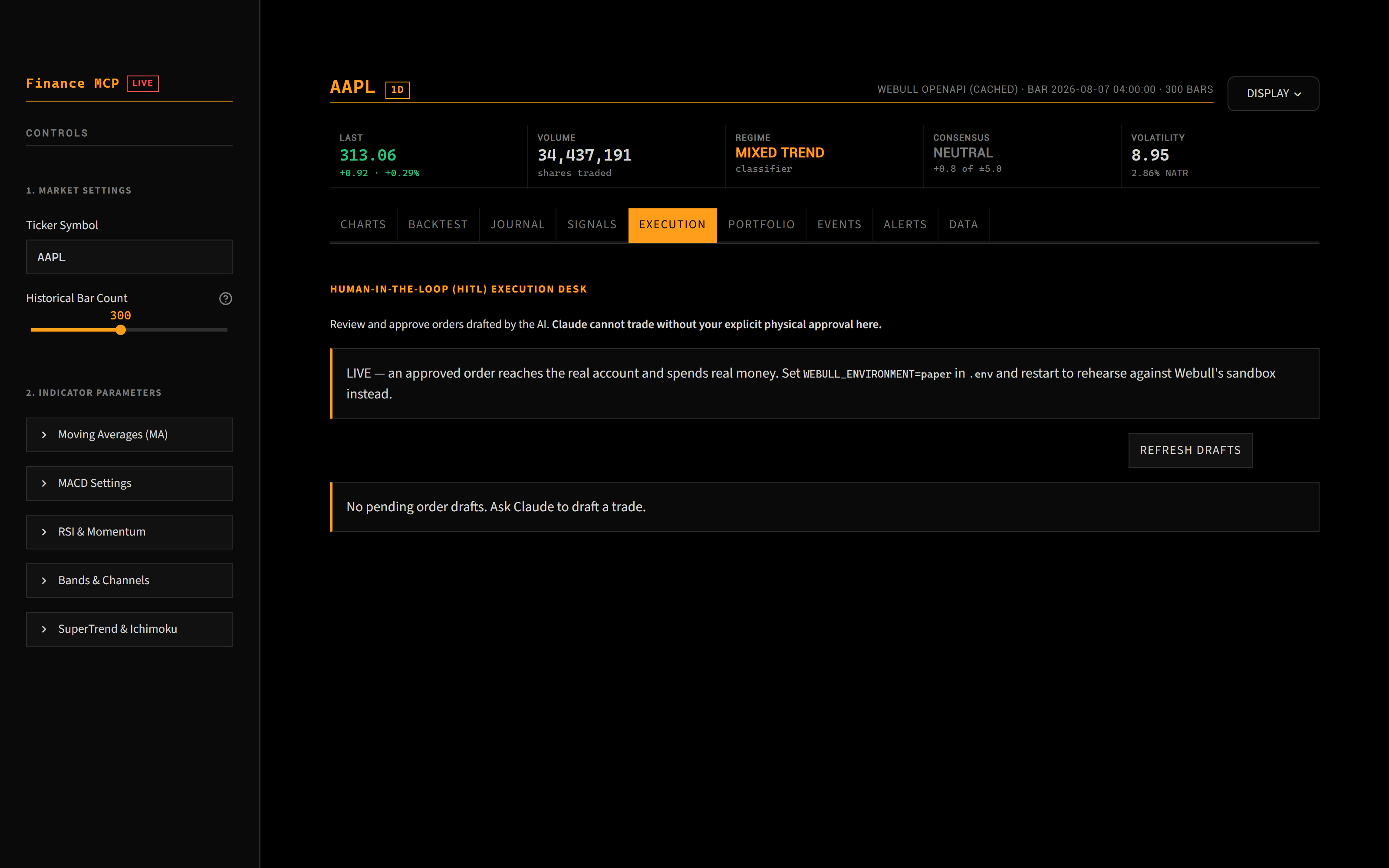
The Execution tab — the only path to the market. Preview with the broker, then approve.
DISPLAY in the top right switches the visual theme (Terminal, the default; Research; Slate), the chart overlay palette and row density.
The Execution tab is the only place an order can be submitted. Submission is two-step by design: 1 — Preview with Webull asks the broker to price the order (non-binding), and only then does 2 — Approve and submit unlock. An order the broker will not preview is never sent, and a failed submission leaves the draft pending rather than marking it executed.
3. What Claude can and cannot do
| Read prices, filings, macro series, your balance and your positions | yes |
| Draft an order to a local JSON file, and preview it with the broker | yes |
| Submit an order | no — the submit button exists only in the dashboard, and only after a broker preview |
There is no configuration flag that grants Claude submission rights. Removing the human from that step would require editing the source.
Disclaimer: This is an open-source project for educational and experimental quantitative research. Algorithmic trading carries significant financial risk.
mcp-name: io.github.Blahaj-gif/hitl-finance-mcp
1 maintainer

Download files
Download the file for your platform. If you're not sure which to choose, learn more about installing packages.
Source Distribution
Built Distribution
Filter files by name, interpreter, ABI, and platform.
If you're not sure about the file name format, learn more about wheel file names.
Copy a direct link to the current filters
File details
Details for the file hitl_finance_mcp-0.3.0.tar.gz.
File metadata
- Download URL: hitl_finance_mcp-0.3.0.tar.gz
- Upload date:
- Size: 378.6 kB
- Tags: Source
- Uploaded using Trusted Publishing? No
- Uploaded via: twine/7.0.0 CPython/3.12.13
File hashes
| Algorithm | Hash digest | |
|---|---|---|
| SHA256 |
b86d961c6082bc1f48bb6791d467011a5a88d23aba6b5d820140b3376ed38d64
|
|
| MD5 |
5cdc290194727391a9681ae37b9c19b0
|
|
| BLAKE2b-256 |
b824e19cb1348294f538872dcde6f3a0606130916dfc3132041c118e9e9529d2
|
File details
Details for the file hitl_finance_mcp-0.3.0-py3-none-any.whl.
File metadata
- Download URL: hitl_finance_mcp-0.3.0-py3-none-any.whl
- Upload date:
- Size: 273.6 kB
- Tags: Python 3
- Uploaded using Trusted Publishing? No
- Uploaded via: twine/7.0.0 CPython/3.12.13
File hashes
| Algorithm | Hash digest | |
|---|---|---|
| SHA256 |
aab1cfc50053eae3f309d14e38a6c6cedceda657780ca9140197a4022abb8de2
|
|
| MD5 |
b51995b5aa31e5137de93087221b9964
|
|
| BLAKE2b-256 |
7797b562b6cfb3284faa3837b06effc5b8f6fc274ee1c0c839b2202ffaf67e74
|







