

hiveloom



Build durable agent harnesses so smaller models can perform repeatable, verifiable tasks.
A model is only one part of an agent. Tools, context, loop policy, guardrails, and verification often decide whether the same model succeeds or fails. hiveloom makes that surrounding system a self-contained folder that can be validated, versioned, run anywhere, measured, and deliberately improved.
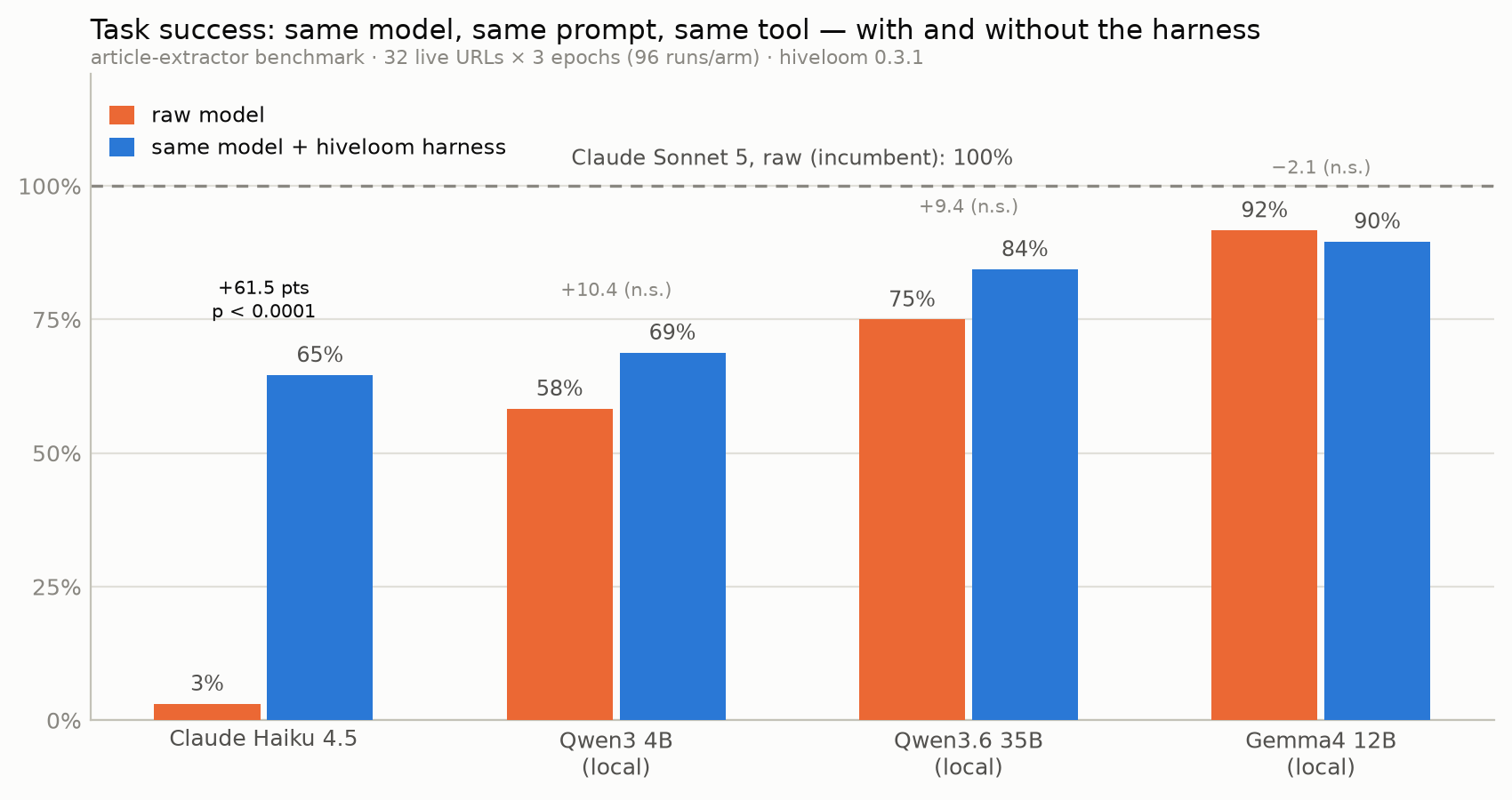
Same model, same prompt, same tool — the only difference is the harness. Claude Haiku goes from 3% to 65%; the three local models move by amounts that are noise at this sample size, and one is slightly worse. Which is the point: the evidence is measured per task and model, not assumed.
Status:
1.0.0. The spec, CLI, Python SDK, runtime, journal/Hive memory, generation, gated evolution, packaging, MCP integration, and HTTP serving surfaces are implemented, along with playbooks, structured artifacts, run control, and a tamper-evident run journal you can fork from, replay, and read in the workbench.
The moat: Your harness is the product
- A durable artifact:
harness.yamland its code hooks replace fragile, conversation-only setup. - One validated construction path: CLI edits and model-generated plans use the same transactional API; invalid changes roll back.
- Closed-loop evidence: every run produces a version-hashed trace, so
statscan show whether a harness change improved success, cost, or turns. - Safety outside the model: cost limits, tool allowlists, redaction, verification, and frozen evolution fields are enforced in code.
- Open and portable: builtins, extension packs, custom providers, and MCP tools share one runtime contract; a harness remains a normal folder.
The hive is the collective memory of runs. The loom turns task intent and that evidence into an improvable harness.
Measured performance
Three checked-in evaluations live in evals/, each with its
harnesses, scoring code, and committed results. They answer three different
questions, and the answers are not the same.
1. Does a harness rescue a weak model? (article-extractor)
The article-extractor benchmark evaluates 32 live URLs over three epochs (96 runs per arm). Raw and harness arms use the same prompt and fetch tool; the difference is the harness scaffolding.
| Model / arm | Task success | Hallucination | Cost per success | p50 latency |
|---|---|---|---|---|
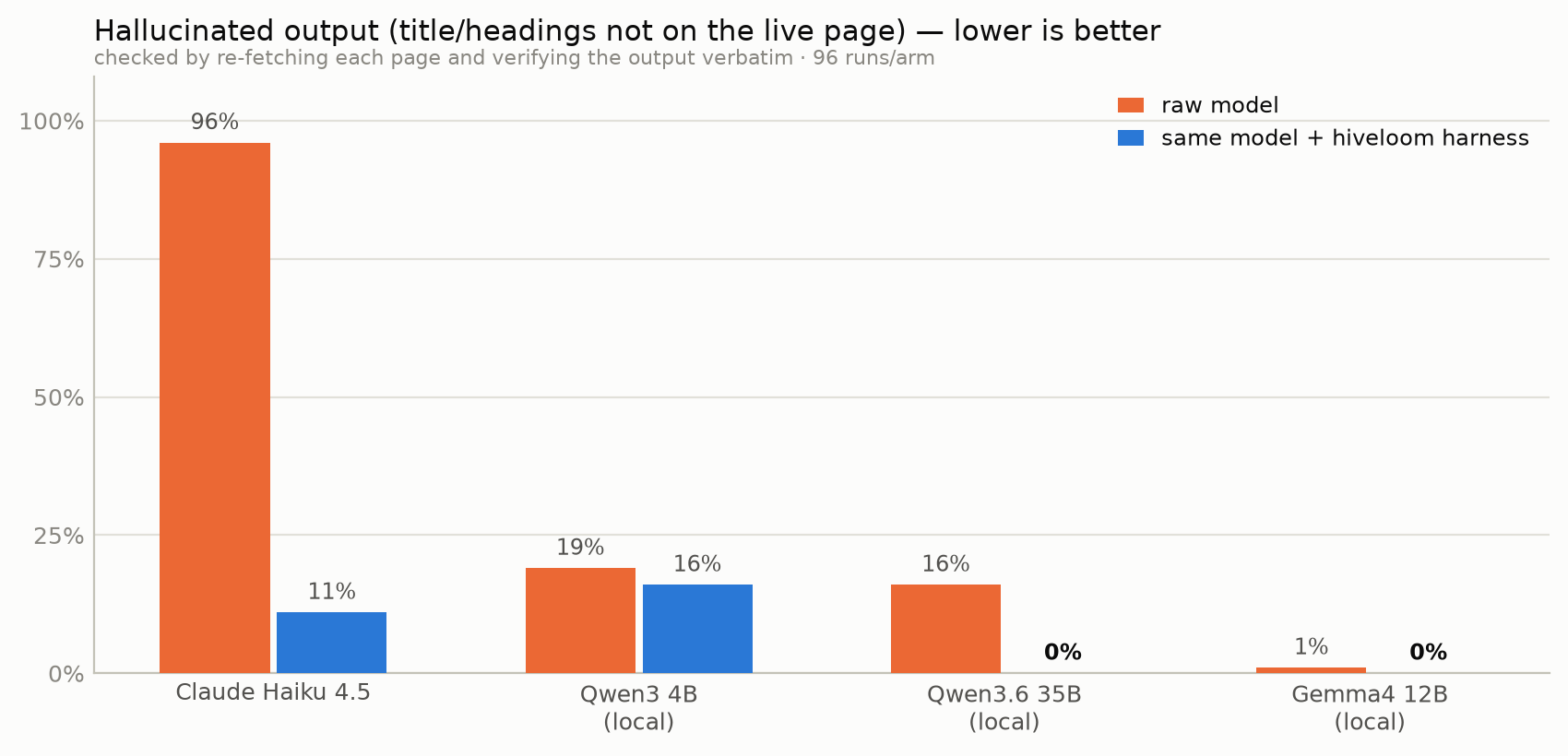
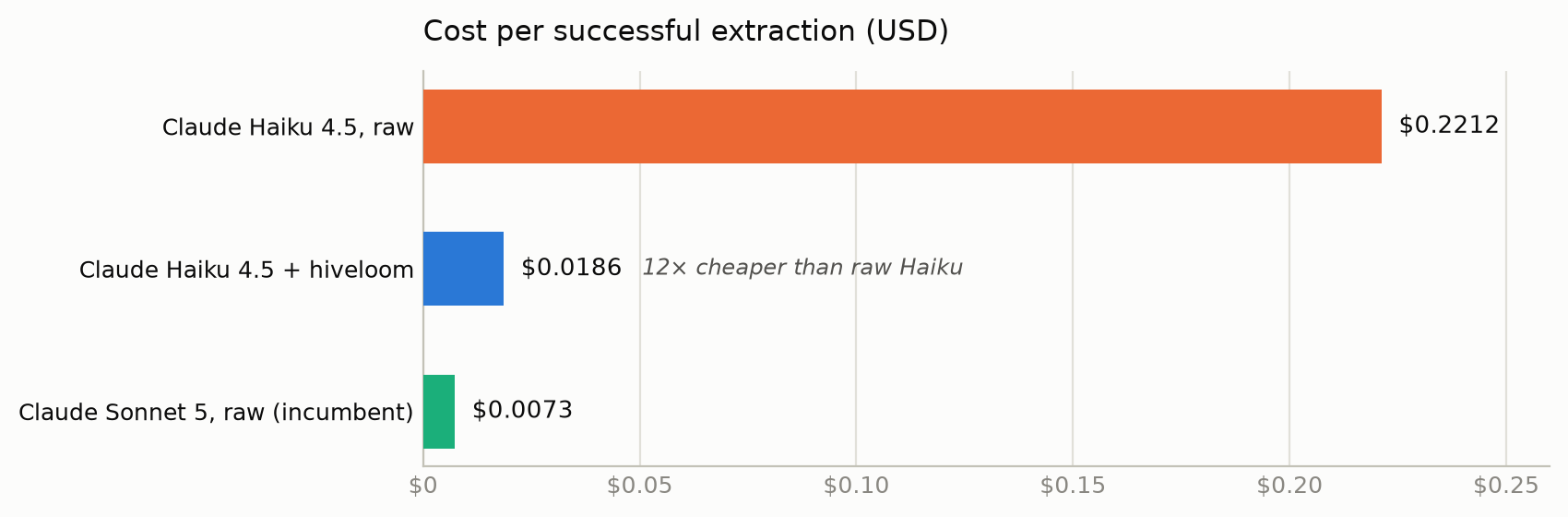
| Claude Haiku 4.5, raw | 3% | 96% | $0.2212 | 5.8s |
| Claude Haiku 4.5 + hiveloom | 65% | 11% | $0.0186 | 10.3s |
| Claude Sonnet 5, raw baseline | 100% | 0% | $0.0073 | 6.4s |
| Qwen 3 4B, raw / harness | 58% / 69% | 19% / 16% | local | 3.9s / 6.3s |
| Qwen 3.6 35B, raw / harness | 75% / 84% | 16% / 0% | local | 13.5s / 16.4s |
| Gemma 4 12B, raw / harness | 92% / 90% | 1% / 0% | local | 26.2s / 9.3s |
The Haiku harness gained 61.5 percentage points over raw Haiku and cut cost per successful result by 12×. Read the rest of the table before generalising from that: Haiku's is the only delta that survives a paired test over the 32 URLs (p < 0.0001); the three local models move by 10 points or less, which is noise at this sample size, and Gemma is slightly worse harnessed. Scaffolding rescues a model that cannot hold the output contract. It does not improve one that already can — and it did not beat raw Sonnet, which wins outright on both success and cost.
Hallucination is the more robust signal, because the effect sizes are large relative to the sample. Every output is checked verbatim against a re-fetch of the live page:
2. Does it still earn its place on frontier models? (article-digest)
article-digest runs an output-heavy task —
a 120-200 word original summary plus five verbatim quotes and a verbatim
outline — on Claude Opus 5 and Sonnet 5. Both arms go through hiveloom with the
same prompt, tool, guardrails, and loop policy; the raw arms only drop the
validators and loop.require_verification, so the measured delta is
validators plus retry-with-feedback, and nothing else.
| Arm | Success | Hallucinated quotes | Cost per success |
|---|---|---|---|
| Opus 5 + hiveloom | 100% | 0% | $0.0383 |
| Opus 5, raw | 80% | 0% | $0.0320 |
| Sonnet 5 + hiveloom | 100% | 0% | $0.0142 |
| Sonnet 5, raw | 80% | 0% | $0.0141 |
Neither model fabricated anything. What the raw arms lost was the contract: one run emitted invalid JSON, another a quote outside the required length. The harness is not buying accuracy from a frontier model — it is buying the tail of contract compliance, at roughly unchanged cost per success.
3. What do frontier models still get wrong? (page-audit)
page-audit targets what remains: exhaustiveness past a truncated tool view, aggregation, and date arithmetic. The fetch tool clips its digest, and half the pages have more headings than the digest shows, so no complete answer is reachable from the tool alone. The metric that matters is not success but whether a wrong answer arrives labelled.
| Arm | Silently wrong | Flagged (verify_failed) |
|---|---|---|
| Opus 5 + hiveloom | 0/6 | 1/6 |
| Opus 5, raw | 5/6 | 0/6 |
| Sonnet 5 + hiveloom | 0/6 | 1/6 |
| Sonnet 5, raw | 3/6 | 0/6 |
Raw arms confidently returned truncated heading lists and off-by-one day
counts. The harnessed arms either recovered on retry or exited verify_failed
— they never returned a wrong audit as a success. That is the property a
downstream automation can actually build on.
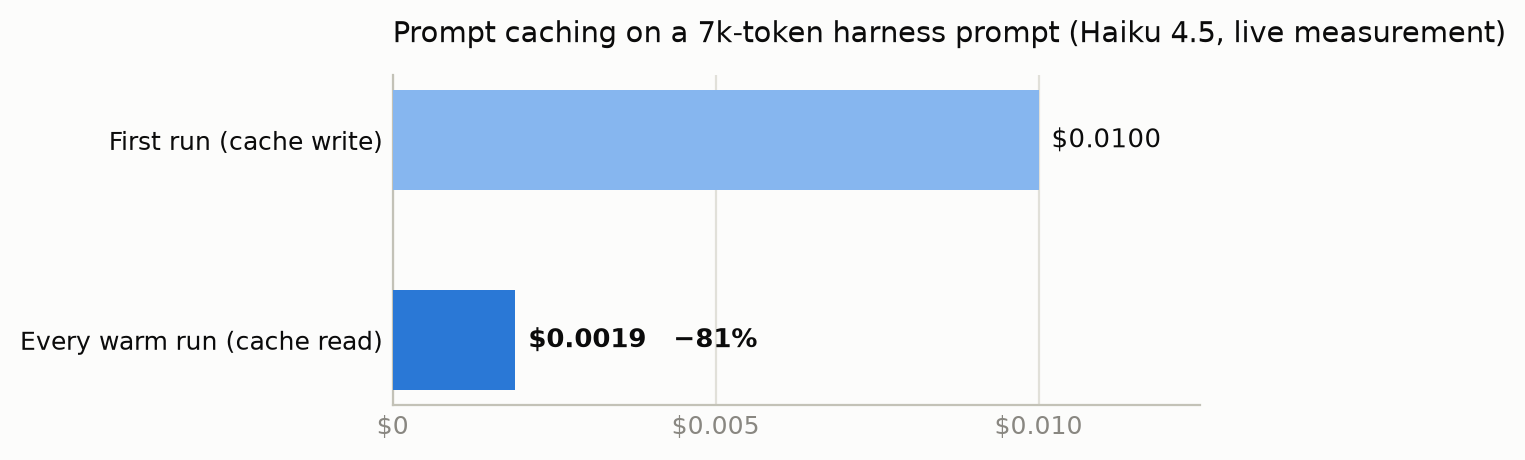
Prompt caching (on by default for the claude provider) compounds this: in a
live measurement on a 7k-token harness prompt (Haiku 4.5, two-turn run), the
first run wrote the prefix to cache and every later run inside the cache TTL
read it back at a tenth of the input price — $0.0019 per warm run vs $0.0100
cold, an 81% reduction. A harness runs the same prompt shape every time,
which is exactly the workload prompt caching rewards.
That is the point of versioned evals: harness value is measured per task and
model, not assumed — it can be a rescue, a compliance floor, or nothing at all.
Sample sizes, scoring code, and caveats are in
evals/README.md.
Install
uv add hiveloom
# or: uv pip install hiveloom
# or: pip install hiveloom
For development:
git clone https://github.com/FrancescoMrn/hiveloom.git
cd hiveloom
uv sync --extra dev
Five-minute quickstart
# Explore the contract without an API call
hiveloom schema --annotated
hiveloom catalog tools

# Construct a harness; every mutation validates and rolls back on error
hiveloom init ./summarizer --name summarizer \
  --task "Summarize a text file into JSON."
printf '%s\n' "The quick brown fox jumps over the lazy dog." \
  > ./summarizer/notes.txt
hiveloom add tool --builtin file_read --dir ./summarizer
hiveloom add validator --builtin regex_match --pattern '"summary"' \
  --dir ./summarizer
hiveloom validate ./summarizer --json

# Assemble the first call without contacting the model
hiveloom run ./summarizer --input notes.txt --dry-run --json

# Run for real (the default provider uses Anthropic)
export ANTHROPIC_API_KEY=sk-...
hiveloom run ./summarizer --input notes.txt --json

# …or any other lab. `hiveloom models` lists every provider and its key
# variable; OpenAI, Gemini, Mistral, DeepSeek, xAI, Groq, OpenRouter,
# Together, Fireworks, Ollama, and vLLM are builtin.
hiveloom models
hiveloom set model openai/gpt-4.1-mini --dir ./summarizer

# Inspect evidence and propose a gated improvement after failures
hiveloom stats ./summarizer --json
hiveloom evolve ./summarizer --propose --json
Prefer model-driven construction?
hiveloom generate "Summarize a text file into JSON." -o ./summarizer --json
The workbench
Prefer not to type any of that? The workbench is a chat-first UI for building, running, debugging, and improving harnesses without first learning the CLI or the spec language — and it is the best way to read what a harness actually did.
npx hiveloom-workbench # workbench http://127.0.0.1:8770

Open the complete workbench tour.
You talk to a bundled copilot that holds constrained tools for creating, validating, dry-running, executing, diagnosing, measuring, and proposing improvements to a target harness. But chat is never the only route to a fact: selecting a harness opens its workspace beside the conversation, with the exact framework state in seven tabs — Use (its generated interface), Overview, Runs, Trace, Versions, Spec, and Improve.
- Read a run properly. The Trace tab shows the whole journal: filters, integrity result, event payloads, the folded context at any model call, timing, and fork controls. This is the shape a terminal is worst at.
- Steer a live run. Stop it, queue and edit steering messages before the
loop drains them, switch its playbook, or hot-swap its model — all at the next
turn boundary, through the same
RunControlthe SDK exposes. - Fork a failure and compare. Re-enter a failed run at the turn it went wrong, change one thing, resume, then put the two versions side by side with their deltas and changed failure signatures.
- Hand it to someone.
create_interfacewrites a dependency-free page into<harness>/interfaces/default/index.htmland previews it in a sandbox, so a harness stops being a CLI invocation.
Applying an improvement is always a distinct human action, and the frozen safety
fields stay frozen: the UI goes through the same construct API as everything
else. It ships separately on purpose — hiveloom is what runs a harness in
production and stays small for it, so nobody deploying one carries a UI they
will never open. One npx command fetches the interface, its Python API, and
the launcher that wires them together; it runs against whatever interpreter
already has hiveloom.
Full tour: docs/workbench.md.
Demo harnesses
Five worked examples live in harnesses/,
each the smallest thing that shows one layer of the runtime:
| harness | what it shows |
|---|---|
quickstart |
a harness with no tools at all — prompt, guardrails, a run, a trace |
example-summarizer |
builtin tools, schema and code verification, retry-with-feedback |
article-extractor |
a custom @tool, an output hook, a validator that re-fetches to catch invention |
routing-lab |
playbooks that move the model and the tool set mid-run — offline, so forking and evolution need no API key |
ticket-triage |
an MCP server (FastMCP over stdio) as the harness's only data source, its tools joining the loop as mcp__tickets__* |
Each was built through the same init/add/set CLI path a user gets —
nothing hand-writes harness.yaml — and is committed as a plain folder: clone
the repo and run one, or copy one as a starting point.
A harness is a folder
my-harness/
├── harness.yaml          # declarative runtime contract
├── tools/                # optional code tools
├── validators/           # optional task-specific verification
├── schemas/
├── skills/
├── .hiveloom/
│   ├── traces/           # append-only run memory
│   └── forks/            # experiments on this harness (see below)
├── .env.example
└── pyproject.toml        # the runtime pin (hiveloom==<version>) + hook deps
Do not hand-edit harness.yaml; use init, add, set, remove, or the
gated evolve flow.
The run journal
Every run writes an append-only JSONL journal that is progressive,
self-describing, and tamper-evident. The conversation is recorded once,
message by message, so a model_call references the folded context instead of
re-snapshotting it — on a 12-call run that cut the trace from 676 KiB to 184 KiB.
Each line commits to the sha256 of the line before it, and run_started carries
the spec plus a path -> sha256 manifest of every behavioural file, so the
harness that ran is in the record.
hiveloom trace <run_id> --verify         # intact: 61 events, chain unbroken
hiveloom trace <run_id> --materialize 42 # the exact request sent at seq 42
A broken chain names the line it broke at; a pre-1.0 trace is reported as
unchained rather than broken, because "we cannot tell" is a different answer
from "it was tampered with". Full reference.
Forking a run
A fork re-enters a finished run at one of its model calls and replays the identical prefix against a changed harness — the same failure from the turn where it went wrong, rather than a fresh run that may not reproduce it.
hiveloom fork <run_id> --list                       # the model calls you may re-enter
hiveloom fork <run_id> --at <seq> --name probe      # -> <harness>/.hiveloom/forks/probe
hiveloom run <harness>/.hiveloom/forks/probe --resume
hiveloom lineage <run_id>                           # parent and forks, on their shared prefix
Forks live inside the harness they came from, under .hiveloom/forks/. A
fork is an experiment on a harness rather than a harness of its own, so
archiving the harness takes its experiments with it, a directory of harnesses
stays a directory of harnesses, and the parent's file tools — rooted at the
harness folder, which they do not descend into .hiveloom from — cannot reach
the experiment. Forking a fork puts the new one beside it under the same
original harness rather than nesting deeper; fork.yaml is what records who
came from whom. The workbench shows forks nested under the harness that
contains them.
--model makes the commonest edit at fork time in one step — replay this exact
prefix on a different model, so both arms keep their own fitness bucket:
hiveloom fork <run_id> --name on-sonnet --model claude-sonnet-5
A run's model can also move mid-flight — declaratively, because a playbook may
declare its own model: (profile cheaply, decide expensively, in one
conversation), or imperatively through RunControl.switch_model. Both fields are
frozen from evolution, and a run whose model moved is held out of its version's
fitness bucket and reported separately: it did not execute the harness as
declared.
Core interfaces
Every CLI command supports --json. Exit codes are stable:
0 success, 1 verification failed, 2 guardrail halt, 3 invalid spec or
request, and 4 runtime failure.
# Explore and construct
hiveloom schema --json
hiveloom explain context.compaction --json
hiveloom catalog validators --json
hiveloom set loop.max_turns 20 --dir ./my-harness --json
hiveloom add tool --builtin file_read --dir ./my-harness --json

# Run and inspect
hiveloom run ./my-harness --input input.txt --stream
hiveloom trace <run-id> --json
hiveloom trace <run-id> --verify
hiveloom stats ./my-harness --json

# Debug a failure where it happened
hiveloom fork <run-id> --at <seq> --name probe
hiveloom run ./my-harness/.hiveloom/forks/probe --resume
hiveloom lineage <run-id> --json

# Improve with a human gate
hiveloom evolve ./my-harness --propose --json
hiveloom proposals list ./my-harness --json
hiveloom proposals apply ./my-harness <proposal-id> --json

# Extend and ship
hiveloom extensions --json
hiveloom mcp list-tools --dir ./my-harness --json
hiveloom package ./my-harness --docker --json
hiveloom serve ./my-harness
hiveloom mcp serve ./my-harness ./other-harness
run --dry-run makes no model call, but declared MCP servers are contacted
because their tools are discovered eagerly. serve provides /healthz and
/runs; the separately documented control-plane is a scoped,
bearer-authorized, non-production operational API.
mcp serve is the agent-facing front door: it exposes each harness as an MCP
tool (run_<name>) plus a list_harnesses tool that carries each harness's
measured success rate and cost, so any MCP-capable agent can pick a harness on
evidence and delegate a task to it — getting back a structured,
validator-checked result instead of improvising the task itself. Input is
always treated as literal text, and untrusted directories fail at startup
(approve them with hiveloom trust). Register harnesses once with
hiveloom registry add <dir> and serve them all with --registered; add
--http (with HIVELOOM_API_KEY) to serve over streamable HTTP instead of
stdio.
Python SDK
The root package exposes the small semver-stable embedding surface:
from hiveloom import (
    Hive,
    dry_run,
    generate_harness,
    load_spec,
    run_harness,
    validate_harness,
)

info = dry_run("./my-harness", "input.txt")
result = run_harness(
    "./my-harness",
    "input.txt",
    on_event=lambda event: print(event.type),
)
spec = generate_harness("Reconcile invoices", "./invoice-reconciler")
Inject a ModelProvider into run_harness or a StrongModel into
generate_harness for custom embedding and deterministic tests. For
language-neutral integration, use run --stream (JSONL) or serve (HTTP).
Safety invariants
- Evolution cannot change
id,guardrails,model,logging.redact,extensions,hooks,mcp_servers, orevolution.auto_propose. - The cost guardrail defaults on at
$1.00. - The shell tool is disabled unless explicitly configured and remains allowlist-only.
- Redaction runs before trace persistence.
- Foreign harness code is trust-gated before loading.
Documentation
- Agent entry point and lifecycle skills
- Evaluations
- Harness spec
- Architecture
- The workbench
- Journal, forks, and model swaps
- Models and providers
- Extensions
- Deployment and evolution
- One-click OpenShell deployment
- Control plane
- Link/sync protocol
- Contributing and QA
- Code of conduct
- Security policy
Agent guidance ships in the wheel: hiveloom guide --list.
Apache-2.0 licensed.
1 maintainer

Release files for hiveloom 1.0.0
For a detailed explanation of source distributions (sdists) and built distributions (wheels), please see the package formats documentation.
Source distribution (sdist)
| File | Size | Uploaded | |
|---|---|---|---|
| hiveloom-1.0.0.tar.gz | 239.9 kB | Details |
Built distribution (wheel)
| File | Interpreter | ABI | Platform | Reset |
|---|---|---|---|---|
| hiveloom-1.0.0-py3-none-any.whl | Python 3 | none | any | Details |
Total release size: 503.3 kB
Release files / hiveloom-1.0.0.tar.gz
| Download URL | hiveloom-1.0.0.tar.gz |
|---|---|
| Size | 239.9 kB |
| Tags | Source |
|
SHA-256 checksum How to use checksums |
472e5c03af228e5099e777e2360da4bff2ea025de8f88eb0ad3cfdc1f8529ee7
|
|
BLAKE2b-256 checksum How to use checksums |
bed74bde48129f29681fe76c67e298e7cc938a019668ed4a81d6b63557443cf6
|
| Upload date | |
|
Uploaded using Trusted Publishing? What is trusted publishing? |
Yes |
| Uploaded via |
twine/7.0.0 CPython/3.13.14
|
Provenance
Provenance describes where a file came from. On PyPI, provenance is shared via attestations, which provide a verifiable record of the build or publishing details. View details, limitations and caveats.


PyPI Publish Attestation
PyPI verified that this artifact, at this checksum, originated from the publisher listed below.
Signed by GitHub Actions, verified by PyPI on Aug 29, 2026.
Transparency logRelease files / hiveloom-1.0.0-py3-none-any.whl
| Download URL | hiveloom-1.0.0-py3-none-any.whl |
|---|---|
| Size | 263.4 kB |
| Tags | Python 3 |
|
SHA-256 checksum How to use checksums |
b33c0b013c6af8e6c9b9d51123cbda5b8fce7bd1e18850dcab80ed0af50e135c
|
|
BLAKE2b-256 checksum How to use checksums |
eb2068afd8446f019be6e6d49974d68537b449ed6ba528f9c49d0d34b2acc9af
|
| Upload date | |
|
Uploaded using Trusted Publishing? What is trusted publishing? |
Yes |
| Uploaded via |
twine/7.0.0 CPython/3.13.14
|
Provenance
Provenance describes where a file came from. On PyPI, provenance is shared via attestations, which provide a verifiable record of the build or publishing details. View details, limitations and caveats.
PyPI Publish Attestation
PyPI verified that this artifact, at this checksum, originated from the publisher listed below.
Signed by GitHub Actions, verified by PyPI on Aug 29, 2026.
Transparency log













