
SDK for Hivemapper APIs

Project description
hive-py

Install
Method: PyPi
pip install hivemapper-python
Method: Clone locally and run
pip install -r requirements.txt
Notes & Limitations
- Generate a base64 encoded string of 'my-user-name:api-key' to use as input for
authorization - The Imagery API demo restricts queries to Polygons with a maximum area of 1 km^2
- This wrapper supports automatically breaking up large geometries into smaller geometries behind the scenes
Usage
Imagery CLI
> python -m imagery.query
usage: query.py [-h] -i INPUT_FILE [-s START_DAY] [-e END_DAY] [-L] [-x] [-d MAX_DIST] [-l MAX_LAG] [-z MAX_ANGLE] -o OUTPUT_DIR [-g] [-w WIDTH] [-M]
                [-I CUSTOM_ID_FIELD] [-S CUSTOM_MIN_DATE_FIELD] [-k] [-E] [-K SKIP_GEO_FILE] [-P IMAGE_POST_PROCESSING] -a AUTHORIZATION [-c NUM_THREADS] [-v]
                [-C] [-b] [-N]

options:
  -h, --help            show this help message and exit
  -i INPUT_FILE, --input_file INPUT_FILE
  -sg SEGMENT_IDS, --segment_ids SEGMENT_IDS
  -s START_DAY, --start_day START_DAY
  -e END_DAY, --end_day END_DAY
  -L, --latest
  -x, --stitch
  -d MAX_DIST, --max_dist MAX_DIST
  -l MAX_LAG, --max_lag MAX_LAG
  -z MAX_ANGLE, --max_angle MAX_ANGLE
  -o OUTPUT_DIR, --output_dir OUTPUT_DIR
  -Z, --zip_dirs
  -Zio, --zip_images_only
  -g, --export_geojson
  -w WIDTH, --width WIDTH
  -m MOUNT, --mount MOUNT
  -M, --merge_metadata
  -I CUSTOM_ID_FIELD, --custom_id_field CUSTOM_ID_FIELD
  -S CUSTOM_MIN_DATE_FIELD, --custom_min_date_field CUSTOM_MIN_DATE_FIELD
  -SF CUSTOM_MIN_DATE_FORMATTING --custom_min_date_formatting CUSTOM_MIN_DATE_FORMATTING
  -Io CUSTOM_OUTPUT_DIR_FIELD, --custom_output_dir_field CUSTOM_OUTPUT_DIR_FIELD
  -Ib CUSTOM_OUTPUT_SUCCESS_FIELD, --custom_output_success_field CUSTOM_OUTPUT_SUCCESS_FIELD
  -Is CUSTOM_OUTPUT_DATE_FIELD, --custom_output_date_field CUSTOM_OUTPUT_DATE_FIELD
  -tI, --track_by_custom_id
  -p, --passthrough_csv_output
  -k, --camera_intrinsics
  -E, --update_exif
  -K SKIP_GEO_FILE, --skip_geo_file SKIP_GEO_FILE
  -P IMAGE_POST_PROCESSING, --image_post_processing IMAGE_POST_PROCESSING
  -a AUTHORIZATION, --authorization AUTHORIZATION
  -c NUM_THREADS, --num_threads NUM_THREADS
  -v, --verbose
  -C, --cache
  -b, --use_batches
  -N, --skip_cached_frames
Bursts CLI
> python -m burts.query
usage: query.py [-h] -i INPUT_FILE -a AUTHORIZAITON

options:
  -h, --help            show this help message and exit
  -i INPUT_FILE, --input_file INPUT_FILE
  -a AUTHORIZATION, --authorization AUTHORIZATION
  -v, --verbose
Map Features CLI
> python -m mapfeatures.query
usage: query.py [-h] -i INPUT_FILE -o OUTPUT_DIR [-w WIDTH] -a AUTHORIZATION [-c NUM_THREADS] [-v]

options:
  -h, --help            show this help message and exit
  -i INPUT_FILE, --input_file INPUT_FILE
                        Input file
  -o OUTPUT_DIR, --output_dir OUTPUT_DIR
  -w WIDTH, --width WIDTH
  -a AUTHORIZATION, --authorization AUTHORIZATION
  -c NUM_THREADS, --num_threads NUM_THREADS
  -v, --verbose
  -z, --zip_images
Python API
Query and download
from imagery import query, download_files

# make the API call to query available data
# note: start_day and end_day are Datetime objects
frames = query(geojson_file, start_day, end_day, output_dir, authorization, use_cache=False)

# download the content into folders grouped by its session id
download_files(frames, output_dir)
Create Honey Burst
from bursts import create_bursts

# make the API call to create new bursts by given geojson polygons
# requires polygon type for each of the location
burst_results = create_burts(geojson_file, authorization)
Example
Query imagery for a GeoJSON Polygon Feature
python -m imagery.query -v -M --input_file "test_feature.json" --start_day "2023-07-28" --end_day "2023-07-28" --output_dir "temp" --authorization <your encoded key string>
Query imagery for a Overture Road Segment Id
python -m imagery.query -v -M -sg 089283082abbffff0423fcc946ad8fec --start_day "2024-07-28" --end_day "2024-07-28" --output_dir "temp" --authorization <your encoded key string>
Query imagery for a Overture Road Segment Id for a given direction
python -m imagery.query -v -M -sg 089283082abbffff0423fcc946ad8fec --start_day "2024-07-28" --end_day "2024-07-28" -A 180 -T 45 --output_dir "temp" --authorization <your encoded key string>
Query imagery for a single week
python -m imagery.query -v -M -sg 089283082abbffff0423fcc946ad8fec --week "2024-07-22" --output_dir "temp" --authorization <your encoded key string>
Query latest contiguous imagery for max coverage of GeoJSON Polygon FeatureCollection; stitch together; save a GeoJSON of LineStrings; use a single min date
python -m imagery.query -v -M -x -g --input_file "test_feature_col.json" -L -G "2025-01-01" -j --output_dir "temp" --authorization <your encoded key string>
Query imagery for multiple Overture Road Segment Id
python -m imagery.query -v -M -sg 089283082abbffff0423fcc946ad8fec 088283082abfffff0467f4b6b725f9af --start_day "2024-07-28" --end_day "2024-07-28" --output_dir "temp" --authorization <your encoded key string>
Query imagery for a GeoJSON Polygon Feature, use cache for resumable, use batches
python -m imagery.query -v -M -C -b --input_file "test_feature.json" --start_day "2023-07-28" --end_day "2023-07-28" --output_dir "temp" --authorization <your encoded key string>
Query imagery for a GeoJSON Polygon FeatureCollection; stitch together; save a GeoJSON of LineStrings
python -m imagery.query -v -M -x -g --input_file "test_feature_col.json" --start_day "2023-07-28" --end_day "2023-07-28" --output_dir "temp" --authorization <your encoded key string>
Query imagery for a GeoJSON Polygon FeatureCollection; save a GeoJSON of points
python -m imagery.query -v -M -g --input_file "test_feature_col.json" --start_day "2023-07-28" --end_day "2023-07-28" --output_dir "temp" --authorization <your encoded key string>
Query imagery for a GeoJSON Polygon Feature, add camera intrinsics and encode to exif
python -m imagery.query -v -M -k -E --input_file "test_feature.json" --start_day "2023-07-28" --end_day "2023-07-28" --output_dir "temp" --authorization <your encoded key string>
Focal Length is encoded in pixel units (i.e., not mm)
Lens is encoded as <k1> <k2>
Note: exiftool is required to be installed (see https://exiftool.org/)
Converting .shp to Hivemapper-optimized GeoJSON
> python -m util.geo -h
usage: geo.py [-h] [-s SHAPEFILE] [-c CSVFILE] -o OUTPUT_JSON [-w WIDTH] [-I CUSTOM_ID_FIELD] [-S CUSTOM_MIN_DATE_FIELD] [-q]

options:
  -h, --help            show this help message and exit
  -s SHAPEFILE, --shapefile SHAPEFILE
  -c CSVFILE, --csvfile CSVFILE
  -o OUTPUT_JSON, --output_json OUTPUT_JSON
  -w WIDTH, --width WIDTH
  -I CUSTOM_ID_FIELD, --custom_id_field CUSTOM_ID_FIELD
  -S CUSTOM_MIN_DATE_FIELD, --custom_min_date_field CUSTOM_MIN_DATE_FIELD
  -q, --quiet
Skipping last output frames areas
> python -m util.geo -h
python -m imagery.query -v -M -g --input_file "test_feature_col.json" --start_day "2023-07-28" --end_day "2023-07-28" --output_dir "temp" --authorization <your encoded key string> -K last_out/frames.geojson
Skipping multiple output frames areas
> python -m util.geo -h
python -m imagery.query -v -M -g --input_file "test_feature_col.json" --start_day "2023-07-28" --end_day "2023-07-28" --output_dir "temp" --authorization <your encoded key string> -K last_out/frames.geojson,another_out/frames.geojson
Querying API Usage
usage: info.py [-h] -a AUTHORIZATION [-b] [-l LIMIT] [-t] [-v]

options:
  -h, --help            show this help message and exit
  -a AUTHORIZATION, --authorization AUTHORIZATION
  -b, --balance
  -l LIMIT, --limit LIMIT
  -t, --history
  -v, --verbose
Querying Remaining API Credit Balance
python -m account.info -ba <your encoded key string>
Querying API Transaction history (default limit of 25)
python -m account.info -ta <your encoded key string>
Querying Map Features
python -m mapfeatures.query --input_file "test_feature_col.json" --output_dir "out" --authorization <encoded key>
Restitching
usage: stitching.py [-h] [-R RESTITCH] [-o OUT] [-d MAX_DIST] [-l MAX_LAG] [-z MAX_ANGLE] [-m MIN_SEQ_SIZE] [-v]

options:
  -h, --help            show this help message and exit
  -R RESTITCH, --restitch RESTITCH
  -o OUT, --out OUT
  -d MAX_DIST, --max_dist MAX_DIST
  -l MAX_LAG, --max_lag MAX_LAG
  -z MAX_ANGLE, --max_angle MAX_ANGLE
  -m MIN_SEQ_SIZE, --min_seq_size MIN_SEQ_SIZE
  -v, --verbose
Restitch a directory out (creates hard links to images)
python -m util.stitching -R out -o out2 -v
Restitch a directory out, but only keep sequences >= 100m (creates hard links to images)
python -m util.stitching -R out -o out2 -v -m 100
Post Processing
- Install ImageMagick >=7.0.0
- Use Python >=3.7
python -m imagery.query -v -M -x -g --input_file "test_feature_col.json" --start_day "2023-07-28" --end_day "2023-07-28" --output_dir "temp" --authorization <your encoded key string> -P clahe-smart-clip
Optical Flow (Image Orientation)
Default Usage:
python optical_flow.py input_dir
All Options:
python optical_flow.py input_dir --unzip --max_corners MAX_CORNERS --num_random_checks NUM_RANDOM_CHECKS --threshold_dxdy_ratio THRESHOLD_DXDY_RATIO --turn_threshold TURN_THRESHOLD
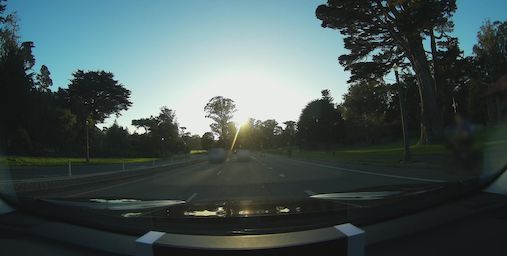
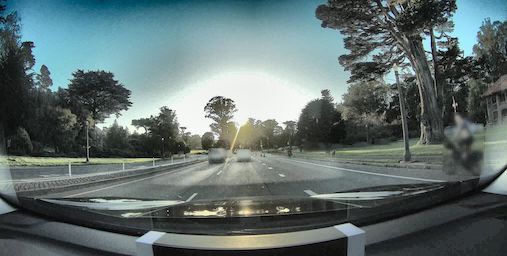
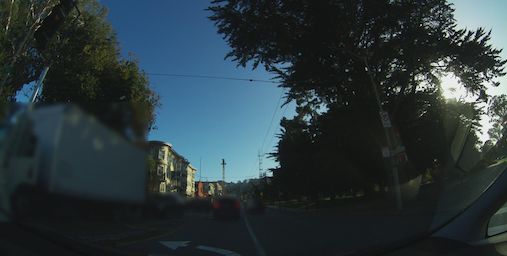
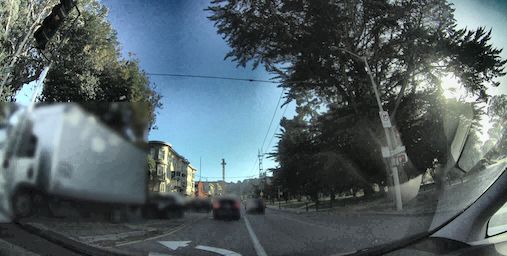
clahe-smart-clip (Contrast Limited Adaptive Histogram Equalization with Smart Clipping)
- https://en.wikipedia.org/wiki/Adaptive_histogram_equalization#Contrast_Limited_AHE
- https://imagemagick.org/script/clahe.php
- https://www.mdpi.com/1424-8220/22/22/8967
It's highly recommended to use the module directly in order to preserve the original imagery, as well as to tune values for your own purposes.
By default, settings are naively configured to sacrifice aesthetics to improve unsupervised feature detection. Some general deep learning inference use cases and human in the loop use cases may also see benefits from these default settings.
Mitigating Direct Sunlight
Mitigating Heavy Shadows
Examples
Release history Release notifications | RSS feed


Download files
Download the file for your platform. If you're not sure which to choose, learn more about installing packages.
Source Distribution
Built Distribution
Filter files by name, interpreter, ABI, and platform.
If you're not sure about the file name format, learn more about wheel file names.
Copy a direct link to the current filters
File details
Details for the file hivemapper_python-0.4.13.tar.gz.
File metadata
- Download URL: hivemapper_python-0.4.13.tar.gz
- Upload date:
- Size: 38.4 kB
- Tags: Source
- Uploaded using Trusted Publishing? No
- Uploaded via: twine/5.0.0 CPython/3.10.10
File hashes
| Algorithm | Hash digest | |
|---|---|---|
| SHA256 |
ba67ec8fd932a9cf030cd2a1cce22d5778ab1f2112900418dcb6bebcbc2d2cd4
|
|
| MD5 |
7bb00790e82b3458168f60fd255e01a0
|
|
| BLAKE2b-256 |
639338304c967f0fc6fd3839a648a3fc5418d4d14b154da4d98e70f1eba5ff25
|
File details
Details for the file hivemapper_python-0.4.13-py3-none-any.whl.
File metadata
- Download URL: hivemapper_python-0.4.13-py3-none-any.whl
- Upload date:
- Size: 38.2 kB
- Tags: Python 3
- Uploaded using Trusted Publishing? No
- Uploaded via: twine/5.0.0 CPython/3.10.10
File hashes
| Algorithm | Hash digest | |
|---|---|---|
| SHA256 |
914d2b28d00277ca9fe1cedc28c9ed8ddcb3bfba41388863be4bbdfbd39a5fdd
|
|
| MD5 |
fd0289aca657bf2d5b32cd35e009fc6a
|
|
| BLAKE2b-256 |
c38149bf21b3ed7ee4480bb602d7669c532e57ae174fea31f0acc499e17cd770
|






