
This release is a pre-release and may not be stable for production use.
HiveMind Plugin Manager
Full documentation: docs/README.md | Getting Started | Concepts | API Reference | Contributing
The HiveMind Plugin Manager (HPM) discovers, manages, and loads plugins for the HiveMind ecosystem. It defines plugin types for databases, network protocols, agent protocols, binary data handlers, and admission policies. HPM loads these plugins at runtime, so HiveMind agents can swap a backend without changing core code.
Features
-
Plugin discovery: find and load plugins of different types, including:
- Database plugins: JSON, SQLite, and Redis.
- Agent protocol plugins: OVOS and Persona, for communication between HiveMind agents.
- Network protocol plugins: WebSockets, for distributed communication.
- Binary data handler plugins: binary data communication, like audio data over HiveMind.
-
Plugin loading: load a specific plugin by name, type, or from an available entry point.
-
Factories for plugin instantiation: each plugin type (database, agent protocol, network protocol, binary protocol) has a factory that creates instances from a user configuration.
Installation
pip install hivemind-plugin-manager
Usage
The examples below show how to discover and load plugins, and how to create instances with the provided factories.
Discovering plugins
Use the find_plugins function to discover all available plugins for a specific type:
from hivemind_plugin_manager import find_plugins, HiveMindPluginTypes

# Find all database plugins
database_plugins = find_plugins(HiveMindPluginTypes.DATABASE)
print(database_plugins)

# Find all agent protocol plugins
agent_protocol_plugins = find_plugins(HiveMindPluginTypes.AGENT_PROTOCOL)
print(agent_protocol_plugins)
Creating plugin instances
Each plugin type has a factory class that creates plugin instances with the required configuration.
Database Plugin Factory
from hivemind_plugin_manager import DatabaseFactory

# Create an instance of a database plugin
db_instance = DatabaseFactory.create("hivemind-redis-db-plugin", password="Password1!", host="192.168.1.11", port=6789)
Agent Protocol Factory
from hivemind_plugin_manager import AgentProtocolFactory

# Create an agent protocol instance
agent_protocol_instance = AgentProtocolFactory.create("hivemind-ovos-agent-plugin")
Network Protocol Factory
from hivemind_plugin_manager import NetworkProtocolFactory

# Create a network protocol instance
network_protocol_instance = NetworkProtocolFactory.create("hivemind-websocket-plugin")
Binary Data Handler Protocol Factory
from hivemind_plugin_manager import BinaryDataHandlerProtocolFactory

# Create a binary data handler protocol instance
binary_data_handler_instance = BinaryDataHandlerProtocolFactory.create("hivemind-audio-binary-protocol-plugin")
Plugin Types
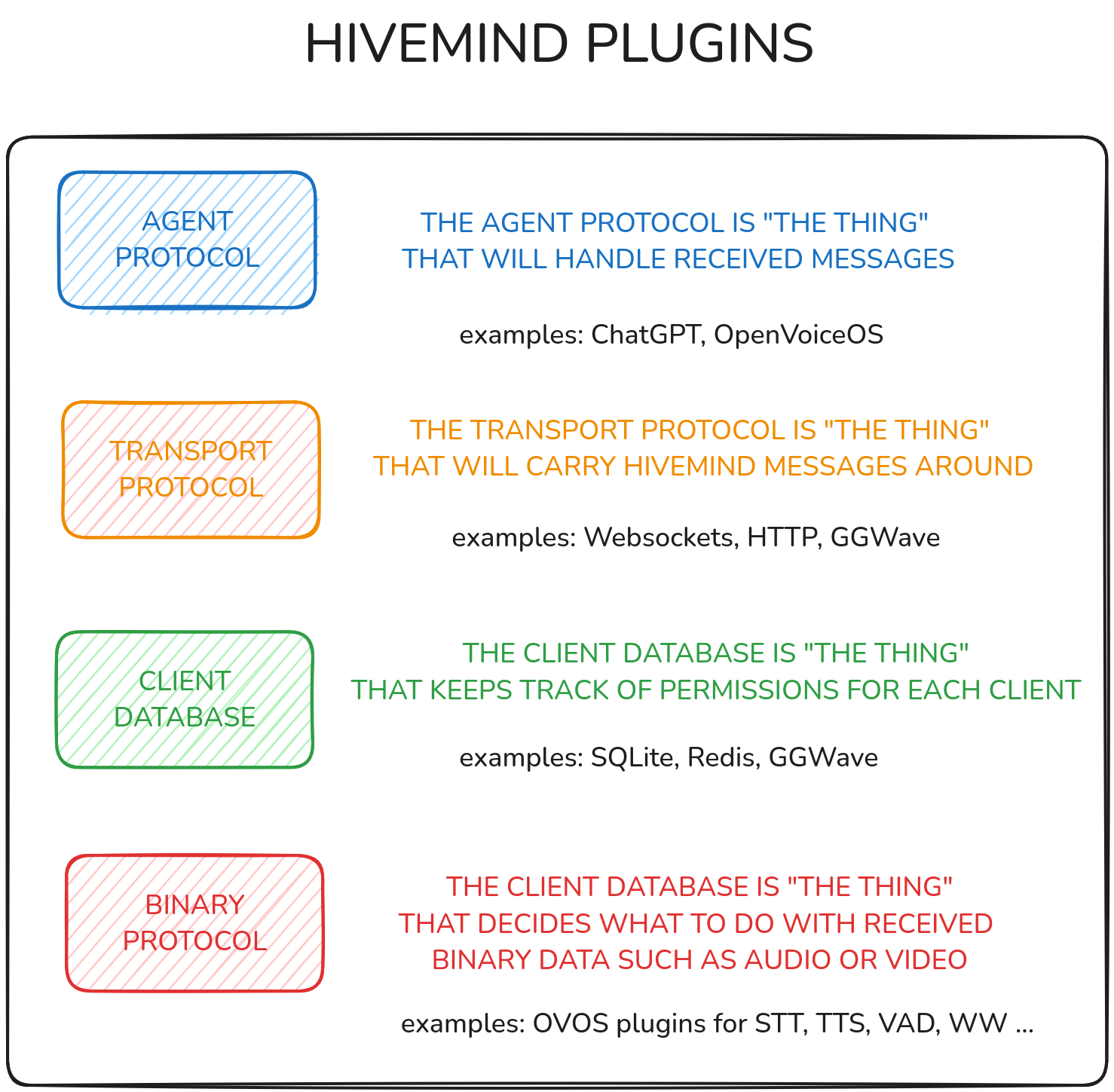
1. Database plugins
Supports multiple database systems:
- JSON database: stores data in JSON format (hivemind-json-db-plugin).
- SQLite database: stores data locally with SQLite (hivemind-sqlite-database).
- Redis database: stores data with Redis, for distributed caching and storage (hivemind-redis-database).
2. Agent protocol plugins
Supports communication protocols for agents:
- OVOS protocol: connects to OVOS-based agents (hivemind-ovos-agent-plugin).
- Persona protocol: connects to the Persona framework.
3. Network protocol plugins
Supports network communication protocols:
- WebSocket protocol: real-time, bidirectional communication over WebSockets (hivemind-websocket-protocol).
4. Binary data handler protocol plugins
Handles binary data, like audio, with a specialized protocol (hivemind-audio-binary-protocol).
Related projects
- HiveMind-core: the HiveMind server that consumes these plugins.
- hivemind-json-db-plugin: database plugin for JSON.
- hivemind-sqlite-database: database plugin for SQLite.
- hivemind-redis-database: database plugin for Redis.
- hivemind-ovos-agent-plugin: agent protocol plugin for OVOS.
- hivemind-websocket-protocol: network protocol plugin for WebSockets.
- hivemind-audio-binary-protocol: binary protocol plugin for audio.
License
See LICENSE.md.
1 maintainer

Metadata
1 maintainer
Release files for hivemind-plugin-manager 0.11.0a1
For a detailed explanation of source distributions (sdists) and built distributions (wheels), please see the package formats documentation.
Source distribution (sdist)
| File | Size | Uploaded | Provenance | Actions |
|---|---|---|---|---|
| hivemind_plugin_manager-0.11.0a1.tar.gz | 33.1 kB | Without provenance | Details for hivemind_plugin_manager-0.11.0a1.tar.gz |
Built distribution (wheel)
| File | Interpreter | ABI | Platform | Actions Reset |
|---|---|---|---|---|
| hivemind_plugin_manager-0.11.0a1-py3-none-any.whl | Python 3 | none | any | Details for hivemind_plugin_manager-0.11.0a1-py3-none-any.whl |
Total release size: 57.0 kB
Release files / hivemind_plugin_manager-0.11.0a1.tar.gz
| Download URL | hivemind_plugin_manager-0.11.0a1.tar.gz |
|---|---|
| Size | 33.1 kB |
| Tags | Source |
|
SHA-256 checksum How to use checksums |
98df7dd51926a7955ec3f3bbfaa770ab32cb1a56a4389fc6e21d944d34d02175
|
|
BLAKE2b-256 checksum How to use checksums |
a02a93756988c7785398c8d2a93fa41ae64ef0f11081788238a5b95935c592b2
|
| Upload date | |
|
Uploaded using Trusted Publishing? What is trusted publishing? |
No |
| Uploaded via |
twine/7.0.0 CPython/3.13.16
|
Release files / hivemind_plugin_manager-0.11.0a1-py3-none-any.whl
| Download URL | hivemind_plugin_manager-0.11.0a1-py3-none-any.whl |
|---|---|
| Size | 23.9 kB |
| Tags | Python 3 |
|
SHA-256 checksum How to use checksums |
b5d01c6ac8b5abff48d6efba0c7b5e6c9d005d700a699086bc6adec4319a9e06
|
|
BLAKE2b-256 checksum How to use checksums |
074a827c0b0f847b1b35d58be110cda3dc19d431bd1fec417621cb71235986e8
|
| Upload date | |
|
Uploaded using Trusted Publishing? What is trusted publishing? |
No |
| Uploaded via |
twine/7.0.0 CPython/3.13.16
|
Security for hivemind-plugin-manager 0.11.0a1
Provenance
Provenance describes where a file came from. On PyPI, provenance is shared via attestations, which provide a verifiable record of the build or publishing details. View details, limitations and caveats.
No provenance found
None of the files in this release were uploaded with provenance metadata.
A note on package security
PyPI is a repository for distributing packages, not a service for auditing them. While third-party security researchers and our staff do their best to detect and remove malicious packages, PyPI cannot guarantee the quality, security or suitability of any given package.
To learn more about protecting yourself from malicious actors, visit our package security documentation.














