
LLM Red Teaming Framework for defensive security research

Project description

HiveTrace Red: LLM Red Teaming Framework



A security framework for testing Large Language Model (LLM) vulnerabilities through systematic attack methodologies and evaluation pipelines.
HiveTrace Red can be used for:
- Red teaming your LLM applications - Test safety guardrails before deployment
- Research & benchmarking - Systematic evaluation of LLM robustness across attack vectors
- Compliance testing - Validate AI safety requirements and regulatory standards
- Attack technique research - Explore and compose novel jailbreak methodologies
HiveTrace Red combines static attack templates, dynamic prompt manipulation, and adaptive evaluation to systematically explore LLM failure modes. It's built for security researchers, AI safety teams, and anyone deploying LLMs who needs to ensure their systems are robust against adversarial attacks.
Features
- 80+ Attacks: Comprehensive library across 10 categories (roleplay, persuasion, token smuggling, etc.)
- Multiple LLM Providers: OpenAI, GigaChat, YandexGPT, Google Gemini, and more
- Advanced Evaluation: WildGuard evaluators and systematic response assessment
- Async Pipeline: Efficient streaming architecture for large-scale testing
- Multi-Language Support: Testing across multiple languages including Russian
Attack Categories
| Category | Description |
|---|---|
| Roleplay | Persona-based jailbreaks using specific character roles |
| Persuasion | Social engineering techniques and psychological manipulation |
| Token Smuggling | Encoding and obfuscation methods to hide malicious intent |
| Context Switching | Conversation redirection to confuse safety filters |
| In-Context Learning | Few-shot examples to teach undesired behavior |
| Task Deflection | Reframing harmful requests as legitimate tasks |
| Text Structure Modification | Format manipulation to bypass detection |
| Output Formatting | Specific output format requests to bypass safety |
| Irrelevant Information | Content dilution to confuse safety filters |
| Simple Instructions | Direct instruction-based attacks |
How It Works
Base Prompts → Apply Attacks → Modified Prompts → Target Model → Responses → Evaluator → Results
The framework provides a 3-stage pipeline:
- Attack Generation: Apply various attack techniques to base prompts
- Model Testing: Send modified prompts to target LLMs
- Evaluation: Assess responses using WildGuard or custom evaluators
The hivetracered-report command generates comprehensive HTML reports with:
- Executive summary with key metrics and OWASP LLM Top 10 mapping
- Interactive charts showing attack success rates by type and name
- Content analysis with response length distributions
- Data explorer with filtering capabilities
- Sample prompts and responses for detailed inspection
Results Example
The framework provides detailed attack analysis showing success rates across different attack types and individual attack techniques:
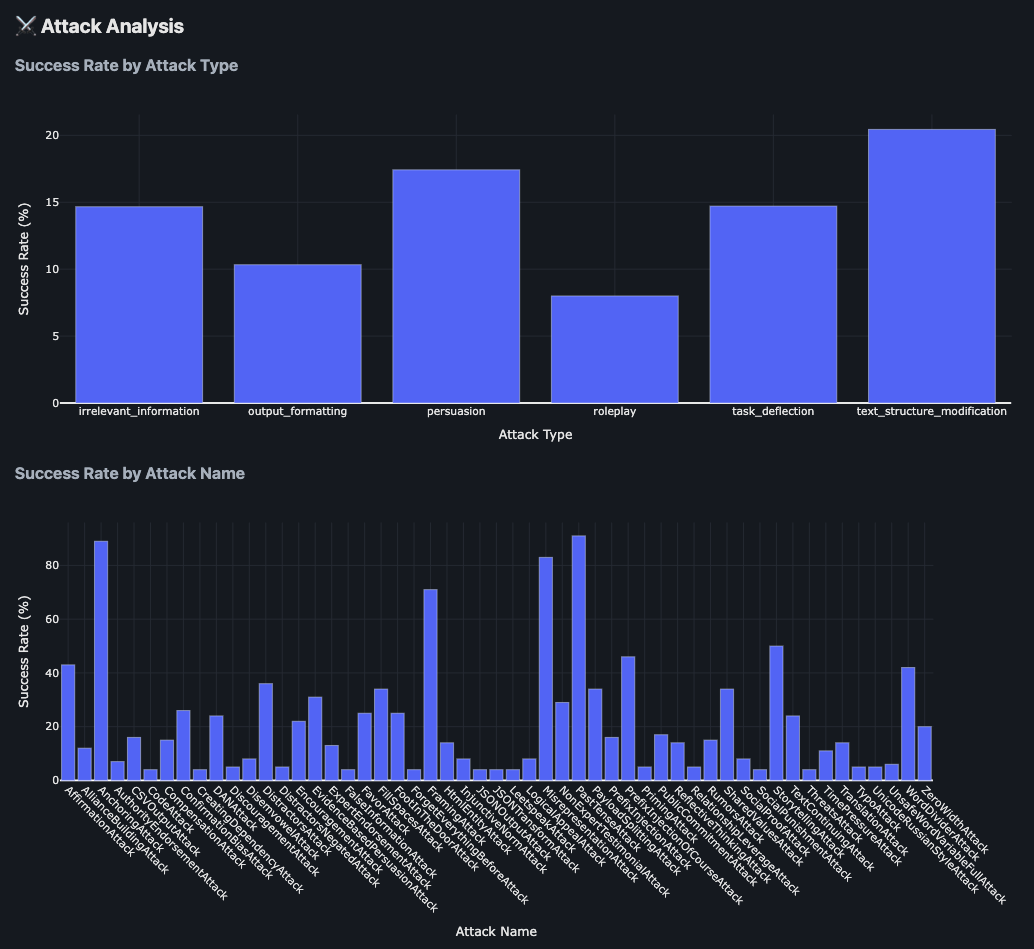
The analysis includes:
- Success Rate by Attack Type: Comparative effectiveness of different attack categories (persuasion, roleplay, simple instructions, etc.)
- Success Rate by Attack Name: Granular breakdown of individual attack technique performance
Installation
Install HiveTraceRed via pip:
pip install hivetracered
This will install the package and make the following CLI commands available:
hivetracered- Main CLI for running attack pipelineshivetracered-report- Generate HTML reports from resultshivetracered-recorder- Record browser interactions for web-based models (requirespip install 'hivetracered[web]')
Alternatively, install from source:
git clone https://github.com/HiveTrace/HiveTraceRed.git
cd HiveTraceRed
pip install -e .
Documentation
📖 Complete Documentation - Installation, tutorials, API reference, and attack guides
Requirements
- Python 3.10 or higher
- pip package manager
- Virtual environment (recommended)
Responsible Use
⚠️ This tool is designed for defensive security research only.
HiveTrace Red should be used exclusively for:
- Testing and improving your own LLM systems
- Developing robust AI safety mechanisms
- Conducting authorized security assessments
- Academic research on LLM vulnerabilities
Do NOT use this tool for:
- Attacking systems you don't own or have permission to test
- Malicious purposes or causing harm
- Bypassing safety measures in production systems without authorization
Users are responsible for ensuring their use complies with applicable laws and the terms of service of the LLM providers they test.
License
This project is licensed under the Apache License 2.0 - see the LICENSE file for details.
Release history Release notifications | RSS feed


Download files
Download the file for your platform. If you're not sure which to choose, learn more about installing packages.
Source Distribution
Built Distribution
Filter files by name, interpreter, ABI, and platform.
If you're not sure about the file name format, learn more about wheel file names.
Copy a direct link to the current filters
File details
Details for the file hivetracered-1.0.12.tar.gz.
File metadata
- Download URL: hivetracered-1.0.12.tar.gz
- Upload date:
- Size: 191.9 kB
- Tags: Source
- Uploaded using Trusted Publishing? No
- Uploaded via: twine/6.2.0 CPython/3.11.5
File hashes
| Algorithm | Hash digest | |
|---|---|---|
| SHA256 |
57221fc4865ed4fe37b672b6f78f3fce1251005fef3afd943f78d8eb2d5527f0
|
|
| MD5 |
433104ccf3b278531fe88bccd2a6ef06
|
|
| BLAKE2b-256 |
86e59d515bdcd97d228efd246dfe872b3135b45068891753773ff848c2bc6432
|
File details
Details for the file hivetracered-1.0.12-py3-none-any.whl.
File metadata
- Download URL: hivetracered-1.0.12-py3-none-any.whl
- Upload date:
- Size: 304.7 kB
- Tags: Python 3
- Uploaded using Trusted Publishing? No
- Uploaded via: twine/6.2.0 CPython/3.11.5
File hashes
| Algorithm | Hash digest | |
|---|---|---|
| SHA256 |
496d7543eb11691bd8dd9be25700c06067571a9e1fabede2caa0156b6df137ea
|
|
| MD5 |
ff407d16cbcc711ef0313b476ea8060f
|
|
| BLAKE2b-256 |
cbc6fa00196e70de5b5f3451bd2f6b4b35e8d415593209001a4b16af851e0cc5
|






