
HiveWatch
hivewatch is a framework-agnostic monitoring toolkit for federated and distributed machine learning workloads. It provides a consistent interface for logging client updates, round summaries, and map-ready metadata across local experiments and larger deployments.
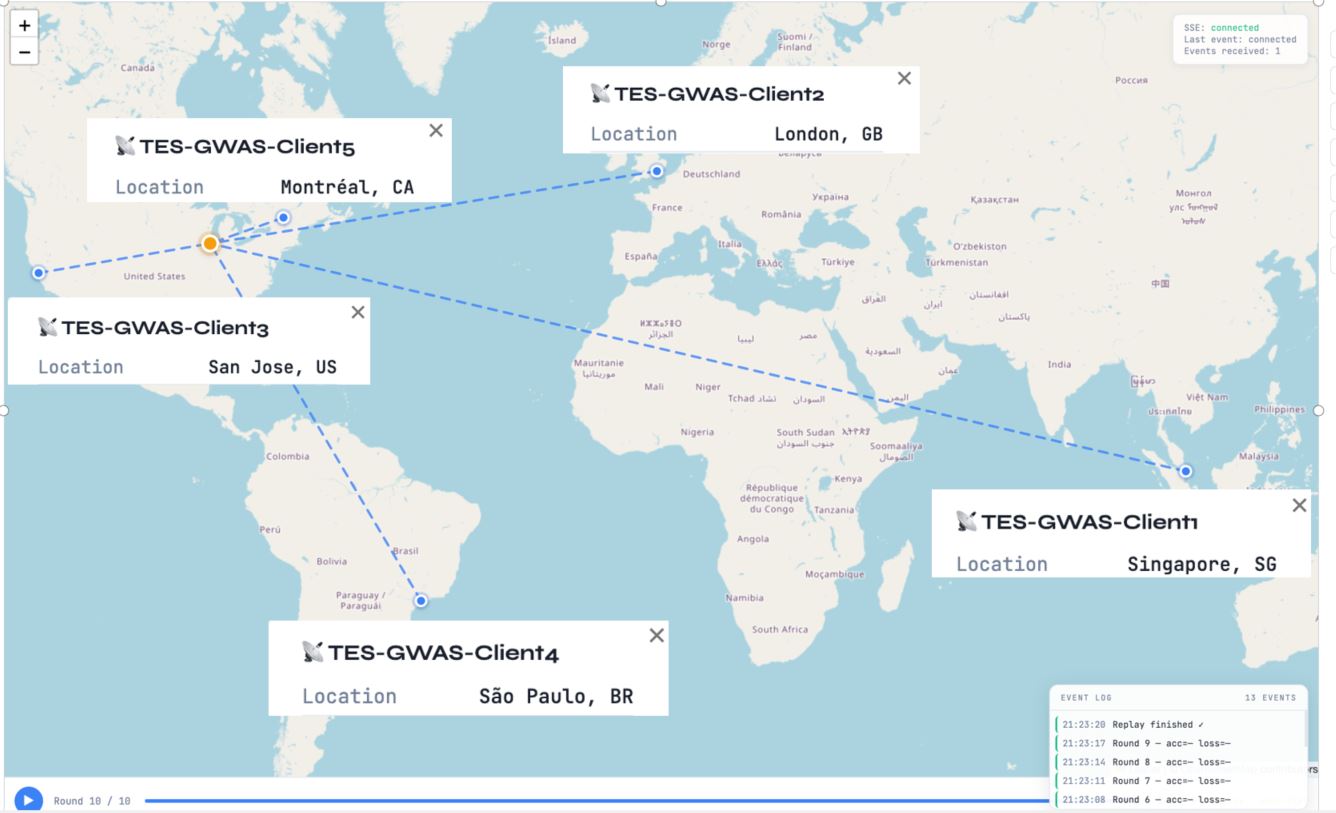
The bundled map dashboard following a live federated run across four international sites — Singapore, London, São Paulo, and Montréal — plus a US client, each streaming round-by-round metadata back to the aggregation server.
Installation
hivewatch requires Python 3.8 or later.
pip install -e .                 # core package
pip install -e ".[wandb]"        # Weights & Biases integration
pip install -e ".[mlflow]"       # MLflow integration
pip install -e ".[wandb,mlflow]" # both integrations
pip install -e ".[all]"          # all optional dependencies
Quickstart
import hivewatch
from hivewatch.emitters import WandbEmitter

hivewatch.init(
    algorithm="FedAvg",
    emitters=[WandbEmitter(project="my-fl-project")],
)

for round_num in range(num_rounds):
    hivewatch.round_start(round_num)

    for client_id, metadata in client_results.items():
        hivewatch.log_client_update(
            client_id=client_id,
            round=round_num,
            **metadata,
        )

    hivewatch.log_round(
        round=round_num,
        global_accuracy=agg_accuracy,
        global_loss=agg_loss,
    )

hivewatch.finish()
Emitters
hivewatch uses a pluggable emitter model. Create one or more emitters and pass them to hivewatch.init() to send the same run data to multiple destinations.
Local map and deferred map metadata
from hivewatch.emitters import GeoEmitter

hivewatch.init(
    algorithm="FedAvg",
    emitters=[GeoEmitter(port=7070, serve_map=False)],
)
GeoEmitter persists both of the following artifacts:
runs/<run_id>.jsonlfor the complete event historyruns/<run_id>.map.jsonfor map-ready metadata that can be loaded directly later
Serve the dashboard separately. Without --run-id, the server watches the run
directory and streams new events as they arrive:
hivewatch map run --runs-dir runs --port 7070
Open one specific saved run in static mode:
hivewatch map run --runs-dir runs --run-id run-abc123
The bundled viewer loads map metadata first and falls back to the JSONL-derived
event history for older runs. It displays non-geographic client metadata in the
sidebar automatically. Prefix a client metadata key with _ when the value
should remain in the saved artifact but stay hidden from the map card.
Package layout
The source tree groups related functionality into focused areas:
src/hivewatch/map/metadata.pyfor map metadata assembly and event-to-round transformationsserver.pyfor the local map/dashboard HTTP server
src/hivewatch/geo/utils.pyfor client-side location resolution helpers
This keeps map-related files together and avoids requiring users to maintain example-local geo helper files or server-side peer inspection patches.
Weights & Biases
from hivewatch.emitters import WandbEmitter

hivewatch.init(
    algorithm="FedAvg",
    emitters=[WandbEmitter(project="my-fl-project")],
)
MLflow
from hivewatch.emitters import MLflowEmitter

# Local tracking directory (MLflow default)
hivewatch.init(emitters=[MLflowEmitter(experiment="my-fl-project")])

# Remote tracking server
hivewatch.init(emitters=[MLflowEmitter(
    tracking_uri="http://localhost:5000",
    experiment="my-fl-project",
)])

# MLflow system metrics
hivewatch.init(emitters=[MLflowEmitter(
    experiment="my-fl-project",
    mlflow_system_metrics=True,
    system_metrics_sampling_interval=5,
)])
Start an MLflow server:
mlflow server --host 0.0.0.0 --port 5000
To use a custom storage directory:
mlflow server \
  --host 0.0.0.0 \
  --port 5000 \
  --backend-store-uri ./my_custom_dir \
  --default-artifact-root ./my_custom_dir/artifacts
The MLflow UI is then available at http://localhost:5000.
Multiple emitters
from hivewatch.emitters import MLflowEmitter, WandbEmitter

hivewatch.init(
    algorithm="FedAvg",
    emitters=[
        WandbEmitter(project="my-fl-project"),
        MLflowEmitter(experiment="my-fl-project"),
    ],
)
Custom emitters
class MyEmitter:
    def on_init(self, run_id, algorithm, config): ...
    def on_round(self, summary, clients): ...
    def on_client_update(self, client): ...
    def finish(self): ...

hivewatch.init(emitters=[MyEmitter()])
Metadata Contract
hivewatch defines the keys it understands, but it preserves unknown keys so applications can attach additional metadata without losing information.
| Field | Type | Description |
|---|---|---|
client_id |
str | Client identifier |
round |
int | Current global round |
local_accuracy |
float | Accuracy after local training |
local_loss |
float | Loss after local training |
num_samples |
int | Local dataset size |
gradient_norm |
float | L2 norm of local gradients |
bytes_sent |
int | Bytes uploaded to the server |
train_time_sec |
float | Local training wall-clock time |
cpu_pct |
float | CPU utilization percentage |
ram_mb |
float | Memory usage in MB |
gpu_util_pct |
float | GPU utilization percentage |
lat / lng / country |
float/str | Client location metadata for map visualization |
base_round |
int | For asynchronous FL, staleness is round - base_round |
Unknown client fields are preserved in ClientUpdate objects and the local
JSONL/.map.json artifacts. The map dashboard displays visible non-geographic
fields automatically. Use a leading underscore for values that should be stored
but hidden from the bundled map viewer, for example _debug_score.
Logged Metrics
Weights & Biases
| Metric | Description |
|---|---|
round/accuracy, round/loss |
Global model performance per round |
round/participation_rate |
Completed clients divided by selected clients |
round/num_stragglers |
Number of stragglers |
round/duration_sec |
Wall-clock time per round |
comm/total_bytes_mb |
Total upload and download volume |
comm/bytes_per_client_mb |
Per-client communication cost |
agg/gradient_divergence |
Standard deviation of per-client gradient norms |
agg/aggregation_time_sec |
Server-side aggregation time |
client/<id>/accuracy |
Per-client accuracy |
client/<id>/gradient_norm |
Per-client gradient norm |
client/<id>/staleness |
Rounds behind the current global model in async FL |
client/<id>/bytes_sent_mb |
Per-client upload size |
client/<id>/train_time_sec |
Per-client training time |
sys/<id>/cpu_pct |
Per-client CPU utilization |
sys/<id>/ram_mb |
Per-client RAM usage |
event/client_dropout |
Dropout counter |
event/comm_failure |
Communication failure counter |
All metrics use round as the x-axis through wandb.define_metric().
MLflow
MLflow records the same metrics. Per-client metrics use dot notation such as client.<id>.accuracy instead of slash notation because of MLflow metric naming conventions. Hyperparameters are logged once as MLflow parameters, and model checkpoints are stored as versioned MLflow artifacts.
Architecture
FL Clients
  └── return metadata dict
        │  (gRPC / HTTP / sockets / others; hivewatch does not depend on the transport layer)
        ▼
FL Server
  └── receives metadata and calls hivewatch:
        hivewatch.round_start(round)
        hivewatch.log_client_update(client_id, round, **metadata)
        hivewatch.log_round(round, global_accuracy, global_loss)
        │
        ▼
hivewatch
  ├── WandbEmitter  →  wandb.ai dashboard
  ├── MLflowEmitter →  MLflow UI (localhost:5000)
  └── GeoEmitter    →  local JSONL/.map.json artifacts and map dashboard
hivewatch does not depend on a specific transport layer or FL framework. Applications bridge their training framework to hivewatch in the same way they would bridge it to another experiment tracking backend.
For map visualization, the storage contract includes a standalone metadata artifact in addition to the raw event log. This supports:
- local CLI runs that immediately launch or serve a map
- local or remote services that persist metadata for later display
- future deployments that store metadata in object storage and load it in a separate web tier
1 maintainer

Metadata
1 maintainer
Release files for hivewatch 0.3.0
For a detailed explanation of source distributions (sdists) and built distributions (wheels), please see the package formats documentation.
Source distribution (sdist)
| File | Size | Uploaded | Provenance | Actions |
|---|---|---|---|---|
| hivewatch-0.3.0.tar.gz | 329.8 kB | With provenance | Details for hivewatch-0.3.0.tar.gz |
Built distribution (wheel)
| File | Interpreter | ABI | Platform | Actions Reset |
|---|---|---|---|---|
| hivewatch-0.3.0-py3-none-any.whl | Python 3 | none | any | Details for hivewatch-0.3.0-py3-none-any.whl |
Total release size: 661.7 kB
Release files / hivewatch-0.3.0.tar.gz
| Download URL | hivewatch-0.3.0.tar.gz |
|---|---|
| Size | 329.8 kB |
| Tags | Source |
|
SHA-256 checksum How to use checksums |
dd84a5f2619e0010f5068acaa4d304a41e60f3be0713da7ac28e0e87de374e4b
|
|
BLAKE2b-256 checksum How to use checksums |
74d5b0d95793bb3e20d40e016f477a80e6b787744606ded5389042fa4c910142
|
| Upload date | |
|
Uploaded using Trusted Publishing? What is trusted publishing? |
Yes |
| Uploaded via |
twine/7.0.0 CPython/3.13.14
|
Provenance
Provenance describes where a file came from. On PyPI, provenance is shared via attestations, which provide a verifiable record of the build or publishing details. View details, limitations and caveats.


PyPI Publish Attestation
PyPI verified that this artifact, at this checksum, originated from the publisher listed below.
Signed by GitHub Actions, verified by PyPI on Sep 22, 2026.
Transparency logRelease files / hivewatch-0.3.0-py3-none-any.whl
| Download URL | hivewatch-0.3.0-py3-none-any.whl |
|---|---|
| Size | 331.8 kB |
| Tags | Python 3 |
|
SHA-256 checksum How to use checksums |
bc1e2bfe59b3335c6b984ab79df2143f0d3916efde88b328900deed4954c04c5
|
|
BLAKE2b-256 checksum How to use checksums |
f42a52bf2a98d76ecafea5b360c16aca1605ebf78d6a72ced8779bab867f5388
|
| Upload date | |
|
Uploaded using Trusted Publishing? What is trusted publishing? |
Yes |
| Uploaded via |
twine/7.0.0 CPython/3.13.14
|
Provenance
Provenance describes where a file came from. On PyPI, provenance is shared via attestations, which provide a verifiable record of the build or publishing details. View details, limitations and caveats.
PyPI Publish Attestation
PyPI verified that this artifact, at this checksum, originated from the publisher listed below.
Signed by GitHub Actions, verified by PyPI on Sep 22, 2026.
Transparency logSecurity for hivewatch 0.3.0
Provenance
Provenance describes where a file came from. On PyPI, provenance is shared via attestations, which provide a verifiable record of the build or publishing details. View details, limitations and caveats.
Full provenance
All 2 files in this release have been uploaded with provenance metadata.
Attestation for hivewatch-0.3.0.tar.gz
PyPI Publish Attestation
PyPI verified that this artifact, at this checksum, originated from the publisher listed below.
Signed by GitHub Actions, verified by PyPI on Sep 22, 2026.
Transparency logA note on package security
PyPI is a repository for distributing packages, not a service for auditing them. While third-party security researchers and our staff do their best to detect and remove malicious packages, PyPI cannot guarantee the quality, security or suitability of any given package.
To learn more about protecting yourself from malicious actors, visit our package security documentation.














