
hoboreader
Python package for reading Onset Hobo sensor csv files
Any problems? Please raise an Issue on GitHub
To install:
pip install hoboreader
Quick demo:
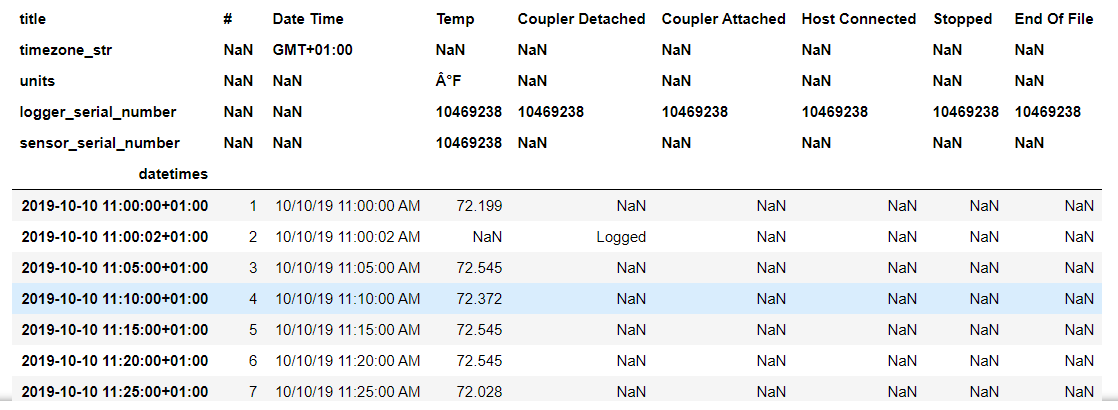
The following code reads a Hobo csv file and converts it to a pandas DataFrame:
from hoboreader import HoboReader
h=HoboReader('sample_hobo_data.csv')
df=h.get_dataframe()
The DataFrame looks like this:
User Guide
Importing the HoboReader class:
from hoboreader import HoboReader
Creating an instance of HoboReader and reading in a Hobo data csv file:
Either:
h=HoboReader()
h.read_csv('sample_hobo_data.csv')
or:
h=HoboReader('sample_hobo_data.csv')
Working with attributes
As the csv file is read in, a number of attributes are populated. These are:
h.reader # a Python csv.reader object
h.header_row # a list of the header row of the csv file
h.header_list # a list of dictionaries with the header row information
h.hobo_timezone_str # a string of the timezone as expressed in the header row
h.timezone # a Python datetime.timezone instance
h.data_rows # a list of each row of the timeseries measured data
h.data_columns # a list of each column of the timeseries measured data
h.datetimes # a list of the timestamps converted to Python datetime.datetime instances
See the attributes_demo.ipynb Jupyter Notebook in the 'demo' section for more on these attributes.
Creating a Pandas DataFrame
A Pandas DataFrame can be created using:
df=h.get_dataframe()
See the dataframe_demo.ipynb Jupyter Notebook in the 'demo' section for how to work with this dataframe.
Creating rdf data
The Hobo data can be converted to rdf data using:
g=h.get_rdf()
See the rdf_demo.ipynb Jupyter Notebook in the 'demo' section for how to work with the rdf data.
Getting the sensor serial number
A function which return the sensor serial number:
sn=h.get_sensor_serial_number()
1 maintainer

Metadata
1 maintainer
Release files for hoboreader 0.0.2
For a detailed explanation of source distributions (sdists) and built distributions (wheels), please see the package formats documentation.
Source distribution (sdist)
| File | Size | Uploaded | |
|---|---|---|---|
| hoboreader-0.0.2.tar.gz | 5.6 kB | Details |
Built distribution (wheel)
| File | Interpreter | ABI | Platform | Reset |
|---|---|---|---|---|
| hoboreader-0.0.2-py3-none-any.whl | Python 3 | none | any | Details |
Total release size: 12.4 kB
Release files / hoboreader-0.0.2.tar.gz
| Download URL | hoboreader-0.0.2.tar.gz |
|---|---|
| Size | 5.6 kB |
| Tags | Source |
|
SHA-256 checksum How to use checksums |
110706656a52f6eec6495180e40c2a8a3132b66a9bf6d53223a243ed4fc55023
|
|
BLAKE2b-256 checksum How to use checksums |
02075809b8f6cfa4c46215a7469510a22dae3f8410c51f454330b78bc682c8c9
|
| Upload date | |
|
Uploaded using Trusted Publishing? What is trusted publishing? |
No |
| Uploaded via |
twine/3.1.1 pkginfo/1.5.0.1 requests/2.22.0 setuptools/42.0.2 requests-toolbelt/0.9.1 tqdm/4.32.1 CPython/3.7.3
|
Release files / hoboreader-0.0.2-py3-none-any.whl
| Download URL | hoboreader-0.0.2-py3-none-any.whl |
|---|---|
| Size | 6.8 kB |
| Tags | Python 3 |
|
SHA-256 checksum How to use checksums |
28595a245bdfc38b025ff5687b668f77b7b80651d87ba24ce818f3727100e0d0
|
|
BLAKE2b-256 checksum How to use checksums |
3561a17dc0c29cf1ba40c6d5c24b6312576acb1386ebb4178660fe729ec8ed26
|
| Upload date | |
|
Uploaded using Trusted Publishing? What is trusted publishing? |
No |
| Uploaded via |
twine/3.1.1 pkginfo/1.5.0.1 requests/2.22.0 setuptools/42.0.2 requests-toolbelt/0.9.1 tqdm/4.32.1 CPython/3.7.3
|













