
an alternative interface to official API of the Holoeye PLUTO-2 Spatial Light Modulator in order to control multiple devices through RNDIS network rather than classic HDMI.

Project description
Classes
class HoloeyeSLM
Description
This class has the main role in commmunication with the Holoeye device. This class inherits the SSHClient class from paramiko package and has all the properties from the same package.
Methods
-
HoloeyeSLM()aka constructor-
Description
Initializes the connection to your Holoeye SLM device
-
Parameters:
parameter=defaultdescription-
logging=FalseEnables the logs from your HOLOEYE device. -
RSA_Keys=NonePath to your prefered RSA keys. -
width=1920Width of your HOLOEYE device. -
height=1080Width of your HOLOEYE device. -
min=0Minimum intensity withing the Holoeye device supporting range -
max=255Maximum intensity withing the Holoeye device supporting range -
hostname=10.10.70.1Your device hostname/IP address -
port=22Your device listening port -
username=rootYour device end username -
password=''Your device end password
-
-
-
flush_RSA_Keys()-
Description
Deletes the current RSA keys.
-
-
prepare_connect()-
Description
Reinitialize and connect to the device with new changes in device parameters. e.g. changing the device IP address.
-
-
connect()-
Description
Connects to the device.
-
-
changeIP(new_IP,mask)-
Description
Changes the device IP configuration to the given IP and network submask and closes the connection. It is recommentded to set your IP addresses with default submask. After changing the device IP configuration, you need to re-plug the device to your computer without turning off the Holoeye device.
-
Parameters
new_IP='10.10.70.2'Desisered IPv4 address for the devicemask='255.0.0.0'Desisered mask for the device
-
-
diconnectHDMI()-
Description
Disconnects the HDMI port access from the Holoeye device.
-
-
sendImage(FILE_PATH)-
Description
Sends the image at given path to the Holoeye device output.
-
Parameters
parameterdescriptionFILE_PATHpath to image file. * image file must be a bitmap of 2-D array with dimentions equal towidthandheightattributes of the class as well as pixel values withing the classminandmaxparameters.
-
-
sendData(data)-
Description
Sends the given array values to the Holoeye device output.
-
Parameters
parameterdescriptiondatanumput 2-D array with dimentions equal towidthandheightattributes of the class as well as pixel values withing the classminandmaxparameters.
-
Device Driver Installation and Configuration
Windows
Installing RNDIS Driver on Windows
-
Connect the HoloeyeSLM USB-OTG port to your computer. Do not connect HDMI to your computer
-
Open DeviceManager on your computer.
To open DeviceManager on your pc, open run(win+R) and type
devmgmt.mscand press Enter button.If you don't have the RNDIS driver installed on your computer for that port, you are supposed to following:
-
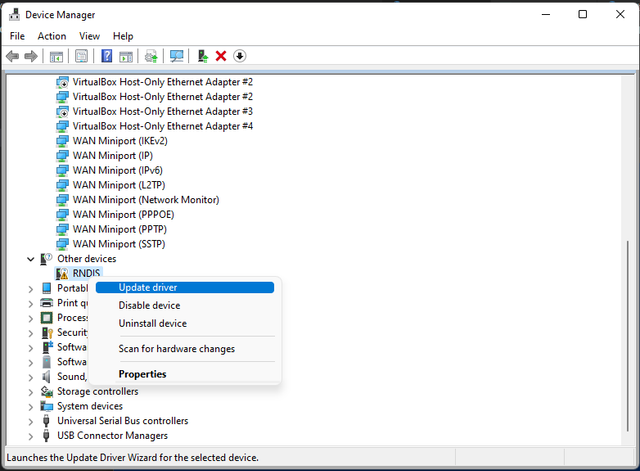
Right click on RNDIS and choose
Update Driver -
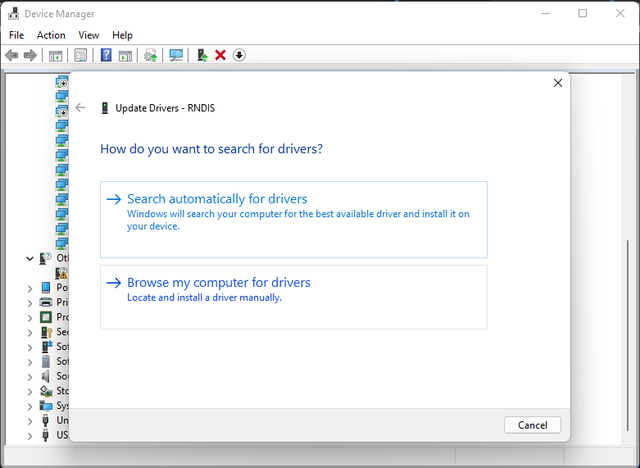
Click on
Browse my computer for drivers -
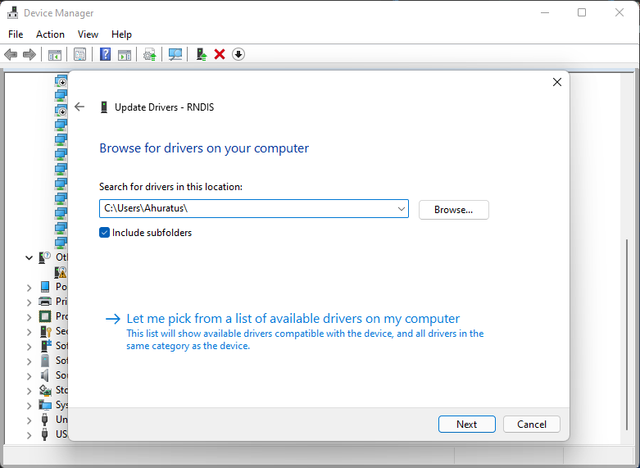
Click on
Let me pick from a list of ...and click onNext -
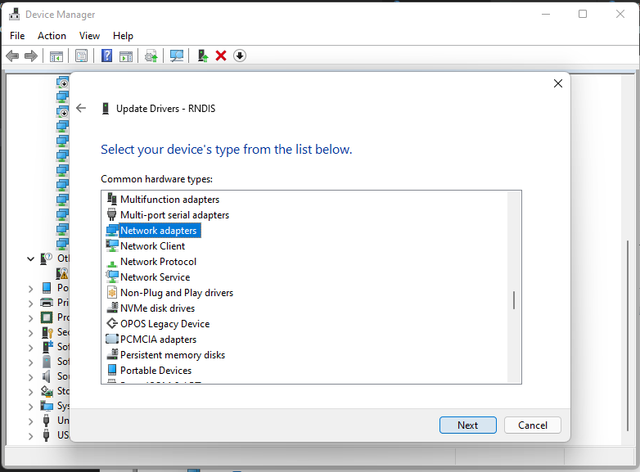
From the list choose
Network adaptersas your decive type and click onNext -
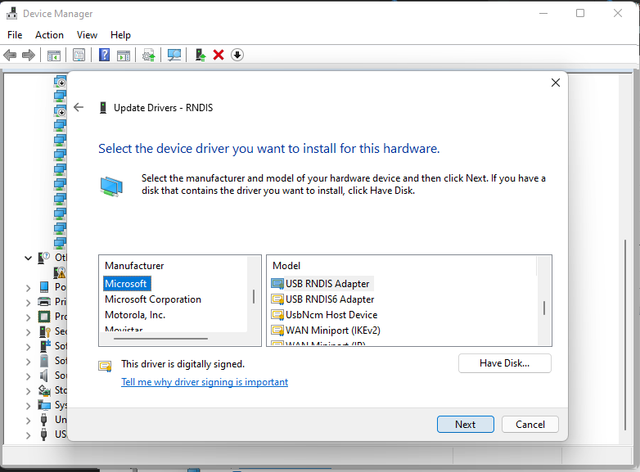
From the list of Manufactures, choose
Microsoftand from Model list choose USB RNDIS Adapter and click onNext -
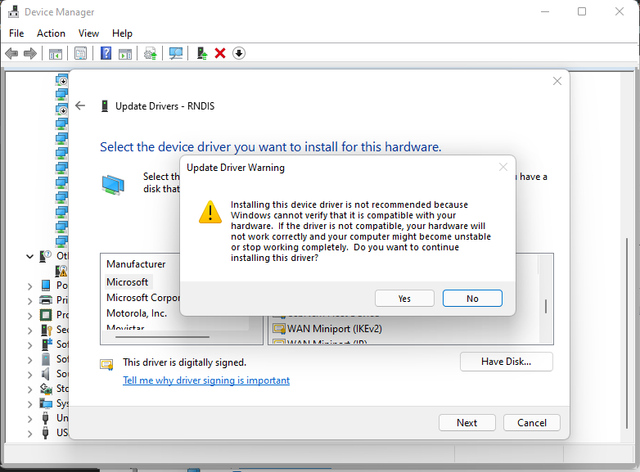
At this step you would have a warning about the possibility of uncompatibality of the chose driver with your device .(Disclaimer: I verified to compatibility with with Holoeye Pluto-2). Choose
yesfor the poping warning dialog.
-
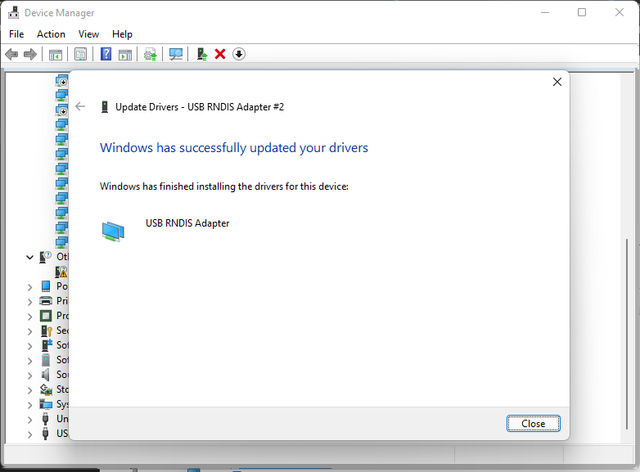
Now you have installed the RNDIS network driver.Now, you can close the window and proceed with Network Configuration.
-
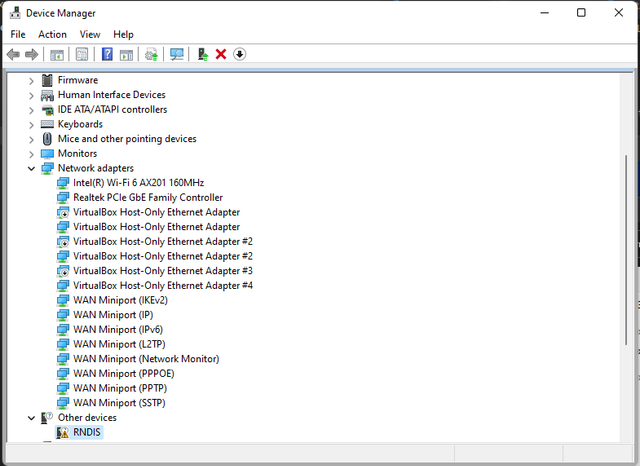
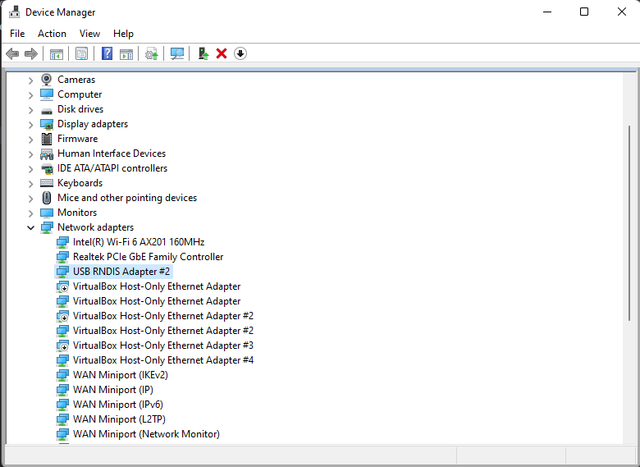
Currently, you should be able to see your RNDIS network adapter in thus section
Number of RNDIS adapter is equal to number of the devices connected to your computer.
Configuring RNDIS network address and gateway
-
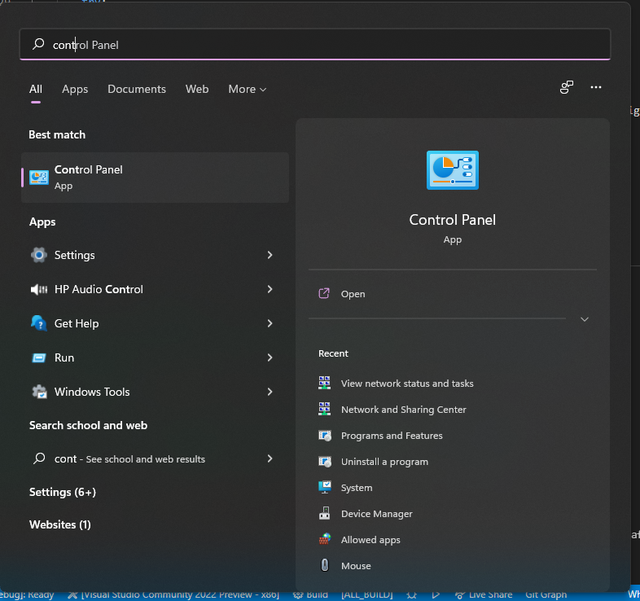
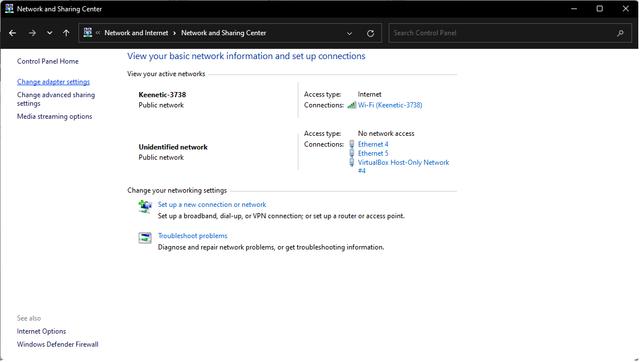
Open
Control Panel -
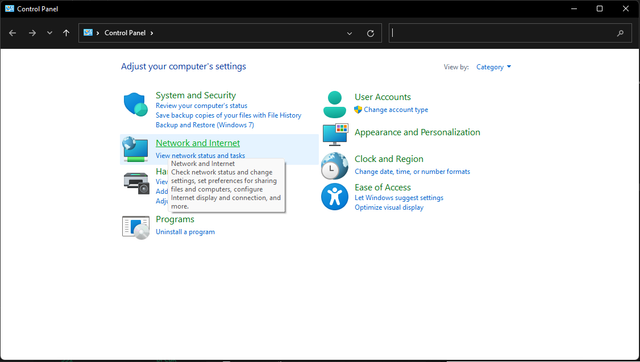
Click on
Network and Internet -
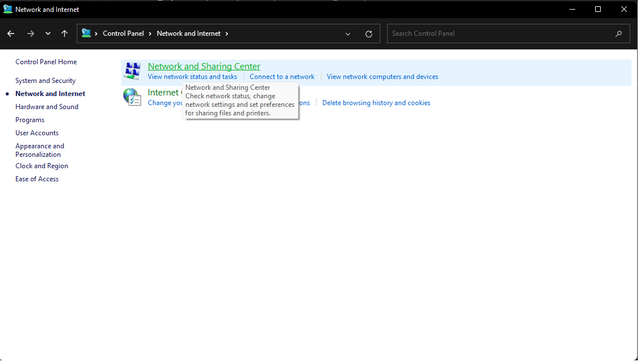
Click on
Network and Sharing Center -
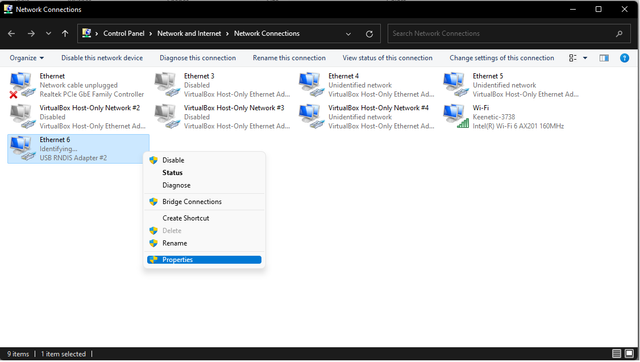
Click on
Change adapter setting -
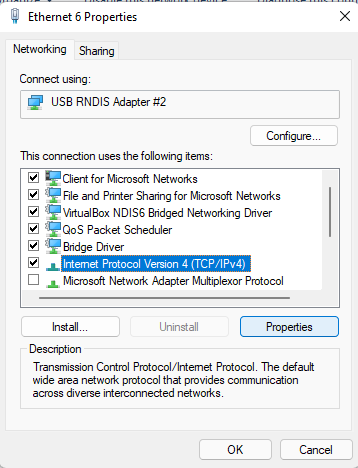
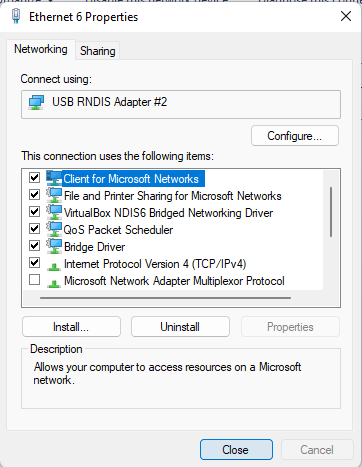
Right click on network adapter which corresponds to your desiered RNDIS adapter and click on
Properties. -
From list items choose
Internet Portocol Version 4(TCP/IPv4)and click onProperties. -
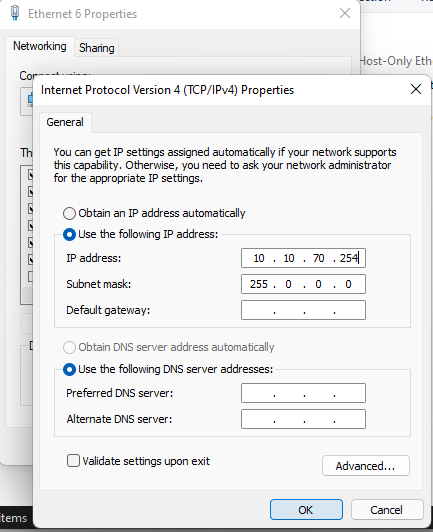
Click on
Use the following IP address. Enter IP address regarding your device assigned IP. The default IP configuration for device is10.10.70.1/8. Thus you may use any IP address which does not conflict with your other RNDIS network configurations and devices and click onOk. E.g :# device IP on RNDIS adapter 1 -> 10.10.70.1 IP address : 10.10.70.254 # RNDIS adapter 1 IP addr Subnet mask : 255.0.0.0 # RNDIS adapter 1 Subnet mask # device IP on RNDIS adapter 2 -> 10.10.70.2 IP address : 10.10.70.253 # RNDIS adapter 2 IP addr Subnet mask : 255.0.0.0 # RNDIS adapter 2 Subnet mask ... -
Click on
Closeand exit. Now you are set up with your devices.
Linux
You may use ifconfig for configuing your device. In order to assign the IP address, consider the following example:
    # device IP on usb0 ->  10.10.70.1
    IP address : 10.10.70.254 # usb0 adapter  IP addr
    Subnet mask : 255.0.0.0   # usb0 adapter  Subnet mask

    # device IP on usb1 adapter  ->  10.10.70.2
    IP address : 10.10.70.253 # usb1 adapter IP addr
    Subnet mask : 255.0.0.0   # usb1 adapter Subnet mask
    ...
MACOS
You may use HoRNDIS for configuring your device connection. Make sure you preserver the address assignment for your different devices. Please refer to linux instruction or step 7 of windows instrction for a more clear example.
CHANGELOG
Version 1.0.0 (2021-11-12)
- Changing device address API added.
- numpy array support
- Windows configuration support added.
- Improvement on documention
Version 0.1.0 (2021-10-15)
- First release after the conversion to the perf module and move to GitHub
- Included RNDIS and SSH API.
CONTRIBUTING
HOLOEYE-EMBEDDED is As an open source project, contributions are welcomed of many forms. Examples of contributions include:
- Code patches
- Suggestion or Implemention of new APIs
- Documentation improvements
- Bug reports and patch reviews
Release history Release notifications | RSS feed


Download files
Download the file for your platform. If you're not sure which to choose, learn more about installing packages.
Source Distribution
Built Distribution
Filter files by name, interpreter, ABI, and platform.
If you're not sure about the file name format, learn more about wheel file names.
Copy a direct link to the current filters
File details
Details for the file holoeye_embedded-1.0.2.tar.gz.
File metadata
- Download URL: holoeye_embedded-1.0.2.tar.gz
- Upload date:
- Size: 8.3 kB
- Tags: Source
- Uploaded using Trusted Publishing? No
- Uploaded via: twine/3.4.2 importlib_metadata/4.8.1 pkginfo/1.7.1 requests/2.26.0 requests-toolbelt/0.9.1 tqdm/4.62.3 CPython/3.9.6
File hashes
| Algorithm | Hash digest | |
|---|---|---|
| SHA256 |
5c81e772280c354824685ecd03090db79962c823b0bccce99d425933e767bc1f
|
|
| MD5 |
72e8d627ef39141089651a539cc153a0
|
|
| BLAKE2b-256 |
6290403e4d24583b67154a7ba797199375444d8b116552661380dcd64866dbc4
|
File details
Details for the file holoeye_embedded-1.0.2-py3-none-any.whl.
File metadata
- Download URL: holoeye_embedded-1.0.2-py3-none-any.whl
- Upload date:
- Size: 7.9 kB
- Tags: Python 3
- Uploaded using Trusted Publishing? No
- Uploaded via: twine/3.4.2 importlib_metadata/4.8.1 pkginfo/1.7.1 requests/2.26.0 requests-toolbelt/0.9.1 tqdm/4.62.3 CPython/3.9.6
File hashes
| Algorithm | Hash digest | |
|---|---|---|
| SHA256 |
3a0d560e393b7ebc2548b6fbac7a853200ad27f61cadf9726d99d20de954e4f1
|
|
| MD5 |
a03aeeaaca54522f5bc63655f3e39ed8
|
|
| BLAKE2b-256 |
c768a042b06d99ba363a69a9a6cedc8077191c7d9a27e4e22457a7607311b97a
|






