
Holt




Find an open-source project that will actually merge your first PR.
Paste a GitHub repository. Holt reads its recent pull requests and tells you, in plain English, whether newcomers get replies, get merged, and where their work lands. The answer is one of Worth your time, Not worth your time or Not enough evidence, with links to the pull requests behind it.
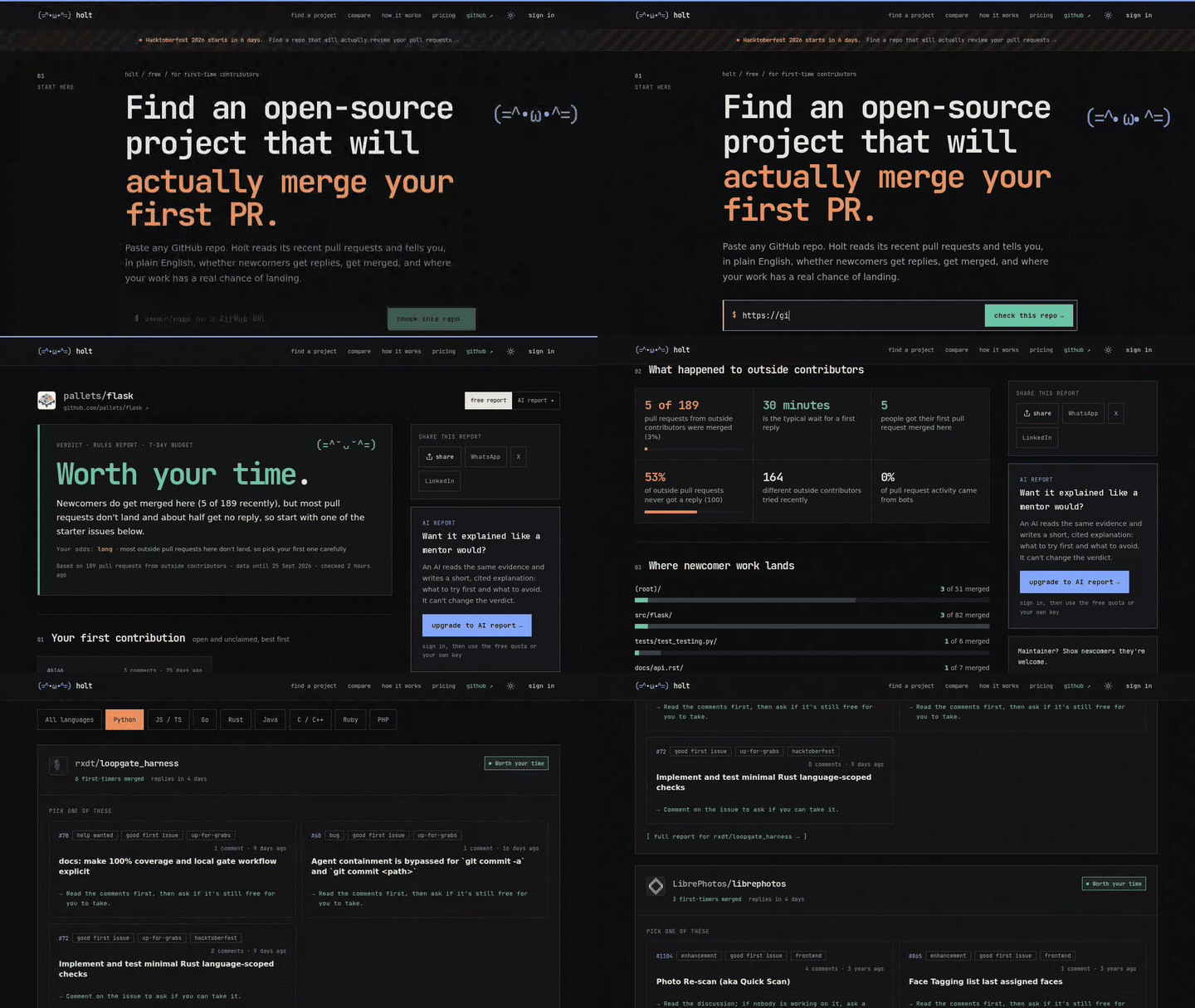
Try it in your browser · no install, no account · Install the CLI · Get the browser extension
Holt is read-only. It never opens pull requests, posts comments or contacts maintainers, on any surface.
Three ways to use it
1. The web app
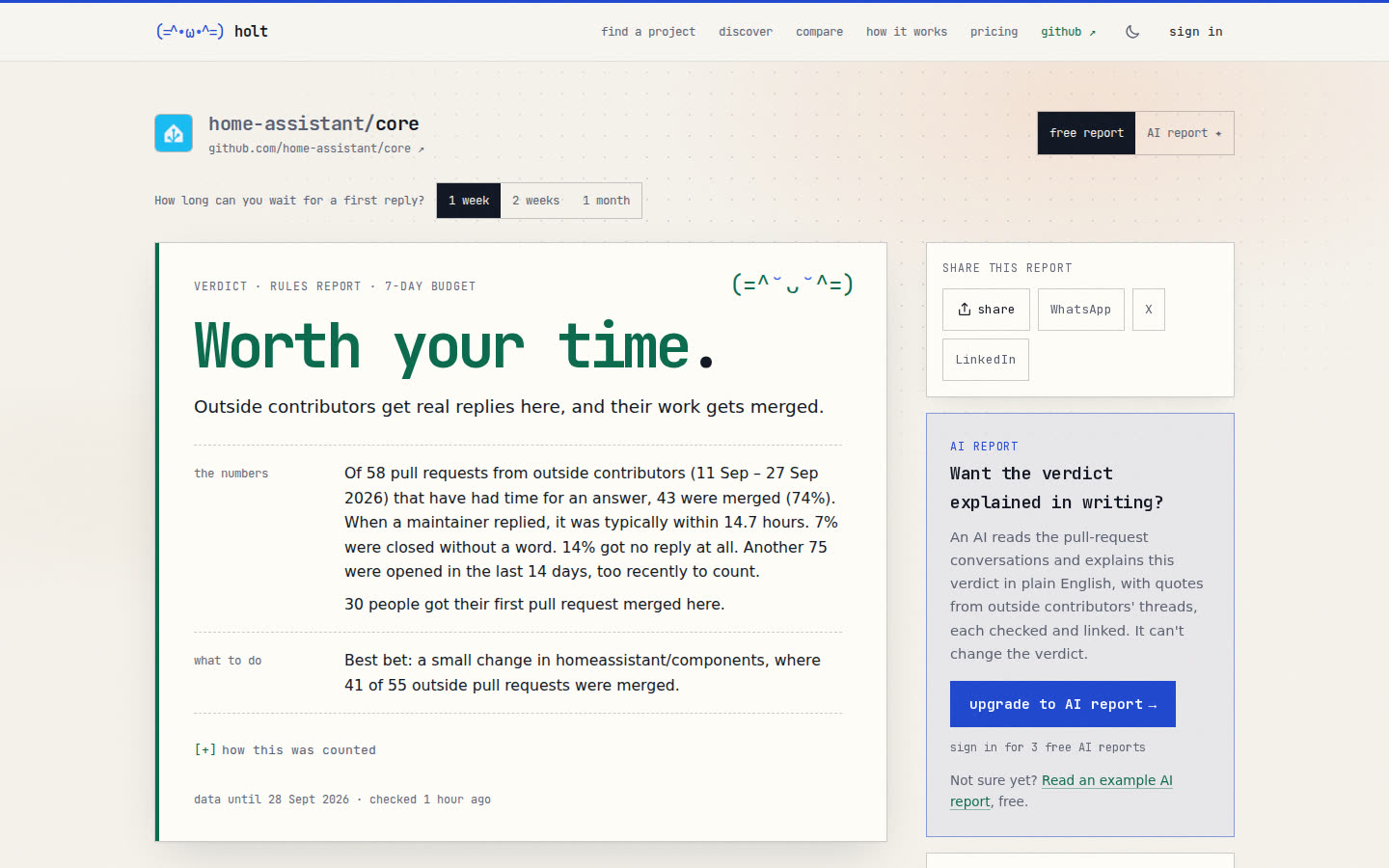
Open https://githolt.com and paste a repository. Or take any GitHub
link and swap hub for holt: github.com becomes githolt.com, and you
land on the report.
https://github.com/home-assistant/core
https://githolt.com/home-assistant/core
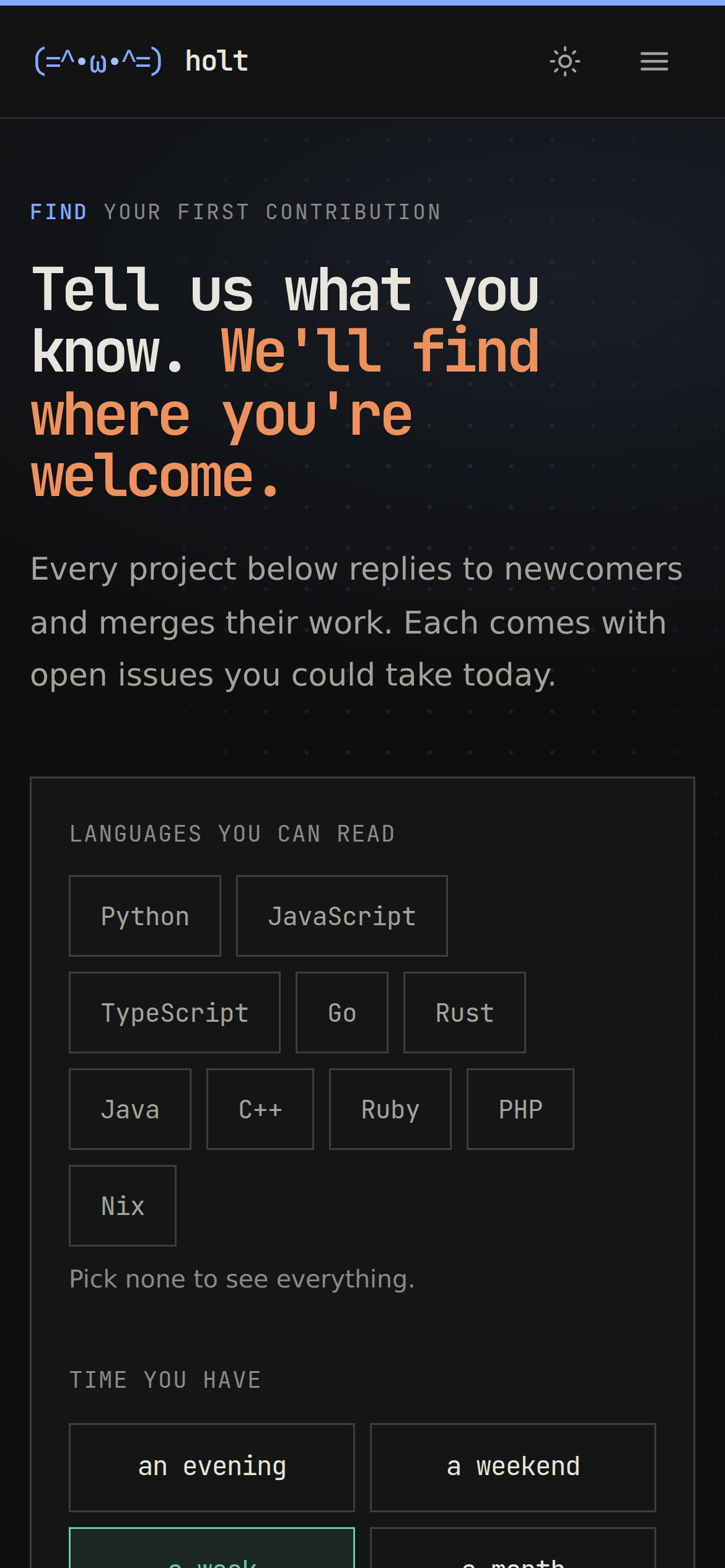
No repository in mind? Find a project asks which languages you read and how much time you have, then lists welcoming repositories with open starter issues.
 |
 |
2. The command line
The same engine runs on your machine, from PyPI. It needs Python 3.11 or newer; use whichever installer you have (all three work in PowerShell too):
pipx install holt-cli
uv tool install holt-cli
pip install --user holt-cli
Give it a GitHub token once. Holt reads only public data, so
create a token with
every box unticked, then run holt token and paste it. If you use the GitHub
CLI, Holt picks up gh auth token and you can skip this.
holt start --lang python          # starter issues in repositories that merge newcomers
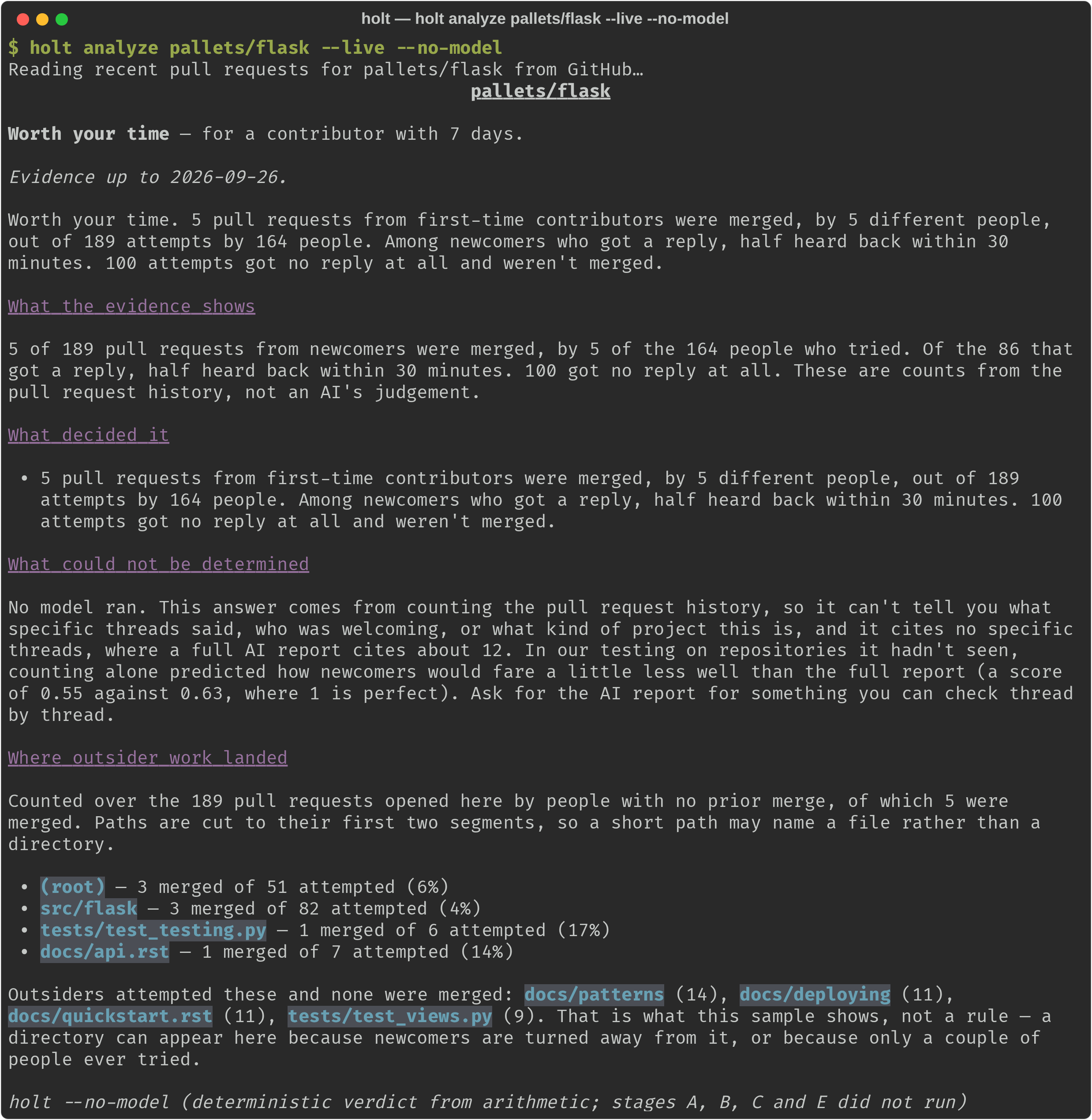
holt analyze home-assistant/core  # is this one worth your time?
holt                              # the interactive terminal interface
No AI key is needed. Without one you get the rules-only report: the answer and
the numbers behind it, free. For a written explanation that quotes the threads
it relied on, holt models sets up a model; Gemini's free tier is the cheapest
start.
| Command | Purpose |
|---|---|
holt analyze <owner/repo> |
Assess one repository. --days N for the time you have, --json for machine-readable output. |
holt start |
Starter issues, across repositories (--lang, --topic, --hacktoberfest) or in one. |
holt compare <repo>… |
Several repositories side by side. |
holt next <repo> --as <login> |
After your first merge: open issues near the files you already changed. |
holt profile, holt discover --live |
Say what you want to work on, then search for it. |
holt token, holt models |
Save a GitHub token; optionally set up a model. |
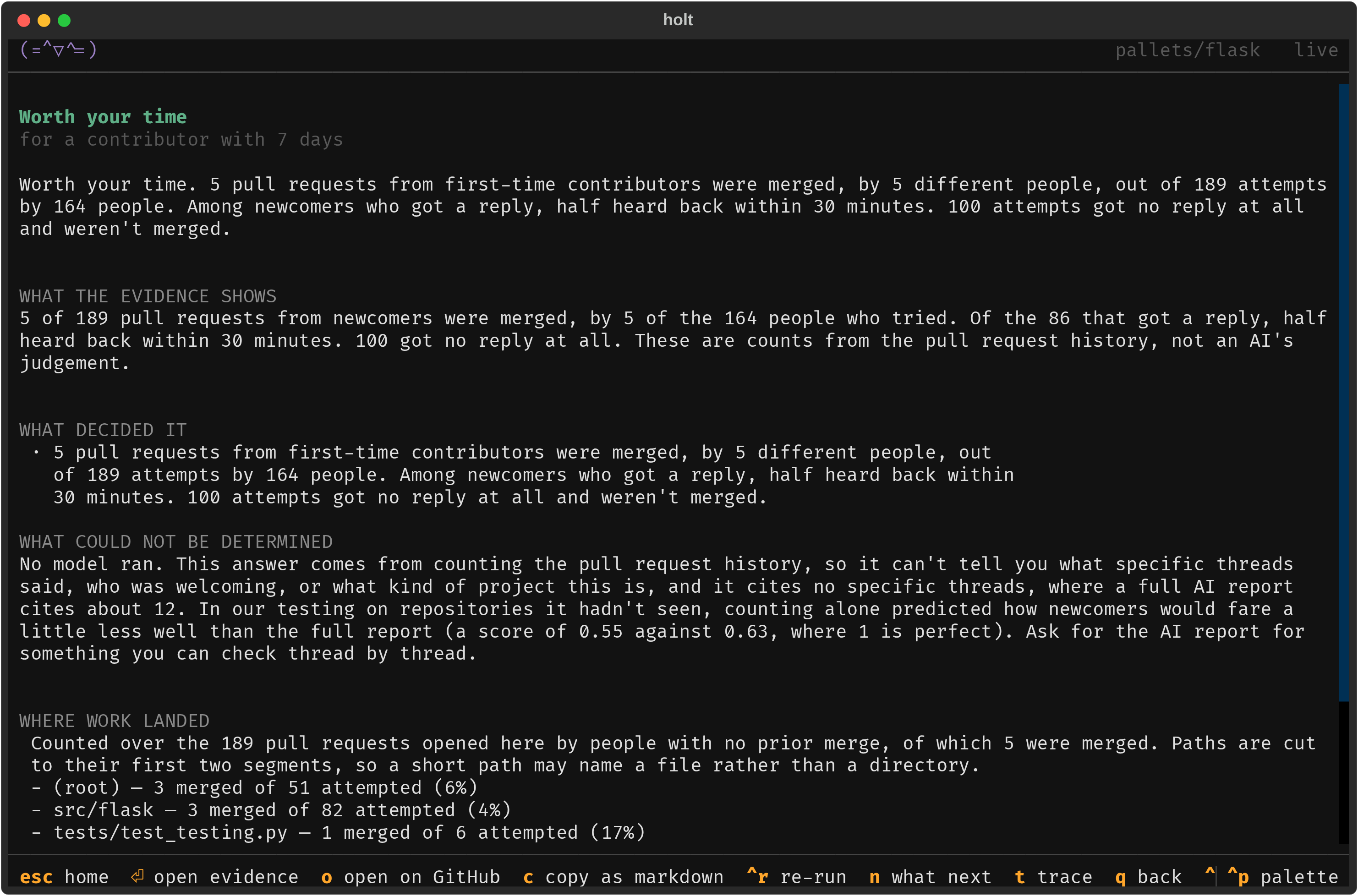
The terminal interface. Bare holt opens it: type a repository, watch the
run, open any piece of evidence on GitHub with o, and come back to past
assessments. Press ? on any screen for help.
docs/USAGE.md walks through the whole workflow and docs/COMMANDS.md lists every flag.
3. The browser extension
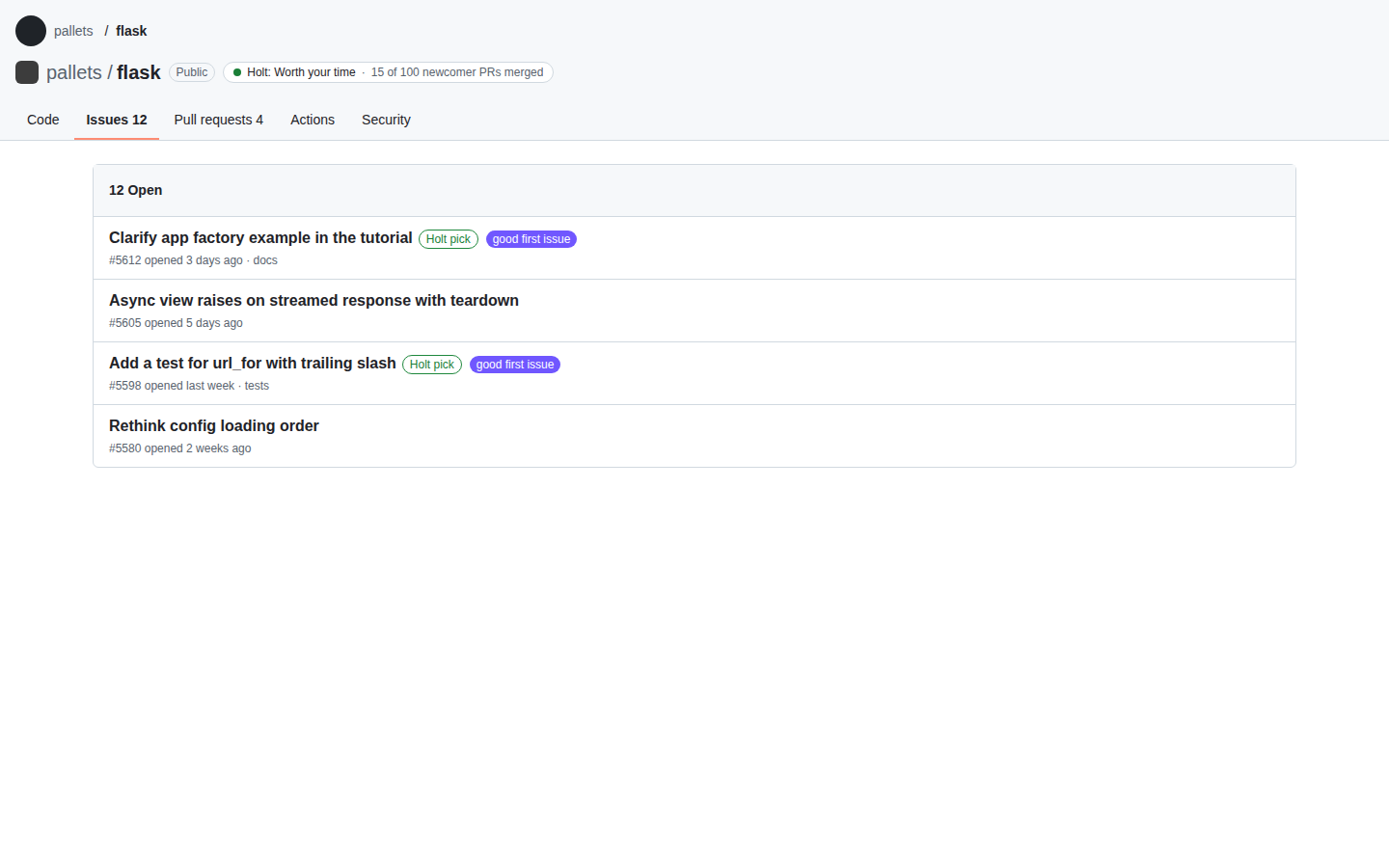
Holt for GitHub adds a small chip next to the repository name on
github.com (Holt: Worth your time · 15 of 100 newcomer PRs merged) and
marks the issues Holt would pick first. Clicking the chip opens the full
report. It sends only the owner/repo you are looking at, keeps nothing, and
never writes to GitHub.
It is not on the extension stores yet. To try it, build it and load it unpacked in Chrome, Edge, Brave or Firefox: extension/README.md.
Hacktoberfest
Every October the site has a seasonal page, /hacktoberfest: repositories taking part that actually merge newcomers' work, with starter issues by language, and a few tips so your pull request doesn't get ignored. From the command line:
holt start --hacktoberfest --lang python
For maintainers: a README badge
Show newcomers they are welcome. Paste this into your README, with your own
owner/repo:
[](https://githolt.com/owner/repo)
The badge shows Holt's current answer for your repository and links to the report. It updates when the report does; you never have to touch it again.
How the verdict works
| Answer | Meaning |
|---|---|
| Worth your time | Outsiders get replies and land real work here, fast enough for the time you have. |
| Not worth your time | The record says a newcomer's week is unlikely to go anywhere here. |
| Not enough evidence | Too little outside activity to call it either way. That is an answer, not an error. |
Rules decide. AI only explains. The answer comes from fixed rules applied to counted evidence: who tried, who got merged, how fast the first reply came, and whether anyone actually reviewed the work. An AI model can add a written explanation that quotes the threads it relied on, and every claim it makes is checked against the record before you see it. Unsupported claims are dropped. The model never chooses the answer. docs/DESIGN.md has the argument.
Where it doesn't work
Holt is a filter, not an oracle. Know the limits:
- It isn't always right. Open the linked pull requests before you commit a week; the evidence is there so you can check it yourself.
- It reads the past. Repository cultures change, and a quiet month can look worse than it is.
- It is about your time, not their quality. A superb project with a deep review queue can still be a poor place for a first pull request.
- Counts, not conversations. Without a model, Holt can't tell you what a thread said or who was welcoming, only what happened.
Holt started as a benchmarked competition entry; that evaluation is now historical research rather than a live product claim. docs/research/EVALUATION.md has the design and the full numbers, and docs/research/REPRODUCTION.md reproduces them from a clone with no API key, no token and no money.
The repository
| Path | What |
|---|---|
src/holt/ |
The engine, the CLI and the terminal interface (holt-cli on PyPI) |
web/ |
The web app |
server/ |
The HTTP API the web app calls |
extension/ |
The browser extension |
docs/ |
Everything else, starting from docs/README.md |
Contributing
Holt is small, and one maintainer runs it. First pull requests are welcome. CONTRIBUTING.md starts with a 15-minute path to your first one, and issues labelled good first issue are sized for it. Participation is governed by the Code of Conduct; security reports follow SECURITY.md.
Working on Holt regularly? docs/DEV-WORKFLOW.md is the one-page guide: run the web app locally, preview a branch on staging, and what CI and deploys expect.
Holt started as the winner of Most useful real-world workflow at the micro1 Frontier Engineering Challenge.
Licensing
Holt uses two licenses, split by directory:
- The engine, CLI, terminal interface and browser extension
(
src/holt/,extension/, everything else at the repo root) are Apache License 2.0. Install the CLI from PyPI, embed the engine, or fork it under Apache terms. - The web app and its server (
web/,server/) are GNU AGPL-3.0. If you run a modified version of the web app or server as a network service, the AGPL requires you to make your modified source available to the people using it.
Apache-licensed contributions from before the split remain Apache-2.0 and are compatible with the AGPL side, so nothing already in the project needed anyone's permission to move. If you're contributing new code, see CONTRIBUTING.md.
1 maintainer

Metadata
1 maintainer
Release files for holt-cli 0.2.0
For a detailed explanation of source distributions (sdists) and built distributions (wheels), please see the package formats documentation.
Source distribution (sdist)
| File | Size | Uploaded | |
|---|---|---|---|
| holt_cli-0.2.0.tar.gz | 236.2 kB | Details |
Built distribution (wheel)
| File | Interpreter | ABI | Platform | Reset |
|---|---|---|---|---|
| holt_cli-0.2.0-py3-none-any.whl | Python 3 | none | any | Details |
Total release size: 517.8 kB
Release files / holt_cli-0.2.0.tar.gz
| Download URL | holt_cli-0.2.0.tar.gz |
|---|---|
| Size | 236.2 kB |
| Tags | Source |
|
SHA-256 checksum How to use checksums |
532e9244c8ac650f5e6fed6b97464fd35fa9e626e7822c78849eea3301f53d47
|
|
BLAKE2b-256 checksum How to use checksums |
6431890e80c0b5580b69e34689c7b9012d8345829edb4fd96d1436b2feab988d
|
| Upload date | |
|
Uploaded using Trusted Publishing? What is trusted publishing? |
Yes |
| Uploaded via |
uv/0.12.19 {"installer":{"name":"uv","version":"0.12.19","subcommand":["publish"]},"python":null,"implementation":{"name":null,"version":null},"distro":{"name":"Ubuntu","version":"24.04","id":"noble","libc":null},"system":{"name":null,"release":null},"cpu":null,"openssl_version":null,"setuptools_version":null,"rustc_version":null,"ci":true}
|
Release files / holt_cli-0.2.0-py3-none-any.whl
| Download URL | holt_cli-0.2.0-py3-none-any.whl |
|---|---|
| Size | 281.7 kB |
| Tags | Python 3 |
|
SHA-256 checksum How to use checksums |
333cbfad6e4cd1edacf139a035f4a36e2b30374a9671d44aef4b66d0cbf54912
|
|
BLAKE2b-256 checksum How to use checksums |
b60f431c0ce38acfda76aa0bd72c130477eb5fb26efd5b904db9bc2a486a4b2c
|
| Upload date | |
|
Uploaded using Trusted Publishing? What is trusted publishing? |
Yes |
| Uploaded via |
uv/0.12.19 {"installer":{"name":"uv","version":"0.12.19","subcommand":["publish"]},"python":null,"implementation":{"name":null,"version":null},"distro":{"name":"Ubuntu","version":"24.04","id":"noble","libc":null},"system":{"name":null,"release":null},"cpu":null,"openssl_version":null,"setuptools_version":null,"rustc_version":null,"ci":true}
|














