






A small, purpose-built ELT / data-replication tool — the parts of Airbyte you actually need when you only care about PostgreSQL, MySQL and SQLite as sources and destinations. Runs entirely in Docker (Windows, macOS, and Linux alike), syncs in real time via change-data-capture (CDC), and ships with a live web dashboard.
📖 Guides: User Guide · Administrator Guide · Developer Guide · MCP Integration Guide
Screenshots
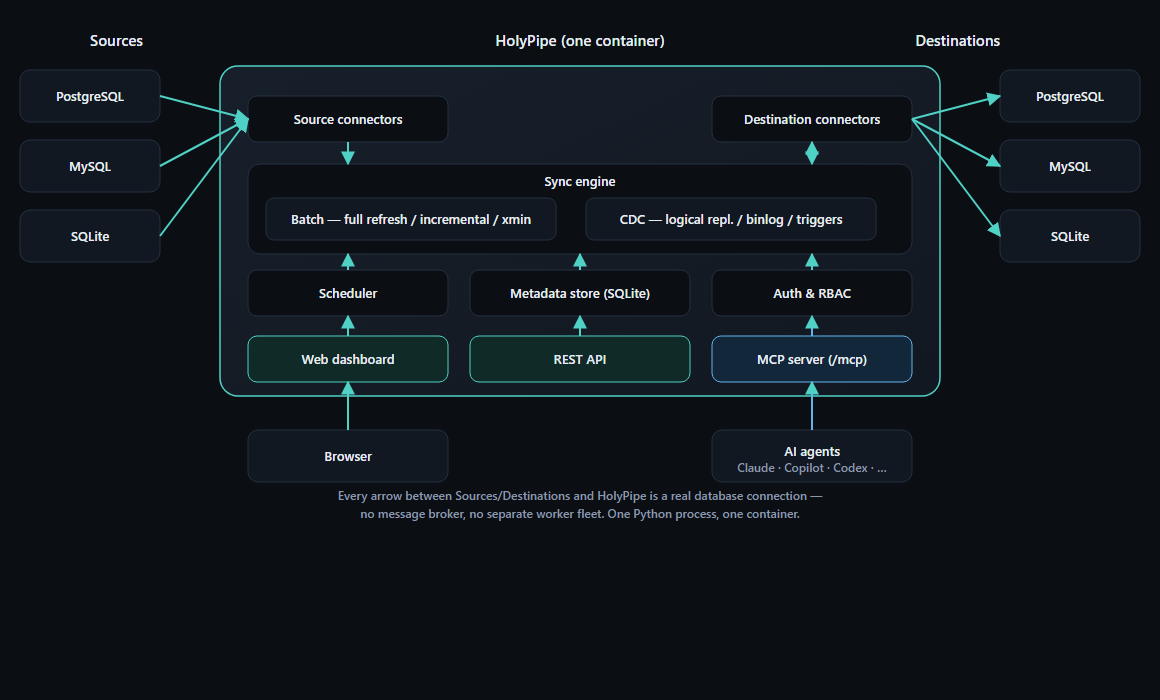
Architecture — one container, no message broker or separate worker fleet

Connections dashboard
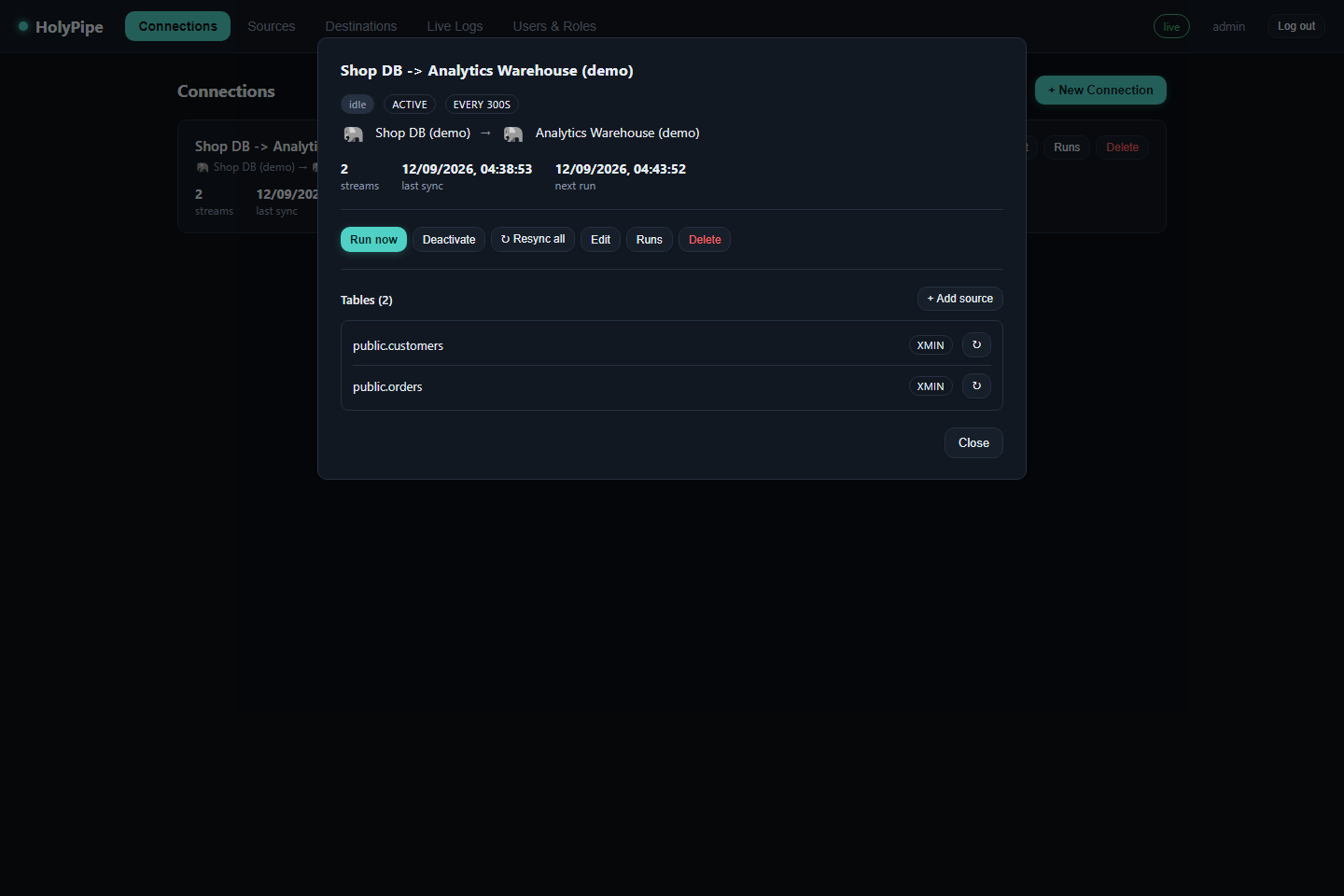
Connection detail — per-table sync mode, resync, and run history
What it does
- Sources & destinations: PostgreSQL, MySQL, SQLite, in any combination (e.g. Postgres → MySQL, MySQL → SQLite, Postgres → Postgres warehouse).
- Real-time sync (CDC):
- Postgres: logical replication (
wal2jsonif available, falls back to the built-intest_decodingplugin — no extension install required). - MySQL: row-based binlog streaming via
mysql-replication. - SQLite: trigger-based change journal, polled sub-second (SQLite has no external replication protocol, so this is the closest equivalent).
- Every CDC connection starts with a one-time initial snapshot of each selected table (captured right after the replication slot/binlog position/trigger journal is created, so nothing that changes during the snapshot is missed) before it switches to streaming — so you get all existing rows and every future change, not just the future ones. The snapshot runs once per connection; stopping and restarting CDC resumes from where it left off instead of re-copying.
- Postgres: logical replication (
- Batch sync: full-refresh, incremental (cursor-column), or — for
Postgres sources — xmin (tracks the system
xmincolumn, so you get change detection without picking a cursor column at all). - Update method per stream: choose Full Refresh / Incremental / Xmin per table when the connection is in batch mode, or CDC at the connection level for continuous log-based streaming.
- Flexible scheduling: batch connections run on a fixed interval or a cron expression (5-field crontab syntax); the connection list shows the configured frequency, last sync time, and next scheduled run.
- SSL modes: pick a PostgreSQL
sslmode(disable/allow/prefer/require/ verify-ca/verify-full) or MySQL SSL mode (DISABLED/PREFERRED/REQUIRED/ VERIFY_CA/VERIFY_IDENTITY) per source/destination. - Two ways to configure a connector: fill in the form fields, or flip to
"Connection URI" and paste a DSN (
postgresql://user:pass@host:5432/db? sslmode=require,mysql://user:pass@host:3306/db,sqlite:////data/a.db) — either way you can Test connection before saving. - Schema discovery & auto-provisioning: pick tables/columns from the
source; destination tables and columns are created and evolved
automatically, with
_hp_extracted_at/_hp_op/_hp_deletedmetadata columns for auditability and soft-deletes. - Live dashboard: create sources/destinations/connections, start/stop
syncs, and watch a live log/event stream over a websocket — all from
http://localhost:8090. - Built-in MCP server: point Claude, Copilot, Codex, or any other
MCP-capable agent at
/mcpwith a personal access token, and it can create connectors, run/resync syncs, and read back logs and run history — using the same permissions model as the dashboard. See the MCP Integration Guide. - Everything else Airbyte doesn't need to be: no Java, no Temporal, no connector marketplace. One Python process, one container.
Install
No cloning required — pick whichever fits how you run things. Works identically on Windows, macOS, and Linux either way.
Docker (recommended) — pulls a prebuilt image, nothing to build:
docker run -d --name holypipe -p 8090:8000 -v holypipe_data:/data \
  ghcr.io/tbwahacker/holypipe:latest
Open http://localhost:8090 and add your own sources/destinations
straight away (see the User Guide).
Python (no Docker):
pip install holypipe
holypipe   # starts the dashboard on http://localhost:8000
Needs Python 3.11+. psycopg2 requires libpq on the host (its wheel
usually bundles this already); everything else is pure Python. Config is
the same environment variables either way — see
Configuration.
Try the full demo stack (clone this repo) — spins up seeded Postgres and MySQL sources plus a warehouse destination alongside HolyPipe, so there's real data to sync immediately:
git clone https://github.com/tbwahacker/holypipe.git && cd holypipe
docker compose up --build
This starts:
holypipe— the app, at http://localhost:8090postgres_demo— a sample Postgres source (shopdb, port 5433), withwal_level=logicalalready configured, seeded withcustomers/ordersmysql_demo— a sample MySQL source (shopdb, port 3307), with binlog row-format already configured, seeded withproducts/inventorywarehouse— an empty Postgres destination (port 5434) to sync into
Open http://localhost:8090, then:
- Sources → New Source → type
postgres, hostpostgres_demo, port5432, databaseshop, user/passwordholypipe/holypipe. Test, Save. (Do the same formysql_demo, port3306, if you want a MySQL source.) - Destinations → New Destination → type
postgres, hostwarehouse, port5432, databasewarehouse, user/passwordholypipe/holypipe. Or picksqlitewith path/data/demo.dbto land data in HolyPipe's own volume — no extra container needed. - Connections → New Connection → pick the source/destination, choose Real-time (CDC) or Batch, Discover tables, select the ones you want, Create. CDC connections start streaming immediately; batch connections run on the interval you set (or click "Run now").
- Watch the Live Logs tab, or
psql/mysqlinto the source containers and insert/update/delete rows — changes land in the destination within about a second under CDC mode.
Configuration (environment variables)
| Variable | Default | Meaning |
|---|---|---|
HOLYPIPE_METADATA_URL |
sqlite:///./data/holypipe.db |
Where HolyPipe stores its own config/state (sources, destinations, connections, run history). |
HOLYPIPE_SCHEDULER |
1 |
Set 0 to disable the background scheduler/CDC supervisor (e.g. for a read-only API replica). |
HOLYPIPE_BATCH_SIZE |
1000 |
Rows per batch for full-refresh/incremental reads. |
HOLYPIPE_CDC_FLUSH_SECONDS |
1.0 |
Max latency before a buffered CDC batch is flushed to the destination. |
HOLYPIPE_CDC_FLUSH_RECORDS |
500 |
Max buffered CDC events before an early flush. |
HOLYPIPE_SCHEDULER_WORKERS |
4 |
Concurrent batch syncs the scheduler runs at once (CDC connections are unaffected — each gets its own thread). |
HOLYPIPE_DISCOVERY_CACHE_TTL |
300 |
Seconds a source's discovered schema is cached before a "Discover tables" click re-scans it. |
HOLYPIPE_LOG_LEVEL |
INFO |
stdout log verbosity. |
HOLYPIPE_LOG_RETENTION |
2000 |
How many log rows to keep in the metadata DB. |
Requirements for CDC on your own databases
- PostgreSQL:
wal_level = logical(restart required), and a user withREPLICATIONprivilege. Tables benefit fromREPLICA IDENTITY FULL(or a primary key) so updates/deletes carry the old row. Nowal2jsonextension is required — HolyPipe falls back to Postgres's built-intest_decodingplugin automatically ifwal2jsonisn't installed. - MySQL:
log_bin = ON,binlog_format = ROW, and a user withREPLICATION SLAVE, REPLICATION CLIENTprivileges. Give each concurrent CDC connection a uniqueserver_idin its source config. - SQLite: nothing special — HolyPipe installs its own triggers on the file the first time CDC starts.
Scaling to large tables and staying stable
- Streaming, not buffering: sources never load a full table into memory.
Postgres uses a named server-side cursor, MySQL uses
SSCursor/SSDictCursor, and SQLite streams viafetchmany— all bounded byHOLYPIPE_BATCH_SIZE(default 1000 rows/batch) regardless of table size. Writes are batched the same way (execute_values/executemany), so a multi-million-row table moves in a steady stream of bounded batches, not one giant transaction. - Reused connections: each running sync/CDC worker holds one connection per source and destination for its whole lifetime instead of reconnecting per batch — important for CDC, which flushes as often as once a second. A dropped/broken connection is detected and transparently reconnected on the next call.
- Bounded CDC memory: real-time changes are buffered up to
HOLYPIPE_CDC_FLUSH_RECORDS(default 500) orHOLYPIPE_CDC_FLUSH_SECONDS(default 1.0), whichever comes first, then flushed and cleared — buffer size never grows with total table size, only with how fast changes arrive. - Pick the right update method for the table size:
full_refreshre-copies the whole table every run — fine for small reference tables, wasteful for millions of rows. Useincremental,xmin, or CDC mode for anything large, so each run only moves what actually changed. - Concurrency: batch connections run on a thread pool sized by
HOLYPIPE_SCHEDULER_WORKERS(default 4); raise it if you have many batch connections you want running in parallel. Each CDC connection gets its own dedicated thread regardless of that limit. - Caching: schema discovery (scanning
information_schema/sqlite_master) is cached per source forHOLYPIPE_DISCOVERY_CACHE_TTLseconds (default 300) so opening the connection wizard repeatedly on a database with thousands of tables doesn't re-scan every time; a "↻ Refresh" button in the wizard bypasses the cache on demand, and the cache is invalidated automatically whenever a source's connection details change. - HolyPipe's own metadata store never holds your data — only connection/run/log bookkeeping — so its size stays tiny no matter how much data flows through the pipelines it manages.
Architecture
holypipe/
  connectors/        Source & destination drivers (postgres, mysql, sqlite)
                      behind a shared canonical-type interface.
  engine/
    sync.py           Batch full-refresh / incremental runner.
    cdc.py            Long-running CDC worker threads + supervisor.
    scheduler.py       Polls connections, dispatches batch runs, keeps CDC
                      workers matched to enabled connections.
  api/                FastAPI routes + websocket event stream.
  web/static/         Plain HTML/CSS/JS dashboard (no build step).
  models.py           Metadata schema (sources, destinations, connections,
                      run history, logs) — stored in HolyPipe's own DB.
Each sync direction only ever needs one thing from a connector: rows in,
rows out, expressed through a small canonical type system (string, integer,
number, boolean, timestamp, date, time, json, binary) so a Postgres numeric
column and a MySQL decimal column land the same way in a SQLite REAL.
Local development (without Docker)
python -m venv .venv && . .venv/Scripts/activate   # or source .venv/bin/activate
pip install -e .
uvicorn holypipe.main:app --reload
You'll need your own Postgres/MySQL to point sources/destinations at, or use
sqlite (just a file path) to try it with zero extra setup.
License
MIT — see LICENSE.
1 maintainer

Metadata
1 maintainer
Release files for holypipe 1.1.0
For a detailed explanation of source distributions (sdists) and built distributions (wheels), please see the package formats documentation.
Source distribution (sdist)
| File | Size | Uploaded | |
|---|---|---|---|
| holypipe-1.1.0.tar.gz | 83.6 kB | Details |
Built distribution (wheel)
| File | Interpreter | ABI | Platform | Reset |
|---|---|---|---|---|
| holypipe-1.1.0-py3-none-any.whl | Python 3 | none | any | Details |
Total release size: 175.8 kB
Release files / holypipe-1.1.0.tar.gz
| Download URL | holypipe-1.1.0.tar.gz |
|---|---|
| Size | 83.6 kB |
| Tags | Source |
|
SHA-256 checksum How to use checksums |
31a75dd9c047376fdd5b09eb35f6f078facd560cde3889da7960c55962d14f6e
|
|
BLAKE2b-256 checksum How to use checksums |
04b4fbeba82cf17b79a0a16525b2fa37c4c6ffc3389b9fac0348b2d935473a54
|
| Upload date | |
|
Uploaded using Trusted Publishing? What is trusted publishing? |
No |
| Uploaded via |
twine/7.0.0 CPython/3.13.14
|
Release files / holypipe-1.1.0-py3-none-any.whl
| Download URL | holypipe-1.1.0-py3-none-any.whl |
|---|---|
| Size | 92.2 kB |
| Tags | Python 3 |
|
SHA-256 checksum How to use checksums |
eab983ead9813574bbbbad8f07d6302bc1f5659b8e583c244b32ab5c1afcf749
|
|
BLAKE2b-256 checksum How to use checksums |
6bb05e3bfab65a95d95d2018c5514c9218b4be955b4fdc47b7ffcc25fa2d201b
|
| Upload date | |
|
Uploaded using Trusted Publishing? What is trusted publishing? |
No |
| Uploaded via |
twine/7.0.0 CPython/3.13.14
|














