
Kivy-androidwidgets
Generate Android home-screen widgets for Kivy / Buildozer apps from a pure-Python DSL — no XML, no Java. Widget definitions are compiled by a CLI pre-build step into res/, src/ and a p4a hook that Buildozer compiles straight into the APK.
Complete sample: working app
Quickstart
1. Install
pip install home-widget
2. Describe your widget in Python
widgets.py (in your project root):
from home_widget import HomeWidget, AWColumn, AWRow, AWText, AWImage, AWButton, AWProgressBar, Color

clock = HomeWidget(
    name="Clock",
    description="Shows the current time",
    layout=AWColumn(
        spacing=6,
        children=[
            AWText("12:00", id="time", size=28, bold=True),
            AWText("Mon 4 Aug", id="date", size=12, color=Color("#888888")),
        ],
    ),
    min_width_dp=110,          # 2 cells
    min_height_dp=110,
    resize_mode="horizontal|vertical",
    update_period_ms=1800000,  # Android minimum: 30 minutes
    tap_to_open=True,          # whole widget opens the app on tap
    background=Color("#FFFFFF"),
    radius=12,
)
3. Generate the Android artifacts
python -m home_widget init     # creates p4a/hook.py (one-time)
python -m home_widget generate --spec buildozer.spec --module widgets.py
This writes (gitignore them):
res/layout/<name>.xml,res/layout/<name>_preview.xmlres/xml/<name>_provider.xml— theappwidget-providermetadatares/drawable/widget_bg_<name>.xml— rounded background shapessrc/<package>/<ClassName>.java— oneAppWidgetProviderper widgetres/values/widgets.xml,p4a/widget_receivers.json
generate reads package.domain + package.name from buildozer.spec. Use --dry-run to preview without writing.
4. Wire it into buildozer.spec
android.add_resources = res
android.add_src = src
p4a.hook = p4a/hook.py
5. Build
buildozer android debug
The generated p4a/hook.py (after_apk_build) injects the <receiver> entries into the dist's AndroidManifest.xml before aapt compiles it, so no manual manifest editing.
DSL Reference
HomeWidget—name,description,layout,min_width_dp,min_height_dp,target_cells,max_cells,resize_mode,widget_category,update_period_ms,preview_image,preview_layout,tap_to_open,background(Color),radius,paddingAWColumn,AWRow—spacing,childrenAWFrame— single child, ideal for cardsAWText—text,size,color,bold,italic,align,max_lines,idAWImage—resource,path,scale_type,content_description,idAWButton—text,idAWProgressBar—style,max,id
Layout children with an id become runtime handles: the generated Java loads images from context.getFilesDir()/app/assets/... for AWImage(path=...) at add-time. tap_to_open=True wires @+id/widget_root to a PendingIntent opening the app (with the API-23 FLAG_IMMUTABLE guard).
Runtime updates
Add widgets to the home screen from Python at runtime (see using-python-to-update-widget.md for the manual version). update_period_ms cannot go below 1 800 000 ms on Android.
Widget & feature recipes: examples.md (clock, battery meter, photo, button, card layouts, multiple widgets per app, and the runtime update API).
Tests
python3 -m unittest discover -s tests -v
Manual fallback
Prefer the DSL above. If you need full control, the original manual method still works: hand-write the layout/provider XML, the Java AppWidgetProvider and the manifest hook (see below).
Step 1: Design the layout
Store in res/layout/simple_widget.xml:
<?xml version="1.0" encoding="utf-8"?>
<LinearLayout xmlns:android="http://schemas.android.com/apk/res/android"
    android:orientation="vertical"
    android:padding="10dp"
    android:background="#FFFFFF"
    android:gravity="center"
    android:layout_width="wrap_content"
    android:layout_height="wrap_content">

    <TextView
        android:id="@+id/widget_text"
        android:text="Loading..."
        android:textSize="18sp"
        android:textColor="#000"
        android:layout_width="wrap_content"
        android:layout_height="wrap_content"/>

</LinearLayout>
Step 2: Create the widget info XML
Path: res/xml/widgetproviderinfo.xml
<appwidget-provider xmlns:android="http://schemas.android.com/apk/res/android"
    android:minWidth="120dp"
    android:minHeight="60dp"
    android:updatePeriodMillis="1800000"
    android:initialLayout="@layout/simple_widget"
    android:previewImage="@drawable/ic_launcher_foreground"
    android:resizeMode="horizontal|vertical"
    android:widgetCategory="home_screen">
</appwidget-provider>
Create the preview image at res/drawable/ic_launcher_foreground.png.
Step 3: Create an AppWidgetProvider
Path: src/SimpleWidget.java
package org.wally.waller; // Change here from buildozer.spec package.domain+package.name

import android.appwidget.AppWidgetManager;
import android.appwidget.AppWidgetProvider;
import android.content.Context;
import android.widget.RemoteViews;

import org.wally.waller.R; // Change here from buildozer.spec package.domain+package.name
import android.app.PendingIntent;
import android.content.Intent;

public class SimpleWidget extends AppWidgetProvider {

    @Override
    public void onUpdate(Context context, AppWidgetManager appWidgetManager, int[] appWidgetIds) {
        for (int appWidgetId : appWidgetIds) {

            RemoteViews views = new RemoteViews(context.getPackageName(), R.layout.simple_widget);

            // Example: Set text
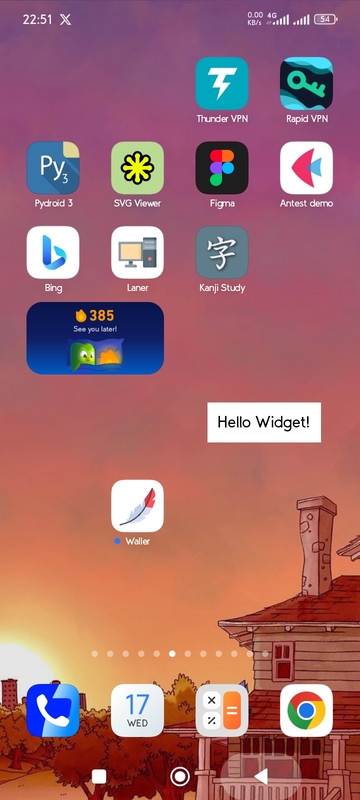
            views.setTextViewText(R.id.widget_text, "Hello Widget!");

            // Update widget
            appWidgetManager.updateAppWidget(appWidgetId, views);
        }
    }
}
Step 4: Inject the receiver with a p4a hook
Path: p4a/hook.py
from pathlib import Path
from pythonforandroid.toolchain import ToolchainCL


def after_apk_build(toolchain: ToolchainCL):
    manifest_file = Path(toolchain._dist.dist_dir) / "src" / "main" / "AndroidManifest.xml"
    text = manifest_file.read_text(encoding="utf-8")

    package = "org.wally.waller"
    receiver_xml = f'''
    <receiver android:name="{package}.SimpleWidget"
              android:enabled="true"
              android:exported="false">
        <intent-filter>
            <action android:name="android.appwidget.action.APPWIDGET_UPDATE" />
        </intent-filter>
        <meta-data android:name="android.appwidget.provider"
               android:resource="@xml/widgetproviderinfo" />
    </receiver>
    '''

    if receiver_xml.strip() not in text:
        if "</application>" in text:
            text = text.replace("</application>", f"{receiver_xml}\n</application>")
            print("Receiver added")
        else:
            print("Could not find </application> to insert receiver")
    else:
        print("Receiver already exists in manifest")

    manifest_file.write_text(text, encoding="utf-8")
    print("Successfully_101: Manifest update completed successfully!")
Step 5: Wire into buildozer.spec
android.add_resources = res
android.add_src = src
p4a.hook = p4a/hook.py
Sample Image:
For more widget customisation check: How to Customise.md
1 maintainer

Download files
Download the file for your platform. If you're not sure which to choose, learn more about installing packages.
Source Distribution
Built Distribution
Filter files by name, interpreter, ABI, and platform.
If you're not sure about the file name format, learn more about wheel file names.
Copy a direct link to the current filters
File details
Details for the file home_widget-0.0.1.tar.gz.
File metadata
- Download URL: home_widget-0.0.1.tar.gz
- Upload date:
- Size: 35.6 kB
- Tags: Source
- Uploaded using Trusted Publishing? No
- Uploaded via:
twine/7.0.0 CPython/3.12.3
File hashes
| Algorithm | Hash digest | |
|---|---|---|
| SHA256 |
e62a19a524dceee2903fbeeb54517468b1224637119ef54e096ead302c42d385
|
|
| MD5 |
e15d222470336b08dba6fd529682845a
|
|
| BLAKE2b-256 |
2a247d451355a54bec236298e06fa550cae140b6e51fc27bce612f571aa4ab2c
|
File details
Details for the file home_widget-0.0.1-py3-none-any.whl.
File metadata
- Download URL: home_widget-0.0.1-py3-none-any.whl
- Upload date:
- Size: 42.3 kB
- Tags: Python 3
- Uploaded using Trusted Publishing? No
- Uploaded via:
twine/7.0.0 CPython/3.12.3
File hashes
| Algorithm | Hash digest | |
|---|---|---|
| SHA256 |
bd06ab070362df0900fbd1f0a9206b5b20bd637f51acedc988ac1b8339cd7f5d
|
|
| MD5 |
0701bb316a8aa2d50eb032bd68e9e254
|
|
| BLAKE2b-256 |
1f53924f1928a2e310e45435fe3dfeea42fae18fb6cd6ca9b46c0c0f948c6a64
|













