



Documentation for your homelab that writes itself, and keeps your notes.
HomelabScribe™ scans your Docker hosts (and, with Pro, your Proxmox cluster) and writes readable Markdown docs: one page per service, one per host, and an overview. Run it again tomorrow and the docs update themselves, while anything you wrote in a page's Notes section stays exactly as you left it.
It drops straight into an Obsidian vault, a Git repo, or any Markdown viewer.
- Read-only. It never changes a container or VM.
- Private. Runs entirely on your network. No telemetry, no phone-home, ever.
- No secrets on disk. Environment variable values are never recorded, only names. Labels that look like credentials are dropped.
Documentation
- Quick start · Installing · Upgrading · User guide
- Architecture · Interfaces · Security · Assurance case
- Dependencies · Verifying releases · Roadmap · Accessibility
- Security policy · Contributing · Governance · Support · Changelog · Code of Conduct
Try it in 10 seconds
No Docker access needed; this renders a made-up homelab with every feature turned on:
pipx install homelabscribe
homelabscribe demo
Then open homelabscribe-demo/index.md.
What you get
homelabscribe-docs/
├── index.md            # every host and service, grouped by category
├── hosts/nova.md       # what runs on each machine
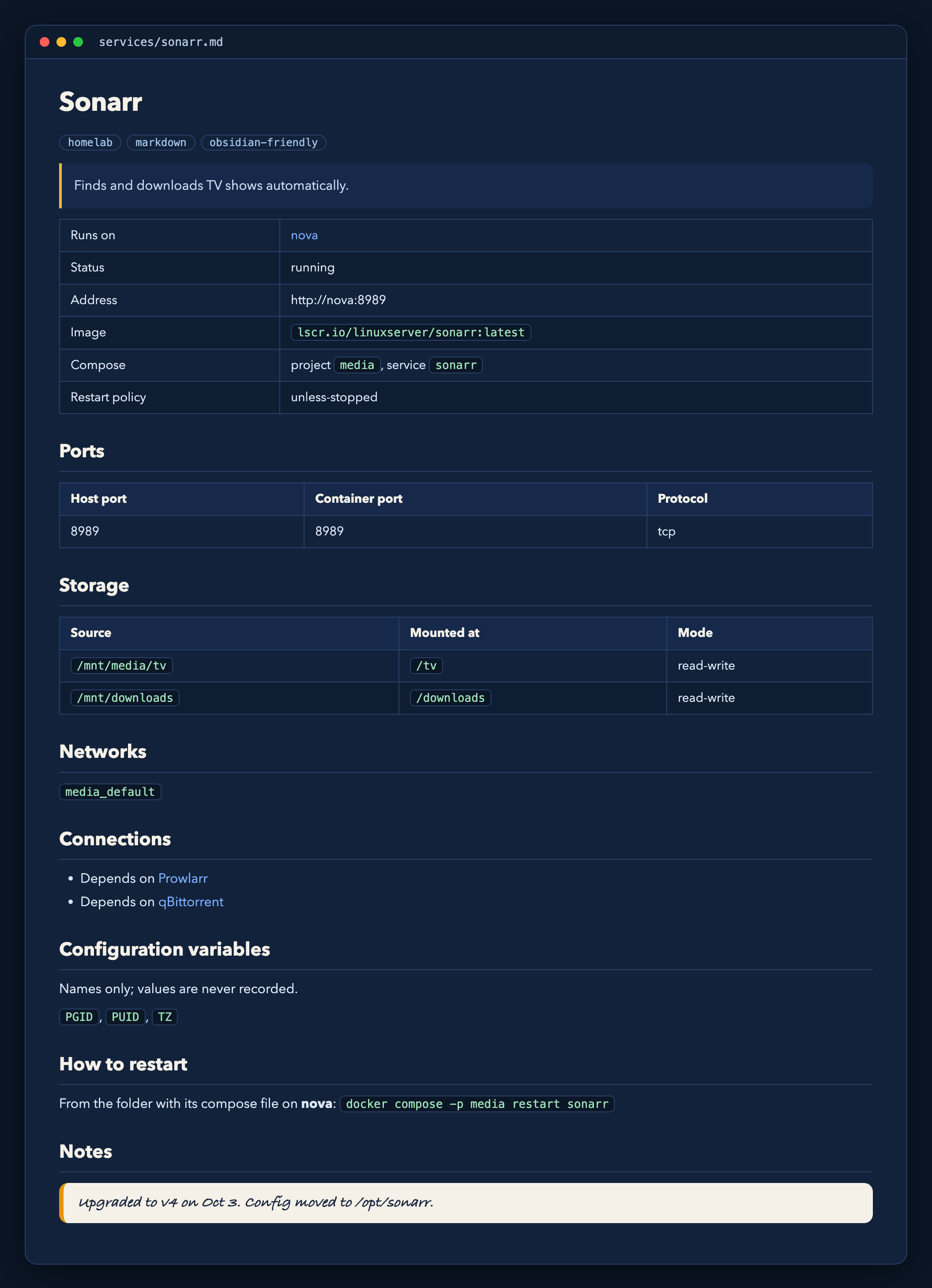
├── services/sonarr.md  # ports, storage, networks, dependencies, how to restart, your notes
├── CHANGELOG.md        # Pro: what changed since the last scan
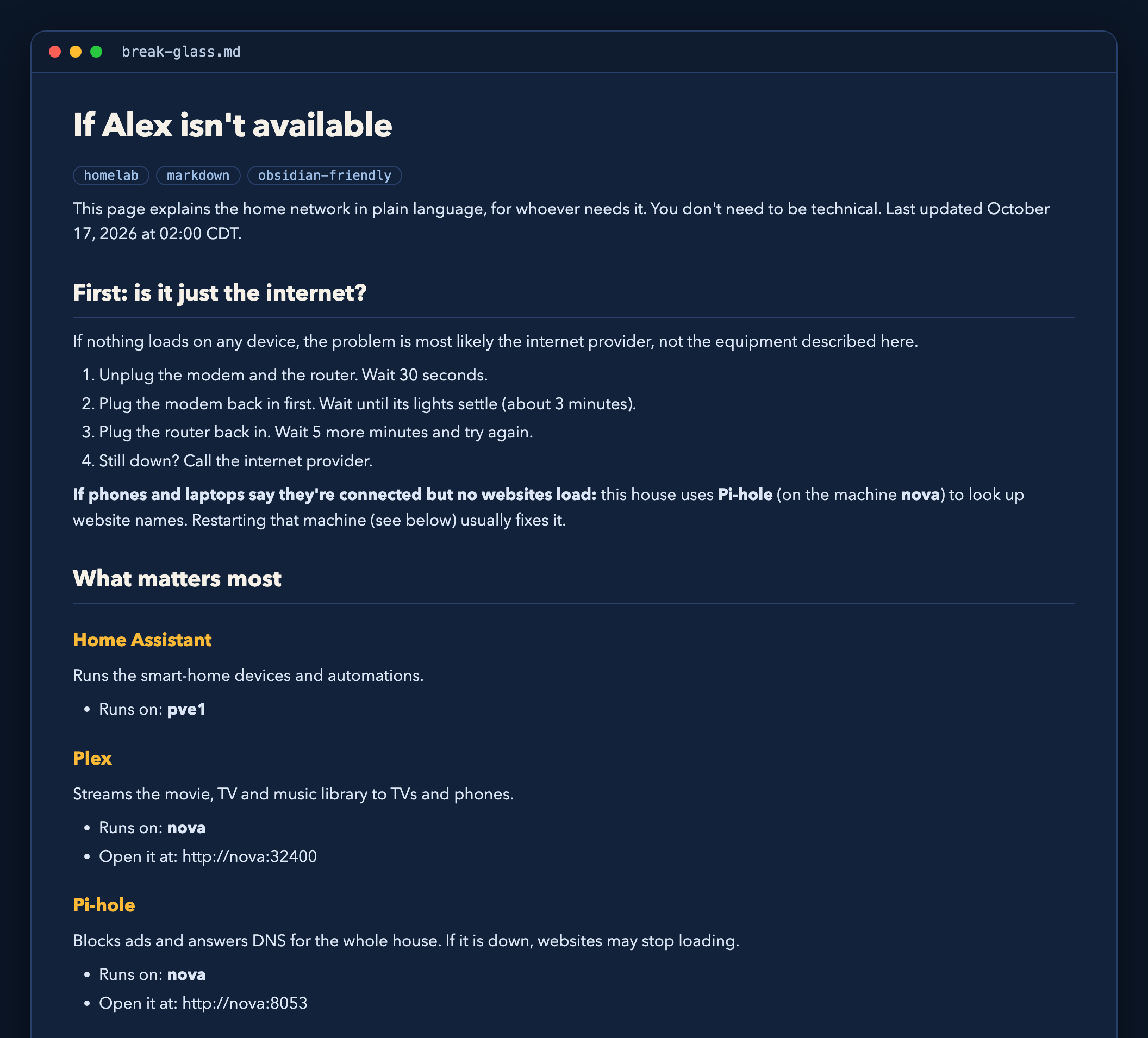
├── break-glass.md      # Pro: a plain-English guide for family if you're unavailable
└── topology.md         # Pro: Mermaid diagram of hosts, services and dependencies
HomelabScribe recognizes 60+ common self-hosted apps (the *arr stack, Plex, Pi-hole, Traefik, Home Assistant, Vaultwarden, Grafana and more) and describes them in plain language. Add your own with labels or a catalog file.
It can also read Nginx Proxy Manager to show each app's real web address, and lets you describe things it can't scan, such as Pi-hole on a Raspberry Pi, by hand.
See it
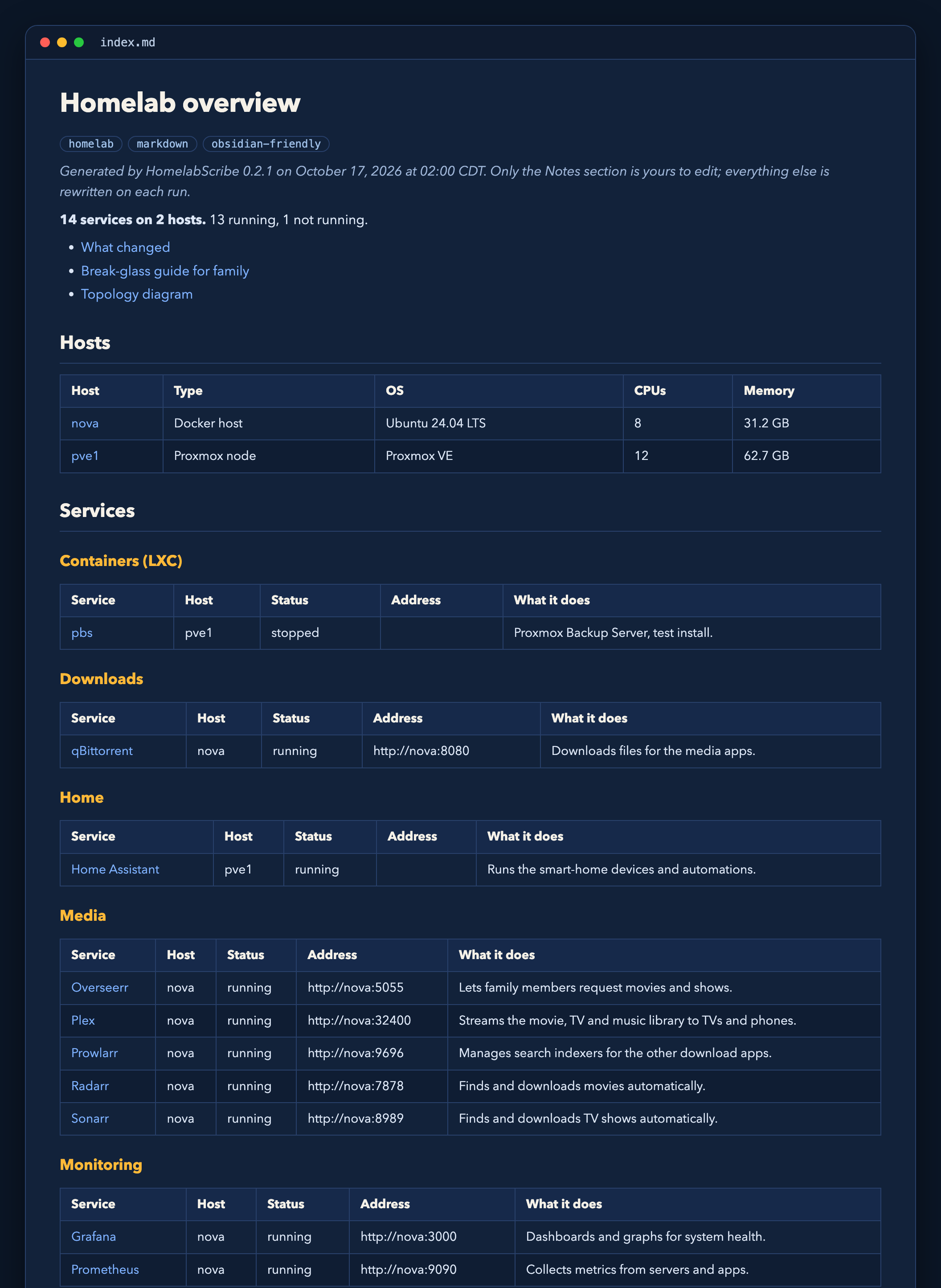
Screenshots of the built-in demo (a made-up lab), rendered from the Markdown it writes. Open the same files in Obsidian, GitHub or any Markdown viewer.
The overview: every host and service, grouped by category.
A service page: ports, storage, dependencies, how to restart it, and your own notes, which are kept on every run.
The break-glass guide (Pro): a plain-English page for family if you're unavailable.
Free vs Pro
| Free | Pro | |
|---|---|---|
| Docker hosts | 1 | Unlimited |
| Proxmox VMs and LXCs | Yes | |
| Service, host and overview pages | Yes | Yes |
| Your notes preserved across runs | Yes | Yes |
| Changelog ("what changed this week") | Yes | |
| Break-glass guide for family | Yes | |
| Topology diagram | Yes | |
Built-in scheduler (--every 1d) |
Yes |
Pro is a one-time or yearly license key, verified offline. Get one at (store link coming soon).
Run it with Docker Compose
HomelabScribe talks to Docker through a socket proxy so it only ever gets read access.
mkdir homelabscribe && cd homelabscribe
curl -O https://raw.githubusercontent.com/HoneyBearTech/homelabscribe/main/docker-compose.example.yml
curl -O https://raw.githubusercontent.com/HoneyBearTech/homelabscribe/main/homelabscribe.example.yaml
mv docker-compose.example.yml docker-compose.yml
mkdir config state && mv homelabscribe.example.yaml config/homelabscribe.yaml
sudo chown 1000:1000 state   # or change `user:` in the compose file to match your docs folder's owner
# Point the ./docs volume at your Obsidian vault folder, then:
docker compose run --rm homelabscribe
Schedule it with cron (free) or --every 1d (Pro).
Configuration
See homelabscribe.example.yaml. Values like ${PVE_TOKEN} are read from the environment.
Per-container labels
labels:
  homelabscribe.name: "Family Photos"
  homelabscribe.description: "Where everyone's phone photos back up to."
  homelabscribe.category: "Photos"
  homelabscribe.url: "https://photos.home.example"
  homelabscribe.hidden: "true"    # leave this container out of the docs
Proxmox (Pro)
Create a read-only API token:
pveum user add homelabscribe@pve
pveum acl modify / --users homelabscribe@pve --roles PVEAuditor
pveum user token add homelabscribe@pve docs --privsep 0
Your notes are safe
Every page ends with a block like this:
<!-- homelabscribe:notes:start -->
Upgraded to v4 on Oct 3; config moved to /opt/sonarr.
<!-- homelabscribe:notes:end -->
HomelabScribe rewrites everything else on the page but copies this block forward untouched. If a service disappears and its page has notes, the page is moved to archive/ instead of deleted.
Commands
| Command | What it does |
|---|---|
homelabscribe run |
Scan, then write docs. The usual command. |
homelabscribe scan |
Take a snapshot only. |
homelabscribe render |
Rewrite docs from the latest snapshot. |
homelabscribe doctor |
Check config, connections and license; safe to paste into an issue. |
homelabscribe demo |
Render a sample homelab. |
Development
python -m venv .venv && . .venv/bin/activate
pip install -e '.[dev]'
pytest && ruff check .
See CONTRIBUTING.md; commits need a DCO sign-off (git commit -s).
Architecture: collectors (Docker, Proxmox) → enrichment (app catalog, labels) → JSON snapshot → diff → Jinja2 renderers. Adding a source means writing one collector; see src/homelabscribe/collectors/.
License
The core is AGPL-3.0. Everything in src/homelabscribe/pro/ is source-available under the HomelabScribe Pro License and needs a Pro key to use.
Trademarks
HomelabScribe™ and its logo are trademarks of HoneyBearTech. The code licenses do not grant rights to the name or logo; see TRADEMARKS.md.
1 maintainer

Metadata
1 maintainer
Release files for homelabscribe 0.2.1
For a detailed explanation of source distributions (sdists) and built distributions (wheels), please see the package formats documentation.
Source distribution (sdist)
| File | Size | Uploaded | |
|---|---|---|---|
| homelabscribe-0.2.1.tar.gz | 68.3 kB | Details |
Built distribution (wheel)
| File | Interpreter | ABI | Platform | Reset |
|---|---|---|---|---|
| homelabscribe-0.2.1-py3-none-any.whl | Python 3 | none | any | Details |
Total release size: 120.1 kB
Release files / homelabscribe-0.2.1.tar.gz
| Download URL | homelabscribe-0.2.1.tar.gz |
|---|---|
| Size | 68.3 kB |
| Tags | Source |
|
SHA-256 checksum How to use checksums |
c3e4251aecce8c165b2740e2a8587c2a68ecc0553e4900da7014320a1666bb53
|
|
BLAKE2b-256 checksum How to use checksums |
b88f17ba687db4974485f1f0ed9f03e0c54cedddbfe9528e3080583f364a6056
|
| Upload date | |
|
Uploaded using Trusted Publishing? What is trusted publishing? |
Yes |
| Uploaded via |
twine/7.0.0 CPython/3.13.14
|
Provenance
Provenance describes where a file came from. On PyPI, provenance is shared via attestations, which provide a verifiable record of the build or publishing details. View details, limitations and caveats.


PyPI Publish Attestation
PyPI verified that this artifact, at this checksum, originated from the publisher listed below.
Signed by GitHub Actions, verified by PyPI on Oct 17, 2026.
Transparency logRelease files / homelabscribe-0.2.1-py3-none-any.whl
| Download URL | homelabscribe-0.2.1-py3-none-any.whl |
|---|---|
| Size | 51.8 kB |
| Tags | Python 3 |
|
SHA-256 checksum How to use checksums |
58b7eae7f3e1bf50097d340daf4ce82161c893535696f76ebd73a4bd8446f31c
|
|
BLAKE2b-256 checksum How to use checksums |
211e73243a70d6e47aa620be324e93ac50a5f88ba179071028341d37ceff9765
|
| Upload date | |
|
Uploaded using Trusted Publishing? What is trusted publishing? |
Yes |
| Uploaded via |
twine/7.0.0 CPython/3.13.14
|
Provenance
Provenance describes where a file came from. On PyPI, provenance is shared via attestations, which provide a verifiable record of the build or publishing details. View details, limitations and caveats.
PyPI Publish Attestation
PyPI verified that this artifact, at this checksum, originated from the publisher listed below.
Signed by GitHub Actions, verified by PyPI on Oct 17, 2026.
Transparency log













