
Homer
Homer is a Python package that can help make your text more clear, simple and useful for the reader.
It provides information on an overall text as well as on individual paragraphs. It gives insights into readability, length of paragraphs, length of sentences, average sentences per paragraph, average words in a sentence, etc. It also tries to identify certain kind of vague words. It also tracks the frequency of "and" words in the text. (More information on all of these follows in the Acknowledgements section.)
This software package grew out of a personal need. Since I am not a native English speaker but am interested in writing, I designed and have been using Homer to improve my writing. I hope others will find it useful.
Please note that this is not a strict guide to control your writing. At least, I don't use it that way. I use it as a guide to make my writing as simple as possible. I strive to write concise paragraphs and sentences as well as use fewer unclear words, and Homer has been helping me.
I have only used it to analyze my blogs and essays and not the large corpus of text. As this software is new, you may well spot bugs, in which case please feel free to open up issues/pull-requests.
You can use Homer as a stand-alone package or on the command line. If you run it on the command line, you can get general stats on your article or essay as well as paragraph stats.
Features
Article/Essay Stats
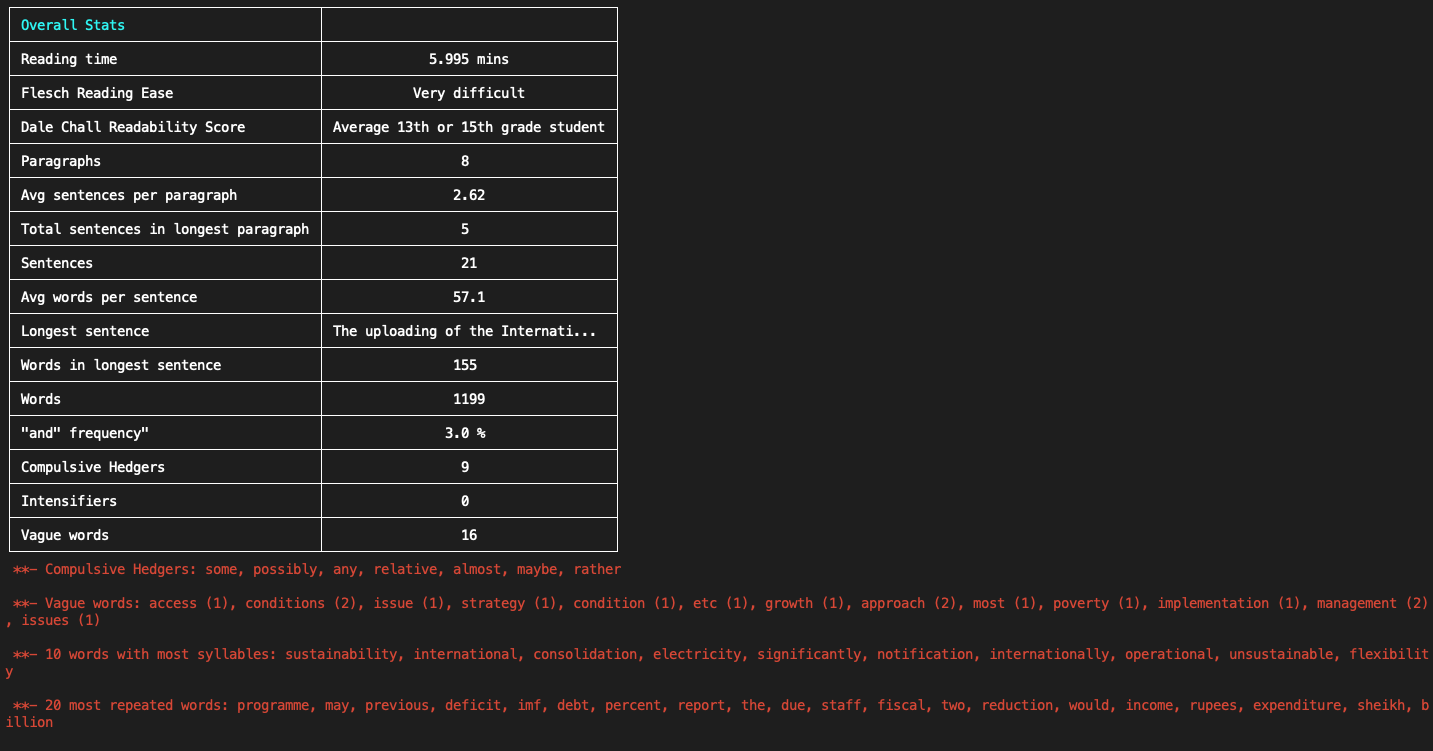
Running Homer from the command line gives the following insights about the article/essay:
- Reading time in minutes (although this will vary some from reader to reader).
- Readability scores (Flesch reading ease and Dale Chall readability scores).
- Total paragraphs, sentences, and words.
- Average sentences per paragraph.
- Average words per sentence.
- "and" frequency.
- Number and list of compulsive hedgers, intensifiers, vague words.
Paragraph Stats
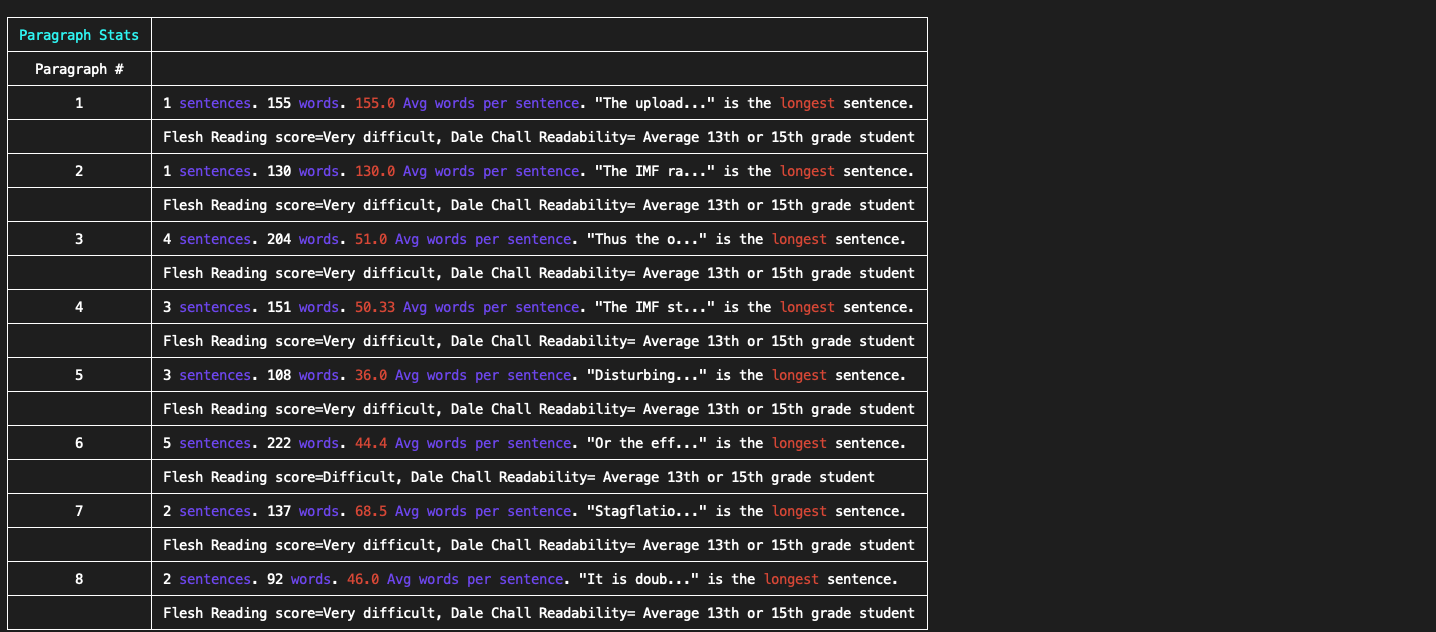
Paragraph stats point out the following information for each paragraph:
- Number of sentences and words.
- Average words per sentence.
- The longest sentence in the paragraph.
- Readability scores (Flesch reading ease and Dale Chall readability scores).
- If the number of sentences is more than five in a paragraph, then Homer gives a warning highlighted in red.
- Similarly, when the number of words is more than 25 in a sentence, then a warning highlighted in red is given.
Installation
Python
I built this on Python 3.4.5. So first we need to install Python.
On Mac, I used Homebrew to install Python e.g. one can use this command:
brew install python3
To install on Windows, you can download the installer from here. Once downloaded this installer can be run to complete Python's installation.
For Ubuntu you might find this resource useful.
Virtual environment
Now it's time to create a virtual environment (assuming you cloned the code under ~/code/homer).
~/code/homer> python3 -m venv venv
~/code/homer> source venv/bin/activate
First line in the above snippet creates a virtual environment named venv under ~/code/homer. The second command activates the virtual environment.
In case you need more help with creating a virtual environment this resource can prove to be useful.
Installing Homer via Pip
Install using Pip:
~/code/homer> pip install homer-text
And that's it.
Usage
Command line
A command line utility, under the homer directory, has been provided. Here is an example showing how to use it:
> python homer_cmd.py --name article_name --author lalala --file_path=/correct/path/to/file.txt
Both --name and --author are optional whereas file_path is mandatory.
Code
You can also use Homer in your code. Here is an example:
from homer.analyzer import Article

article = Article('Article name', 'Author', open('/file/path/article.txt').read())
article.print_article_stats()
article.print_paragraph_stats()
Tests
Tests can be run from the tests directory.
Authors
Acknowledgements
-
Steven Pinker's The Sense of Style: The Thinking Person's Guide to Writing in the 21st Century. This book gave me quite a few insights. It also prompted me to include tracking of vague words, complex hedgers and intensifiers.
-
Complex hedgers: These are words such as apparently, almost, fairly, nearly, partially, predominantly, presumably, rather, relative, seemingly, etc.
-
Intensifiers: Words such as very, highly, extremely.
-
-
Bankspeak: The Language of World Bank Reports, 1946–2012: https://litlab.stanford.edu/LiteraryLabPamphlet9.pdf. This source also gave me a few ideas. The idea to keep track of "and" and the vague words in a text was taken from here.
-
"and" frequency: Basically it is the number of times the word "and" is used in the text (given as a percentage of total text). I try to keep it under 3 %.
-
Vague words is a list of words I compiled after reading the above report. Using these words unnecessarily, or without giving them the proper context, can make a text more abstract. These are words such as derivative, fair value, portfolio, evaluation, strategy, competitiveness, reform, growth, capacity, progress, stability, protection, access, sustainable, etc.
-
Contributing
Pull requests are welcome. For major changes, please open an issue first to discuss what you would like to change.
Please make sure to update tests as appropriate. Also, add your name under Authors section of the readme file.
License
1 maintainer

Metadata
1 maintainer
Release files for homer-text 0.4.1
For a detailed explanation of source distributions (sdists) and built distributions (wheels), please see the package formats documentation.
Source distribution (sdist)
| File | Size | Uploaded | Provenance | |
|---|---|---|---|---|
| homer_text-0.4.1.tar.gz | 13.2 kB | Without provenance | Details |
Built distribution (wheel)
| File | Interpreter | ABI | Platform | Reset |
|---|---|---|---|---|
| homer_text-0.4.1-py3-none-any.whl | Python 3 | none | any | Details |
Total release size: 25.8 kB
Release files / homer_text-0.4.1.tar.gz
| Download URL | homer_text-0.4.1.tar.gz |
|---|---|
| Size | 13.2 kB |
| Tags | Source |
|
SHA-256 checksum How to use checksums |
601b8aef9f1f6017590b91c32a7292ba10e5a21e9ce0555472a5e86bc7deca2f
|
|
BLAKE2b-256 checksum How to use checksums |
1371f2dee093bf1ba792b9a9d31a177c55fee5e6c49b60cea7019db761966d37
|
| Upload date | |
|
Uploaded using Trusted Publishing? What is trusted publishing? |
No |
| Uploaded via |
twine/1.14.0 pkginfo/1.5.0.1 requests/2.22.0 setuptools/41.2.0 requests-toolbelt/0.9.1 tqdm/4.35.0 CPython/3.4.5
|
Release files / homer_text-0.4.1-py3-none-any.whl
| Download URL | homer_text-0.4.1-py3-none-any.whl |
|---|---|
| Size | 12.6 kB |
| Tags | Python 3 |
|
SHA-256 checksum How to use checksums |
ed733d9d0a45d70293e8ea47587e897cada1d700711c826916b535c08e1c4499
|
|
BLAKE2b-256 checksum How to use checksums |
794fea560f56ef683c07a4eaa093399b1a355a607a499d00d339bd5c0dd01624
|
| Upload date | |
|
Uploaded using Trusted Publishing? What is trusted publishing? |
No |
| Uploaded via |
twine/1.14.0 pkginfo/1.5.0.1 requests/2.22.0 setuptools/41.2.0 requests-toolbelt/0.9.1 tqdm/4.35.0 CPython/3.4.5
|
Security for homer-text 0.4.1
Provenance
Provenance describes where a file came from. On PyPI, provenance is shared via attestations, which provide a verifiable record of the build or publishing details. View details, limitations and caveats.
No provenance found
None of the files in this release were uploaded with provenance metadata.
A note on package security
PyPI is a repository for distributing packages, not a service for auditing them. While third-party security researchers and our staff do their best to detect and remove malicious packages, PyPI cannot guarantee the quality, security or suitability of any given package.













