
honeyfile




Plant decoy files and get alerted the moment ransomware or an intruder touches them.
honeyfile drops tempting-looking bait — Payroll_2026_Q4.csv, passwords.txt, .env, backup.sql — into a directory and records exactly what each one looks like. Then it watches. The instant something encrypts, modifies or deletes a decoy, you get an alert with the file and what happened. It's a tripwire: a normal user never touches these files, so any change is a signal.
Why
Ransomware encrypts files fast, and by the time you notice, it's done. But it has to touch files to encrypt them, and a decoy that no human ever opens is the perfect early warning: one honeyfile changing means something is walking through your directory encrypting everything. The same tripwire catches an intruder browsing a file share for passwords.txt.
This is a detection tool, the opposite of malware. It never encrypts anything; it watches for something else that does.
Try it in 30 seconds
pipx install git+https://github.com/winxtxrgit/honeyfile

mkdir demo
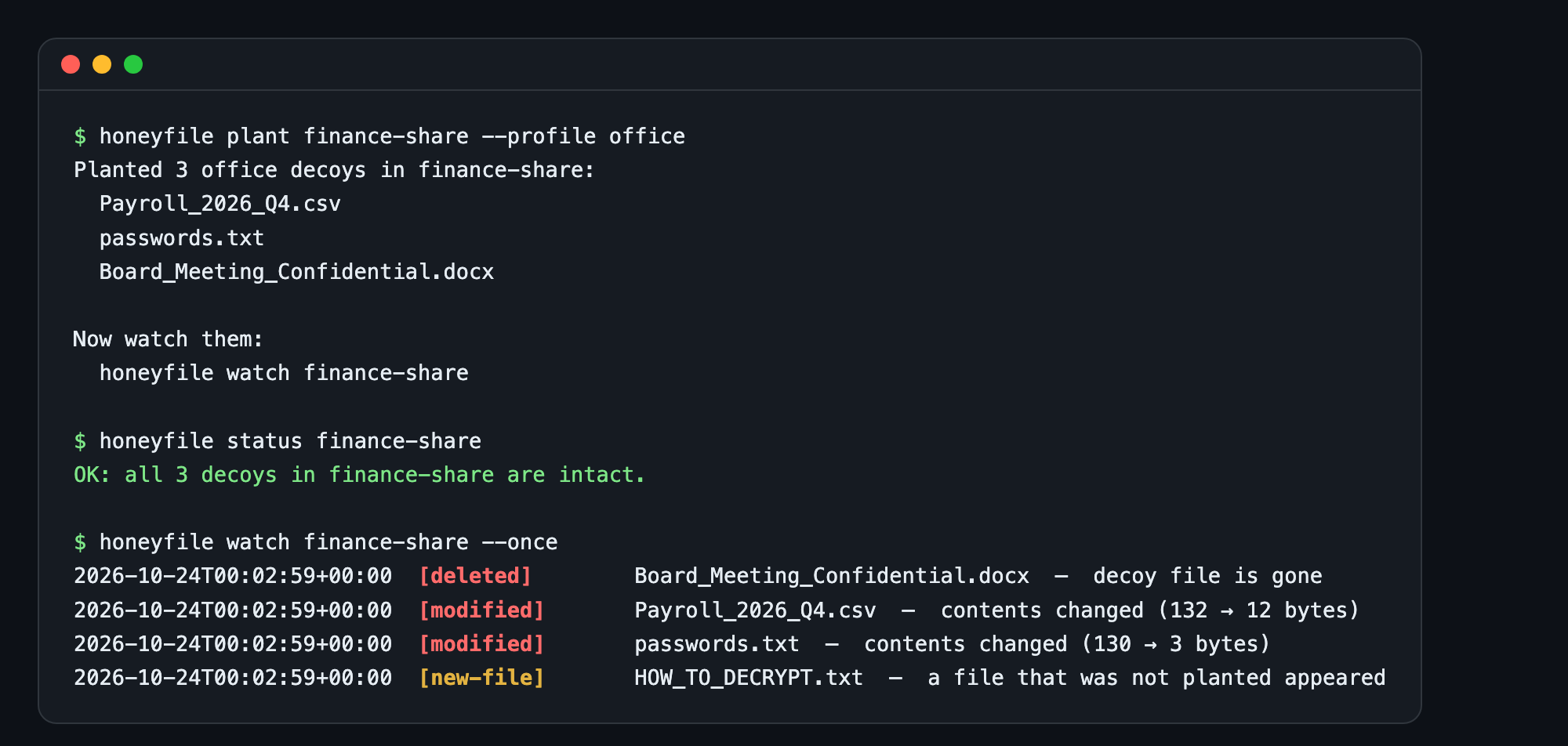
honeyfile plant demo --profile office
honeyfile status demo                 # OK: all 3 decoys are intact

echo "encrypted" > demo/passwords.txt # pretend to be ransomware
honeyfile watch demo --once           # [modified] passwords.txt — contents changed
Usage
honeyfile plant /srv/share --profile office   # plant decoys and record a baseline
honeyfile plant ./repo --profile dev          # .env, id_rsa, deploy_keys.json
honeyfile status /srv/share                   # one-shot check, exits 1 if anything changed

honeyfile watch /srv/share                    # keep watching, alert on every change
honeyfile watch /srv/share --json alerts.jsonl
honeyfile watch /srv/share --webhook https://hooks.example.com/honeyfile
honeyfile watch /srv/share --exec "/usr/local/bin/isolate-host.sh"
honeyfile watch /srv/share --once             # for cron; exits 1 if anything changed

honeyfile unplant /srv/share                  # remove the decoys and the baseline

# Keep the baseline out of the watched directory (recommended for shares an
# intruder can browse). Use the same --manifest path for plant, status and watch:
honeyfile plant  /srv/share --manifest /var/lib/honeyfile/share.json
honeyfile status /srv/share --manifest /var/lib/honeyfile/share.json
On Linux, watch uses inotify by default: it reacts the instant a decoy is touched and — unlike polling — catches a decoy merely being opened or read, before anything is changed. Elsewhere it falls back to polling. Force either with --backend poll or --backend inotify.
Profiles decide which decoys get planted: office (payroll, passwords, a confidential doc), dev (.env, id_rsa, deploy keys), db (SQL dumps, a customer export). Every decoy contains only inert placeholder data — the one AWS-shaped key is AWS's own documented example — plus a unique HONEYFILE-CANARY-… token you can also search for in logs, email or outbound traffic.
What it detects
| Event | Severity | Means |
|---|---|---|
modified |
high | A decoy's contents changed — ransomware encrypting, or someone editing it |
deleted |
high | A decoy is gone — wiped or moved |
manifest-error |
high | The baseline itself was altered or deleted — someone covering their tracks |
opened |
high | A decoy was opened or read — someone browsing the bait (Linux inotify backend only) |
new-file |
medium | A file that wasn't planted appeared next to the decoys — a ransom note, a dropped tool |
touched |
low | A decoy's timestamp changed but its contents are intact — re-saved or restored |
Each decoy is fingerprinted by sha256 + size, so a change that keeps the same byte count is still caught. The baseline lives in .honeyfile.json, which carries a checksum of its own contents: editing it to hide a change fails the check, and deleting it is reported too. Pass --manifest PATH to keep that baseline outside the watched directory, so an intruder among the decoys can't read it to learn which files are bait. Planted decoys also get varied, backdated timestamps so a directory of them doesn't betray itself by sharing one creation time.
Alerting
watch prints every alert to stderr (coloured by severity on a terminal) and fans each one out to whatever you configure:
--json FILE— one JSON object per line:{"time", "event", "severity", "path", "directory", "detail"}. Feed it to your log pipeline.--webhook URL— POST that JSON to Slack, Discord, or your SOAR. A dead endpoint is logged and never stops the watch.--exec CMD— run a command on each alert, with the event passed asHONEYFILE_EVENT,HONEYFILE_PATH,HONEYFILE_SEVERITYand so on. Use it to isolate a host, kill a session, or page someone. No shell is involved, so a filename from disk is never interpreted.
Good places to plant decoys
- File shares people rarely open — the first thing ransomware and intruders sweep.
- A user's Documents or Desktop — many ransomware strains start there.
- Backup and database directories — high-value targets.
- Web roots and repos — where a
.envorid_rsais what an attacker is hunting for.
Put decoys where a legitimate user has no reason to go, so every alert is real. honeyfile tells you something touched the bait; pair it with --exec or your EDR to respond.
Limits, honestly
- Read detection is Linux-only. On Linux the inotify backend reports a decoy being opened or read (
opened), the earliest possible signal. On macOS and Windowswatchpolls, which can only compare snapshots: a plain read changes nothing it can see, so there it detects tampering, not reads. For OS-level read-auditing everywhere, useauditd(Linux) or Windows file-access auditing; honeyfile is the lightweight, portable layer. - Polling is near-real-time, not instant. Where inotify isn't used,
watchscans every few seconds, so fast ransomware may encrypt several files between scans — you'll still catch it, within one interval. The inotify backend reacts immediately. - Decoys protect themselves and signal an attack; they don't stop it. The response is yours, via
--execor your tooling.
Development
python -m venv .venv && . .venv/bin/activate
pip install -e ".[dev]"
pytest
ruff check . && ruff format --check .
No dependencies outside the Python standard library. Tested on Python 3.10–3.13, Linux/macOS/Windows.
License
MIT © Thanut Jongteerathanachote
1 maintainer

Metadata
1 maintainer
Release files for honeyfile 0.3.0
For a detailed explanation of source distributions (sdists) and built distributions (wheels), please see the package formats documentation.
Source distribution (sdist)
| File | Size | Uploaded | Provenance | Actions |
|---|---|---|---|---|
| honeyfile-0.3.0.tar.gz | 20.3 kB | With provenance | Details for honeyfile-0.3.0.tar.gz |
Built distribution (wheel)
| File | Interpreter | ABI | Platform | Actions Reset |
|---|---|---|---|---|
| honeyfile-0.3.0-py3-none-any.whl | Python 3 | none | any | Details for honeyfile-0.3.0-py3-none-any.whl |
Total release size: 40.0 kB
Release files / honeyfile-0.3.0.tar.gz
| Download URL | honeyfile-0.3.0.tar.gz |
|---|---|
| Size | 20.3 kB |
| Tags | Source |
|
SHA-256 checksum How to use checksums |
8feacb8ab3067957d17ef79446db36daae75f47b07dbf1527052e9987f957456
|
|
BLAKE2b-256 checksum How to use checksums |
fffb7218dc04ec5fc7b4bd97c635a9b63e97d2205b278532dc21f14a01262d55
|
| Upload date | |
|
Uploaded using Trusted Publishing? What is trusted publishing? |
Yes |
| Uploaded via |
twine/7.0.0 CPython/3.13.16
|
Provenance
Provenance describes where a file came from. On PyPI, provenance is shared via attestations, which provide a verifiable record of the build or publishing details. View details, limitations and caveats.


PyPI Publish Attestation
PyPI verified that this artifact, at this checksum, originated from the publisher listed below.
Signed by GitHub Actions, verified by PyPI on Oct 30, 2026.
Transparency logRelease files / honeyfile-0.3.0-py3-none-any.whl
| Download URL | honeyfile-0.3.0-py3-none-any.whl |
|---|---|
| Size | 19.8 kB |
| Tags | Python 3 |
|
SHA-256 checksum How to use checksums |
842a95e3a3cb326915df7ebd8fa0ba0ec89ce4ab84edac1d10d9dfad51b80b2d
|
|
BLAKE2b-256 checksum How to use checksums |
984cdedfaa916fc484560c506235f4b047478e7e2d1b4cea68bb9c9fc2180d96
|
| Upload date | |
|
Uploaded using Trusted Publishing? What is trusted publishing? |
Yes |
| Uploaded via |
twine/7.0.0 CPython/3.13.16
|
Provenance
Provenance describes where a file came from. On PyPI, provenance is shared via attestations, which provide a verifiable record of the build or publishing details. View details, limitations and caveats.
PyPI Publish Attestation
PyPI verified that this artifact, at this checksum, originated from the publisher listed below.
Signed by GitHub Actions, verified by PyPI on Oct 30, 2026.
Transparency logSecurity for honeyfile 0.3.0
Provenance
Provenance describes where a file came from. On PyPI, provenance is shared via attestations, which provide a verifiable record of the build or publishing details. View details, limitations and caveats.
Full provenance
All 2 files in this release have been uploaded with provenance metadata.
Attestation for honeyfile-0.3.0.tar.gz
PyPI Publish Attestation
PyPI verified that this artifact, at this checksum, originated from the publisher listed below.
Signed by GitHub Actions, verified by PyPI on Oct 30, 2026.
Transparency logA note on package security
PyPI is a repository for distributing packages, not a service for auditing them. While third-party security researchers and our staff do their best to detect and remove malicious packages, PyPI cannot guarantee the quality, security or suitability of any given package.
To learn more about protecting yourself from malicious actors, visit our package security documentation.













