
🍯 Honeypot Server

Fake services that log everyone who knocks.




"They didn't break in. They just told us they were here."
What is it?
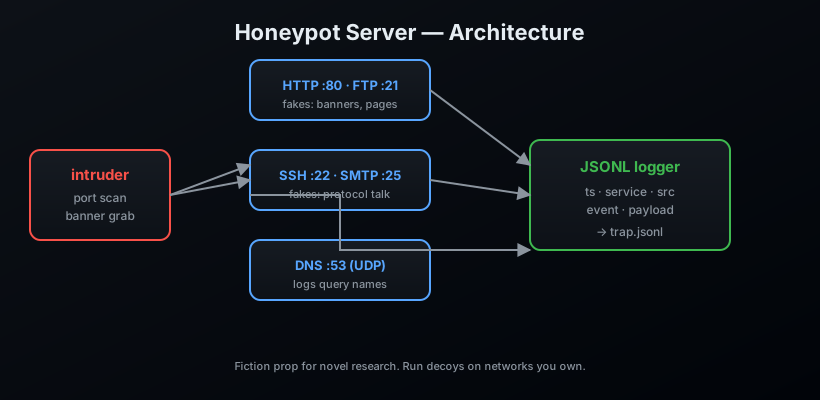
A low-interaction honeypot and deception platform: eight convincing decoys that speak real protocol grammar, plus the layer around them that turns raw log lines into intelligence. Every handshake, banner grab, login attempt and probe lands in a JSONL log; from there the platform profiles attackers, maps their behaviour to simplified MITRE ATT&CK ids, exports IOC feeds, renders dashboards, and grades how believable your own deployment is.
Defensive tooling for networks you own. Pure standard library — zero dependencies.
Features
- 🖥️ Eight decoys:
http,ftp,ssh,smtp,dns(UDP),telnet,redis,mysql - 🎭 Persona engine — one seeded fake identity (hostname, OS, versions, user roster) told consistently across every protocol surface
- 🕸️ Tar pit mode — configurable per-service delays that waste attacker time while staying human-plausible
- 🐦 Canary tokens & documents — fake AWS keys, API tokens, JWTs, canary URLs and bait files (password lists, VPN rosters, shell history) that raise critical alerts the moment they are touched
- 🕵️ Attacker profiling — per-IP behaviour tracking with a TTP classifier mapping events to simplified MITRE ATT&CK ids (T1046 scanning, T1110 brute force, T1078 valid accounts, T1105 tool transfer, ...)
- 📊 Deception score — a 0-100 grade of how convincing your deployment looks to an adversary, with per-check breakdowns
- 📤 IOC feeds — blocklists, STIX 2.1 bundles and fail2ban lines
- 📈 Dashboards — ANSI terminal dashboard and a self-contained HTML report
- ⏪ Session replay — record attacker sessions from the log and replay them into another deployment at any speed
- 📝 JSONL logging with rotation, enrichment and redaction
- 📦 Zero dependencies
Install
pip install honeypot-server
From source:
git clone https://github.com/AnonymoDGH/honeypot-server
cd honeypot-server
pip install -e .
Quickstart
# Deploy decoys on their classic ports, log everything to trap.jsonl
honeypot run --services http,ftp,ssh,smtp --log trap.jsonl
# [+] http decoy on 0.0.0.0:80   -> trap.jsonl
# [+] ftp decoy on 0.0.0.0:21    -> trap.jsonl
# [+] ssh decoy on 0.0.0.0:22    -> trap.jsonl
# [+] smtp decoy on 0.0.0.0:25   -> trap.jsonl
# [*] 4 decoys live. Ctrl+C to stop and log out.
The classic flag-style invocation still works unchanged:
honeypot --services http,ftp,ssh,smtp --log trap.jsonl
Now point a scanner at yourself, or wait for the curious. Every knock lands in the log:
{"ts": "2026-08-13 03:33:33", "service": "http", "src": "192.168.1.50:51234", "event": "request", "data": "GET /admin HTTP/1.1"}
{"ts": "2026-08-13 03:33:34", "service": "ftp", "src": "192.168.1.50:51240", "event": "login_attempt", "user": "admin"}
CLI reference
| Command | What it does |
|---|---|
honeypot run |
Start decoys (--services, --host, --ports, --log, --persona, --tarpit, --rotate, --canary, --config) |
honeypot status --log trap.jsonl |
Summarise a log: events, sources, services |
honeypot report --log trap.jsonl |
Terminal dashboard (--html out.html for a static report) |
honeypot blocklist --log trap.jsonl --out feeds/ |
Export blocklist, STIX bundle, fail2ban lines |
honeypot canary tokens --seed 7 |
Generate canary tokens (docs writes bait files) |
honeypot replay --log trap.jsonl --record sessions.json |
Record sessions; --recording replays them |
honeypot diff a.jsonl b.jsonl |
Compare two logs by behaviour fingerprints |
honeypot score --seed 7 |
Grade the deployment's deception score |
honeypot config --write-default |
Emit a starter deployment config |
Personas, tar pits and canaries
# One seeded identity across every protocol, slowed-down responses,
# and a standard set of planted canary tokens:
honeypot run --services http,ftp,ssh,telnet,redis \
    --persona acme-dc1 --tarpit 0.4 --canary --log trap.jsonl

# Grade how believable that persona is:
honeypot score --seed acme-dc1
# Deception score: 100/100 (grade A)
Canary documents plant fake password lists, VPN rosters, AWS credential files
and shell history under the FTP decoy's /internal tree — each seeded with
unique tokens, so a download or a reused secret raises a critical
canary_hit.
How it works
Tests
pip install pytest
pytest
License
MIT — defensive deception for networks you own. Run decoys on infrastructure you control and let the real fun stay in the manuscript.
1 maintainer

Release files for honeypot-server 0.2.0
For a detailed explanation of source distributions (sdists) and built distributions (wheels), please see the package formats documentation.
Source distribution (sdist)
| File | Size | Uploaded | |
|---|---|---|---|
| honeypot_server-0.2.0.tar.gz | 105.4 kB | Details |
Built distribution (wheel)
| File | Interpreter | ABI | Platform | Reset |
|---|---|---|---|---|
| honeypot_server-0.2.0-py3-none-any.whl | Python 3 | none | any | Details |
Total release size: 190.3 kB
Release files / honeypot_server-0.2.0.tar.gz
| Download URL | honeypot_server-0.2.0.tar.gz |
|---|---|
| Size | 105.4 kB |
| Tags | Source |
|
SHA-256 checksum How to use checksums |
66ba773ee03bc90860aede0a6d2fa71977821c807fe82519b8a63ce99f2a0f2d
|
|
BLAKE2b-256 checksum How to use checksums |
42af718fd1d97708b38b2d3452868bb3782a79fe144128a045814e61d5444578
|
| Upload date | |
|
Uploaded using Trusted Publishing? What is trusted publishing? |
No |
| Uploaded via |
twine/7.0.0 CPython/3.14.3
|
Release files / honeypot_server-0.2.0-py3-none-any.whl
| Download URL | honeypot_server-0.2.0-py3-none-any.whl |
|---|---|
| Size | 84.9 kB |
| Tags | Python 3 |
|
SHA-256 checksum How to use checksums |
68bb28d8021e580525fe0dfd94f3373c81cbaa41feda659bfa90634bcc219f86
|
|
BLAKE2b-256 checksum How to use checksums |
308828c3f014642ba5c9d0ed4a01567d5dba984ecf72c7e34546a396527f3f26
|
| Upload date | |
|
Uploaded using Trusted Publishing? What is trusted publishing? |
No |
| Uploaded via |
twine/7.0.0 CPython/3.14.3
|













