
hooklens
See what your coding agent actually did.
Every tool call, shell command, file change, MCP call, and token, from Claude Code, Codex, and Cursor. On a timeline and a graph, on your machine.




Why hooklens
Coding agents run commands, edit files, and call tools faster than you can read the transcript. hooklens records what happened through the agents' own hooks, so you can answer questions like:
- Which files did the agent change, and which did it only read?
- What shell commands ran, and which ones failed?
- Which MCP servers and tools did it use?
- Where did the time go, and how many tokens did the session cost?
It is a single Python package with no dependencies. Data stays in a local SQLite file, and the UI is a local web page. Nothing leaves your machine.
Features
- Timeline of every tool call, with duration and status. Long idle gaps are compressed.
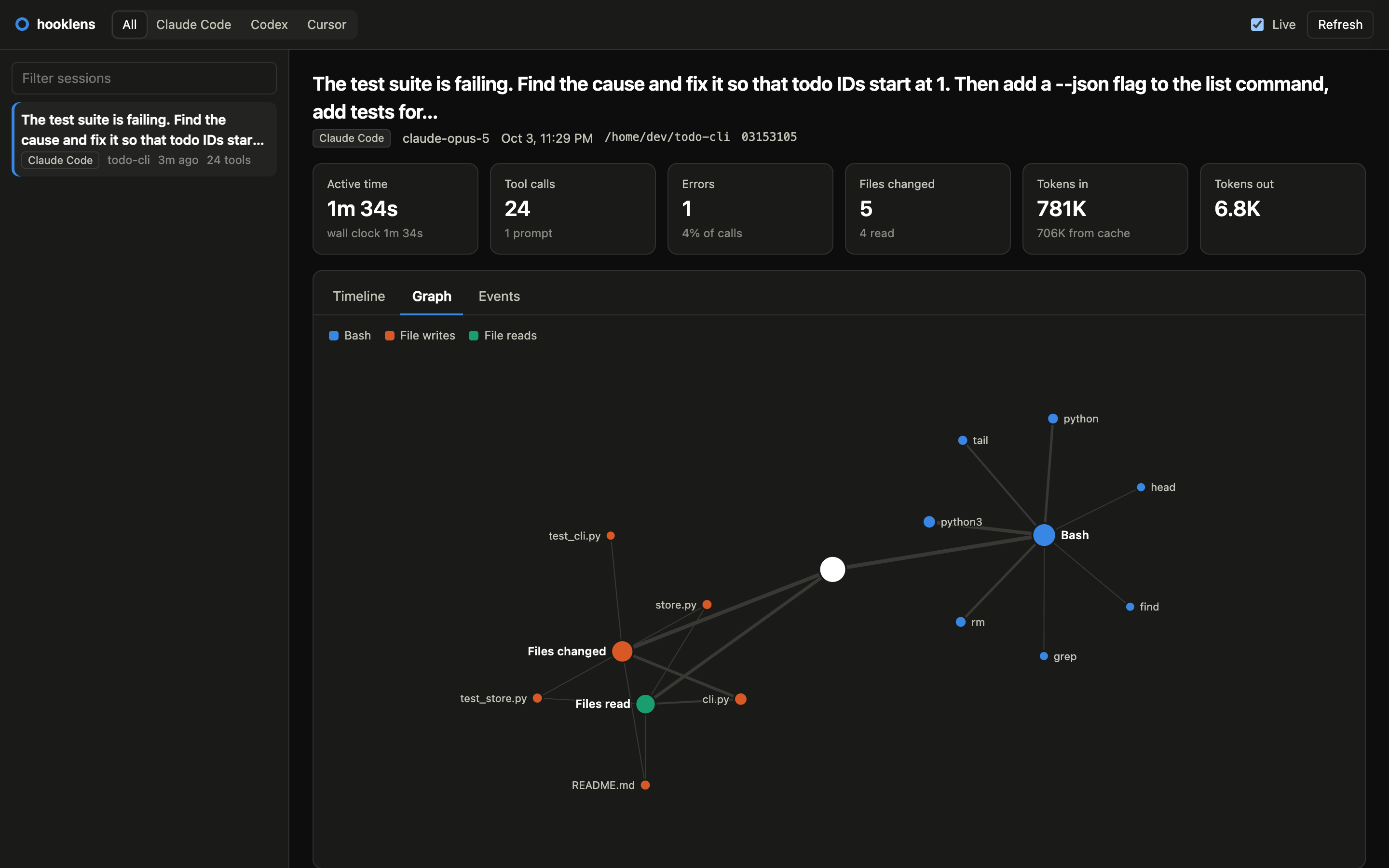
- Graph of the session: tools, programs, files, MCP servers, and how often each was used.
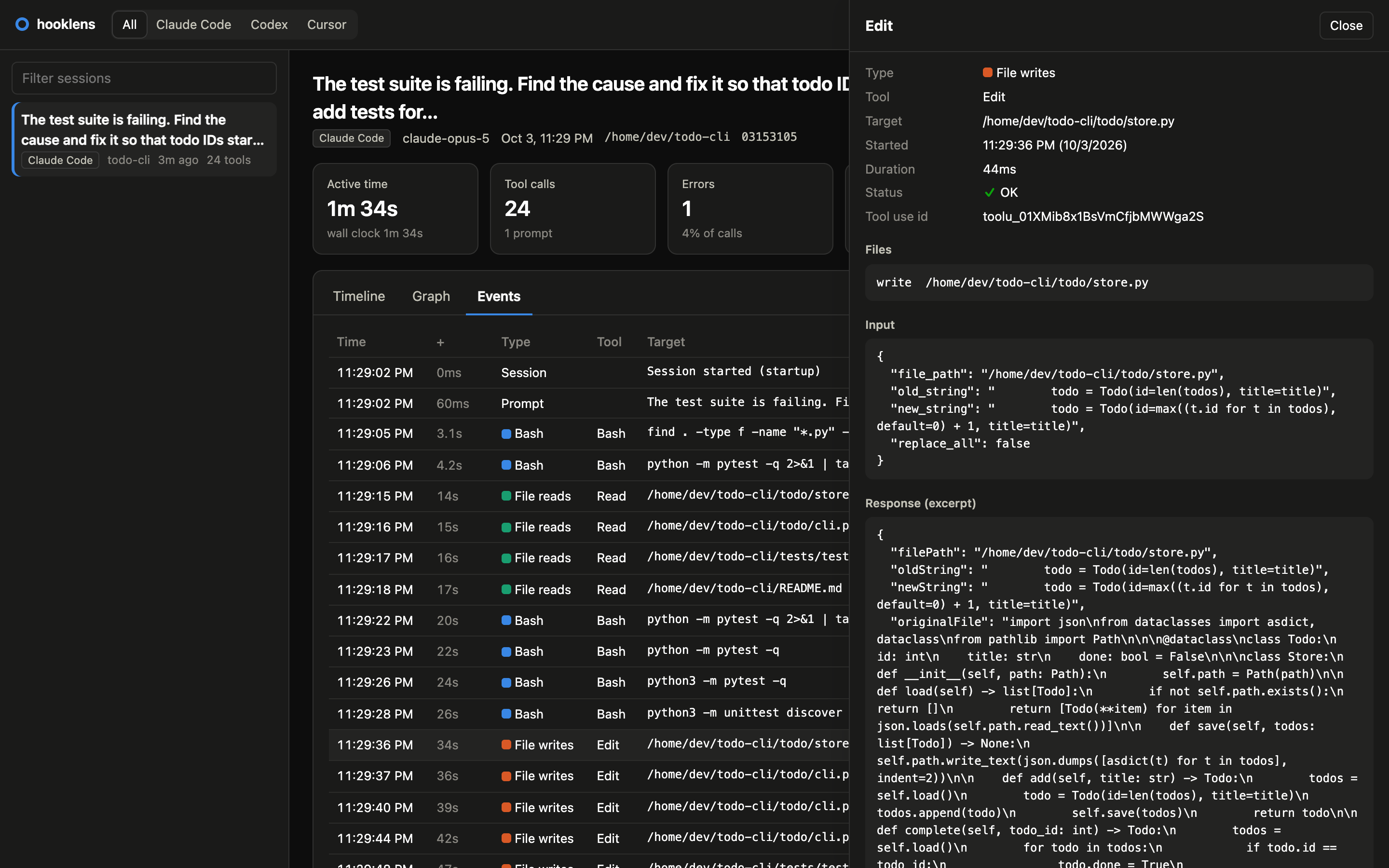
- Event log with the input and a response excerpt of every call.
- Summary of files changed, files read, commands, and MCP servers.
- Tokens and model from the agent's transcript.
- Live view that updates while the agent works.
- One view for three agents. Claude Code, Codex, and Cursor events are normalized to one schema.
Supported agents
| Agent | Tool calls | Prompts and turns | Tokens | Hooks file |
|---|---|---|---|---|
| Claude Code | ✅ | ✅ | ✅ | ~/.claude/settings.json |
| Codex | ✅ | ✅ | ✅ | ~/.codex/hooks.json |
| Cursor | ✅ | ✅ | — | ~/.cursor/hooks.json |
Quick start
uv tool install hooklens        # or: pipx install hooklens
hooklens install                # add hooks to every agent it finds
Start a new agent session (hooks load when a session starts), use the agent, then run:
hooklens show # opens http://127.0.0.1:7878
To install one agent at a time, use hooklens claude install, hooklens codex install, or
hooklens cursor install.
Usage
| Command | What it does |
|---|---|
hooklens show [session] |
Open the UI for all sessions, or one session |
hooklens <agent> show |
Open the UI for one agent (claude, codex, cursor) |
hooklens sessions |
List recent sessions in the terminal |
hooklens doctor |
Check the hooks, the database, and recent events |
hooklens clear |
Delete all recorded data (the hooks stay) |
hooklens uninstall |
Remove the hooks (your other hooks and settings stay) |
hooklens uninstall --purge |
Remove the hooks, the data, and the config backups |
Commands that delete data ask first. Add --dry-run to see what would be removed, or --yes to
skip the question.
More screenshots
The session graph: tools, the programs they ran, and the files they touched.
The details of one event, with its input and response.
How it works
agent ──hook event (JSON)──> hooklens hook ──> SQLite (raw events)
                                                   │
                         hooklens show ──> normalize ──> sessions, events, files ──> local UI
- Capture. The agent runs
hooklens <agent> hookon each event. The hook stores the raw event and exits in about 30 ms. It never blocks or changes what the agent does. - Normalize. When you open the UI, hooklens maps each agent's events to one schema, pairs tool starts with their results, and reads token usage from the agent's transcript.
- View. A small server on
127.0.0.1serves the UI and a JSON API.
hooklens only uses hooks that report what happened. It never subscribes to hooks that can allow or block an action. Read design/architecture.md for the details and design/sequence.md for the full call flow.
Privacy and safety
- All data is in
~/.hooklens/hooklens.db. Nothing is sent over the network. - Each string is trimmed to 4096 characters before it is stored, so full file contents and long
outputs are not kept. Set
HOOKLENS_MAX_FIELDto change the limit (0keeps everything). - Cursor sends your account email with each event. hooklens removes it before storage.
- hooklens backs up an agent config file before it changes it, and only ever edits its own entries.
hooklens uninstall --purgeremoves everything hooklens created, and nothing else.
Configuration
| Variable | Default | Purpose |
|---|---|---|
HOOKLENS_HOME |
~/.hooklens |
Where the database and error log live |
HOOKLENS_MAX_FIELD |
4096 |
Max characters stored per string (0 = no limit) |
HOOKLENS_CLAUDE_SETTINGS |
~/.claude/settings.json |
Claude Code settings file |
CODEX_HOME |
~/.codex |
Codex config folder |
HOOKLENS_CURSOR_HOME |
~/.cursor |
Cursor config folder |
Roadmap
See the milestones: the first PyPI release, importing past sessions, cost estimates, OpenTelemetry and SIEM export, and policy hooks for security tools.
Contributing
Contributions are welcome. Read CONTRIBUTING.md to get started.
make setup     # create .venv with the dev dependencies (needs uv)
make check     # lint, format check, and tests: the same checks as CI
Releasing (maintainers)
- Set
__version__insrc/hooklens/__init__.py(the only place with the version), and merge tomain. - Publish a GitHub release with a SemVer tag:
v1.2.3, orv1.2.3-alpha.1,-beta.1,-rc.1. - Approve the
pypideployment. The release workflow checks the tag, runs the tests, builds the package, and publishes it to PyPI.
License
Apache License 2.0. Copyright 2026 Kunal.
1 maintainer

Metadata
1 maintainer
Release files for hooklens 0.1.2
For a detailed explanation of source distributions (sdists) and built distributions (wheels), please see the package formats documentation.
Source distribution (sdist)
| File | Size | Uploaded | Provenance | Actions |
|---|---|---|---|---|
| hooklens-0.1.2.tar.gz | 869.4 kB | With provenance | Details for hooklens-0.1.2.tar.gz |
Built distribution (wheel)
| File | Interpreter | ABI | Platform | Actions Reset |
|---|---|---|---|---|
| hooklens-0.1.2-py3-none-any.whl | Python 3 | none | any | Details for hooklens-0.1.2-py3-none-any.whl |
Total release size: 919.3 kB
Release files / hooklens-0.1.2.tar.gz
| Download URL | hooklens-0.1.2.tar.gz |
|---|---|
| Size | 869.4 kB |
| Tags | Source |
|
SHA-256 checksum How to use checksums |
618b0459a81d7930c5d02c0286577a328f0821294774eace6caeb3ec2759aea8
|
|
BLAKE2b-256 checksum How to use checksums |
89c69cd17b3e24a369db64cb4576c52c7a6e438cbbd7fcbe557f89f633788834
|
| Upload date | |
|
Uploaded using Trusted Publishing? What is trusted publishing? |
Yes |
| Uploaded via |
twine/7.0.0 CPython/3.13.14
|
Provenance
Provenance describes where a file came from. On PyPI, provenance is shared via attestations, which provide a verifiable record of the build or publishing details. View details, limitations and caveats.


PyPI Publish Attestation
PyPI verified that this artifact, at this checksum, originated from the publisher listed below.
Signed by GitHub Actions, verified by PyPI on Oct 5, 2026.
Transparency logRelease files / hooklens-0.1.2-py3-none-any.whl
| Download URL | hooklens-0.1.2-py3-none-any.whl |
|---|---|
| Size | 50.0 kB |
| Tags | Python 3 |
|
SHA-256 checksum How to use checksums |
3f0951ac3c3597e4a0213034cf04e0f0778bb974d23322fbff7ce1e264be2881
|
|
BLAKE2b-256 checksum How to use checksums |
841d77a71b4670ff4088f7f8612ef70e637d0474300aed36af545a340a5712ff
|
| Upload date | |
|
Uploaded using Trusted Publishing? What is trusted publishing? |
Yes |
| Uploaded via |
twine/7.0.0 CPython/3.13.14
|
Provenance
Provenance describes where a file came from. On PyPI, provenance is shared via attestations, which provide a verifiable record of the build or publishing details. View details, limitations and caveats.
PyPI Publish Attestation
PyPI verified that this artifact, at this checksum, originated from the publisher listed below.
Signed by GitHub Actions, verified by PyPI on Oct 5, 2026.
Transparency logSecurity for hooklens 0.1.2
Provenance
Provenance describes where a file came from. On PyPI, provenance is shared via attestations, which provide a verifiable record of the build or publishing details. View details, limitations and caveats.
Full provenance
Both files in this release have been uploaded with provenance metadata.
Attestation for hooklens-0.1.2.tar.gz
PyPI Publish Attestation
PyPI verified that this artifact, at this checksum, originated from the publisher listed below.
Signed by GitHub Actions, verified by PyPI on Oct 5, 2026.
Transparency logA note on package security
PyPI is a repository for distributing packages, not a service for auditing them. While third-party security researchers and our staff do their best to detect and remove malicious packages, PyPI cannot guarantee the quality, security or suitability of any given package.
To learn more about protecting yourself from malicious actors, visit our package security documentation.














