
hookrecon — find Stripe payments that never reached your database
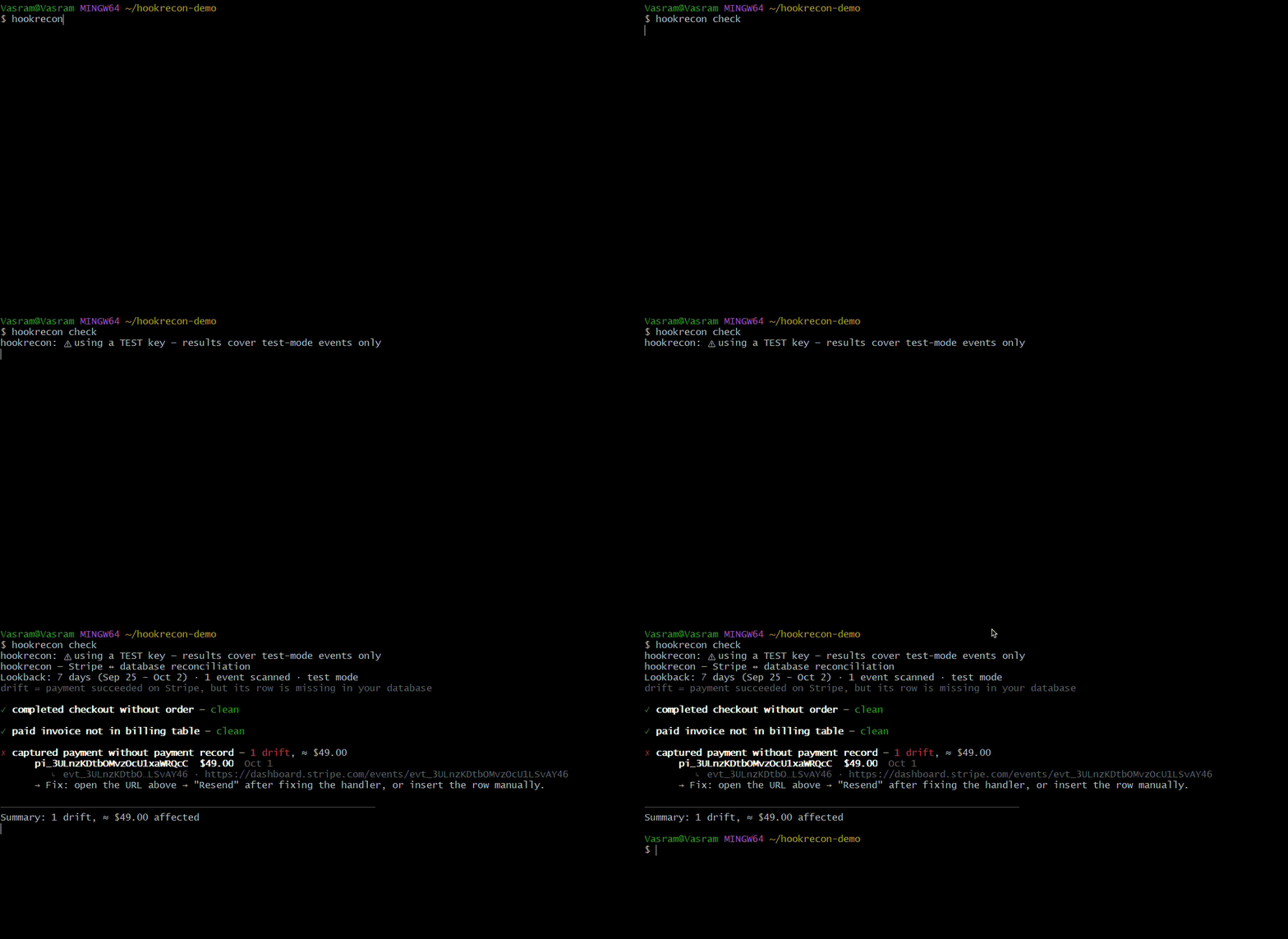


hookrecon is a read-only CLI that reconciles Stripe against your Postgres database. It lists every completed payment whose webhook never made it into your app — with the amount, the customer's object id, and a deep link to the event in your Stripe dashboard. Zero install, zero signup, zero telemetry.
The problem: your customer pays, Stripe shows the payment as succeeded — but the order, subscription, or payment row never appears in your database. The webhook failed silently. It happens more often than anyone admits: a CDN or WAF answered Stripe with
200 OKbefore the request ever reached your app, a deploy broke your handler, or your handler threw an error after acknowledging the event. Stripe retries failed webhooks for up to 3 days, then gives up forever. Nobody notices until a customer emails support.
If that's you right now — payment succeeded but no order created, Stripe webhook not updating your database, webhooks silently failing in production, Stripe events missing after a deploy — hookrecon finds every affected payment in one command, along with the money involved.
Why Stripe webhooks fail silently
Your webhook handler looks healthy in the dashboard because most failures happen after something returns 200 OK:
| Failure mode | What actually happens |
|---|---|
| CDN / WAF / proxy acks early | Cloudflare or your load balancer returns 200 OK to Stripe; the request never reaches your handler. Stripe marks the delivery successful. |
| Handler throws after acking | Your code accepted the event, then crashed on the DB write (migration missing, RLS denied, connection pool exhausted). Stripe already got its 200. |
| Deploy breaks the handler | New version renamed a column, dropped an event type, or the signing-secret env var didn't survive the deploy. Every payment since then is missing. |
| Endpoint timeout | Your handler does too much work before responding; Stripe times out and the retry chain starts — and gives up 3 days later. |
Stripe's dashboard shows you delivery status — it cannot tell you whether the payment reached your database. That gap is exactly what hookrecon closes: it diff's Stripe's records against your own tables and tells you which completed payments never landed, how much money is involved, and where to click to fix each one.
Quick start (60 seconds)
1. Run it — no Python needed on your machine (uv installs it automatically):
uvx hookrecon init
Prefer pipx or already have Python? pipx install hookrecon (needs Python 3.10+), then hookrecon init.
2. Answer 3 questions. The wizard writes hookrecon.config.json pre-filled with the 3 canonical checks — you just edit the table and column names to match your schema.
3. Point it at your secrets (env var names live in the config; the values never do):
export STRIPE_SECRET_KEY="sk_live_..."     # or rk_live_... restricted key — see Trust below
export DATABASE_URL="postgresql://user:pass@host/db?sslmode=require"
4. Reconcile:
hookrecon check
hookrecon doctor runs the same preflight first — config, env vars, Stripe API, database connection, and a write-privilege audit — if anything is off, it tells you exactly what.
What you get
hookrecon — Stripe ↔ database reconciliation
Lookback: 7 days (Sep 24 – Oct 1) · 1,842 events scanned · live mode

✗ completed checkout without order — 3 drifts, ≈ $249.00
    evt_1P9xK…  cs_live…a1  $89.00   Sep 28  https://dashboard.stripe.com/events/evt_1P9…
    evt_1P2mQ…  cs_live…b7  $120.00  Sep 30  https://dashboard.stripe.com/events/evt_1P2…
    evt_1P8zL…  cs_live…c2  $40.00   Oct 1   https://dashboard.stripe.com/events/evt_1P8…
    → Fix: open the event URL → "Resend" after fixing the handler, or insert the row manually.

✓ paid invoice not in billing table — clean
✗ captured payment without payment record — 1 drift, ≈ $12.00
    …

Summary: 4 drifts, ≈ $261.00 affected · run `hookrecon doctor` if any check errored.
Every drift row deep-links to the event in your Stripe dashboard — open it, fix your handler, hit Resend, and your app processes the payment like nothing happened.
How it works
- Fetch —
hookreconpulls recent Stripe events (checkout.session.completed,invoice.payment_succeeded,payment_intent.succeeded, or any types you configure) over your lookback window. - Diff — for each event it runs your SQL (one read-only
SELECTper check, bound as a parameterized query) against your database. 0 rows = the record the webhook should have created is missing = drift. - Report — drifts with amounts per currency, deep links, and exit codes your CI can act on.
What hookrecon is not: it never writes to your database, never resends events itself, never hosts anything, and has no daemon. It's the diff tool — detection stays local and read-only, so you can trust it with production credentials.
Under the hood — what happens when you run check
- Load + validate config —
hookrecon.config.jsonis read and validated: eachsqlmust be a single read-onlySELECTreferencing$1, check names must be unique, at most 20 distinct event types. Errors name the offending check and exit 2. - Resolve the key — the secret comes from the env var named in your config; the key's prefix (
sk_test_,sk_live_,rk_…) decides the mode shown in the report. Missing → exit 2 with a hint. - Fetch Stripe events —
GET /v1/eventswithcreated ≥ now − lookbackand your configured types; auto-paginates, dedupes by event id, stops at--limit(and says so if it did). - Connect to Postgres — your
DATABASE_URL, one independent transaction per statement, nothing ever written. - Diff — for every event matching a check: the
parampath (defaultdata.object.id) is pulled out of the event, your SQL runs with that id bound as a parameterized query. 0 rows = drift; an SQL error marks only that check as errored and the others continue. - Render — the human table (or
--json), money summed per currency, every drift deep-linked to its Stripe dashboard event. - Exit code —
0clean ·1drift found ·2couldn't run reliably. Cron/CI acts on the code, not the output.
Nothing in these steps ever writes to your database or calls a Stripe write endpoint.
The three commands
| Command | What it does |
|---|---|
hookrecon init |
Interactive wizard: writes a starter hookrecon.config.json (3 canonical checks), prints the restricted-key recipe, ends with a doctor preflight |
hookrecon check |
The product: fetches Stripe events, runs your per-check SQL, reports drift |
hookrecon doctor |
Preflight only: env vars → Stripe events ping → DB connection → per-check SQL dry-run → write-privilege audit |
check flags:
| Flag | Meaning |
|---|---|
--since <Nd> |
Override the configured lookback (e.g. 30d) |
--json |
Machine-readable JSON report instead of the table (CI/cron-friendly) |
--show-sql |
Print every SQL statement with its param before running it |
--limit <n> |
Safety cap on Stripe events fetched (default 10000; warns if hit) |
--quiet |
Only drift lines + summary, no banner |
Exit codes — act on the code, not the output:
| Exit | Meaning |
|---|---|
0 |
Ran fully, no drift (also: doctor all green) |
1 |
Ran fully, drift found |
2 |
Could not run reliably — config/fatal error, or any check's SQL errored. Usage errors also exit 2 — same class. |
init exits 0 once the config is written — even if the preflight that follows finds issues; it exits 2 only if hookrecon.config.json already exists.
Configuration reference
hookrecon init writes this starter config — edit the table/column names, not the structure:
{
  "stripe": {
    "apiKeyEnv": "STRIPE_SECRET_KEY",
    "lookbackDays": 7
  },
  "database": {
    "urlEnv": "DATABASE_URL"
  },
  "checks": [
    {
      "name": "completed checkout without order",
      "event": "checkout.session.completed",
      "sql": "SELECT 1 FROM orders WHERE stripe_session_id = $1",
      "money": "data.object.amount_total",
      "param": "data.object.id"
    },
    {
      "name": "paid invoice not in billing table",
      "event": "invoice.payment_succeeded",
      "sql": "SELECT 1 FROM subscriptions WHERE stripe_invoice_id = $1",
      "money": "data.object.amount_paid",
      "param": "data.object.id"
    },
    {
      "name": "captured payment without payment record",
      "event": "payment_intent.succeeded",
      "sql": "SELECT 1 FROM payments WHERE stripe_payment_intent_id = $1",
      "money": "data.object.amount_received",
      "param": "data.object.id"
    }
  ]
}
| Field | Rules |
|---|---|
event |
Exact Stripe event type. Unknown types are allowed with a warning — but they're sent to Stripe as-is, so a typo'd type fails the fetch with a Stripe error. Max 20 distinct types (Stripe's own limit). |
sql |
A single SELECT. 0 rows = drift (the record is missing — the webhook never landed), ≥1 row = processed fine. Your SQL must reference $1 at least once — it is bound as a parameterized query, never string-interpolated. |
param |
JSON path into the Stripe event, default data.object.id. |
money |
Optional JSON path to an integer amount (minor units) for the "≈ $X affected" summary. Absent → that check contributes no money figure. |
name |
Free text shown in the report — must be unique across checks. |
Suppress known false positives with your own WHERE — imported customers, test orders, free-trial invoices:
{
  "name": "completed checkout without order (real customers only)",
  "event": "checkout.session.completed",
  "sql": "SELECT 1 FROM orders WHERE stripe_session_id = $1 AND customer_id NOT IN (SELECT id FROM test_accounts)"
}
The SQL is yours — anything from a simple existence check to joins against your own tables works, as long as it's one read-only SELECT and returns 0 rows when something went missing.
Automation: cron, CI, and alerting
check is built for unattended runs — exit code 1 means drift, --json gives you structured output:
# crontab — every hour, log the JSON report
0 * * * * cd /srv/yourapp && hookrecon check --quiet --json >> /var/log/hookrecon.json 2>&1

# Slack yourself only when there's drift
hookrecon check --quiet --json | jq -e '.checks[] | select(.driftCount > 0)' \
  || curl -s -X POST -d '{"text":"hookrecon found missing payments"}' $SLACK_WEBHOOK
GitHub Actions (secrets, not plaintext):
- name: Stripe ↔ DB reconciliation
  env:
    STRIPE_SECRET_KEY: ${{ secrets.STRIPE_SECRET_KEY }}
    DATABASE_URL: ${{ secrets.DATABASE_URL }}
  run: uvx hookrecon check --quiet
Trust & security — why you can paste your DB URL into this
The reason you'd hesitate is the reason this section exists:
- Read-only end to end. hookrecon only issues
SELECTstatements to your database and only reads from Stripe's API. It never writes to your DB, never calls a Stripe write endpoint. - The SELECT lint is a convenience, not a sandbox. Postgres functions (
setval,dblink, …) and sequence writes sit outside table privileges — a read-only DB user is the real boundary, anddoctor's audit tells you when you forgot one. - No telemetry. No outbound calls except the Stripe API and your own database. The source is a handful of small Python files — read it in one sitting.
--show-sql. Print every statement with its bound param before it runs. Verify exactly what happens.- Write-privilege audit.
doctorextracts every table your checks touch and asks Postgres itself —has_table_privilege(current_user, table, ...)for INSERT/UPDATE/DELETE/TRUNCATE — which catches PUBLIC grants, inherited roles, and superusers thatinformation_schemaviews miss. If the connected user could write, you get: "⚠ connected user can WRITE to <table> — use a read-only user; hookrecon never writes, but don't take our word for it." - Secrets stay in env vars. The config file stores env var names (
apiKeyEnv,urlEnv), never values. Your key and DSN are never echoed. The config file is commit-safe.
Give hookrecon a Postgres role that can only read:
Read-only Postgres user recipe
CREATE ROLE hookrecon_ro LOGIN PASSWORD 'choose-a-long-password';
GRANT CONNECT ON DATABASE yourdb TO hookrecon_ro;
GRANT USAGE ON SCHEMA public TO hookrecon_ro;
GRANT SELECT ON ALL TABLES IN SCHEMA public TO hookrecon_ro;
ALTER DEFAULT PRIVILEGES IN SCHEMA public GRANT SELECT ON TABLES TO hookrecon_ro;
Caveat: ALTER DEFAULT PRIVILEGES only covers tables created by the role that runs it. Run it as (or once per) whichever role creates your app's tables, so tables added later are readable too.
On the Stripe side, create a restricted key (Dashboard → Developers → API keys) with Events: Read — the only API hookrecon calls — plus Read on Checkout Sessions, Invoices, and Payment Intents if you keep the default checks. doctor pings GET /v1/events?limit=1 rather than /v1/balance on purpose: the balance endpoint returns 403 for exactly this Events:Read-only key, while the events ping validates both auth and the one permission the tool actually needs.
Troubleshooting — every error, and its fix
| You see | Why | Fix |
|---|---|---|
config file not found: hookrecon.config.json |
You're running from a directory that has no config — hookrecon reads it from the current directory | cd into your project folder, or run hookrecon init there once to create it |
environment variable STRIPE_SECRET_KEY is not set |
The env var named in your config isn't set in this shell | Bash: export STRIPE_SECRET_KEY="sk_..." · PowerShell: $env:STRIPE_SECRET_KEY = "sk_..." · cmd: set STRIPE_SECRET_KEY=sk_... · persistent on Windows: setx STRIPE_SECRET_KEY "sk_..." then reopen the terminal |
Invalid API Key provided |
Key typo'd, or test key against live expectations | Copy it again from Dashboard → Developers → API keys; check test vs live mode |
| Stripe ping fails with a permissions/403 error | Restricted key is missing Events: Read (or the object reads your checks need) |
Dashboard → Restricted keys → add Events: Read (+ Checkout Sessions / Invoices / Payment Intents: Read) |
relation "orders" does not exist |
The check's SQL names a table your DB doesn't have (starter config uses example names) | Edit hookrecon.config.json — change FROM orders etc. to your real tables/columns, or delete checks you don't need |
connection refused / connection timeout |
Wrong host/port, or SSL required | Append ?sslmode=require to your DATABASE_URL; check firewall; for Neon/Supabase use their provided pooled connection string |
the query has 0 placeholders but 1 parameters were passed |
Your check SQL doesn't use $1 |
Add it: ... WHERE your_stripe_id_column = $1 |
SQL must start with SELECT / forbidden keyword 'UPDATE' |
The SQL lint rejected something that isn't one read-only SELECT | One SELECT statement only; filter with WHERE, no CTEs (WITH) in v1 |
duplicate check name(s) |
Two checks share a name |
Give each check a unique name |
unknown config key 'urlenv' — ignored (typo?) |
A key in the config isn't recognized — likely a typo | Fix the spelling (e.g. urlenv → urlEnv); unknown keys are ignored, defaults apply |
⚠ fetch stopped at --limit N — results are incomplete |
More events matched than --limit |
Raise --limit or narrow --since |
0 events in lookback — widen --since if this is unexpected |
No events matched — wrong mode? | Check the key: sk_test_ sees only test-mode payments, sk_live_ only live. Widen --since |
hookrecon: command not found (after install) |
The install dir isn't on PATH |
uv: add %USERPROFILE%\.local\bin to PATH · pipx: run pipx ensurepath, reopen the terminal |
hookrecon.config.json already exists — not overwriting |
init never clobbers |
Delete or rename the old file first |
FAQ
How long does Stripe retry failed webhooks? Up to 3 days with exponential backoff. After that the event is marked failed and never retried — the payment stays completed in Stripe and permanently missing from your app unless someone notices. hookrecon sees events up to 30 days back (Stripe's API retention), so run it within that window — hourly cron is the point.
My webhook returns 200 OK but my database isn't updated — how is that possible?
Because 200 OK was sent by something that isn't your handler: a CDN/WAF/ingress acking early, or your handler crashing after acknowledging. Stripe sees success; your DB never got the write. That's the exact failure hookrecon detects.
How do I find Stripe payments missing from my database?
That's this tool: uvx hookrecon check diffs Stripe's completed payments against your tables and lists every one that never landed, with amounts and dashboard deep links.
Is it safe to give a CLI my production database URL?
That's the design center: run it as a read-only Postgres user (recipe above), watch doctor's write-privilege audit confirm your grants, use --show-sql to see every statement before it runs. No telemetry, no third-party calls, config file holds env-var names only. The whole codebase is a few small Python files.
Does hookrecon support MySQL, MongoDB, or SQLite? Postgres only in v1 — deliberately one dialect, done well. Open an issue if you need another; demand decides the roadmap.
Does it work with Shopify, Razorpay, or Paddle? Stripe only in v1, for the same reason. Star/watch the repo if you want those first.
Why does it say 0 events?
Three usual reasons: your lookback window is too short (--since 30d), you're using a test key but looking for live payments (or vice versa), or your handler is actually working — 0 events with no drift is a good result.
Why do $0 invoices show as drift?
Free trials legitimately fire invoice.payment_succeeded with amount_paid: 0. If you don't track trials in your billing table, suppress them with a WHERE amount_paid-style filter in your own SQL.
Can hookrecon fix the missing rows for me? No — it's read-only by design, which is what makes it safe to point at production. Each drift row links to the event in Stripe's dashboard where Resend replays it to your (now-fixed) handler, or you insert the row manually.
Does it work with Stripe test mode? Yes — it detects test keys and says so loudly, since test-mode results cover test-mode payments only.
Roadmap
v1 is deliberately small. What gets built next is decided by demand, not speculation — open an issue or star/watch the repo to vote with your attention:
- MySQL / SQLite / MongoDB dialects
- Shopify, Razorpay, Paddle gateways
- A scheduled runner with alerting (the CLI stays free and dumb)
- A "delivery status" side-report (events Stripe never delivered at all)
Contributing & development
git clone https://github.com/sonagara-vashram/hookrecon && cd hookrecon
python -m pip install -e .
python -m unittest discover tests
53 tests, no test frameworks beyond stdlib unittest, no network in the suite. Bug reports with your (redacted) config shape are the most useful contributions right now.
License
MIT — the psycopg dependency is LGPL-3.0-only (unmodified pip dependency; see LICENSE).
If hookrecon found money your database forgot, a ⭐ helps the next developer find it before their customers do.
1 maintainer

Metadata
1 maintainer
Release files for hookrecon 0.9.3
For a detailed explanation of source distributions (sdists) and built distributions (wheels), please see the package formats documentation.
Source distribution (sdist)
| File | Size | Uploaded | |
|---|---|---|---|
| hookrecon-0.9.3.tar.gz | 99.4 kB | Details |
Built distribution (wheel)
| File | Interpreter | ABI | Platform | Reset |
|---|---|---|---|---|
| hookrecon-0.9.3-py3-none-any.whl | Python 3 | none | any | Details |
Total release size: 126.2 kB
Release files / hookrecon-0.9.3.tar.gz
| Download URL | hookrecon-0.9.3.tar.gz |
|---|---|
| Size | 99.4 kB |
| Tags | Source |
|
SHA-256 checksum How to use checksums |
256dc76cbacc1872140f6bc0d83c397189e710418da3681ff6a27e86657c4527
|
|
BLAKE2b-256 checksum How to use checksums |
567c6982aae28df93b5aeb34f6afc9c6c2aafec13ce5615cd23b6295684125b7
|
| Upload date | |
|
Uploaded using Trusted Publishing? What is trusted publishing? |
Yes |
| Uploaded via |
twine/7.0.0 CPython/3.13.14
|
Provenance
Provenance describes where a file came from. On PyPI, provenance is shared via attestations, which provide a verifiable record of the build or publishing details. View details, limitations and caveats.


PyPI Publish Attestation
PyPI verified that this artifact, at this checksum, originated from the publisher listed below.
Signed by GitHub Actions, verified by PyPI on Oct 2, 2026.
Transparency logRelease files / hookrecon-0.9.3-py3-none-any.whl
| Download URL | hookrecon-0.9.3-py3-none-any.whl |
|---|---|
| Size | 26.8 kB |
| Tags | Python 3 |
|
SHA-256 checksum How to use checksums |
37e91aa4d2ee5513ccdf5998f0e02b22b3ee90d8fdbc10cef391a7a0dc3f975d
|
|
BLAKE2b-256 checksum How to use checksums |
89b1fd98b59fa4ade12bb014990c0db63dcff3818e0295fc44d8837d58013e61
|
| Upload date | |
|
Uploaded using Trusted Publishing? What is trusted publishing? |
Yes |
| Uploaded via |
twine/7.0.0 CPython/3.13.14
|
Provenance
Provenance describes where a file came from. On PyPI, provenance is shared via attestations, which provide a verifiable record of the build or publishing details. View details, limitations and caveats.
PyPI Publish Attestation
PyPI verified that this artifact, at this checksum, originated from the publisher listed below.
Signed by GitHub Actions, verified by PyPI on Oct 2, 2026.
Transparency log













