
horizonchart
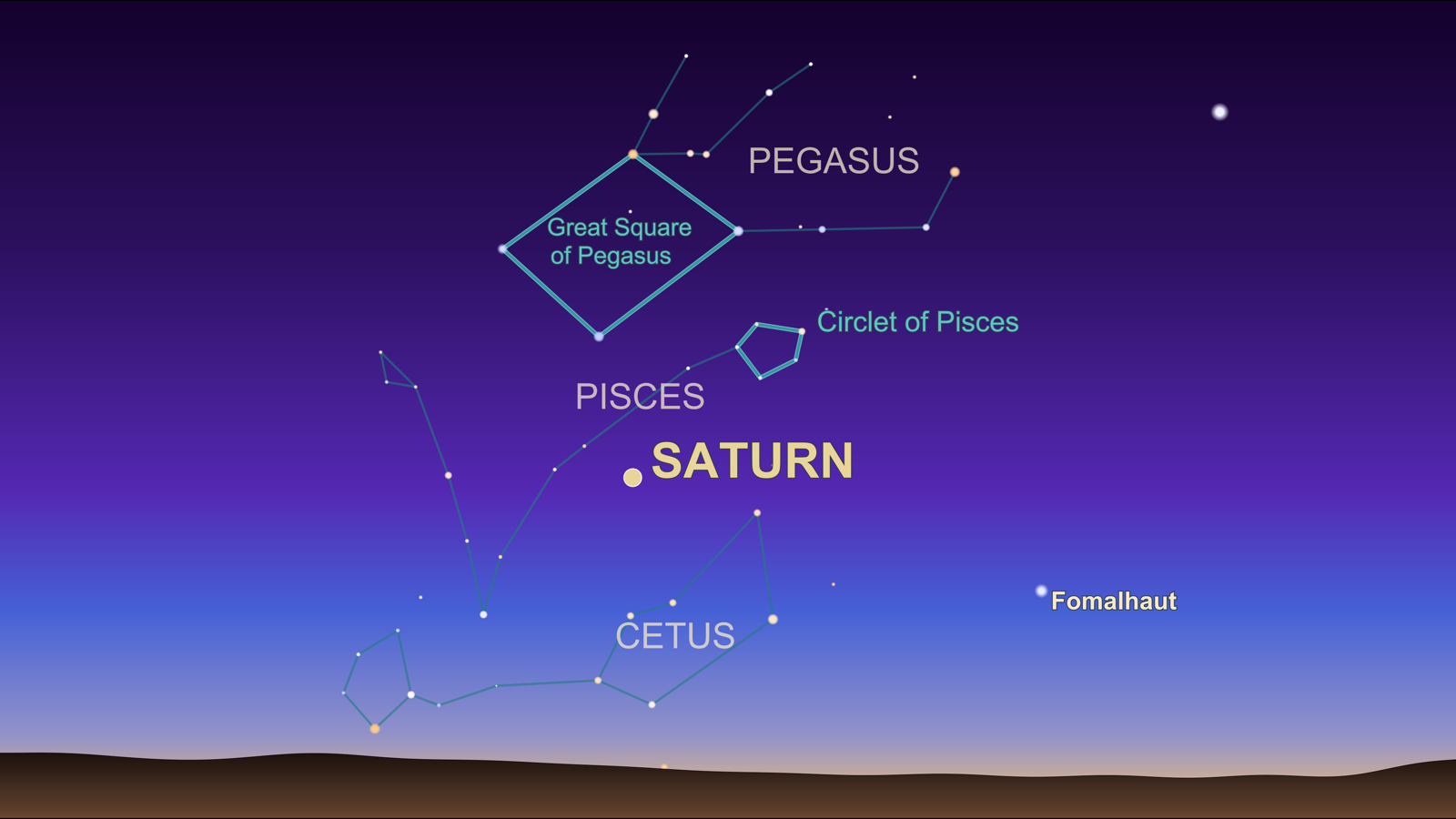
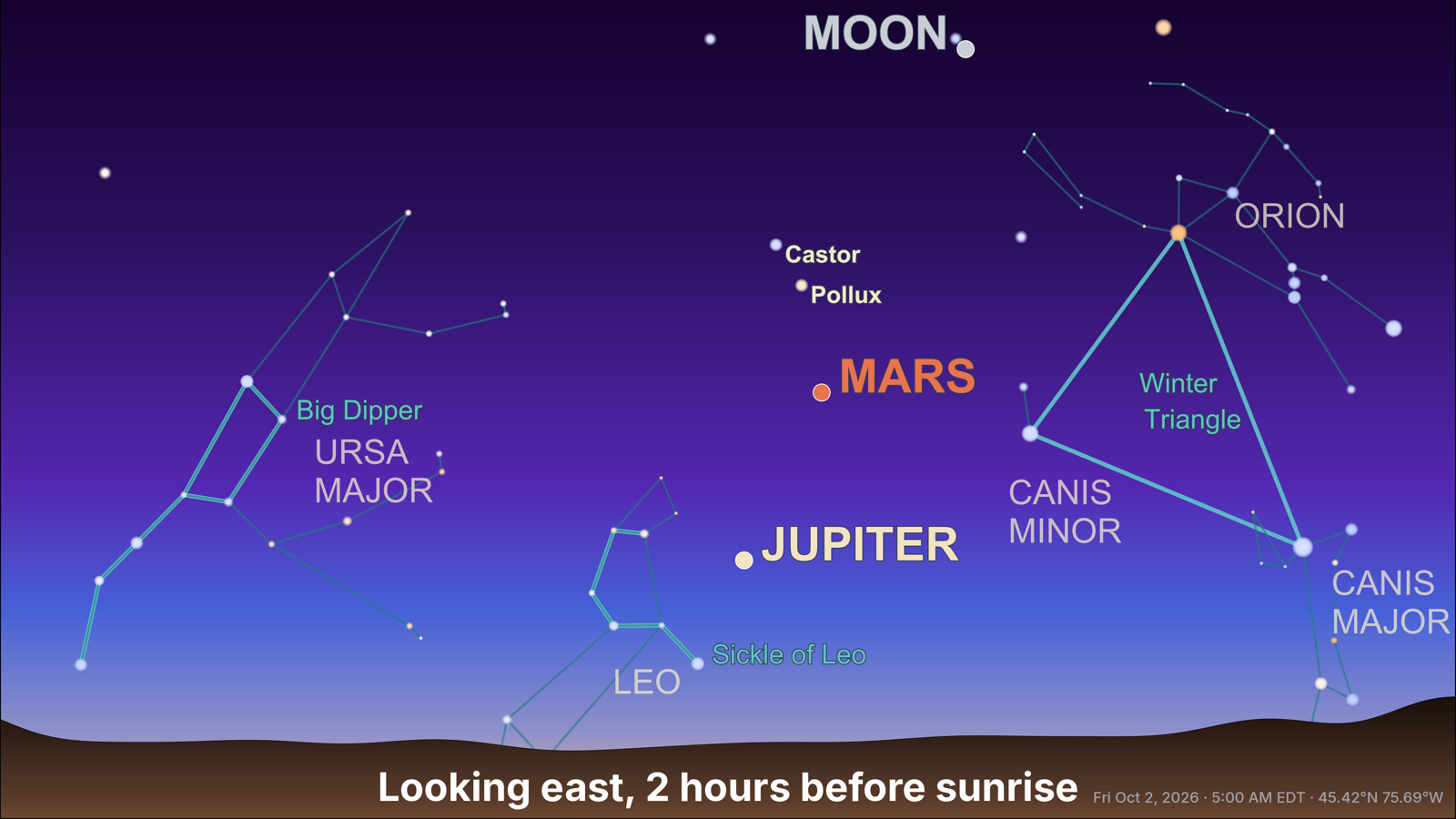
Clean, 16:9 horizon-view sky charts built on starplot:
- Finder charts for planets, the Moon, stars or deep-sky objects at a given place and time, showing just enough context (nearby constellations, asterisms, bright stars) to find them.
- Twilight views for a date: the sky before sunrise and after sunset, looking east or west, whichever has more to see.
Install
Requires Python 3.11+.
pip install horizonchart
or, from a checkout, with uv: uv sync.
System requirement: Cairo
starplot renders PNGs with CairoSVG, which needs the Cairo graphics library installed on the system:
| Platform | Install |
|---|---|
| macOS | brew install cairo |
| Debian / Ubuntu | sudo apt install libcairo2 |
| Fedora | sudo dnf install cairo |
| Windows | see CairoSVG's notes (a GTK runtime provides it) |
On macOS, Pythons that don't look in Homebrew's library folder (such as
uv-managed or python.org builds) may report no library called "cairo" was found; point them at it with
export DYLD_FALLBACK_LIBRARY_PATH=/opt/homebrew/lib.
Data files
The first run downloads star and deep-sky catalogs and planetary ephemerides (~120 MB). They, and the place-name cache, are stored in the first of:
$STARPLOT_DATA_PATH, if set/var/data, if it exists and is writable- the per-user cache folder for your platform (e.g.
~/Library/Caches/horizoncharton macOS,~/.cache/horizoncharton Linux,%LOCALAPPDATA%\horizonchart\Cacheon Windows)
Command line
Finder chart for specific objects
horizonchart target Saturn --location "Monkey's Eyebrow, KY" --time "2026-10-02 22:00"
# -> saturn_20261002T2200_35.78N_78.64W.png

horizonchart target Moon Pleiades -l "35.78N 78.64W" -t "2026-10-03 02:00"

# No --time: 2 hours after tonight's sunset
horizonchart target Saturn -l "35.78N 78.64W"
Targets can be:
| Kind | Examples |
|---|---|
| Moon and planets | Moon, Mars, Saturn, "saturn barycenter" (BSP-style naming), Pluto |
| Messier / NGC / IC | M31, M45, "NGC 1976", "IC 2391" |
| Deep-sky common names | Pleiades, "Andromeda Galaxy", Beehive |
| Named stars | Vega, Betelgeuse |
-t, --time is local time at the location. By default it's 2 hours after
today's sunset there, rounded to the nearest half hour. Each target must be
above the horizon at that time.
Twilight views for a date
horizonchart twilight --location "Ottawa, ON" --date 2026-10-02
# -> 20261002T0500_45.42N_75.69W_mor.png, 20261002T2030_45.42N_75.69W_eve.png
#    (both moved to 2 hours from the Sun because planets were low at 1 hour)
| Option | Meaning |
|---|---|
-d, --date |
Date (default: today at the location) |
-m, --limiting-magnitude |
Faintest stars and deep-sky objects shown. Default 2.0 (suburban twilight); 4–6 for dark skies |
--no-title |
Leave off the title ("Looking east, 1 hour before sunrise") |
Common options
| Option | Meaning |
|---|---|
-l, --location |
Coordinates (35.19,-88.99, 47.99N 84.77W) or a place name ("Monkey's Eyebrow, NC", "Wawa, ON") |
--tz |
Time zone name; by default it's looked up from the location |
-o, --output-dir |
Where to write PNGs (default: current directory) |
--no-timestamp |
Leave off the date, time and location in the lower right corner |
--no-labels |
Leave off all names: planets, the Moon, stars, deep-sky objects, asterisms and constellations |
Place names are looked up with OpenStreetMap's
Nominatim service, at most one request per second,
and cached (horizonchart-geocode.json in the data folder), so each place is
looked up once. Coordinates never touch the network. Nominatim's
usage policy
asks applications to identify themselves; set HORIZONCHART_CONTACT (e.g. to
your email address) to include a contact in the request's user agent.
Python
from datetime import date, datetime
from zoneinfo import ZoneInfo

from horizonchart.skyview import plot_targets, plot_twilight_views

plot_targets(47.99, -84.77, ["Saturn"],
             datetime(2026, 10, 2, 22, 0, tzinfo=ZoneInfo("America/New_York")))

plot_twilight_views(47.99, -84.77, date(2026, 10, 2))
# {"morning": Path(...), "evening": Path(...)}

# The command line's --no-title, --no-timestamp and --no-labels
plot_targets(..., timestamp=False, labels=False)
plot_twilight_views(..., title=False, timestamp=False, labels=False)
How charts are composed
Both chart types
- Planet and Moon markers are drawn in roughly their naked-eye colors. Uranus, Neptune and Pluto are drawn smaller and semi-transparent.
- Asterisms (Great Square, Big Dipper, Summer Triangle, Orion's Belt, …) are highlighted and labeled. When an asterism is essentially its whole constellation (Cassiopeia's W, the Little Dipper), only the constellation is named.
- Easily recognized constellations (Orion, Ursa Major and Minor, Cassiopeia, Cygnus, Scorpius, Leo, Crux) are shown whenever most of the figure is in view.
- At most five stars are labeled, chosen from a priority list of well-known names (Polaris, Sirius, Betelgeuse, Vega, …). Other stars are unlabeled.
- The date, time and location are in small text in the lower right.
Finder charts
- Constellations are shown only if they contain a target, border it within 3°, or are home to a highlighted asterism.
- The view is framed automatically around the targets and asterisms.
Twilight views
- Each view is 1 hour before sunrise or after sunset, rounded to the half hour. If planets or the Moon are low then, 2 hours is tried and used if it shows more.
- Each view looks east or west, scored by what's in view (planets, the Moon, deep-sky objects, asterisms, bright stars).
- The title, e.g. "Looking east, 1 hour before sunrise", is drawn on the landscape.
Tuning constants (radii, magnitudes, font sizes, the asterism and
priority-star lists) are at the top of src/horizonchart/skyview.py.
Compatibility with starplot
horizonchart draws its charts with starplot's public API, but a few features rely on starplot internals that have no public equivalent yet: keeping labels clear of highlighted asterism lines, detecting whether a label was placed, and converting coordinates for those checks. Because of this, the dependency is pinned to the tested starplot release series (>=0.21.1,<0.22). Update at your own risk.
Tests
uv run pytest
The tests render real charts which require download of significant catalogs on first run and can take a few minutes to run as a result.
Credits
- starplot by Steve Berardi does the chart drawing, projections and catalogs (stars from Hipparcos/Tycho via its Big Sky catalog, deep-sky objects from OpenNGC). The horizon-view style follows its horizon gradient example.
- Skyfield by Brandon Rhodes computes sunrise and sunset, planetary magnitudes and alt/az positions, using JPL ephemerides.
- Place-name lookup uses Nominatim through geopy; geocoding data © OpenStreetMap contributors.
- Time zones come from timezonefinder.
- Titles use the Inter typeface by Rasmus Andersson, bundled under the SIL Open Font License (
src/horizonchart/fonts/OFL.txt).
License
MIT; see LICENSE. The bundled Inter font is under the SIL Open Font License 1.1.
1 maintainer

Metadata
1 maintainer
Release files for horizonchart 0.1.0
For a detailed explanation of source distributions (sdists) and built distributions (wheels), please see the package formats documentation.
Source distribution (sdist)
| File | Size | Uploaded | |
|---|---|---|---|
| horizonchart-0.1.0.tar.gz | 499.6 kB | Details |
Built distribution (wheel)
| File | Interpreter | ABI | Platform | Reset |
|---|---|---|---|---|
| horizonchart-0.1.0-py3-none-any.whl | Python 3 | none | any | Details |
Total release size: 1.0 MB
Release files / horizonchart-0.1.0.tar.gz
| Download URL | horizonchart-0.1.0.tar.gz |
|---|---|
| Size | 499.6 kB |
| Tags | Source |
|
SHA-256 checksum How to use checksums |
9413da0a265704e0e25c36f590713bb5a615cc79b5087a014a690510c8204648
|
|
BLAKE2b-256 checksum How to use checksums |
c14cc9ae662f08964610fcd9c162583edbb6423c9cc01da2a3e7f08782cbe9ca
|
| Upload date | |
|
Uploaded using Trusted Publishing? What is trusted publishing? |
No |
| Uploaded via |
twine/7.0.0 CPython/3.13.11
|
Release files / horizonchart-0.1.0-py3-none-any.whl
| Download URL | horizonchart-0.1.0-py3-none-any.whl |
|---|---|
| Size | 502.5 kB |
| Tags | Python 3 |
|
SHA-256 checksum How to use checksums |
4f3c1b395bd9c8b173501ca1485f7568fcb403f22bdac2026104ac5fe6339d84
|
|
BLAKE2b-256 checksum How to use checksums |
0af17ce431db9143a6882c7ab3fae644423e25757028aa808363dd4c97fae24c
|
| Upload date | |
|
Uploaded using Trusted Publishing? What is trusted publishing? |
No |
| Uploaded via |
twine/7.0.0 CPython/3.13.11
|













