

host-pressure
A command-line resource check that tells you whether your machine has room for another job.
Python 3.9+ · Rust


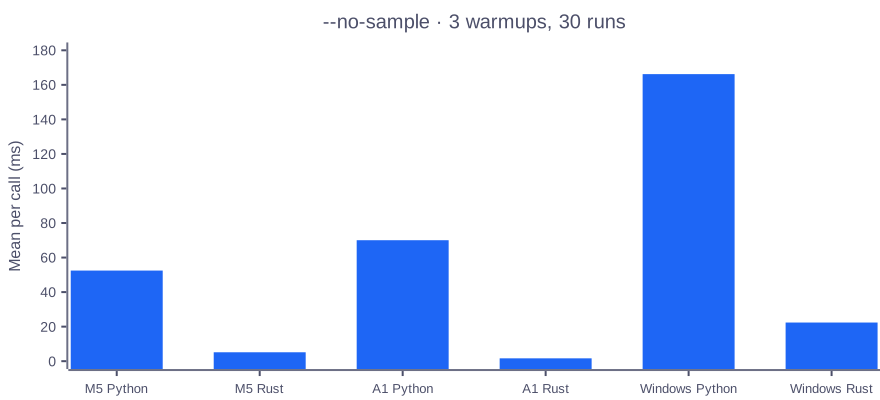
Rust --no-sample returns in 5.2 ms; the Python command takes 52.5 ms on the same M5 Pro. Both from the saved 30-run measurement.
Install · Quick start · Why

The recording runs the Python CLI with synthetic readings. It shows formatting and verdicts, not a measurement of a real host.
Install
pipx install host-pressure
uv tool install host-pressure
pip install host-pressure
Python 3.9+. Wheels install the Rust command and the importable Python package. A source install needs Rust.
| Platform | Observed runs |
|---|---|
| macOS arm64 | Rust command and Python library |
| Linux arm64 | Rust command and Python library on Ubuntu 24.04 |
| Windows x64 | Both commands on Windows 11 |
Quick start
You can read one line, check whether to start work, or choose fields for a status bar. These outputs were captured from the demo fixture; your readings will differ.
$ host-pressure
CPU 16% MEM 72% SWAP 1.5G pressure normal
$ host-pressure check
ok
$ host-pressure --format '{level} | CPU {cpu} | MEM {mem}'
ok | CPU 16% | MEM 72%
$ host-pressure check --memory-busy 60
busy: memory 72% >= 60%
check exits 0 for ok, 1 for busy, and 2 for overloaded. The last command exits 1 because it lowers the memory threshold to 60%.
Why
Before you start another build, a memory percentage alone leaves you guessing. host-pressure check combines CPU, memory, load per core, disk usage, and the pressure signals your operating system exposes. You get a verdict and the readings that caused it.
Use top or htop when you need to find the process using resources. Use psutil when you need a general process-management library. Use this command when a script needs an exit code, a status bar needs one line, or you need macOS memory pressure and Linux PSI alongside ordinary usage figures.
Measurements
Repeated calls without waiting
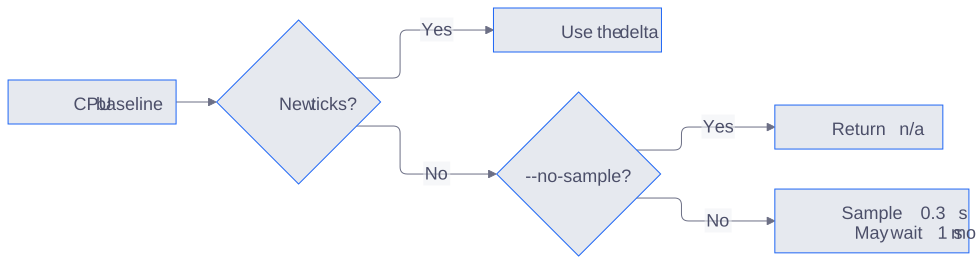
For a status bar or a script that must return immediately, use --no-sample. It still reads and updates the CPU baseline; if counters have not advanced, CPU prints n/a instead of waiting. These are the same flag and 3-warmup/30-run method on all three hosts, measured 2026-11-17. Peak RSS comes from separate /usr/bin/time calls.
| Host / CPU | Command | Mean (ms) | Peak RSS (MiB) |
|---|---|---|---|
| macOS / Apple M5 Pro | python3 -m host_pressure --no-sample |
52.5 | 20.8 |
| macOS / Apple M5 Pro | Rust host-pressure --no-sample |
5.2 | 9.7 |
| OCI A1 / aarch64¹ | python -m host_pressure --no-sample |
70.0 | 15.3 |
| OCI A1 / aarch64¹ | Rust host-pressure --no-sample |
1.6 | 2.1 |
| Windows 11 / Ryzen 7 PRO 6850U | python -m host_pressure --no-sample |
166.2 | —² |
| Windows 11 / Ryzen 7 PRO 6850U | Rust host-pressure.exe --no-sample |
22.4 | —² |
¹ The A1 architecture was observed; its CPU model was not verified in this run. ² Windows timings include the venv launcher. Its peak working set excludes the Python child, so those memory readings are not comparable and are omitted.
# macOS: from the source checkout; no CPU sampling wait
PYTHONPATH=src hyperfine --warmup 3 --runs 30 \
  --export-json docs/bench/m5-no-sample.json \
  'python3 -m host_pressure --no-sample' \
  './rust/target/release/host-pressure --no-sample'
PYTHONPATH=src /usr/bin/time -l python3 -m host_pressure --no-sample
/usr/bin/time -l ./rust/target/release/host-pressure --no-sample
# A1: installed Python package and Rust binary
python3 docs/bench/a1-no-sample-bench.py
# Windows: silent temporary venv, removed when finished
powershell -NoProfile -File docs/bench/windows-bench.ps1 -NoSample
M5 uses Hyperfine 2.0.0, A1 uses a perf_counter subprocess loop, and Windows uses PowerShell Measure-Command. The saved runners and raw outputs describe each launch method. These are running machines, not isolated CPU benchmarks.
Default command, including sampling waits
With no flag, both editions fall back to a 0.3-second CPU sample when no usable baseline delta exists. A short sample can extend by up to one second while waiting for counters. The earlier default-command runs include those waits:
| Host | Python mean (ms) | Rust mean (ms) |
|---|---|---|
| M5 | 179.7 | 177.5 |
| A1 | 72.1 | 122.4 |
| Windows | 164.2 | 22.2 |
This is a different workload from --no-sample, not a startup-speed comparison. Exact default commands and raw runs are retained in docs/bench.
On A1, a follow-up run with separate baseline directories explained the reversal: 11 of 30 rapid Rust calls saw zero new ticks and used the sample fallback. All 30 Python calls saw a new baseline delta. With 50 ms between Rust calls, all 30 used the baseline and averaged 2.36 ms per call, excluding the pause. The source logic uses the same 0.3-second fallback and baseline rules in both editions; no sampling-interval difference was found. See the recorded diagnosis.
Reference
| Command or flag | Result |
|---|---|
host-pressure --all |
Add load, disk, thermal, battery and PSI where available |
host-pressure --json |
Full reading and verdict as JSON |
host-pressure check --json |
Verdict and reasons as JSON |
host-pressure --watch 2 |
Repeat every two seconds; Ctrl+C stops it |
host-pressure wait --until ok --timeout 120 |
Wait for room; exit 75 on timeout |
--format TEMPLATE / --format-help |
Select fields; values already include units |
--disk MOUNT |
Read a mount; repeat for more than one |
--sample 0.5 |
Take a CPU sample in this call |
--no-sample |
Never wait for CPU counters |
--consumer ID / --state-dir DIR |
Select the CPU baseline and storage directory |
--watch --json writes one object per line. Without --watch, JSON is formatted across multiple lines. Parse JSON rather than the human-readable line.
Thresholds
| Threshold flags | Busy / overloaded defaults |
|---|---|
--cpu-busy, --cpu-overloaded |
80 / 95 percent |
--memory-busy, --memory-overloaded |
85 / 95 percent |
--load-busy, --load-overloaded |
1 / 2 load per CPU core |
--disk-busy, --disk-overloaded |
90 / 97 percent |
--swap-busy-gb, --swap-overloaded-gb |
Disabled |
Use --config FILE, HOST_PRESSURE_CONFIG, or $XDG_CONFIG_HOME/host-pressure/config.json for persistent thresholds. Keys use snake case, such as memory_busy; unknown keys are errors. Environment overrides use HOST_PRESSURE_MEMORY_BUSY=80. Only swap_busy_gb and swap_overloaded_gb accept off, none or null; every other threshold must be a number, and a bad value is a usage error. Command-line values win over environment values, which win over the file.
Config and environment also accept psi_cpu_busy, psi_cpu_overloaded, psi_memory_busy, psi_memory_overloaded, psi_io_busy, and psi_io_overloaded. macOS kernel pressure and thermal states have fixed verdict mappings. On Linux, PSI is classified by the psi_* thresholds only, so raising them relaxes the verdict.
CPU baselines live under $XDG_STATE_HOME/host-pressure; HOST_PRESSURE_STATE_DIR overrides that directory. Give separate callers their own --consumer value. The baseline interval is the time between calls, not a fixed sampling window. Rust and Python share its format.
Python
import host_pressure

reading = host_pressure.read(consumer_id="my-tool")
result = host_pressure.verdict(reading)
print(result["level"], result["reasons"])
read(sample=0.5) takes an explicit CPU sample. verdict() without a reading samples for 0.2 seconds by default; use verdict(reading) to classify an existing reading without waiting. The library uses only the Python standard library.
Limits
- Missing readings stay
nullin JSON andn/ain text. A missing CPU number does not mean 0% usage. - Windows has no load-average or thermal reading. Its pressure verdict comes from memory load.
- Battery-present readings were not exercised in these runs. Linux virtual machines may expose no thermal zone.
- A short CPU sample can stretch by up to one second while waiting for counters to move. The first default call may also sample.
- macOS swap can remain allocated after pressure falls, so swap thresholds are off by default.
--watchrepeats readings; it stores no history and sends no alerts. Oneokdoes not describe the machine over time.- macOS/Linux x86_64 wheels exist, but those backends were not run here.
Contributing
Issues and platform reports are welcome; run bash rust/parity.sh from the source checkout. See CONTRIBUTING.md for the checks and the review process, and AGENTS.md for the code layout and safety rules.
License
MIT. See LICENSE.
1 maintainer

Metadata
1 maintainer
Release files for host-pressure 0.1.4
For a detailed explanation of source distributions (sdists) and built distributions (wheels), please see the package formats documentation.
Source distribution (sdist)
| File | Size | Uploaded | Provenance | Actions |
|---|---|---|---|---|
| host_pressure-0.1.4.tar.gz | 56.3 kB | Without provenance | Details for host_pressure-0.1.4.tar.gz |
Built distributions (wheels)
| File | Actions Reset | |||
|---|---|---|---|---|
| host_pressure-0.1.4-py3-none-win_amd64.whl | Python 3 | none | Windows x86-64 | Details for host_pressure-0.1.4-py3-none-win_amd64.whl |
| host_pressure-0.1.4-py3-none-manylinux2014_x86_64.manylinux_2_17_x86_64.whl | Python 3 | none | Linux glibc 2.17+ x86-64 | Details for host_pressure-0.1.4-py3-none-manylinux2014_x86_64.manylinux_2_17_x86_64.whl |
| host_pressure-0.1.4-py3-none-manylinux2014_aarch64.manylinux_2_17_aarch64.whl | Python 3 | none | Linux glibc 2.17+ ARM64 | Details for host_pressure-0.1.4-py3-none-manylinux2014_aarch64.manylinux_2_17_aarch64.whl |
| host_pressure-0.1.4-py3-none-macosx_11_0_arm64.whl | Python 3 | none | macOS 11.0+ ARM64 | Details for host_pressure-0.1.4-py3-none-macosx_11_0_arm64.whl |
| host_pressure-0.1.4-py3-none-macosx_10_12_x86_64.whl | Python 3 | none | macOS 10.12+ x86-64 | Details for host_pressure-0.1.4-py3-none-macosx_10_12_x86_64.whl |
Total release size: 1.7 MB
Release files / host_pressure-0.1.4.tar.gz
| Download URL | host_pressure-0.1.4.tar.gz |
|---|---|
| Size | 56.3 kB |
| Tags | Source |
|
SHA-256 checksum How to use checksums |
57020d398f14cb6ace062cf1f75d41f5449a393d8b2013b2caf10b9467b5426c
|
|
BLAKE2b-256 checksum How to use checksums |
88757e2e22c336177b391d8689dc986bb6527fa5fa201bc0e45961c3a3be80e3
|
| Upload date | |
|
Uploaded using Trusted Publishing? What is trusted publishing? |
No |
| Uploaded via |
twine/7.0.0 CPython/3.12.8
|
Release files / host_pressure-0.1.4-py3-none-win_amd64.whl
| Download URL | host_pressure-0.1.4-py3-none-win_amd64.whl |
|---|---|
| Size | 262.4 kB |
| Tags | Python 3 Windows x86-64 |
|
SHA-256 checksum How to use checksums |
b6a12c91c31407677423b7523b3bd3fa33bb5934cfda4a8bdd14022d37fe4657
|
|
BLAKE2b-256 checksum How to use checksums |
e91b061801140becc1f63bf4ffa2bbd8836c7912508941f3d2960e3f091da072
|
| Upload date | |
|
Uploaded using Trusted Publishing? What is trusted publishing? |
Yes |
| Uploaded via |
maturin/1.16.0
|
Release files / host_pressure-0.1.4-py3-none-manylinux2014_x86_64.manylinux_2_17_x86_64.whl
| Download URL | host_pressure-0.1.4-py3-none-manylinux2014_x86_64.manylinux_2_17_x86_64.whl |
|---|---|
| Size | 375.9 kB |
| Tags | Linux glibc 2.17+ x86-64 Python 3 |
|
SHA-256 checksum How to use checksums |
29f349d8dba1d9439d60c5d61e144080f26bf3e40e52fbee54f96f7215bacf82
|
|
BLAKE2b-256 checksum How to use checksums |
faedab55fa390d504a873ae02d9968a10366e049669763d3ff3bfd245479a35c
|
| Upload date | |
|
Uploaded using Trusted Publishing? What is trusted publishing? |
Yes |
| Uploaded via |
maturin/1.16.0
|
Release files / host_pressure-0.1.4-py3-none-manylinux2014_aarch64.manylinux_2_17_aarch64.whl
| Download URL | host_pressure-0.1.4-py3-none-manylinux2014_aarch64.manylinux_2_17_aarch64.whl |
|---|---|
| Size | 359.7 kB |
| Tags | Linux glibc 2.17+ ARM64 Python 3 |
|
SHA-256 checksum How to use checksums |
c4737fa8f79a6ac061c4f56fa4de52e2c44d428186bd03b32f9ff5be326744c0
|
|
BLAKE2b-256 checksum How to use checksums |
d7e7181529e7ed14c3acb2f30c50a400632ab735447a5db779d41ec02b5cbd19
|
| Upload date | |
|
Uploaded using Trusted Publishing? What is trusted publishing? |
Yes |
| Uploaded via |
maturin/1.16.0
|
Release files / host_pressure-0.1.4-py3-none-macosx_11_0_arm64.whl
| Download URL | host_pressure-0.1.4-py3-none-macosx_11_0_arm64.whl |
|---|---|
| Size | 328.2 kB |
| Tags | Python 3 macOS 11.0+ ARM64 |
|
SHA-256 checksum How to use checksums |
a9862b51895ade0b73c99ad427931e16b0a68c8ff75977c2c1403275444d7d4e
|
|
BLAKE2b-256 checksum How to use checksums |
cc851f13441f00f465690485da2f5c97a654af96cd9ca428c8eb226aaf786375
|
| Upload date | |
|
Uploaded using Trusted Publishing? What is trusted publishing? |
Yes |
| Uploaded via |
maturin/1.16.0
|
Release files / host_pressure-0.1.4-py3-none-macosx_10_12_x86_64.whl
| Download URL | host_pressure-0.1.4-py3-none-macosx_10_12_x86_64.whl |
|---|---|
| Size | 339.8 kB |
| Tags | Python 3 macOS 10.12+ x86-64 |
|
SHA-256 checksum How to use checksums |
207e5d6579ab511c42282cd0c20184fb9435152dfb5ab7bbbea4ca283baef7e0
|
|
BLAKE2b-256 checksum How to use checksums |
e5814c260859b7f5021ac7d9e141655baa8573817f3ecaad196b00d444fe2cba
|
| Upload date | |
|
Uploaded using Trusted Publishing? What is trusted publishing? |
Yes |
| Uploaded via |
maturin/1.16.0
|
Security for host-pressure 0.1.4
Provenance
Provenance describes where a file came from. On PyPI, provenance is shared via attestations, which provide a verifiable record of the build or publishing details. View details, limitations and caveats.
No provenance found
None of the files in this release were uploaded with provenance metadata.
A note on package security
PyPI is a repository for distributing packages, not a service for auditing them. While third-party security researchers and our staff do their best to detect and remove malicious packages, PyPI cannot guarantee the quality, security or suitability of any given package.
To learn more about protecting yourself from malicious actors, visit our package security documentation.














