
Turn-taking regression tests for voice agents: score real call recordings for agents that talk over interruptions, stop for a mere 'mhm', or are slow to go quiet, and fail CI when the timing regresses. Offline, deterministic, MIT.

Project description

 hotato
Find interruption bugs in your voice agent before users do.





Hotato is turn-taking regression tests for voice agents. It scores a call recording on your machine, so call audio never leaves it, and it catches the three failures callers feel most:
- Talk-over: the agent keeps talking while the caller is talking.
- False stop: the caller says a short acknowledgement like "mhm" (a backchannel, not a request to take over) and the agent stops mid-sentence.
- Slow yield: the caller starts talking and the agent takes too long to stop and let them speak.
Every failing event returns three measured signals (did_yield, seconds_to_yield, talk_over_sec) and a fix that names the exact setting to change in your stack.
See it fail a bad agent
uvx hotato demo
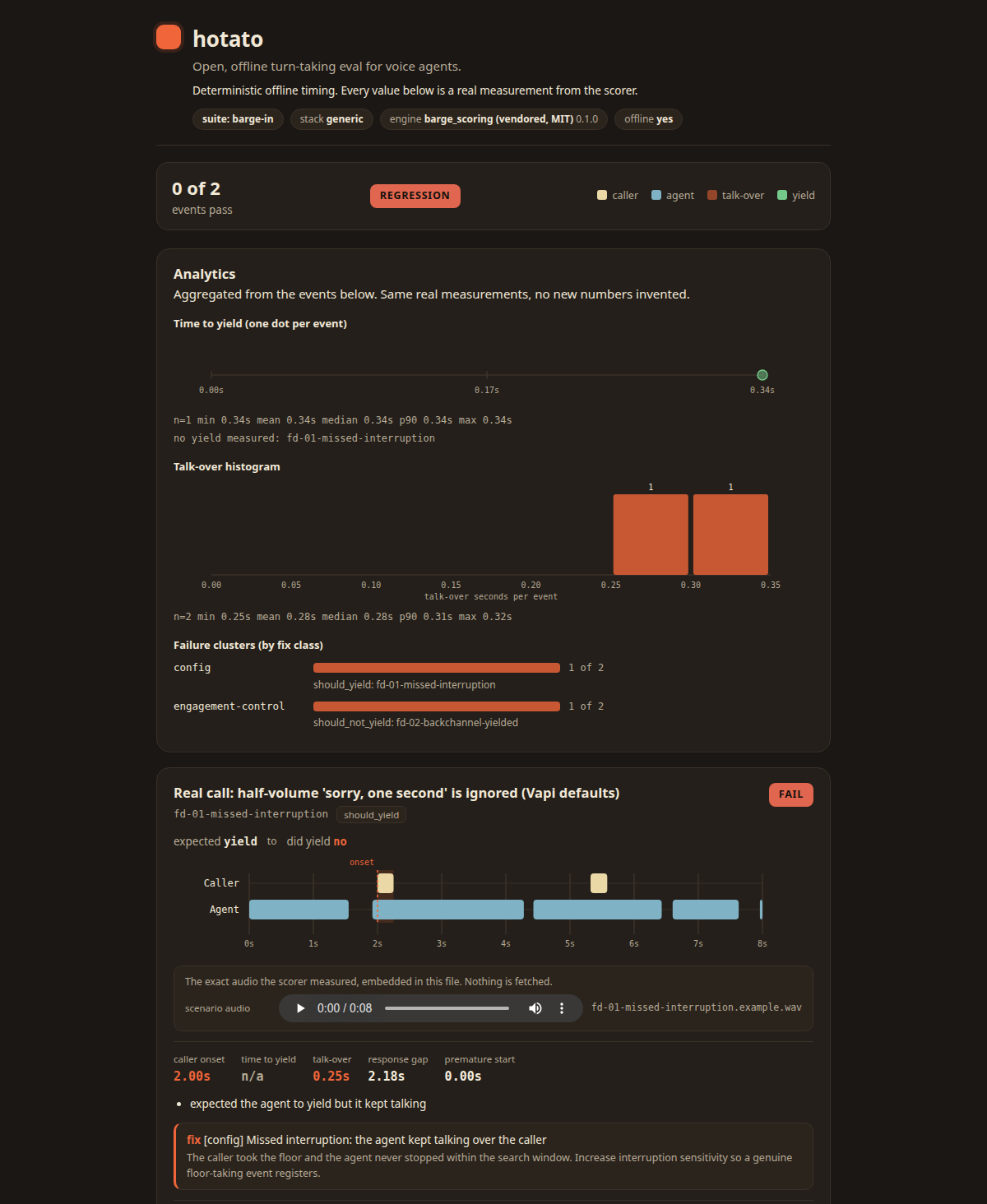
The demo scores a deliberately bad agent on synthetic audio, so you see the FAIL verdicts, the timelines, and the fix cards before touching your own calls.
Score your own call
uvx hotato doctor --stereo your_call.wav # two-channel WAV: caller ch0, agent ch1
doctor scores the call, writes the visual HTML report, and opens it. Or pull a recording straight from your stack:
- Vapi:
uvx hotato capture --stack vapi --call-id <id>withVAPI_API_KEYset. - Twilio:
uvx hotato capture --stack twilio --recording-sid RE...withTWILIO_ACCOUNT_SID/TWILIO_AUTH_TOKENset. - Retell:
uvx hotato capture --stack retell --call-id <id>withRETELL_API_KEYset; fetches the call's multichannel recording. - LiveKit / Pipecat:
uvx hotato setup --stack livekit(orpipecat) prints the recording config for your infra, thenhotato capturescores the files it produces.
Input, stated once: Hotato needs the caller and the agent on separate audio tracks, as one two-channel WAV or two aligned mono WAVs. Per-stack details and verification dates: adapters/README.md, docs/ADAPTER-STATUS.md.
What Hotato measures
Three timing signals per event, measured frame by frame from the audio and re-derivable by hand with --dump-frames:
| Signal | What it answers |
|---|---|
did_yield |
did the agent stop talking after the caller started talking? |
seconds_to_yield |
how many seconds passed between the caller starting and the agent stopping? |
talk_over_sec |
for how many seconds were the caller and the agent talking at once? |
Every failing event carries exactly one fix, in one of two classes. Pass --stack livekit, pipecat, vapi, or generic and the fix uses your stack's own setting names:
| Failure | fix_class |
The setting it names |
|---|---|---|
| Missed a real interruption | config |
interruption sensitivity: LiveKit turn_handling interruption.min_duration / interruption.min_words, Pipecat VADParams(start_secs, stop_secs, confidence), Vapi stopSpeakingPlan.numWords |
| Slow yield | config |
endpointing delay, how long the stack waits before deciding the caller is speaking or finished: LiveKit endpointing.min_delay / endpointing.max_delay, Pipecat SpeechTimeoutUserTurnStopStrategy(user_speech_timeout=...), Vapi stopSpeakingPlan.backoffSeconds |
| Excess talk-over | config |
overlap debounce: LiveKit interruption.min_duration, Pipecat VADParams(stop_secs), Vapi stopSpeakingPlan.voiceSeconds |
| Yielded to its own echo | config |
audio routing: echo cancellation and separate caller/agent channels |
| Stopped for a backchannel | engagement-control |
no setting fixes this one: no timing threshold can tell "mhm" apart from a one-word "stop". If your stack has an interruption/backchannel classifier, use it; otherwise the fix is a learned layer that decides whether the caller is actually asking to take the turn (engagement control / addressee detection) |
Each config fix states which direction to move the setting and what that trades away. When one test set fails both ways at once (the agent missed a real interruption AND stopped for a backchannel), Hotato flags the pattern by name: a single sensitivity threshold trades those two failures against each other, so the fix is a classifier, not another threshold value.
CI
uvx hotato run --suite barge-in --format json # text output is for humans; json is for machines
The bundled barge-in suite scores recordings of callers barging in, that is, starting to talk while the agent is talking. Exit codes: 0 every event passed (or --no-fail), 1 a regression, 2 a usage or IO error, or a recording that is not scorable. Not scorable means the recording cannot answer the question (the caller channel is silent, or the agent was not talking when the caller started); the event reports scorable: false with the reason, never an invented verdict. Two ready-made gates: copy .github/workflows/hotato.yml for a PR check that posts one self-updating results comment (docs/CI.md), or add --hotato-suite to the pytest run you already have; the plugin registers itself on install and fails the session on a regression (docs/PYTEST.md).
What you get
doctor: score a recording (or the bundled self-test), write the visual report, open it.report: self-contained HTML with per-event SVG timelines, a per-frame inspector, print CSS for PDF, and--base base.jsonregression deltas.team: aggregate a directory of runs into pass rate over time plus mean/median/p90 talk-over and time-to-yield.export: research-grade CSVs (events.csv,frames.csv,envelope.json), columns documented in-file.benchmark: score the battery you captured through each stack, then compare the result files side by side.- Pytest plugin: a
hotato_scorefixture plus a session gate (pytest --hotato-suite). - MCP server: one tool,
voice_eval_run; passreport_pathto also get the HTML report.uvx --from "hotato[mcp]" hotato-mcp - Tiered corpus suites: 112 deterministic scenarios across silver and gold tiers, plus defect suites that fail on purpose to prove the scorer catches what it claims.
Optional neural cross-check (verified, non-reference)
pip install 'hotato[neural]', then hotato run --stereo call.wav --backend neural recomputes the same timing signals over speech regions found by Silero VAD, a small neural speech detector, instead of the default energy threshold. The ONNX weights ship inside the package and inference runs offline on CPU. Verified properties:
- Same contract. The neural run returns the identical result shape as the energy reference, on the same 10 ms frame grid, end to end.
- Deterministic. Repeated runs on the same audio are byte-identical.
- The energy reference is untouched. Installing the extra changes no energy number, and
--suitealways scores with energy (a note says so if you pass--backend neuralthere). - Built for real recordings. The bundled fixtures are synthetic shaped noise rendered for the energy reference; a speech-trained model finds no speech in them, so run the cross-check on your own calls, where both tracks carry real speech.
- Clear errors. Without the extra,
--backend neuralexits with an explicit error, never a silent fallback to energy. Silero accepts 8000 Hz, 16000 Hz, and integer multiples of 16000 Hz; other rates get an actionable resample message.
Full method and the measured cross-check properties: METHODOLOGY.md.
Install
uvx hotato runs every command with zero install. To add it to a project:
pip install hotato                 # core: stdlib-only, zero dependencies
pip install 'hotato[neural]'       # optional Silero VAD cross-check
pip install 'hotato[livekit]'      # LiveKit live capture
pip install 'hotato[pipecat]'      # Pipecat live capture
More
- Reports and analytics:
docs/REPORTS.md· Pytest gate:docs/PYTEST.md· Suites:docs/SUITES.md· CI recipes:docs/CI.md - Turn a bad call into a regression test: hotato.dev/docs/regression-loop.html
- Python API:
docs/API.md· Stack benchmarks:docs/BENCHMARK-STACKS.md - Adapters:
adapters/README.md· Status and verification dates:docs/ADAPTER-STATUS.md - Why this exists:
docs/WHY.md· Method:METHODOLOGY.md· Security:SECURITY.md - Contributing: the highest-value PR is a real, labelled call fixture. Start at
docs/SUBMITTING.md.
Why "hotato": good turn-taking is a game of hot potato. Literally: speak, then stop the moment the caller wants the turn. Hotato measures how fast and how cleanly your agent passes it. MIT licensed (LICENSE); the open core stays open.
mcp-name: io.github.attenlabs/hotato
Release history Release notifications | RSS feed


Download files
Download the file for your platform. If you're not sure which to choose, learn more about installing packages.
Source Distribution
Built Distribution
Filter files by name, interpreter, ABI, and platform.
If you're not sure about the file name format, learn more about wheel file names.
Copy a direct link to the current filters
File details
Details for the file hotato-0.2.3.tar.gz.
File metadata
- Download URL: hotato-0.2.3.tar.gz
- Upload date:
- Size: 7.1 MB
- Tags: Source
- Uploaded using Trusted Publishing? No
- Uploaded via: uv/0.11.9 {"installer":{"name":"uv","version":"0.11.9","subcommand":["publish"]},"python":null,"implementation":{"name":null,"version":null},"distro":{"name":"Ubuntu","version":"24.04","id":"noble","libc":null},"system":{"name":null,"release":null},"cpu":null,"openssl_version":null,"setuptools_version":null,"rustc_version":null,"ci":null}
File hashes
| Algorithm | Hash digest | |
|---|---|---|
| SHA256 |
043b3894b3725de99ad9d9dee135582350dacbbbc896cc34456b78cfd38f842a
|
|
| MD5 |
84f3b2ec3f0af63c267d51f87f8965b3
|
|
| BLAKE2b-256 |
77c3184cf99ac9480a6ef9549a77c619b4c326dcdb38cc3d4f1180568c6c8b16
|
File details
Details for the file hotato-0.2.3-py3-none-any.whl.
File metadata
- Download URL: hotato-0.2.3-py3-none-any.whl
- Upload date:
- Size: 2.9 MB
- Tags: Python 3
- Uploaded using Trusted Publishing? No
- Uploaded via: uv/0.11.9 {"installer":{"name":"uv","version":"0.11.9","subcommand":["publish"]},"python":null,"implementation":{"name":null,"version":null},"distro":{"name":"Ubuntu","version":"24.04","id":"noble","libc":null},"system":{"name":null,"release":null},"cpu":null,"openssl_version":null,"setuptools_version":null,"rustc_version":null,"ci":null}
File hashes
| Algorithm | Hash digest | |
|---|---|---|
| SHA256 |
dada775de23bb1106af512ee5be2edd1ace96a017f95716655be7980cbb30529
|
|
| MD5 |
d03f8b38fb9f38ffb0181c92c3acf3da
|
|
| BLAKE2b-256 |
24fe62ed48bf5d2321ba1f6ca113f58cd25ab8bbe02cb0befbcd8bcbc547bd2a
|






