
Intro
Tired of dealing with major & minor numbers? You like the TOML format (kind of "ini" on steroids)? Always wanted to play with traffic shaping on linux but it turned too complex or confusing? This alpha tool aims at simplifying the learning curve for traffic control on ip route 2.
The format started quite close to the original command-line and progressively adds more support and shorter or easier notations.
Forget about classid, flowid.
Consider parent sometimes handle for complex scenarios only!
Check the examples folder to dive into the syntax.
Supported features
- hosts aliases
- network interfaces aliases
- speeds aliases
- automatic generation of major & minor mumbers (all of them!) when possible
- visual representation of the setup
Trafic control coverage
- sfq : makes a more fair traffic
- netem : simulate network problems
- htb : control traffic rate using categories
- tbf : very basic shaping
QDiscs
- sfq
- netem
- htb
- tbf
Classes
- htb
Filters (assign traffic)
- fw
- u32
- ip (src, dst, sport, dport)
- action
Installation
pip install hotbuckets
You can also directly download the file, mark it executable adn run it.
You can optionally install graphviz to enable the --show action.
Usage
Check the examples for more usages.
Given the file:
[speeds]
full = "32mbit"
half = "15mbit"

[interfaces.nic]
dev = "wlo1"

[shaper.base]
dev = "nic"
default = "baseline"
ceil = "full"

[class.unlimited]
parent = "base"
rate = "full"

[class."baseline"]
parent = "unlimited"
rate = "half"
ceil = "full"

[shaper.fairness]
parent = "baseline"
type = "sfq"
perturb = 10

[class."web"]
parent = "unlimited"
rate = "half"
ceil = "full"

[shaper.fairness-web]
parent = "web"
type = "sfq"
perturb = 10

[match.filtHttp]
protocol = "ip"
parent = "base"
sendTo = "web"
ip = {dport="80"}

[match.filtHttps]
protocol = "ip"
parent = "base"
sendTo = "web"
ip = {dport="443"}
You can use the command htb configuration.toml to get the following output:
#!/bin/bash
# Cleanup:
tc qdisc del dev wlo1 root
set -ex
# Rules:
tc qdisc add dev wlo1 root handle 1: htb default 2 # base
tc class add dev wlo1 parent 1: classid 1:1 htb rate 32mbit # unlimited
tc class add dev wlo1 parent 1:1 classid 1:2 htb rate 15mbit ceil 32mbit # baseline
tc class add dev wlo1 parent 1:1 classid 1:3 htb rate 15mbit ceil 32mbit # web
tc qdisc add dev wlo1 parent 1:2 handle 2: sfq perturb 10 # fairness
tc qdisc add dev wlo1 parent 1:3 handle 3: sfq perturb 10 # fairness-web
tc filter add dev wlo1 protocol ip parent 1: u32 match ip dport 80 0xffff flowid 1:3 # filtHttp
tc filter add dev wlo1 protocol ip parent 1: u32 match ip dport 443 0xffff flowid 1:3 # filtHttps
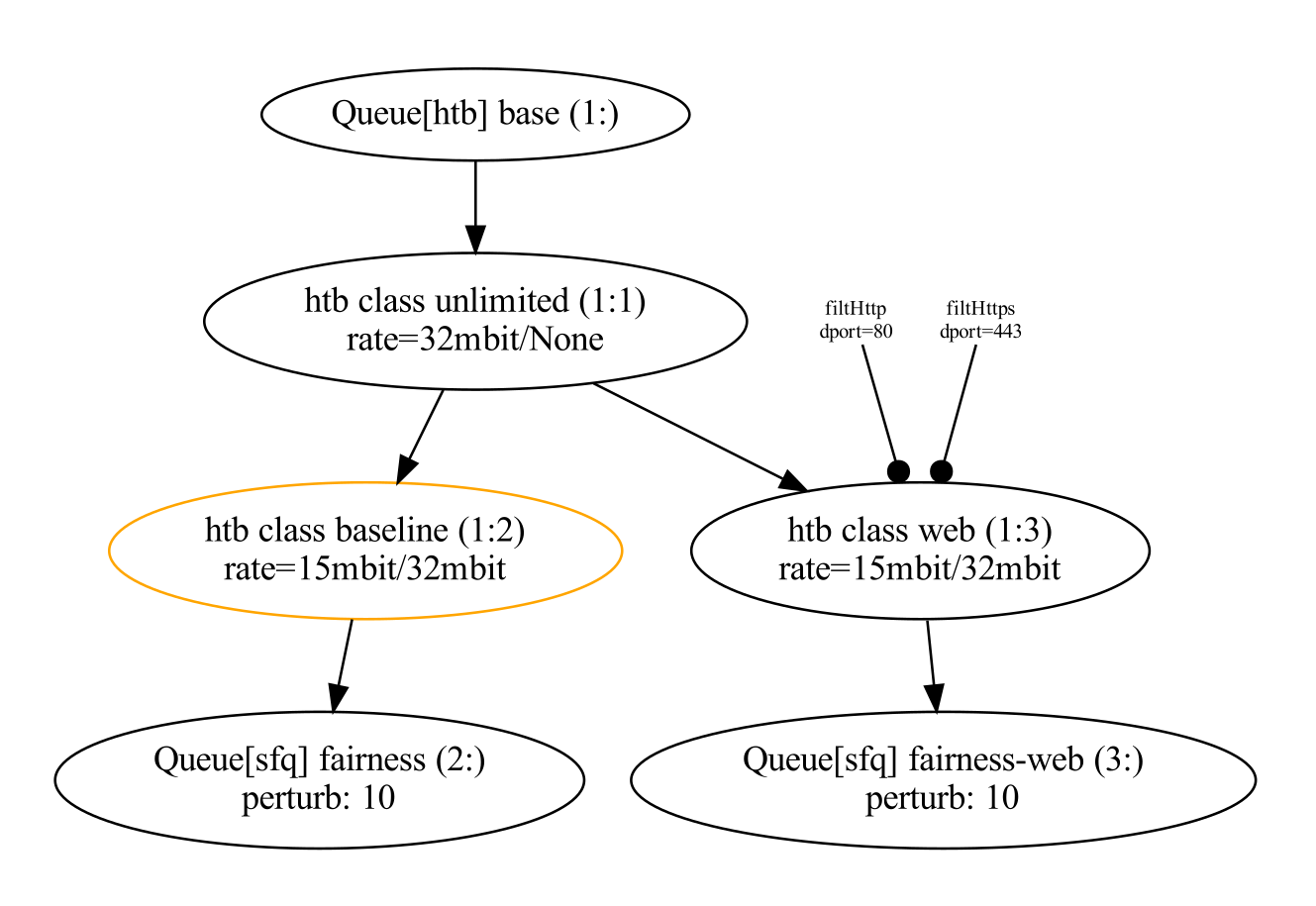
You can also use the --show parameter to get a representation like this:
Misc notes
- shapers are qdiscs, the "main" type of traffic control object, some can use classes
- classes are used by some shapers to divide the traffic
- match allows sending network traffic to a specific class or shaper (qdisc)
- try to avoid using the same names in match and class, some cases are ambiguous
TODO
- relative speeds (percents)
- templates (for repeated attributes)
1 maintainer

Metadata
1 maintainer
Release files for hotbuckets 0.1.1
For a detailed explanation of source distributions (sdists) and built distributions (wheels), please see the package formats documentation.
Source distribution (sdist)
| File | Size | Uploaded | |
|---|---|---|---|
| hotbuckets-0.1.1.tar.gz | 6.2 kB | Details |
Built distribution (wheel)
| File | Interpreter | ABI | Platform | Reset |
|---|---|---|---|---|
| hotbuckets-0.1.1-py3-none-any.whl | Python 3 | none | any | Details |
Total release size: 12.1 kB
Release files / hotbuckets-0.1.1.tar.gz
| Download URL | hotbuckets-0.1.1.tar.gz |
|---|---|
| Size | 6.2 kB |
| Tags | Source |
|
SHA-256 checksum How to use checksums |
6d2094ab4d5091bbcb82349cb61c23e22f67ee06c4fa0ffdd633a49e1f47c02c
|
|
BLAKE2b-256 checksum How to use checksums |
02d2b6c70f8e1d5bac70c95b9c966b8d32ac426a8ad291fafb23aacfa457f861
|
| Upload date | |
|
Uploaded using Trusted Publishing? What is trusted publishing? |
No |
| Uploaded via |
poetry/1.2.0 CPython/3.10.7 Linux/5.19.9-zen1-1-zen
|
Release files / hotbuckets-0.1.1-py3-none-any.whl
| Download URL | hotbuckets-0.1.1-py3-none-any.whl |
|---|---|
| Size | 5.9 kB |
| Tags | Python 3 |
|
SHA-256 checksum How to use checksums |
2f4be754a484dffd1413a439d7146cf80f43a15258746b59ab33015ba6ad2eec
|
|
BLAKE2b-256 checksum How to use checksums |
afeedac7733baf4414eaf09e8e8ef32dee822b660eb810f116325dd88da8919d
|
| Upload date | |
|
Uploaded using Trusted Publishing? What is trusted publishing? |
No |
| Uploaded via |
poetry/1.2.0 CPython/3.10.7 Linux/5.19.9-zen1-1-zen
|














