


HotMaps Dispatch Model
A web user interface for energy systems modelling | GitHub
Content
- About
- How to install
- Quick start
- Documentation
- Contributing
- What's new
- Citing
- License
- Remove/Uninstall
- Attribution
About
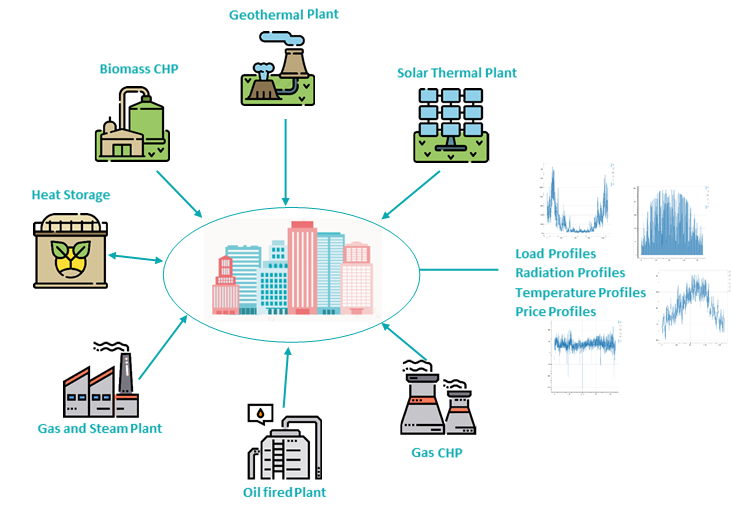
The HotMaps Dispatch Model is a web user interface to develop energy system models. It is based on Pyomo for modeling and bokeh for visualization and interaction. The primary focus is flexible model creation with/and without the web user interface, and a high temporal resolution (hourly based) for the optimization. It has also the ability to execute and create many scenarios.
A model can be fully defined by the web user interaface, with financal and technical details on technologies, demand,electricity,temperature and radiation profiles. You can also define and upload your own data. The Hotmaps Disptach Model takes these inputs and constructs an optimization problem, solves it, and reports back the results. The results are saved as HTML (for visialisation), JSON and EXCEL Files and can be further analyzed.
How to install
How to install 1 (easy)
-
install miniconda
-
open the conda prompt and type following comands
a.
conda create -n hotmapsDispatch python=3.6b.
conda activate hotmapsDispatchc.
conda install nodejsc.
pip install hotmapsDispatchd.
hotmapsDispatch_console
After that your default browser should open and the web user interface will show up
How to install 2 (advanced)
-
install miniconda
-
Download this repository and save and unzip the content into your desired loacation
-
open the conda prompt in that location and type following comands
a.
conda env create -f environment.ymlb.
conda activate hotmapsDispatchc.
cd app/modules/common/FEAT/F16d.
python F16_server.py
After that your default browser should open and the web user interface will show up
Hot to install 3 (easy)
Not implemented todo
The Hotmaps Dispatch Model can run on Windows, macOS and Linux.
Installing it is quickest with the conda package manager by running a single command: conda create -c conda-forge -n python=3.6 hotmapsDispatch
Quick start
See the documentation for more information on installing.
and also some example are included
The Getting Started Guide is a good place to start and to get a feeling how the model works.
After installation open the conda prompt and activate your environment conda activate hotmapsDispatch
Then you can start the application by typing hotmapsDispatch_console. This will open your default browser and also show you progress messages in the prompt
If you type only hotmapsDispatch no prompt messages will be shown and you have to close the process after fininshing, since closing the tab will not shut down the process
Documentation
Not implemented todo
Documentation is available on Read the Docs:
Contributing
Not implemented todo
To contribute changes:
- Fork the project on GitHub
- Create a feature branch to work on in your fork (
git checkout -b new-feature) - Add your name to the AUTHORS file
- Commit your changes to the feature branch
- Push the branch to GitHub (
git push origin my-new-feature) - On GitHub, create a new pull request from the feature branch
See our contribution guidelines for more information -- and join us on Gitter to ask questions or discuss code.
What's new
Not implemented todo
See changes made in recent versions in the changelog.
Citing
Not implemented todo
If you use HotMaps Disptach for academic work please cite:
Autor Name. HotMaps Disptach: a web user interface for energy systems modelling. Reference. doi
License
Copyright 2019 HotMaps Disptach contributors:
- Michael Hartner
- Richard Büchele
- David Schmidinger
- Michael Gumhalter
- Jeton Hasani
Licensed under the Apache License, Version 2.0 (the "License"); you may not use this file except in compliance with the License. You may obtain a copy of the License at
http://www.apache.org/licenses/LICENSE-2.0
Unless required by applicable law or agreed to in writing, software distributed under the License is distributed on an "AS IS" BASIS, WITHOUT WARRANTIES OR CONDITIONS OF ANY KIND, either express or implied. See the License for the specific language governing permissions and limitations under the License.
Remove/Uninstall
open the conda prompt and enter following comand:
conda remove --name hotmapsDispatch --all
Attribution
The layout and content of this document is partially based on the calliope-project.
1 maintainer

Metadata
1 maintainer
Release files for hotmapsDispatch 0.0.1
For a detailed explanation of source distributions (sdists) and built distributions (wheels), please see the package formats documentation.
Source distribution (sdist)
| File | Size | Uploaded | |
|---|---|---|---|
| hotmapsDispatch-0.0.1.tar.gz | 89.9 kB | Details |
Built distribution (wheel)
| File | Interpreter | ABI | Platform | Reset |
|---|---|---|---|---|
| hotmapsDispatch-0.0.1-py3-none-any.whl | Python 3 | none | any | Details |
Total release size: 49.9 MB
Release files / hotmapsDispatch-0.0.1.tar.gz
| Download URL | hotmapsDispatch-0.0.1.tar.gz |
|---|---|
| Size | 89.9 kB |
| Tags | Source |
|
SHA-256 checksum How to use checksums |
5236bfdb602e773f6ece1bf1c4b1675a2d87fe0a0c8961981dc7b7694395dd4e
|
|
BLAKE2b-256 checksum How to use checksums |
4c6f8dcf7e8801323a231c2b5177090f32233c60caf5a46deb77ed82b8d2ea24
|
| Upload date | |
|
Uploaded using Trusted Publishing? What is trusted publishing? |
No |
| Uploaded via |
twine/2.0.0 pkginfo/1.5.0.1 requests/2.22.0 setuptools/41.0.0 requests-toolbelt/0.9.1 tqdm/4.40.0 CPython/3.6.7
|
Release files / hotmapsDispatch-0.0.1-py3-none-any.whl
| Download URL | hotmapsDispatch-0.0.1-py3-none-any.whl |
|---|---|
| Size | 49.8 MB |
| Tags | Python 3 |
|
SHA-256 checksum How to use checksums |
47ddd4ca4b0648896b28063243137771093893060f37388f7e6fc9ac7df5e171
|
|
BLAKE2b-256 checksum How to use checksums |
1e73601452c06110b520903cd302a81fdd4bc9f8b70405b14d0524b8bd0ef0ab
|
| Upload date | |
|
Uploaded using Trusted Publishing? What is trusted publishing? |
No |
| Uploaded via |
twine/2.0.0 pkginfo/1.5.0.1 requests/2.22.0 setuptools/41.0.0 requests-toolbelt/0.9.1 tqdm/4.40.0 CPython/3.6.7
|














